-
Does anyone have experience using Headshot by Abalone?
Comprehensive review https://www.daz3d.com/forums/discussion/292591/headshop-11-questions#latest
Does anyone have experience using Headshot by Abalone?There are several threads around the forums This seems to be the most lively
https://www.daz3d.com/forums/discussion/292591/headshop-11-questions/p1
Does anyone have experience using Headshot by Abalone?Headshot 11 by Abalone looks interesting and I could put it to good use. But how well does it work?
HeadShop 11 Installation HelpWe completed a brief video on youtube about installing HeadShop 11 in conforming (c:\Program Files) and non-conforming (b, d, e etc:\) locations.
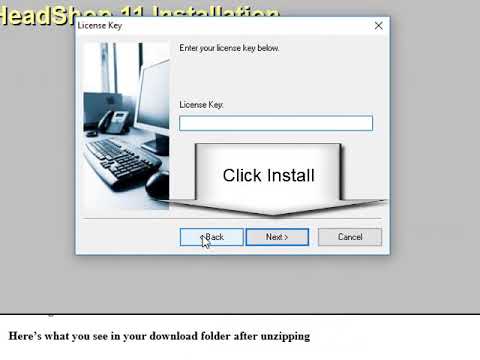 Bought headshop for DAZ Stuido but have no idea where it went after download with Install Manager
Hmm!
I used Install Manager for download and Install Headshop but nothing in Install Manager show any listed for Headshop if it was installed or download!
I tried again and click the button so I am not sure if it ge installed a not! I tried to find it in DAZ Studio as well but can't find anything there!
Anyone who have a clue what happend or where it might be!
Thanks
Alf K
HeadShop does not use InstallManager. It has its own installer.
Download zip, unzip and read README.
headshop oneclick installation problemCan one have both OneClick and Headshop 11 installed on the same computer?
Just in case, if OneClick handle better non smile reference images.
It is possible. Two options: have both in the same DAZ 3D folder, and rename one "HeadShop plugin" folder that is not used (for example 11HeadShop plugin or similar).
The second option is to have two DAZ Studios, and launch the one you want to use.
Bought headshop for DAZ Stuido but have no idea where it went after download with Install ManagerYou may want to check
https://www.daz3d.com/forums/discussion/293751/new-headshop-11-installer-available-for-non-c-drive-studio#latest
or
https://www.daz3d.com/forums/discussion/292591/headshop-11-questions#latestheadshop oneclick installation problemCan one have both OneClick and Headshop 11 installed on the same computer?
Just in case, if OneClick handle better non smile reference images.
Bought headshop for DAZ Stuido but have no idea where it went after download with Install ManagerBought headshop for DAZ Stuido but have no idea where it went after download with Install ManagerHmm!
I used Install Manager for download and Install Headshop but nothing in Install Manager show any listed for Headshop if it was installed or download!
I tried again and click the button so I am not sure if it ge installed a not! I tried to find it in DAZ Studio as well but can't find anything there!
Anyone who have a clue what happend or where it might be!
Thanks
Alf K
New HeadShop 11 installer available for non-c: drive StudioOK, for those who do not have skype or can't do tech support, here's an installation video:
Please note that the critical step is to find the correct destination folder when installing HeadShop 11!! It is the "DAZ 3D" folder, wherever it lives.
(Many DAZ users also have incomplete "DAZ 3D" folders. Inside "DAZ 3D" there should be a complete folder called "DAZStudio4" which should contain all Studio files, including the exe file.)
headshop oneclick installation problemOK, for those who do not have skype or can't do tech support, here's an installation video:
Please note that the critical step is to find the correct destination folder when installing HeadShop 11!! It is the "DAZ 3D" folder, wherever it lives.
(Many DAZ users also have incomplete "DAZ 3D" folders. Inside "DAZ 3D" there should be a complete folder called "DAZStudio4" which should contain all Studio files, including the exe file.)
headshop oneclick installation problemDaveso, this is frustrating. You need to take this offline and contact me at [email protected]! We can provide tech support. Also, here's how you can check that all your files are installed in the right location (image from the HeadShop 11 manual)
i have sent email... i orginally had them in that fdirectory, but it did not work. then i installed to "plugins" but the email i sent a bit ago thanks
YES .. very frustratingNew HeadShop 11 installer available for non-c: drive Studioi just tried this and it still not working ... it installed to where i pointed it, but not coming up in Daz Studio....
I see that there is a separate plugin folder ... Headshp installed to its own folder called Headshop plugin.
I'm using Headshop oneclickHave you tried to email to [email protected]? We can do a skype/screen exchange review of your issue...
no, i haven't ... i will
headshop oneclick installation problemDaveso, this is frustrating. You need to take this offline and contact me at [email protected]! We can provide tech support. Also, here's how you can check that all your files are installed in the right location (image from the HeadShop 11 manual)
headshop oneclick installation probleminstalled oneclick again to the plugin directory... installed ok, the START HEADSHOP is there, but still get the above error.
headshop oneclick installation problemoops..the START HEADSHOP is in the edit pulldown, but when clicked it says "unable to find headshop application ... maybe becasue i have oneclick?
New HeadShop 11 installer available for non-c: drive Studioi just tried this and it still not working ... it installed to where i pointed it, but not coming up in Daz Studio....
I see that there is a separate plugin folder ... Headshp installed to its own folder called Headshop plugin.
I'm using Headshop oneclickHave you tried to email to [email protected]? We can do a skype/screen exchange review of your issue...
New HeadShop 11 installer available for non-c: drive Studioi just tried this and it still not working ... it installed to where i pointed it, but not coming up in Daz Studio....
I see that there is a separate plugin folder ... Headshp installed to its own folder called Headshop plugin.
I'm using Headshop oneclickheadshop oneclick installation problemThis thread might help, but if not, then I’ve seen elsewhere that their tech support provides individualized assistance.
thanks..i will check it out.
Daz 3D is part of

Connect
DAZ Productions, Inc.
7533 S Center View Ct #4664
West Jordan, UT 84084Licensing Agreement | Terms of Service | Privacy Policy | EULA
© 2026 Daz Productions Inc. All Rights Reserved.







