-
StrangeFate's stuff: Argentheart Crowns promos.
Strangefate said:
Just a quick update.
We added G9 support to the ROG Fantasy shields. G9 versions should be there if you update the product through install manager or Daz Central. Store page doesn't reflect the G9 support yet.
We're also adding G9 support to the Brutal Weapons for G8 product.
Do you think you would add G9 support for Bonebreaker, even as add-on or new product, recognising that it takes significant work?
Autofit works fine for some components, but other components not so much.
DAZ Central not recognizing assets after moving files to new computerOh dear. Well, my advice - assuming you want to continue using Daz Central to manage your installs - is to do the following. Note, this is a bit of an extreme approach but Connect has caused me multiple issues in the past until I did this.
- Log out of your account inside Daz Studio and ensure you stay logged out.
- Find the base path of Daz Connect and search for product references - I cannot remember the exact path but somewhere under the cloud folder is a folder of products and another with json files (these are metadata files relating to Connect)
- Within Daz Studio right click and uninstall any products that have a reference within the product folder of Daz Connect (this should delete the related product folder).
- When that folder is empty, delete it
- Then delete the folder containing the json files
- Use the Content DB Maintenance to reset your database (skip the backup first since you do not want to save the broken config).
- Use Content DB Maintenance to reimport metadata again (e.g. pull from the /Runtime/Support/*.dsx files)
Hopefully, that should give you back the same Smart Content from the last time you backed up on the old machine.
DAZ Central not recognizing assets after moving files to new computerI don't use Daz Central but as I believe it works similarly to DIM you have probably not copied the manifest files across perhaps?
For the Smart Content that will not show up just by copying the files across - you must go into Content DB Maintenance and Re-import all the metadata. This will give you a window showing all products found under all linked base libraries and when you hit continue it will read in all the DSX files under the Runtime/Support/ folder. Depending on the number of products and your hardware this process is likely to take up quite a few minutes.
DAZ Central not recognizing assets after moving files to new computerHey again, all. So, I successfully moved all my DAZ assets to a new computer and got them all on the D drive. Everything is there, I think I've got all my paths set up properly, but after installing DAZ Central ( also on the D drive), it doesn't show anything installed. Also, in DAZ Studio, the Smart Content tab doesn't show the installed assets in the "Products" tab.
Any ideas?
Daz Install Manager (DIM) 1.4.1.87, Now Available! (*UPDATED*)Richard Haseltine said:
ed3D said:
kyoto kid said:
...didn't we just have an update a couple weeks ago?
+ 1
Install Manager has been getting some focussed attention, presumably as they seem to be moving features from Daz Central into it. If updates are still causing issues for you then there is probably a system issue (unless it's a Windows 7 limitation, which seems fairly unlikely) that is affecting your system, generally they seem to go smoothly.
Alright Then + Thanx
Weird Texture Issue with Topmodel Updo Hair and OOT Hairblending 2.0 for Genesis 3 Female(s)Cyonix said:
NorthOf45 said:
Well, the new definition is coming from somewhere. It could be in the saved scene or scene subset.
I recall another situation where the original shader crashed Studio, and one user could not stop it even after installing the new version. Turns out there was an older version that had been installed through Connect, but was not updated because the user was, um-m, disappointed (yeah, that's it) with Connect and vowed to never use it again. Unfortunately, Connect versions get priority, no matter what is installed with DIM. You don't have any Hairblending products installed with DIM, perhaps?
Nope, everything I have installed came through DazCentral
Sorry, I meant installed with Connect, but Central uses the same protocols as DIM, so that's not a problem.
Daz Studio 5 development updateThere is no sign whatesoever that Daz is even considering moving to an "online only" system - why would they be updating DIM, and adding in features from Daz Central, if that was on the cards? How would it even work? I appreciate that nature abhors a vacuum and in the absence of actual information it is tempting to speculate wildly, but this feral speculation is pretty much untenable as far as I can see.
CGI Pupil Utilities for Genesis 9 I can't make it workHmm, I've tried uninstalling through Daz Central, then reinstalling. The files are not in the Shapes tab in any form, nor in the Parameters/Shaping tabs for the G9 Eyes. I uninstalled and tried through DIM, same thing.
I'm trying a redownload via Daz Central again now, after deleting the base files.
- Did not work. No files shown. Same as issue as above.
Searching the Content Library in Daz Studio now.
- No items found via search using CGI as search parameter.
I will now manually install the files after uninstalling them via Daz Central, I opened the .zip file, selected the data, People, Runtime folders and dropped them into my install directory.
- It worked, file are in Shapes>Color Galeria. Now to test use
Selected the Eyes figure of G9, double clicked a 'Pose', and it worked! Hope my steps help others.
Daz Install Manager (DIM) 1.4.1.87, Now Available! (*UPDATED*)ed3D said:
kyoto kid said:
...didn't we just have an update a couple weeks ago?
+ 1
Install Manager has been getting some focussed attention, presumably as they seem to be moving features from Daz Central into it. If updates are still causing issues for you then there is probably a system issue (unless it's a Windows 7 limitation, which seems fairly unlikely) that is affecting your system, generally they seem to go smoothly.
How to restore changes to Daz Central Base Path Location?eroguysensei said:
crosswind said:
This UI is from Install Manager but not DC, I just wanna show you the 'Default paths' of Base Directory...
Hey. Just wanted to let you know that by installing the "Install Manager" from Daz, I was able to figure out the asset installation path which led me to be able to fix my problem. Thank you so much. I always thought that DazCentral was just a modern version of Install Manager, but it appears Install Manager has a few features not available on Daz Central. Thanks again :)
That's great!
 You're welcome ~~ How to restore changes to Daz Central Base Path Location?
eroguysensei said:
crosswind said:
This UI is from Install Manager but not DC, I just wanna show you the 'Default paths' of Base Directory...
Hey. Just wanted to let you know that by installing the "Install Manager" from Daz, I was able to figure out the asset installation path which led me to be able to fix my problem. Thank you so much. I always thought that DazCentral was just a modern version of Install Manager, but it appears Install Manager has a few features not available on Daz Central. Thanks again :)
DIM has a lot more options, for example the ability to have multiple install directories, but because of that it can be a bit confusing. So DazCentral was created as a simplified version of DIM, intended for new users and/or users with simple content setup.
How to restore changes to Daz Central Base Path Location?crosswind said:
This UI is from Install Manager but not DC, I just wanna show you the 'Default paths' of Base Directory...
Hey. Just wanted to let you know that by installing the "Install Manager" from Daz, I was able to figure out the asset installation path which led me to be able to fix my problem. Thank you so much. I always thought that DazCentral was just a modern version of Install Manager, but it appears Install Manager has a few features not available on Daz Central. Thanks again :)
How to restore changes to Daz Central Base Path Location?crosswind said:
Hmm, might be a good way... I just used DC for less than a week years ago and never used it again but just Install Manager in which there's a 'Default' option under Base Directory. The default setting should be all the same in DC.. You may give it a check.
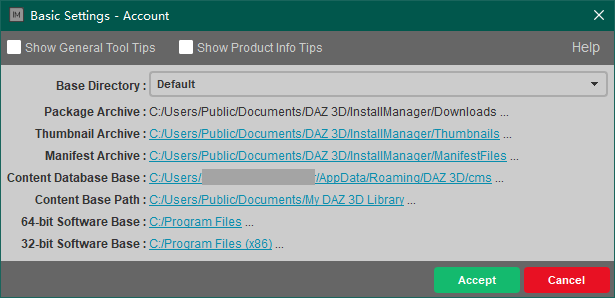
What you are showing me is nothing that I see in Daz Central. This user interface looks quite old while mine is white and modern.
Daz Central not recognizing installed assetsYour screenshot above showed the path, the path is also (I think) listed in the Daz Central settings and can certainly be seen in the Install manager advacned settings (in the Installation tab).
Issues in serie with the interactive tutorialThat's right! After "installing" in Daz Studio (althought it was already installed with Daz Central), it seems to work. The conclusion seems to be that it is far better to install from DS than DC (?)
Thanks again for you help Richard !
How to restore changes to Daz Central Base Path Location?I accidentally changed the Base Path Location in DazCentral and now my years of installed assets all are marked as "Install" indicating that I need to install them all from the start if I want to continue to use them in my projects.
I don't know what the original Base Path Location was and there is no undo changes or reset or default option for me to undo my mistake. The only viable option is to redirect the path back to its original location.
Does anyone know what the default Base Path Location is that Daz creates when installing the program for the first time?
Daz Central not recognizing installed assetsDaz Central does not look to see if the product files are there, it looks solely at the manifests to see what it installed and where.
Daz Central not recognizing installed assetsIf I put simply the base directory c:\Daz 3D the assets land in the proper folder.
4. The new product installed is "Lyam hair". I can see the other products of the vendor previously installed in the same folder.5. I can open the file either using the "Open" button on the central or on the Smart content tab inside Daz. But is the only product listed. None of the other hair of the same vendor, (or anything else).

I am assuming a specific list is the one corrupted. I suppose I can open this original folder as an "additional location". (Or reinstall everything I do not have that many assets, including Daz studio) But if it can be fixed, the better.
(P.D. I am very careful about antivirus or downloading anything in general. I did not install any additional thing on Daz like a render engine or anything.)
Daz Central not recognizing installed assetsThose look OK.
Daz central does just allow setting a base path - that is one of its featrues, to avoid having the multiple settings in Install Manager. Have you been able to find the manifest fiels for the products thata re installed but not showing? Where are they if so?
Issues in serie with the interactive tutorialSo it wasn't installed through Daz Studio and you used the option? That means DS is seeing the files from Daz Central but not loading them even though there are (or were) no Connect files/relics of connect files to confuse it. I suspect theer is soemthing going on that is blockling file acess, which might very well also cause a crash if it interfered mid-process.
Daz 3D is part of

Connect
DAZ Productions, Inc.
7533 S Center View Ct #4664
West Jordan, UT 84084Licensing Agreement | Terms of Service | Privacy Policy | EULA
© 2026 Daz Productions Inc. All Rights Reserved.