-
Identify Character, hair and clothing asset from an abandoned game.That's Victoria 8.1's skin, but it's definitely not her morph, so this is a mix and therefore impossible to accurately ID. Sorry.Problem with custom character eyelids / eyes
Generally morphs you buy (or freebies) should already have had the rigging adjustment made and linked to the controller - it's only custom morphs you make (via dForm or importing an OBJ) that will need the adjustment. If you use third party morphs, then export as OBJ and load as a new morph - don't: not only do you lose all the rigging adjustments, which are not too hard to redo, but you also lose all links to corrective morphs that improve the bending, and those would be a lot of work to rebuild.
Morph Transfers between G8F and G8MI know G9 is the new thing, but I am looking for something where I can transfer character morphs between females and males for G8 and G8.1. I thought there was a product like that, but I am drawing a blank
Facetransfer 1 and Genesis 8.1Face Transfer 1 only create Genesis 8 characters, but not 8.1
[Released] dForce2Morph [Commercial]takezo_3001 said:
RiverSoftArt said:
From the manual: It is recommended to not use custom characters, but the generic Genesis 3 Female, Genesis 8 Female, etc. You are creating a morph the will make the sweater work on a large-breasted character. The short part really doesn't make a lot of sense to me; that changes the character and not the sweater in any way.
The morphs will be in the data folder. Look for the most updated file location after running the script.
Hmmm, I'm wondering if it's possible to use custom poses/characters via the timeline, as in starting the process with the default figure/pose, (which practically no one uses) and having the last frame contain custom poses/characters?
In general, morphs are supposed to base off the generic figures. Then they are combined with other morphs (such as a fat morph) to give you what you want. If they are not based off a common starting point, they won't always give you want you want.
Roll back to 4.21 ?? Too many bugs in 4.22!57331.fury said:
I`m having major issues with importing into Daz 4.22
The GoZ bridge no longer works. It sends the object to ZBrush, but when trying to send the item back to Daz, nothing happens.
If you try to manually load a morph through Morphloader Pro, the morph it creates is approximately 9500% smaller than the object that was used to create the morph.
If you do it manually with the morph loader you have to set the Export Scale in Zbrush . Default is 1 , For me it works when i set it to 100.
Hope that helps.
How to rotate a certain area of a mesh (character lip)?Blender is more powerful and stable, but perhaps you should consider learning Hexagon as well. It is designed to work with Daz Studio (easy import and export) and it works great at making small morph changes like you are describing.
Things to note: maker sure your model is zeored out when you send it over and back or strange things happen. Also, pay attention to the names as everything must stay the same for the morph to apply to the model when re-imported.
Facetransfer 1 and Genesis 8.1Face Transfer is build into DS.
You can find it in Windows > Panes.
It will give you 3 saves, and then waternark the following,
To register it you must go to Help > About Installed Plugins and add your serial number under Face Transfer. You can find your serial number under Account > Serial Numbers on the Daz web page.
Morphing characterI really shouldnt weigh in because i've used blender for like 1 minute years ago, but i assume making a transformation animation is as simple as key-framing the relevant shapekey.
I recall seeing instructions for bringing your library of daz morphs into Blender as shapekeys on Diffeomorphic site/video tutorials.
Otherwise an alternative could be to transfer shapekeys based on geometry using one of Blender's modifiers (data transfer modifer if i remember correctly)
Let's appreciate/discuss today's new releases - ongoing threadI like this new paradigm Cinnabar has been getting into. Before, it had been either cute but very simplified, or cute but exaggerated HD details. There seems to be a good balance with these last few. (neither had been a deal breaker for me previously, I love every purchase from them)
The only complaint I have about Mia, now that I've done a cursory render, is the eye scaling. If you look at her right eye (left side of the photo) you can see here it creates a gap when looking side-to-side. But otherwise I'm very pleased with the morph and the color palette.
AOBB's G9 Catwalk Icons bundle. 5 head morphs. No materials nor textures included.I finally present you with the head morphs of the 5 top supermodels of the 90's. You will find them here:
https://drive.google.com/file/d/1CqPQDgULcIs6G95MDeaTsYRtod-Ty3vE/view?usp=sharing
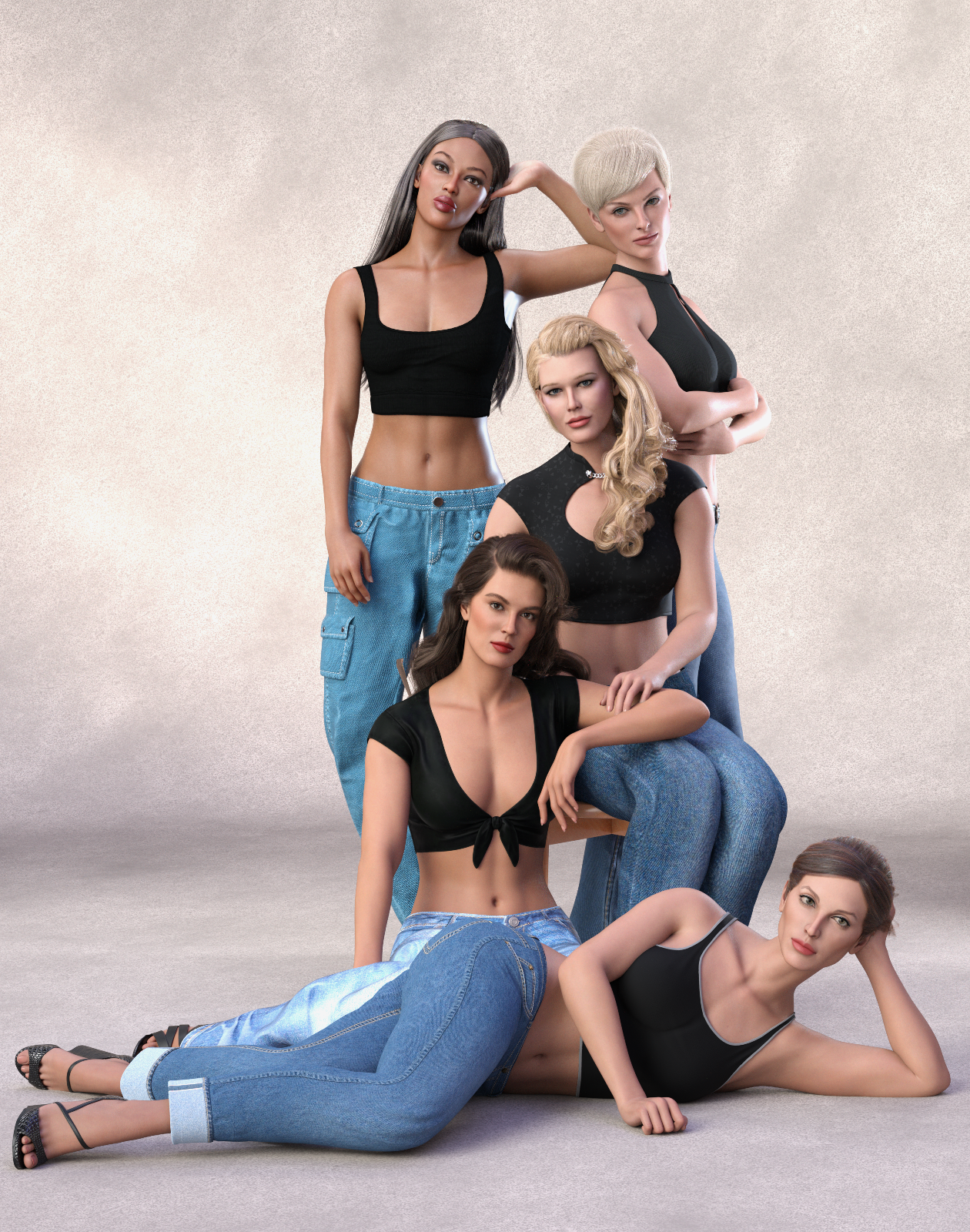
The head morphs include the likenesses of the following supermodels: Christy Turlington, Cindy Crawford, Claudia Schiffer, Linda Evangelista and Naomi Campbell.
Noncommercial use only!
Please read the Readme.txt file for how to install and use this bundle.
I have included also in the zip file a table with the list of brows, hair and skin textures used for each morph.
Have fun and please post your renders with these head morphs in this thread!

Cheers,
AOBB
Moves oars with handsIt appears if I use any newer version than daz studio 4.12 the limbstick script fails to load even for genesis3 and gensis8,
Log report from daz studio 4.16
{removed about 300 morph load strings to short the post}
--
2024-02-02 23:01:04.181 File loaded in 0 min 16.0 sec.
2024-02-02 23:01:04.184 Loaded file: Genesis 8 Basic Female.duf
2024-02-02 23:01:04.600 Loaded Morph Deltas in 0 min 0.0 sec.
2024-02-02 23:01:04.600 Loaded file: Vagina_UltraPenet-Tight_key.dsf
2024-02-02 23:01:04.604 Loaded Morph Deltas in 0 min 0.0 sec.
2024-02-02 23:01:04.604 Loaded file: Vagina_SupPenet-Tight_key.dsf
2024-02-02 23:01:04.607 Loaded Morph Deltas in 0 min 0.0 sec.
2024-02-02 23:01:04.607 Loaded file: Vagina_Penet-Tight_key.dsf
2024-02-02 23:01:04.610 Loaded Morph Deltas in 0 min 0.0 sec.
2024-02-02 23:01:04.610 Loaded file: default-shape.dsf
2024-02-02 23:01:04.625 Loaded Morph Deltas in 0 min 0.0 sec.
2024-02-02 23:01:04.625 Loaded file: !Tight Vagina.dsf
2024-02-02 23:01:04.644 Loaded Morph Deltas in 0 min 0.0 sec.
2024-02-02 23:01:04.644 Loaded file: PHMEyelashesLengthUpper.dsf
2024-02-02 23:01:04.647 Loaded Morph Deltas in 0 min 0.0 sec.
2024-02-02 23:01:04.647 Loaded file: PHMEyelashesLengthLower.dsf
2024-02-02 23:01:04.651 Loaded Morph Deltas in 0 min 0.0 sec.
2024-02-02 23:01:04.651 Loaded file: PHMEyelashesCurl.dsf
2024-02-02 23:01:05.078 Loaded image G8FBaseLegsMapD_1003.jpg
2024-02-02 23:01:05.167 Loaded image G8FBaseEyes01_1007.jpg
2024-02-02 23:01:05.428 Loaded image G8FBaseArmsMapD_1004.jpg
2024-02-02 23:01:05.515 Loaded image G8FBaseMouthMapD_1005.jpg
2024-02-02 23:01:05.766 Loaded image G8FBaseFaceMapD_1001.jpg
2024-02-02 23:01:06.003 Loaded image G8FBaseTorsoMapD_1002.jpg
2024-02-02 23:01:50.528 Loading script: G:/Documents/Daz/Scripts/3D Universe/Limb Stick/3DU LimbStick.dse
2024-02-02 23:01:50.528 Failed to load script: G:/Documents/Daz/Scripts/3D Universe/Limb Stick/3DU LimbStick.dse
2024-02-02 23:02:08.456 Loading script: G:/Documents/Daz/Scripts/3D Universe/Limb Stick/3DU LimbStick.dse
2024-02-02 23:02:08.456 Failed to load script: G:/Documents/Daz/Scripts/3D Universe/Limb Stick/3DU LimbStick.dse
2024-02-02 23:02:18.401 Loading script: G:/Documents/Daz/Scripts/3D Universe/Limb Stick/3DU LimbStick.dse
2024-02-02 23:02:18.401 Failed to load script: G:/Documents/Daz/Scripts/3D Universe/Limb Stick/3DU LimbStick.dse
2024-02-02 23:02:21.720 Loading script: G:/Documents/Daz/Scripts/3D Universe/Limb Stick/3DU LimbStick (How to Use).dsa
2024-02-02 23:02:21.737 Script executed successfully: G:/Documents/Daz/Scripts/3D Universe/Limb Stick/3DU LimbStick (How to Use).dsa
2024-02-02 23:04:18.720 Loading script: G:/Documents/Daz/Scripts/3D Universe/Limb Stick/3DU LimbStick.dse
2024-02-02 23:04:18.720 Failed to load script: G:/Documents/Daz/Scripts/3D Universe/Limb Stick/3DU LimbStick.dse
2024-02-02 23:04:26.958 Loading script: G:/Documents/Daz/Scripts/3D Universe/Limb Stick/3DU LimbStick.dse
2024-02-02 23:04:26.959 Failed to load script: G:/Documents/Daz/Scripts/3D Universe/Limb Stick/3DU LimbStick.dseHmmm ?!
MY WORK IS TRAPPED INSIDE DAZ3D. HOW DO I GET IT OUT?Barbult, thank you for the comment. This problem has plagued me since May of last year, when I was using the most up-to-date version of Daz. Currently, I am using Daz 4.22.158 Public Build and I have Photoshop versions CS5, CS6, CC and Photoshop 2024 installed. The transfer no longer works on any of them. Additionally, I totally backed up my computer a few months ago, re-installed Windows 11 and Daz and Photoshop and STILL I get this message.
The photoshop bridge worked perfectly for YEARS, delivering crystal-sharp renders into my computer (A Dell 8470 with 64Gigs of RAM) and suddenly, when I went to transfer/port a small object to Photoshop CC,it failed, gave that message and has never worked since. It's as if someone flipped a switch and killed its ability.
Learning 3Delight AgainRegarding glossy lips: Consider using the coat layer or the base thinfilm layer to add specular/reflection. Make a grayscaleRGB thickness/strength map for the face, with black for no strength and white for 100% strength, and blur the edges slightly for a smooth transition. Apply to both the face and lips.
Also, I use about 70% diffuse roughness for female skin, but for lips and nails I use 0%, or a very small value. Instead I fiddle with IoR and GlossyFresnel roughness to get the sheen I want. I guess there are many ways of achieving the same thing...
We've been debating, off and on, the use of specular maps with wowie and Mustakettu85. Admittedly spec. maps are a "hack"(IRL reflectivity is pretty uniform over the whole body, only roughness varies), and no maps are def better than bad maps, if you ask me. Watch out for super dark maps, nothing but trouble! No maps is the PBR way, but that requires good topology and height/roughness maps.
And you only need to make one face roughness map for each UV-layout, or you could probably do just one map and use the UV transfer function to create copies for the other Generations? I haven't tried that myself,though.
[Released] dForce2Morph [Commercial]RiverSoftArt said:
From the manual: It is recommended to not use custom characters, but the generic Genesis 3 Female, Genesis 8 Female, etc. You are creating a morph the will make the sweater work on a large-breasted character. The short part really doesn't make a lot of sense to me; that changes the character and not the sweater in any way.
The morphs will be in the data folder. Look for the most updated file location after running the script.
Hmmm, I'm wondering if it's possible to use custom poses/characters via the timeline, as in starting the process with the default figure/pose, (which practically no one uses) and having the last frame contain custom poses/characters?
calf colliding with thighs too early on Genesis 9That looks like a corrective morph, designed to improve the bends when another shape is applied, kicking in when it isn't needed. Apply the minimum pose needed to show the issue (e.g. bend the shin) and in the Parameters pane option menu (the lined button in the top corner or right-click the tab) and enable Preferences>Show Hidden Properties, then go to the Currently Used group and look for any greyed-ourt sliders (correctives ar usually hidden). With luck that slider will have a name that tells you which character it is from, check to see if that has any updates and if not report it.
calf colliding with thighs too early on Genesis 9This looks a lot like there's a JCM (or CBs as they became on Genesis 9) that is not correctly linked to its parent morph; are you *sure* you've checked all the morphs, including all hidden ones?
Clothing mesh messed up when posed on customized characterDissendior said:
Thank you again @crosswind - this was the solution: I exported the mesh of the character and re-imported it to Daz as a morph with Morph loader pro on the Genesis 8 base figure. Then I followed the mentioned tutorial: adjust rigging to shape and ERC freeze. Now the pants are deforming correctly when the figure is posed.
Man... this was a source of stress
Nice!It proved that one or some of the PBMs was the culprit.
Clothing mesh messed up when posed on customized characterThank you again @crosswind - this was the solution: I exported the mesh of the character and re-imported it to Daz as a morph with Morph loader pro on the Genesis 8 base figure. Then I followed the mentioned tutorial: adjust rigging to shape and ERC freeze. Now the pants are deforming correctly when the figure is posed.
Man... this was a source of stress
Clothing mesh messed up when posed on customized characterThe individual morphs should already have the necessary rigging adjustments set up, unless they are morph you created your self (in which case do the adjustment and ERC Freezing on those). Do the clothes work on a base figure, or are they broken there too?
Daz 3D is part of

Connect
DAZ Productions, Inc.
7533 S Center View Ct #4664
West Jordan, UT 84084Licensing Agreement | Terms of Service | Privacy Policy | EULA
© 2026 Daz Productions Inc. All Rights Reserved.