-
[SOLVED] Morph loader - partial morph
arthenics said:
To be fair, since all my characters start from a "slider-adjusted" genesis (G9), it's faster for me to just export a genesis with only the body modified and another with only the head modified and I join the two morphs sliders in a third one when I reload everything from Blender.
(for combined morphs : see https://www.daz3d.com/forums/discussion/495356/combine-morphs)
If you are using standard morphs, rather than your own custom morphs, then that kind of baking has several drawbacks:
- you cannot distribute the morph, which may or may not matter for you
- you lose all joint adjustments, though those are fairly simple to redo
- you lose all corrective morphs (improving joint bends, or making sure that things like eyes closed or mouth closed work without gaps or intersection), rebuilding those will be a pain.
Character SplitterVersion 3 available

Changelog:
- excluding head bones for body morph and body bones for head morphs
- addded tutorials for D-Former creation and 'Reference Vertex' use
- added checks for mandatory plugins on startup
- added checks for D-Former number of vertices matching base figure
- 'normalized' becomes the default mode (previously 'WYSIWYG')
- updated user manual (added plugins page)Where is the 64 bit Beta version of Hexagon? [Solved] (an internal error has occurred)RexRed said:
Okay, I found the 64 bit beta in the 64 bit Windows Program Files folder. I am testing it out to see if if has the same error.
This thread is "solved" until I encounter the "an internal error has occurred" message.
I will get back to you all.
So far the error message has not occured so fingers crossed.
Also when I imported the morph for my pants, I needed to turn smooting off on my figure or it distorted the new morph.
Any suggestions on why smoothing does this?
How to transfer several products to a custom category at once ?Hi, i'm currently building my daz library from scratch and there's this annoying issue i'm having. I'm trying to place several assets in smart content to a custom category but it's just too much time-consuming. I have to do it individually and it's kinda annoying. Is there any way i could select several assets and place them at once ?
Face Transfer helpAnyone familiar with the Face Transfer 2 plugin?
I keep getting a message prompt saying please use image picker? I could use guidance. Anyone get this message? Is there a fix? Thx
Problem with custom character eyelids / eyesBejaymac said:
crosswind said:
If you had the body morph dialed, adjusted rigging to shape and the distortion was gone... it still means the body morph was wongly made 'cause it affected the rigging and vertices of the character's head.
Nothing unusual about that, haven't found a G8+ character that wasn't "wrongly done".
My own custom characters are a single DSF file with just over 1k formula, but with separate head and body morphs you have just over 1500 formula, yep that's roughly 500 duplicate formula messing with the rigging.
Oh and Richard, you'd be surprised at the number of "store" bought G8+ characters I've had to rig, I have two friends who also use DS, and they regularly buy from everywhere, so barely a week goes by where I'm not "fixing" something they've bought. Which includes no rigging adjustments in the DSF files, bad rigging adjustments in the DSF file, and lets not forget the character presets that don't load the geografts.
I did say "should" - if not, from Daz at least and with an actual character set or end-user morph set, I would report it as a bug.
Problem with custom character eyelids / eyesBejaymac said:
crosswind said:
If you had the body morph dialed, adjusted rigging to shape and the distortion was gone... it still means the body morph was wongly made 'cause it affected the rigging and vertices of the character's head.
Nothing unusual about that, haven't found a G8+ character that wasn't "wrongly done".
My own custom characters are a single DSF file with just over 1k formula, but with separate head and body morphs you have just over 1500 formula, yep that's roughly 500 duplicate formula messing with the rigging.
Oh and Richard, you'd be surprised at the number of "store" bought G8+ characters I've had to rig, I have two friends who also use DS, and they regularly buy from everywhere, so barely a week goes by where I'm not "fixing" something they've bought. Which includes no rigging adjustments in the DSF files, bad rigging adjustments in the DSF file, and lets not forget the character presets that don't load the geografts.
Well, I don't think they're unusual nowadays but just routine... Though I also fixed a lot... I'd rather say most of them were "inappropriately done" than "wrongly done" (of course some of them were...)
And Character Presets can load geografts as well as their material presets as long as Post Load script is correctly configured...
[Released] dForce2Morph [Commercial]takezo_3001 said:
RiverSoftArt said:
In general, morphs are supposed to base off the generic figures. Then they are combined with other morphs (such as a fat morph) to give you what you want. If they are not based off a common starting point, they won't always give you want you want.
Ahhh, that makes perfect sense, thanks for the enlightenment!
You're welcome! Thanks for the support!
Problem with custom character eyelids / eyescrosswind said:
If you had the body morph dialed, adjusted rigging to shape and the distortion was gone... it still means the body morph was wongly made 'cause it affected the rigging and vertices of the character's head.
Nothing unusual about that, haven't found a G8+ character that wasn't "wrongly done".
My own custom characters are a single DSF file with just over 1k formula, but with separate head and body morphs you have just over 1500 formula, yep that's roughly 500 duplicate formula messing with the rigging.
Oh and Richard, you'd be surprised at the number of "store" bought G8+ characters I've had to rig, I have two friends who also use DS, and they regularly buy from everywhere, so barely a week goes by where I'm not "fixing" something they've bought. Which includes no rigging adjustments in the DSF files, bad rigging adjustments in the DSF file, and lets not forget the character presets that don't load the geografts.
Elementary, my dear Walter 9paulawp (marahzen) said:
benniewoodell said:
paulawp (marahzen) said:
I don't normally do much with characters, but I might actually be able to use Walter here and there ... this is just an initial bit of tinkering.
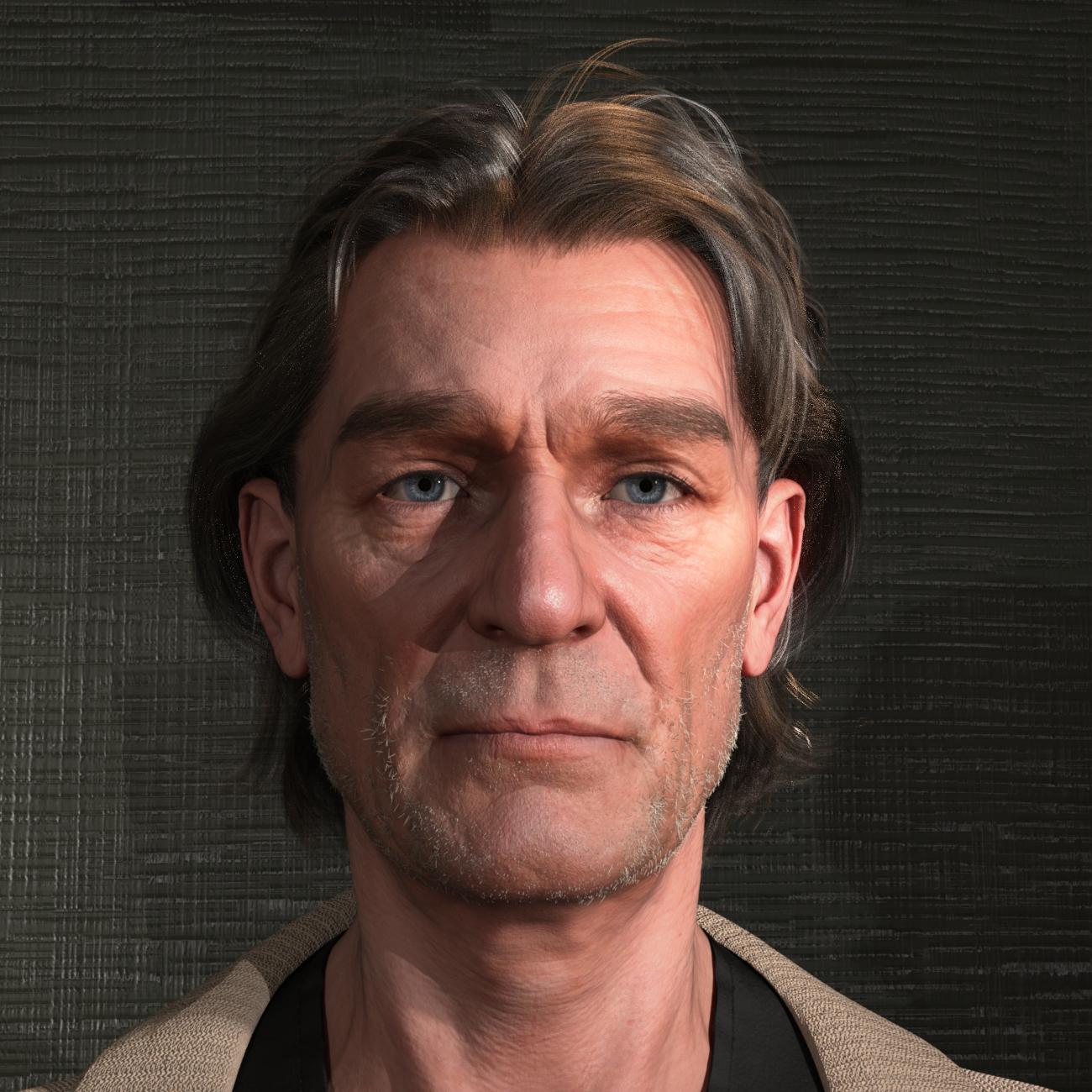
Fantastic looking character! Might I ask which product has that kind of facial hair? I've been looking for something patchy like that.
That is the Old George Beard and Old George Facial Hair with the respective OGB Shorter shaping options cranked up to 100%. I too was looking for a patchy look here and was pretty happy with this product. I had thought I'd used a non-stock shader, but in reviewing the scene, it does appear that the texture is the default for the product.
The head itself is made with 55% Walter and 100% one of my shapes sourced from the original G8 Face Transfer transferred to G9 via ManFriday's converter.
And, although I fully expect that Edna 9 (lol, or whoever) is working her way toward release even as we speak, you can even use Walter as the base of a serviceable older woman. This is a five-minute test with part Walter, part one of my FT/MF characters and Base Feminine.
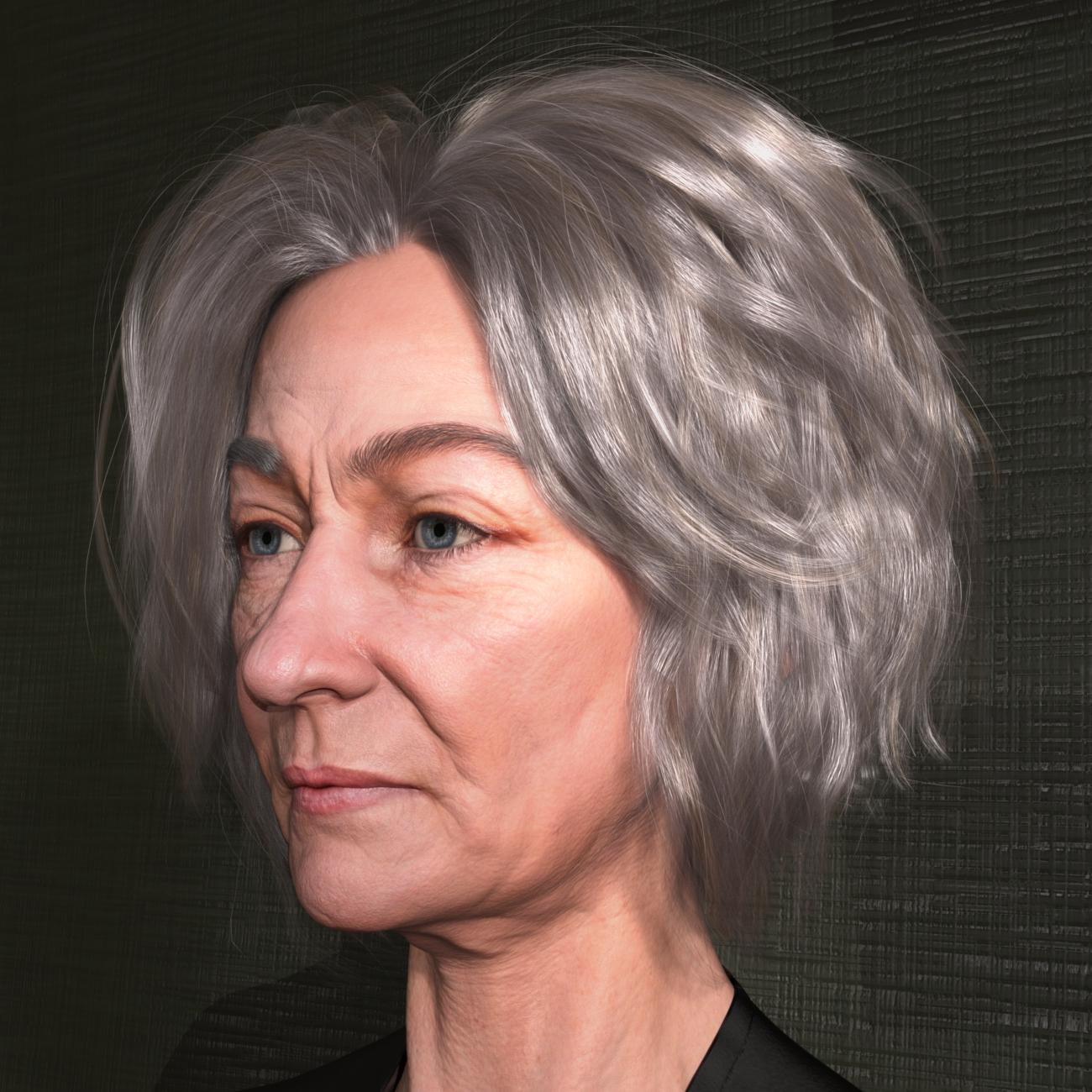
Oh wow, that was the beard from the pro bundle? Dang, I didn't catch that from the promos. Thank you so much for taking the time to let me know! The hair looks great too. Maybe I should have gotten the pro bundle instead of just the character and the suit. And the mix with the feminine morph works rather nicely too.
Problem with custom character eyelids / eyesIf you had the body morph dialed, adjusted rigging to shape and the distortion was gone... it still means the body morph was wongly made 'cause it affected the rigging and vertices of the character's head.
Character SplitterHi Mike3D, great to hear you're still refining the script, thank you! I successfuly used it again last night, this time with G8f. Perfect result! This time I somehow forgot to add the morphs to split, but then without closing the scene, I did it right choosing different head / body morph names, and it worked as hoped and, interestingly, for the first time in my splits it didn't need rigging to shape. I then used the user friendly "find morph" option and deleted the unneeded ones - thanks for that function! I'm not sure I can post the log (from another PC), I'll try. And, I did wonder about your workflow. Question: Do you start with a base figure, and then zero it, so that when you next add the D-Former it's in the correct position? I assume that's true. So, the next question is: How do you add your morph(s) to be split? The only managable way I could think of to add my many morphs (a dial spun character) was to have it loaded in the scene, a separate figure, then copy and paste it to the 1st one (which normally would work) but it's been failing. So, my workflow is: 1) Load my character to be split. 2) Memorise figure. 3) Zero figure. 4) Add D-Former. 5) Restore figure. (sometimes I've also zeroed resolution) 6) Have the figure selected, open and use script as instructed. The only issue has been the missing rigging adjustment, which is only another click. Wishing you a great day!
 / peacePhoto to 3D for Daz3d Figures
I have looked into Face Transfer... keep getting a message pick from image picker?
[Released] dForce2Morph [Commercial]RiverSoftArt said:
In general, morphs are supposed to base off the generic figures. Then they are combined with other morphs (such as a fat morph) to give you what you want. If they are not based off a common starting point, they won't always give you want you want.
Ahhh, that makes perfect sense, thanks for the enlightenment!
Elementary, my dear Walter 9benniewoodell said:
paulawp (marahzen) said:
I don't normally do much with characters, but I might actually be able to use Walter here and there ... this is just an initial bit of tinkering.
Fantastic looking character! Might I ask which product has that kind of facial hair? I've been looking for something patchy like that.
That is the Old George Beard and Old George Facial Hair with the respective OGB Shorter shaping options cranked up to 100%. I too was looking for a patchy look here and was pretty happy with this product. I had thought I'd used a non-stock shader, but in reviewing the scene, it does appear that the texture is the default for the product.
The head itself is made with 55% Walter and 100% one of my shapes sourced from the original G8 Face Transfer transferred to G9 via ManFriday's converter.
And, although I fully expect that Edna 9 (lol, or whoever) is working her way toward release even as we speak, you can even use Walter as the base of a serviceable older woman. This is a five-minute test with part Walter, part one of my FT/MF characters and Base Feminine.
Facetransfer 1 and Genesis 8.1That is not correct - see
http://docs.daz3d.com/doku.php/public/software/dazstudio/4/change_log_4_22_0_15#4_22_0_8
http://docs.daz3d.com/doku.php/public/software/dazstudio/4/change_log_4_22_0_15#4_22_0_9
which refer to Face Transfer (1) working with both 8 and 8.1
Bodybuilder MorphsHow do I make a male & female bodybuilder?
I see those in the store, how do I make them?
I've been looking for tutorials.
How do I take a basic body and morph the individual body parts as I like them?
Linday question and suggestionFSMCDesigns said:
I had forgot about the Satine Detective Outfit. Even though it autofits to G9 pretty well, I wouldn't be opposed to a G9 version with open/close options for the top
Or if open/close morph is too hard to do, just two version of the top.
Photo to 3D for Daz3d FiguresIf you want to be able to use a character in Daz Studio it has to have rigging and corrective morphs. Therefore you would usually do it as a morph of a base character, i.e. where you keep all verteces and just move them around (a morph).
So have you considered this https://www.daz3d.com/face-transfer-2
So does the Unity bridge actually work?My example transfer to URP is in another thread:
https://www.daz3d.com/forums/discussion/441967/post-your-daz-to-unity-renders#latest
Daz 3D is part of

Connect
DAZ Productions, Inc.
7533 S Center View Ct #4664
West Jordan, UT 84084Licensing Agreement | Terms of Service | Privacy Policy | EULA
© 2026 Daz Productions Inc. All Rights Reserved.