-
Ribs Morph
Hi m4dara, I'm another advocate for rib morphs! But much more normal than the SY ones, I've been reluctant to say it but IMO, that seems mostly like monster stuff - I only use the 1-4 ribs and then usually have to narrow the sternum. ( but many, many thanks to SY for all the free morphs and tutorials ) Sometimes I use the spine morph, but I like the free SY one better. But being such a fan of ribs or noticable bone structure, I'm glad to have purchased it! So, yes, someone please make a REALISTIC rib morph product for G9 (or G8) with lots of individual bone control so one could use it more exactly. Like the 1-4 ribs would be more functional if they were 4 seperate morphs. IMO, every rib should be separate with the option of some full morphs also. RE: Lexi, I purchased that, because of a previous forum rib discussion that suggested it. I was hoping that it would have a separate HD morph that was mostly the ribs, so I could use it with other totally different characters, but I don't think it was good for that - I'll check it out again to make sure I'm not misleading anyone. I've been using the normal map method for ribs. 3D universe, London character for G8F has a good ribs/torso normal that, of course, also works on G3. It does have a little other detail in it, but I put it in GIMP and got a sense of the normals color scheme ( what was depth and what was height ) and duplicated the background and essentially copied over everything except the ribs then carefully tapering off the edges. It's all I usually need to get some rib effect. And for G9, using the same reworked normal, I somehow raised the active part up so that the normal was in the right vertical position in the body parameter. It's a lot of messing around and not perfect, but you can also use it with negative values to line it up better sometimes. Let's hear it for ribs!

 /peaceCharacter Splitter
Mike3D Hey, thanks very much for trying to replicate my issue! I'll definitely try your suggested trouble shooting approach. I'm also gonna post my question about the unexpected difference from the original morph when saving as a shaping preset or loading an exported obj.( the exact copy, including the manual scaling) into MLP and then the manual scaling is not there. To me, that seems like the initial problem. Anyway, have a great day!
 / peaceDiffeomorphic - Animation not quite the same in Blender and DAZ
James said:
g9
@James
While I do not use Diffeo to send Blender animation back to Daz studio ( never found it reliable)
I do work with applying external animation data to G9 from outside sources.
such as Mixamo, Iclone and Endorphin
My experience has been that you do not have to perform any turning off of limits or unlocking of bones etc. with G9 as we have to with G8 before applying external animation data.
But as Padone mentioned ,Any animation using Blender IK system will not transfer
to Daz studio with 100% accuracy because baked IK to FK position data does not transfer well into Daz studio
IMHO Particulary as Daz .duf "pose" files coming from an MHX control rig going to a base FK skeleton in Daz studioEven the old BVH FK format handles this better as my BVH files from Iclone are flawless in Daz studio.
Face Transfer 2Thanks a lot, nonesuch00
I really like these Pinup Boxes, so below is another Face Transfer creation on Genesis 8 Female
 River 8.1 Morph...why does she look familiar?
Anyone know the source image for her....she looks Reeeaaaalll familiar.
Need help with Small Breasts Morphs (vol 1-4) for G8F by AnagordMatt_Castle said:
Yeah, that's a common problem with more petite breasts, and one of the main things I'm expecting to need to fix with this tool.
...looking forward to this.
Apparently a portion of newer female clothing is including a "smoother" built into the chest area mesh to mitigate the "saran wrap" look but in only few instances is there a control to reduce it. What I find odd is there is a centre chest smoother in 3DU's Message Magic clothing (which has no slider) as it is primarily intended for young characters. Not sure if dForce takes it out (the clothing is listed as being dForce but also works as conforming) as I have recently been experiencing display driver crashes when running sims.
Richard Haseltine said:
That is because morph projection essentially matches the changes to the nearby parts of the base mesh - and the sternum isn't changing as the breasts are reduced.
..I would think the eternum bone is separate from the breasts as I have Zev0's Breast Control (and a couple other breast shaping utilities) which doesn't deal with the sternum, just cleavage. I've only seen this happen more recently with clothing content when I try to fit is to more petite or younger characters. It doesn't whow up in the unclothed character (which of course I cannot post an attachment of) just wshen the clothing is fitted.
For example, one clothing set, the Boho Dress for G3F (which I converted to G8) does have a slider for the centre smoother. Meanwhile the Basicwear Tank Top and Sports Bra for G8F doesn't, and actually deforms pretty badly when fitted to a character with a smaller bust circumference (worse than the example I attached above)
There needs to be some type of universal tool that can be used to reduce the smoother since it is apparently a permanant part of the clothing mesh and does not have a sepaate slider.
Ribs MorphHey, I just wanted to ask if there are ribs morphs for genesis 9? For skinny people x). Male and/or female. Sickleyield has some really nice morphs for G8 in HD. looking for something similar for a long time. Tried to sculpt myself, also tried normals... but meeh, I am not really talented xD... So maybe you know something. Or just a product suggestion x). Hope u can help. ThanksFace Transfer 2Artini said:
Finally purchased https://www.daz3d.com/pin-up-boxes
Works great with my new creation made with Face Transfer 2.

Nice render & I'm buying that Pinup Boxes product. That's for the heads up.
Basic Morph Settings Import/Export One More Time?I am sure this has been asked a thousand times, and I have watched at least three Youtube videos, but I am still getting a scrambled mesh when I try to do a simple morph to a base G8F figure using OBJ export and OBJ import.
- Open Daz Studio. Load G8F. Delete eyelashes. Set mesh resolution to base. Export OBJ. Choose Daz Studio preset. Export at 1%.
- Open Blender. Import G8F. Edit to make a morph, in this case simple nose change. Export OBJ. Make sure check box for vertex order. Export at 100.
- Return to Daz Studio. Select G8F. Edit OBJ, start morph loader pro. Use Daz Studio Preset. Select morphed obj. Set deltas only. Morph is 'successful.' Yay.
- Find new morph in parameters tab. Start dialing up. Mesh is yucky. Oops.
*** - What export settings from Daz Studio? Import settings in Blender? Export settings in Blender? Morph loader pro settings? For simple figure morph like this Cyrano nose morph?
Face Transfer 2Finally purchased https://www.daz3d.com/pin-up-boxes
Works great with my new creation made with Face Transfer 2.
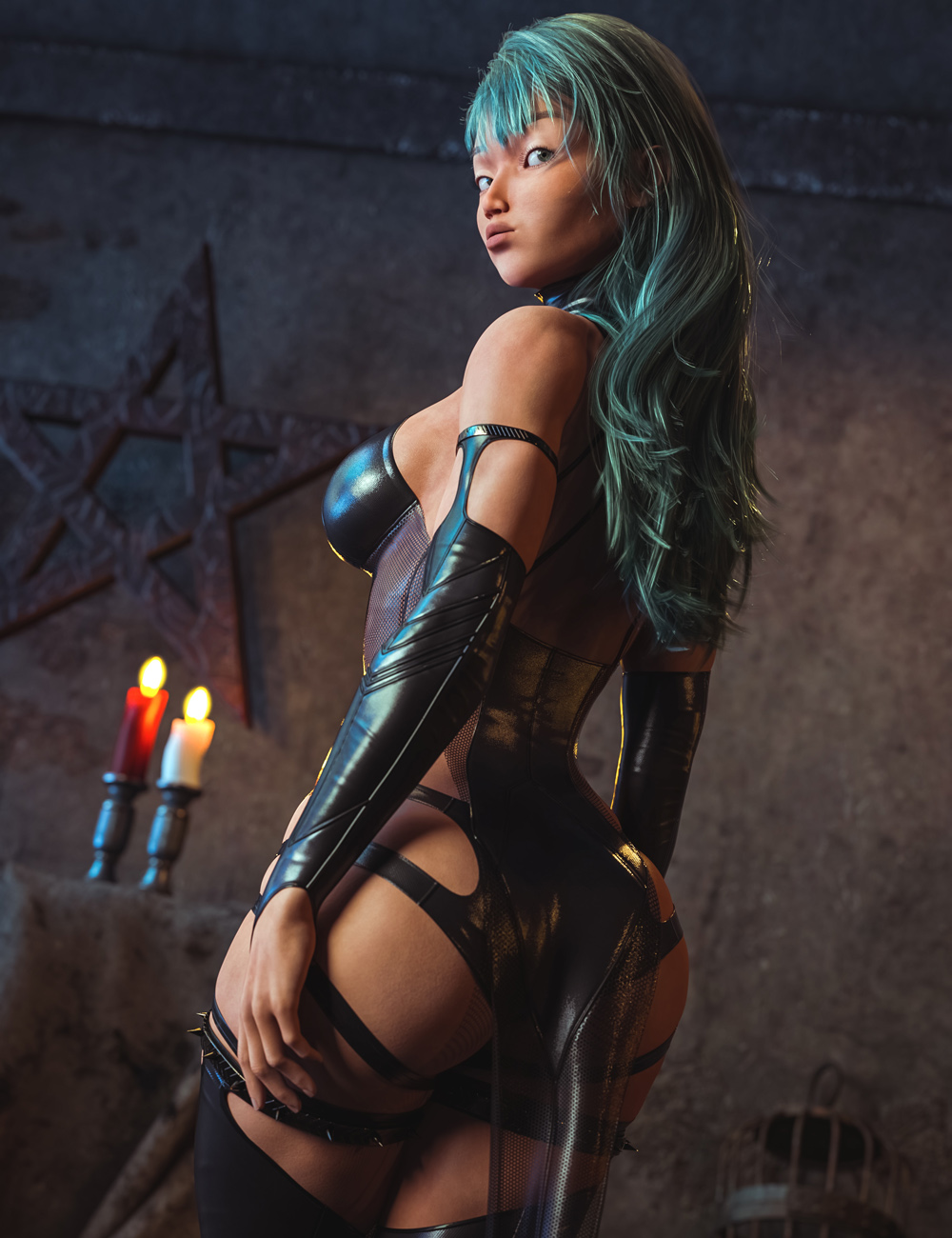
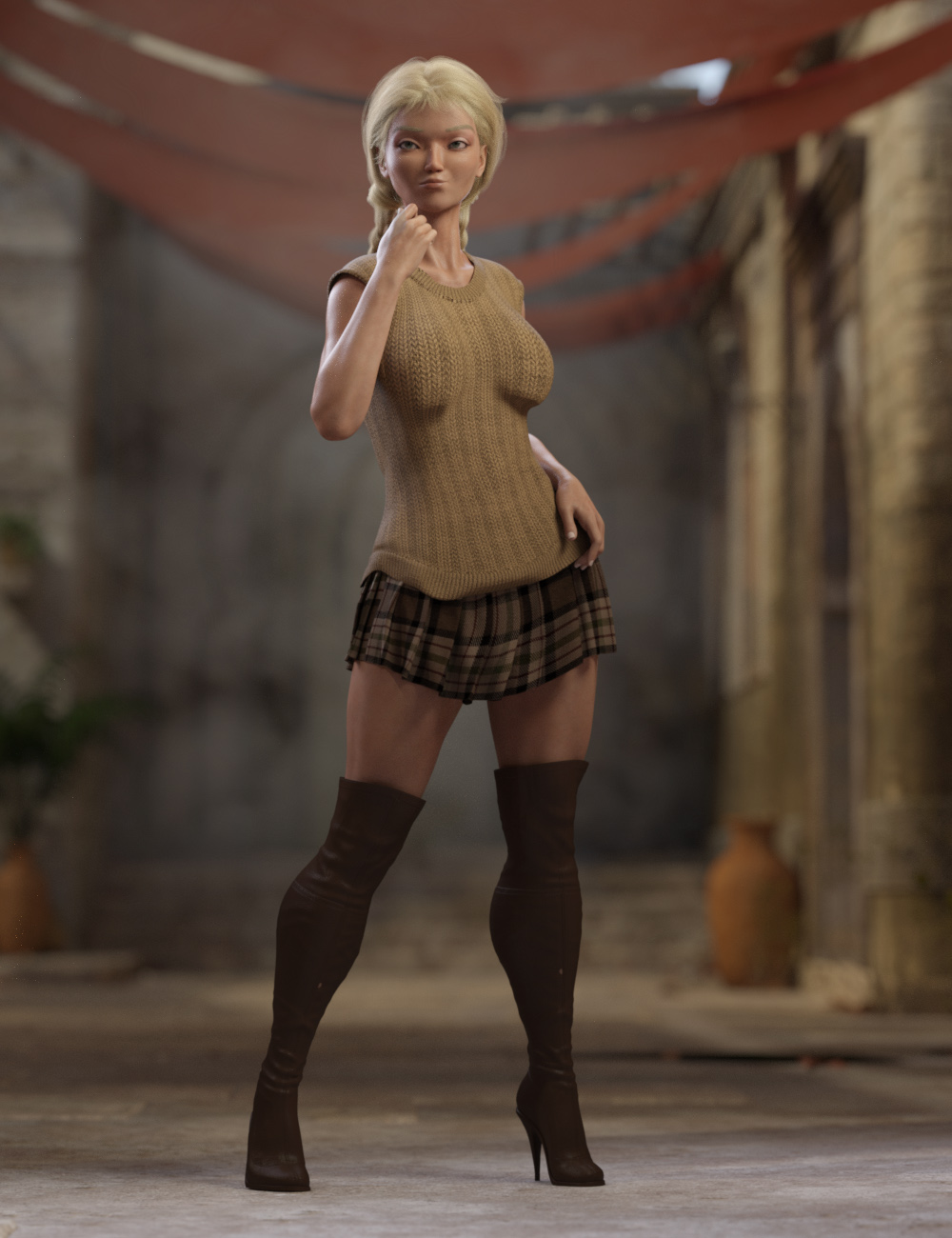
Hannalea for Genesis 9 [commercial]Hannalea for Genesis 9
https://www.daz3d.com/hannalea-for-genesis-9
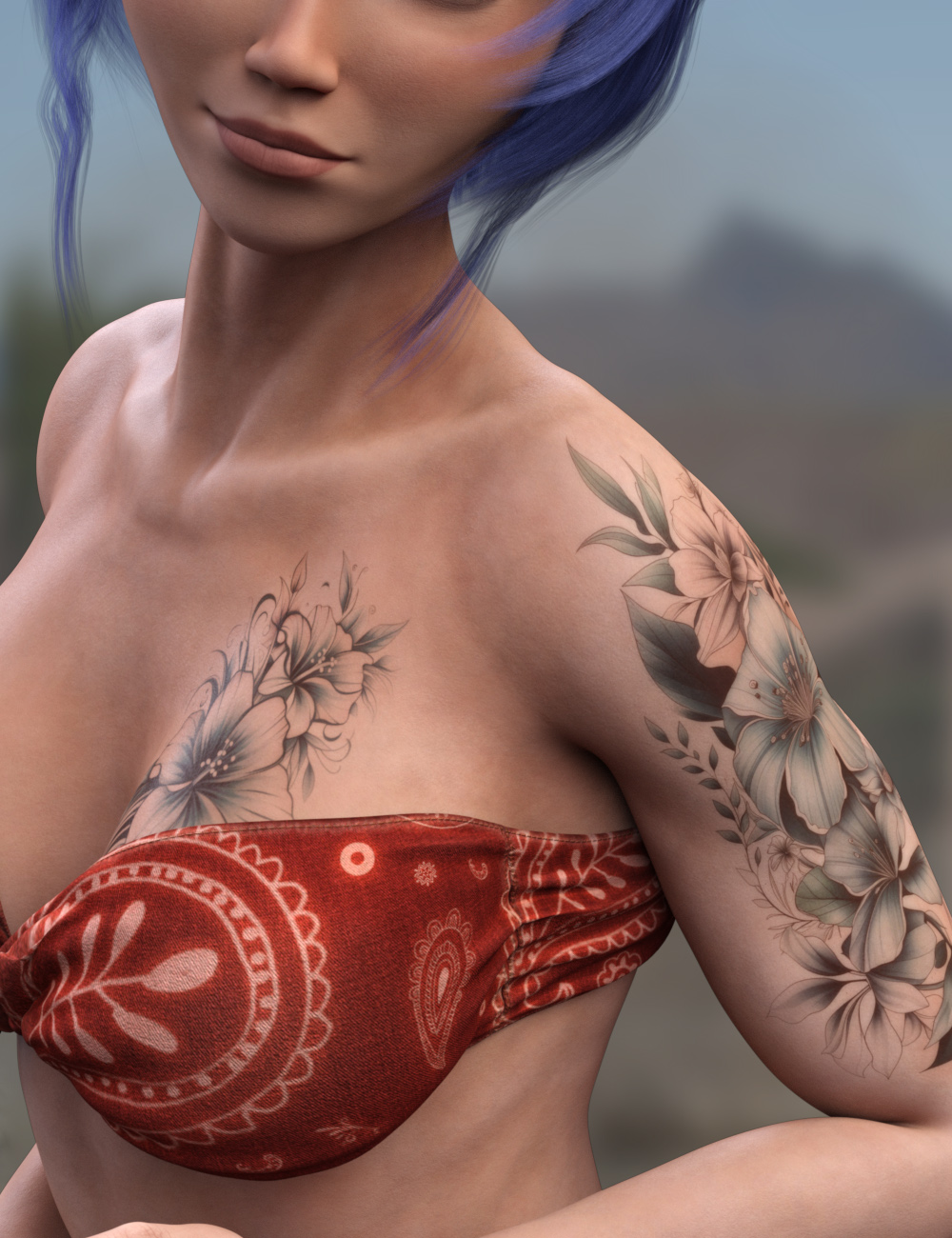
Hannalea is a beautiful young woman who is proud of all her curves. She is fit and ready for adventure, or an elegant night on the town. With individual tattoos and multiple makeup options, she can suit many character styles, from the sweet girl next door to the powerful Femme Fatale.
Separate head and body morph dials allow easy blending with other Genesis 9 characters, to create some unique characters.
Hannalea comes with High Definitions morphs, Ultra Realistic textures, and dForce Eyebrows to bring this character to life for your renders
What's Included and Features
- Hannalea for Genesis 9: (.DUF)
- Hannalea Character Preset
- Hannalea Shaping Preset
- Material Options:
- One Full Skin Mat with Female Anatomical Elements
- Six Makeup Material Presets
- Five Eye Material Presets
- Five Nails Material Presets
- Two Eyebrow Material Presets
- Two Tattoo Material Presets
- Hannalea dForce Eyebrows

 Need help with Small Breasts Morphs (vol 1-4) for G8F by Anagord
kyoto kid said:
...the bulge I am seeing doesn't cause the distortion above but actually pokes out abnormally from between the breasts at the lower centre of the chest. Again I've found no active hidden morph causing this, nor such am adjustment morph within the clothing's "Actor" settings tree.SOme cloghign actually has a centre smoother that can be adjusted but mosd dfoes not.
The perplexing and frustrating part is I've never had this happen before with this particular character until; the other night.
Example attached using Kawaii Overalls (this dress does not have a separate control for the centre smoother)
That is because morph projection essentially matches the changes to the nearby parts of the base mesh - and the sternum isn't changing as the breasts are reduced.
Zipper Help G9 - X-Fashion Slim Fit JacketFabler said:
crosswind said:
The weight on G9's Spine 4 is different from G8's Chest Lower, so auto-fit or whatever converter will bring your "distortion" as long as G9's Clone is used. Even if you go for tweaking weight, it won't work. There's no better way other than fixing it with external application...
If you know a sculpting software like Blender / ZB, it'll be pretty easy to fix it. Export Jacket to OBJ file with Base Resolution and fix the distorted area in Blender with Smooth Brush, then import OBJ back to Jacket as a fix morph...
Thanks for the info about the G9 Spine, that explains why other jackets with the zipper in the closed position were also distorting.
I have not used Blender / ZB. Can you give pointers on how to fix the distorted area in Blender with Smooth Brush?
Or do you know of a video or tutorial on how to do that?
I ever learnt it from Sickleyield's tutorial in here - https://youtu.be/wHfe6t2J4EY?si=F2dEkr6kzrQGeacJ
You just fix the Jacket with figure's A Pose, and fix the Base instead...
Character SplitterHi Mike3D, thanks for the reply. I haven't been creating a controller cause I don't need complete characters on one slider. What you're suggesting sounds interesting, maybe that would fix things, but don't know if I could edit the file correctly. And I'm not sure I'm being clear about the issue. In the process of dial spinning a new character, I also manually scale individual parts of the base figure ( legs, pelvis, lower and upper stomach, lower and upper chest, pectorals, collars, shoulders, arms, lower and upper neck, everything except the extremities and the head ( which distort when manually scaled ). What I have observed is, if the character is not as tall as the base figure, at least some of this manual scaling is lost, i.e., after exporting it as an obj. and loading it in morph loader pro on a fresh base figure at 100% ( when the exported obj. is actually identical, containng all the manual scaling.) When using WYSIWYG, ( by unchecking "normalize" ) the same issue is happening (what I get isn't what I see). I'm not saying there's an error in the script, rather I don't understand why D/S does this and I assume your script must be affected by this behaviour. And, the stumbled upon solution, has been to, scale up the whole spun figure ( not any individual parts ) to match the base BODY height, either as an initial export or to scale up the figure right in the scene before running the script, and then all the previous manual scaling seems to be there! Does that make any sense?
 As mentioned before, saving and loading the character as a shaping preset loses the manual scaling also. / Wishing you all the best!/ peaceNeed help with Small Breasts Morphs (vol 1-4) for G8F by Anagord
...the bulge I am seeing doesn't cause the distortion above but actually pokes out abnormally from between the breasts at the lower centre of the chest. Again I've found no active hidden morph causing this, nor such am adjustment morph within the clothing's "Actor" settings tree.SOme cloghign actually has a centre smoother that can be adjusted but mosd dfoes not.
The perplexing and frustrating part is I've never had this happen before with this particular character until; the other night.
Example attached using Kawaii Overalls (this dress does not have a separate control for the centre smoother)
Zipper Help G9 - X-Fashion Slim Fit Jacketcrosswind said:
The weight on G9's Spine 4 is different from G8's Chest Lower, so auto-fit or whatever converter will bring your "distortion" as long as G9's Clone is used. Even if you go for tweaking weight, it won't work. There's no better way other than fixing it with external application...
If you know a sculpting software like Blender / ZB, it'll be pretty easy to fix it. Export Jacket to OBJ file with Base Resolution and fix the distorted area in Blender with Smooth Brush, then import OBJ back to Jacket as a fix morph...
Thanks for the info about the G9 Spine, that explains why other jackets with the zipper in the closed position were also distorting.
I have not used Blender / ZB. Can you give pointers on how to fix the distorted area in Blender with Smooth Brush?
Or do you know of a video or tutorial on how to do that?
not enough genesis 8/9 (female) tactical/military outfits.the obj's can be imported into DAZ studio and fitted with the transfer utility
you may need to do weight paint editing
as for props export them separately at 0,0,0 and parent them or if it's a thirdperson player in Unreal create a socket and add them in the Blueprint
Zipper Help G9 - X-Fashion Slim Fit JacketThe weight on G9's Spine 4 is different from G8's Chest Lower, so auto-fit or whatever converter will bring your "distortion" as long as G9's Clone is used. Even if you go for tweaking weight, it won't work. There's no better way other than fixing it with external application...
If you know a sculpting software like Blender / ZB, it'll be pretty easy to fix it. Export Jacket to OBJ file with Base Resolution and fix the distorted area in Blender with Smooth Brush, then import OBJ back to Jacket as a fix morph...
dForce simulations in animationsDForce is OK for certain things but can be very temperamental, with so many dials it's very hard to know what needs fixing. Most important thing is to ensure there's no self-intersections or intersections with the character mesh (from the pose) before you start it. It works in animations fine otherwise. If you want to loop it you really need to get into scripting, exporting each frame as .obj and importing back as a morph on the clothing, fading it out towards the end back to the first frame. So, non-trivial.
Character SplitterHi Mike3D, Sorry I haven't tried version 3 yet. But I thought I should mention some things now. It's a lot but I'll try to compress it. My previous success with splitting was because I was exporting the morphed figure ( smaller than the base ) which I had scaled up so that the shoulders were the same height as the base figure and then loading it to a base figure with MLP - then splitting with "normalise". The reason I scaled it up was that it became evident that the manual scaling used to create the character was being lost. I guess it's a D/S thing. If I export a dial spun character as an obj. and load it just as a regular obj. it looks identical. But when loaded in MLP on a base figure at 100%, that manual scaling is gone ( typically I manually scale the limbs and parts of the torso ). Strangely, to me, scaling it up KEEPS the manual scaling from the original ( limbs etc. ). I had this realization in the process of baking the smoothing. Exporting as an obj.( scaled up ) loading in MLP, turning on the smoothing, then in the bake smoothing dialog unchecking the main node and then somehow finding and checking the MLP node. (why is there no "bake currently used" ?)
 Anyway, when I asked you the way to add a complex character to your script I was expecting to proceed that way but actually I've been just using the 1 smoothing baked, full body morph in MLP. And, when I saved the comlpex morphs as a shaping preset, double clicking it and proceeding as instructed, with "normalise" or unchecked, again, somehow my manual scaling is gone. I'm pretty sure this was the same issue I had with Shape-Splitter. I'm exporting then loading MLP with the default Daz settings. If I don't scale it up it loses the manual scaling, so I scale it up put it in MLP at 100%, use normalise, and your script splits it perfectly! Thanks for reading all this!
 Have a good 1!!!!!/ peace
Daz 3D is part of

Connect
DAZ Productions, Inc.
7533 S Center View Ct #4664
West Jordan, UT 84084Licensing Agreement | Terms of Service | Privacy Policy | EULA
© 2026 Daz Productions Inc. All Rights Reserved.