-
Correct tiling values for Iray shader presets?Bit of necromancy, but it worked for me: use Sketchup. I was having the same problem, how to get a tile shader (as in, bathroom tile) to tile consistently across the planes I was using for walls, floors, etc. Couldn't wrap my old artist's brain around the math. So I figured I'd try it in Sketchup, and got lucky. I just build what I wanted in Sketchup, and textured it with a material made from the image in the Daz shader. I tweaked the geometry so that it looked right, i.e., no tiles cut into thirds. I exported it as an FBX, imported it into DS, and applied the shader. Lo and behold, it just "works." I don't know if it's repeatable, but I was pleasantly surprised at how easy it was.New Pixologic software coming - Zbrush Core for entry level artists
I came across a site with a lot of free brushes and other extras including ones to help make creatures/monsters as well as the ability to add textures/paint our creations which core don't though some have mentioned using substance painter or 3d coat even with zbrush but zbrush you can get away without having to buy these extra programs if you don't want to right guys? you only need want these others along with zbrush if you want better more cooler advanced looking textures correct and there is enough tools in full z to get away with pretty good looking results?
Free brushes, free scripts, macro...crazy amount of free video or pic-rich tutorials... but these are mere bonuses...
Based on the published comparison list so far, the reason to go full ZBrush is about 3 things: speed, unimaginable creative possibilities, industry standard assets creation (game assets/ Daz3D products).
ZBrush's true strength = ZModeler, Retopo tools, Photoshop style Layers, SubD, Polygroup/Masking Selection, high quality preview shaded Polypainting + Sculpting in realtime, Shadowbox, in no particular order.
The modeling aspect is the most underestimated. 4R7 update alone made many architecture/ game asset type very very happy. ZModeler alone is worth at least 75% the price of SketchUp.

Another angle to consider: at some point in the last 3 years, within version 4, ZBrush price has jumped from $695 to $795. There's no guarantee when ZBrush 5 comes, it won't jump to $895. And the non-US residents would know it's pointless to project discount buy coinciding with your currency.
This makes the current window a very rare opprtunity to get into ZBrush at under $700. Very rare. So for the commercial grade users, unless your currency is going to go 1:1 to USD, 24 hours to research!
New Pixologic software coming - Zbrush Core for entry level artistsA creative software's worth is subjective, esp for most of the world who live with exchange rate and insane sales taxes....
Decisions decisions...priorities priorities...
ZBrushCore seems to target at a specific class of CG intermediate: the emerging 3D printing crowd. Secondarily, to encourage beginner Sculptors to cross the threshold to the real deal with a cut-down preview version. It's definitely not meant as a cheap standalone modeler/sculptor/painter/mapper for game content or advanced render content (Daz3D/ Maya/ C4D renders). Not to say it cannot be used for these purposes however, subjected to skills and knowledge.

For the hobbyists dabbled in free yet powerful Sculptris, SketchUp, Blender, (freeish) Hexagon/ Carrara etc, who has no commercial needs at all, they just have to decide if they have $120 to spend on a far more powerful sculpting tool than Sculptris. The hobbyists who haven't sculpted/ modeled in either of the free/cheap tools mentioned, would of course find a $120 pro-use capable sculpting tool totally "useless" to them. The hobbyists who enjoy sculpting for the fun of it (not to make props or morph premade things), do check out the abundant Dynamesh/ ZSphere/ MatCap videos, then decide if it's fun enough.
IMO, for hobbyists, ZBrush full version is an overkill. Compared to ZBrushCore, 3Dcoat Lt version is a far "all-rounded" entry solution for hobbyists with low budget but wish to create/ custom morph 3D things for games or 3D photo rendering.
...
For experienced semipros curious/ mulling over ZBrush vs ZBrushCore, all the indispensable pro user basic functionalities: UV, FBX, advanced retopo, GoZ, ZModeler, Instancing could be filled with Blender or 3Dcoat Lt version, so won't be an issue. This gets into subjective "user experience" and speed of use. A good Blender user can be faster than a unskilled pro tool user. A good modeler will find joy in the tool he/she has mastered.
I personally believe in well made artist tool have merits: creative process more optimized, more fun, I create more interesting stuff. For the intermediate semipros who subscribe to the idea of "well made tool inspire creativity and productivity", I'd say, the current narrow window of ZBrush full version 20% discount is very rare. You need to watch a lot of (well made well organized) videos in the enxt 24 hours to decide whether it's worth it...
24 hours!
 oh no hurry! lol
Beyond ZBrushCore/ upgrade now or future - for experienced freebie tool power users, ZBrush's value should be self-evident, so it's a matter of budget. To most commercial indies and pro Max/Maya/C4D crowd, ZBrush V4's entire upgrade history is full of gems and pleasant surprises. The latest good news on 4R8 speaks to the integrity and love of the creators at Pixologic for their creations. That's worth a lot to me.
3D Art Freebie Challenge – September, 2016: The Leaves of Autumn Bring Changes (Entry Thread)DAZ September 2016 Freebie Challenge - The Leaves of Autumn Bring Changes
The Bunny Hunter
Rendered in DAZ Studio using 3Delight
No postworkNo counts:
Genesis Male (Hunter)
Genesis Evolution: Morph Bundle (Hunter)
Genesis 2 Female (Bunnies)Hunter:
1. DieTrying's 182 V4 Morphs for Genesis by SickleYield (registration required)
http://www.sharecg.com/v/58198/favorite/21/DAZ-Studio/DieTryings-182-V4-Morphs-for-Genesis
2. Genesis Pinstripe Suit by Wilmap (registration required)
https://www.wilmapsdigitalcreations.co.uk/view_product.php?id=136
3. Headkase's Bossy Boots 2.0 for GENESIS by Varsel (registration required)
http://www.sharecg.com/v/56443/browse/11/Poser/Bossy-Boots-2.0-for-GENESIS
4. Fable Outfit for M4 by Dyald (registration required) - belt only used
http://www.sharecg.com/v/30237/gallery/11/Poser/Fable-For-M4
5. Smart Prop cap for Michael 4 by Adam Thwaites
http://www.most-digital-creations.com/free_poser_poses_textures_morphs_props_27.htm
(third from bottom - scroll down)
6. Remington Model 870™ Express® 12 Gauge Shotgun w/ 22" Vent Rib Barrel by MorBius
https://3dwarehouse.sketchup.com/model.html?id=a5e69b50e35473c6e4773d7a183337d9
(Converted to Wavefront .obj from .dae in Blender)
7. Nicholas texture for M4 by by Unicornst (registration required)
http://www.sharecg.com/v/38154/favorite/21/DAZ-Studio/Nicholas-for-M4-Part01
http://www.sharecg.com/v/38155/gallery/21/DAZ-Studio/Nicholas-for-M4-Part02
http://www.sharecg.com/v/38156/gallery/21/DAZ-Studio/Nicholas-for-M4-Part03
(texture only used)Bunnies:
8. Esther Bunny by Lexbaird (registration required)
http://www.sharecg.com/v/84068/browse/21/DAZ-Studio/Esther-Bunny
9. Esther Bunny Tail by Lexbaird (registration required)
http://www.sharecg.com/v/84608/browse/21/DAZ-Studio/Esther-Bunny-Tail
10. Genesis 2 Children by becibear (registration required)
http://www.sharecg.com/v/76705/view/21/DAZ-Studio/Genesis-2-Children
11. Dead Bunny Character by Styxx (registration required)
http://www.sharecg.com/v/36600/browse/11/Poser/Dead-Bunny-Character
12. Animal Furs 1 by Liladieni (registration required) - textures
https://www.renderosity.com/mod/freestuff/animal-furs-1/39911
13. Tony Bunny by drakelot
http://drakelot3d.com/site/index.php/freebies/item/72
14. Marker Pen by mauvefluffybunny (registration required)
http://www.sharecg.com/v/47631/browse/21/DAZ-Studio/Marker-Pen
15. Realistic Vegetables by by Senem Sonkaya (registration required)
https://grabcad.com/library/realistic-vegetables-3ds-max-1
(Actually these are in Wavefront .obj format, but the individual veggies must be separated - I usedBlender - that's where I got the carrot)
Background:
16. Autumn Forest #01 Poser pz3 scene by HoboBo (registration required)
http://www.sharecg.com/v/68120/gallery/11/Poser/Autumn-Forest-01-Poser-pz3-sceneGround plane
17. F3D Stone Ruins Stair - parts - ground and rocks (registration required)
https://www.renderosity.com/mod/freestuff/stone-ruins-stair/74430
Texture swapped out for that from Autumn Forest scene for ground
18. 2 Stumps by Dax Eternal (registration required)
http://www.sharecg.com/v/85198/browse/21/DAZ-Studio/2-StumpsTrees and shrubs:
Note - these links no longer work. Sometime in the last week or so most of the long-time free plants
available from XFrog were moved to products for purchase, although I am uncertain of exactly when this
occured. They were still available for free when I was collecting the links for content that I thought I
would use when I began working on the scene. There are still a half dozen free plants on offer
(registration required), but not those listed below. So, since technically they weren't available for the
entire month, they can't count. :(
http://xfrog.com/product/AL05.html Horse Chestnut
http://xfrog.com/product/EA01.html Red Maple
http://xfrog.com/product/SH03.html Bloodtwig Dogwood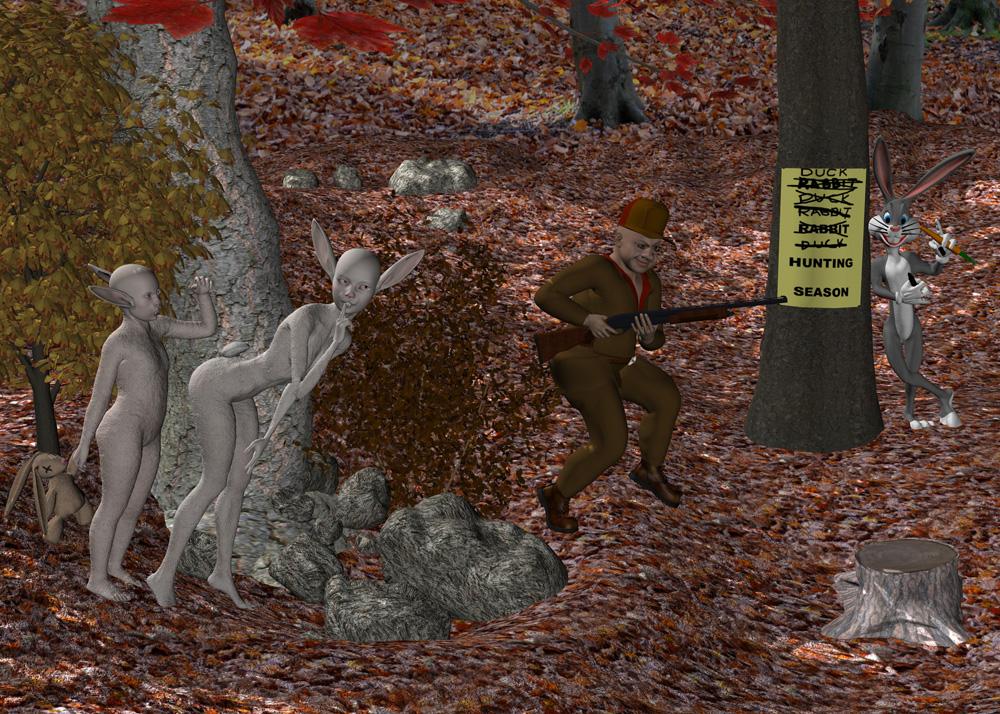 3D Art Freebie Challenge – September, 2016: The Leaves of Autumn Bring Changes (Main Thread)
DAZ September 2016 Freebie Challenge - The Leaves of Autumn Bring Changes
The Bunny Hunter
Rendered in DAZ Studio using 3Delight
No postworkNo counts:
Genesis Male (Hunter)
Genesis Evolution: Morph Bundle (Hunter)
Genesis 2 Female (Bunnies)Hunter:
1. DieTrying's 182 V4 Morphs for Genesis by SickleYield (registration required)
http://www.sharecg.com/v/58198/favorite/21/DAZ-Studio/DieTryings-182-V4-Morphs-for-Genesis
2. Genesis Pinstripe Suit by Wilmap (registration required)
https://www.wilmapsdigitalcreations.co.uk/view_product.php?id=136
3. Headkase's Bossy Boots 2.0 for GENESIS by Varsel (registration required)
http://www.sharecg.com/v/56443/browse/11/Poser/Bossy-Boots-2.0-for-GENESIS
4. Fable Outfit for M4 by Dyald (registration required) - belt only used
http://www.sharecg.com/v/30237/gallery/11/Poser/Fable-For-M4
5. Smart Prop cap for Michael 4 by Adam Thwaites
http://www.most-digital-creations.com/free_poser_poses_textures_morphs_props_27.htm
(third from bottom - scroll down)
6. Remington Model 870™ Express® 12 Gauge Shotgun w/ 22" Vent Rib Barrel by MorBius
https://3dwarehouse.sketchup.com/model.html?id=a5e69b50e35473c6e4773d7a183337d9
(Converted to Wavefront .obj from .dae in Blender)
7. Nicholas texture for M4 by by Unicornst (registration required)
http://www.sharecg.com/v/38154/favorite/21/DAZ-Studio/Nicholas-for-M4-Part01
http://www.sharecg.com/v/38155/gallery/21/DAZ-Studio/Nicholas-for-M4-Part02
http://www.sharecg.com/v/38156/gallery/21/DAZ-Studio/Nicholas-for-M4-Part03
(texture only used)Bunnies:
8. Esther Bunny by Lexbaird (registration required)
http://www.sharecg.com/v/84068/browse/21/DAZ-Studio/Esther-Bunny
9. Esther Bunny Tail by Lexbaird (registration required)
http://www.sharecg.com/v/84608/browse/21/DAZ-Studio/Esther-Bunny-Tail
10. Genesis 2 Children by becibear (registration required)
http://www.sharecg.com/v/76705/view/21/DAZ-Studio/Genesis-2-Children
11. Dead Bunny Character by Styxx (registration required)
http://www.sharecg.com/v/36600/browse/11/Poser/Dead-Bunny-Character
12. Animal Furs 1 by Liladieni (registration required) - textures
https://www.renderosity.com/mod/freestuff/animal-furs-1/39911
13. Tony Bunny by drakelot
http://drakelot3d.com/site/index.php/freebies/item/72
14. Marker Pen by mauvefluffybunny (registration required)
http://www.sharecg.com/v/47631/browse/21/DAZ-Studio/Marker-Pen
15. Realistic Vegetables by by Senem Sonkaya (registration required)
https://grabcad.com/library/realistic-vegetables-3ds-max-1
(Actually these are in Wavefront .obj format, but the individual veggies must be separated - I usedBlender - that's where I got the carrot)
Background:
16. Autumn Forest #01 Poser pz3 scene by HoboBo (registration required)
http://www.sharecg.com/v/68120/gallery/11/Poser/Autumn-Forest-01-Poser-pz3-sceneGround plane
17. F3D Stone Ruins Stair - parts - ground and rocks (registration required)
https://www.renderosity.com/mod/freestuff/stone-ruins-stair/74430
Texture swapped out for that from Autumn Forest scene for ground
18. 2 Stumps by Dax Eternal (registration required)
http://www.sharecg.com/v/85198/browse/21/DAZ-Studio/2-StumpsTrees and shrubs:
Note - these links no longer work. Sometime in the last week or so most of the long-time free plants
available from XFrog were moved to products for purchase, although I am uncertain of exactly when this
occured. They were still available for free when I was collecting the links for content that I thought I
would use when I began working on the scene. There are still a half dozen free plants on offer
(registration required), but not those listed below. So, since technically they weren't available for the
entire month, they can't count. :(
http://xfrog.com/product/AL05.html Horse Chestnut
http://xfrog.com/product/EA01.html Red Maple
http://xfrog.com/product/SH03.html Bloodtwig DogwoodMy apologies for not checking this thread yesterday for last minute entries. It was a busy day.
All links verified
ENTRY ACCPETED
Pelase move to Entry Thread
Buttom Shortcuts for Common CommandsI got all the restore/ zero/ memorize/ save preset/ base shader one click buttons out on the menu...
One of Daz Studio's great virtues = custom interface.
https://daz3dcookbook.wordpress.com/customising-daz-studio-menus-toolbars/
http://snowsultan.deviantart.com/art/Customizing-DAZ-Studio-Interface-Tutorial-1-309379885
Making buttons is fun. My menu bar is like Sketchup
 3D Art Freebie Challenge – September, 2016: The Leaves of Autumn Bring Changes (Main Thread)
DAZ September 2016 Freebie Challenge - The Leaves of Autumn Bring Changes
The Bunny Hunter
Rendered in DAZ Studio using 3Delight
No postworkNo counts:
Genesis Male (Hunter)
Genesis Evolution: Morph Bundle (Hunter)
Genesis 2 Female (Bunnies)Hunter:
1. DieTrying's 182 V4 Morphs for Genesis by SickleYield (registration required)
http://www.sharecg.com/v/58198/favorite/21/DAZ-Studio/DieTryings-182-V4-Morphs-for-Genesis
2. Genesis Pinstripe Suit by Wilmap (registration required)
https://www.wilmapsdigitalcreations.co.uk/view_product.php?id=136
3. Headkase's Bossy Boots 2.0 for GENESIS by Varsel (registration required)
http://www.sharecg.com/v/56443/browse/11/Poser/Bossy-Boots-2.0-for-GENESIS
4. Fable Outfit for M4 by Dyald (registration required) - belt only used
http://www.sharecg.com/v/30237/gallery/11/Poser/Fable-For-M4
5. Smart Prop cap for Michael 4 by Adam Thwaites
http://www.most-digital-creations.com/free_poser_poses_textures_morphs_props_27.htm
(third from bottom - scroll down)
6. Remington Model 870™ Express® 12 Gauge Shotgun w/ 22" Vent Rib Barrel by MorBius
https://3dwarehouse.sketchup.com/model.html?id=a5e69b50e35473c6e4773d7a183337d9
(Converted to Wavefront .obj from .dae in Blender)
7. Nicholas texture for M4 by by Unicornst (registration required)
http://www.sharecg.com/v/38154/favorite/21/DAZ-Studio/Nicholas-for-M4-Part01
http://www.sharecg.com/v/38155/gallery/21/DAZ-Studio/Nicholas-for-M4-Part02
http://www.sharecg.com/v/38156/gallery/21/DAZ-Studio/Nicholas-for-M4-Part03
(texture only used)Bunnies:
8. Esther Bunny by Lexbaird (registration required)
http://www.sharecg.com/v/84068/browse/21/DAZ-Studio/Esther-Bunny
9. Esther Bunny Tail by Lexbaird (registration required)
http://www.sharecg.com/v/84608/browse/21/DAZ-Studio/Esther-Bunny-Tail
10. Genesis 2 Children by becibear (registration required)
http://www.sharecg.com/v/76705/view/21/DAZ-Studio/Genesis-2-Children
11. Dead Bunny Character by Styxx (registration required)
http://www.sharecg.com/v/36600/browse/11/Poser/Dead-Bunny-Character
12. Animal Furs 1 by Liladieni (registration required) - textures
https://www.renderosity.com/mod/freestuff/animal-furs-1/39911
13. Tony Bunny by drakelot
http://drakelot3d.com/site/index.php/freebies/item/72
14. Marker Pen by mauvefluffybunny (registration required)
http://www.sharecg.com/v/47631/browse/21/DAZ-Studio/Marker-Pen
15. Realistic Vegetables by by Senem Sonkaya (registration required)
https://grabcad.com/library/realistic-vegetables-3ds-max-1
(Actually these are in Wavefront .obj format, but the individual veggies must be separated - I usedBlender - that's where I got the carrot)
Background:
16. Autumn Forest #01 Poser pz3 scene by HoboBo (registration required)
http://www.sharecg.com/v/68120/gallery/11/Poser/Autumn-Forest-01-Poser-pz3-sceneGround plane
17. F3D Stone Ruins Stair - parts - ground and rocks (registration required)
https://www.renderosity.com/mod/freestuff/stone-ruins-stair/74430
Texture swapped out for that from Autumn Forest scene for ground
18. 2 Stumps by Dax Eternal (registration required)
http://www.sharecg.com/v/85198/browse/21/DAZ-Studio/2-StumpsTrees and shrubs:
Note - these links no longer work. Sometime in the last week or so most of the long-time free plants
available from XFrog were moved to products for purchase, although I am uncertain of exactly when this
occured. They were still available for free when I was collecting the links for content that I thought I
would use when I began working on the scene. There are still a half dozen free plants on offer
(registration required), but not those listed below. So, since technically they weren't available for the
entire month, they can't count. :(
http://xfrog.com/product/AL05.html Horse Chestnut
http://xfrog.com/product/EA01.html Red Maple
http://xfrog.com/product/SH03.html Bloodtwig Dogwood[Just Released] Planet Earth - ULTRA HD 32K for iRay [Commercial]Great addition to my arsenal.
Really nice! A question .. is there a good source of spacecraft props - like your ISS and satellites that are inexpensive and readily work with DS?
If you have Sketchup you can download from an arsenal of props from their site....the ISS model was pretty moderately priced, considering the detail.
The OMG It is 2017 This thread's end is Nigh Complaint Thread.how can I find something when I forgot what I am looking for?
Statistics show that most of us stop looking for things after we find them. So, I suggest if you stop looking for whatever it was that you were looking for you will discover that you've already found it. Problem solved. You're welcome.
It was a tutorial I was looking for and I found it but all that searching made me exhausted so I did not watch it.
I find way too many (video) tutorials to be excellent sleep aids... Or the cause of serious frustration.
I want to know how to weld a vertex in a particular program, so after watching five fifteen minute long videos that don't really show what they claim they'll show, I find one that does... Sorta... But it's twenty minutes long and by the time the guy gets to the point after having gone through the history of the tool and why he likes his tablet pen, he finally gets to the point I started watching for... For the whole video he was talking like droopy dog, but then suddenly the caffeine from what I can only guess was 12 double espressos kicks in and he starts zipping the cursor around here and there and talking a mile a minute and BAM... "So that's it... Hope you like the video!...."
I'm already partly brainlocked and numb from the previous videos, but that just shuts my brain down completely... I keep trying to reverse to the point where he starts explaining what I need to know, but being a YouTube video it either goes way before or way after, and being near the end it keeps going to the next video if I go too far and when it does I have to start over and then I have to wait for the same damn commercial to try and sell me car or cow insurance for the mandatory first couple of seconds which is just sealing the deal that I now hate the insurance company and will never buy their cow insurance...
Why does the simplest thing have to be a video?
Once upon a time people wrote stuff instead of creating videos for everything.
How to weld a vertex in Slappy3D: Select vertices to weld... In the menu bar at top of screen, go to- OPTIONS... In drop down menu go to- GLUE... In that drop down click - JOIN... In that drop down- JOIN VERTICES...
Slappy3D is not real but a metaphor for most software (especially paid) that comes sans instructions, or long ago let their tutorial links expire and now rely on YouTube to solve their instructional needs
One does not need a fifteen minute long video that covers turning on the computer (seriously, one guy actually starts the video without having the program open... And then it won't open right away and he is puzzled by that), to do one simple thing that is less then a paragraph of info.
Why is it that as technology becomes more powerful and holds the potential to improve our lives and make information, and learning, better and smoother, humans take those gains and potential and muck it up so as its either hardly better then before or just plain complicated and terrible... ?
We are going to be so screwed eventually... Sometimes I see the laziness of people manifest in certain ways and it's not so hard to envision the evolution and consequences of certain behaviors... The Twittery textspeak and YouTubish desire to forego written explanations, makes me wonder what language will be like in a hundred years... Will at some not too distant point everything become abbreviations, icons and videos? Will only handfuls of "traditionalists" even bother to know how to write, and aside from them, just scholars, scientists and tech-elite will be the only ones to hold these skills... And the "common man" will just go the path of least resistance, letting technology hold his hand for everything... It's gonna really suck should a solar EMP or some disaster take away that technology... It'll be a new Dark Ages, while society reorganizes.
Ooooh... I found pound cake! Gotta go!
do you wanna know how to weld 2 verts in carrara? the carrara forum very helpful!
Naaa, actually that would be easy... There is a lot of written info still available and the forums here are great.
Whatever it was, either Silo or 3D coat (possibly) was several months ago, I was fixing an old fairly detailed model I had made in SketchUp, but on export, a bunch of vertices became detached... I wanted to work on the model in Silo or 3D Coat, because of a specific tool... I think I eventually gave up and fixed it in Hexagon, but trying to fix it in Silo or 3D Coat was super frustrating... It probably was Silo, because even though it's a good modeler, and still for sale... Info on certain operations is hard to find...
I hate asking in some software forums because either there are language barriers (translation) or people don't fully read or try to understand what you are asking... It often seems like they only read a few words and jump to an answer... I appreciate they tried, but then you have to re explain it several times and often it just makes it worse because the origin question was probably formated the best and in trying to find a different way to express the question, you just have more people only skimming the thread and answer stuff you never asked... So generally I just try my best to find the answer on my own and not bother anyone... But over here, it's different... Mostly, people do read the question and try to answer that.
I've often seen people chide someone for not using Google first... I don't know if it's just me, what I search for, or just fate, but Google is not my friend... More like cruel, mocking antagonist, because it hardly ever gives me what I'm looking for (without trying twenty version of the topic) easily or quickly... unless I'm googling something really, really stupid.
Despite Studio's Popularity, People Still See 'Poser Art'I have observed that viewers from other user communities only use "poser art " in a derogatory fashion when it depicts scantily clad or naked northern european white women.
The online poser/Daz community has to accept some of the blame for this Negative stereotype.
Eee'yup. That's about the exact same reasoning/explanation given when people say why they don't like Poser art. And I've heard that not just from other women, but some men as well.
I also remember being at a panel at Alamo City Comic Con last year about using 3D Artwork alongside 2D art when making comics. The artist, Brian Haberlin, is well-known for exenstively using the two in his work (not necessarily when he was drawing 'Spawn', but more in his creator-owned work). He gave us an anecdote about how in some interviews, when he's asked about what programs he uses to create his comics/art, he would list off Photoshop, Corel Painter, Sketchup, Manga Studio/Clip Studio Paint, and would hurriedly add "and Poser". Largely because he knew there's a huge stigma against Poser in professional art circles, usually either because of the aforementioned White Near-Nude Vicky with a Sword low quality renders or fetish-based renders (also low quality).
And even then, using Poser for comic book art is... hit or miss, IMHO. I get some pros use it for their comics -some examples of this would be the early runs of Justice League Dark, Grayson, some Top Cow sci-fi comic whose name escapes me, and anything Mike Deodato Jr. has put out recently- and the hypothetical reason is that it saves time and gets the work done by the monthly deadline, but it has this stiff, lifeless, uncanny valley-esque look to it. Needless to say, it's not a very well liked style by 4chan's /co/ board (and honestly, as crude as they might be, they're not exactly wrong in their criticism of it either...) As an artist, I have much more respect for someone who uses Poser/Studio to set up a scene as reference and later later drawing/inking it by hand, than I do someone who uses a plug-in/filter to fake line art/inking, but that's neither here nor there.
(Although I would not be surprised if there are even more veteran comic artists who use programs like Studio or Poser to help with their art, but again, because of the stigma the 3D art medium has in professional circles/the comic book community, they are very secretive about their usage of it)
I do think that if people want to combat the stereotype of 3D art in the Poser/Studio realm, they need to not be afraid to offer concrit (constructive critique), but as many have said in this thread, that's an extremely dicey area. Since not everyone wants to necessarily improve and just do 3D stuff in Poser/Studio for fun -which is perfectly okay-, or there are those who take even the slightest bit of concrit -however politely/positively phrased- as a personal attack/trolling/flaming. And that's a shame, IMHO, but what are you gonna do.
Although I wouldn't be at all surprised if Miku Miku Dance, if not XNALara/XNA Posing Studio becomes the next "Poser Art", especially with how prevalent that junk is on DeviantArt, yikes.
Suggested software question for anyone with Blender experience.Hi Sigurd
Your question: is ZBrush good for hard surface modeling.
ZBrush 4R6 and before, so so. ZBrush 4R7, current version? Pure happiness for buildings, furniture, jewelry makers, even pro 3D printers. Because Pixologic is so awesome it surprises everyone with ZModeler - a FREE 4R7 update!
You will probably find the new dynamic SubD useful. 4R7 Zmodelers add tons more beveling options and edge control to the hard surface toolbox to existing good-enough 4R6 process.
Creating mech stuff, for me, is like 500% speed from 4R6 to 4R7! I never miss Sketchup after that.
You may wish to know the ease of ZBrush --- Daz Studio workflow.
GoZ comes free with DS and make life easy for ZBrushers. Will send vertex colors, or UV-ed textures including displacement/normal over to DS too, with one click. (btw ZBrush also has Go Blender direct link)
Daz GoZ support is not "comprehensive", for example won't send polygroups over as Daz groups/zones (I wish it does), but the usual OBJ and FBX i/o between the 2 apps are overall stable.
Most top content creating PAs here use ZBrush, which keeps the pipeline well oiled. Something to consider....
Check out ZModeler tutorial and judge it for yourself. https://www.youtube.com/playlist?list=PLMjnnUF3eJFeGI5qFVeYd7ffnBhvnG76B
Or pick an area of interest by video playlist https://www.youtube.com/user/ZBRUSHatPIXOLOGIC/playlists
Cheers...
Looking for an Mi-24 Hind.There are a few options depending on what apps you have installed. You can convert sketchup files (.skp) from ulltimate unwrap with a plugin or use the trail version of sketchup pro to export to .obj. DS does import collada files, and most sketchup files have that download option, so you might try that if avaliable.
Once you get a format that hexagon can import, you can them apply a UVMap in hexagon
Ok. The model is converted. I ran it through UVMapper and created a box UV. How do I apply the UVto the model?
Didnt think youd be teaching a 101 class today did you?

 Looking for an Mi-24 Hind.
There are a few options depending on what apps you have installed. You can convert sketchup files (.skp) from ulltimate unwrap with a plugin or use the trail version of sketchup pro to export to .obj. DS does import collada files, and most sketchup files have that download option, so you might try that if avaliable.
Once you get a format that hexagon can import, you can them apply a UVMap in hexagon
Looking for an Mi-24 Hind.There are a few decent models at the 3dwarehouse for sketchup. I picked one that seemed the most accurate, changed the format to .OBJ and tested it out. it didn't have any UVmapping, so I mapped it, threw on a texture or two and then some iray shaders, about 10 minutes work so depending on your 3D skills, you should be able to get one of them working for your project fairly fast
Welll, im not quite sure how to go about this. How do I convert the model into obj? I tried messing with it in hexagon but had no luck.
Looking for an Mi-24 Hind.There are a few decent models at the 3dwarehouse for sketchup. I picked one that seemed the most accurate, changed the format to .OBJ and tested it out. it didn't have any UVmapping, so I mapped it, threw on a texture or two and then some iray shaders, about 10 minutes work so depending on your 3D skills, you should be able to get one of them working for your project fairly fast
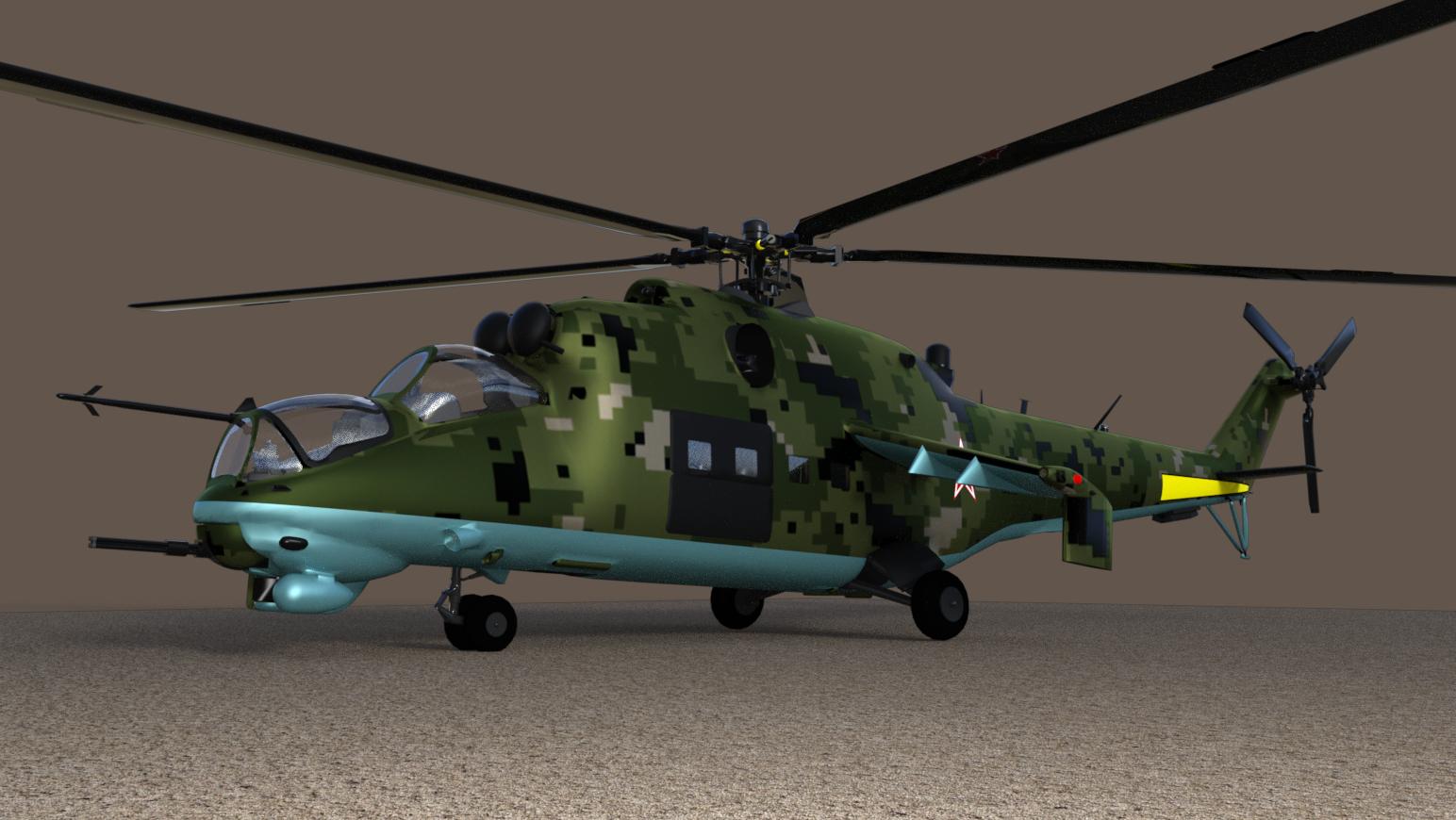
That actually dosent look too bad. 3dwarehouse is another one that I havent heard of. Would you be willing share your UV map?
Also, is that the HIND D that you have there?
Looking for an Mi-24 Hind.There are a few decent models at the 3dwarehouse for sketchup. I picked one that seemed the most accurate, changed the format to .OBJ and tested it out. it didn't have any UVmapping, so I mapped it, threw on a texture or two and then some iray shaders, about 10 minutes work so depending on your 3D skills, you should be able to get one of them working for your project fairly fast
Why do I want CarreraCarrara is an all-in-one program. It is a combination of Studio/Hexagon/Bryce (+more stuff) all in one package. Has pluses and minuses. See the following thread that answers some similar questions.
http://www.daz3d.com/forums/discussion/109316/why-should-daz-studio-user-try-carrara#latest
Daz Studio by itself is not an alternative to Carrara. That is not a criticism of Daz Studio. Studio is designed to do a limited number of functions. It does them well. It is not just that Carrara does other functions better, it is that Carrara does them at all. So, if you already model in Blender, use Howie Farkes' new plugin to turn trees into forests across surfaces, use LAMH to create dynamic hair, use Byce to create landscapes, animate in yadda, yadda, yadda, and combine all those functions with Studio, then you can talk about an alternative to Carrara.
Daz has a trial period so it might be worth experimenting with at the current price.
This is coming from a carrara fan and user with versions 6-8.5. I use DS for ease of use and workflow that gives me great results in the best time possible. I have blender installed, along with 3DSMax, Rhino, Sketchup, and a few other modeling apps. Blenders UI still baffles me to this day, better than previous versions, but still a mystery which is why I don't use it much.
I love carrara, but i find posing a pain and navigation harder than with DS. I also love using genesis 3 figures, so that leaves me out till it's updated for their use or i use another import format. Honestly, if they added carraras import (FBX actually works in carrara) funtionality, terrain creation tools and modeling capabilities to DS, it would be the perfect tool for me and my workflow.
Why should DAZ Studio User try Carrara?Thank you diomede. I do my modelling in sketchup as my models are mostly non-organic shapes.
I understand what you mean about all those DAZ plugins......they do get expensive. For example, doing animation as a minimum really demands animator2, keyframe and graphmate plugins and still no real physics plugins available (we finally got a particles plugin and the scatter instances plugin).
NEVER MIND! FIXED - Need a clean install, can't do it -Sketchup has nothing to do with DAZ or DAZ Studio so I don't see how an update to it killed Studio.
Carrara to Sketchfab (FBX and OBJ issues)Incidentally, I meant say, why is Carrara so overlooked? Sketchfab has plugins for many different 3D packages but not Carrara. I have used lots of different 3D software over the years (Sketchup, DAZ, SolidWorks etc.) and I think as an overall package Carrara is fantastic - especially it's format support. There aren't many non CAD packages that support STEP. I don't use its modeller much as my background is CAD so I prefer parametric modelling but as an animation and rendering studio I can hardly fault Carrara.
Just a shame it's not getting the love and care from the developers it needs to push it more mainstream. I'd so love it to get iray built in. We can but hope.
Daz 3D is part of

Connect
DAZ Productions, Inc.
7533 S Center View Ct #4664
West Jordan, UT 84084Licensing Agreement | Terms of Service | Privacy Policy | EULA
© 2026 Daz Productions Inc. All Rights Reserved.