-
More Non-photorealisitic Renders (NPR II)
I experimented with a bunch of post filters but was annoyed by loss of detail in each... so whatever, here it is straight PWToon.
Do you use Topaz Studio? You can use it to bring back some of the details after simplifing it, if that makes any sense.
More Non-photorealisitic Renders (NPR II)I experimented with a bunch of post filters but was annoyed by loss of detail in each... so whatever, here it is straight PWToon.
More Non-photorealisitic Renders (NPR II)Yeah. LineRender9000 does a much better job at outlining... but the SPEED of PWToon means I almost always just make do (particularly since I like to do additional filters that make it less critical).
LR9k is king of making nice neat consistent outlines, and I like both for making 'clean' outlines without a lot of garbage noise of other methods.
More Non-photorealisitic Renders (NPR II)I'm thirsty for more of that good Star Wars stuff you're doing.
PWToon + FotoSketcher
I find it a fun, fast, combo; PWToon isn't perfect but it renders VERY fast, and those imperfections generally vanish once it gets into FotoSketcher. While some options are slow, oil pastel option is also pretty fast and produces results I like.
PwToon's speed is one of my favorite things about it. It can render full scenes in the same amount of time it takes to render just a lone figure with some of the other options out there. Honestly the only toon option I use that's faster, is the less capable free toon shader option that comes with D|S, but that can be coaxed to do some nice things as well.
More Non-photorealisitic Renders (NPR II)PWToon + FotoSketcher
I find it a fun, fast, combo; PWToon isn't perfect but it renders VERY fast, and those imperfections generally vanish once it gets into FotoSketcher. While some options are slow, oil pastel option is also pretty fast and produces results I like.
Show us your 3Delight rendersI may be diffident toward most 3dl stuff, but PWToon has my heart...
Ok that one had me crack up, cool:)
Show us your 3Delight rendersI may be diffident toward most 3dl stuff, but PWToon has my heart...
Show us your 3Delight rendersAnother PWToon thing
Show us your 3Delight rendersAlways love pwtoon.
(PWToon on the hot air balloon, rest is ds shader or uber volume)
Show Us Your Iray Renders. Part VII
I was really disappointed the dome didn't cause the eye to get real big. I can get that effect with a large sphere, but the sphere hides the rest of the face. It was still fun to put together, though.
This image was entered in the PFDLives Edition of Llola Lane's Monthly Challenge. (PFDLives is member-only, but registration is free.)
It's a great idea for an image and the posing is great. Personally I would have went with a more realistic skin set to match the backgroud, but I like it!
Thank you, @FSMCDesigns.
The background was created after the main scene was finished. I didn't really think about it being "too realistic" for the foreground. I was focused on trying to get that big eye effect, and made the eyes very oversized. As you can see, it didn't help. But I liked the character, especially with that hair, so I kept the changes. The background is actually it's own scene, rendered separately, and composited together in Photoshop. I could bring it into 4.9 and try one of the toon cameras on it. (I didn't like 4.10, so I skipped it, and use the 4.11 beta most of the time. But some aspects of pwToon, ToonyCam Pro and even Sketchy don't seem to work for me in the Beta.)
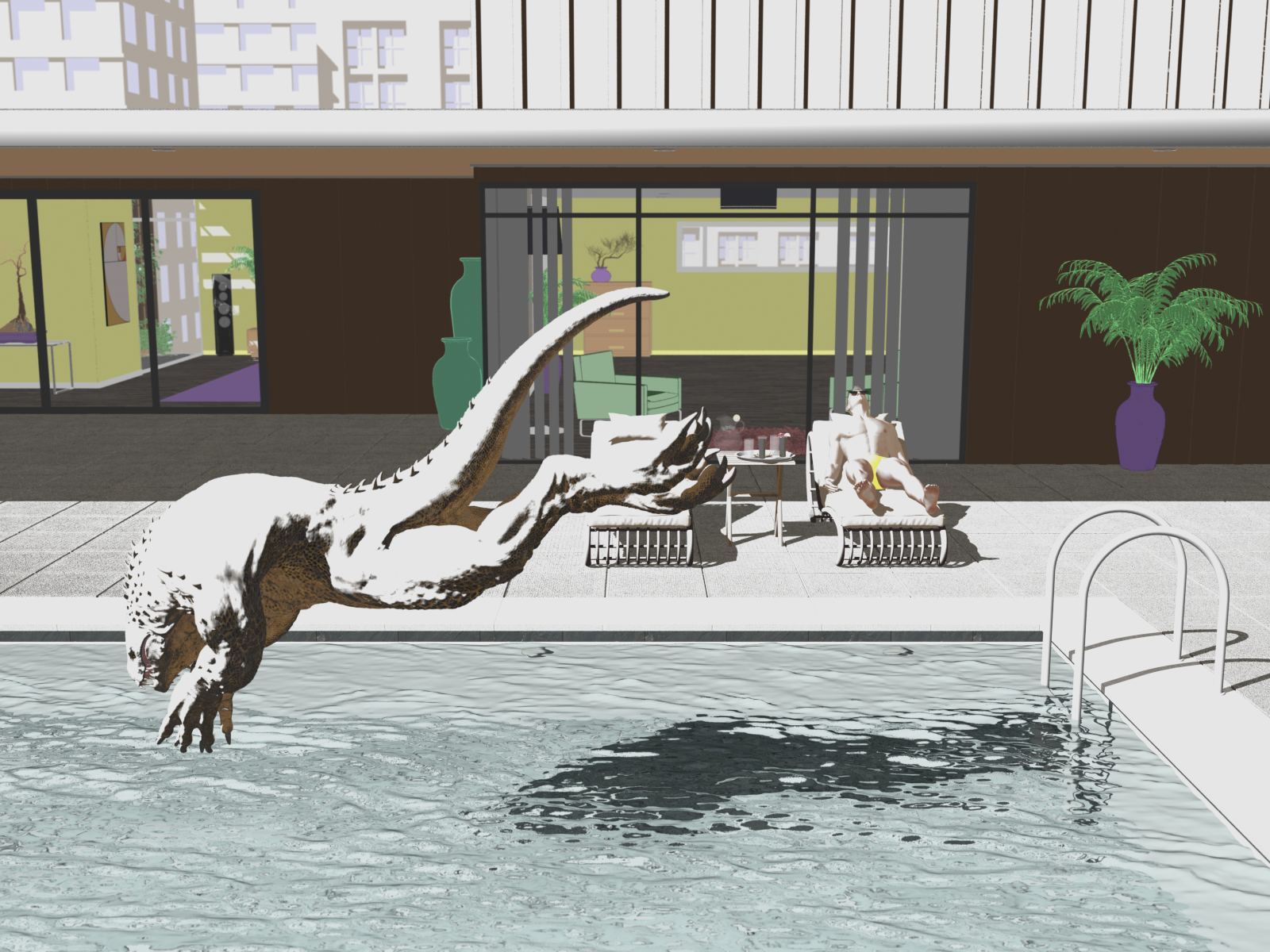
More Non-photorealisitic Renders (NPR II)Notes from using PWToon a lot:
The carnomoloch detail doesn't really match the rest of the scene. If you agree, try lowering bump/displacement until you get the look you want.
I highly recommend setting water opacity lower, although it's admittedly tricky to get right. Another option I've sometimes used is to NOT use PWToon for the water; the right reflective/refractive effect can help mesh with the rest.
Notes from using PWToon a lot:
The carnomoloch detail doesn't really match the rest of the scene. If you agree, try lowering bump/displacement until you get the look you want.
I highly recommend setting water opacity lower, although it's admittedly tricky to get right. Another option I've sometimes used is to NOT use PWToon for the water; the right reflective/refractive effect can help mesh with the rest.
I agree with both tips. The water looks like concrete to me. Try using the default 3Delight water shader and see if that works better
Good call on the lizard, thanks, I wanted to keep the texture detail in the foreground, but the difference between the figures was too much. I had an extra outline turned on for him as well that I didn't realize, and fortunately enough detail was in the displacement that I was able to keep the main textures in place and still simplify it a lot.
I did like the water effect in the details, but overall I see what you mean about it still looking too solid when taken in with the rest of the image. Not sure if I've got a good way to get somewhere in between what I had before and what I had now, but at least here it reads more clearly as water, I think.
 More Non-photorealisitic Renders (NPR II)
Notes from using PWToon a lot:
The carnomoloch detail doesn't really match the rest of the scene. If you agree, try lowering bump/displacement until you get the look you want.
I highly recommend setting water opacity lower, although it's admittedly tricky to get right. Another option I've sometimes used is to NOT use PWToon for the water; the right reflective/refractive effect can help mesh with the rest.
I agree with both tips. The water looks like concrete to me. Try using the default 3Delight water shader and see if that works better
More Non-photorealisitic Renders (NPR II)Notes from using PWToon a lot:
The carnomoloch detail doesn't really match the rest of the scene. If you agree, try lowering bump/displacement until you get the look you want.
I highly recommend setting water opacity lower, although it's admittedly tricky to get right. Another option I've sometimes used is to NOT use PWToon for the water; the right reflective/refractive effect can help mesh with the rest.
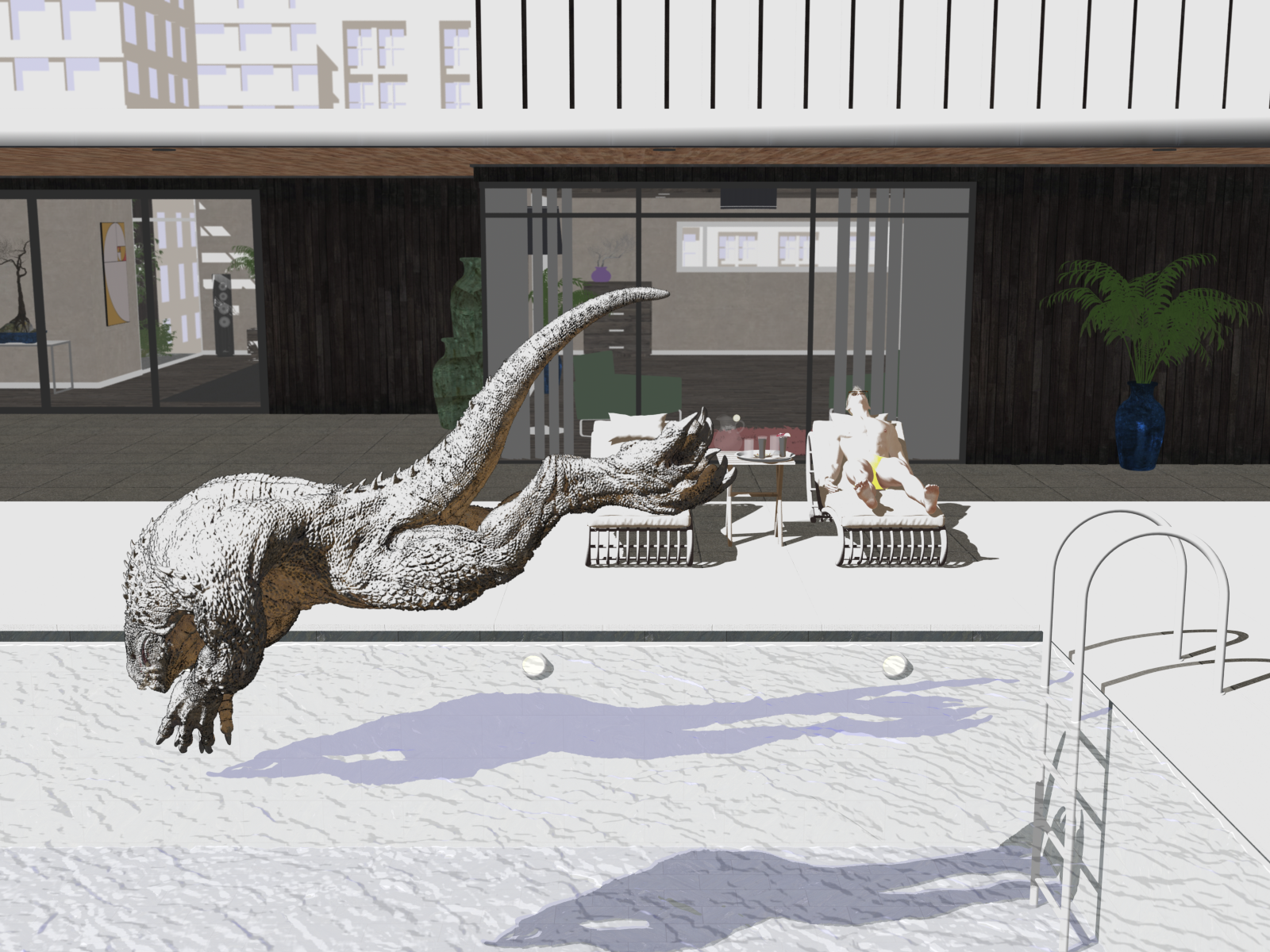
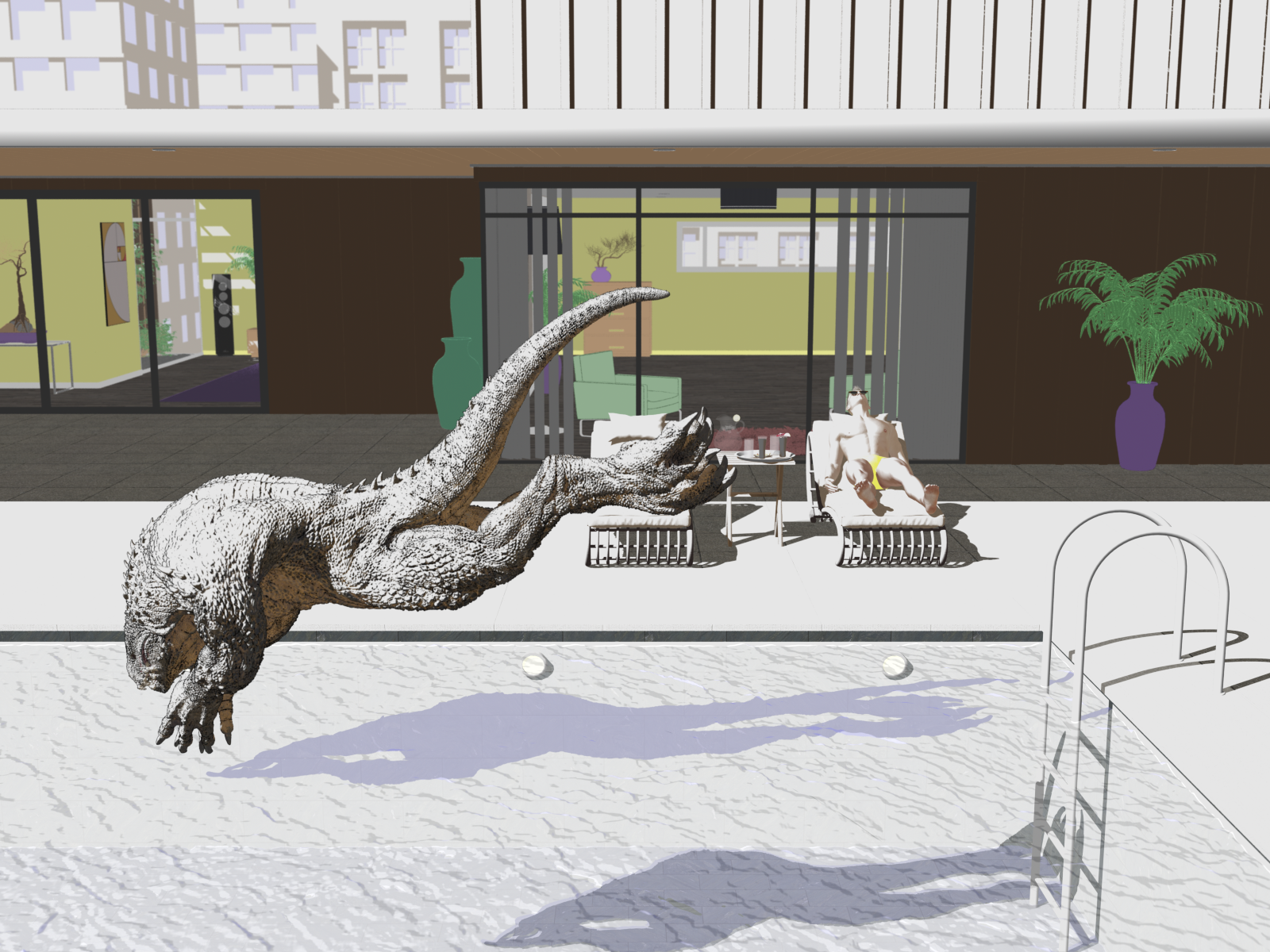
More Non-photorealisitic Renders (NPR II)I had a scene from the recent contest, and wanted to practice some more with my pwToon shader presets. Two versions of this, one with a more simplified background. I think the first version I could do a little more work on a few surfaces to add more texture, but overall like the effect. Still have a limitation with these, I seem to have more luck with either everything in direct light, or almost everything in shadow, the mixed scenes can be a challenge to get the right "mix", so I spend more time on these than I expect.
Version 1:
Version 2:
 LineRender9000 [FAQ]
I am working with LineRender, and have a question, if someone could take a look:
When I render, i want to produce a pwtoon render, then the two outline renders.
- yy__01_Main camera (this is my existing pwtoon camera)
- yy__02_Main camera
- yy__02_Main camera_lines
- yy__03_Fresnel reflected v
- yy__03_Fresnel reflected v_lines
So, I do not want renders 2 and 4, as they add time, and I don't use them. Any way to turn them off?
(yy_ was the prefix, so just ignore that)
If you use the render script, you can remove the passes you don't want.
LineRender9000 [FAQ]I am working with LineRender, and have a question, if someone could take a look:
When I render, i want to produce a pwtoon render, then the two outline renders.
- yy__01_Main camera (this is my existing pwtoon camera)
- yy__02_Main camera
- yy__02_Main camera_lines
- yy__03_Fresnel reflected v
- yy__03_Fresnel reflected v_lines
So, I do not want renders 2 and 4, as they add time, and I don't use them. Any way to turn them off?
(yy_ was the prefix, so just ignore that)
easy way to improve the cartoon rendering ?sorry for the double post !
so i have figured out how to install it, i just puted crescent in my pwtoon folder and was able to find it.
i was still using intermediate OpenGL and that's why it didn't work, tried with 3D delight and worked perfectly fine i have that 2D shadow anime look i was looking for so it's already pretty awesome for me !
now i am wondering if there are any way to control the level of detail of this shadow, an exemple :
my character has breast and it's supposed to have a shadow under the breast (because of the cast shadow) in a normal render i would see it, but with this anime render i am not able to see this cast shadow, is there a way to add those kind of shadow ? having a bit more detailed one ?
thank you ! :D
easy way to improve the cartoon rendering ?Hello !
i just buy the pwtoon and yeah at the moment i don't understand much about it, but i'm at the beginning of the little tutorial on devianart and my first problem is about this crescent stuff, the link seem to doesn't work anymore, is there any link to be able to download it ? do i really need it to make it works ?
is there any video tutorial on youtube ? i already checked there is one but i'm not even sure he is using pwtoon, so just asking :D
Ok i have fixed one problem, i've found where to download the crescent stuff, but where am i supposed to put it in my daz 3d library folder ? i just put i like that or do i have to choose a specific folden ? thanks again xD
easy way to improve the cartoon rendering ?@beignetpomme because I started with pwToon first I can get better line control with that product (mainly because I've used it a lot more). I'm sure it's probably possible with Visual Style Shaders too but I haven't experimented as much. I tend to do skin with VS and then move on to pwToon. It's worth watching out for sales on both products because they do come down in price.
Some time ago I put some links into this thread for tutorials on how to use pwToon plus there are also some useful links to some great free shaders in the same thread. It might be worth reading up on the tutorials (they are at DeviantArt) and see if you think this is the product for you. To be honest it took me a little while to learn but then when it all clicked I found that I really loved pwToon. It's the set up of the shaders that takes time and then the rendering is incredibly fast (3Delight). The brilliance being you can then simply reposition and then render again.
easy way to improve the cartoon rendering ?I have pwtoon, Manga Marker Materials and also Visual Style Shaders. I like them all for various different reasons. I even mix them on occasion. I haven't used them for a while and need to pick up doing these again because they are fun.
There is a bit of a learning curve to using pwtoon and Visual Style Shaders but once you get used to them they are really useful. I have some images in my gallery using these (take a look at the link in my signature below), but if you have the add on for Google Chrome you'll be able to find lots more gallery examples. Also do a search for forum posts on these products (I use google rather than the forum search bar) and you'll find a number of useful threads that will help.
Daz 3D is part of

Connect
DAZ Productions, Inc.
7533 S Center View Ct #4664
West Jordan, UT 84084Licensing Agreement | Terms of Service | Privacy Policy | EULA
© 2026 Daz Productions Inc. All Rights Reserved.