-
People who make Daz characters (that look too much like their other characters)
Counterpoint: coming from a software background, I'd welcome a system that incentivizes developers to proudly release improved versions of their bestsellers.
Like DAZ did Victoria 1-8. Same figure, but better. I bought V1 V4 and V8 and it was worth it.
(Or like Microsoft does NOT have to release Word, WriteStar and DocumentTyper to make money. They just release Word 1 2 3 4 5 ....)
Would be nice if some artists revisited their best works, poured in everything they learned since then, tuned and polished it, and released it as “same figure v2, best I can do”. I would rather buy a better version of my favorites than a similar rehash with changes for change's sake.
And yeah I've got a figure of iTellNoNames, it's pretty and I like it. Every week there are new ones that look quite similar, so I'm not really interested. But I don't mind, I check them out, they're pretty, mine's prettier. All good with me as long as I know what I'm getting. Same with textures and eyebrows etc, if you reuse them, ok with me, but it would be nice if I knew that before I purchase. Promo pics only tell so much.LJ Studios - Art Work and TipsVictoria 2, Rendered in iRay.
I have been having some artist block. Just don't seem to have it in me to make art. But I did manage to do something with V2. I converted her textures to iRay and rendered in iRay. I call her Dark Angel.

Here is the render useage list for the image:
Freebies Still Available Description Link Environment: Lighting for Innocense UberEnvironment2 Light-set5 (for SkyDome Exp5) by glaseye. Goth Angel: Character: Pose Natty-V2 Clone by Casette. Goth Angel: Clothing: Shader: Jewelry: Gold jewelry_iray_shaders by AllenArt. Goth Angel: Hair: Raven Punk GaGa Hair by Mareek. Goth Angel: Jewelry: Arm bands ( Kawasaki Riders' Club Kaze by Z3D. Goth Angel: Jewelry: Lip piercing Cyberpunk: BabyJane for Anastasia by Cybrea. Goth Angel: Jewelry: Necklace chain Heart of Ocean by Pretty3d. Goth Angel: Jewelry: Necklace chain Jeweled Necklace Set by robrose. Goth Angel: Jewelry: Necklace: Pendant Ankh Earrings for Poser by Chris Cox. Goth Angel: Jewelry: Nose Bridge Piercing Aery Soul's Face piercings for Victoria 4 and Alice by aerysoul. sixth row, 2nd column Goth Angel: Jewelry: Nose Ring Anjali Nose Jewels by Valea. I reassigned the chain between the Nose Ring and ear attachment and hid that section of model. Goth Angel: Shader: Clothing: Bikini Top Pd-Soft Leather Daz Studio Shaders for Iray by parrotdolphin. Goth Angel: Shader: Jewelry, Wings Metalic Black Iray car related shader presets 'megapack' by Tom2099. Goth Angel: Texture E's Sasha V2 by Ecstasy.
No Longer Available Description Product Environment: Lighting for Dark Angel and Dark Angel - Innocense FWSA Soft Light Probes by Forbidden Whispers. Goth Angel: Base figure Victoria 2.0 by DAZ 3D. Goth Angel: Clothing: Bikini Top Victoria 2.0 Morphing Clothing Pack 1 by DAZ 3D. Goth Angel: Jewelry: Neckband Cyber Punk 02 by Traveler. Goth Angel: Jewery: Chain on Bikini Top Nipple Chain for V2 and M2 by Traveler. Goth Angel: Necklace:Pendent: Cross Gothic Cross by Traveler. Goth Angel: Wings Deco Wings by Eric VanDycke. Commerical Products Description Link Goth Angel: Jewelry: Shader: Necklace chain gold and micro textures Mec4d PBS Shaders vol.1 for Iray by Mec4d. The thunderclap heard around the world (or how to stop worrying and love IRay)Iray rendering. This happens to me sometimes. You see, I couldn't get the meshugana spotlight to fill in any light. Turned up the lumens, And up, And up some more - by orders of magnatude.
Yes the light was on. Like a bleedin' supernova at about 60 billion lumens. Ten centimenters from the target. Dark as a dungeon. You think I might be missing something obvious?
"Why does the universe hate me?", I asked while reveling in self-pity. Then for some reason I glanced over at the render settings "enviroment" parms.
That's when the thunderclap happend . It was my palm slapping against my forehead.
Three words:"Sun-Sky Only". (Does the hyphen make it two words? Nevermind. I digress)
Other than still lacking adult supervision, I corrected the situaton by changing it to "Dome and Scene" ( or Scene only )
Victoria 8 and most of the set were immediately vaporized by my spotlight -- a complete white-out. Yeah, I probably should back off the lumens a bit.
But I got this. Thanks for letting me share.
Sade's Thread [Commercial]Did i mentioned i love shaders? I want open to architect stuffs.. carpets, furnitures, etc.. and so many stuff for youngers.. so we made a Kid Room Carpets with John. Yeah, i know, its not sell well than the victoria's secret alike outfits, but tell the truth i just had to make it. With it you can totally change any room. And like my other carpets, unlike the carpet shaders what i saw, its fit the threads exactly. If you know what i mean. <3
Report sales errors here: "There's Always Another Sale™""Daz 3D has let us know that they are working on the issue with the sales rules and it shouldbe fixed in a few minutes. In the meantime we have a contest. Post what your favorite product is and why. The most entertaining 3 answers that have been posted when the issue is fixed each get $150 store credit added to their acount. Here is my post"
Victoria 8 , who continues the long linage of Victorias...since the very 1st Victoria 1. The beginnings od DAZ.
Probably too late, butI'm afraid the issue was fixed and the game is well and truly over.
yeah ..sorry for posting that. for some reason it was left hanging on the bottom of the page, even though I had already posted it the day of ... but anyway, I couldn;t get rid of it. it can be deleted or whatever, as its not serving any purpose.
Click the gear at the right end of the blue bar at the top of the page and choose "My Drafts" and you can delete it. I find that even though you posted it already, sometimes the draft is still there every time you visit the thread.
wow..thanks
 Less Morphs can be more when posing
Hi, @SixDs I don't typically, I just create the character, and then save them as a scene subset, to use whenever I need them. I do save things like custom facial expressions and head size changes (to fit hair) as Morph Assets. Just not characters.
I did not think the adjust rigging to shape was needed for slider/dialed in morphs, but more for imported OBJ morphs, as the vendors already did the "dirty work"? I guess I could have pointed out that this was more on sliders/dialed in morphs that could change the characters shape like a Character Preset such as Aiko, Keiko, Victoria Supermodel, etc. Things like eye open close, thigh tone, and such, won't affect the pose too much.
Daz Studio Pro BETA - version 4.12.2.60! (*UPDATED*)So with Daz public beta 4.12.1.109
Nvidia drivers 445.87 Game ready
Each card show in the Nvidia panel : Dedicated video memory : 11264 MB GDDR6
Theses are 2 x GeForce RTX™ 2080 Ti WINDFORCE OC 11G
I have a scene with 1 x Victoria 8, 1 x Olympia 8 and 1 x Alexandra 8.
Alexandra is wearing the preset Legend !Full Armor from the "The Legend" product by Aeon Soul.NVLink Peer Group Size : 1
2020-05-14 20:49:15.483 Iray [INFO] - MATCNV:RENDER :: 1.0 MATCNV rend info : found 1353 textures, 76 lambdas (40 unique)
2020-05-14 20:49:15.541 Iray [INFO] - IRAY:RENDER :: 1.0 IRAY rend info : Emitter geometry import (1 light source with 2 triangles, 1 instance) took 0.000s
2020-05-14 20:49:15.541 Iray [INFO] - IRAY:RENDER :: 1.0 IRAY rend info : Updating environment.
2020-05-14 20:49:15.557 Iray [INFO] - IRAY:RENDER :: 1.0 IRAY rend info : Updating backplate.
2020-05-14 20:49:15.559 Iray [INFO] - IRAY:RENDER :: 1.0 IRAY rend info : Updating lens.
2020-05-14 20:49:15.559 Iray [INFO] - IRAY:RENDER :: 1.0 IRAY rend info : Updating lights.
2020-05-14 20:49:15.559 Iray [INFO] - IRAY:RENDER :: 1.0 IRAY rend info : Updating object flags.
2020-05-14 20:49:15.561 Iray [INFO] - IRAY:RENDER :: 1.0 IRAY rend info : Updating caustic portals.
2020-05-14 20:49:15.561 Iray [INFO] - IRAY:RENDER :: 1.0 IRAY rend info : Updating decals.
2020-05-14 20:49:15.612 Iray [INFO] - IRAY:RENDER :: 1.0 IRAY rend info : Allocating 1-layer frame buffer
2020-05-14 20:49:15.624 Iray [INFO] - IRAY:RENDER :: 1.0 IRAY rend info : Using batch scheduling, caustic sampler disabled
2020-05-14 20:49:15.626 Iray [INFO] - IRAY:RENDER :: 1.0 IRAY rend info : Initializing local rendering.
2020-05-14 20:49:15.700 Iray [INFO] - IRAY:RENDER :: 1.0 IRAY rend info : Rendering with 2 device(s):
2020-05-14 20:49:15.700 Iray [INFO] - IRAY:RENDER :: 1.0 IRAY rend info : CUDA device 1 (GeForce RTX 2080 Ti)
2020-05-14 20:49:15.704 Iray [INFO] - IRAY:RENDER :: 1.0 IRAY rend info : CUDA device 0 (GeForce RTX 2080 Ti)
2020-05-14 20:49:15.704 Iray [INFO] - IRAY:RENDER :: 1.0 IRAY rend info : Rendering...
2020-05-14 20:49:15.704 Iray [INFO] - IRAY:RENDER :: 1.5 IRAY rend progr: CUDA device 1 (GeForce RTX 2080 Ti): Processing scene...
2020-05-14 20:49:15.704 Iray [INFO] - IRAY:RENDER :: 1.2 IRAY rend progr: CUDA device 0 (GeForce RTX 2080 Ti): Processing scene...
2020-05-14 20:49:15.828 Iray [VERBOSE] - IRAY:RENDER :: 1.8 IRAY rend stat : Geometry memory consumption: 379.364 MiB (device 1), 0.000 B (host)
2020-05-14 20:49:15.832 Iray [INFO] - IRAY:RENDER :: 1.8 IRAY rend info : Using OptiX version 7.1.0
2020-05-14 20:49:15.834 Iray [VERBOSE] - IRAY:RENDER :: 1.11 IRAY rend stat : Geometry memory consumption: 379.364 MiB (device 0), 0.000 B (host)
2020-05-14 20:49:16.123 Iray [INFO] - IRAY:RENDER :: 1.8 IRAY rend info : Initializing OptiX for CUDA device 1
2020-05-14 20:49:16.123 Iray [INFO] - IRAY:RENDER :: 1.11 IRAY rend info : Initializing OptiX for CUDA device 0
2020-05-14 20:49:32.539 Iray [VERBOSE] - IRAY:RENDER :: 1.11 IRAY rend stat : Texture memory consumption: 2.921 GiB for 146 bitmaps (device 0)
2020-05-14 20:49:32.539 Iray [INFO] - IRAY:RENDER :: 1.11 IRAY rend info : Importing lights for motion time 0
2020-05-14 20:49:32.543 Iray [INFO] - IRAY:RENDER :: 1.11 IRAY rend info : Initializing light hierarchy.
2020-05-14 20:49:32.555 Iray [VERBOSE] - IRAY:RENDER :: 1.8 IRAY rend stat : Texture memory consumption: 2.921 GiB for 146 bitmaps (device 1)
2020-05-14 20:49:32.567 Iray [INFO] - IRAY:RENDER :: 1.11 IRAY rend info : Light hierarchy initialization took 0.024s
2020-05-14 20:49:32.569 Iray [VERBOSE] - IRAY:RENDER :: 1.11 IRAY rend stat : Lights memory consumption: 948.000 B (device 0)
2020-05-14 20:49:32.573 Iray [VERBOSE] - IRAY:RENDER :: 1.11 IRAY rend stat : Material measurement memory consumption: 0.000 B (GPU)
2020-05-14 20:49:32.579 Iray [VERBOSE] - IRAY:RENDER :: 1.8 IRAY rend stat : Lights memory consumption: 948.000 B (device 1)
2020-05-14 20:49:33.399 Iray [VERBOSE] - IRAY:RENDER :: 1.11 IRAY rend stat : Materials memory consumption: 732.105 KiB (GPU)
2020-05-14 20:49:33.399 Iray [VERBOSE] - IRAY:RENDER :: 1.11 IRAY rend stat : PTX code (257.080 KiB) for SM 7.5 generated in 0.826s
2020-05-14 20:49:33.401 Iray [VERBOSE] - IRAY:RENDER :: 1.8 IRAY rend stat : PTX code (257.080 KiB) for SM 7.5 generated in 0.000s
2020-05-14 20:49:33.696 Iray [INFO] - IRAY:RENDER :: 1.8 IRAY rend info : JIT-linking wavefront kernel in 0.053s
2020-05-14 20:49:33.710 Iray [INFO] - IRAY:RENDER :: 1.11 IRAY rend info : JIT-linking wavefront kernel in 0.063s
2020-05-14 20:49:33.710 Iray [INFO] - IRAY:RENDER :: 1.8 IRAY rend info : JIT-linking mega kernel in 0.014s
2020-05-14 20:49:33.710 Iray [INFO] - IRAY:RENDER :: 1.5 IRAY rend info : CUDA device 1 (GeForce RTX 2080 Ti): Scene processed in 18.006s
2020-05-14 20:49:33.712 Iray [INFO] - IRAY:RENDER :: 1.11 IRAY rend info : JIT-linking mega kernel in 0.002s
2020-05-14 20:49:33.716 Iray [INFO] - IRAY:RENDER :: 1.5 IRAY rend info : CUDA device 1 (GeForce RTX 2080 Ti): Allocated 36.558 MiB for frame buffer
2020-05-14 20:49:33.716 Iray [INFO] - IRAY:RENDER :: 1.2 IRAY rend info : CUDA device 0 (GeForce RTX 2080 Ti): Scene processed in 18.012s
2020-05-14 20:49:33.720 Iray [INFO] - IRAY:RENDER :: 1.2 IRAY rend info : CUDA device 0 (GeForce RTX 2080 Ti): Allocated 36.558 MiB for frame buffer
2020-05-14 20:49:33.800 Iray [INFO] - IRAY:RENDER :: 1.5 IRAY rend info : CUDA device 1 (GeForce RTX 2080 Ti): Allocated 1.688 GiB of work space (2048k active samples in 0.084s)
2020-05-14 20:49:33.804 Iray [INFO] - IRAY:RENDER :: 1.2 IRAY rend info : CUDA device 0 (GeForce RTX 2080 Ti): Allocated 1.688 GiB of work space (2048k active samples in 0.082s)
2020-05-14 20:49:33.810 Iray [INFO] - IRAY:RENDER :: 1.5 IRAY rend info : CUDA device 1 (GeForce RTX 2080 Ti): Used for display, optimizing for interactive usage (performance could be sacrificed)
2020-05-14 20:49:33.810 Iray [INFO] - IRAY:RENDER :: 1.2 IRAY rend info : CUDA device 0 (GeForce RTX 2080 Ti): Used for display, optimizing for interactive usage (performance could be sacrificed)
2020-05-14 20:49:34.027 Iray [INFO] - IRAY:RENDER :: 1.2 IRAY rend info : Allocating 1-layer frame buffer
NVLink Peer Group Size : 2
2020-05-14 20:53:15.455 Iray [INFO] - MATCNV:RENDER :: 1.0 MATCNV rend info : found 1353 textures, 76 lambdas (40 unique)
2020-05-14 20:53:15.493 Iray [INFO] - IRAY:RENDER :: 1.0 IRAY rend info : Emitter geometry import (1 light source with 2 triangles, 1 instance) took 0.000s
2020-05-14 20:53:15.495 Iray [INFO] - IRAY:RENDER :: 1.0 IRAY rend info : Updating environment.
2020-05-14 20:53:15.505 Iray [INFO] - IRAY:RENDER :: 1.0 IRAY rend info : Updating backplate.
2020-05-14 20:53:15.507 Iray [INFO] - IRAY:RENDER :: 1.0 IRAY rend info : Updating lens.
2020-05-14 20:53:15.507 Iray [INFO] - IRAY:RENDER :: 1.0 IRAY rend info : Updating lights.
2020-05-14 20:53:15.507 Iray [INFO] - IRAY:RENDER :: 1.0 IRAY rend info : Updating object flags.
2020-05-14 20:53:15.507 Iray [INFO] - IRAY:RENDER :: 1.0 IRAY rend info : Updating caustic portals.
2020-05-14 20:53:15.507 Iray [INFO] - IRAY:RENDER :: 1.0 IRAY rend info : Updating decals.
2020-05-14 20:53:15.521 Iray [INFO] - IRAY:RENDER :: 1.0 IRAY rend info : Allocating 1-layer frame buffer
2020-05-14 20:53:15.531 Iray [INFO] - IRAY:RENDER :: 1.0 IRAY rend info : Using batch scheduling, caustic sampler disabled
2020-05-14 20:53:15.531 Iray [INFO] - IRAY:RENDER :: 1.0 IRAY rend info : Initializing local rendering.
2020-05-14 20:53:15.579 Iray [INFO] - IRAY:RENDER :: 1.0 IRAY rend info : Rendering with 2 device(s):
2020-05-14 20:53:15.579 Iray [INFO] - IRAY:RENDER :: 1.0 IRAY rend info : CUDA device 1 (GeForce RTX 2080 Ti)
2020-05-14 20:53:15.583 Iray [INFO] - IRAY:RENDER :: 1.0 IRAY rend info : CUDA device 0 (GeForce RTX 2080 Ti)
2020-05-14 20:53:15.583 Iray [INFO] - IRAY:RENDER :: 1.0 IRAY rend info : Rendering...
2020-05-14 20:53:15.583 Iray [INFO] - IRAY:RENDER :: 1.13 IRAY rend progr: CUDA device 1 (GeForce RTX 2080 Ti): Processing scene...
2020-05-14 20:53:15.583 Iray [INFO] - IRAY:RENDER :: 1.4 IRAY rend progr: CUDA device 0 (GeForce RTX 2080 Ti): Processing scene...
2020-05-14 20:53:15.783 Iray [VERBOSE] - IRAY:RENDER :: 1.2 IRAY rend stat : Geometry memory consumption: 379.364 MiB (device 0), 0.000 B (host)
2020-05-14 20:53:15.787 Iray [INFO] - IRAY:RENDER :: 1.2 IRAY rend info : Using OptiX version 7.1.0
2020-05-14 20:53:15.789 Iray [VERBOSE] - IRAY:RENDER :: 1.5 IRAY rend stat : Geometry memory consumption: 379.364 MiB (device 1), 0.000 B (host)
2020-05-14 20:53:15.791 Iray [INFO] - IRAY:RENDER :: 1.2 IRAY rend info : Initializing OptiX for CUDA device 0
2020-05-14 20:53:15.793 Iray [INFO] - IRAY:RENDER :: 1.5 IRAY rend info : Initializing OptiX for CUDA device 1
2020-05-14 20:53:31.708 Iray [VERBOSE] - IRAY:RENDER :: 1.2 IRAY rend stat : Texture memory consumption: 1.471 GiB for 62 bitmaps (device 0)
2020-05-14 20:53:31.714 Iray [INFO] - IRAY:RENDER :: 1.5 IRAY rend info : Importing lights for motion time 0
2020-05-14 20:53:31.714 Iray [VERBOSE] - IRAY:RENDER :: 1.5 IRAY rend stat : Texture memory consumption: 1.450 GiB for 84 bitmaps (device 1)
2020-05-14 20:53:31.714 Iray [INFO] - IRAY:RENDER :: 1.5 IRAY rend info : Initializing light hierarchy.
2020-05-14 20:53:31.716 Iray [INFO] - IRAY:RENDER :: 1.5 IRAY rend info : Light hierarchy initialization took 0.001s
2020-05-14 20:53:31.716 Iray [VERBOSE] - IRAY:RENDER :: 1.2 IRAY rend stat : Lights memory consumption: 948.000 B (device 0)
2020-05-14 20:53:31.722 Iray [VERBOSE] - IRAY:RENDER :: 1.5 IRAY rend stat : Lights memory consumption: 948.000 B (device 1)
2020-05-14 20:53:31.724 Iray [VERBOSE] - IRAY:RENDER :: 1.5 IRAY rend stat : Material measurement memory consumption: 0.000 B (GPU)
2020-05-14 20:53:31.915 Iray [VERBOSE] - IRAY:RENDER :: 1.5 IRAY rend stat : Materials memory consumption: 732.105 KiB (GPU)
2020-05-14 20:53:31.915 Iray [VERBOSE] - IRAY:RENDER :: 1.5 IRAY rend stat : PTX code (257.080 KiB) for SM 7.5 generated in 0.193s
2020-05-14 20:53:31.921 Iray [VERBOSE] - IRAY:RENDER :: 1.2 IRAY rend stat : PTX code (257.080 KiB) for SM 7.5 generated in 0.000s
2020-05-14 20:53:32.071 Iray [INFO] - IRAY:RENDER :: 1.5 IRAY rend info : JIT-linking wavefront kernel in 0.033s
2020-05-14 20:53:32.073 Iray [INFO] - IRAY:RENDER :: 1.5 IRAY rend info : JIT-linking mega kernel in 0.002s
2020-05-14 20:53:32.073 Iray [INFO] - IRAY:RENDER :: 1.13 IRAY rend info : CUDA device 1 (GeForce RTX 2080 Ti): Scene processed in 16.490s
2020-05-14 20:53:32.089 Iray [INFO] - IRAY:RENDER :: 1.2 IRAY rend info : JIT-linking wavefront kernel in 0.032s
2020-05-14 20:53:32.091 Iray [INFO] - IRAY:RENDER :: 1.2 IRAY rend info : JIT-linking mega kernel in 0.002s
2020-05-14 20:53:32.091 Iray [INFO] - IRAY:RENDER :: 1.4 IRAY rend info : CUDA device 0 (GeForce RTX 2080 Ti): Scene processed in 16.507s
2020-05-14 20:53:32.093 Iray [INFO] - IRAY:RENDER :: 1.13 IRAY rend info : CUDA device 1 (GeForce RTX 2080 Ti): Allocated 36.558 MiB for frame buffer
2020-05-14 20:53:32.099 Iray [INFO] - IRAY:RENDER :: 1.4 IRAY rend info : CUDA device 0 (GeForce RTX 2080 Ti): Allocated 36.558 MiB for frame buffer
2020-05-14 20:53:32.195 Iray [INFO] - IRAY:RENDER :: 1.13 IRAY rend info : CUDA device 1 (GeForce RTX 2080 Ti): Allocated 1.688 GiB of work space (2048k active samples in 0.095s)
2020-05-14 20:53:32.195 Iray [INFO] - IRAY:RENDER :: 1.13 IRAY rend info : CUDA device 1 (GeForce RTX 2080 Ti): Used for display, optimizing for interactive usage (performance could be sacrificed)
2020-05-14 20:53:32.201 Iray [INFO] - IRAY:RENDER :: 1.4 IRAY rend info : CUDA device 0 (GeForce RTX 2080 Ti): Allocated 1.688 GiB of work space (2048k active samples in 0.095s)
2020-05-14 20:53:32.201 Iray [INFO] - IRAY:RENDER :: 1.4 IRAY rend info : CUDA device 0 (GeForce RTX 2080 Ti): Used for display, optimizing for interactive usage (performance could be sacrificed)
2020-05-14 20:53:32.466 Iray [INFO] - IRAY:RENDER :: 1.13 IRAY rend info : Allocating 1-layer frame bufferSpeed result, even thou I'm not sure if it's significative of anything.
each card on their own
2020-05-14 20:49:56.723 Total Rendering Time: 56.78 seconds
nvlink group with the 2 cards
2020-05-14 20:53:53.941 Total Rendering Time: 51.92 secondsReport sales errors here: "There's Always Another Sale™""Daz 3D has let us know that they are working on the issue with the sales rules and it shouldbe fixed in a few minutes. In the meantime we have a contest. Post what your favorite product is and why. The most entertaining 3 answers that have been posted when the issue is fixed each get $150 store credit added to their acount. Here is my post"
Victoria 8 , who continues the long linage of Victorias...since the very 1st Victoria 1. The beginnings od DAZ.
Probably too late, butI'm afraid the issue was fixed and the game is well and truly over.
yeah ..sorry for posting that. for some reason it was left hanging on the bottom of the page, even though I had already posted it the day of ... but anyway, I couldn;t get rid of it. it can be deleted or whatever, as its not serving any purpose.
Click the gear at the right end of the blue bar at the top of the page and choose "My Drafts" and you can delete it. I find that even though you posted it already, sometimes the draft is still there every time you visit the thread.
Report sales errors here: "There's Always Another Sale™""Daz 3D has let us know that they are working on the issue with the sales rules and it shouldbe fixed in a few minutes. In the meantime we have a contest. Post what your favorite product is and why. The most entertaining 3 answers that have been posted when the issue is fixed each get $150 store credit added to their acount. Here is my post"
Victoria 8 , who continues the long linage of Victorias...since the very 1st Victoria 1. The beginnings od DAZ.
Probably too late, butI'm afraid the issue was fixed and the game is well and truly over.
yeah ..sorry for posting that. for some reason it was left hanging on the bottom of the page, even though I had already posted it the day of ... but anyway, I couldn;t get rid of it. it can be deleted or whatever, as its not serving any purpose.
Report sales errors here: "There's Always Another Sale™""Daz 3D has let us know that they are working on the issue with the sales rules and it shouldbe fixed in a few minutes. In the meantime we have a contest. Post what your favorite product is and why. The most entertaining 3 answers that have been posted when the issue is fixed each get $150 store credit added to their acount. Here is my post"
Victoria 8 , who continues the long linage of Victorias...since the very 1st Victoria 1. The beginnings od DAZ.
Probably too late, butI'm afraid the issue was fixed and the game is well and truly over.
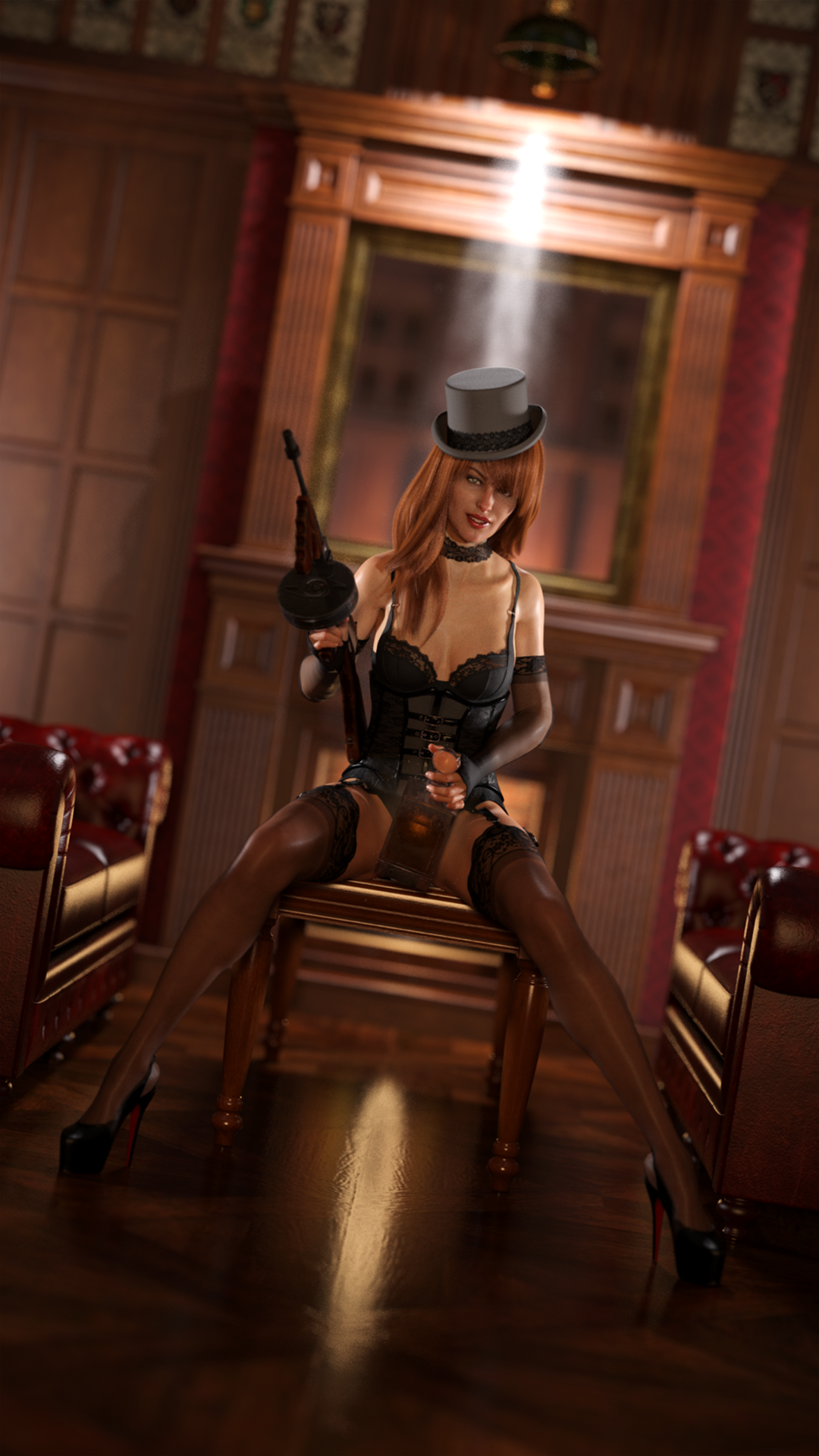
May 2020 - Daz 3D New User Challenge - Using Props and Push Modifiers/DeformersI'm entering the beginner "props" pose this month as I still consider myself a beginner. This is a simple scene I'm calling Prohibition. The figure I used is Victoria 8. I finally bit the bullet and picked up Victoria because every other product seems to be tailored for her, but I have to say, I'm a little disappointed. I've rendered this scene 4 times and can't get the grain out of her. I don't know what's causing it either. I've just put together a new computer with a rtx 2070 super for rendering and all my other figures look great. She is the only exception. Oh well. Here is the scene anyway. Let me know what you think.
 Report sales errors here: "There's Always Another Sale™"
"Daz 3D has let us know that they are working on the issue with the sales rules and it shouldbe fixed in a few minutes. In the meantime we have a contest. Post what your favorite product is and why. The most entertaining 3 answers that have been posted when the issue is fixed each get $150 store credit added to their acount. Here is my post"
Victoria 8 , who continues the long linage of Victorias...since the very 1st Victoria 1. The beginnings od DAZ.
Probably too late, butAnother Dazaholic Needs an Intervention Thread - Pro Bundle EditionI have 17 G8 Pro Bundles. As far as I know, I got Ellithia 8 Pro for free with Dain (which I wouldn't have otherwise bought because I only liked him, but had Ellithia on my wishlist because I didn't have enough to get her when she was released), and Victoria 8 Pro was once offered for like $20. Most of mine were the earlier ones that offered a lot more Freebies.Beta for DazCentral, your new Content ManagerThat said, if you are uising SmartContent/Connect as your primary download option then not all items have the Connect install options and a quite a few of these content require DIM/manual download so they won't appear in SmartContent tab.
How can I figure out which of my items are cannot be installed with Connect? I know about Victoria / Michel 4, but I don't use them and I don't care.
There was a thread about it a while back: https://www.daz3d.com/forums/discussion/257606/finding-dim-manual-only-available-content-i-e-only-non-connect-ones
use DIM to install everything and obvious anything is then not installed with Connect.
Beta for DazCentral, your new Content ManagerThat said, if you are uising SmartContent/Connect as your primary download option then not all items have the Connect install options and a quite a few of these content require DIM/manual download so they won't appear in SmartContent tab.
How can I figure out which of my items are cannot be installed with Connect? I know about Victoria / Michel 4, but I don't use them and I don't care.
There was a thread about it a while back: https://www.daz3d.com/forums/discussion/257606/finding-dim-manual-only-available-content-i-e-only-non-connect-ones
Beta for DazCentral, your new Content ManagerThat said, if you are uising SmartContent/Connect as your primary download option then not all items have the Connect install options and a quite a few of these content require DIM/manual download so they won't appear in SmartContent tab.
How can I figure out which of my items are cannot be installed with Connect? I know about Victoria / Michel 4, but I don't use them and I don't care.
Models, Characters and Character Presets... what's the difference?Some of these terms are rather vague. I generally use Base Model or Base Figure to refer to Genesis 8 Female, etc., and Character to refer to something built on that base, such as Victoria 8 or a character made by a PA The following have specific meanings:
Actor: this loads the base model (e.g. G8F) and can apply other settings, like Shapes and Materials. Most characters based on the base model (e.g. Victoria 8) come with an Actor that installs the whole character at once.
Preset: this applies some properties to something already loaded into the scene
Material Preset: this just applies the textures and their settings to what's selected in the scene. For example, a makeup option for a particular character.
Shaping Preset: this applies the morphs but not the textures to what's selected in the scene.
Character preset: this applies both the materials and the shape to what's selected in the scene.
Pose Preset: this applies a pose to what's selected in the scene.
Properties Preset: this applies any combination of properties to what's selected in the scene. It might be a pose and also hiding some body parts for example.
If you want to save your character as well as their hair, clothing, hand-held items, etc., that's best done as a subset
Models, Characters and Character Presets... what's the difference?Models, Characters and Character Presets... what's the difference?
Without ever really having understood much, I have oddly amassed quite a collection* of DAZ models, characters and "character presets" over the years. It might be the simplest most obvious explanation but could somebody enlighten me so that I will no longer harbor this big question mark in my head :P
(1) Models are the basic, no-frills base starting point which is usually free (eg. Genesis 8 Male G8M)
(2) Characters are specifically created from base models and portray, well, a character; these usually come with their own set of skins, textures, body transformations etc to be applied on a base model from the same generation (eg. Jonathan 8 for G8M)
(3) Character Presets are other characters built/derived from Characters from the same generation; these always come with body/face transformations and sometimes with their own set of skins and textures (eg. Deric for Jonathan 8)
(4) Both Characters and Character Presets are primarily time-saving artistic renders that enable us to "dive straight" into a scene without having to transform the base models to a face which we will enjoy seeing in our renders :P
Q: Based on the examples above, if Deric is derived from Jonathan 8 who is himself derived from Genesis 8 Male, why then would Jonathan 8 be a prerequisite for Deric? Because Deric uses Jonathan's skins? (ie. if C:B:A then why not C:A)
Q: So, if one were to only purchase Deric, what would happen if one were to apply Deric to Genesis 8 Male without first owning Jonathan 8?
Q: Characters and Character Presets are not necessary items (eg. I could manually morph G8M to look like Jonathan but I will just not have the latter's skins and eye colors, etc).*A cursory look at my Product Library revealed that I currently own Genesis, Genesis 2, Genesis 3, Aiko 3, Michael 3, James, Benjamin, Victoria 5, Gabi, Tori, Aiden, Axel, Logan, Brandon, Michael 6, Victoria 6, Genesis 8, Callan, Quinton, Zander, Ryker, Martin, Orrin, Chace, John, Wufei, ... most of whom I have never before used or even greeted... and not to mention I believe I have dogs, robots and dragons too!... I sometimes feel like I have a whole extended family that I have yet to meet LOL This has been such a mystery and it wish it could be unraveled once and for all :P
Thanks guys!
Aubrey 8First is plain Aubrey as she loads in. I'm not seeing the face/body seam issue.
Next is with Victoria 8's HD details, resolution at 3, with the Natural Eyes iris and lacrimal morphs at 100% and cornea at 70%
Last we have maps edited in the style of the Sunless product, with normal map strength bumped up to 2.Yea, not seeing any seams there.
Maybe it got corrected between the time the promos were made and the release itself.
Aubrey 8First is plain Aubrey as she loads in. I'm not seeing the face/body seam issue.
Next is with Victoria 8's HD details, resolution at 3, with the Natural Eyes iris and lacrimal morphs at 100% and cornea at 70%
Last we have maps edited in the style of the Sunless product, with normal map strength bumped up to 2.Daz 3D is part of

Connect
DAZ Productions, Inc.
7533 S Center View Ct #4664
West Jordan, UT 84084Licensing Agreement | Terms of Service | Privacy Policy | EULA
© 2026 Daz Productions Inc. All Rights Reserved.