-
Central Station?????
Looks a bit like the place in Manahattan but that's called Penn Station I think. It looks like that product is so old that it is likely Poser format only so you need to check in your Poser format section of your DAZ Studio library.
There are two in Manhatten one is "Grand Central Station" and the other is "Penn Station"
I'm now wanting to visit again. :-)
Central Station?????Looks a bit like the place in Manahattan but that's called Penn Station I think. It looks like that product is so old that it is likely Poser format only so you need to check in your Poser format section of your DAZ Studio library.
There are two in Manhatten one is "Grand Central Station" and the other is "Penn Station"
Central Station?????Look in Environments > Architecture > Central Station. If you still can't find it try looking in your content library > product > Central Station
ETA: Cross Posting Rules! DaWaterRat beat me out while I was waiting for DIM to open so I could check the file location
Central Station?????Smart content -> Environments -> architecture -> Interiors
Alternately in the apropriate directory under DS formats in Environments->Architecture->Central Station
Edit to add - I found it by looking under Products on the Content Library tab, which is my prefered content tab. I make a lot of use of the Products directories there. If I can't figure out where something was installed (because the powers that be categorize it differently than I would), I check for it there.
Central Station?????I brought Central Station but I can not find it no where in my Daz3d. It showed it installed and all. So what is going on?
Book Covers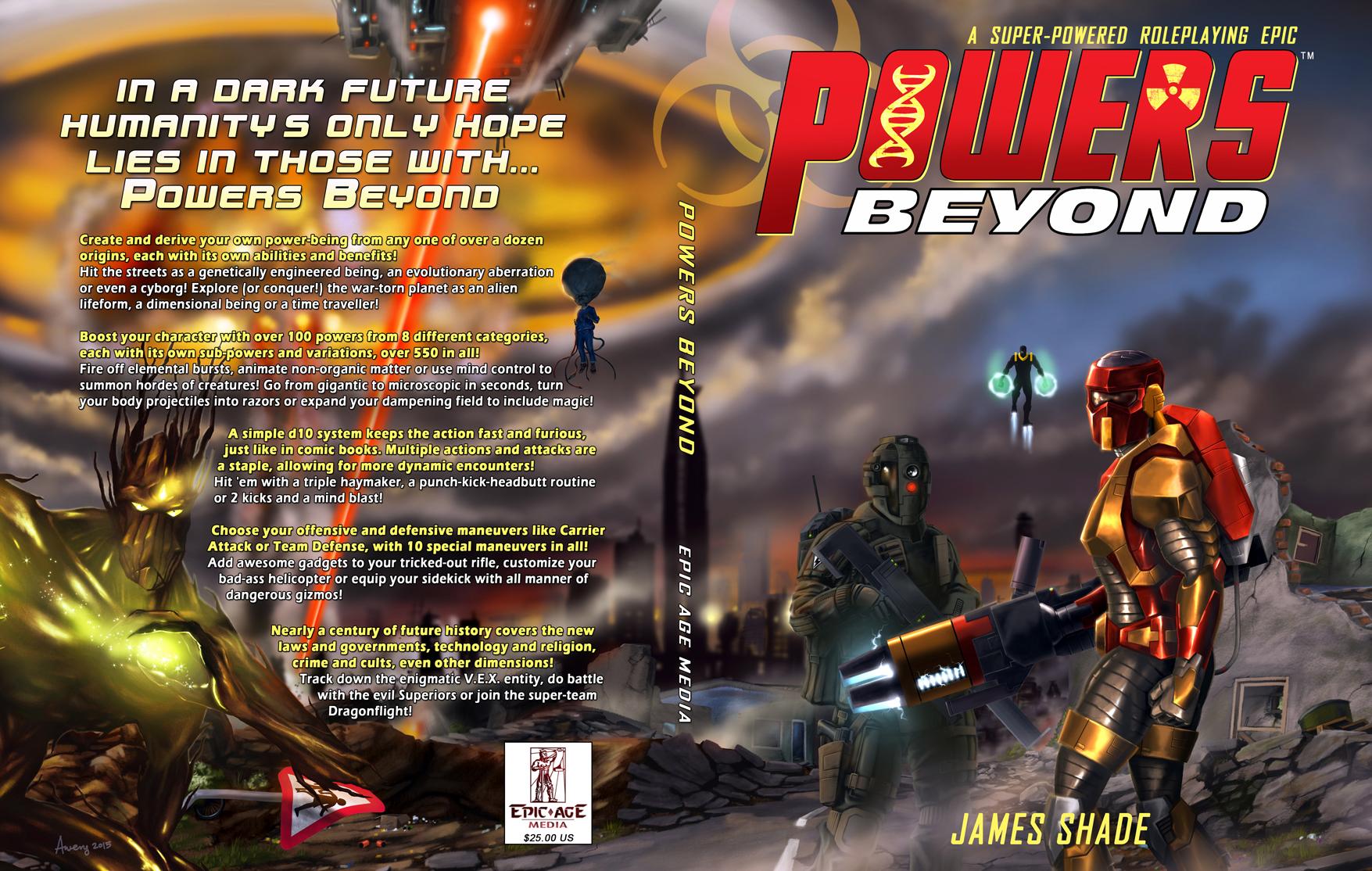
Click on image for larger view
Here's the cover for an RPG that will be published next month by Epic Age Media. First and foremost, I DID NOT DO THIS ARTWORK! I don't want anyone thinking that. However, I did do the following:
- Created the logo
- Placed the cover text
- Enhanced and darkened areas of the image to make them pop or so that the text would be legible (this was a very time-consuming process).
The enhancement was actually the biggest problem after we agreed on the logo design (which was only finalized last night when I added a layter of grunge to the DNA and Radiation symbols). The key armored figure was too dark to be the central figure on the cover -- I had to pump up the yellows to make him pop. I also had to do the same with the "Groot" figure on the back cover -- in the original you could hardly see him. The most agonizing thing was coming up with a color scheme for the back cover. I am not happy with what we chose, but it really is the best we could do. I kept trying different shades of blue, red, black, and even tried dropping a semi-transparent fill box behind the text (it just obscured the art and looked tacky). The yellow with a black outline was finally the best compromise. This is the problem you get when the background uses all sorts of different colors. Nothing is really the perfect contrast color, so you wind up settling. I think it looks pretty good in the end, though.
Semi-OT - nVidia Pascal cards debut finished, 1080GTX and 1070GTX announced!You mean Titan X Hybrid ( Hydro is with only water block for central water cooling ) last year when I purchased my first 2 cards, Titan X was around $1000 , Titan X SC $1229 and Titan X Hybrid $1500
My first was Titan X SC $1229 each , then I upgraded it with Hybrid kit $99 so each card cost me $1328 each still cheaper as original Hybrid and run at the same speed . This year I got additional 2 original Titan X Hybrids 1 for $1099 and the other for $1000 so I spent $4755 for my 4 cards
The new Titan X P base price is $1200 so it is not going to cost less for a long while , now you add Hydro kit for $99 ending in the same price range as me last year with Titan X SC + Hydro kit but whwn EVGA change the bios , set it at 1800Mhz or more and add more power it will cost no less than $1600-$1700 so in this case everyone will be happy to render with 2 x 1080 at the price of $1200 , 4 core CPU at max with 32GB of RAM .. best perfomance for the money
you need upgrade your PC
$1200 for 2 x 1080
$400 for CPU
$250 for Motherboard
$250 for RAM
1000W PSU or little less if not gaming
so you have super fast rendering rig for less than $2500 if build yourself and render in couple of minutes and not hours
I am not even using my 4 cards on a daily basic but max 2 as the viewport works wonderful and it render pretty quick + I can do all other stuff at the same time without even notice something is rendering
However you want the power of CPU rendering as well so that is different scenario and different planing egarding you CPU and RAM so the costs will be much higher
....true, but as I mentioned, any of the new Pascal series GPUs wil require I buld an entrirely new system as my current hardware is out of date and therefore incompatible.
So what did the EVGA Titan-X Hydros in your system cost?
o....however, only about a 70% chance that a scene would stay in VRAM. Oh, and there is still the Pascal/IRay driver issue.
Not about to go back to duo channel memory either. One of the reasons I had better render times with 3DL was because of the way tri channel memory works. If I am going to shell out to build a new system, I'd like it to be a reasonable step up from what I now have, just like my current one was over the last. Again, I am looking to render in higher resolution for gallery quality printing. For ray trace (3DL & Carrara), that means a more memory and CPU cores.
There are still things that 3DL is capable of (and which I already have utilities/plugins for) which Iray does not support.
Semi-OT - nVidia Pascal cards debut finished, 1080GTX and 1070GTX announced!You mean Titan X Hybrid ( Hydro is with only water block for central water cooling ) last year when I purchased my first 2 cards, Titan X was around $1000 , Titan X SC $1229 and Titan X Hybrid $1500
My first was Titan X SC $1229 each , then I upgraded it with Hybrid kit $99 so each card cost me $1328 each still cheaper as original Hybrid and run at the same speed . This year I got additional 2 original Titan X Hybrids 1 for $1099 and the other for $1000 so I spent $4755 for my 4 cards
The new Titan X P base price is $1200 so it is not going to cost less for a long while , now you add Hydro kit for $99 ending in the same price range as me last year with Titan X SC + Hydro kit but whwn EVGA change the bios , set it at 1800Mhz or more and add more power it will cost no less than $1600-$1700 so in this case everyone will be happy to render with 2 x 1080 at the price of $1200 , 4 core CPU at max with 32GB of RAM .. best perfomance for the money
you need upgrade your PC
$1200 for 2 x 1080
$400 for CPU
$250 for Motherboard
$250 for RAM
1000W PSU or little less if not gaming
so you have super fast rendering rig for less than $2500 if build yourself and render in couple of minutes and not hours
I am not even using my 4 cards on a daily basic but max 2 as the viewport works wonderful and it render pretty quick + I can do all other stuff at the same time without even notice something is rendering
However you want the power of CPU rendering as well so that is different scenario and different planing egarding you CPU and RAM so the costs will be much higher
....true, but as I mentioned, any of the new Pascal series GPUs wil require I buld an entrirely new system as my current hardware is out of date and therefore incompatible.
So what did the EVGA Titan-X Hydros in your system cost?
obatch untick UV plugin please
thanks for that ;-)
Tips on making good Eyes?Central question when you use Iray as a renderer, do you use Iray surfaces? Select the item (Michael in your case) in the scene tab and switch to the surfaces tab, that should indicate if you use the Iray surface. If not, you can look in the materials if there are Iray materials for the surfaces you need ( the eyes in this case, but it is better to have everything switched or render time goes up or strange results come up). In case you don't have preset materials select your surfaces and go to the content Library /My DAZ 3D Library/shader presets/ iray/ ands apply the Iray uber base to your surfaces.
GENERAL FREEBIE REQUESTS Part 2One here as well
https://www.cgtrader.com/free-3d-models/architectural-exterior/street-infrastructure/building-row
Unfortunately I need lots of points before I can download from CGTrader.
On another subject, has anyone seen any store fronts or street fronts? I currently have AntFarm's Window Shopping http://www.daz3d.com/window-shopping, as well as Victorian Street Front http://www.daz3d.com/victorian-street-front, but would love suggestions for others. The Central District Subway is great, but it's got a subway station. http://www.daz3d.com/the-central-district-subway
--MW
take a look at this one. it's a whole street!
Was that the correct link? It looks like just one shop and not a whole street to me.
GENERAL FREEBIE REQUESTS Part 2On another subject, has anyone seen any store fronts or street fronts? I currently have AntFarm's Window Shopping http://www.daz3d.com/window-shopping, as well as Victorian Street Front http://www.daz3d.com/victorian-street-front, but would love suggestions for others. The Central District Subway is great, but it's got a subway station. http://www.daz3d.com/the-central-district-subway
--MW
take a look at this one. it's a whole street!
GENERAL FREEBIE REQUESTS Part 2Greentoken has a free online converter that will do 3ds > obj conversions: http://www.greentoken.de/onlineconv/
On another subject, has anyone seen any store fronts or street fronts? I currently have AntFarm's Window Shopping http://www.daz3d.com/window-shopping, as well as Victorian Street Front http://www.daz3d.com/victorian-street-front, but would love suggestions for others. The Central District Subway is great, but it's got a subway station. http://www.daz3d.com/the-central-district-subway
--MW
http://www.sharecg.com/v/50625/gallery/5/3D-Model/Coney-Coffee-Cafe and there is this one from page 65 of this thread: https://www.cgtrader.com/free-3d-models/architectural-exterior/cityscape/nyc-block-set-8#
GENERAL FREEBIE REQUESTS Part 2Greentoken has a free online converter that will do 3ds > obj conversions: http://www.greentoken.de/onlineconv/
On another subject, has anyone seen any store fronts or street fronts? I currently have AntFarm's Window Shopping http://www.daz3d.com/window-shopping, as well as Victorian Street Front http://www.daz3d.com/victorian-street-front, but would love suggestions for others. The Central District Subway is great, but it's got a subway station. http://www.daz3d.com/the-central-district-subway
--MW
Superheroes Rebooted - Ready to Rrrrrender?This is my largest project to date. Definitely spent a great deal of time on this scene.
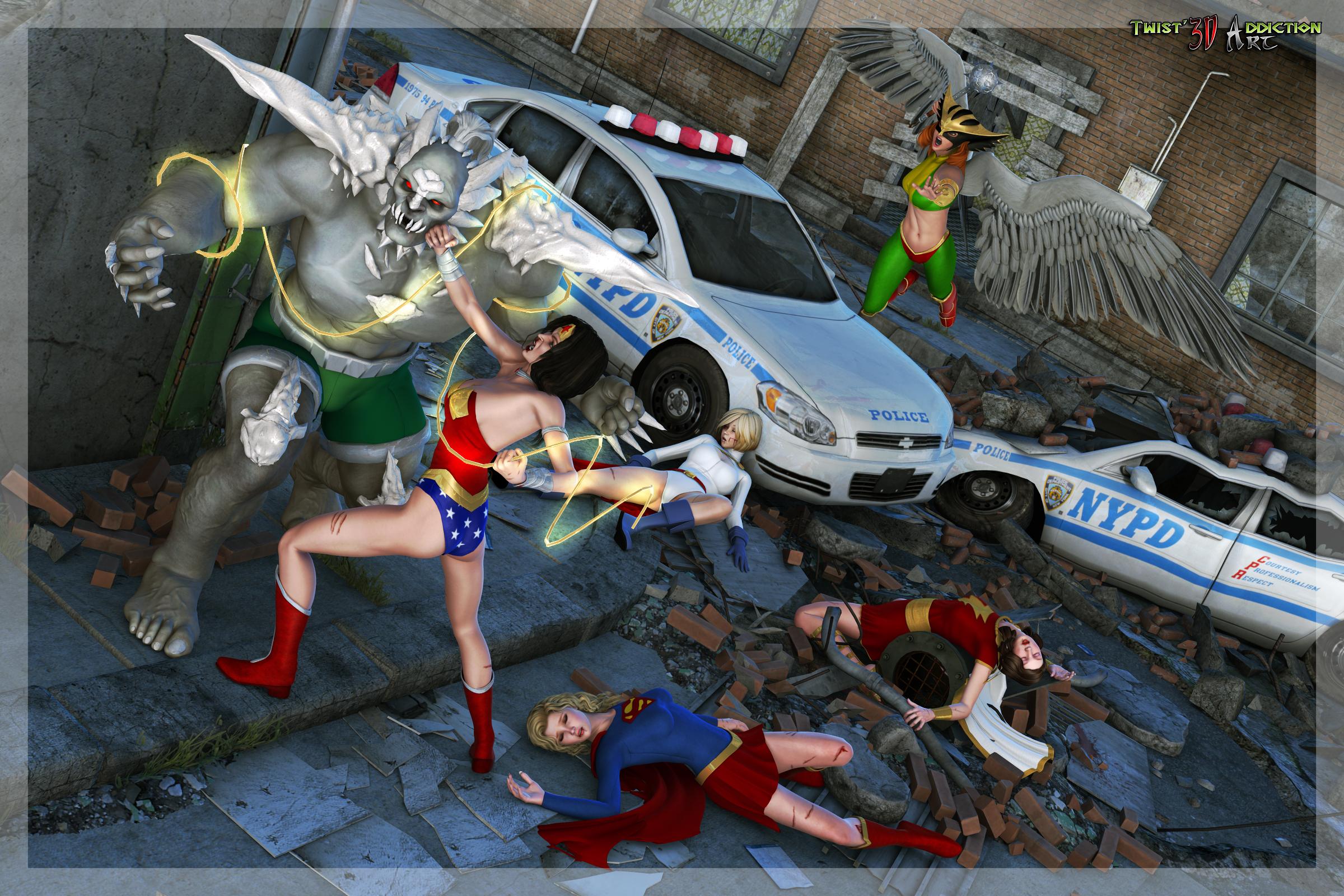
Awesome. Just Fantastic! :D
I COULD see Diana going at him with her Magical sword and shield...and Doomy winding up for a devastating right hook...
(Hope Kara wakes up SOON, 'cuz if Diana gets pushed BACK by Doomy ANY further, she's likely to step on the Maid of Might's head! 0_o;;;; ) :)
If Doomy power-punched Mary Marvel or Kara, I could see one of them draped over (maybe) the top of the cop car on the right...or slammed up against the side of the building...If the guy can trade full-power blows with Kal, a blow from him would send these ladies FLYING...(in a BAD way) :(
(And he'd probably LAUGH about it... 0_0;; )
______________________
• I wonder if anyone has done Metropolis PD/Central City/Hub City/Gotham City 'decals' for the police cars? That might put another cherry on this bloody sundae... :)
• Are Doomy's bone spurs UV mapped? If you could add 'dirt' to them (add further depth and shading to them), it might bring him into the 'grunginess' of the cityscape more. You can see the shading/dirt on the ladies/Hawkwoman, and it ties them into the scene very well...But Doomy's bones are reading as too...clean...to my eyes. (Which is weird, 'cuz his skin reads fine to my eyes...*shrugs*)
______________________
All told, VERY cool scene! Wish we had gotten a bit of this during the 'Death of Superman' arc...instead of the A-List JLA just HAPPENING to NOT be available to help Kal (and Guy, Booster,Ted, Ice and the rest) fight the monster. Wonder Woman is a wizened fighter/warrior. Doomy would have beat on her, but she would've GIVEN him pain as good as any she would've gotten...
And Kal then would've ENSURED that Doomy would have PAID for EVERY bruise or cut Diana got... :(
GPU too hot?If you reach 80C you starting losing the speed on your clock and your cards will render slower than it should, no matter it is rendering or games , for air cooling cards the only solution here is side fan , I have in the begining air cooled cards and the same problem as yours , after I installed the side fan the temp dropped to 67C and everything was fine again , now I use closed water cooling with independent radiator for each GPU and everything run at 37C . I am not sure yet if I want central Water cooling as it will give me no more as I have now .
If you PC case allow you to install side panel fan go for it , also if you don't have already buy backplates for your cards it will lower the temp also around 3-5 C by cooling better the VRAM that is outside of the card that can get very hot and actually is not cooled by anything but the air in your case heating up the rest of the components on top of that .
The secret in cooling right PC case is in creating the right pressure , so fans running like crazy may cool less than slower fans , also you will never get lower temp than your ambient room temp unless you use nitrogen ;)
1.Backplates
2.Side fan
that are all option you have here but with possible good result as I did and it worked . Or get yourself EVGA Hydro Kit for your cards and forget about the rest , your warranty will be not affected as long you keep the original parts just in case. I did with my 2 early cards as well and that was the best choice ever and the fact that everything will be protected by warranty even if something leak make it even better .
It's normal to reach 79 celcius while rendering with the gpu?
How can I know if my gpus are working? I only have two 980 ti. Both reach the same temperature with the fans working. That's a good sign to know if my gpus are working?
Thanks!
4.9 64-Bit Main Viewport disappeared.I couldn't begin to tell you what I did to cause it to go bye bye, it just went away and I was left with a big blank space in the middle of my workspace. I still have my Aux Viewport, I can even drag it into the central area and expand it, but then I lose the Aux Viewport. Also there seems to be no easy way to get back from full screen.
I hate to say it, but it's crap like this that makes me glad DS is free. If I'd paid for software that behaved like this I do believe I'd be pissed. I tried searching the forums, I don't know if anyone else ever tries that but in my experience it is an excercise in futility. It has to be the worst search engine ever.
Anyway, I appreciate any advise on offer. I'm sure that there is some unintuitive sub-menu that will get my Viewport back that I just can't find.
My Lease Is Nearly Up On The Complaint ThreadMorning. Having a bit of weather here...
...still raining there accroding to my weather site though not as bad as the other day.
More rain than we're used to I guess it goes to show be careful what you wish for but on the upside our roof isn't leaking, the central heating works and I got a few days off so could be worse :)
My Lease Is Nearly Up On The Complaint Threadno use cant remember astoria or greenpoint. called my cousin to ask if she has pictures.
i remember the trains vaguely, cuz they were reddish.
ate all me spinach, so now can eat desert, butter pecan ice cream guilt-free
sorta remember the train stations. people pushed. and they huddled cuz they knew exactly where the train doors open
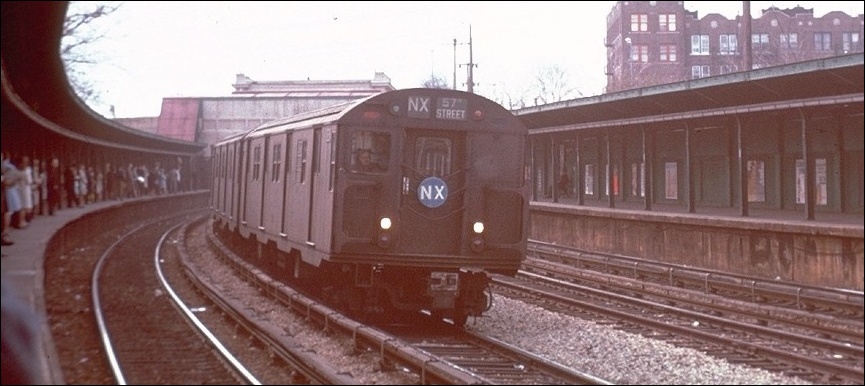
red trains were the old diesel trains to long island, electrified tracks stopped, the trains switched to diesel power
cant find pictures. they stopped running them 80s or 90s
If you lived in/around Astoria, the red elevated subways were the R34 "Redbirds"... The last were retired in the mid 90s... Most are now part of an artificial reef somewhere down around the Carolinas. Back in the 70s they were mostly drab dark green... The red scheme came about the the early 80s... But they were mostly the 7 line, which was a Flushing line... They didn't really go into Astoria, just Queensborough Plaza then up Queens Blvd. The N and the R, which ran into Astoria and also through Greepoint (over the years they keep switching the N & R's routes), those had all sorts of different (filthy) colors... Some still had "64' Worlds Fair" light blue colors into the early 80s... I grew up on Crescent Street (Long Island City, or L.I.C.... the area was also known as Dutch Kills), three blocks from the 59th Bridge... (Ed Kotch bridge now?)... Those were interesting times... NYC was falling apart, crime was rampant and the area was an industrial mess... Every other block had a burned down factory or abandoned lot... One whole block was a crumbled lot near 21st street, complete with a ten foot deep, 30 ft diameter crater where a water main broke and the city only caped (and never filled in the hole for about six years). There were some areas that were abandoned for so long that you'd occasionally find pheasants in, that had flown over from the LIRR freight yards near Queens Plaza (Long Island animals used to wander into the area by traveling along the tracks). The area was a favorite dumping ground for stolen cars and contractors who just dumped whole loads of demolition debris on the streets... At least one block was impassable to cars due to the amount of debris dumped on the street. But as terrible as it was, it wasn't so bad to me as a kid and could be sorta fun at times... In a Fallout 4 kinda way... (Really, if you have played the game, they got the urban destruction details perfect)... There were no rules... You could explore anywhere, nobody cared... We had countless buildings, half of Roosevelt island, and even the (then) abandoned 63rd street subway tunnel project to explore... On Roosevelt island we once found an open hatch that led down to some access tunnels that ended up in the giant aqueduct tube which was still under construction at the time... Even the 59th street bridge was our playground... We used to ride our bikes down the outer roadways when they would close them down for perpetual repairs... A half mile downhill run... if you were lucky you could get your bike to 50mph. My friend and me once made soapbox racers (more like "assorted garbage racers") and ran them down the south roadway... On my turn it broke to pieces... I have no idea how fast I was going, but it was feet from the concrete decking... Theres nothing like falling on studded steel decking at speed to make you appreciate falling on concrete. One summer a stupid game we had involved climbing out onto one of the scaffolds above an abandoned lot near the river and dropping bottles into a 55 gallon steel drum below... We would lug dozens of bottles up the bridge in a folding shopping cart... We got pretty good at it and eventually someone moved the barrel... We had a mini adventure getting into the lot to reset the barrel... When we found it, it was almost 1/3 full of glass... We were really bored I guess. Another side effect of living there was, if you were mechanically inclined, you could find almost anything to build almost anything, virtually anywhere if you looked long enough or knew were certain things tended to be found... Granted, stuff tended to look like it was made by the raiders from The Road Warrior, but you learned to be innovative... That and you hardly had to have any money to have fun (none of us did anyway). my step dad still lives in Long Island City in that same house. The neighborhood is totally different now. Some of the old houses are still there and many of the crappy old factories too, but one by one they are turning into hi-rise hotels and condos... The neighborhood is now an odd mix of working class and tourists, with stray groups of bohemians and wealthy hipsters mixed in... (I preferred the rats to the hipsters... They have more personality). That LIC is long gone... Some of it I wouldn't wish on anyone... Some of it is why I hate apathetic mismanagement of infrastructure by hired officials... Some of it is why I don't trust the intentions or rhetoric of "urban developers"... Some of it made me a little tough and quick to fight... Some of it made me somewhat street smart, but at a cost... Some of it made me quite cynical... But some of it I wouldn't change... Because some of it gave me some of the best closest friends anyone could want... We went through hell in a place nobody cared about and learned to watch out for one another on the way... As bad as it was, sometimes you can't find that in other places...
Sorry... This started out with me mentioning the trains and I got to thinking about the ones that ran to Greenpoint, which was mentioned... It reminded me of a friend who died last year and some of our crazy adventures and crazy Fourth of July's (stuff that would get SWAT teams into the area today, but back then the cops would just tell you "hey, stop that" and drive on)... My friend's family had a Deli in Greenpoint, so that was why I started thinking about all that and the other stuff...
oh yeah the 7! use to take it to Hunter's Point from Grand Central. ears popping. scared to death of the tunnels now. terror vortex subway tunnels and ferris wheels
dunno if i could get to staten island ferry, no tunnels on the way
havent been to avery fisher hall in 20 years, never been to the big one, the met
What is this train station?...the Boston and Pacific one would work for the 50s- 70s livery. Before that they were affiliated with the Union Pacific which would be the Denver and Southern texture. The Rio Grande & Western is perfect for the Penn Central. The Southern Coast lines works for the older Milwaukee Road, before they partnered with Union Pacific
Daz 3D is part of

Connect
DAZ Productions, Inc.
7533 S Center View Ct #4664
West Jordan, UT 84084Licensing Agreement | Terms of Service | Privacy Policy | EULA
© 2026 Daz Productions Inc. All Rights Reserved.