-
Everyday 2 "Undress" Poses and Clothes. Clothing item not matching pose on plain G8F.
Hi.
I am having trouble with Everyday 2 Undress Poses and Clothes for Genesis 8 Female(s) | Daz 3D
1 Using a G8F (without any morphs applied to it) I do the following:
2 Load the clothing item on G8F
3 Load the pose On G8F
4 Apply the matching morph on the clothing Item
But arms and hand of G8F goes through the clothing item.
Anyone have an idea what I am doing wrong?
Many thanks.
How to put G9 skins on G8 models?When Genesis 9 figures first came out, I put a lot of thought into this and over time came up with a solution that works in 80% of all cases.
Yes, you can put a Genesis 9 skin on a Genesis 8 character. It only takes a few seconds to do it.
But it takes a bit of prep work, and it does not work the way you think it may.
First you have to convert your Genesis 8 character to Genesis 9 using the RSSY converter program (see link below). This will create body and face morphs for most of your Genesis 8 characters and it works perfectly on most Genesis 8 characters. After you morph the face and body you can, in most cases, superimpose most figures and the generation body shapes will perfectly align with one another.
What is a Genesis 8 character without its skin? Well, it is a unique face and body shape. If you have the same face and body shape on a Genesis 9 character then you have the same character, simple as that (for the most part). Most clothes, and hair autofit (geographs and bodysuits are a different story) . The same would go for Genesis 9 to Genesis 8. If you can morph the face and body shape of a Genesis 9 character to a Genesis 8 then you can use all the Genesis 8 bodysuits on a Genesis 9 character. If both characters can obtain the same shape, you technically have the same character in a different generation.
You may never solve the problem of using UV skins on a different generation. My suggestion for now is, instead, use morphs.
https://www.daz3d.com/rssy-character-and-material-conversion-genesis-8-to-genesis-9-bundle
Daz Studio BETA - version 4.23.0.4! (*UPDATED*)barbult said:
crosswind said:
It doesn't work either with GR 4.22.0.15.... I checked the DSON file, the error happens when writing the data of "D-Former Field" ... but a d-Former with Weight Map mode has no "D-Former Field"... so it's a bug I presume... though I never use Weight Map mode.
Thanks for confirming the problem and your additional analysis. Weight map mode is very useful for creating attenuators for Morph Loader Pro, when creating morphs to apply to only a partial area. Even though I wasn't able to save the D-Former as a preset, it did work correctly as an attenuator within the scene file.Yeah, agreed. However I think you can just use a D-Former with Default Settings, with adding weight map on "D-Former Field" rather than "D-Former Base", then Attenuate in MLP works with it as well. The HeadSplit D-Former in Starter Essentials just uses this way. And it can be saved as D-Former Preset...
Daz Studio BETA - version 4.23.0.4! (*UPDATED*)
Thanks for confirming the problem and your additional analysis. Weight map mode is very useful for creating attenuators for Morph Loader Pro, when creating morphs to apply to only a partial area. Even though I wasn't able to save the D-Former as a preset, it did work correctly as an attenuator within the scene file.crosswind said:It doesn't work either with GR 4.22.0.15.... I checked the DSON file, the error happens when writing the data of "D-Former Field" ... but a d-Former with Weight Map mode has no "D-Former Field"... so it's a bug I presume... though I never use Weight Map mode.
Genesis 3 Expressions to Genesis 8That's right ~ if an expression is a pure morph rather than using Pose Control properties, you have to do morph conversion instead. As for the product from Zeddicuss as you mentioned, they're Pose Controls.
Genesis 3 Expressions to Genesis 8Dial an expression property from this product, Edit mode in Parameters pane, right-click on the property - ERC Bake, then save a Pose Preset with Pose Controls under Head node only (Figure Head node + Pose Control - Head path...) AFAIK, there's no batch converter for converting expressions from G3 to G8... I'm afraid you have to do it one by one.
Then apply the Pose Preset on G8, create a Control property and ERC Freeze. Save a Morph asset for the Control property. Done ~
An alternative: replicate the product folder under "data\DAZ 3D\Genesis 3\Female\Morphs\Zeddicuss\..." and edit DSF files by replacing strings: "Genesis3Female" with Genesis8Female, as well as "Genesis 3/Female" with "Genesis 8/Female". Then copy the product folder to "data\DAZ 3D\Genesis 8\Female\Morphs\Zeddicuss...." , accordingly. Then test. Suggest you use Notepad++ to edit DSF files with which you can batch replace strings and save the files. That'll be pretty fast.
Be noted that depending on the expressions... there might be some tiny difference even if G8 has the same facial joints as G3. And this way won't work on a G8.1 with default FACS... ( i.e. if you haven't removed those dummy aliases in data folder of G8.1...)
Genesis 3 Expressions to Genesis 8This may seem like a really stupid question, but is there a quick and easy way to convert Genesis 3 expressions to Genesis 8? Perhaps some sort of equivalent to the X-Transfer utility for morphs?
I remember trying this quite some time ago, and ended up copying folders from G3 over to G8 and editing the files so the expression sliders appeared for G8.. I did this as a test on a selection of expression presets, but now for the life of me I cannot remember how I did it. Yes, I know I can probably save each expression as a pose preset, load them into G8, and then save again - but ideally I'd like sliders as I rarely set expressions to 100%. I tend to mix and match until I have a result I'm satisfied with.
The expression pack I'm particularly interested in converting is Z Childhood Wonder for Genesis 3 https://www.daz3d.com/z-childhood-wonder-expressions-for-genesis-3-female. A batch conversion would be great. :)
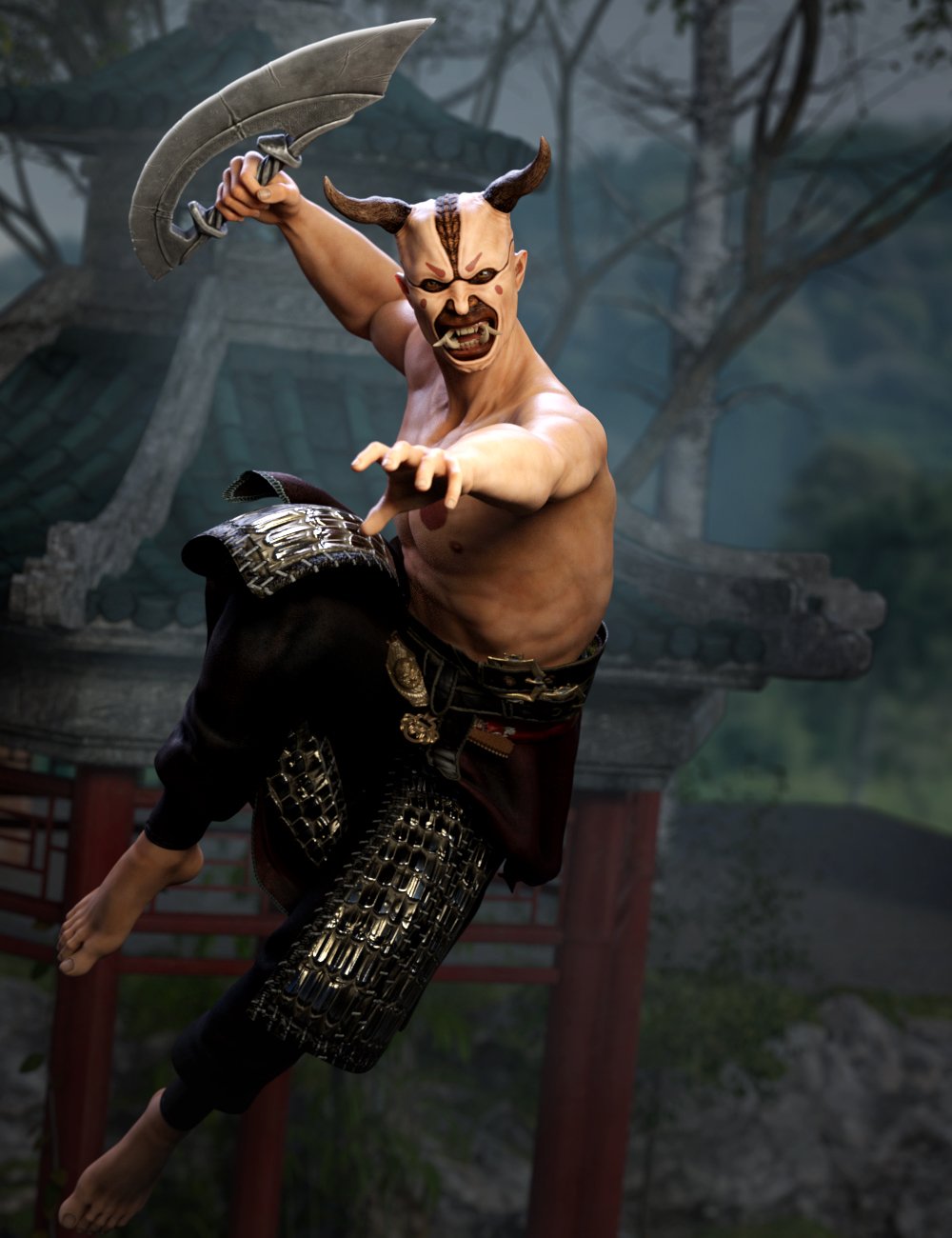
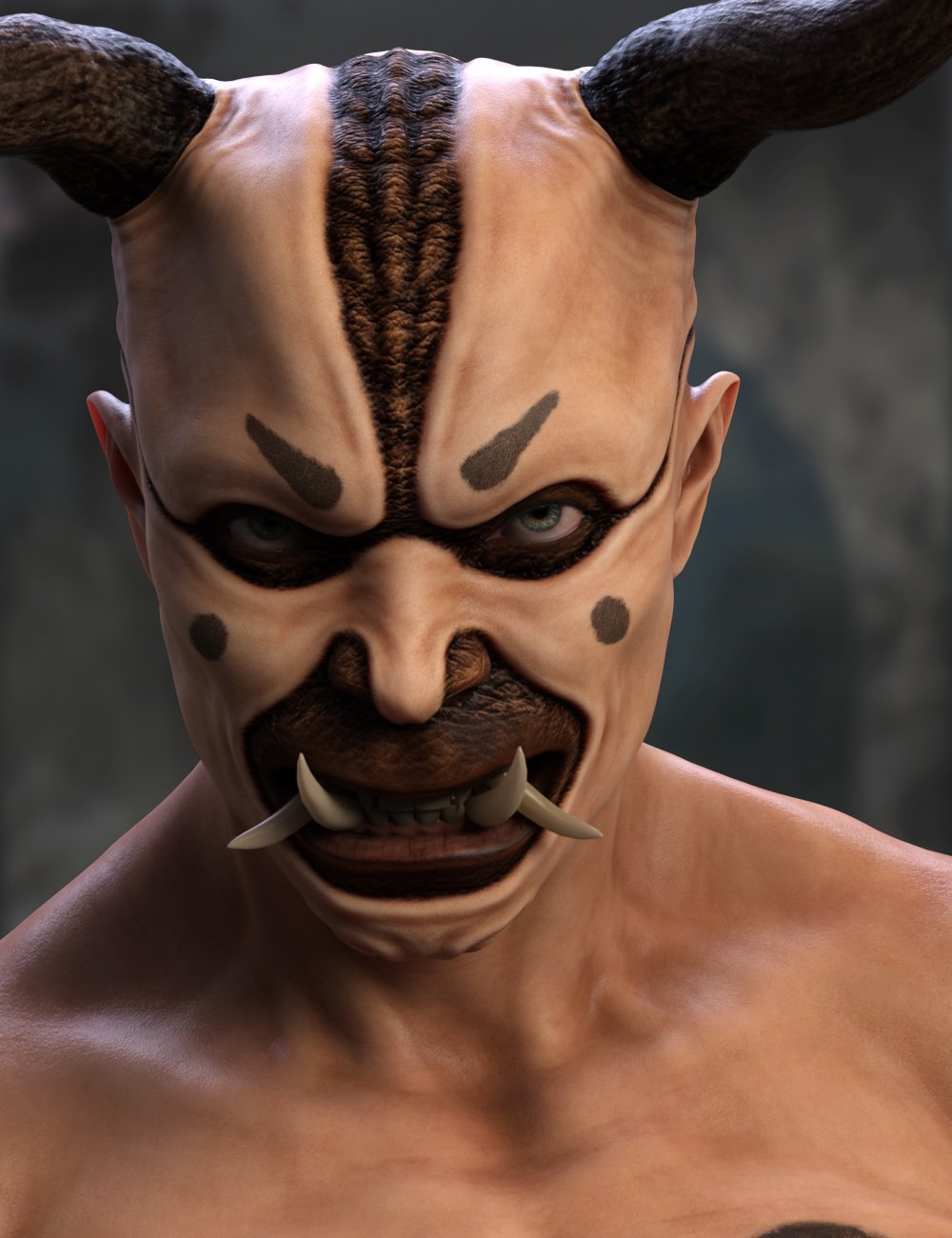
Oni Demon for Genesis 9 [commecial]Oni Demon for Genesis 9
https://www.daz3d.com/oni-demon-for-genesis-9
When consumed by grief or rage or any range of personal vice, ones demonic nature can be inflamed and the Oni emerges. With tusks and horns, a person can become a truly horrific monster.
This set was designed with ultra-realistic PBR skin skin techniques. The High Definition morphs, Geografts and High Quality textures to really bring this character to life for your renders.What's Included and Features
- Oni Demon for Genesis 9: (.DUF)
- Raw Oni Demon Character Preset
- RAW Oni Morph
- Raw Oni Horns
- All Curl Front/Back
- All Curl Side/Side
- All Twist
- Left Curl Front/Back
- Left Curl Side/Side
- Left Twist
- Oni Horns Pose-1
- Oni Horns Pose-2
- Right Curl Front/Back
- Right Curl Side/Side
- Right Twist
- Shaping Presets
- Raw Oni Demon Shape
- Materials:
- Skin Materials Support Male Anatomical Elements
- Raw Oni 01 MAT Dark
- Raw Oni 01 MAT Pale
- Raw Oni 01 MAT Red
- Raw Oni 02 Makeup Black
- Raw Oni 02 Makeup Gold
- Raw Oni 02 Makeup Red
- Raw Oni 02 Makeup White
- Raw Oni 02A Makeup Off
- Raw Oni 03 Eye Black-Blue
- Raw Oni 03 Eye Black-Gold
- Raw Oni 03 Eye Black-Green
- Raw Oni 03 Eye Black-Red
- Raw Oni 03 Eye White-Blue
- Raw Oni 03 Eye White-Gold
- Raw Oni 03 Eye White-Green
- Raw Oni 03 Eye White-Red
- Raw Oni 04 Horn Makeup Black
- Raw Oni 04 Horn Makeup Gold
- Raw Oni 04 Horn Makeup Red
- Raw Oni 04 Horn Makeup White
- Raw Oni 04A Horn Makeup Off

 (Help) How to transfer custom genesis 8 female to genesis 9?
I don't know of any way to move HD morphs between generations. The fit suit method will only transfer the basic shape of your character. If you can find/afford similar morph packages for G9 you can then re-create the characters details on the basic shape. Other options include creating your own displacement and normal maps for fine details and sculpting things like muscles, ribs, hips on the fit suit basic shape morph.
FaceTransfer 2 vs Headshop 2024
Thank you for the detailed comparison. I think you confirmed my instincts. You're right. Headshop does seems like a better choice overall outbox for morphs creation. Now I guess I've wait until it goes sale, lol. (Here's hoping that March madness sale delivers)FelixFFDS said:Both are good programs. In a head-to-head comparison, though, I give the nod to HeadShop2024.
FaceTransfer has a serious problem with the side profile. My opinion is that the resulting morph looks like an alien for G8 heads. G9 - from my tinkering with the trial version, is a bit better. In either case, you'd also need Face Transfer Shapes (3rd Party program) to flesh out the Face Transfer G8 profile.
In that sense, HeadShop2024 provides a overall better shape on the G8 model. Also, Headshop2024 allows you to create the morph without creating a corresponding texture.
Attached is a quick comparison of the two. I used a mugshot off the Internet and created the head morphs in both Face Transfer and Headshop2024. Since textures aren't the issue here, I used the default G8F base materials (Iray). There is no "post morph creation" tweaks done.Hope this helps.
Felix
some deforce hair not attaching to gen 9 characterchad said:
How do I adjust the rigging to the shape? I don't think my custom morphs make that much difference, most of my changes were just to the face andI certanily didn't change the overall height and other hair fits fine.
apply the hair on base Gen9 then apply your morph and you would know if it's the morph
FaceTransfer 2 vs Headshop 2024Both are good programs. In a head-to-head comparison, though, I give the nod to HeadShop2024.
FaceTransfer has a serious problem with the side profile. My opinion is that the resulting morph looks like an alien for G8 heads. G9 - from my tinkering with the trial version, is a bit better. In either case, you'd also need Face Transfer Shapes (3rd Party program) to flesh out the Face Transfer G8 profile.
In that sense, HeadShop2024 provides a overall better shape on the G8 model. Also, Headshop2024 allows you to create the morph without creating a corresponding texture.
Attached is a quick comparison of the two. I used a mugshot off the Internet and created the head morphs in both Face Transfer and Headshop2024. Since textures aren't the issue here, I used the default G8F base materials (Iray). There is no "post morph creation" tweaks done.Hope this helps.
Felix
some deforce hair not attaching to gen 9 characterTexturs won't matter, but shape will - especially if you haven't adjusted the rigging to the shape for a custom morph (but that would break posing too).
Model nameMatt_Castle said:
It's definitely the skin from https://www.daz3d.com/van-helsing-9-hd although I'm not certain if the morph has been tweaked.
Ok thanks !
Scope of License ApplicationI am not a lawyer, but have purchased many of the interactive licenses,
so the topic is interesting for me, as well.
As stated in https://www.daz3d.com/eula/
under point 3.0 Interactive License Addendum:If the game only provides Two-Dimensional Works,
so it is not a 3D design tool using Daz 3D assets
to create or modify such items, then if developer
of the game has purchased interactive license may:(i) incorporate, copy and modify such Content
in the creation and presentation of two-dimensional animations and renderings
which may require access to the Content by the User's customer
during electronic execution of the User's application(ii) incorporate two dimensional images
(including two dimensional images that simulate motion of three dimensional objects)
derived by User from the Content in User's other two-dimensional works(iii) publish, market, distribute, transfer, sell or sublicense
such two-dimensional animations, renderings and other works;
provided that User may NOT in any case:
publish, market, distribute, transfer, sell or sublicense any renderings,
animations, software applications, data or any other product from which any Content,
or any part thereof, or any substantially SIMILAR version of the Content
can be separately exported, extracted, or de-compiled
into any re-distributable form or format.Super Fun Happy Computer Upgrade TimeElor said:
hjake said:
3. The difference in rendering time between main and secondary computer with the RTX 2070 Super was only 1 minute. That is what made me consider placing a RTX 4060 Ti 16GB in the old computer to extend its life and give me a no fuss way to render (whistle) while I work. :-)Would a RTX 4060 works with such an old motherboard ?
I have a 4790k laying around, sitting unused on its Asus Z97A motherboard, with only the integrated GPU (I gave my GPU to my brother when his own GPU died at the height of the GPU crazed prices time a year or two ago) and if a modern GPU works on it, it would save me some money to get such a GPU while keeping the motherboard and the CPU (I would need to find more RAM too, I only have 8GB on it I think, but I suppose it's easier to find cheap second hand RAM that cheap second hand 12 GB+ GPU…).
As was mentioned in the previous posts by everyone the answer is yes, BUT there are caveats. You will need a sufficiently powerful/stable enough power supply. You can see in my secondary sytem, above, I have a Corsair CS750M (750 watts). I would recommend a 750 WATT minimum with at least 80 Plus Gold certification. However you may need a larger power supply depending on what devices are in your computer. Remember you want some power supply overage (but don't over do it) so you are not always running your power supply at the top end of performance which keeps it cooler and prolongs its life.
Generally more RAM is better, so if your motherboard lets you go above 32GB then I would recommend that. Try to make sure all your RAM is the same spec, if not the same brand. You will notice in my main computer I have 2 pairs of RAM (Corsair and G.Skill) because I bought them a few weeks apart and a second set of Corsairs was not available. That system is very stable even witrh different brand of RAM, but the same specifications.
Now concerning the PCI-E bus (the slot you insert the graphics card into), the Intel chipset Z97 is only PCI-E 3.0 and the RTX 4060 is PCI-E 4.0. What do you sacrifice by putting the latest graphics card in your prehistoric i7 4790K? Gaming speed and 3D scene loading time prior to actual rendering in programs like DAZ Studio!
The problem is games are always loading new things to the graphics card and your data transfer rate to the card is throttled down to PCI-E 3.0 performance. Therefore I would not put that card in your old system if you are going to play games above 1080p and even there you might have turn down the dials on settings in the game. I am talking about games that are best with pretty graphics like Cyberpunk.
As for DAZ Studio, a rule of thumb I have read in many places on these forums is to have 3 times the amount of graphics card VRAM for your computer system RAM. So in my case the ideal would be 48GB of computer system RAM for my 16GB graphics card. However, ideally I would probably want even more RAM, say 64GB RAM because I also have other memory hog progams running in the background (e.g. photo-editing software, and 500 web browser tabs, kidding I never run more that 499 tabs). However, my motherboard maximum is 32GB. Basically I would not use this solution as a way to run DAZ Studio for scene development or as my latest 3D games computer. It can do it all but it is not taking advantage of all the graphics card's performance. Once the DAZ scene is loaded into the RTX 4060 and I leave the computer alone and I don't run other apps on that computer, then in theory, it should perform similar to putting that card in my main computer which has 64GB RAM and PCI-E 4.0.
In my original post, I explained that my primary use for the secondary computer is to sit there and grind away at rendering scenes and I wanted to just prepare the scene on my main computer then copy the scene DUF file to the secondary computer through remote desktop and let the secondary computer take however long it needs to render the scene while I keep working on main computer creating master works of art to rival any AI generated masterpieces (note to self: insert self-depricating humour here). Spending all that money on the RTX 4060 Ti 16GB may be worth it to me for my workflow and to avoid buying a new computer as my main computer for another 12 to 18 months.
I hope that brief but spectacular answer helps you. :-)
FaceTransfer 2 vs Headshop 2024I don't use any such product myself, but Face Transfer 2 is the only product of its kind I've seen that produces results I would even describe as usable.
Daz Studio 4.23(.0.x) - Highlights4.22.1.88 (February 21, 2024)
- NVIDIA Iray
- Integrated Iray 2023.1.3 (373000.2208); see this thread for more detail
- REQUIRES:
- NVIDIA Driver 537.13 (R535) on Windows
- NOTE: This is a lower minimum requirement than 4.22.1.41
- See NVIDIA Driver Downloads
- NVIDIA recommends installing Studio Drivers (SD)
- SSSE3 enabled CPU is a minimum requirement on macOS/x86
- NVIDIA Driver 537.13 (R535) on Windows
- REQUIRES:
- ...
- Integrated Iray 2023.1.3 (373000.2208); see this thread for more detail
- Scene pane
- The actions in the Option Menu > Reorder submenu now operate on the selected node(s) in the same level of hierarchy, regardless of a node's parented state
- Selected Node(s) To Top
- Selected Node(s) Up
- Selected Node(s) Down
- Selected Node(s) To Bottom
- The actions in the Option Menu > Reorder submenu now operate on the selected node(s) in the same level of hierarchy, regardless of a node's parented state
- FBX Importer
- Improved handling of situations presented by files produced by 3rd party applications/sources; see the Change Log for details
- Transfer Utility
- Added a "Greedy" option to the "Remove Unused Bones" Extended Options, for the "Weight Maps" General Option
- When checked, this option causes bones that do not have a binding defined to be treated similarly to bones that have a binding defined but no weight assigned (i.e., as insignificant except for establishing/replicating hierarchy)
- Added a "Greedy" option to the "Remove Unused Bones" Extended Options, for the "Weight Maps" General Option
- Joint Editor
- Holding [Ctrl/Cmd] while clicking the "Delete Unused Bones..." action will cause it to executed "greedily"
- Bones that do not have a binding are treated similarly to bones that have a binding defined but no weight assigned
- The "Delete Unused Bones..." action can now be triggered from script with settings to control its operation; see the Change Log for details
- Holding [Ctrl/Cmd] while clicking the "Delete Unused Bones..." action will cause it to executed "greedily"
- Shader Mixer
- Initial support for custom "Filament" language shader bricks
- Decimator
- ...
- ...
- Scripting API
- Made additions in various areas; see the Change Log for more detail
- Fixed bugs and/or made improvements in various areas; see the Change Log for details
What hair was used in this promo?If you could, I'd like to know what body textures and outfit were used in the promo too, since the product was just body morph, and link has been removed.
I hope someone knows.
Clothing Distortion on thin bodies (between and under breasts)I have tools for fixing that unnatural crease between the breasts that occurs in many clothing items. These stretch the clothing fabri straight across the cleavage. I am working on a project where I have the opposite problem. The clothing item is a sprorts bra that looks natural on Genesis 8.1. When I apply certain character full body morphs the clothing distorts between and under the breast. I have been able to repeat this using thin body morph, or smaller breasts that the default G8.1F. The distortion is opposite of what my tools, fixers and helpers are designed to correct. Instead of an unnaturally deep cleavage, I have a raised triagle between the breasts, which extends about a half way under the breast. I was able to get a fairly smooth area by cranking the smoothing iterations up to 30, but then I lost the "tension wrinkles" between the breasts that made this garment so attractive.
I also tried applying a dForce Dynamic Modifier with contraction set to 99 and simulating. After plaiyng with several settings I got something close, but it did not look great.
Short of exporting the garment to OBJ, taking into Zbuish or Blender, applying a smoothing modifier, then painting (scultping) the wrinkles back in, exporting to DAZ, transfer rigging or creating a morph...(are we tired yet?) Are there any tricks people have discovered to make this better within DAZ? Again the problem is: Raised traingle in a garment, between breasts when applying thin body morph or reducing the breast size from the default G8.1F.
Daz 3D is part of

Connect
DAZ Productions, Inc.
7533 S Center View Ct #4664
West Jordan, UT 84084Licensing Agreement | Terms of Service | Privacy Policy | EULA
© 2026 Daz Productions Inc. All Rights Reserved.