-
Gina Carano Character look-alike?
Hi,
Matching a skin tone exactly can be really difficult as this depends so much on the light conditions (and in regard to a real person also on how much sunshine he/she has seen recently).
Maybe Rozy by Emris might be a choice ( https://www.daz3d.com/rozy-hd-for-genesis-8-female ). Once the Gina morph is available I could do some test renders for comparison.
P.S. Thanks for commissioning the morph creation. I'm definitely curious how the morph will turn out.
[EDIT] After some testing I believe Victoria 8 seems to be closer to Gina. I have attached the renders I made.
CJ 8 ( https://www.daz3d.com/cj-8 ) seems interesting in that regard, too. Unfortunately she's not part of my DAZ collection (yet).
Victoria 4 skin to GF8this should do the trick https://www.daz3d.com/legacy-uvs-for-genesis-8-victoria-4
About PA's Sales and RevenueThey're not going to directly tell you that but you can figure out the highest selling genre of items in the last 1000 products (they are numberically given consecutive larger product numbers) by getting a product listing and calculating the ratio of the different genres. Examples:
a) Genesis 8 Female Characters & Morphs of all sorts
b) Genesis 8 Male Characters & Morphs of All Sorts
c) Genesis 8 Female Clothing of All Sorts
d) Genesis 8 Male Clothing of All Sorts
e) Genesis 8 Female Hair of All Sorts
f) Genesis 8 Male Hair of All Sorts
g) Vehicles of all Sorts
h) Natural Environments of All Sorts
i) Architectural Environments of All Sorts
j) Architectural Props of All Sorts (eg furniture, ...)
k) Genesis 8 Female Poses
l) Genesis 8 Male Poses
m) Non-wearable Props of All Sorts
n) Animations of All Sorts
j) DAZ Studio Scripts and Plugins of All Sorts
Get the Product Number of Victoria 8 (the 1st Genesis 8 Female) and then use that to get a product listing of all products released after that and categorize them of above or using the categorization check boxes in the product menu listing with is roughly equivalent. Count the number of released products in those categories and that would almost surely be the most popular product genre (it's going to be Genesis 8 Female characters I can tell you but maybe you have better talents in other generes than sculpting females)
You can sort by "Most Popular" or "Trending" too but doing that won't really help as much as counting the total number of individual products released in the product genres. Don't count bundles as you'll be double counting some products.
Victoria 4 skin to GF8Does [a way to apply Victoria 4 skin to GF8]it exist? Or did I miss it somewhere? Can I get pointed in the right direction please? I want to convert my V4 skin textures to use on the G8Female.
Thanks all
IRAY Photorealism?Okay, now that I tested some more. I know why getting photoreal images with daz is so complicated. The thing is there is a HUGE problem with the default lights, enviroment setup and the tonemapper. The characters skins are all dark. Them, I guess, what Daz team did was to cranck up the lightning all they way. So you can't have normal objects with Daz characters because the light explodes on the normal objects. Making it impossible to make photoreal scenes, unless you put everything on the same page.
So the first thing I did was to set a white ball. Yes, the ball is actually 255,255,255 white whithout any translucency. Them set the light to illuminate and not blow up. Cahnged the enviroment intensity and tonemapper settings. And this is what I got: A dark character.
So translucency makes the character too dark, or it has been setup that way because of the strong lights, making it impossible to fine tune, every change you do to the translucency on strong lights change the whole appereance of the character.
Now that you have the lights correct, you need to "light" the skin, having the white ball as a reference. I took the translucency out of the character, making it from 0.9 to 0.2. And that left the character pale. Unfortunately, you lose a lot of the saturation. But know the light will scatter and behaves correctly and is going to be predictiable and easier to get a photoreal look.
Rhis is victoria 8 whithout any changes to texture, just the translucency drop. She is pale, and whithout saturation. But look how on the pale close up you can cleary see the detail of the mouth and the pores bumps, while on the super translucent version the details are all washed out.
Well I hope thats been helpful for someone who wants to light thing like they should be.
Please don't post nude renders - either apply some clothes or zoom in on the ehad, as in the remaining images.
IRAY Photorealism?Okay, now that I tested some more. I know why getting photoreal images with daz is so complicated. The thing is there is a HUGE problem with the default lights, enviroment setup and the tonemapper. The characters skins are all dark. Them, I guess, what Daz team did was to cranck up the lightning all they way. So you can't have normal objects with Daz characters because the light explodes on the normal objects. Making it impossible to make photoreal scenes, unless you put everything on the same page.
So the first thing I did was to set a white ball. Yes, the ball is actually 255,255,255 white whithout any translucency. Them set the light to illuminate and not blow up. Cahnged the enviroment intensity and tonemapper settings. And this is what I got: A dark character.
So translucency makes the character too dark, or it has been setup that way because of the strong lights, making it impossible to fine tune, every change you do to the translucency on strong lights change the whole appereance of the character.
Now that you have the lights correct, you need to "light" the skin, having the white ball as a reference. I took the translucency out of the character, making it from 0.9 to 0.2. And that left the character pale. Unfortunately, you lose a lot of the saturation. But know the light will scatter and behaves correctly and is going to be predictiable and easier to get a photoreal look.
Rhis is victoria 8 whithout any changes to texture, just the translucency drop. She is pale, and whithout saturation. But look how on the pale close up you can cleary see the detail of the mouth and the pores bumps, while on the super translucent version the details are all washed out.
Well I hope thats been helpful for someone who wants to light thing like they should be.
Another Dazaholic Needs an Intervention Thread - Pro Bundle EditionI should not have gone looking to see how many bundles I have - because it's scary. According to my product library, I have exactly 333 bundles (eep, odd number - kind of makes me want to quickly go buy another bundle so that the number isn't so weird. Three threes makes me twitchy lol), but those are just any product with the word "bundle" in the name. So I'm sure a lot of those aren't official Daz Original figure bundles.
So now to find out out how many of each generation I have - I do a search of "pro bundle" and that comes out to 115. Ok, whew, much better.
Now to figure out how many of each generation I have.
Searching by "4 pro bundle" I get four results:
*Edit: Looks like Victoria 4 didn't show up in the search, even though I own her pro bundle. Probably because she's listed as 4.2 instead of just "4".*
Cool. Not too bad. I've been "good" with not buying too many of that generation's bundles. I think, though, that they only came out with like 8 pro bundles for that generation, so I probably shouldn't pat myself on the back too much. lol I think I'm only missing the Kids 4 Pro Bundle, Freak 4 Pro Bundle, and Hiro 4 Pro Bundle. Are there any others from that generation that have slipped my mind?
On to Genesis 1. I did a search of "5 Pro Bundle" in my product library and came up with again only 4:
I think I'm missing Young Teens Pro Bundle, Freak 5 Pro Bundle, Hiro 5 Pro Bundle, and Stephanie 5 Pro Bundle. Is that all they released - 8 pro bundles for Genesis? Did I forget to list anyone?
On to Genesis 2. A search of "6 Pro Bundle" comes up with 14 in my Product Library:
- Belle 6 Pro Bundle
- Gia 6 Pro Bundle
- Gianni 6 Pro Bundle
- Giselle 6 Pro Bundle
- Keiko 6 Pro Bundle
- Lilith 6 Pro Bundle
- Mei Lin 6 Pro Bundle
- Monique 6 Pro Bundle
- Ninive 6 Pro Bundle
- Olympia 6 Pro Bundle
- Scott 6 Pro Bundle
- Teen Jayden 6 Pro Bundle
- Teen Josie 6 Pro Bundle
- Victoria 6 Pro Bundle
I think I'm still missing the pro bundles for Callie 6, Darius 6, Lee 6, Aiko 6, Stephanie 6, Michae 6, and The Girl 6. Did I forget anyone?
Genesis 3: A search of "7 Pro Bundle" shows I own 34 (which I think is ALL of them lol). I don't think I'm missing any of the "Official 7 Daz Original" characters.
Genesis 8 (oy, this is where it gets scary). A search of "8 Pro Bundle" comes up with ...53!
 That's more than I thought! Which, according to this post, looks like I'm still missing 18 of the G8 pro bundles, if it's right. I think most of the ones I'm missing are males, since I don't render males very often.
 Yeah, I definitely have more bundles than I realized. lol And sadly many of the ones I'm "missing" from earlier generations I already own ALL of the content that comes in those bundles - so buying the bundles would be pointless. I kind of wish that if you own everything that comes in a bundle it would show up as owning the bundle (my mild OCD wishes that anyway lol).
Wearable Assets (pz2) not Importing Into SceneVictoria 4.2 is Poser format as are her accessaries so you have look for the main model in the Content Library pane under Poser Formats. The texture presets also seem to be only in Poser format.
Can someone explain the whole clones/templates game?There is a veritable army of "clones" and humanoid "templates" marching around the Daz store, like Night of the Living Dead come to life. (No, wait ...) It is making my head spin. There are all of these clone cloners (many of which say they include templates) and template tempters, e.g.:
SY Genesis 8 Clones for Genesis 3
SY Victoria 4 and Michael 4 Clones for Genesis 8
Michael 4 for Genesis 2 Male
Wear Them All - Autofitting Clones and Clothing Smoothers for Genesis 3 Male(s)
Wear Them All - Autofitting Clones and Clothing Smoothers for Genesis 3 Female(s)
Wear Them All - Autofit Clones Expansion for Genesis 3 Male(s) and Genesis 3 Female(s)
Genesis 3 Male for Genesis 2 Male(s)
Genesis 3 Female for Genesis 2 Female(s)
Genesis 3 Female Clone for Genesis
Genesis 2 Female Clone for Genesis
Genesis 2 Male Clone for Genesis (which for some weird reason shows a female)
Genesis 3 Male Clone for Genesis
Clone for V4
Victoria 4 for Genesis 2 Female
Clone for V3 Active Wear Basics
SY Ultra Templates Genesis 8 Female(s)
SY Ultra Templates Genesis 8 Male(s)Aiiiiiiiiiiiiiiieeeeeeee-e-e-e-e-e-e! I surrender!
I read that Autofit is supposed to work between generations, but then somewhere else I get heavily given the impression that it doesn't really work all that well unless you roll in the army of clones and/or templates, like an invasion of Twilight Zone seamstress mannequins. But if you go add up the cost of all those packages, you might could feed a family with as many members as all those clones for a week or two.
Can somebody puh-lease tell me what this whole clone/template thing is about, and why I need them? Tell it to me like I'm a 5-year-old.
Clones allow a figure from one generation to wear clothing designed for a different generation figure. The current generation (Genesis 8) has a lot of great stuff but people also like to use content from other generations, so the clones allow for that.
Autofit is like "build in clones", but they're only basic. They don't do so well with some things like coats, capes, dresses, and the like. That's where additional templates come in - they can help fit non-skin tight clothing better. For Genesis 8, autofit does work pretty well on it's own. It's the first generation figure (that I know of) that automatically comes with clones for all previous Genesis generations (Genesis, Genesis 2 Female, Genesis 2 Male, Genesis 3 Female, and Genesis 3 Male). People still like using content that was made for older figures, so clones for additional figures that aren't in the Genesis line (like Michael 4 and Victoria 4) can allow Genesis 8 figures to wear clothing meant for M4 and V4.
Clones are pretty helpful, especially for older Genesis figures that don't have very many autofit clones that come with them automatically. They all (to my knowledge) come with a clone for the previous generation one step behind them, but anything older than that and you'll need additional clone purchase. And templates are just really helpful, imo. Autofit does struggle a lot with certain types of clothing, so the templates can be a big help.
Can someone explain the whole clones/templates game?There is a veritable army of "clones" and humanoid "templates" marching around the Daz store, like Night of the Living Dead come to life. (No, wait ...) It is making my head spin. There are all of these clone cloners (many of which say they include templates) and template tempters, e.g.:
SY Genesis 8 Clones for Genesis 3
SY Victoria 4 and Michael 4 Clones for Genesis 8
Michael 4 for Genesis 2 Male
Wear Them All - Autofitting Clones and Clothing Smoothers for Genesis 3 Male(s)
Wear Them All - Autofitting Clones and Clothing Smoothers for Genesis 3 Female(s)
Wear Them All - Autofit Clones Expansion for Genesis 3 Male(s) and Genesis 3 Female(s)
Genesis 3 Male for Genesis 2 Male(s)
Genesis 3 Female for Genesis 2 Female(s)
Genesis 3 Female Clone for Genesis
Genesis 2 Female Clone for Genesis
Genesis 2 Male Clone for Genesis (which for some weird reason shows a female)
Genesis 3 Male Clone for Genesis
Clone for V4
Victoria 4 for Genesis 2 Female
Clone for V3 Active Wear Basics
SY Ultra Templates Genesis 8 Female(s)
SY Ultra Templates Genesis 8 Male(s)Aiiiiiiiiiiiiiiieeeeeeee-e-e-e-e-e-e! I surrender!
I read that Autofit is supposed to work between generations, but then somewhere else I get heavily given the impression that it doesn't really work all that well unless you roll in the army of clones and/or templates, like an invasion of Twilight Zone seamstress mannequins. But if you go add up the cost of all those packages, you might could feed a family with as many members as all those clones for a week or two.
Can somebody puh-lease tell me what this whole clone/template thing is about, and why I need them? Tell it to me like I'm a 5-year-old.
Wearable Assets (pz2) not Importing Into SceneI am new to DAZ but not to this kind of program. I purchased the "Steampunk Lady" bundle and installed it, and also bought the Victoria 4 model that it's compatible with, but try as I might I cannot get the assets to load into the scene. It is this item:
https://www.daz3d.com/steampunk-lady-bundle
I have downlaoded it, installed it, uninstalled it, installed it again, installed it manually. I have tried importing it, dragging it into the scene manually, as well as the standard method of selecting the model and attempting to apply it. I have tried dragging directly in from the finder, every permutation of everything I can think. It will not load. I can't get them into the scene on it's own. I have tried selecting the whole model, just the area of the model the asset is supposed to attach to. I have tried all other models than Victoria 4.
Nothing.
Please someone take pity on me before I go mad. I have raised a tehncial support ticket - a few days ago. No response. I have purchased other things that have worked perfectly - notably the Steampunk Man...Cogsworth.
3D Art Freebie Challenge-June 2020 - "A Day At..." - Main Thread Only"I do declare"
as one southern belle once said. This thread is pretty quite. What no ideas for an image. What say you to A Day at the "Movies", A Day at the "Wedding" of my cousin Luie's. A Day at the Zoo. A Day at the Beach. A Day at the Mall. A Day at the Park. A Day at the game. A Day at the Museum. A Day at ......... you get the idea. I am kind of partial to my suggested theme in the banner "A Day at the Circus" and with that in mind I have some links I think might help you with at least a couple of the ideas for a A Day at ,,,,,, Check them out just for fun.
A Day at the Zoo
redeyecat does some wonderfull theme projects where she collects different 3D products to be used in an image. She has a DIY Zoo category here: https://redeyecat.wordpress.com/2014/08/10/freebie-spotlight-diy-zoo-01/ she identifies location of animals, fences, stalls, food and such. Not only does she help you find things but she also includes her own freebies such as textures or poses.
The poser daz freebies wiki is another place to rumage about and find some of those hard to find things. Here is the current Animals list: https://poserdazfreebies.miraheze.org/wiki/Animals
A Day at the Circus
Poser Daz Freebies wiki has a Circus Prop page that has some things that a circus image might need here: https://poserdazfreebies.miraheze.org/wiki/Circus_Props
The banner image for this month uses Trick Pony by HaiGan (Jellyworman) on his site here: http://www.jellywormman.net/haigan/ It contains tack, prop, morphs, textures and poses for the P4 horse and two poses for Victoria 3. One of which I used on V2 in my image.
There is also a RingMistress outfit for V3 by PhilC here: https://web.archive.org/web/20050204181801/http://www.philc.net/freestuff_archive.htm (Look at the bottom of the page for content) It contains, the hat, hair, neck tie and cuffs props and coat dress with panties and a whip that is rigged. The attached image is G8F wearing the outfit. I used Genesis as the base to get the suit into a weight map format and then on to G8F.
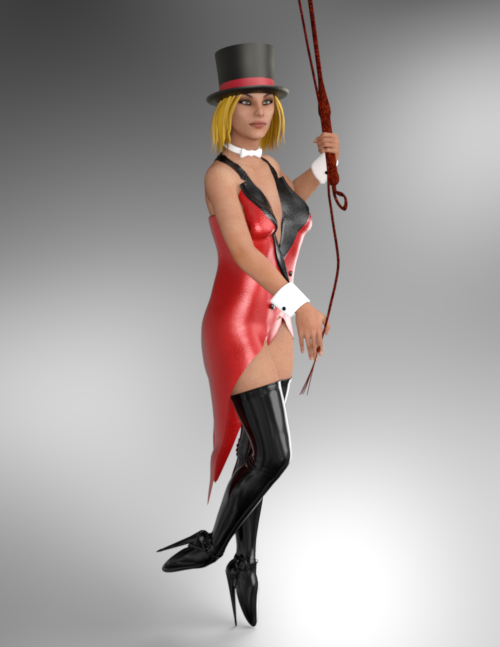
Oh and those wicked boots are here: https://www.sharecg.com/v/94239/
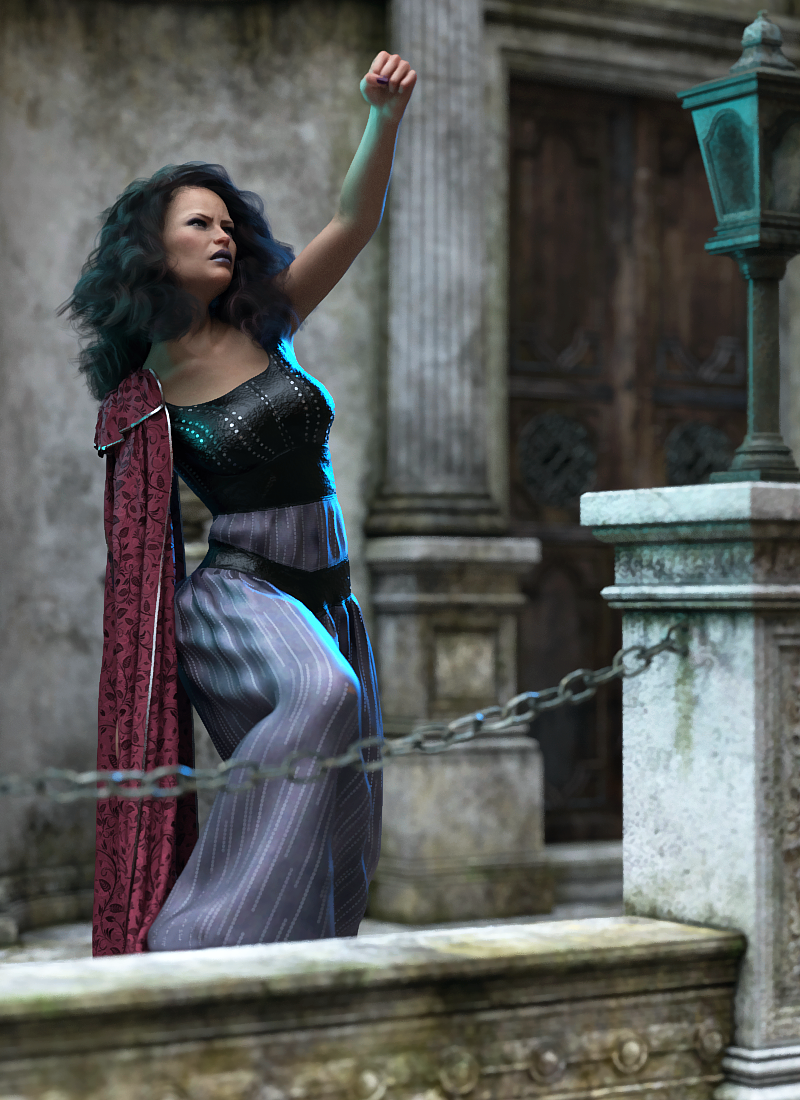
Novica & Forum Members Tips & Product Reviews Pt 13Amaris HD (V8) dForce Ancient Warrior (G8F) dForce Soft Curls (G3F / G8F) ElianeCK Face and Body Iray Lights
iRadiance Pro Series Rain Chicago IGD Fierce Poses (G3F / G8F) Abatement
The ElianeCK Face and Body Iray Lights can be used with Dimension Theory's iRadiance Pro Series Rain City Chicago to give you a nice rim light / colored glow in a dusk / overcast day setting. I love these two light products together. I left this darker for a dusk environment.
I do not like Amaris chest at all. It has the boobs squished together and they look really fake. I literally did about twelve different morphs to correct the breasts to something that looked more normal to me. The Breast Separation had to be -39, I changed the underneath of the breast and the breast slope. So she is really altered compared to default.
Also, why have purple eyes, purple nails, purple eye makeup but no purple brows? Would have loved to see that option.

 Can Genesis 3 figures be imported into Carrara?
Thanks, Diomede!
I ended up starting anew with a fresh Janette and a fresh loading of Victoria 7. And, Lo! Her parameters, this time, loaded into the Actor selection, as previous posters indicated should have happened.
Don't know why it loaded incorrectly into the Genesis 3 Female selection the last time.
But it is now working properly!
Thanks for everybodies help! It would have taken a long time to discover the problem without these posts!
Novica & Forum Members Tips & Product Reviews Pt 13Even though I didn't need anyting in them I bought the Michael 7 & Victoria 7 Pro Bundles for $1.99 each in case owning those is relevant to future discounts.
Cant "snap" shoes to figureHello. So im trying to do some posing with "the art of dance ballet v4" stuff, everything works but the shoes. I mean i can "spawn" them but I cant make them to follow feet.
* It was created for victoria 42 figure and I have it
* other clothes "snap and move" perfectly together as intended
My question here is how to put them on correctly and how to parent them to the feet after that? Im aware I can move them by hand but if other things can snap automatically maybe there is a way for shoes? Also maybe I need to do something else to correctly install this? Because everything Im talking about now appears in "lost and found" section.
Also is there a way to message author of these models directly about the issue?
No gen mats for Underbelly? What's that about?maybe he is really a she
SEE?!
People laughed when I said it was Victoria 9.
BWAHAHAHA This whole conversation cracks me up :D :D
He's got a butt, though.
truthfully seeing Underbelly without underwear would scare me a bit
He could keep a well-manicured man garden.
Big bear like that? I'm guessing he'd keep it real tidy.
No gen mats for Underbelly? What's that about?maybe he is really a she
SEE?!
People laughed when I said it was Victoria 9.
BWAHAHAHA This whole conversation cracks me up :D :D
He's got a butt, though.
truthfully seeing Underbelly without underwear would scare me a bit
He could keep a well-manicured man garden.
Big bear like that? I'm guessing he'd keep it real tidy.
where to find what this girl is wearing pleaseGardenTurtle is correct, the top and shorts with the wide belt is the Unlimited for G3F outfit (and Off-Limits textures).
The last promo image of the swimsuit is the LF Sorbet Swimwear for G3F and can be found here on Daz (as part of the Gillian for V7 character):
https://www.daz3d.com/fwsa-gillian-hd-for-victoria-7-and-lf-sorbet-swimwearPlatinum Club Plus Sale!For non-members, I'll post a copy of the post I made in the MO forum, here..
We are excited to announce an all-new summer sale for the Platinum Club.
This is a first for us, but something we've been wanting to do for a while...but I wanted to really clear on a few things first of all.
This isn't replacing the anniversary sale, obviously.. but it's a bunch of extra promotions and daily new content from us in the PC. We're going to be opening up last years bundles again (with a pricing twist) as well favourites like the BYOB's.
If you shopped like crazy last year, then I'll save you the trouble of complaining that these are of no interest to you. These are more a teaser of what to expect in October for all the new PC members we've seen over the last few months.. and for those people who might have missed them the first time around.
For existing, anniversary-hardened members, this promotion will see increased discounts on new releases, back-cat items.. extra weekly freebies.. loads of stuff. For us to go from 4 items a week to 14, for hopefully a whole month, (in addition to the Anniversary sale) hasn't be trivial I can assure you. So I'm hoping it gets some support.
This thread as usual is for discussion (but please keep it positive)... funny pics, renders.. etc. Also feel free to post issues or questions here too, but if so, please don't feel like you need to repost elsewhere, I'll handle it all from here. There's also going to be a big render contest, with the big prizes you've come to expect, but I won't be keeping an idex thread on this one.
Please remember it's a month-long celebration of all things Platinum.
Thanks!
Yeee :) . It's a nice sale already

Victoria 7 Pro Bundle $1.99

Michael 7 Pro Bundle $1.99
I wasn’t planning to ever buy those, but I can’t say no to that price.
@Jack, are you at liberty to disclose how many of the Anniversary Bundles will be re-released? Only the first one is active in the store, so I can’t currently see what’s in the bundles I didn’t buy to see whether I should be looking forward to them.
I think the plan all being well is have them all make an appearance from 2019
Daz 3D is part of

Connect
DAZ Productions, Inc.
7533 S Center View Ct #4664
West Jordan, UT 84084Licensing Agreement | Terms of Service | Privacy Policy | EULA
© 2026 Daz Productions Inc. All Rights Reserved.