-
Tara 9, breaking your heart, stealing your soul.
Ninefold said:
jd641 said:
I think the elbow issue is a general G9 problem, I'm still waiting a specific bend morph product that usually gets released with each generation to fix these issues but it seems to be taking longer than I expected.
There are actually two already, Ultimate Natural Bend Morphs for G9F and Natural Movements Pack.
It's still disappointing that G9 without additional morph packs bends worse than G8 without additional morph packs.
In the Tara 9 HD promo, shoulder-armpit area looks off as well.
OT - Who knows about tank printers?JasmineSkunk said:
Okay, so here's this issue... The Canon G3270 is a tank type printer, meaning it doesn't have a cartridge. Instead it has independant empty tanks that you pour the ink directly into. Okay so I have already researched and found out that it can be turned into a sublimation printer. A sublimation printer uses specialized sublimation ink formulas to be used to transfer designs onto shirts and stuff with a heat press. I am not trying to do that, actually, but....
The issue is that the Black ink used by Canon is a hybrid ink that is both dye and pigment. The individual magenta, cyan, and yellow are already a dye based only ink. Only the black is a mix. The problem with the black hybrid ink is that it can not be used very nicely with printable vinyl due to the pigment in the formula... and I want to use it to print on printable vinyl with my cricut.
Okay so, I'm wondering that since it can be turned into a sublimation printer, can I just use a dye based ink in the black tank, or perhaps use a brand for epson that is known to work well with printable vinyl...and if I can would I use all the epson line or just change out the black, if this is even posbsible...
I hope all that made sense... LOL
It cannot be turned into a a real dye sublimation printer because in that technology the ink is IN the paper, not in the printer or the print heads. Those printers use the heat of the printers rolling heads to melt the dye waxes in the appropriate places on the paper to create the image. That's why the print process requires 3 passes, one for each primary dye wax color. If someone is calling printing on a vinyl sheet in an inkjet technology printer sublimation they are wrong.
And furthermore, no, the tank is subset part of the module called the cartridge that contains the ink jet print head nozzles as well. It's the same tech except the cartitridges are bigger and called tanks because you can refill them. It's still the same tech and yes, they can print to that special vinyl paper some businesses sell. Don't ask me about steadfastness though.
I believe, when using that special vinyl paper in such a printer yu choose "photo paper" as the paper type, rather than "normal paper".
I can tell you I have inkjet photos printer on inkjet photo paper from Kodak from 25 years ago that still looks as good the day it was printed. And I have a small Canon Dye Sublimation printer still and printers printed as early as 2007 on special dye sublimation paper from Canon from 18 years ago also still loook like the day they were printed.
Any way to refresh DAZ studio after installing new morphsBy installing new morphs, I meant copying all necessary morph files in my library. In order to use the added morphs, I usually restart DAZ studio but it takes more than 10 minutes to do that. Is there any way to "refresh" DAZ studio without restarting?
Genesis 9 shape to Genesis 8?Hello,
Since I've had the problem several times. If you wish to convert G9 shapes to G8 shapes, before to use of transfer utility on the G8 suit (the imported .OBJ), turn the "G8 female clone" slider to 0 (the hidden option for the Gensis 9 figure. The clone will look like the defautl G9 again) and then using the dev tool in utilities, use the "set shape" option to get the clone back to G8 shape. Distorsions can be fixed easilly after, setting clone option at -100 before exporting the new G8 shape as OBJ to creeate the morph.
Scale down face / make face smallerWith the standard head morphs and Zev0's 200+ morphs you can achieve what you want, but you'll have to move/scale all facial features individually, there's not one single dial.
You could do it just once and save it as single dial:
Fixing pants on waistlineThat depends... As for "mesh pants", mostly it results from the design of "low waist" which turns out to be a geometry issue rather than a weight issue, i.e. you just need to tweak the geometry. As a Blender user, I surely suggest you go for tweaking the pants in Blender. Or if you own Mesh Grabber, you can just do it in DS and create a "high waist" morph as you wish... The screenshots show an example of a "fixed morph" I did in Blender.
As for "geoshell pants", I'm afraid you have to retouch the texture map(s)...
Scale down face / make face smallerI also recommend 200 Plus as well as RareStone's Face Morphs Collection. For instance, with 200 Plus, you may just need to dial Face Length, Face Upper/Lower Narrow and Face Depth, you'll get pretty good proportional "scaling result".
I have HSTW Head Morph Kit 2... Face Smaller doesn't work well 'cause eyeballs don't follow scaling ...
Scale down face / make face smallerThis has a 'face smaller' morph - https://www.daz3d.com/genesis-8-female-head-morph-resource-kit-2
I don't have it so I'm not sure it works on 8.1
Conforming QuestionIf you mean a Character rather than a Genesis Base figure, you need to fix FBM / bs (full body morph on G8, base shape on G9) on the socks by using a modeling / sculpting software, e.g. Blender, Hexagon. Then import the fixed morph to update FBM/bs.
Well, adding more smoothing iteration or using Mesh Grabber to fix it can also be quick alternatives... For instance, fix it with Mesh Grabber then save as a morph or use the morph to update FBM... etc.
OT - Who knows about tank printers?Okay, so here's this issue... The Canon G3270 is a tank type printer, meaning it doesn't have a cartridge. Instead it has independant empty tanks that you pour the ink directly into. Okay so I have already researched and found out that it can be turned into a sublimation printer. A sublimation printer uses specialized sublimation ink formulas to be used to transfer designs onto shirts and stuff with a heat press. I am not trying to do that, actually, but....
The issue is that the Black ink used by Canon is a hybrid ink that is both dye and pigment. The individual magenta, cyan, and yellow are already a dye based only ink. Only the black is a mix. The problem with the black hybrid ink is that it can not be used very nicely with printable vinyl due to the pigment in the formula... and I want to use it to print on printable vinyl with my cricut.
Okay so, I'm wondering that since it can be turned into a sublimation printer, can I just use a dye based ink in the black tank, or perhaps use a brand for epson that is known to work well with printable vinyl...and if I can would I use all the epson line or just change out the black, if this is even posbsible...
I hope all that made sense... LOL
Tara 9, breaking your heart, stealing your soul.jd641 said:
I think the elbow issue is a general G9 problem, I'm still waiting a specific bend morph product that usually gets released with each generation to fix these issues but it seems to be taking longer than I expected.
There are actually two already, Ultimate Natural Bend Morphs for G9F and Natural Movements Pack.
Face transfer 2 - such DUMB AND TERRIBLE way of doing things.Try File>Save As>Support Assets>Morph Asset for the morph, but remember it will then be available on every figure 9and so risks cluttering the list up) - also make sure it is zeroed before saving. File>Save As>Materials preset for the textures, or save a Character preset after saving the morph to get a preset that can either load a new figure or modify a selected base figure.
Exporting FBX with Expression Morph Targets Reverts Character Mesh to Base Genesis 8 FemaleI was scratching my head for a day and a half on this. I wanted to retain my characters appearance while also exporting the morphs for later use. I realized after some testing that this happens when you adjust the sliders before export. If you want to keep your character settings and still have access to the morphs in another program (like Unreal) then you need to go line by line and transfer your values on Daz sliders to the sliders in the program you imported the FBX to (in unreal or whatever). Before fbx export, Daz resets all sliders to 0 so any morph changes done in Daz have to be redone manually on the program your exporting for. You can bake these in your morph export settings as explained above, or you can lock these by clicking the lock icon on the slider in Daz, but doing either will cause the morph to not be exported and you wont be able to change it in Unreal or whatever other program your using.
Face transfer 2 - such DUMB AND TERRIBLE way of doing things.Hi, I don't know what's going on and if perhaps I'm missing something. In any case, face transfer 2 should be better in the saving-loading process.
I followed all the videos and steps. Use a clear portrait photo, load it, apply face transfer, save face. It goes all well until I close DAZ, and then open the file. It NEVER loads the transfered face and materials, so I have to go again through the same process. Saving char or materials is useless, and the only way, which is loading the scene subsets, where it supposedely saves the transferred face, takes as long as doing the same process again, and not everytime works.I've saved many times a second transferred face, and it makes a mess in the scene when I load it.
A question for the developers: Why you couldn't do it SIMPLE as saving char or saving materials instead of taking a long, difficult, unreliable path?
RANT OVER.
Thanks.
Conforming QuestionRichard Haseltine said:
Shrink-wrapping wouldn't have much to do with conforming/fitting. Are you thinking of morph following? if so then yes, a rigidity map (created with the Geometry Editor) - though it would affect all projected morphs. Another option would be a custom morph for the clothing - if that was given the same name as the problem shape then it would be used when the shape was set on the base figure.
What would be the best resource for the technique of custom morphing?
This sounds like what I need...
JD
Conforming QuestionShrink-wrapping wouldn't have much to do with conforming/fitting. Are you thinking of morph following? if so then yes, a rigidity map (created with the Geometry Editor) - though it would affect all projected morphs. Another option would be a custom morph for the clothing - if that was given the same name as the problem shape then it would be used when the shape was set on the base figure.
Tara 9, breaking your heart, stealing your soul.caravelle said:
xyer0 said:
The elbows! The elbows!

 Fortunately, I didn't buy her.
I think the elbow issue is a general G9 problem, I'm still waiting a specific bend morph product that usually gets released with each generation to fix these issues but it seems to be taking longer than I expected.
I definitely would buy Tara's base morph, her face sculpt looks fantastic but the price... not so much.
AOBB's Lady Noir G9 head morph and Rockabilly Noir G9 morph for the RN G8F hair prop.I just couldn't help myself and I just had to return to the world Of "Blade Runner" and give Rachael another shot. Here is how the G9 version looks like:
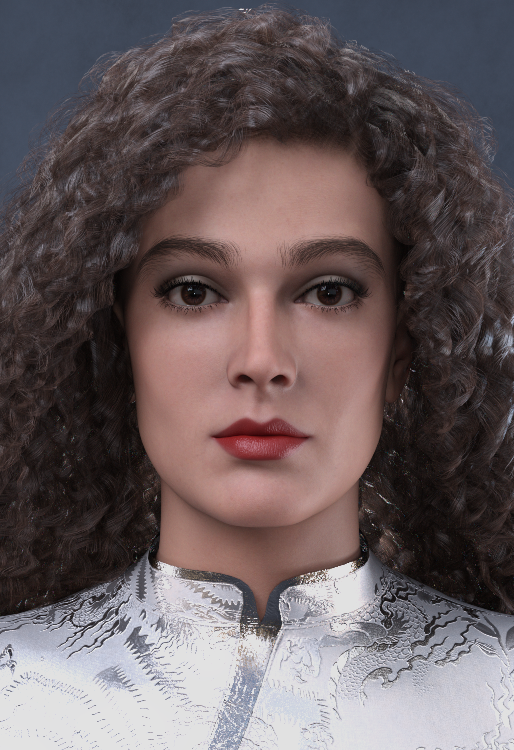
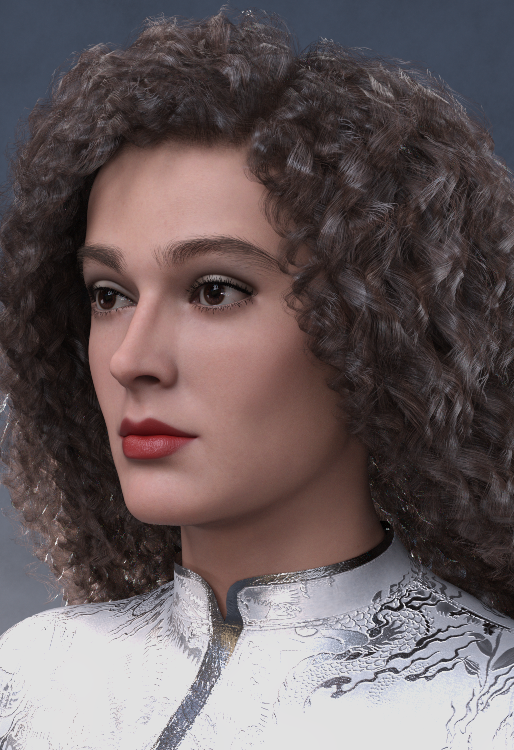
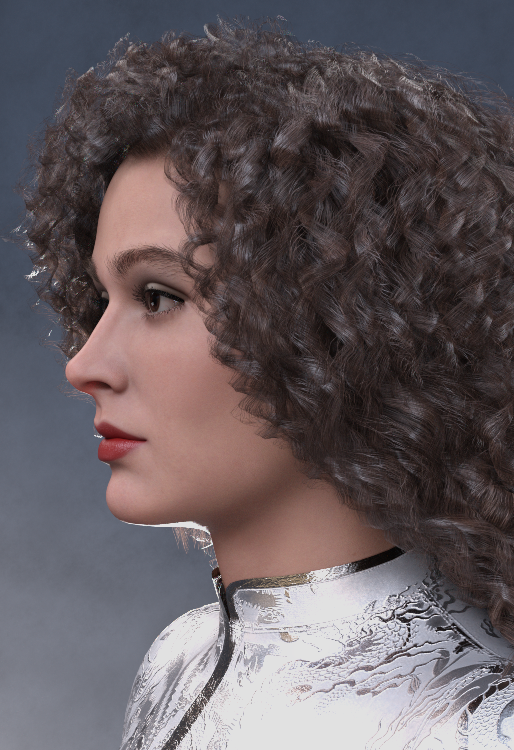
Assets used:
G9 Eyebrows Fiber Style 08 High
dForce Ay Lin dress for G9
Daiosa hair for G8F
Noncommercial use only.
Enjoy and post in this thread some renders with Lady Noir G9! Thank you!

AOBB
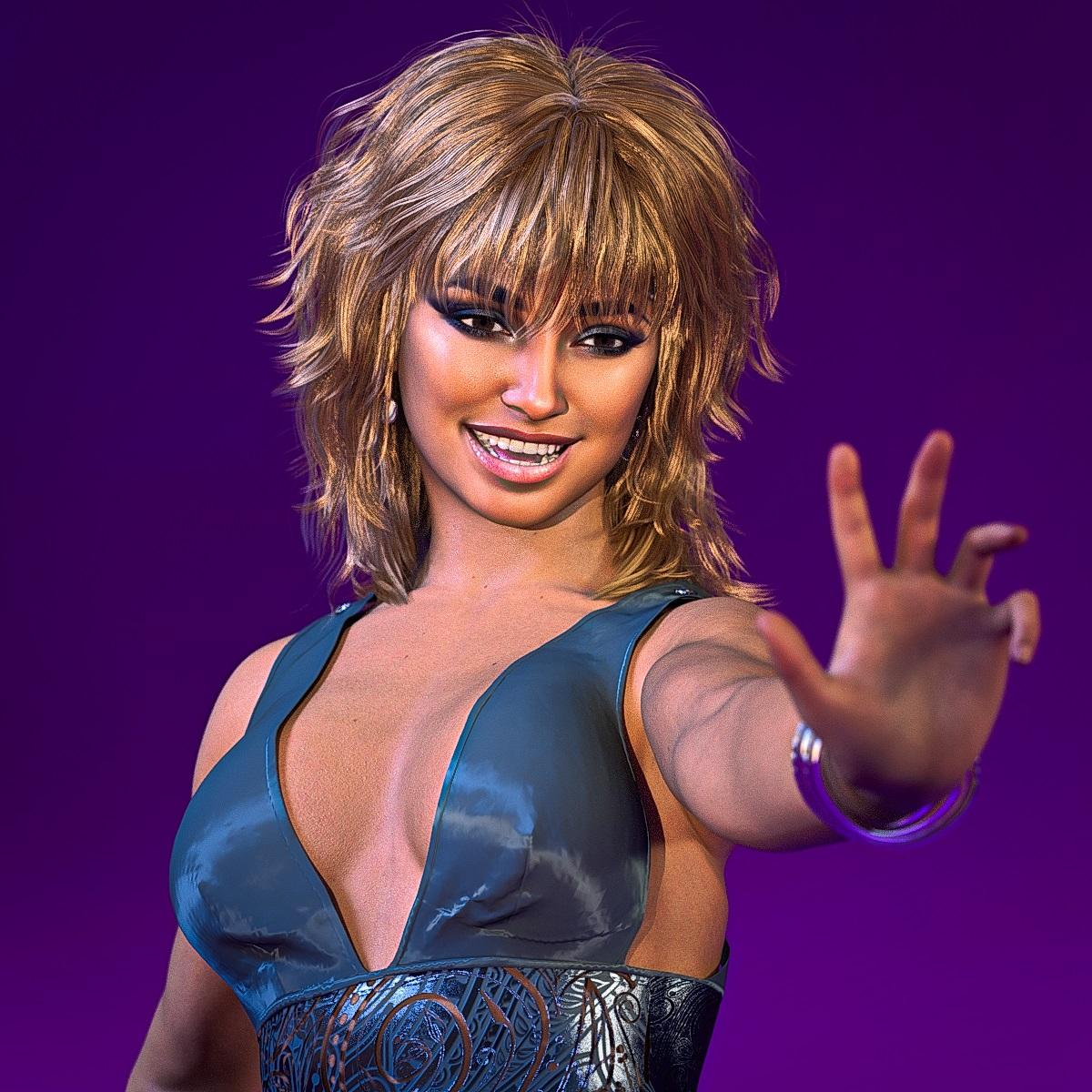
Face Transfer 2New version of Daz Studio Beta: 4.22.1.88
so just another creation made with Face Transfer 2 on Genesis 9
 How to put G9 skins on G8 models?
RexRed said:
When Genesis 9 figures first came out, I put a lot of thought into this and over time came up with a solution that works in 80% of all cases.
Yes, you can put a Genesis 9 skin on a Genesis 8 character. It only takes a few seconds to do it.
But it takes a bit of prep work, and it does not work the way you think it may.
First you have to convert your Genesis 8 character to Genesis 9 using the RSSY converter program (see link below). This will create body and face morphs for most of your Genesis 8 characters and it works perfectly on most Genesis 8 characters. After you morph the face and body you can, in most cases, superimpose most figures and the generation body shapes will perfectly align with one another.
What is a Genesis 8 character without its skin? Well, it is a unique face and body shape. If you have the same face and body shape on a Genesis 9 character then you have the same character, simple as that (for the most part). Most clothes, and hair autofit (geographs and bodysuits are a different story) . The same would go for Genesis 9 to Genesis 8. If you can morph the face and body shape of a Genesis 9 character to a Genesis 8 then you can use all the Genesis 8 bodysuits on a Genesis 9 character. If both characters can obtain the same shape, you technically have the same character in a different generation.
You may never solve the problem of using UV skins on a different generation. My suggestion for now is, instead, use morphs.
https://www.daz3d.com/rssy-character-and-material-conversion-genesis-8-to-genesis-9-bundle
I actually agree with this thought process. I moved all my custom morphs over to G9, so no matter the generation of skin, clothing or hair, I can have the same figures regardless of generation.
Daz 3D is part of

Connect
DAZ Productions, Inc.
7533 S Center View Ct #4664
West Jordan, UT 84084Licensing Agreement | Terms of Service | Privacy Policy | EULA
© 2026 Daz Productions Inc. All Rights Reserved.