-
Movie Set Theme Survey [COMMERCIAL-ISH™]
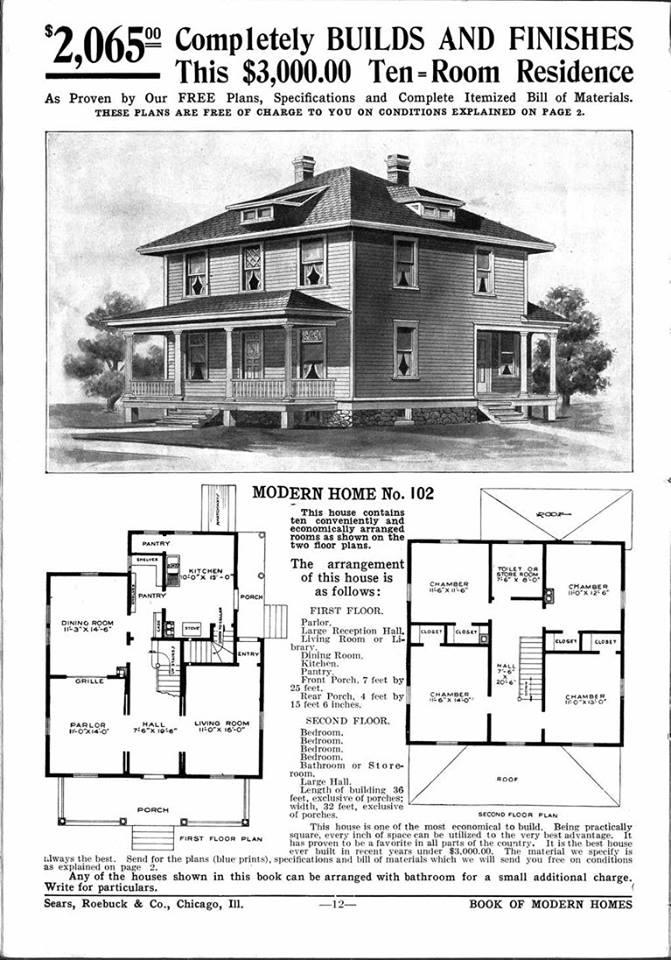
Yeah, that's a great house. What state is it in?
Also, I'm getting lots of great data here from the poll. Thanks to everyone who's cast a vote!
The great state of Illinois- Land of Lincoln, baby! I'm south west of Chicago, in central Illinois. Close enough to drive up there occasionally, far enough away to enjoy really being out in the country. I live close to Starved Rock State Park. Not your typical cornfields. It's a gorgeous area with hills, rivers, sandstone canyons and fantastic views. Lots of tourists come out to the park to hike, and you can hear just about every language there. It's pretty neat. Unfortunately, this area is a bit economically depressed as well. I guess every area has its challenges.
I believe this Sears and Roebucks kit is the one used for my house, modified with a fifth bedroom. They made the other rooms smaller to fit it in. The closets are small too. The attic is huge and unfinished. Some day I'd love to have an art studio up there overlooking the fields. In my first Midwest book, Crazy in the Heart, I put the heroine in a dilapidated version of this house and then ran it over with a tornado. The hero is an itinerant carpenter who ends up rebuilding it better than before, adding a wrap around porch, which comes in very handy in the finale of the book. The house has character and is definitely a character in the series. I love me some good architecture!
 Monique 7
Monique 7 came a year and a half after Victoria 7, as Monique 6 did after Victoria 6. I would like for Genesis 4 to begin with Victoria, then an Asian, then an African, then a Polynesian. At that point, we would have the diversity of morphs and skins established so we could then have the usual slew of Caucasian types to continue. As an alternative to that suggestion: Perhaps the Asian, African, and Polynesian females could be released in successive months after Michael 8, as the second, third, and fourth mates of their corresponding Genesis 4 males. Either option would be far better than having to wait so long for a Daz Core representative for the different skintones and ethnic morphs.
Furthermore, this would better integrate with and facilitate the Morph3D line, since games typically are far more diverse than 3D hobbyist pin-up art.
I'm not sure I'd accept that as a definitive list of types - or indeed, as clear types in themselves. Obvious lacks are Nativer American (north and south), near-eastern/middle-eastern/north-African, Central Asian, and the Indian sub-continent. All groups with little if any coverage, no doubt others could be added.
Not definitive, Richard, but Daz-defined, as you noted. One omission from the group I listed is honey-coloured skin, useful for many of the groups you named.
Either option would be far better than having to wait so long for a Daz Core representative for the different skintones and ethnic morphs.
They wouldn't be better options if they led to Genesis 4 being a commercial failure (then there might be no further releases at all). If what brings in the revenue is whitey pin-up and fantasy, that's likely what will be released first. Stuff needs to sell to make payroll and meet server bills.
If DAZ is missing a big market in diverse ethnicity, the gap will be filled by others.
I expect a similar pattern.
Consider, if you will, that the second option I suggested would leave room for six months' worth (June through November) of Caucasian core females (plus 6 x 2 of accompanying PA Pro Bundle figures) before introducing a change. Daz Core characters are the elite textures of the Genesis lines, and this is why I am lobbying for a policy shift. The gap for ethnically diverse photorealistic skins was not really filled by others during Genesis 3 (with the notable exceptions of the illustrious Raiya and Saiyaness). We know from experience that Daz does listen to its customers. If Monique 7 and Darius 7 do not sell well, then I, too, would expect the usual pattern. Monique 7 certainly has less associated characters than her Genesis 2 namesake.
Actually it says a lot, without saying a lot that we can so casually consider that the inclusion of a few ethnic characters could be so unmarketable that it can cause a company to lose money and then roll with it as "well that just the way it is; gotta' do what you gotta' do".
It's really nice to know what kind of society we really live in, and the attitude one needs to take to be profitable in it. And you wonder why so many people balk when some group uses a hypen before "American" when they designate themselves.Monique 7Monique 7 came a year and a half after Victoria 7, as Monique 6 did after Victoria 6. I would like for Genesis 4 to begin with Victoria, then an Asian, then an African, then a Polynesian. At that point, we would have the diversity of morphs and skins established so we could then have the usual slew of Caucasian types to continue. As an alternative to that suggestion: Perhaps the Asian, African, and Polynesian females could be released in successive months after Michael 8, as the second, third, and fourth mates of their corresponding Genesis 4 males. Either option would be far better than having to wait so long for a Daz Core representative for the different skintones and ethnic morphs.
Furthermore, this would better integrate with and facilitate the Morph3D line, since games typically are far more diverse than 3D hobbyist pin-up art.
I'm not sure I'd accept that as a definitive list of types - or indeed, as clear types in themselves. Obvious lacks are Nativer American (north and south), near-eastern/middle-eastern/north-African, Central Asian, and the Indian sub-continent. All groups with little if any coverage, no doubt others could be added.
Not definitive, Richard, but Daz-defined, as you noted. One omission from the group I listed is honey-coloured skin, useful for many of the groups you named.
Either option would be far better than having to wait so long for a Daz Core representative for the different skintones and ethnic morphs.
They wouldn't be better options if they led to Genesis 4 being a commercial failure (then there might be no further releases at all). If what brings in the revenue is whitey pin-up and fantasy, that's likely what will be released first. Stuff needs to sell to make payroll and meet server bills.
If DAZ is missing a big market in diverse ethnicity, the gap will be filled by others.
I expect a similar pattern.
Consider, if you will, that the second option I suggested would leave room for six months' worth (June through November) of Caucasian core females (plus 6 x 2 of accompanying PA Pro Bundle figures) before introducing a change. Daz Core characters are the elite textures of the Genesis lines, and this is why I am lobbying for a policy shift. The gap for ethnically diverse photorealistic skins was not really filled by others during Genesis 3 (with the notable exceptions of the illustrious Raiya and Saiyaness). We know from experience that Daz does listen to its customers. If Monique 7 and Darius 7 do not sell well, then I, too, would expect the usual pattern. Monique 7 certainly has less associated characters than her Genesis 2 namesake.
Monique 7Monique 7 came a year and a half after Victoria 7, as Monique 6 did after Victoria 6. I would like for Genesis 4 to begin with Victoria, then an Asian, then an African, then a Polynesian. At that point, we would have the diversity of morphs and skins established so we could then have the usual slew of Caucasian types to continue. As an alternative to that suggestion: Perhaps the Asian, African, and Polynesian females could be released in successive months after Michael 8, as the second, third, and fourth mates of their corresponding Genesis 4 males. Either option would be far better than having to wait so long for a Daz Core representative for the different skintones and ethnic morphs.
Furthermore, this would better integrate with and facilitate the Morph3D line, since games typically are far more diverse than 3D hobbyist pin-up art.
I'm not sure I'd accept that as a definitive list of types - or indeed, as clear types in themselves. Obvious lacks are Nativer American (north and south), near-eastern/middle-eastern/north-African, Central Asian, and the Indian sub-continent. All groups with little if any coverage, no doubt others could be added.
Infinite Insanity - There's ALWAYS Another Sale! (Daily Sale Talk)Thank you for the updates! I was able to get Ultra Genesis Studio Vol 1 - Iray Box Lights with the HOLLIDAZ coupon. I wasn't going to use the coupon since I wasn't really interested in anything else, so yay!!! Plus I got http://www.daz3d.com/after-the-war , still free here at 9:25 pm Central.
I used it for that light set too. I wasn't really interested in anything else - except maybe the Teradome2, but since it is Poser only and I don't have Poser I had to pass. I'm hoping the light set is nice and something I will want to use. :)
Infinite Insanity - There's ALWAYS Another Sale! (Daily Sale Talk)Thank you for the updates! I was able to get Ultra Genesis Studio Vol 1 - Iray Box Lights with the HOLLIDAZ coupon. I wasn't going to use the coupon since I wasn't really interested in anything else, so yay!!! Plus I got http://www.daz3d.com/after-the-war , still free here at 9:25 pm Central.
its not showing as free here at 10:53 est which is about a hour ahead of you... I think daz must be trageting me or blocking the sales for me or something..lol
Infinite Insanity - There's ALWAYS Another Sale! (Daily Sale Talk)Thank you for the updates! I was able to get Ultra Genesis Studio Vol 1 - Iray Box Lights with the HOLLIDAZ coupon. I wasn't going to use the coupon since I wasn't really interested in anything else, so yay!!! Plus I got http://www.daz3d.com/after-the-war , still free here at 9:25 pm Central.
Sale Discounts- How are they supposed to work?Also, it was really late in the evening when these prices were in play, and eight of them had been that way since about 1am (Central time) in the morning. So seventeen hours or more, approximately.
Animation Clubs 3rd animation finished. Watch the final film now.awesome.... I love it ...

great work everyone
 Creating a packet of my project possible?
I am not entirely sure what you are asking. I assume that you know how to save a scene in DAZ Studio? That will contain all the references to all the content used in the scene regardless of where you have stored those individual assets. If, on the other hand, you are asking whether you can collect all those assets and move or copy them all to a central location for use in that particular scene, then the answer is yes, but you are going to need to recreate your scene. Once you move the files and attempt to open your original scene file, DAZ Studio will no longer be able to find those files, and throw error messages. You could hypothetically open and edit the scene file (yourscene.duf), by changing all the paths to the content to reflect the new locations, but this could be a big job and prone to error. Most people probably would prefer not to go there, as .duf files can be huge for a complex scene.
Long story short, what you are wanting (collecting all the necessary content and placing it in a single location) is really something that is best done before you create your scene. Also, it is always better to place the content that you are using in your content library so DAZ Studio knows where to find it when and if it needs to. I have done the same thing that you have myself, but only when I believe that I am never likely to be needing to re-open or re-render that scene (and occasionally I regret it).
Dear content authors: Please continue to support 3delightWhat are you looking for? Daz hasn't, as I recall, written any 3Delight hadrs since the Default Daz Shader - the application does support most of the newer features, we lack shaders that use them
And yeah, Daz really ought to make or commission a better core shader to make use of newer features in some central way. Again, that's part of making a render option viable.
In 2016 in most other software "learning a render engine" means learning to create your own materials in a node based editing environment.
For new users it is great that they can buy shader products from artists and then simply click on a preset.
But for advanced users the current system of buying shaders in order to use "features" of render engines is a dead end from a creative and financial perspective.
What finally needs to happen is an update for the "Shader Mixer"
- > In order not to go to far offtopic here I create a separate thread if anyone is interested to share some thoughts on that:
http://www.daz3d.com/forums/discussion/130626/any-plans-to-update-the-shader-mixer
You can try to attach a jet engine to a car.
This will not mean the car can fly without also adding some kind of wings and adjusting the rest of the design.
...if the shader mixer worked more like Carrara's Shader tab, I'd use it, but to my eyes it looks like an overturned bowl of spaghetti.
Dear content authors: Please continue to support 3delightWhat are you looking for? Daz hasn't, as I recall, written any 3Delight hadrs since the Default Daz Shader - the application does support most of the newer features, we lack shaders that use them
And yeah, Daz really ought to make or commission a better core shader to make use of newer features in some central way. Again, that's part of making a render option viable.
In 2016 in most other software "learning a render engine" means learning to create your own materials in a node based editing environment.
For new users it is great that they can buy shader products from artists and then simply click on a preset.
But for advanced users the current system of buying shaders in order to use "features" of render engines is a dead end from a creative and financial perspective.
What finally needs to happen is an update for the "Shader Mixer"
- > In order not to go to far offtopic here I create a separate thread if anyone is interested to share some thoughts on that:
http://www.daz3d.com/forums/discussion/130626/any-plans-to-update-the-shader-mixer
You can try to attach a jet engine to a car.
This will not mean the car can fly without also adding some kind of wings and adjusting the rest of the design.
Any plans to update the "Shader Mixer" node editing system?This post was inspired by remarks in another thread. I create a new thread in order not to go to far offtopic there.
update / edit: rephrase some sentences
What are you looking for? Daz hasn't, as I recall, written any 3Delight hadrs since the Default Daz Shader - the application does support most of the newer features, we lack shaders that use them
The underlying problem for both 3Delight and Iray in DAZ Studio is that the "Shader Mixer" is not a user friendly node based editing system. It has not been in the past and it certainly is not anymore in 2016.
Users should be able to create their shaders easily by
- adding nodes
- connecting nodes with pins
- grouping nodes together to meta nodes or group nodes to keep the node layout manageable.
The current system is a maze of 100s of pins that can only be navigated with a lot of patience and even then it is completly unefficient and unfit to create and manage more complex shader setups.
The "lack of shaders" is a direct result of this outdated shader management system that seems to complicated for even very motivated people to keep experimenting with.
And yeah, Daz really ought to make or commission a better core shader to make use of newer features in some central way. Again, that's part of making a render option viable.
In 2016 in most other software "learning a render engine" means learning to create your own materials in a node based editing environment.
For new users it is great that they can buy shader products from artists and then simply click on a preset.
But for advanced users the current system of buying shaders in order to use "features" of render engines is a dead end from a creative and financial perspective.
People keep pointing out how much cheaper 3Delight and Iray are than other solutions.
Have you added together how much money you spent for shader products for both Iray and 3Delight?
Depending on how much you spent you could have purchased a full license for another 3rd party render engine that even offers a database with free material and shaders to download...
- - -
Keeping both the 3Delight and Iray node editing system in an unuseable state and forcing people to buy shader products is from my point of view not an efficent solution.
- - -
Update /Edit:
Offtopic - Please disregard the following remarks. I do not delete them because one user allready replied.
Suggestions:
- if advanced DAZ Studio features can be provided for free then great keep it that way
if not:
- introduce again a paid DAZ Studio Pro version that offers advanced features like node based scene editing
- if necessary make an improved deal with both Nvidia and 3Delight so users can have access to advanced render engine features by paying an upgrade price
- - -
Dear content authors: Please continue to support 3delightRichard: UE2 that works efficiently with new versions of Daz Studio would be a huge one, easier access/control over ray tracing for new users, and maybe a conversion from Iray to Daz that doesn't miss really obvious stuff like opacity maps.
And yeah, Daz really ought to make or commission a better core shader to make use of newer features in some central way. Again, that's part of making a render option viable.
I mean, they've done improvements on Iray Uber, like the overlay stuff.
Just off the top of my head, the 3DL wonks, I'm sure, have more incisive ones to point out.
Dynamic Cloth in Studio 4.8This is an account of my experience of using VWD cloth and hair dynamics within Daz Studio 4.8. It isn't a DAZ product, but I checked through the Terms of Service and I hope the mods will be fine with this - it is a straight user review of something of interest to many Daz users.
I like using historical wardrobe items. Many of these items are old and date back to the V4 generation. Posing morphs may be very limited. To give an example, many medieval dresses (even G3) have flowing sleeves that can be near impossible to pose in the simplest situations - they intersect with the arms of a chair, or the top of a table. They stick out at weird non-physical angles. Many clothing items don't have sitting morphs, or if they do, they drape badly and usually intersect with the chair. This drives me nuts. I seriously contemplated using Poser just to have the cloth room. But I never went that far.
I have attached an image showing the standard G2 female wearing the freebie (and very nice) Persian Dancer outfit from the G2 starter pack. I chose that combination because I know everyone reading this has it. The Persian Dancer top has floaty sleeves, and if there are pose controls for them, I have yet to see them. In the image you will see the sleeves are draped from the upper arm in a more realistic manner than one could achieve using any pose control on the model. How did I do this?
I used an accessory program called VWD Cloth & Hair that has a DAZ Studio Bridge (written by another person). I had to buy both parts. It is easy to install. XVD 'sees' the DAZ Studio scene and one can select out of the scene a cloth mesh, a hair mesh, and one or more collision meshes. It then imports the meshes and converts cloth (say) into a mesh of springs. The Persian Dancer top is imported as a single mesh and the nodes become weights and the vertices springs, and the weights and springs move around according to gravity, inertia, air resistance and friction, while avoiding collisions with the selected collision items (e.g. the G2 figure and perhaps a chair say). The dynamic system then evolves forward in time and when one is happy with the result, one can export a deformed version of the Persian Dancer top back to Daz Studio for normal rendering.
What I have done with the Persian Dancer top is the simplest version of what VWD can do: drape a garment over a figure in a static pose. It can also do the dynamic verson, starting with the Null pose and animating a deformation into a more complex pose.
Anyone who has tried dynamic cloth will know it is as unpredictable as picking up overcooked spagetti. It goes everywhere. VWD recognises material zones, so in the case of the Persian Dancer outfit, I selected the rings on the upper arms and nailed them to the G2 female. I also nailed the central jewel in the underbust area. This has the effect of holding those points to the figure mesh using stronger springs. They can still move, but not by much. There is an elaborate set of tools for selecting parts of the cloth mesh and treating it - making it more rigid, or nailing it.
The first item I tried was an old M4 priestly cassock, a classic voluminous drape-from-the-shoulders item that is really hard to pose. I did a 30 frame animation that went from the Null position to kneeling, and not only did it work, it looked amazing as the cloth reacted physically to the speed of the body movements.
The second item was a G2 Sensibility dress, a classic big dress that is snug around the chest and arms, and loose from under the breasts. There are beautiful materials for this item and I really like it. At first I was disappointed. Because the dress was made of springs, it hung out of shape. It needed to be nailed under the breasts. The arms hung too loose. I realised I need to learn a lot about nailing vertices and rigidifying vertices and I'm still way down the learning curve on this. There is a neat cheat though. I increase the strength of gravity during the early part of the sim to pull everything down, and then reduce the strength of gravity to a tenth of its normal value, and the springs naturally pull back into shape. I did that with the Persian Dancer so that fabric in the breast area looked better.
The initial learning curve is not too steep. There is a 58 page manual. The simplest situation: one figure, one clothing item, no animation, can be tried out in minutes. On my system the sim runs in interactive real time - I can pull and deform the mesh manually, and watch it relax into shape. Then disappointment sets in. It's like buying an ancient V4 Poser item and realising the shader settings are terrible, and not knowing how to fix it. A month later you know how to Iray it, and it is then fine. That is how VWD is. You can do the simple thing quickly. Then you spend the month. I am about 8 hours in.
I have had lots and lots of crashes. The sim has usually been fine. It is the cumulative impact of multiple load/configure/sim/load/configure/sim cycles that does the damage. I tend to save lots and reload a lot. Tedious but worth it IMO. When one considers the time I waste fiddling with lights, rendering, and fiddling with lights, its fine.
I could write more, but the essential message of this post is that there is a product that will take a lot of older DAZ and Poser content and do wonderful things to it. By magic.
Valkeerie
Too hot to render!I don't know how the average radiator is controlled, but (assuming it's water-based) is there some sort of valve you can adjust to reduce the flow to it?
If it's electric there might be a hidden control knob that adjusts it inside the removeable end panel (I either turned mine down or off in one room years ago, while leaving the other baseboard heaters unaffected and still controlled by the main thermostat.)
If all rooms are too warm (and it isn't set that way to heat the coldest room to a reasonable temperature, or because you need enough hot water for showers for all tenants), and the central unit can be adjusted, maybe you can convince your landlord to turn it down by doing a bit of math and showing how much it's costing over a many-year period to heat. I can't imagine your landlord wouldn't want free money, which may be easily obtained by simply turning down a thermosthat or setting somewhere.
DIM not connecting...I can't sign into DIM or even Daz Studio. I guess no render render work for me today.

NOT GOING TO BUY ITEMS I CAN"T EVEN ACCESS TO USE !!!

I don't use connect, but I do believe that if you don't sign in, you can still use the stuff you've previously downloaded. So, the only thing you can not render are the items that you haven't installed yet.
FWIW, I too am unable to download, and haven't been able to do so since about 8:00 Central US last night. Hopefully someone will be able to shake the turkey haze and give the necessary server(s) a solid kick so they'll start up once again:)
Dear content authors: Please continue to support 3delightWell, basic tips:
Opacity maps aren't going to transfer right. So be sure to have copies or something to set Opacity properly.
I recommend US or US2, if you have it. Keep an eye on bump and displacement values, since those tend to default to -.1 - +.1
Metals are easily captured by looking at Raytraced reflections.
If you are stumped by specular (which I've gotten weird results with), I'd recommend finding a shader that's in the same ballpark and looking at it's settings. Like, you want glossy wood? Apply glossy wood to something and check the values. Or apply glossy wood and switch the maps back.
Skin is another story. I'm still struggling to get consistently decent skin.
Also 3DL seems to like really weirdly high lighting values. Again, struggling with it. 3DL seems to require a bit more unintitive learning than, IMO, Iray has.
Thanks, Will. Given your comment about opacity maps and skins, do you think that IRay to 3DL on the consumer end is best served with objects (vehicles, tools, sets) than with characters?
I agree 110% about the lighting levels needed for 3DL. My very first renders looked like they were done with a single flashbulb in the middle of a blackout in the middle of the night at Grand Central Station. There's a real learning curve with 3DL but I think it's worth it, especially if you treat a render as a starting point to be fiddled with further in Photoshop for artistic reasons (i.e. faking a painting on canvas).
...a good solution to that would be AoA's Advanced Ambient light which ambient produces fill lighting that is fully adjustable. UE does too but it can bloat render time pretty badly particularly if you use full GI, and you have to mess with the sampling rate to get a clean crisp image.
Using real life products in commercial renders... Anyone get in trouble with it?People tend to confuse copyright with trademark. Being US-centric here, using a trademark in a way that suggests an official association, when there is none, may be against the Lanham Act. Similar "passing off" laws exist in other countries. The typical corporate response is a cease and desist letter. If the work has gained monetarily, the demand letter may include a not-very-polite paragraph on accounting for (subject to further discovery) and surrendering all monies received from the work.
Silent Winter's comments regarding the primary focus of the art applies in the US as well, but there is no clear delineation as to what defines such a focus. There are exceptions for fine art, but these hold when, presumably, the depiction is not malicious. Similar exceptions apply to works of parody and satire, but in each case, these are decided in court. There is no central arbitrator that says yea or nay and decides the merits from some book of what's allowed.
The "worst" that can happen is that you will be sued.
The above is not legal advice.
Dear content authors: Please continue to support 3delightWell, basic tips:
Opacity maps aren't going to transfer right. So be sure to have copies or something to set Opacity properly.
I recommend US or US2, if you have it. Keep an eye on bump and displacement values, since those tend to default to -.1 - +.1
Metals are easily captured by looking at Raytraced reflections.
If you are stumped by specular (which I've gotten weird results with), I'd recommend finding a shader that's in the same ballpark and looking at it's settings. Like, you want glossy wood? Apply glossy wood to something and check the values. Or apply glossy wood and switch the maps back.
Skin is another story. I'm still struggling to get consistently decent skin.
Also 3DL seems to like really weirdly high lighting values. Again, struggling with it. 3DL seems to require a bit more unintitive learning than, IMO, Iray has.
Thanks, Will. Given your comment about opacity maps and skins, do you think that IRay to 3DL on the consumer end is best served with objects (vehicles, tools, sets) than with characters?
I agree 110% about the lighting levels needed for 3DL. My very first renders looked like they were done with a single flashbulb in the middle of a blackout in the middle of the night at Grand Central Station. There's a real learning curve with 3DL but I think it's worth it, especially if you treat a render as a starting point to be fiddled with further in Photoshop for artistic reasons (i.e. faking a painting on canvas).
Daz 3D is part of

Connect
DAZ Productions, Inc.
7533 S Center View Ct #4664
West Jordan, UT 84084Licensing Agreement | Terms of Service | Privacy Policy | EULA
© 2026 Daz Productions Inc. All Rights Reserved.