-
Infinite Insanity - There's ALWAYS Another Sale! (Daily Sale Talk)
Thank you for the updates! I was able to get Ultra Genesis Studio Vol 1 - Iray Box Lights with the HOLLIDAZ coupon. I wasn't going to use the coupon since I wasn't really interested in anything else, so yay!!! Plus I got http://www.daz3d.com/after-the-war , still free here at 9:25 pm Central.
its not showing as free here at 10:53 est which is about a hour ahead of you... I think daz must be trageting me or blocking the sales for me or something..lol
Infinite Insanity - There's ALWAYS Another Sale! (Daily Sale Talk)Thank you for the updates! I was able to get Ultra Genesis Studio Vol 1 - Iray Box Lights with the HOLLIDAZ coupon. I wasn't going to use the coupon since I wasn't really interested in anything else, so yay!!! Plus I got http://www.daz3d.com/after-the-war , still free here at 9:25 pm Central.
Sale Discounts- How are they supposed to work?Also, it was really late in the evening when these prices were in play, and eight of them had been that way since about 1am (Central time) in the morning. So seventeen hours or more, approximately.
Animation Clubs 3rd animation finished. Watch the final film now.awesome.... I love it ...

great work everyone
 Creating a packet of my project possible?
I am not entirely sure what you are asking. I assume that you know how to save a scene in DAZ Studio? That will contain all the references to all the content used in the scene regardless of where you have stored those individual assets. If, on the other hand, you are asking whether you can collect all those assets and move or copy them all to a central location for use in that particular scene, then the answer is yes, but you are going to need to recreate your scene. Once you move the files and attempt to open your original scene file, DAZ Studio will no longer be able to find those files, and throw error messages. You could hypothetically open and edit the scene file (yourscene.duf), by changing all the paths to the content to reflect the new locations, but this could be a big job and prone to error. Most people probably would prefer not to go there, as .duf files can be huge for a complex scene.
Long story short, what you are wanting (collecting all the necessary content and placing it in a single location) is really something that is best done before you create your scene. Also, it is always better to place the content that you are using in your content library so DAZ Studio knows where to find it when and if it needs to. I have done the same thing that you have myself, but only when I believe that I am never likely to be needing to re-open or re-render that scene (and occasionally I regret it).
Dear content authors: Please continue to support 3delightWhat are you looking for? Daz hasn't, as I recall, written any 3Delight hadrs since the Default Daz Shader - the application does support most of the newer features, we lack shaders that use them
And yeah, Daz really ought to make or commission a better core shader to make use of newer features in some central way. Again, that's part of making a render option viable.
In 2016 in most other software "learning a render engine" means learning to create your own materials in a node based editing environment.
For new users it is great that they can buy shader products from artists and then simply click on a preset.
But for advanced users the current system of buying shaders in order to use "features" of render engines is a dead end from a creative and financial perspective.
What finally needs to happen is an update for the "Shader Mixer"
- > In order not to go to far offtopic here I create a separate thread if anyone is interested to share some thoughts on that:
http://www.daz3d.com/forums/discussion/130626/any-plans-to-update-the-shader-mixer
You can try to attach a jet engine to a car.
This will not mean the car can fly without also adding some kind of wings and adjusting the rest of the design.
...if the shader mixer worked more like Carrara's Shader tab, I'd use it, but to my eyes it looks like an overturned bowl of spaghetti.
Dear content authors: Please continue to support 3delightWhat are you looking for? Daz hasn't, as I recall, written any 3Delight hadrs since the Default Daz Shader - the application does support most of the newer features, we lack shaders that use them
And yeah, Daz really ought to make or commission a better core shader to make use of newer features in some central way. Again, that's part of making a render option viable.
In 2016 in most other software "learning a render engine" means learning to create your own materials in a node based editing environment.
For new users it is great that they can buy shader products from artists and then simply click on a preset.
But for advanced users the current system of buying shaders in order to use "features" of render engines is a dead end from a creative and financial perspective.
What finally needs to happen is an update for the "Shader Mixer"
- > In order not to go to far offtopic here I create a separate thread if anyone is interested to share some thoughts on that:
http://www.daz3d.com/forums/discussion/130626/any-plans-to-update-the-shader-mixer
You can try to attach a jet engine to a car.
This will not mean the car can fly without also adding some kind of wings and adjusting the rest of the design.
Any plans to update the "Shader Mixer" node editing system?This post was inspired by remarks in another thread. I create a new thread in order not to go to far offtopic there.
update / edit: rephrase some sentences
What are you looking for? Daz hasn't, as I recall, written any 3Delight hadrs since the Default Daz Shader - the application does support most of the newer features, we lack shaders that use them
The underlying problem for both 3Delight and Iray in DAZ Studio is that the "Shader Mixer" is not a user friendly node based editing system. It has not been in the past and it certainly is not anymore in 2016.
Users should be able to create their shaders easily by
- adding nodes
- connecting nodes with pins
- grouping nodes together to meta nodes or group nodes to keep the node layout manageable.
The current system is a maze of 100s of pins that can only be navigated with a lot of patience and even then it is completly unefficient and unfit to create and manage more complex shader setups.
The "lack of shaders" is a direct result of this outdated shader management system that seems to complicated for even very motivated people to keep experimenting with.
And yeah, Daz really ought to make or commission a better core shader to make use of newer features in some central way. Again, that's part of making a render option viable.
In 2016 in most other software "learning a render engine" means learning to create your own materials in a node based editing environment.
For new users it is great that they can buy shader products from artists and then simply click on a preset.
But for advanced users the current system of buying shaders in order to use "features" of render engines is a dead end from a creative and financial perspective.
People keep pointing out how much cheaper 3Delight and Iray are than other solutions.
Have you added together how much money you spent for shader products for both Iray and 3Delight?
Depending on how much you spent you could have purchased a full license for another 3rd party render engine that even offers a database with free material and shaders to download...
- - -
Keeping both the 3Delight and Iray node editing system in an unuseable state and forcing people to buy shader products is from my point of view not an efficent solution.
- - -
Update /Edit:
Offtopic - Please disregard the following remarks. I do not delete them because one user allready replied.
Suggestions:
- if advanced DAZ Studio features can be provided for free then great keep it that way
if not:
- introduce again a paid DAZ Studio Pro version that offers advanced features like node based scene editing
- if necessary make an improved deal with both Nvidia and 3Delight so users can have access to advanced render engine features by paying an upgrade price
- - -
Dear content authors: Please continue to support 3delightRichard: UE2 that works efficiently with new versions of Daz Studio would be a huge one, easier access/control over ray tracing for new users, and maybe a conversion from Iray to Daz that doesn't miss really obvious stuff like opacity maps.
And yeah, Daz really ought to make or commission a better core shader to make use of newer features in some central way. Again, that's part of making a render option viable.
I mean, they've done improvements on Iray Uber, like the overlay stuff.
Just off the top of my head, the 3DL wonks, I'm sure, have more incisive ones to point out.
Dynamic Cloth in Studio 4.8This is an account of my experience of using VWD cloth and hair dynamics within Daz Studio 4.8. It isn't a DAZ product, but I checked through the Terms of Service and I hope the mods will be fine with this - it is a straight user review of something of interest to many Daz users.
I like using historical wardrobe items. Many of these items are old and date back to the V4 generation. Posing morphs may be very limited. To give an example, many medieval dresses (even G3) have flowing sleeves that can be near impossible to pose in the simplest situations - they intersect with the arms of a chair, or the top of a table. They stick out at weird non-physical angles. Many clothing items don't have sitting morphs, or if they do, they drape badly and usually intersect with the chair. This drives me nuts. I seriously contemplated using Poser just to have the cloth room. But I never went that far.
I have attached an image showing the standard G2 female wearing the freebie (and very nice) Persian Dancer outfit from the G2 starter pack. I chose that combination because I know everyone reading this has it. The Persian Dancer top has floaty sleeves, and if there are pose controls for them, I have yet to see them. In the image you will see the sleeves are draped from the upper arm in a more realistic manner than one could achieve using any pose control on the model. How did I do this?
I used an accessory program called VWD Cloth & Hair that has a DAZ Studio Bridge (written by another person). I had to buy both parts. It is easy to install. XVD 'sees' the DAZ Studio scene and one can select out of the scene a cloth mesh, a hair mesh, and one or more collision meshes. It then imports the meshes and converts cloth (say) into a mesh of springs. The Persian Dancer top is imported as a single mesh and the nodes become weights and the vertices springs, and the weights and springs move around according to gravity, inertia, air resistance and friction, while avoiding collisions with the selected collision items (e.g. the G2 figure and perhaps a chair say). The dynamic system then evolves forward in time and when one is happy with the result, one can export a deformed version of the Persian Dancer top back to Daz Studio for normal rendering.
What I have done with the Persian Dancer top is the simplest version of what VWD can do: drape a garment over a figure in a static pose. It can also do the dynamic verson, starting with the Null pose and animating a deformation into a more complex pose.
Anyone who has tried dynamic cloth will know it is as unpredictable as picking up overcooked spagetti. It goes everywhere. VWD recognises material zones, so in the case of the Persian Dancer outfit, I selected the rings on the upper arms and nailed them to the G2 female. I also nailed the central jewel in the underbust area. This has the effect of holding those points to the figure mesh using stronger springs. They can still move, but not by much. There is an elaborate set of tools for selecting parts of the cloth mesh and treating it - making it more rigid, or nailing it.
The first item I tried was an old M4 priestly cassock, a classic voluminous drape-from-the-shoulders item that is really hard to pose. I did a 30 frame animation that went from the Null position to kneeling, and not only did it work, it looked amazing as the cloth reacted physically to the speed of the body movements.
The second item was a G2 Sensibility dress, a classic big dress that is snug around the chest and arms, and loose from under the breasts. There are beautiful materials for this item and I really like it. At first I was disappointed. Because the dress was made of springs, it hung out of shape. It needed to be nailed under the breasts. The arms hung too loose. I realised I need to learn a lot about nailing vertices and rigidifying vertices and I'm still way down the learning curve on this. There is a neat cheat though. I increase the strength of gravity during the early part of the sim to pull everything down, and then reduce the strength of gravity to a tenth of its normal value, and the springs naturally pull back into shape. I did that with the Persian Dancer so that fabric in the breast area looked better.
The initial learning curve is not too steep. There is a 58 page manual. The simplest situation: one figure, one clothing item, no animation, can be tried out in minutes. On my system the sim runs in interactive real time - I can pull and deform the mesh manually, and watch it relax into shape. Then disappointment sets in. It's like buying an ancient V4 Poser item and realising the shader settings are terrible, and not knowing how to fix it. A month later you know how to Iray it, and it is then fine. That is how VWD is. You can do the simple thing quickly. Then you spend the month. I am about 8 hours in.
I have had lots and lots of crashes. The sim has usually been fine. It is the cumulative impact of multiple load/configure/sim/load/configure/sim cycles that does the damage. I tend to save lots and reload a lot. Tedious but worth it IMO. When one considers the time I waste fiddling with lights, rendering, and fiddling with lights, its fine.
I could write more, but the essential message of this post is that there is a product that will take a lot of older DAZ and Poser content and do wonderful things to it. By magic.
Valkeerie
Too hot to render!I don't know how the average radiator is controlled, but (assuming it's water-based) is there some sort of valve you can adjust to reduce the flow to it?
If it's electric there might be a hidden control knob that adjusts it inside the removeable end panel (I either turned mine down or off in one room years ago, while leaving the other baseboard heaters unaffected and still controlled by the main thermostat.)
If all rooms are too warm (and it isn't set that way to heat the coldest room to a reasonable temperature, or because you need enough hot water for showers for all tenants), and the central unit can be adjusted, maybe you can convince your landlord to turn it down by doing a bit of math and showing how much it's costing over a many-year period to heat. I can't imagine your landlord wouldn't want free money, which may be easily obtained by simply turning down a thermosthat or setting somewhere.
DIM not connecting...I can't sign into DIM or even Daz Studio. I guess no render render work for me today.

NOT GOING TO BUY ITEMS I CAN"T EVEN ACCESS TO USE !!!

I don't use connect, but I do believe that if you don't sign in, you can still use the stuff you've previously downloaded. So, the only thing you can not render are the items that you haven't installed yet.
FWIW, I too am unable to download, and haven't been able to do so since about 8:00 Central US last night. Hopefully someone will be able to shake the turkey haze and give the necessary server(s) a solid kick so they'll start up once again:)
Dear content authors: Please continue to support 3delightWell, basic tips:
Opacity maps aren't going to transfer right. So be sure to have copies or something to set Opacity properly.
I recommend US or US2, if you have it. Keep an eye on bump and displacement values, since those tend to default to -.1 - +.1
Metals are easily captured by looking at Raytraced reflections.
If you are stumped by specular (which I've gotten weird results with), I'd recommend finding a shader that's in the same ballpark and looking at it's settings. Like, you want glossy wood? Apply glossy wood to something and check the values. Or apply glossy wood and switch the maps back.
Skin is another story. I'm still struggling to get consistently decent skin.
Also 3DL seems to like really weirdly high lighting values. Again, struggling with it. 3DL seems to require a bit more unintitive learning than, IMO, Iray has.
Thanks, Will. Given your comment about opacity maps and skins, do you think that IRay to 3DL on the consumer end is best served with objects (vehicles, tools, sets) than with characters?
I agree 110% about the lighting levels needed for 3DL. My very first renders looked like they were done with a single flashbulb in the middle of a blackout in the middle of the night at Grand Central Station. There's a real learning curve with 3DL but I think it's worth it, especially if you treat a render as a starting point to be fiddled with further in Photoshop for artistic reasons (i.e. faking a painting on canvas).
...a good solution to that would be AoA's Advanced Ambient light which ambient produces fill lighting that is fully adjustable. UE does too but it can bloat render time pretty badly particularly if you use full GI, and you have to mess with the sampling rate to get a clean crisp image.
Using real life products in commercial renders... Anyone get in trouble with it?People tend to confuse copyright with trademark. Being US-centric here, using a trademark in a way that suggests an official association, when there is none, may be against the Lanham Act. Similar "passing off" laws exist in other countries. The typical corporate response is a cease and desist letter. If the work has gained monetarily, the demand letter may include a not-very-polite paragraph on accounting for (subject to further discovery) and surrendering all monies received from the work.
Silent Winter's comments regarding the primary focus of the art applies in the US as well, but there is no clear delineation as to what defines such a focus. There are exceptions for fine art, but these hold when, presumably, the depiction is not malicious. Similar exceptions apply to works of parody and satire, but in each case, these are decided in court. There is no central arbitrator that says yea or nay and decides the merits from some book of what's allowed.
The "worst" that can happen is that you will be sued.
The above is not legal advice.
Dear content authors: Please continue to support 3delightWell, basic tips:
Opacity maps aren't going to transfer right. So be sure to have copies or something to set Opacity properly.
I recommend US or US2, if you have it. Keep an eye on bump and displacement values, since those tend to default to -.1 - +.1
Metals are easily captured by looking at Raytraced reflections.
If you are stumped by specular (which I've gotten weird results with), I'd recommend finding a shader that's in the same ballpark and looking at it's settings. Like, you want glossy wood? Apply glossy wood to something and check the values. Or apply glossy wood and switch the maps back.
Skin is another story. I'm still struggling to get consistently decent skin.
Also 3DL seems to like really weirdly high lighting values. Again, struggling with it. 3DL seems to require a bit more unintitive learning than, IMO, Iray has.
Thanks, Will. Given your comment about opacity maps and skins, do you think that IRay to 3DL on the consumer end is best served with objects (vehicles, tools, sets) than with characters?
I agree 110% about the lighting levels needed for 3DL. My very first renders looked like they were done with a single flashbulb in the middle of a blackout in the middle of the night at Grand Central Station. There's a real learning curve with 3DL but I think it's worth it, especially if you treat a render as a starting point to be fiddled with further in Photoshop for artistic reasons (i.e. faking a painting on canvas).
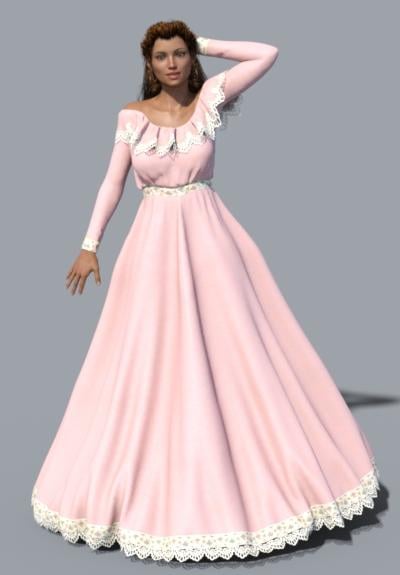
Novica & Forum Members Tips & Product Reviews Pt 7Another one, while it's on sale- you have 45 minutes left to shop, so I would be remiss in not getting you more deeply in debt- The Longitude and Latitude lights are great for people who want click-click solutions, who are starting with Iray, or who don't quite "get it" yet. And for folks who like good lighting!
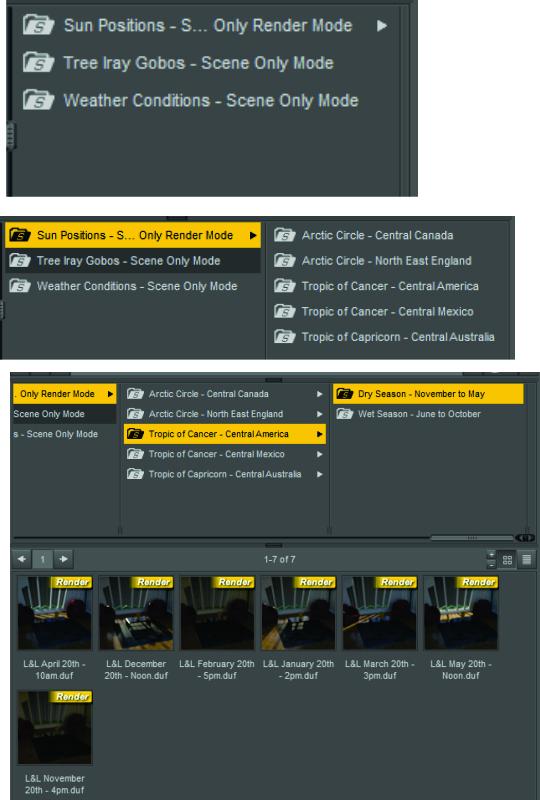
Here's how it works- you choose the location and time of day. Yes, that easy. You can tweak if you want, but you don't have to. It also comes with tree gobos for some fun effects. And these render quickly. I did Tropic of Cancer: Central Mexico>Dry Season>November 23rd. No tweaks, this is what I got. I put Nadine in Belle Dress.
So for Sun-Sky renders at a click, you can't go wrong with Latitude and Longitude!
You may want to click this to enlarge. You get the gist. It will show you the sun coming through the window so you get a feel of how strong it is and the direction it comes from. Easy!
 Infinite Insanity - There's ALWAYS Another Sale! (Daily Sale Talk)
This all started around 5:45am ish (Central time) It went up and down quite a bit. Haven't checked lately.
Novica & Forum Members Tips & Product Reviews Pt 7Again, all these prices are currently even lower. The store prices are changing on everything, not just these. I checked stuff I already own and put in the cart to test them. Note the Umbris Outfit Textures are currently $4.20 (Showed the outfit, black, on Callista.)
Darkshade Outfit is very classy, family friendly- unusual for a warrior type outfit. Boots have low heels. Already 65% off before discounts- Goes to $7.11 Weapons are INCLUDED.
DONT MISS THIS!!!! Bundle Bast for Genesis 3 Female. The first time I had it in my cart and forgot to check out, it is amazing. It's a bundle. And the price is $2.70 !!!!!
If you have Space Corps, note the textures for $4.19 Note it is not just color changes, those have subtle textures with them too. (Space Corps is linked on that page, click it to see if you have it.)
ADDING MORE HERE IN THIS POST THROUGHOUT THE NEXT FEW HOURS, it's 4:30am Sat morning, central time. If you find deals/ want to recommend products, feel free to post!
If you're looking for seasonal, you'll laugh at this Halloween option for 3D Universe's Toon Baby. Only $2.70
Turtle Boy is good for a kid's toy and you can't beat the price of $2.70
Not sure about Mishka Hair, but it's for Genesis 2 and with Slosh's hair shaders, may soften up a bit. It's $2.70. Same with Bridgette Hair. These would definitely be fine for your toon characters or toon renders (actually, superb. Very crisp lines with filters.)
And for cheap boots (again, $2.70 for Genesis 3, check out Urban Strap Boots.
Oh, this wasn't what I thought it was. I was thinking poses. This Pin-Up Look will get you a hat, lipstick, 50's-60's sunglasses, necklace, earrings, bracelet. $2.70
These are for Poser, I assume with tweaking, will be fine. Think kitchen for the Blender, Contact Grill, Expresso Machine (love the scoops), Coffee Maker, Toaster, Food Processor. You may have a hodge-podge of other kitchen items, but these will all have the same style. $2.70 each.
Haven't heard anything about the ABC's of Modeling, but it's another $2.70
Creating Big City Scenes in DAZ StudioDock Crane
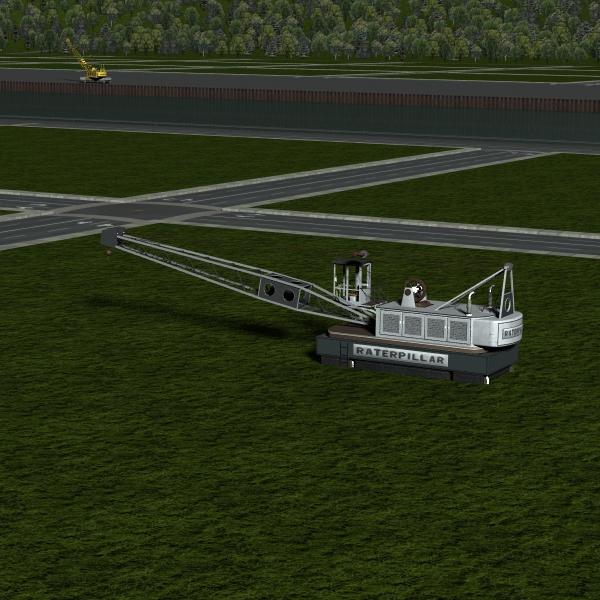
I wanted to show you the Warehouse District: Dock Crane. This looks small in the grand scene of River Front but is good up close for industrial scenes along the wharf.
The crane loads to the central block 046. There is a pose that moves it to the wharf on top of the embedded track rails. The crane sits nicely on top of the embedded rails with no adjustment needed.
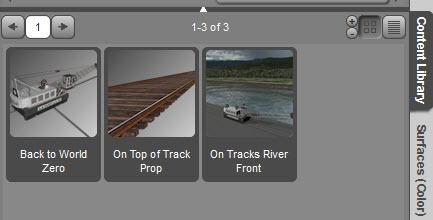
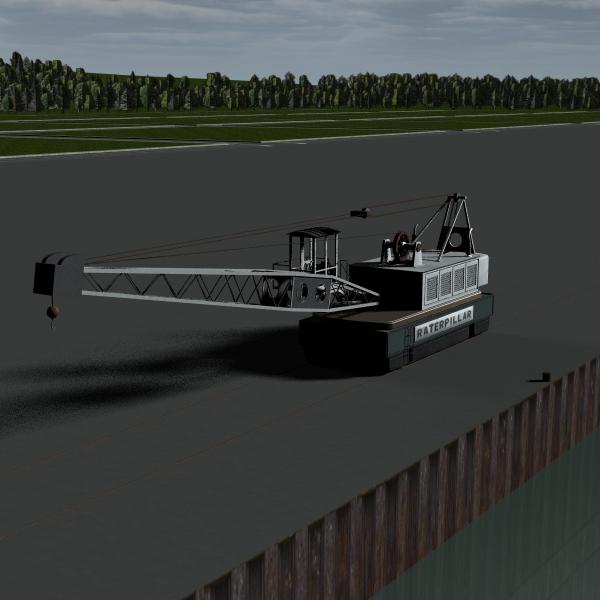
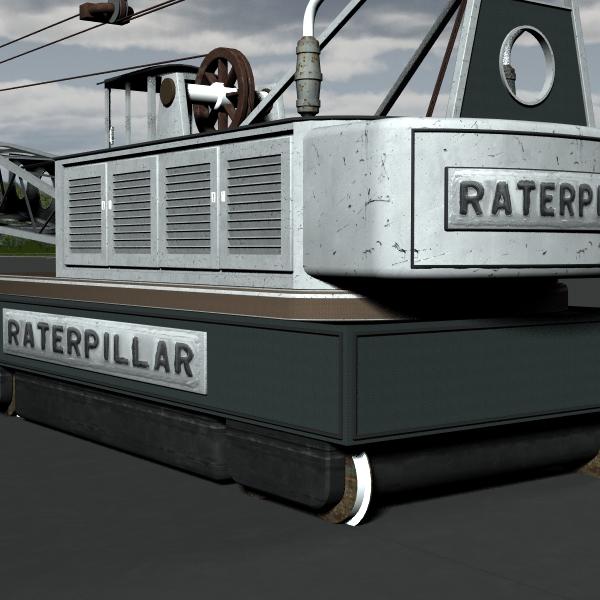
There is a tracks prop (rails with ties) that is the length of the wharf. It loads to city center and the move to wharf pose does not work on it. So set the track's North-South parameter value to 33274 and Down-Up value to -5.31 to get it in position. You'll also need to set the crane's Up-Down position to 13.72 so the wheel hubs sit on top of the track.

The crane has a number of different material presets. They are easy to use. Just select the crane and click on the preset you want. You can also remove the name plate with a material preset.
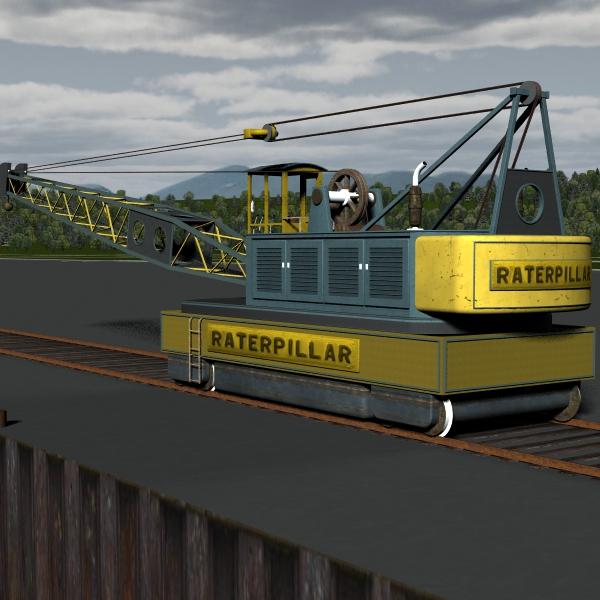
The crane has a number of moving parts you can control from the Parameters tab. Boom Up-Down, Cab Door, Hook Turn and Hook Up-Down all work well. You can individually control the 4 levers and 4 pedals in the cab but you need to expand the hierarchy and select the right bone to get to the parameter dial for that item, as the universal tool will not select them. Drive Reverse-Forward and Turn Crane work but are super sensitive. I adjusted the Drive max min parameters from +/- 1918 to 900 and the Turn Crane max min from +/- 100 to 0.36 (click on the gear icon in the upper right of the parameter dial to get to the settings).

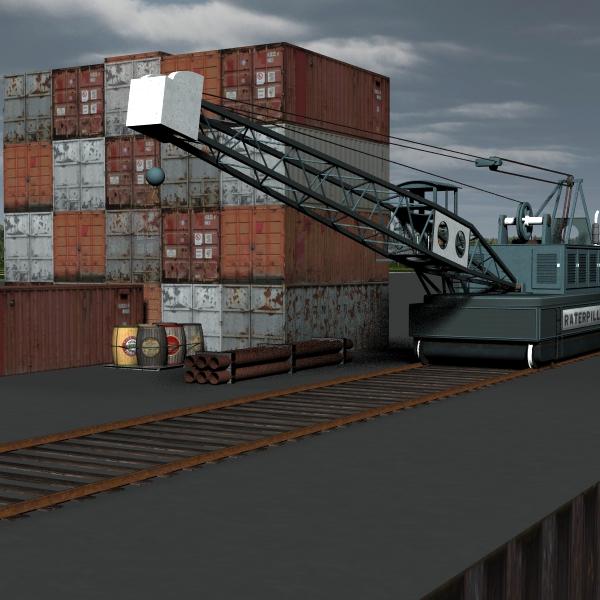
There's a number of props that come with the crane. Individual barrels, pipes, and shipping containers plus pre-assembled multiples of them.
 Name That Petipet Model Inspiration!
Well, does anyone else have any ideas of what may have inspired http://www.daz3d.com/starship-vampire ? I stilll think Slave 1 was an inspiration. Now that I think of it, the fuselage resembles that of an F-117 stealth fighter.
Not a Petipet product, but it had definitely been used for the central part of the craft in this set: http://www.daz3d.com/space-dock
Daz 3D is part of

Connect
DAZ Productions, Inc.
7533 S Center View Ct #4664
West Jordan, UT 84084Licensing Agreement | Terms of Service | Privacy Policy | EULA
© 2026 Daz Productions Inc. All Rights Reserved.