-
NPR renders of daz model 1
I have been using Thea render for a couple of years now.It originally was just a stand alone studio but it now exists as a plugin for multiple modelling programs such as 3d max,sketchup,Rhino etc.
It painlessly imports daz 3d scenes once they are exported from Daz as .obj files.All textures come through but bump maps,reflection maps etc have to be reapplied but it dosent take long.
It has a great interface that allows for interactive rendering on the fly that means you can alter/revise materials,lights and sun and see them updtae immediatly.It also allows for detailed vegetation,either imported or placed from the default Thea library which comes as standard.
I have had a background in painting,both oils and acrylics but in the last few years I have shifted to digital art,and as said before,the models available from Daz are brilliant to work with.
My goal for each render is not so much the detail but more for mood and I will always sacrifice detail if it means getting a more evocative image e.g using a strong Depth of field or darkening parts of the images a lot so while some detail is lost,the area in light is really pronounced,such as the church images above.
My Gallery: https://www.daz3d.com/gallery/#users/142080/
Old Bryce images on my new web pagesmspieth - welcome to the forum and absolutely stunning work you have done, looking forward to many more!

Your mountain snow render is just awesome. I am busy with my 1st snow render and struggling quite a bit. If you are willing to share how you have done that snow it will be much appreciated - maybe a short tutorial!?
 Attached is a render (not completed yet) of my 1st snow scene attempt. Still want to add some pieces of snow on the truck, etc. I am using Bryce's own snow mats. By the way, even using smoothing in Bryce on the truck, it still have issues. It's a sketchup model and maybe bad quality causing this issue. The black falling snow dots needs postwork I think in a 2D program. For plants I need to follow David Brinnen's video to add snow on trees. Only the branches show snow after applying snow mat on whole model.
Regards,
Laura
Prop Hierarchy-Stuff Questions@mjc1016 Sketchup (and thanks for the geometry shell advice, you were spot on, apparently the magic number for enameled christmas balls is .005 instead of .001)
Okay, Khory, I think I get it now.. the "props" actually behave more like prop assets and the subset is the actual "prop".. will have a go at it. The reason for 5 parts is partially based on ignorance. I want different zones (surfaces) for the handles (leather), the main blade (brushed steel) and the blade edge (polished metal).. but every format I exported the model to, refused to cooperate and I kept getting 1 surface, if I got anything at all (sometimes it was just interdimensional geometry!). After trying EVERY format, I think it was FBX that finally worked. Bear in mind I AM the world's biggest noob at 3D modeling.
Looking for movie grip equipmentNividia IRAY vs Chaos Group VrayYes, Vray is a fantastic renderer and considered by many as the industry standard, and while much cheaper than it once was the cost keeps most hobbyists away from it. I had access to it when I worked for a studio and would use it to this day if I could afford it. Not to mention the lack of an user interface from DS to it kinda like Reality for luxrender. It's funny that sketchup has a Vray plugin and Blender will soon also, but DS doesn't.
If someone came out with a plugin for DS, I would spend the $265 for it in a heartbeat.
3D Art Freebie Challenge -- November: I am so THANKFUL I am not... -- Entries ThreadI've been watching a lot of CGI-Anime lately, so in honor of my first Iray render, I thought I would do something silly. So here goes.
I am so Thankful that I'm not a Teen aged Super Hero.
Think of all the fighting, the angush, the pain and the over saturated hormones.
Been there, done that, long since lost the tee shirt.
Now I'm an old fart and proud of it.Here we have the Miraculous LadyBug from Paris France. Shezow & Kelly from Australia. And Batgirl from New York.
No count items:
Aiko3+, Young Teen Luke & Laura, Genesis2-Female.
Pigtail hair - .xps format converted to .obj.Ladybug:
Rani for Aiko 3 #
Sarina skin tex.
Mask #
Hair ribbon #Shezow/Guy:
A3 Moko hair - 11 down
Summer skin tex #
Cosplay cape #
MMWCasualforPT Skirt
Morphing Belt #
Thigh boots A3 %%
spikes # (on boots)
Gloves # %%Kelly:
Aditi Hair #
Summer skin tex
70s Old Fashion 2 dress & stockings %%
Wild skirt #
Morphing Belt
MMWCasualforPT boots %%
Mask
Cosplay capeTofu skin shader pak used on skin.
Batgirl:
Teen Ellie #
Beach bundle Hair #
G2F-Urban-Justice #Scene:
Village
Dodge Viper - .skp converted to .obj.
Bike 004 # - Rendo newsletter middle of page
Bike tex #
Pidgeon
Black cat
Barrel
Hesco boxPaid Items:
Crossdresser3 licence for Luke3
Crossdresser3 licence for Laura3Poses from several sets adjusted with some dial tweaking.
# free site registration required.
%% Items converted with CrossDresser 3.
Custom clothing & 2nd skin textures made in PSP 7 & BSP.Software used:
CrossDresser v.3
Sketchup Pro
Poseray
Hexagon
Paint Shop Pro 7
Blacksmith Paint
Rendered in DAZ Studio 4.8 Iray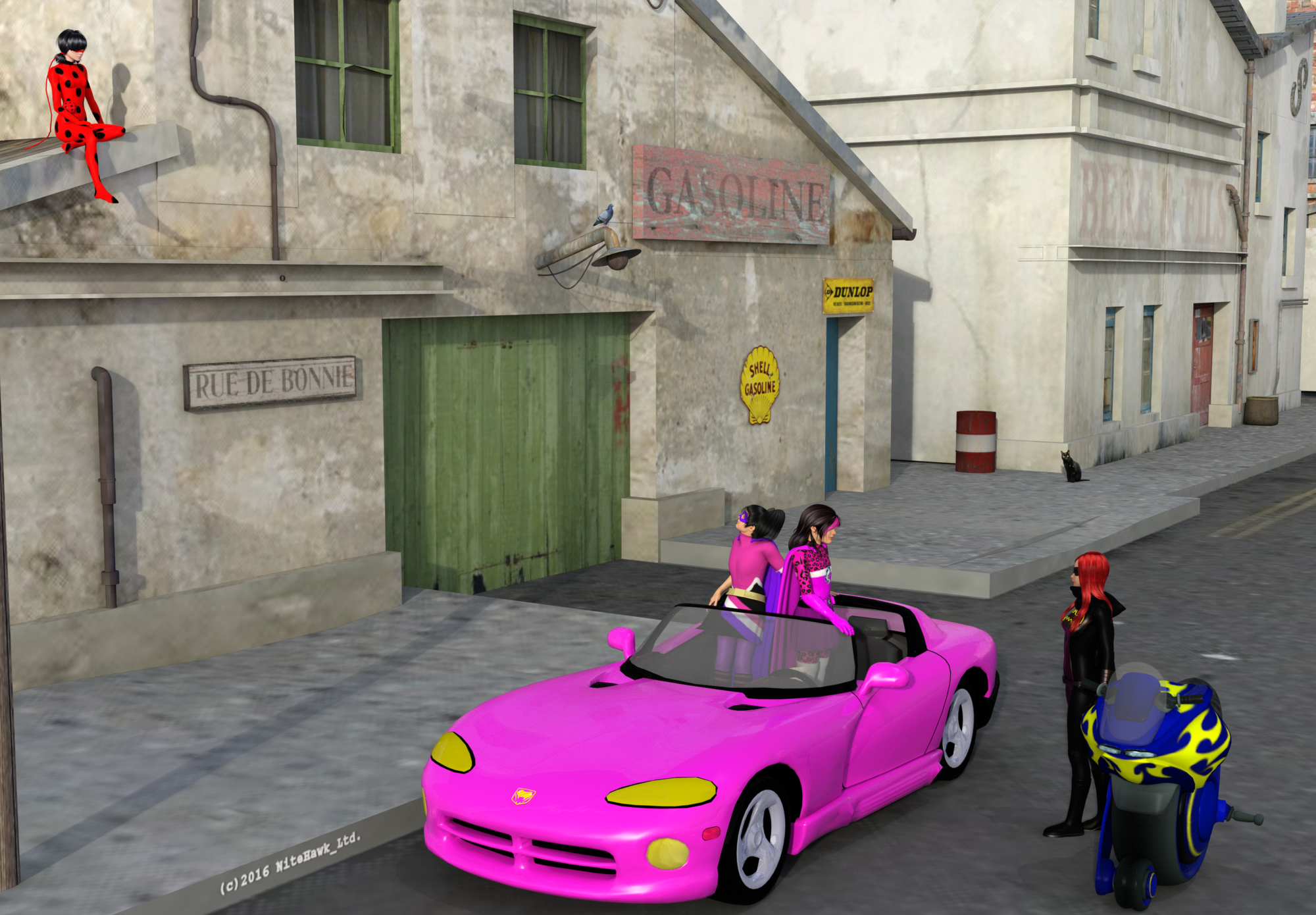
It's Nov. 25 and I'm the only entry? Come on people! Get cracking I don't want to win this by default!
Show Us Your Bryce Renders! Part 9launok: What I meant, was houses created in something like Bryce (or Wings, or Hexagon, or so) with nice procedural textures. I think it is mostly the textures that are too flat and do no have the bump maps that Bryce procedural textures have. Perhaps you can also modify the textures to also have a bump map from the original texture and then they might already look better. I know there are quite nice houses here and there, but usually not free.
Jamahoney: Yep, there sure are houses there. But I think most of them suffer from similar issues as the Sketchup houses: photo-like textures, but no bump and therefore strangely flat looking. But I definitely get a lot of free issues from this site, such as various props, cars, etc. that look quite reasonable. I tend to find that specifically on the larger surfaces of houses, the texture makes quite a difference.
You made a nice cosy render with these items.
Show Us Your Bryce Renders! Part 9launok: what a very nice set of renders. OK, the houses really do look a bit more plastic than Bryce houses with Bryce textures. And the house on the corner with the ladies in front appears to be just a tiny bit above the ground, but in total a very nice set!
Thank you Hansmar. :) I have noticed the house not quite touching the ground but I was just too lazy to lower it a fraction. Well, sketchup models are very low-poly but for my personal use and that I can't afford proper quality models, this has to do. I have also built a shop in sketchup as it's easier for me at this stage. When I have more time and know how to, I will try buildings in proper programs as Blender, etc.
@Hansmar, you mention Bryce houses with their textures ... are there sites with free Bryce houses, also shops? I am mostly interested in town/city scenes. I have seen quite a lot of buildings online but I can't buy them as I am a pensioner with low income.
Show Us Your Bryce Renders! Part 9A variation of my render which I have posted here a few days back. I have included another shop between the Gameworld and Donuts shops. All characters used are low-poly exported via Xnalara.
For the complete town render I have also used only Sketchup buildings, including the terrain. The 2 women sitting on the bench and dogs are also from Sketchup Warehouse as well as pickup vehicle. Bushes/Trees are Bryce's.
Show Us Your Bryce Renders! Part 9C-ram – outstanding, stunning render, love the grass and flowers.
Hansmar- thanks, I don’t normally have much success with SketchUp models, this one worked okay. I like the island with the underwater effect, so cool.
Horo- thanks. Another beautiful stacked terrains landscape.
Electro-Elvis – both your renders are great, nice modeling.
Laura – thanks, I’m also a novice in a sense
With all the excitement of the Super Moon, I did a moon render, again using one of the sky presets from David's Cloudscape pack.
 GTX vs. Quadro
Titan-X's are showing-up all over for about $750 for the 12GB models. Well worth the money now.
Price is higher for Quadro's, due to direct support from Nvidia, for those actually buying from Nvidia. No other reason. (Those not buying from Nvidia are just paying more for nothing. You can get them half price without support. Which is why they sell them and push them all the time. Not Nvidia, the hack-dealers.)
The chips are the same, the capacitors are the same, the drivers are the same. One set of drivers has the "bit" that unlocks the double-precision floating-point values. Now, in the new ones, there is a section of the chip that ALSO has that "bit", as a physical device on the chip. For gaming computers, they short it out, and that burns that single gold wire, representative of the checking bit, "Use double precision bits". The chip is still the same.
(Literally, there is a hacked set of drivers that just turns your card into a Quadro, or turns a Quadro into the equivelant GeForce card. 100%, Quadro is slower than the counterpart, in all tests, for real-world uses.)
I have both. Quadro is only faster on specific hardware that is programmed to be faster on it. (Which is almost none now.) And, it is only faster at a few specific things, it is slower at much more things, due to using double-precision floating values in all formulas. Takes longer to do all math, twice as long to do all divisions and multiplications. Also due to error-checking each cell of RAM data before giving it out, or writing it in memory as OK to use.
The only program that I saw it ever faster on, was Sketchup 3D, when refreshing the screen. I don't do weather-computational programming nor do I do theoretical universe planatary and galaxy calculations... I surf for porn and render it. Doesn't require more than four decimals of precision and two hands to do that.
Any other claims of them being special in any way, is pure hype. These have been tested, forwards and back, and disected and even the patents and schematics are the same. (The gaming chips are essentially chips that have also failed to be "perfect", on benches. Minor imperfections that "could" reduce stabiltity of function of cores, but often times does not, in a major way.)
http://gpu.userbenchmark.com/Compare/Nvidia-Quadro-K6000-vs-Nvidia-GTX-Titan-X/2837vs3282
http://www.videocardbenchmark.net/compare.php?cmp[]=3106&cmp[]=3554&cmp[]=3597
The Tesla K80 is the one with the most "Cuda cores", at 4992, with Titan-X having only 3072. Guess how much it costs? $3,500 to $5,500 (The prior price is "new/used" and "unsupported". The latter comes with Nvidia's prime support.)
Doing Maths...
Titan-X $1000 for 3072 cores = 3.07 cores per dollar or $0.3255 per core
Tesla K80 $5000 for 4992 cores = 0.998 cores per dollar or $1.0016 per core
Two Titan-x's gives you over 6100 cores for under $2000, still less than half the cost of one Tesla K80, and 1100 more cores.
However, Tesla K80 has 24GB of RAM... not sure if that is 12 and 12, in dual-core, isolated/shared, or one core with all 24GB available for it. That is a rather large Daz scene. 12GB is just at my limits now.
Also... Daz doesn't support Tesla or Quadro drivers, nor do they support Daz. They barely support windows. (The drivers) :P
However, IRAY might. I have not looked into that. I have not seen it posted anywhere. That is a specific set of support needed for those drivers. Like I said, it takes hacks to make drivers work on opposing cards. It is not just a plug-n-play deal. Stuff has to be programmed for the cards, and DX (Direct-X, which is for games), is not. (Which is what all these render-engines use. None talk directly to the cards core components, or they would just as easily do the same with Radeon, which has the same exact formulas, just a diferent core stack, for flow, through the API.)
Show Us Your Bryce Renders! Part 9Launok – you did a great job, putting the different models altogether.
Horo- the lighting and reflections on the artefact is stunning.
Inspired by Launok, I tried a SketchUp model the Rumah for this render. I removed the 2D trees from the model and used one of David’s skies from the Cloudscape pack and some xFrog trees.

It's good to know that I have inspired you although I am just a novice.
 Your render is great, well done!
 I also have to remove 2D plants, trees, etc. sometimes from Sketchup models.
Laura
Show Us Your Bryce Renders! Part 9Horo: Thank you and . . . . . very nice lights on your alien artefact.
mermaid010: I did try some Sketchup models in the past. They are OK and as a model this one is very nice. I find the texturing often looking 'plastic' and unreal, compared to Bryce procedural textures.Not too bad in this one, I think.
launok: Yep, some models are made, or made available, in a form not well suited for modification. You'd better keep such models in the background, so you don't see the ugly mats too much.
c-ram: Wow, amazing results. Must be very many instances of grass and flowers. I guess the total scene will test the limits of Bryce?
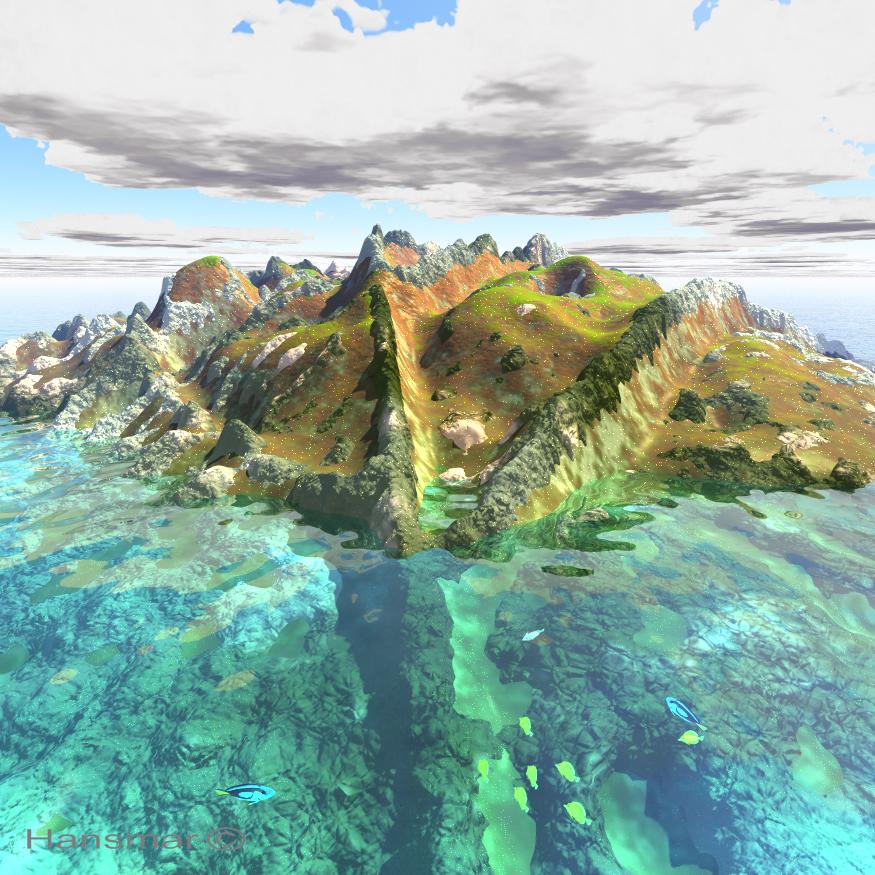
I made an island from a height-map based on a leaf photo again. Used it twice, smoothed one considerably, gave them different textures and put it partly under water. Found a bunch of tropical fish for free at Turbosquid (http://www.turbosquid.com/3d-models/free-tropical-fish-pack-3d-model/652729). Rather low poly and textures are simple, but they look well in the distance. So I added a few under water. I quite like the result now.
 3D Art Freebie Challenge -- November: I am so THANKFUL I am not... -- Main Thread
Sorry to be a pest nitehawk but I am curious. Okay I found out that mesh.ascii files are xps files but when I look at my blender I do not see xps or mesh as being an option in the import. Is there a plugin for blender for this type of file? Do you mind sharing your process of conversion. Those hairs are really nice.
Not a problem, I asked for comment.
You will need Blender 2.7 XPS Tools, get them Here.
It has a list of tutorials for Blender.
There is a lot of nice hair on Deviant Art, but you have to work on it to use it in DAZ Studio.
I used this model because it looks exactly like the hair in the TV show.Converting the hair was not a problem. Had more trouble with the car.
I've gotten into the habit of running all the xps/mesh.ascii & .skp to .obj convert files through PoseRay to fix the bad normals and phantom vertices problem.Sketchup Pro 8 .obj output leaves a lot to be desired. PoseRay will fix most of it.
In PoseRay:
Load tab - load model.
Group tab - check the weld verts box then click update tab. All the bad verts and normals will go away.
Materials tab - verify that the texture files are right. Having the tex files in the same directory as the prop will save you grief later.
Save to obj tab, save button, navigate to your prop directory and your done.
Uncheck the texture path box, this will save you from editing the .mtl file.I took the car into Hexagon to flip the normals on half of it so it would render right.
Some of xps/mesh.ascii files will have the texture files in .dds format. Studio does not use .dds.
I've started using IfanView to convert the .dds texture files to .png.
I was using DDS Convert, but it won't run under win7.
Then I'll make the trans mats for the hair in PaintNet, simply because it's so easy.When imported into DS, it comes in as a static prop with no morphs or meta data. You'll need to use D-Forms or rig it to pose it.
Hey, I did say you would have to work for it!
3D Art Freebie Challenge -- November: I am so THANKFUL I am not... -- Main ThreadI think the spikes are on Shezow/Guy's chest and the Bike 004 link is under Marketplace Articles where it says get your FREE download:
nitehawk I was following the bread crumbs on the pigtail hair. I am assuming that this model can be read by Sketchup. Do you have to have Pro to convert to obj?
3D Art Freebie Challenge -- November: I am so THANKFUL I am not... -- Main ThreadHuh, first again...
I've been watching a lot of CGI-Anime lately, so in honor of my first Iray render, I thought I would do something silly. So here goes.
I am so Thankful that I'm not a... Teen Aged Super Hero.
Think of all the fighting, the anguish, the pain and the over saturated hormones.
Been there, done that, long since lost the tee shirt.
Now I'm an old fart and proud of it.Here we have the Miraculous LadyBug from Paris France. Shezow & Kelly from Australia. And Batgirl from New York.
No count items:
Aiko3+, YT Luke & Laura, Genesis2-Female.Ladybug:
Rani for Aiko 3 #
Sarina skin tex.
Pigtail hair - converted to .obj.
Mask #
Hair ribbon #Shezow/Guy:
A3 Moko hair - 11 down
Summer skin tex #
Cosplay cape #
MMWCasualforPT Skirt
Morphing Belt #
Thigh boots A3 %%
spikes #
Gloves # %%Kelly:
Aditi Hair #
Summer skin tex
70s Old Fashion 2 dress & stockings %%
Wild skirt #
Morphing Belt
MMWCasualforPT boots %%
Mask
Cosplay capeTofu skin shader pak used on skin.
Batgirl:
Teen Ellie #
Beach bundle Hair #
G2F-Urban-Justice #Scene:
Village
Dodge Viper - skp. converted to obj.
Bike 004 # Rendo newsletter
Bike tex #
Pidgeon
Black cat
Barrel
Hesco boxPaid Items:
Crossdresser3 license for Luke3
Crossdresser3 license for Laura3Poses from several sets adjusted with some dial tweaking.
# free site registration required.
%% Items converted with CrossDresser 3.
Custom clothing & 2nd skin textures made in PSP 7 & BSP.Software used:
CrossDresser v.3
Sketchup Pro
Poseray
Hexagon
Paint Shop Pro 7
Blacksmith Paint
Rendered in DAZ Studio 4.8 IrayI did not see the "spikes" and I could not confirm the Bike 004 link from the Renderosity Newsletter.
Even without these 2 items you have more than enough links to qualify.
ENTRY ACCEPTED
Please move to Entries Thread.
Show Us Your Bryce Renders! Part 9Launok – you did a great job, putting the different models altogether.
Horo- the lighting and reflections on the artefact is stunning.
Inspired by Launok, I tried a SketchUp model the Rumah for this render. I removed the 2D trees from the model and used one of David’s skies from the Cloudscape pack and some xFrog trees.
3D Art Freebie Challenge -- November: I am so THANKFUL I am not... -- Main ThreadHuh, first again...
I've been watching a lot of CGI-Anime lately, so in honor of my first Iray render, I thought I would do something silly. So here goes.
I am so Thankful that I'm not a... Teen Aged Super Hero.
Think of all the fighting, the anguish, the pain and the over saturated hormones.
Been there, done that, long since lost the tee shirt.
Now I'm an old fart and proud of it.Here we have the Miraculous LadyBug from Paris France. Shezow & Kelly from Australia. And Batgirl from New York.
No count items:
Aiko3+, YT Luke & Laura, Genesis2-Female.
Pigtail hair - xps format converted to .obj.Ladybug:
Rani for Aiko 3 #
Sarina skin tex.
Mask #
Hair ribbon #Shezow/Guy:
A3 Moko hair - 11 down
Summer skin tex #
Cosplay cape #
MMWCasualforPT Skirt
Morphing Belt #
Thigh boots A3 %%
spikes #
Gloves # %%Kelly:
Aditi Hair #
Summer skin tex
70s Old Fashion 2 dress & stockings %%
Wild skirt #
Morphing Belt
MMWCasualforPT boots %%
Mask
Cosplay capeTofu skin shader pak used on skin.
Batgirl:
Teen Ellie #
Beach bundle Hair #
G2F-Urban-Justice #Scene:
Village
Dodge Viper - skp. converted to obj.
Bike 004 # - Rendo newsletter middle of page.
Bike tex #
Pidgeon
Black cat
Barrel
Hesco boxPaid Items:
Crossdresser3 license for Luke3
Crossdresser3 license for Laura3Poses from several sets adjusted with some dial tweaking.
# free site registration required.
%% Items converted with CrossDresser 3.
Custom clothing & 2nd skin textures made in PSP 7 & BSP.Software used:
CrossDresser v.3
Sketchup Pro
Poseray
Hexagon
Paint Shop Pro 7
Blacksmith Paint
Rendered in DAZ Studio 4.8 IrayTUTOR??Hi DDCreate, I think it's pretty basic stuff. At least for now, I'm using Daz for content. Things like dogs/cats where I'll pose in Daz, then export OBJ to Sketchup where I use in other models. I've got that down pretty well I think. But I just downloaded a rose pack, for example, and can't seem to get it to load. Plus I've lost the "shaping" tab in the lower right and can't seem to find it. I think my issues are really just about navigating around properly. Your help would be much appreciated. I happen to be on vacation this week so I could do this almost any time ... will be away either tomorrow or Thu. Maybe email me at [email protected] with your cell and I'll give you a call. I could share my screen with you via joinme which should work fine. Thanks again so much!
TUTOR??Anyone want to spend a paid hour with a newbie to help me familiarize w Daz 3D. I'm a high-end Sketchup/Thea user so very familiar with modeling, rendering, etc., but I have to admit Daz is very counterintuitive to me. Tutorials have helped a little, but I often find myself "lost" when trying to find content, navigating around, etc. If you're a Daz expert, I can't imagine it'd take more than an hour for you to get me where I need to be. Thanks! Dave H.
Daz 3D is part of

Connect
DAZ Productions, Inc.
7533 S Center View Ct #4664
West Jordan, UT 84084Licensing Agreement | Terms of Service | Privacy Policy | EULA
© 2026 Daz Productions Inc. All Rights Reserved.