-
Daz Studio BETA - version 4.23.0.4! (*UPDATED*)
Dolce Saito said:
Richard Haseltine said:
Dolce Saito said:
I have some sort of instability with the latest beta update.
During powerposing (or *maybe* anything else requiring you to hold your mouse button in viewport) PBR or OpenGL, There are occasional freezes occuring. It unfreezes itself after around 3-5 seconds. Another way to unfreeze is to right click to somewhere else other than daz studio (like taskbar).
If I make this foreplay enough times, then daz studio crashes to desktop saying an access violation in qt4.dll or something. In the list of the stack, It caught my attention that it mentions "undo stack".
(Nothing in the log, rest of the system seems stable.)
Do you have the HEAT plug-in installed? if so is it the updated version or the original?
I don't have it. I've 551.86 studio drivers installed. I've yet to identify root cause of this problem, if it is a plug-in (I haven't installed any in a considerable amount of time) or something else. I also confirmed that there are no event log entries for any systematic problem or any other constant freezes occuring in the system. Only in the Daz Studio, and only during viewport operations.
Edit: I created a camera and did some orbit, zoom, fly operations with/without mouse. It IS stable. So, I've isolated it down to figure posing operations for now.
Edit 2: During posing, not only powerposing via mouse in the viewport, but also moving parameter sliders cause the same freezes if I hold any parameter slider and drag left-right for enough duration.
Edit 3: Did some random figure animations. And if I move frame slider, it can cause this freezes again. Playing a timeline which includes figure movements can also cause this. In general, I isolated this to the figure movement in the viewport for now.
When you first use a morph, or bend a joint that triggers a corrective morph, the morph deltas (the shape change) have to be loaded from disc. Also, every time you make a change DS has to trace through the links to and from the changed bone/shape to look for links that may be affected by the change and so need updating.
A simple triangular plane for Daz?Just for the fun, I spent a little while creating a morphing triangle prop. The apex of the triangle (behind the character) can be moved in X and Z. The movement is 1cm = 1% morph at 100% scale. Morph "Corner X Movement" = +/-86.6% to make the triangle into a rightangle triangle. Yep, I know the number is horrible, but with an eqilateral triangle, some numbers always will be. The triangle is UV mapped from above, scene X axis the image horizontal axis, though no texture is included. The texture will distort as the triangle apex moves.
Anyway, please find below a Floor Triangle prop library item with two morphs, tex mapping, a duf file, .duf.png and .tip.png & data files. I cannot imagine it's possible to have a prop with fewer than the 1 facet and 3 vertices this prop has...
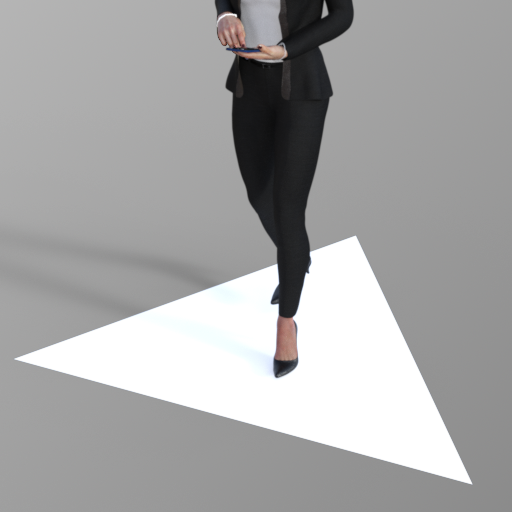
I hope it's worth the effort!
Regards,
Richard
Converting V4 textures to Genesis 3,8,9 MethodologyI personally use Ultimate Unwrap3d or Zbrush to transfer textures and mostly use genesis1 to get to the other figures
I do obj export collapse UV tiles for UUW3D
Zbrush trickier, I use a UDIM version of Genesis 1 no longer available
Converting V4 textures to Genesis 3,8,9 MethodologyThanks for the input, WendyLuvsCatz!
I know about the figures needing to match up with the same zero pose, so that's at least one thing that's clear for doing the texture transfer! Everything after that gets a bit foggy.
As mentioned in the previous posts, I'm having some trouble getting the clone shapes or the V4 UV sets to hold when I'm exporting the G8 figure. But I'll be giving the FBX export a try tonight and also giving G3 a whirl, see if I have more luck with that. I might even drop back to G1 and see if I can get that to export out correctly. I think if I can at least get my V4 textures converted to one of the Genesis figures, it will make it much easier to transfer them across to other generations. I'll be focusing on G3 and G8 for my V4 textures, so I'm not looking to transfer them a dozen times... getting them to transfer once seems to be the trick.
Converting V4 textures to Genesis 3,8,9 Methodologyas long as both figures are the same shape, you should be able to transfer baked textures
you don't need geografts just clone shapes
each generation has one for the previous one and G1 has V4 UVs
the clones are not exact, for example G9 legs need reposing to match G8
so make sure you match them up, the shrinkwrap modifier in Blender might help
Certain object can't be imported using morph loader.Yes, I did tick the selected object only. But still not working.
If I just imported the object NOT through morph loader
https://prnt.sc/7Xek86Q8iDm5the scene info shows the same number between the original and the one from blender. The differences only the name of the object and class.
Could class differences causes the problem?yet it still throws error when through the morph loader.
can you import it through the morph loader?
The right way to export Victoria 4 into, and out of Daz?Oh... how does that result came from.. by importing a morph or sth. ?
As for Blender / "No delta" issue, I'm sorry that I forgot to mention..., AFAIK, you have to first of all convert V4 to Weight Mapping - General Weight. Then when exporting V4 to OBJ, uncheck "Ignore Invisible Nodes" as there's a hidden node "eyeBrow" on V4 (or unhide it)... otherwise you'll get geometry mismatch error when importing OBJ from Blender to V4 with MLP...
Certain object can't be imported using morph loader.What are you trying to morph?
[SOLVED] ERC Freeze sets my morph to 0% instead of 100%I'm trying to make some custome expressions for my chatacter. First I dialed in some expression morphs, created a new property in the expression folder and did an Erc Freeze, named it expression 1. Upon clicking accept on ERC Freeze everything worked correct and the new property automatically put it'self at 100% and if i pull it to 0% the expression goes away as expected. I did this again, this time I wanted to use some of my new "expression 1 morph," so i dialed it up along wth some other expression morphs and repeated the process naming this morph Expression 2. Success. For some reason though, this wont continue to work. I dialed in both those mophs and some more expression morphs (re-using some some that make up expression 1 and expression 2) and this time when I do ERC Freeze it sets the morph to 0% and the expression is there, meaning if i then pull it up to 100% it's double the parameters I had used to make the expression. I tried leaving the min value on -1 when creating my first expression morph which in theory should work if I just dial it back to -100%, but then the expression doesn't look like the combination of expression 1 and 2 like it should, it just looks weird.
Certain object can't be imported using morph loader.Blender 4.0
import export using the new generation.
Other object sometimes throws error like:
Error: Facet count mismatch - base does not equal target (142316 != 117830)
Error: Error matching facets
Warning: Geometry did not match, failed to create morph.The right way to export Victoria 4 into, and out of Daz?WendyLuvsCatz said:
well unlike Genesis+ you don't have to export all of the mesh, just the head
(with eyelashes etc, whole head)
as all body parts are separate meshes by bone name
you then reimport that mesh using morphloader specifying its the head (or whatever other part under attenuate I think (read or watch a tutorial been a while and I used Poser or Carrara personally)
eyes and mouth you can move the bones manually to fit (again separate meshes)
creating ExP injection files is another load of fun (I have done it but following DAZ documentation tutorials)
It took me a while to figure out how to move the eyes and mouth in Daz. It's just a shame that it isn't possible with the eyelashes. Because then everything thing could be corrected in Daz Studio.
Alas, no.
crosswind said:
1. Even with Genesis figures, you don't have to hide or delete anything, just use Filter Objects option when exporting OBJ ( DS version 4.12+, IIRC...). The same settings apply for V4 when exporting to OBJ, there's nothing special.
2. V4 has no multi-resolutions by default. Leave it alone if you did not convert it to SubD beforehand.
3. If you use FaceForm Wrap, as the floating geometry, V4's vertex positions must have change after wrapping. Then when importing OBJ with MLP, you'll get the delta with no problem, just by using Reverse Deformations + Deltas Only.
4. As per my exp., with wrapping V4/G2, in FaceForm Wrap, 1) hide eyelashes, inner mouth, gum, eyes related surfaces, etc. on the floating and fixed geometry with the nodes of Selection Polygons and Subset; 2) Add a Brush Node after Wrapping node to smooth / tweak any distortion / displacement.
5. After importing OBJ into DS, if there's any rigging issue on eyeballs / mouth cavity, etc., re-rig them as needed.
Attached is my attempt. I managed to reposition the eyes. But the Lacrimal, lashes, and eye sockets have "dropped". I've tried to fix everything in Blender, but when I try to import it through MLP into Daz, I get the "missing deltas" message.
As a quick test. I even created a morph for V4.2 in Blender. When I tried to load the morph through MLP, "No deltas".
No matter what I do, everything just comes up as having no deltas. Right now, I feel like smashing my face into a blender - turned up to full.
NylonGirl said:
That is two cats in a row.
It'd be three, but my boy doesn't stay still for very long ^^'
Thank you for the replies.
Certain object can't be imported using morph loader.I've use morph loader very frequently.
But currently I'm facing certain object that's somehow throws error when imported back using the obj from blender.
If I exported the object out and reimport back again using morph loader, no problem.
But the same object exported to blender, done nothing, exported, and imported back to DAZ, there's a problem.THe errors say:
Error maching facet
Geometry did not match, failed to create morph.The object is already base res
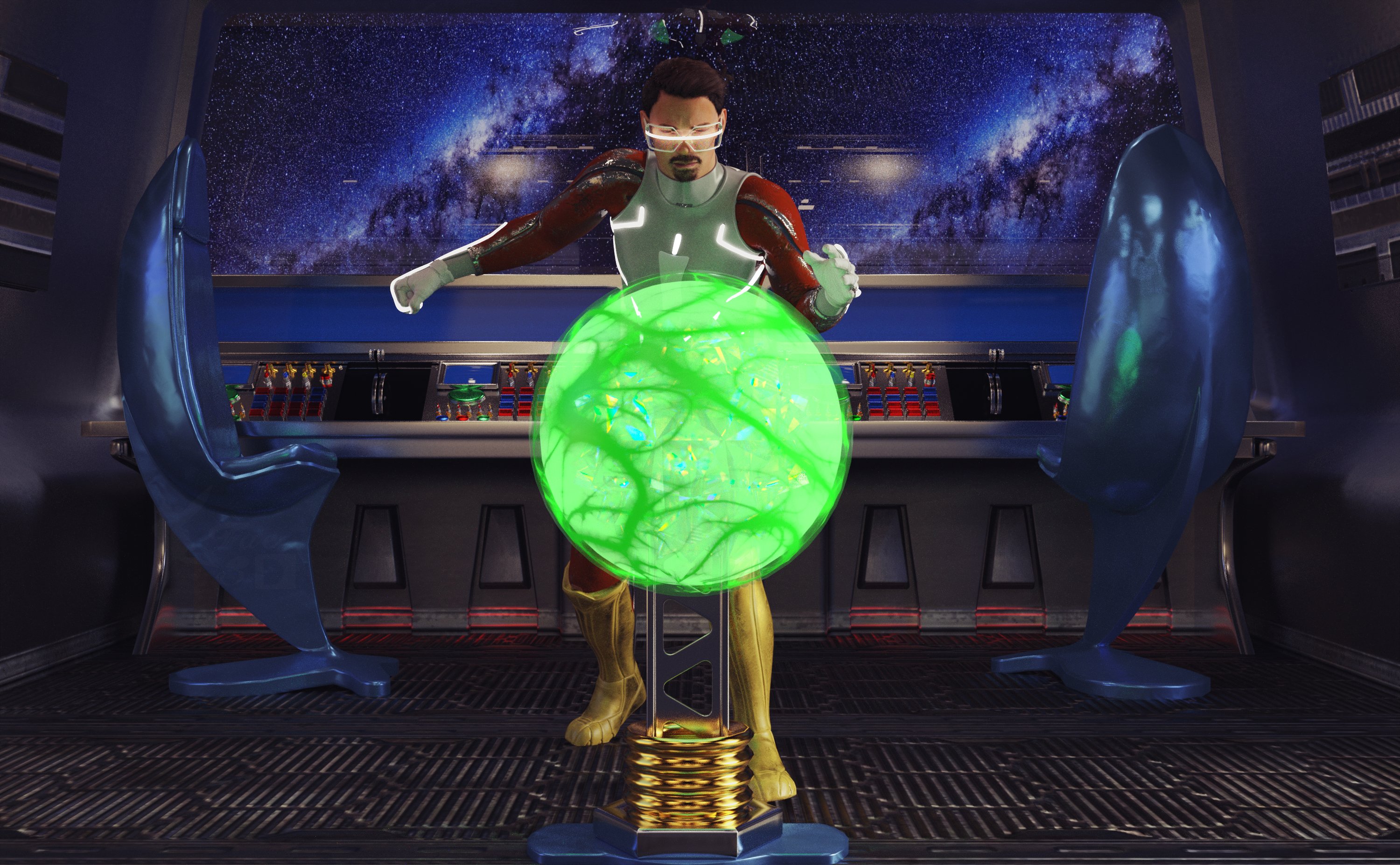
Freebie Challenge March 2024 - "Power Source" - Entries ThreadStealing the Power Core
No one else was on the ship, they had all fled to the escape shuttles when all the emergency alarms went off. Of course, he had been the one to trigger them. The traitor was alone, no one had noticed that he had remained behind. Now was his chance - the brand new, secretly developed power core was unguarded and ripe for the taking. With the fortune he would make from selling it on the black market, he knew he would be able to retire to any planet he desired!
Freebies:
Anakin Skywalker for G8M and G8.1M (Character Morph) - https://www.deviantart.com/shinteo/art/Anakin-Skywalker-for-G8M-and-G8-1M-873019338
Walther G8M (materials) - https://sharecg.com/v/92848/favorite/21/DAZ-Studio/G8M-Walther
S.EXE Full Outfit G8F - https://www.renderosity.com/freestuff/items/96378/sexe-full-outfit-g8f
Sci-fi Suit for Gf8 - https://www.renderosity.com/freestuff/items/88617/sci-fi-suit-for-gf8
Panther Gloves G8M - https://www.sdebstore.com/collections/free-stuff/products/panther-gloves-g8m-free
Batgirl for G8F and G8M dForce (Boots) - https://sharecg.com/v/94473/browse/21/DAZ-Studio/Batgirl-for-G8F-and-G8M-dForce
Cyber Glasses 2 - https://www.renderhub.com/mbit/cyberglasses-2
Every Day Style Hair (and beard) G8M - https://www.renderhub.com/zoro-d/everyday-style-hair-for-genesis-8-males
Glowing Eyes - https://sharecg.com/v/99763/browse/21/DAZ-Studio/Glowing-eyes
The Brawl! Poses for G8M - https://www.renderosity.com/freestuff/items/84898/the-brawl-poses-for-g8m
Unsplash Space BG (I don’t remember which one, sorry!) - https://unsplash.com
AAL Plasmaball (Glowing Core) - https://sharecg.com/v/74972/favorite/21/DAZ-Studio/AAL-Plasmaball (This thing is really useful!)
Ghastly's Sci-Fi Sets - https://sharecg.com/v/93518/gallery/21/DAZ-Studio/Ghastlys-Sci-Fi-Sets
Iray Jewelry Shaders (On just about everything except the character) - https://sharecg.com/v/95893/favorite/21/DAZ-Studio/Iray-Jewelry-Shaders
No Count:
Tetrasphere (It's inside the sphere for colors) - https://www.daz3d.com/forums/discussion/541886/the-january-2022-render-challenge-glass/p2(scroll down a little over half way)***Works for me but not for someone else, so unsure***
Space Station Window - Can’t find anymore, was free when I got it (I used this once before and forgot that it was no count, lol!)
Paid:
None
Lighting is the default HDRI light and point lights in Daz Studio. I tweaked the materials, the lights and the pose. Set up and rendered within Daz Studio Iray. Postwork in Pixelmator Pro.
I’ve attached the before post render (the one that says Raw Render) and the finished image file.
which v4 is better to load?Moved to Technical Help as it is a content question, not a Daz Studio question.
They are not different versions of the figure, they are different morph sets which can be toggled on or off independently. Which is better will depend on what you are doing.
Remove Items from 'Lost and Found' TabI have purchased 'Face Transfer' and I have saved many characters using the 'Save Face...' function.
When I was new to DAZ I didn't know how to properly delete some of these characters (I have since learned to do it the right way).
But back then I just deleted the files, causing DAZ to move them to the 'Lost and Found' tab (see pic below).
Even though it's not important, is there a way to remove these items from the tab so it's empty?
Thanks for any help! :)
Freebie Challenge March 2024 - "Power Source" - Main ThreadFae3D said:
Stealing the Power Core
No one else was on the ship, they had all fled to the escape shuttles when all the emergency alarms went off. Of course, he had been the one to trigger them. The traitor was alone, no one had noticed that he had remained behind. Now was his chance - the brand new, secretly developed power core was unguarded and ripe for the taking. With the fortune he would make from selling it on the black market, he knew he would be able to retire to any planet he desired!
Freebies:
Anakin Skywalker for G8M and G8.1M (Character Morph) - https://www.deviantart.com/shinteo/art/Anakin-Skywalker-for-G8M-and-G8-1M-873019338
Walther G8M (materials) - https://sharecg.com/v/92848/favorite/21/DAZ-Studio/G8M-Walther
S.EXE Full Outfit G8F - https://www.renderosity.com/freestuff/items/96378/sexe-full-outfit-g8f
Sci-fi Suit for Gf8 - https://www.renderosity.com/freestuff/items/88617/sci-fi-suit-for-gf8
Panther Gloves G8M - https://www.sdebstore.com/collections/free-stuff/products/panther-gloves-g8m-free
Batgirl for G8F and G8M dForce (Boots) - https://sharecg.com/v/94473/browse/21/DAZ-Studio/Batgirl-for-G8F-and-G8M-dForce
Cyber Glasses 2 - https://www.renderhub.com/mbit/cyberglasses-2
Every Day Style Hair (and beard) G8M - https://www.renderhub.com/zoro-d/everyday-style-hair-for-genesis-8-males
Glowing Eyes - https://sharecg.com/v/99763/browse/21/DAZ-Studio/Glowing-eyes
The Brawl! Poses for G8M - https://www.renderosity.com/freestuff/items/84898/the-brawl-poses-for-g8m
Unsplash Space BG (I don’t remember which one, sorry!) - https://unsplash.com
AAL Plasmaball (Glowing Core) - https://sharecg.com/v/74972/favorite/21/DAZ-Studio/AAL-Plasmaball (This thing is really useful!)
Tetrasphere (It's inside the sphere for colors) - https://www.daz3d.com/forums/discussion/541886/the-january-2022-render-challenge-glass/p2 (scroll down a little over half way)
Ghastly's Sci-Fi Sets - https://sharecg.com/v/93518/gallery/21/DAZ-Studio/Ghastlys-Sci-Fi-Sets
Iray Jewelry Shaders (On just about everything except the character) - https://sharecg.com/v/95893/favorite/21/DAZ-Studio/Iray-Jewelry-Shaders
No Count:
Space Station Window - Can’t find anymore, was free when I got it (I used this once before and forgot that it was no count, lol!)
Paid:
None
Lighting is the default HDRI light and point lights in Daz Studio. I tweaked the materials, the lights and the pose. Set up and rendered within Daz Studio Iray. Postwork in Pixelmator Pro.
I’ve attached the before post render (the one that says Raw Render) and the finished image file.
"Tetrasphere" link is broken, but since you have enough freebies anyway:
Entry approved, please move to Entries Thread!
Weird 'hole' in clothing - Genesis 9crosswind said:
I think the culprit comes from the body shape / morph you dialed on this figure... if you find no issue after fitting jeans on Base figure. And you used auto-fit by the way? Yes, I used autofit
Yes, I used autofit but I get the same result when applying Genesis 9 clothing. The character is extensvely morphed, including my custom morphs but it was fine the day before. The other issue is that the problem is with the clothes not the body. Yet I have not done anything to the clothes....so I'm at a loss as to what the problem is...which is why I posted on this forum. I will try to recreate a duplicate figure using the same morphs to see which is causing the problem.
FBX doesn't match in other software - HELPAfter importing to C4D, go to Pose Morph, you'll find the corrective morph properties. Normally they'll be auto dialed.
G8.1 Morphs visible in parameters but don't workThat was it. Thanks for the detailed info.
PerttiA said:
Making the G8 base expressions (and any expressions that are using them) work on G8.1 requires removing dummy/placeholder expressions that are installed to G8.1 morph folders - These dummy/placeholder expression files have no other function than to prevent the base G8 expressions from loading.
The dummy/placeholder files are located in;
...\Data\DAZ 3D\Genesis 8\Female 8_1\Morphs\Daz 3D\Base Pose Head\ (255 files, can be more if you have additional DAZ expression packs)
...\Data\DAZ 3D\Genesis 8\Female 8_1\Morphs\Daz 3D\Expressions\ (24 files, can be more if you have additional DAZ expression packs)
...\Data\DAZ 3D\Genesis 8\Male 8_1\Morphs\Daz 3D\Base Pose Head\ (255 files, can be more if you have additional DAZ expression packs)
...\Data\DAZ 3D\Genesis 8\Male 8_1\Morphs\Daz 3D\Expressions\ (24 files, can be more if you have additional DAZ expression packs)Please make sure you are removing the files from G8.1 morph folders and not G8 morph folders.
Note 1; If you are logging in to DS and letting DAZ Connect (within DS) to install/update your content, you may have these also in an other location that has "\Data\Cloud\" in it's path
Note 2; Do not remove any files from "FACS" or "FACSExpressions" foldersTroubles when creating custom morph for G8F based on combination of other morph dialsAs Gordig says - apply your character, using the existing morph settings not the OBJ, and then right-click in the Parameters pane and check Edit Mode (if it isn't already checked)
- right-click in the group you want to hold your character (e.g. Actor>People) and select Create New Property
- In the dialogue that opens enter a name and label (the label is what appears in the property list, the name is the internal identifier which isn't user-facing and absolutely must be unique), usually turn on respect Limits and set the minimum to either -100% or 0 according to taste. Clicjk Accept
- Set the new property to 100%
- Right-click on the new property and select ERC Freeze
- In the dialogue that opens run your eye down the list of Sub-components to make sure there is nothing that shouldn't be there (you don't usually want to include any poses, for example, or expression controls). Click Accept.
- Test your new morph controller
Assuming all is well you can either save a Scene subset (if this is for a specific project, for example) or a morph asset (if you want to have the character available all the time): to save as a morph File>Save As>Suport Assets>Morph Asset (or Modifier Asset, according to the change log the command is getting updated to reflect the scope of the function); in the dialogue that opens the Author and Product names are used for folder names within the data folder for the character, so you know what to back up.
Daz 3D is part of

Connect
DAZ Productions, Inc.
7533 S Center View Ct #4664
West Jordan, UT 84084Licensing Agreement | Terms of Service | Privacy Policy | EULA
© 2026 Daz Productions Inc. All Rights Reserved.