-
Jaderail is looking down on the STUPID THREAD X
Why do I have to get out of bed to do the following; take a shower, get dressed or make my bed?
Is actually quite easy to get dressed while still in bed. Well sort of easy. Used to do it quite often when young when it was really cold (pre central heating)
Multiple character scenesThere are several methods to go about it. If you are rendering in 3Delight, you can do very large scenes rendered at once but you will want to break it all down into seperate scenes first that you can work on one at a time as Odaa mentioned. If you are rendering in Iray, you are going to have to do it differently by rendering in layers.
For the first method, which I used here - http://www.daz3d.com/gallery/#images/48862/ - I would like to share a few tips from what I did. I personally set up one character as the central focus and used her to set up my camera and lighting. After that was done, the character, outfit and hair was saved out as a seperate scene. The set was also saved as a scene with the lights and camera. I then made a seperate scene with the same set, camera and lights but with no textures. This alternate set was used to set up the rest of the characters. For each additional character(s) that were setup (and saved as a stand alone scene) I would bring in one of the previous ones, remove all the clothes and hair and all textures and just leave them posed in place as a reference. Once each character was set up, I merged them all together to see how they looked. I did make a few changes and also saved them all as a single scene. Depending on your hardware, saving them all as a scene can take a few min or a lot more.
For the second method, rendering in layers and compositing in post, - http://www.daz3d.com/gallery/#images/293986 - I will admit this was simplified compared to what others have done but its easy to digest. The scene was split in two. The first scene was just the room and lighting, which I must credit Jack Tomlin for setting up. I used his Iray lighting that came with the addon to the Library. It fits pefectly. The only light I added was a large primative plane in front to illuminate the girls like a flash on a camera. The second scene was the girls, the lighting (and lamps) plus the table and chairs. Because their shadows are only noticable on the capet and table, I had to keep those in their scene. Again, simple but easy to mentally chew on.
ALso, if you are rendering in Iray, any prop that is not visable to the camera, is not seen in reflections or is not responsable for adding shadow or lights to the scene should be removed as textures take up more VRAM then a mesh does.
Certain Updates will not updateI recently reinstalled Studio on my laptop. I install using Install manager and Daz Connect. I have several updates showing in Studio that when I select "install update", it looks like they update, but they do not. They still show in the updates tab. I am running Studio Public Build Beta. Here are the updates that will not update:
Carhop for Genesis Female
The Central Districy Subway
Corset Hat
A Curious Tea: Drink Me
Denver Hair
Genesis 2 Starter Essentials
Genesis Starter Essentials
Holiday Accessories
IDG Portrait Studio
The SteamBoat Machine
Yuletide Treasure Tree 2011
Any ideas of why this is so?
OT: It's mah birthday..belated happy "X" number of trips you have completed around the central main sequence stellar primary.
February 2017 - Daz 3D New User Challenge - LightingHere is my entry. I stopped the render early because I know it still needs work. Any suggests?

Only thing I would suggest at the moment is changing the camera view slightly or the position of the figure in the chair so that she isn't quite so central in the image. Otherwise, the light is very beautiful, the contrast between cool colour outside and warm colour inside is lovely. Maybe you could accentuate that even more?
Love the contrast between the hot and the cold as well. You might try cropping the left (our left) out just a bit which will also help bring her out of the center of the image.
any superhero building damage avaliable?..yeah I have the entire City Ruins Series as well as the Rubble sets and After the War. . They work well for the scenes in my story that take place after an invasion and subsequent occupation.of the central character's hometown.
Creating Big City Scenes in DAZ StudioComparison of Urban Sprawl 3 and Dreamland Models in River Front
Here's a look at Urban Sprawl 3. It comes with 5 city blocks in both Iray and 3DL versions. As far as I can see, there is no preset scene where the blocks are already assembled into a unit, so this is something you have to do for yourself. The spacing is 9500, so it's pretty easy to move blocks into position using multiples of that number. This size is fairly close to River Front's block spacing which is about 9866, so the Dreamland Models blocks that load are of a similar scale. The size similarity is somewhat deceiving because of how the products are designed. The Dreamland Model blocks are 1 big square with streets along the outside edges (on right in image below) while the US3 blocks have a smaller central block with streets in from the sides, and a partial block of buildings along the outside edges (on left in image below). The benefit of the US3 design is that you have buildings on both sides of the street after loading just one block, so you are ready to render an image looking down the street, but that advantage can disappear depending upon the position and orientation of the camera.
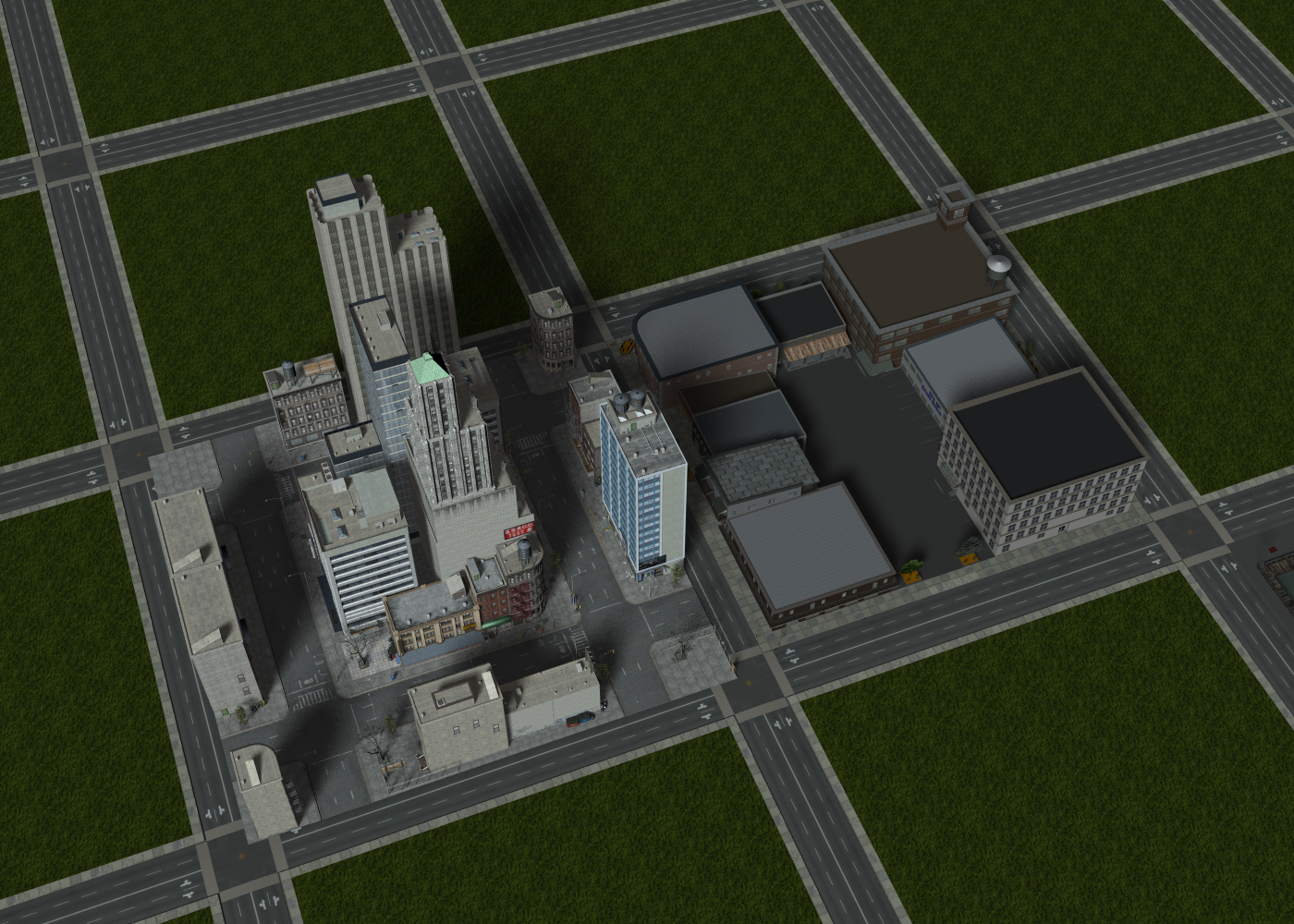
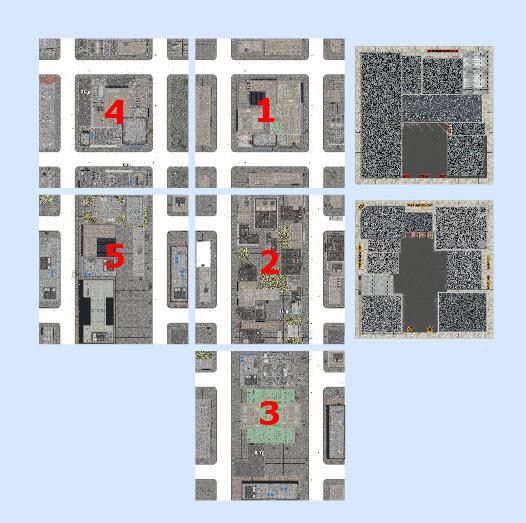
The US3 blocks do not have the same street pattern. Blocks 01 and 04 have one square of buildings in the center with adjoining partial blocks on all 4 sides and an eight block in each corner. Blocks 02, 03, and 05 have a long rectangle of buildings in the center. You can easily see the street pattern in the screen capture below.
One thing you'll notice in distant views is that many of the US3 buildings in the background are high rises compared to the Dreamland buildings in the foreground.
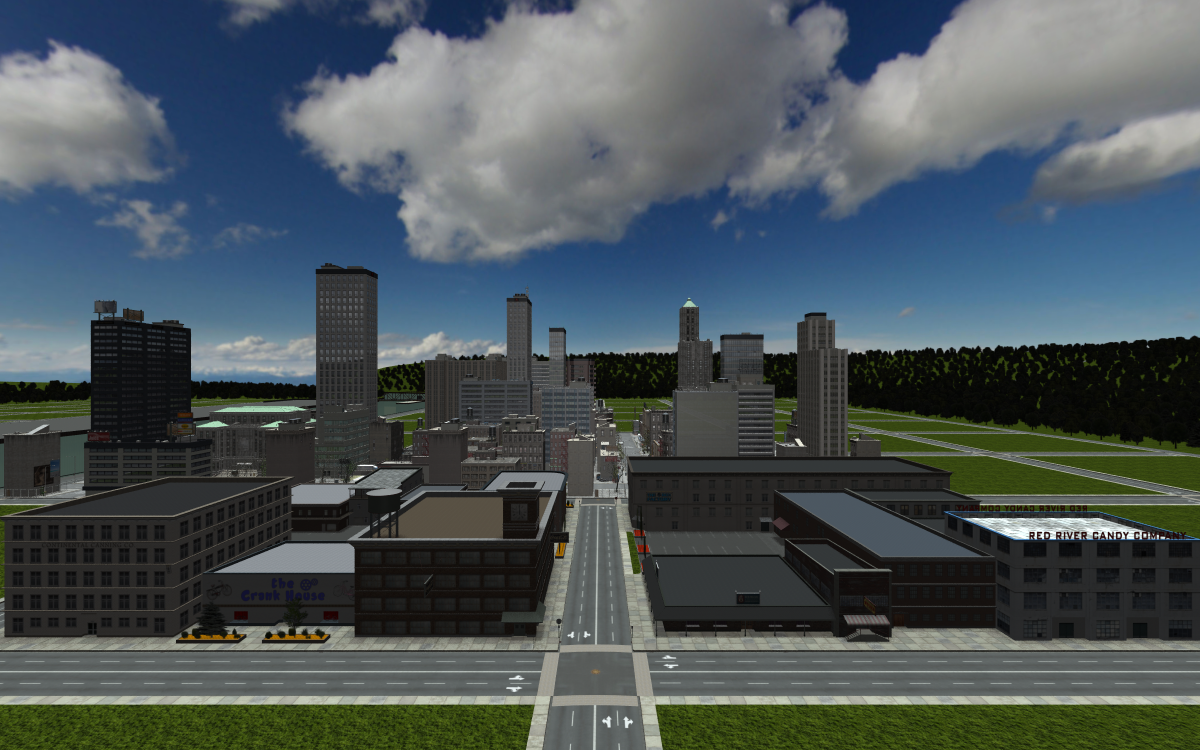
The US3 streets are 1-way with 3 lanes. The RF streets are 2-way with 4 lanes total. The US3 lanes are about 20% wider. I found the RF lanes to be a bit tight for most of the vehicles I was testing, so the bigger lanes are a plus.
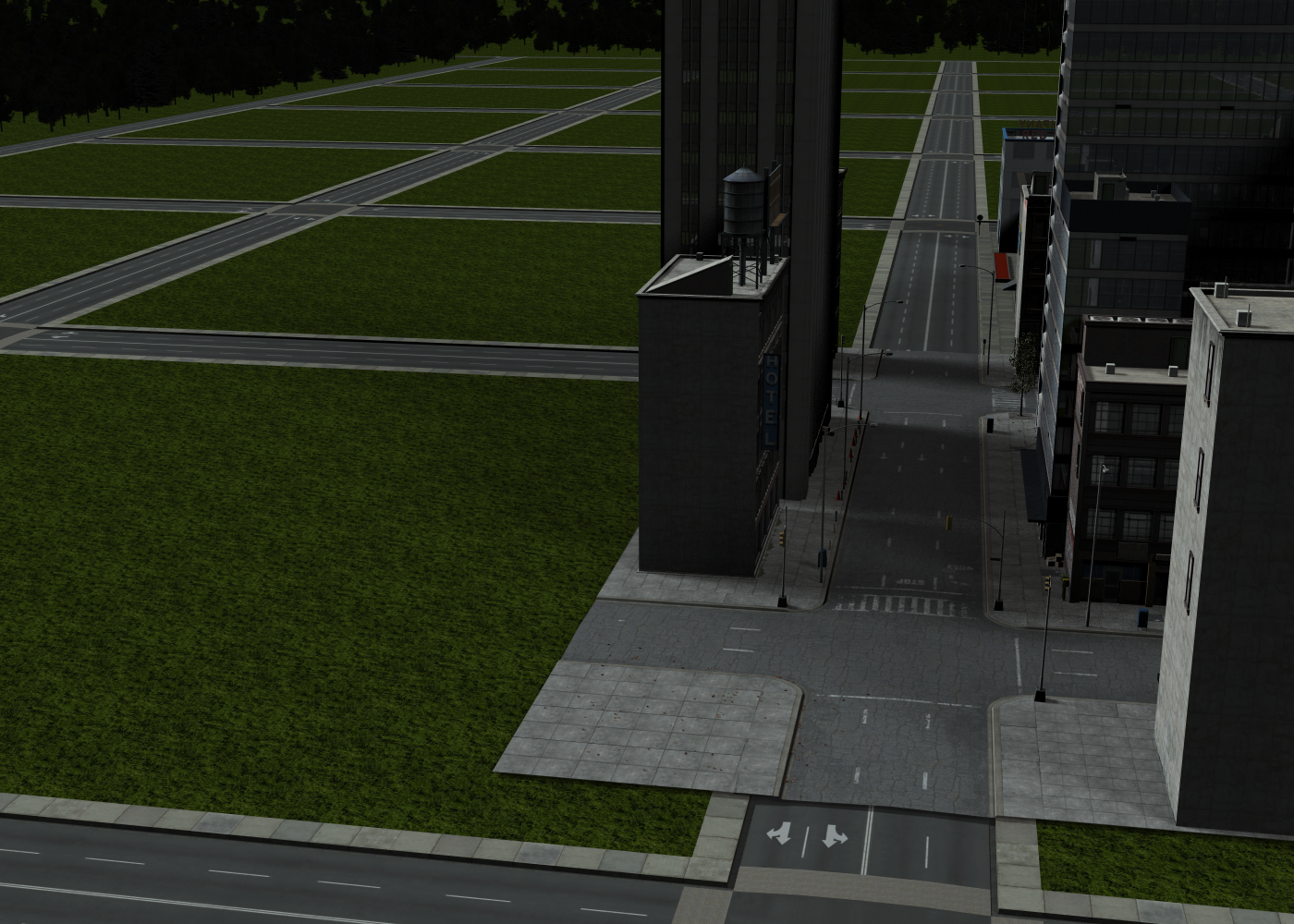
I wondered if the building heights are compatible and they look like they are. This view shows a 4-story building from US3 on left and a 3-story building from DM on the right. Doors and floor levels appear to be of similar heights.
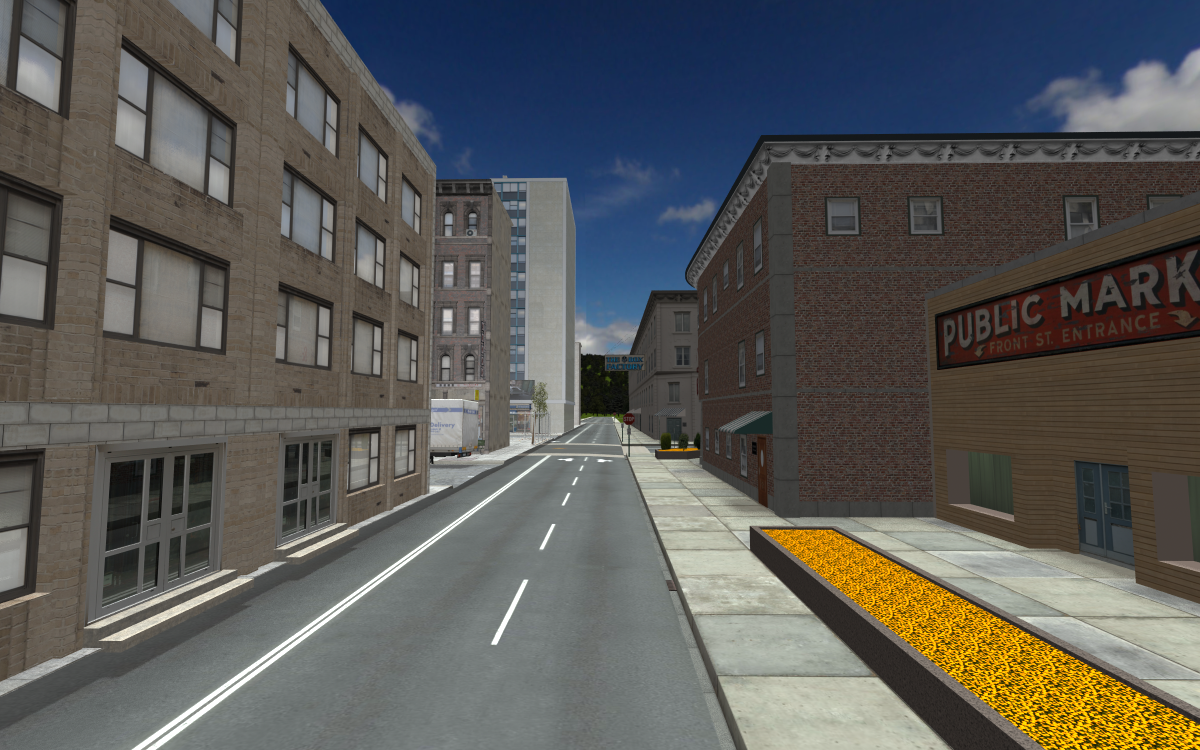
One big difference between the two product lines are the look and details. RF is quite clean, with fresh sidewalks, streets, and building textures. There's some details that load, like stop signs at corners and billboard trees and it also comes with electrical poles with wires you can add. But if you want other common street elements like mailboxes, litter, trash cans, etc., or you want buildings/streets with more variegated textures, you'll have to add that yourself. US3 comes with much of that already in place. The trees are 3D models, there's litter in the gutters, trash bag piles by buildings, mailboxes, street signs, etc.
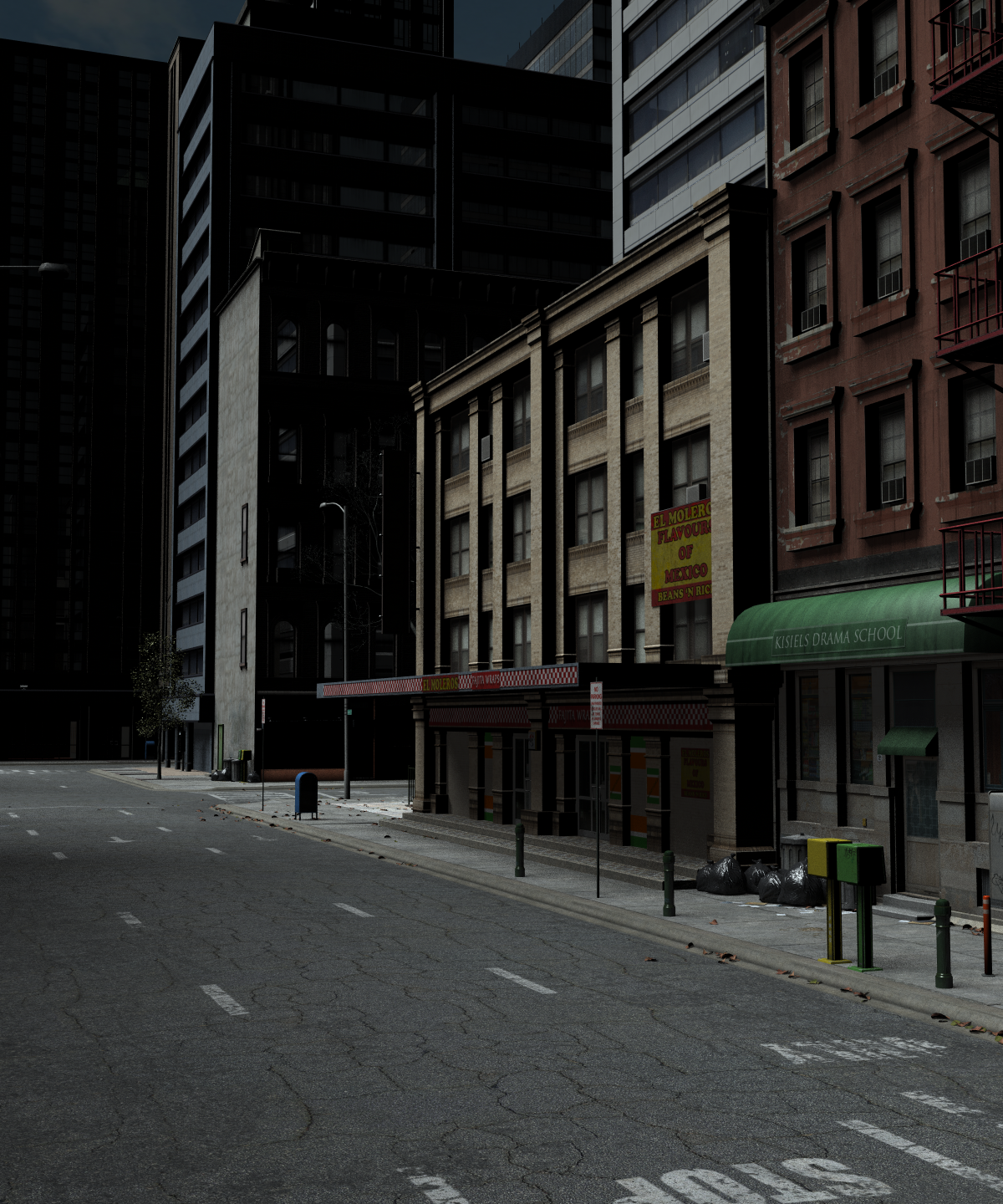
Click on images for larger views. Note these were all 3DL renders just because they render faster.
One way to think of these products is that if you want to build your own city, River Front is a good setting, and as I've shown in this thread, can accept not only Dreamland models but also other products including Urban Sprawl 3 (more on this in a future post). US3 on the other hand gives you an instant city with lots of the tiny details already in place, which is most helpful if your focus is on rendering a city scene with people and vehicles added.
Please, a little more warning when products are Connect only ):If nothing else- it is a great way to see how many would purchase encrypted content if an entire release is made that way. Not so good for vendors who suffer if people refuse, but it's a smart way to test it in marketing. How will they know for sure if they don't test it out?
I often just add products without going into them; I'd got out of that habit, but I will have to change my shopping methods - but spending more time on shopping increases the cost to me; time is more valuable than a dollar or two here or there.
So I can't trust Daz; I'm not saying by this that Daz are untrustworthy - it's a personal thing, and I will change my style of shopping - one method is as shown in the image.
The one thing above all others that is in Daz's favour, is the returns policy, and when there are issues with something, there is a central point of contact.
DRM negates that. If I have to filter all the DRM products out, and remember to check, then that increase in hastle makes other places more appropriate.
Michael and Friends Appreciation Association [Lots of images, please.]I like the little pull on the material where the bits bulge is... makes a nice central point to wonder what's going on there! What can I say, I have a dirty mind! lmao

Yes you do

I must, too, because I love that little bit. It really draws the eyes in. :)
Just had to try out the new Iain from Darwin Mishap, he's amazing and I really love the LIE makeups.
Looks very nice!
The Sinner
Fantastic image!
I think I am finally over my fear of men! While it was fun hosting the contest for the It's Raining Men Again, I have to admit I had a few moments of "What did I get myself into?!" thinking. I ended the contest on testosterone overload and didn't even want to look at another male render! I'm happy to say that I'm currently working on a male render so I think I'm over that. I'll post when I get the kinks all worked out.
I have started looking at this thread again with anticipation. :)
Somewhat New to Carrara QuestionsMissed out a bit on this discussion (sorry, it's been a busy weekend!). My own technique, preference, habit maybe, is somewhere between Phil's and Diomede's. Let me illustrate with a render of what I'm working on right now. It's a little more complicated because the doorways are arches, but in principle it's the same.
You're looking at two rooms joined together by a shallow staircase. Each room has only three sides and each is a single vertex object. The ceiling is another vertex object. The rooms are symmetrical, so the facing walls mirror each other, although the front/back walls are different. Within the vertex model, the walls are separate meshes. I made one wall - three arches joined together. For this, I started with three cylinders rather than a cube. Set them next to each other and bridged between them, then knocked out the middles. Once I was happy, I duplicated the wall for the other side. The end wall just has the central arch enlarged.
The door frames were made by selecting the inside of the arch, duplicating, scaling and adding thickness. Separate cross-piece for the top, which is duplicated around. The doors are separate models, parented and constrained for axis rotation. There's a right side door and a left side door, mirrors of each other, hinges positioned at 0,0. Duplicated and fitted to each door frame. There's a revolving door in the middle, which is no more complicated really than the other doors (again, make one door segment, duplicate & rotate.)
BTW, if you're duplicating meshes, it's preferable to UV map them first (otherwise you'd need to UV map each duplicated part separately). If you're just punching holes in a grid, you probably won't even lose the mapping. That both saves time, and it helps the textures to line up between walls.
Right now, I haven't decided whether to keep the walls in a single vertex object (I can name them and bone them in DS, which allows them to be hidden for camera access etc), or split them into separate vertex objects so they can be moved apart. Generally, the smaller the room is, the more important it is to have walls that can be moved or hidden.
Keep Calm : There's always another Sale (Daily Sale Talk)I'm making an effort to curb my spending here considerably this year. I had to take a good, long hard look at some of the things I've had in my cart (usually clothes and hair) and ask myself "Do I really need this?" Unless it's something substantial at a really deep discount.
I thought the BYOB sale was rather ingenious (even including certain base characters for $5 extra), but if it ended up causing Daz to lose more money than it actually made, then I doubt we'll see anything like it again any time soon, especially since it could be activated with PC+ items that are typically dirt cheap for PC+ members. Same thing with the freebies from the Christmas sale last year... but a lot of those items were either PC+, textures, poses that are included in the pro bundles, or reeeeeeally old items (we're talking Vicki/Michael 3 era). I'm not sure if that makes a difference.
Either way, it will be interesting to see what happens with March Madness this year.
I wonder if they *can* lose more money than they make selling digital content. It seems at a certian point with digital titles delivered electronically, it becomes almost purely profit. I mean, you've got to pay the IT staff and the developers and the utilities and the equipment - but if you're selling something you've already recouped all your costs to CREATE on - it becomes an equation of, "would we make MORE charging more and selling less, or more charging less and selling more?"
I'm inclined to believe the latter is generally the case, if you can scale up sales enough. Businesses can get caught up in seeing discounts as lost profits on money they *think* they should be able to make for an item, versus what the market is actually willing to pay. I think this argument applies to the monetary claims the software industry attributes to piracy. "We lost 20 bajillion dollars to piracy this year."
No, you didn't. You put a price on what you think your product was worth, and then looked at the number of people who stole your stuff, and said, "that is how much we lost."
But at the price you were charging, a huge majority of those pirates would have just skipped your product altogether, if paying had been the ONLY way to get it. You can't lose a sale you never would have made.
Very rarely does a manufacturer underestimate the demand for their product and price it too low. The release of the Mazda Miata may have been the classic modern example of that. It is obvious when this happens, as demand outpaces supply. Most retail businesses have the other problem, they've got a whole lot of widgets to move and they can't seem to find as many consumers as they would like. :)
Not trying to justify piracy, here. Creators should get paid for their labor, and they've got to make enough to cover their costs *and* have a quality standard of living.
The equation here would seem to be, "did the advertising campaigns and subsequent sales make more money than they cost?"
If they did, I suspect we'll see similar sales in the future. My guess is that they know that there is a certain segment that will pay full price when they need content for a project, and there is another that will buy content they don't need when it isn't full price - and getting ALL the money possible from BOTH groups would be MY goal, if I were DAZ. :)In truth, the digital world rarely works that way.. The first point is that at least half of all businesses fail; we simply don't notice when a company has underpriced a product and, instead, just notice that the store on the corner that used to stock the thing you wanted is gone. The second point is that the digital transition didn't eliminate the central cost to business which is people. I endless hear people discussing that digital books should be cheaper since there is no physical printing. Unfortunately, the physical component is the smallest portion of the equation. It is all of that editing, the lawyers, etc... that is the bulk of the cost. What you are paying for when you buy a product is the sweat of the creator and all the people who have to process it. A practical example is the university I work at. We normally buy things through vendor agreements which may or may not give a cheaper price. Every once in a while, someone wants something that must be purchased through Amazon. The trick is voiding the vendor agreement and paying in a way that Amazon can accept adds another $30-40 Us to the cost so it is silly to buy a $5 object from Amazon. What you are getting from having digital assets is the ability to have hundreds of thousands of products in your store and being able to manage them in a sane way; it doesn't mean that they will be any cheaper.
Michael and Friends Appreciation Association [Lots of images, please.]I like the little pull on the material where the bits bulge is... makes a nice central point to wonder what's going on there! What can I say, I have a dirty mind! lmao
Yes you do
It's all good! lmao
Michael and Friends Appreciation Association [Lots of images, please.]I like the little pull on the material where the bits bulge is... makes a nice central point to wonder what's going on there! What can I say, I have a dirty mind! lmao
Yes you do
Michael and Friends Appreciation Association [Lots of images, please.]I like the little pull on the material where the bits bulge is... makes a nice central point to wonder what's going on there! What can I say, I have a dirty mind! lmao
Book Covers


Thanks SO MUCH for the great tutorial. That was fantastic info. I really love your mock covers, and if I ever do a pulp-themed game, I'm either going to use your techniques or try to hire you! One thing I wanted to mention about your covers is that they work so well because you focus on storytelling. As I've read through this forum over the past few months, I keep coming across covers that work and that's almost always part of the reason: The cover tells a story. I'm definitely not positioning myself as an expert on cover design (I struggle with it each and every time), but I have published a few books (some for myself and some for others) and I always try to focus on composition and storytelling (the two usually go hand-in-hand). Looking at your covers, you can tell what's going to happen. Each of the three covers above have only a few elements (2 - 4) with a single central figure. These scenes are all existing in the pause of a single heartbeat right before all hell breaks loose. We know what's about to happen, and you make us want to read the book to find out what happens next. Even though these are mock covers (and based on a style that uses strong color blocking that isn't quite in line with modern tropes), you still nail the fundamentals of GREAT design.
Anyway, now that I read this, I think I'm coming off as a pompus know-it-all. But... we're all here to learn, so I'm going to take off my guest-lecturer's cap and make one final suggestion. If you want to study storytelling in illustrations, do a google search for the works of Norman Rockwell. That man was a MASTER storyteller. From each of his single illustrated covers, you can get the tale he's telling. Note how he uses body language and object placement to set a scene and give us a clue about how the people are reacting. I know that his images are quaint by today's standards, and he worked in a larger space than most of us have (he did full-size magazines and most of us work on smaller, paperback-sized covers), but the basics are there and definitely worth spending an hour or more exploring.
Novica & Forum Members Tips & Product Reviews Pt 7Flash sale- Flipmode and Stonemason. While I would love to get the Winter Castle, Mayan Ruins, etc, I just don't need them anytime soon. How long do the Flash Sales last compared to the Blink Sales- when did these get put on the scrolling banner? It's 10:30ish right now and I just saw them, how long have they been up? A couple hours I presume. IIRC, most of the time Flash pop up around 8pm (Central) or a bit earlier. Never got the hang of the Blink sales, they came and went and I saw comments about them but didn't see several of the vendors referenced as they'd already been changed.
Creating Big City Scenes in DAZ StudioVehicles - Pickup Trucks
Pick-up trucks are common for work and every day use. This scene shows several products. Four trucks use the model from Pick 'em Up Truck. This set give you the basic truck with a few solid color schemes, a camouflage color, and one prop you can add (called commando grill). The far red truck and the yellow truck illustrate this set. The yellow truck also shows you can open a few things up but you won't find the controls on the top level, you have to drill down to the actual item to find the open-close parameter dial. You can open the doors and the back gate as shown. You can also steer the front wheels and adjust the back suspension.
On the Job for Pick 'em Up Truck is an add-on that gives some more complex color schemes (border patrol, construction, police, search & rescue) to the basic truck. Each of these color schemes come in a clean and dirty version (the white truck shows the dirty construction livery). The set also allows you to add several props, some of which are shown on the white and black trucks (antenna, clearance lights, light bar, rack, rails, roll bars). Even though this was a Daz product, it wasn't loaded correctly by DIM. I found the materials in both the smart content and the content library but none of the props. I had to go to the readme to find where they were. Instead of trying to manage getting it right myself, I uninstalled in DIM and reinstalled a fresh copy and the props appeared correctly.
There's another add-on for this set that I don't have. It's the Ole' Horse Trailer. It adds the trailer AND some truck parts: rear fenders, headache rack, toolbox, moon visor, hitch balls, push bumpers, and wheels). Additional materials for these are on the On the Job add-on.
The final truck (the central truck in between the outer four) is a Rendo product called Silverado Truck 2007. It loads white and the different paint schemes do not work in Daz Studio (as they are Poser materials) but you can use shaders to change the color. I added a white and a red shader from Real Paint for DAZ Studio. There are some poses to change the license plate and they do work (I find it odd to go to poses to change textures). You can turn the plate on and off and choose from 5 different plates (or roll your own if you'd like by putting in a license plate image in the Diffuse Color channel).
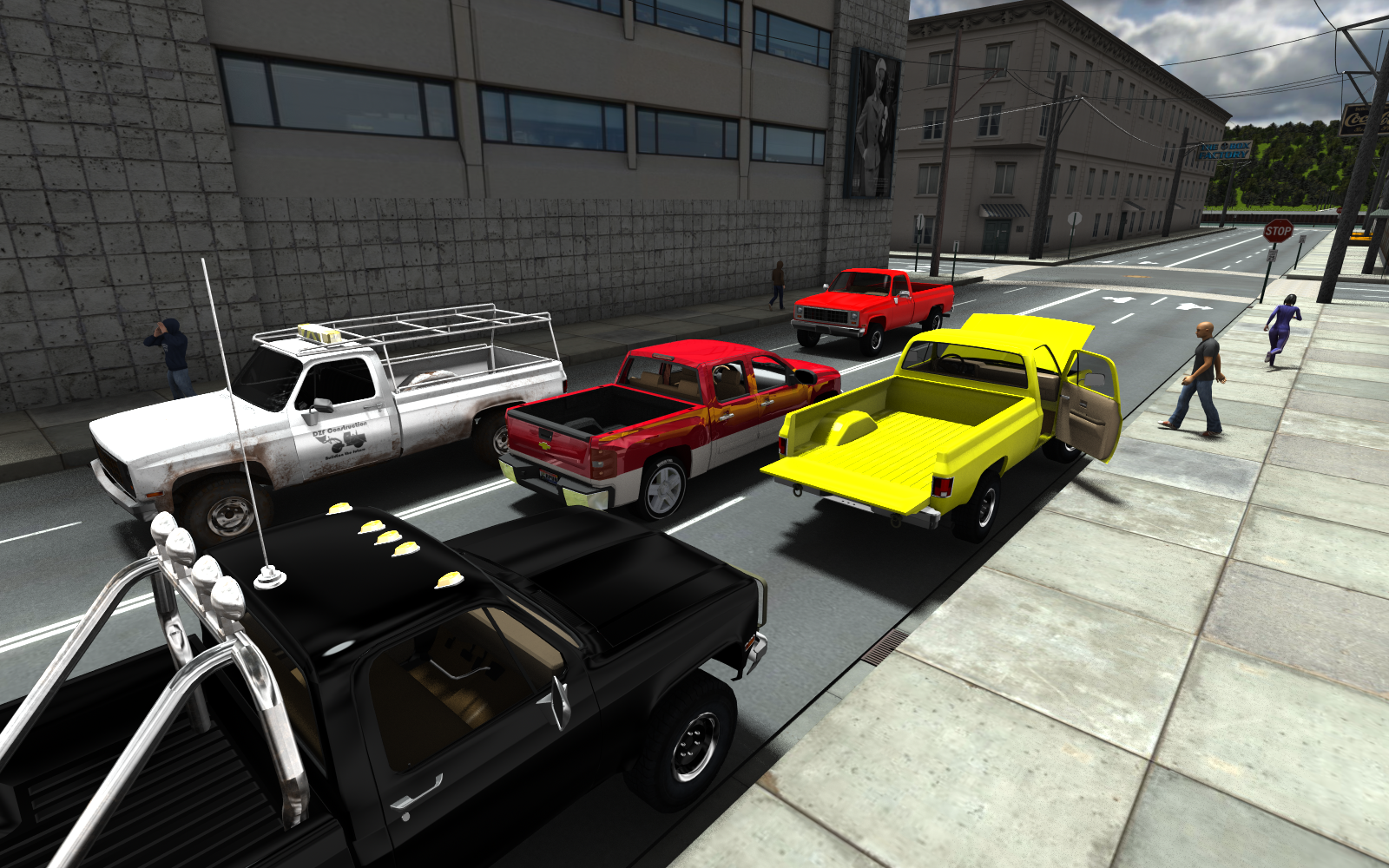
Click on image for larger version.
The Amazing Ever Growing Massive Multi-Figure MuseHaving been a big fan of Neelzonline's works over the years, I've become infatuated with massive multi-figure compositions. I decided to start work on another one and leave it perpetual wip. Each time I add a new figure or figures, I'll come back to this thread and update the image. Reccommendations, comments and feedback appreciated as always. The image is created at 2000 px wide so please expand for a better view. In some case the figures may be very small and in unexpected placed.
Name: Mutantville Central 2017
 The They Stuck Gears on my Convoy Whinging Complaint Thread
squireel nomms = timtams


leetl water towers
 It's Raining Men Again Contest -- Announcement about unclaimed Carrara Prize
Congrats to the winner in the Carrrara section... not sure who it was as I couldn't find it..
Great job though


whoever it was

Daz 3D is part of

Connect
DAZ Productions, Inc.
7533 S Center View Ct #4664
West Jordan, UT 84084Licensing Agreement | Terms of Service | Privacy Policy | EULA
© 2026 Daz Productions Inc. All Rights Reserved.