-
Getting on the 9 train, or not
Torquinox said:
I'm increasingly moving to G8 with a fair amount of G3 and still some G2. I have no mechanism for moving hd morphs across generations. That's a limitation and some of .the earlier work is still great! I'll probably do something with G9 some day. It's just, today is not that day.
...this will let you move G3 morphs to G8, and it's even on sale right now.
https://www.daz3d.com/xtransfer--genesis-3-to-genesis-8-converter
it even works with morph kits. and Genisis X Utilities
Also check Genesis X which as well as the add-ons will let you transfer morphs from Gen4 and G1/G2 to G3 Morphs and shapes transferred to G3 are also transferable to G8 with the above.
https://www.daz3d.com/genesis-generation-x2
https://www.daz3d.com/genx2-addon-for-genesis-2
https://www.daz3d.com/genx2-addon-for-genesis-3 (this will lt you transfer Genesis 2 morphs and shapes to Genesis 3.
All are also on sale.
IRAY Stops workingPerttiA said:
Keiku said:
PerttiA said:
Three lines stand out from your log;
E:/3D Artwork/!Daz Library/data/DAZ 3D/Genesis 8/Female/Morphs/guhzcoituz/New Black Cat/BC Head.dsf (1,1): Syntax error - expected '{' or '['
\src\sdksource\fileinput\dzassetdaz.cpp(7934): Circular ERC!: P3D Amused with ERC ERC [DeltaAdd] > Katie : P3D Amused
\src\sdksource\fileinput\dzassetdaz.cpp(7947): Unsupported formula: /data/Daz%203D/Genesis%208/Female%208_1/Morphs/P3Design/Every%20Day%20Emotions/P3D%20Amused.dsfI noticed things like that. I don't understand why the first line matters as that shouldn't even be used in the file.
It doesn't matter, what is used in the scene, all the morphs you have installed for the base figure (Genesis 8 and 8.1 female) are read when a figure based on those is opened in DS, the dials for them are created and all the interdepencies created.
The "BC Head.dsf" is corrupted and/or incomplete and you need to download and reinstall a working version or remove the morph.
Circular ERC and Unsupported Formula in "P3D Amused" sound serious enough to uninstall.Well, both of those items are fixed. Still having IRAY stop. It's so very strange.
IRAY Stops workingKeiku said:
PerttiA said:
Three lines stand out from your log;
E:/3D Artwork/!Daz Library/data/DAZ 3D/Genesis 8/Female/Morphs/guhzcoituz/New Black Cat/BC Head.dsf (1,1): Syntax error - expected '{' or '['
\src\sdksource\fileinput\dzassetdaz.cpp(7934): Circular ERC!: P3D Amused with ERC ERC [DeltaAdd] > Katie : P3D Amused
\src\sdksource\fileinput\dzassetdaz.cpp(7947): Unsupported formula: /data/Daz%203D/Genesis%208/Female%208_1/Morphs/P3Design/Every%20Day%20Emotions/P3D%20Amused.dsfI noticed things like that. I don't understand why the first line matters as that shouldn't even be used in the file.
It doesn't matter, what is used in the scene, all the morphs you have installed for the base figure (Genesis 8 and 8.1 female) are read when a figure based on those is opened in DS, the dials for them are created and all the interdepencies created.
The "BC Head.dsf" is corrupted and/or incomplete and you need to download and reinstall a working version or remove the morph.
Circular ERC and Unsupported Formula in "P3D Amused" sound serious enough to uninstall.Help with Clothing
What software will I be able to do this? I'm interested since, it doesn't look right.crosswind said:Content creators have no way to make and fix FBM / PBM on the wearables for the character's shape that users customize... If you do need that shape, you have to always fix the distortion yourself.
If the geometry in the area of cleavage / under breasts are badly distorted, a better way is always to export the wearable to external modeling software for fixing and import back OBJ to update the generated FBM / PBM on the wearables, or make a corrective morph.
Help with Clothing
I will have to try this out as soon as I get homeRichard Haseltine said:It needs a custom morph - and ideally it probably needs remapping and retexturing. Currently the morphs in the figure are being projected into the clothing, moving the vertices of the clothing so that they stay in the same position relative to the nearby vertices of the base figure as they had before the morph was applied. The surfaces of the breast have been moved out, but the sternum has not moved - as a result some parts of the clothing have stretched out relative to others. Extreme shapes will always be a problem for any kind of auto-generated morph. You could try aplying a Smoothing Modifier (Edit>Figure>Geometry) to the clothes and then set the Smoothing Type to Generic in the hope of reducing the pinching effect, or you could try applying a dForce modifier and runing a timeline Simulation from the base shape to your shape, but really you need to export the model as OBJ and then use a modelling tool to pull the surface into a more sensible configuration, then load that a new morph (Edit>Figure>Morph Loader Pro - ideally one for each of the morphs used to achieve that shape, being careful to make the morph name and OBJ name match so that the morphs are auto-aplied as needed).
Converting dforce clothing to "nomal"If it is already rigged then what would you want changed? If not, use Edit>Figure>Transfer Utility - but something that is dForce only may well work poorly as purely rigged clothing,unless you pre-simulate to generate lots of draping morphs.
Why are G8 nails messed up?There was a time when that was decent advise, and while it still works it can do more damage than good.
A couple of years back changes were made to DS, now every time you load a figure into DS a new system is forced onto that figure, which flags the figure as having been modified.
As a result if you use "zero figure" then you will zero out settings in the figure that should never be zeroed, and then save those zeroed settings into the figures DSF file when you use "save modified assets", basically breaking the figure.
Not as big a deal with G1 to G8.1, but with G9 you can leave yourself with a totally ****** figure.
If you have to use this method then use "Zero Figure Shape" instead, as that will just zero morph sliders, and wont touch any of the important settings in the figure.
The figure's main DSF file will still be overwritten, but at least you wont have bricked it by zeroing the figure's settings.
LipSync on Daz 4.21?Are the morph included in genesis 3 or they are part of the plugin?
Sorry for all the questions, I'm just trying to find it out if for my purpose before buying it
How to convert G2F poses to G8F without messing everything upWell, if you can't get that to work, I have done a very simple pose transfer script, that takes a pose applied to a G2F figure and applies it to a G8F/G8.1F figure, here: https://www.renderosity.com/freestuff/items/89255/g2f-pose-transfer-to-g8f. It's a bit less convenient to use as you need G2 to be in the scene with the pose, but it's OK for one pose at a time.
Regards,
Richard.
Are G2 items still selling?Drogo Nazhur said:
Faeryl Womyn said:
I still use G2 and buy for G2 if there's a really good sale. I'm kinda in the process of learning to fit stuff from different generations onto other generations.
I tried that but it never seemed to work right for me :(
It's actually a lot easier then you think. Morph Loader Pro allows you to export the item to a chosen program to fit the model you want and import it back to Daz as a morph preset. I recently bought the Mesh Grabber bundle and going to give that a try, thereby reducing the number of steps to make things fit. It's remembering to export and import and save as a new morph present I keep forgetting and get stuck having to refit the item...lol
Are G2 items still selling?I don't bother with the converters for clothes, If I can't make something fit in Daz, then I export the outfit as an obj and import into Blender (use to be Hexagon) to make it fit the required avatar I want it to fit, then delete the model and export the clothing item and import to Daz as a morph preset, then you can keep the rigging and morphs it comes with. Of course it's a problem if there are major differences between models, but there are ways around that as well.
The only thing I can't do this with is footwear, since each model has something different that messes with the mesh if you try to fit to a different model. In this case I simply do the export thing and when I bring it back to Daz, I redo the whole rigging and such and save as a new item(have a folder for these things so as not to forget who actually made them).
One reason I also like the older products is because their texture sizes don't run in the thousands, the majority are 1024 x 1024 and smaller, not 4000 and up, which makes them lighter on the computer and easier to render and animate.
LOL was just about to go on a rant about texture sizes, but you are safe, I stopped myself in time lol
Mesh and Texture Stretching, a way to fix?I wasn't able to put some time into trying this out until today.. putting noob hat back on head (although I never really took it off heh). I feel pretty comfortable in DS, but something this simple kinda defeated me.. after about two hours I gave up.
I did manage to get the Daz to Blender bridge to work but it wouldn't ever let me just send the skirt to Blender, it kept sending the actor and everything. I wasn't able to get the deformation to occur without the skirt being fit-to an actor and the moment I remove the actor from the scene the skirt reverts back to normal, so at the very least I had to have an actor present. This is probably just due to my lack of experience with these sorts of things, as I did feel like I was blindly stumbling around to get this to work in the first place. The only real way I was able to get it into Blender was to export it as a wavefront from DS and then import it normally into Blender, but then ran into other issues that are already commonly reported about the forum (such as loss of textures, etc). I smoothed it out and then exported it as a wavefront from Blender and tried to bring it back into DS but then got lost as to how to make it a corrective morph heh. Since I already have the textures, it wasn't a big deal that they were lost during the transfer, I could always put those back on... I'll look up some more tutorials on creating morphs to try to advance past this part, it's been a while since I made or converted anything into one.
I tried this in Hexagon also, and ended up with some weird results, lol. But I don't have any problems importing and exporting things that way either, so figured it was worth a shot.
Anyway, I'll try at this periodically as my understanding of things improves over time, until I eventually get it right. :)
In the meantime, I found a rather simple workaround.. adding smoothing to the object in DS, and then applying smoothing, will also work.. at least for this item it does. I'm certain this is not the best method of going about it, and I can't say if it'll work with everything I have that stretches out like that--but if anyone finds themselves in a similar situation as me it might work for you as well.
Simple smoothing in DS method:
- Select desired object in Scene tab
- Navigate to Edit on the menubar
- Object submenu
- Geometry submenu
- Choose Add Smoothing Modifier
- With object still selected in Scene, navigate to Parameters window pane
- If skirt is not selected, use dropdown menu to select it
- Click All to show all parameters
- Find Enable Smoothing, tick to "On" if it is not already
- Increase Smoothing Iterations until desired effect is acquired (check for changes in Iray preview mode if nothing is occurring and I can't guarantee this method will work for everything)
Most clothes already come with smoothing modifiers, but I have had to add them to clothing items before for poke-through problems. Check to make sure your clothing item doesn't already have it added first (in parameters), although I don't really think adding a smoothing modifier to something that already has it will harm anything. The higher smoothing and collison iterations you use, the more time to calculate such things is required, and can cause lag in DS when you're trying to work with the model (posing, translating, etc).
@crosswind has the best solution, and if you're able to you should use their posted method.
The right way to export Victoria 4 into, and out of Daz?crosswind said:
Oh... how does that result came from.. by importing a morph or sth. ?
As for Blender / "No delta" issue, I'm sorry that I forgot to mention..., AFAIK, you have to first of all convert V4 to Weight Mapping - General Weight. Then when exporting V4 to OBJ, uncheck "Ignore Invisible Nodes" as there's a hidden node "eyeBrow" on V4 (or unhide it)... otherwise you'll get geometry mismatch error when importing OBJ from Blender to V4 with MLP...
Sorry I haven't replied sooner.
I did that... And it didn't work.
I'm just flabbergasted, and fed up with this. I've got to the point where I've had to leave it, because there's other things that I want to work on.
I do have some good news. A friend got an older version of this morph working in Poser, but the mesh needs correcting (plus, I'll have to pay them to do renders).
Plus, after going through this, I'm not going to become a V4 content creator anytime soon (especially where Daz Studio is concerned).
Thanks a lot for the help though

 Can I block expressions for G8.1 ?
Making the G8 base expressions (and any expressions that are using them) work on G8.1 requires removing dummy/placeholder expressions that are installed to G8.1 morph folders - These dummy/placeholder expression files have no other function than to prevent the base G8 expressions from loading.
The dummy/placeholder files are located in;
...\Data\DAZ 3D\Genesis 8\Female 8_1\Morphs\Daz 3D\Base Pose Head\ (255 files, can be more if you have additional DAZ expression packs)
...\Data\DAZ 3D\Genesis 8\Female 8_1\Morphs\Daz 3D\Expressions\ (24 files, can be more if you have additional DAZ expression packs)
...\Data\DAZ 3D\Genesis 8\Male 8_1\Morphs\Daz 3D\Base Pose Head\ (255 files, can be more if you have additional DAZ expression packs)
...\Data\DAZ 3D\Genesis 8\Male 8_1\Morphs\Daz 3D\Expressions\ (24 files, can be more if you have additional DAZ expression packs)Please make sure you are removing the files from G8.1 morph folders and not G8 morph folders.
Note 1; If you are logging in to DS and letting DAZ Connect (within DS) to install/update your content, you may have these also in an other location that has "\Data\Cloud\" in it's path
Note 2; Do not remove any files from "FACS" or "FACSExpressions" foldersStrand based hairjohara45 said:
It is an intel i9 10900k , Asus Maximus XII Formula, 64gb 3600 Mhz Ram, and an Nvidia RTX 3090ti.
That system seems good on paper and you can expect Daz to work fine with it.
Anytime I load the character with the hair the system takes forever to load the character and editing takes even longer.
Does "load the character with the hair takes forever" mean that when you load each independently they load quickly, but together it is slow?
Loading a character into the scene takes a while if you have many morph products installed. Likewise, loading a heavy hair product can take a while to load into the scene, especially if you have made a very complex hairstyle with many strands (it's unclear if that's the case in your case).
If instead, you mean that the viewport is slow when they are both in the same scene file, for example, if rotating the camera around in the viewport is slow, it could be because the settings are wrong. Ensure Edit>Preferences>Display Optimisation is set to "Best". I think you should expect the viewport to be quite smooth with only a character and hair in the scene.
Also check which Draw Settings you are using in the viewport. The Nvidia preview is slower than the other viewport modes.
Posing a character with many fitted objects will be slow. So it is best to finalise pose before adding hair, clothing, etc.
Posing a character with high Viewport Subdivision (SubD) can be slow also. You can see the SubD level in Paramaters. So best to change Resolution to Base and only use HIgh Resolution after finished editing.
I been wanting to learn more about Dforce but after watching some videos on youtube step by step, for some reason I can't apply all that is being covered. Some of the processes that is being done is just not working as I'm running through it. I may just give up using this program all together as it seems it may not be optimized atleast to work on my computer. Other programs seems to run pretty quickly. Video coverters, VamX and freecad most of which has not been reinstalled after reloading my entire Operating System.
Thanks for you help!
It might pay to be more specific about the problem encountered.
AIUTO...CHI CONOSCE L’ITALIANO? PARTE QUATTORDICIHo visto che Anngun farà Maria Maddalena, in Jesus Christ Superstar a Milano. Speriamo si ispirino a lei per l'omonimo morph :DAIUTO...CHI CONOSCE L’ITALIANO? PARTE QUATTORDICIGeni del marketing, a Natale faranno i morph di Giuseppe, Maria e del bambinello.
Però, devo spezzare una lancia a favore della DAZ, visto che in USA ci sono molti cristiano con confessioni quasi estremiste, magari qualcuno lo compra giusto per fare render a sfondo religioso. Non dimentichiamoci che in USA esiste il supereroe biblico
Daz to 3ds Max Update 1.1Richard Haseltine said:
This week Daz released an update to the Daz to Cinema 4D Update update. Here are the items in the update. Enjoy!
- Fix export issue when for face morphs with changes to Daz Studio in 4.14
- Genesis 8.1 Facs Morph Support. Please note that characters must be selected to export the morphs.
- Now Supports 8.1 Characters
What about 3ds max 2024/2025? I noticed that the last check-in for code was done many years ago. Please continue to support 3ds max for all the versions of Genesis.
x4 PCIe 4.0 bottleneck for RTX A4000, how relevant is it?I agree with TimberWolf 100%.
Something else to keep in mind in regards to file transfers: even the fastest lane takes a while to transfer lots of smaller files. Textures are large, but a scene is usually composed of many other smaller files too (light objects, geometry etc) so you'll never get that onto the GPU in under 10 seconds, regardless of architecture. Even a sphere without textures takes a few seconds to get going.
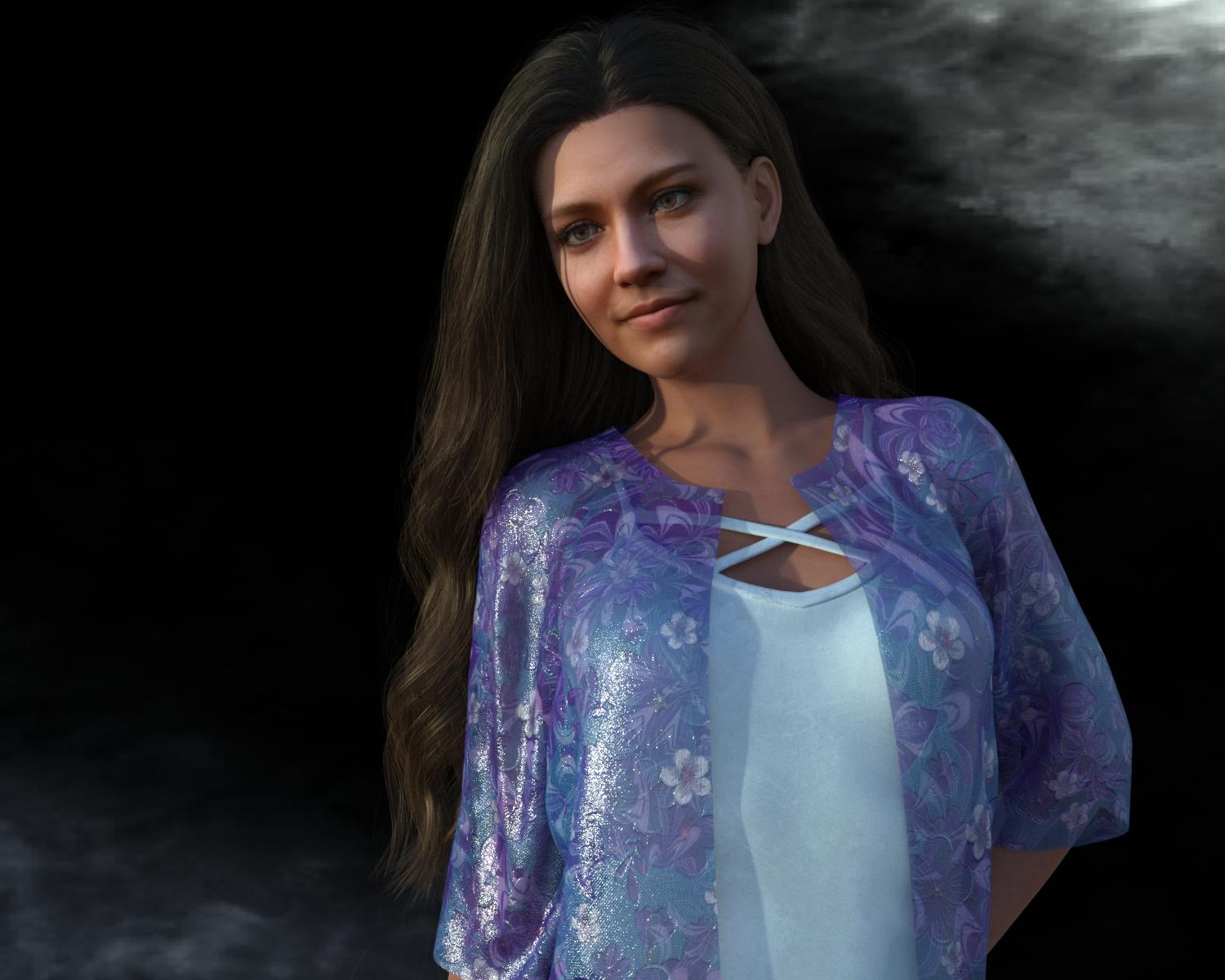
Marahzen's Musings on Creating Characters (and other matters)While Face Transfer/Face Transfer Shapes resolved some issues I had been facing, it introduced a big new one, which has already been mentioned (and seen!) in these ramblings: ugly relics on the resulting texture files. FaceGen produces much cleaner texture files than does Face Transfer Unlimited; and what I began to refer to as "Face Transfer stains", stretches and washouts now stared at me front and center.
For reasons that were (and, frankly, still are) unclear to me, my Altern8 hack seemingly helped minimize the problem a bit, but on a closer look, most of my new characters had stains on the side of the face ...
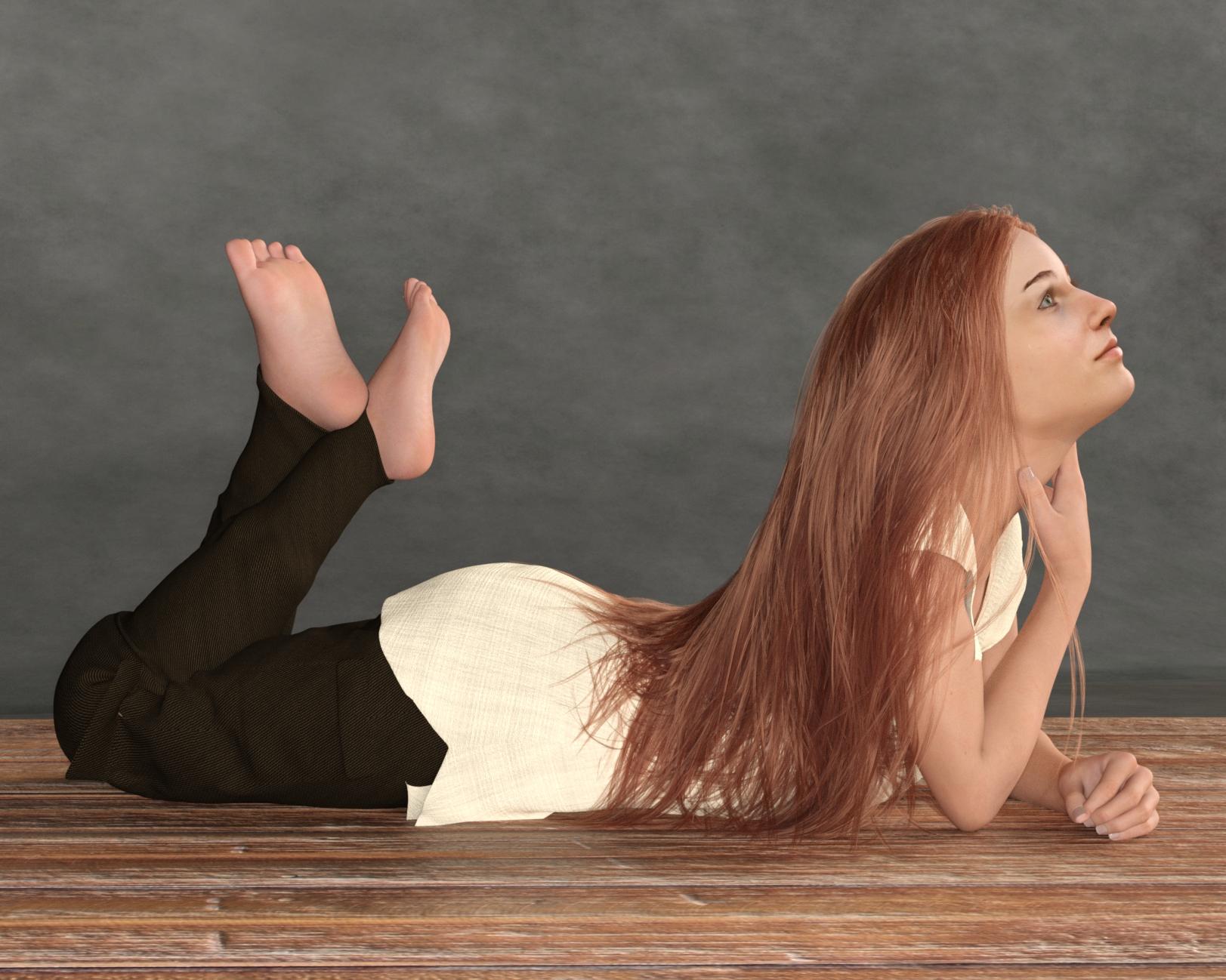
... or obnoxious light/white areas ... (the white around her eyes and cheeks)
... or stretch marks. (you'll see literal stretch marks in various places on the side of his face)
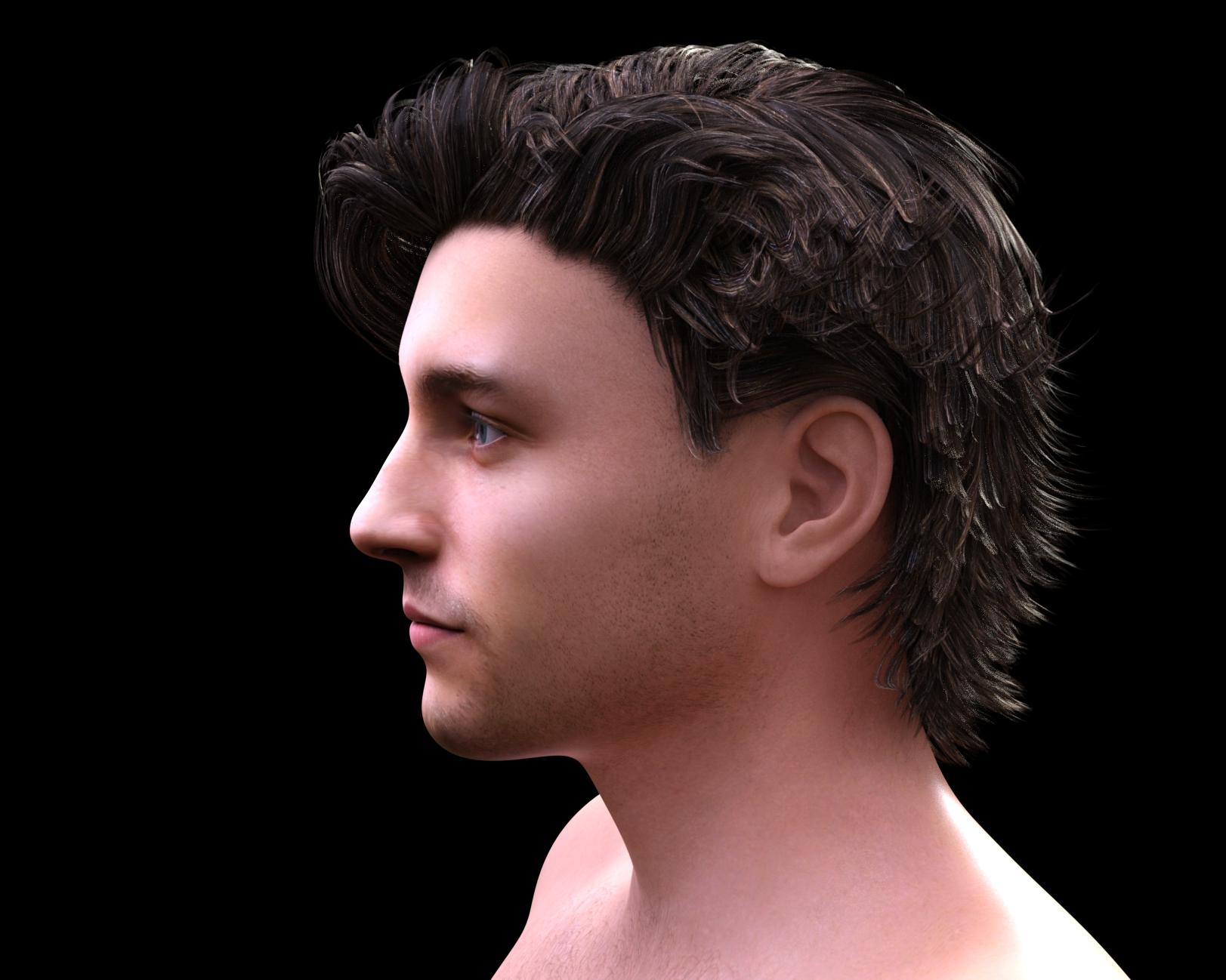
These are relics from the source image and the transfer process. The stains, most commonly on the lower half of the side of the face, are from shadows on the source image and the white areas are from highlights. These are normally present on any image that looks like a natural photo - it looks weird without them, in fact. The stretches seem to represent transfer issues from the edges of the source, often areas that are a bit out-of-focus or hazy.
On top of those predictable trouble spots, the original Face Transfer was very finicky on what it could handle. Remember my snarky comment way back about getting a source image? In fact, I had to do a bunch of updating of some of my original source images from 2020 to make them more FT-friendly. To create a starter set of textures from a source image with the original Face Transfer, you have to start with a head-on image, with a neutral expression, the right kind of lighting, and no glasses, no long hair, no facial hair ... nothing that gets in the way of the basic face that you wouldn't want as a permanent part of the textures.
I started off with rudimentary skill at best with Photoshop, and thanks to the University of Google, spent a lot of time reviewing training videos to teach myself how to use the various tools, to create masks, and perform various other Photoshop wizardry. If anyone cares, maybe one day I'll illustrate my favorite Photoshop tips and tricks that any total amateur* can do but as a general comment, I'll just say that I've done my time of fixing source images and the resulting textures. [*I was and still am a total Photoshop amateur. I'm hoping that one day I'll cross paths with someone who isn't, who can teach me how to properly fix these things.]
Daz 3D is part of

Connect
DAZ Productions, Inc.
7533 S Center View Ct #4664
West Jordan, UT 84084Licensing Agreement | Terms of Service | Privacy Policy | EULA
© 2026 Daz Productions Inc. All Rights Reserved.