-
DELETE
Am I alone in feeling that Victoria 8 is actually not very nice looking? The proportions look wrong to me. She's athletic, but heavily endowed up top. To get that sort of muscle definition, her body fat percentage must be low, which would reduce her bust considerably. How many Olympic athletes are large up top?
OK, I know that was a silly little winge. However I admit that generally I prefer the shape of DS women to those I see in my local area. Many local residents being wider than they are tall, needing to turn sideways to get through a door, fag in hand, pushing a double buggy and shrieking at their other demon spawn, shiny with sweat from the effort of waddling 100 yards, leggings and stretch top unable to meet due to the 6" wide roll of fat hanging out and limp greasy hair completing the look.
[Released] RSSY Hair Converter from Victoria 4 to Genesis 8 Female [Commercial]I'm having a hard time. I picked up G3 to G8, and M4V4 to G8 converters. I also picked up the ZippityDo hair, and its not working.
First, with the G3 hair, it works, but its inside the skull just a little bit which needs to be tweaked. (Honestly wish you guys tossed in a few extra clean up morphs like 'Expand All' at minimum.) This issue is a concern for me since I use Octane, and intersecting planes cause black lines everywhere.
Is this only for the G3 hair or for M4Vr hair. From the manual: Hair Shrinkage error on certain Prop or HR2 Hairs. On some, but not all prop or .hr2 hairs, such as the Cuffed Tail 2, an error in Daz Studio's Prop to Figure process can occur. Sometimes when the prop is converted to a figure, the hair shrinks down suddenly and does not fit even after conversion. If this happens, a morph has been included to fix it. Your converter hair contains a morph called "Head Size Correction." After conforming your hair to Genesis 8, dial in the Head Size Correction morph from the Actor/Converter Morphs group in your Parameters tab until the hair is the correct size and in the correct position again.
If I attempt to convert the V4 ZippityDo Hair I get empty files that don't do anything.
18:19:25 GMT-0600 (Mountain Daylight Time): WARNING: Forcing Conversion of Hair Items
18:19:25 GMT-0600 (Mountain Daylight Time): Executing Script
18:19:25 GMT-0600 (Mountain Daylight Time): Selecting Preset: D:/Daz 3D/My Library/Runtime/libraries/Hair/V4 - ZippityDo Hair/ZippityDo Hair.hr2
18:19:25 GMT-0600 (Mountain Daylight Time): Converting hair from D:/Daz 3D/My Library/Runtime/libraries/Hair/V4 - ZippityDo Hair/ZippityDo Hair.hr2 to D:/Daz 3D/My Library/People/Genesis 8 Female/Hair/!Victoria 4/V4 - ZippityDo Hair/ZippityDo Hair.duf
18:19:40 GMT-0600 (Mountain Daylight Time): Copy Icons from D:/Daz 3D/My Library/Runtime/libraries/Hair/V4 - ZippityDo Hair/ZippityDo Hair.hr2 to D:/Daz 3D/My Library/People/Genesis 8 Female/Hair/!Victoria 4/V4 - ZippityDo Hair/ZippityDo Hair.duf
18:19:40 GMT-0600 (Mountain Daylight Time): Copy Categories from D:/Daz 3D/My Library/Runtime/libraries/Hair/V4 - ZippityDo Hair/ZippityDo Hair.hr2 to D:/Daz 3D/My Library/People/Genesis 8 Female/Hair/!Victoria 4/V4 - ZippityDo Hair/ZippityDo Hair.duf
18:19:40 GMT-0600 (Mountain Daylight Time): Cannot find assets for old preset /Runtime/libraries/Hair/V4 - ZippityDo Hair/ZippityDo Hair.hr2
18:19:46 GMT-0600 (Mountain Daylight Time): Execution Complete.
I can send you the duf file, I do suspect that Octane may be interfering, but the G3F conversion worked so I'm curious to know why and what I can do about it.
Could you post the Daz Log with extra information? Perhaps that will tell me what is happening.
[Released] RSSY Hair Converter from Victoria 4 to Genesis 8 Female [Commercial]I'm having a hard time. I picked up G3 to G8, and M4V4 to G8 converters. I also picked up the ZippityDo hair, and its not working.
First, with the G3 hair, it works, but its inside the skull just a little bit which needs to be tweaked. (Honestly wish you guys tossed in a few extra clean up morphs like 'Expand All' at minimum.) This issue is a concern for me since I use Octane, and intersecting planes cause black lines everywhere.
If I attempt to convert the V4 ZippityDo Hair I get empty files that don't do anything.
18:19:25 GMT-0600 (Mountain Daylight Time): WARNING: Forcing Conversion of Hair Items
18:19:25 GMT-0600 (Mountain Daylight Time): Executing Script
18:19:25 GMT-0600 (Mountain Daylight Time): Selecting Preset: D:/Daz 3D/My Library/Runtime/libraries/Hair/V4 - ZippityDo Hair/ZippityDo Hair.hr2
18:19:25 GMT-0600 (Mountain Daylight Time): Converting hair from D:/Daz 3D/My Library/Runtime/libraries/Hair/V4 - ZippityDo Hair/ZippityDo Hair.hr2 to D:/Daz 3D/My Library/People/Genesis 8 Female/Hair/!Victoria 4/V4 - ZippityDo Hair/ZippityDo Hair.duf
18:19:40 GMT-0600 (Mountain Daylight Time): Copy Icons from D:/Daz 3D/My Library/Runtime/libraries/Hair/V4 - ZippityDo Hair/ZippityDo Hair.hr2 to D:/Daz 3D/My Library/People/Genesis 8 Female/Hair/!Victoria 4/V4 - ZippityDo Hair/ZippityDo Hair.duf
18:19:40 GMT-0600 (Mountain Daylight Time): Copy Categories from D:/Daz 3D/My Library/Runtime/libraries/Hair/V4 - ZippityDo Hair/ZippityDo Hair.hr2 to D:/Daz 3D/My Library/People/Genesis 8 Female/Hair/!Victoria 4/V4 - ZippityDo Hair/ZippityDo Hair.duf
18:19:40 GMT-0600 (Mountain Daylight Time): Cannot find assets for old preset /Runtime/libraries/Hair/V4 - ZippityDo Hair/ZippityDo Hair.hr2
18:19:46 GMT-0600 (Mountain Daylight Time): Execution Complete.
I can send you the duf file, I do suspect that Octane may be interfering, but the G3F conversion worked so I'm curious to know why and what I can do about it.
Her beautiful smile....Hi,
I could not resist "Margot" and invited her in my Library. She is beautiful. And also beautiful is her smile on the promo images. In the "Additional Products used in Promo Images: " is listed "20 Unique Smiles for Genesis 8 Female" but.... these smiles are all open smiles. Is this beautiful smile with closed lipps creatable with this product? Or how? I don't have the 20 unique smiles but I adore hers.... so.... How?
Thank you and best wishes!
https://www.daz3d.com/margot-for-victoria-8
https://www.daz3d.com/20-unique-smiles-hd-for-genesis-8-females
Distorted mesh of a custom Victoria 4.2++I'm going to try to explain my problem in English (but I don't know English !!)
I still use DAZ Studio 4.6.0.18 Pro Edition (64-bit) on Windows 10.
I have been using the Victoria 4.2 ++ figure and many other items for DAZ and Poser for years without significant problems. The only problems I have had until recently were related to the performance of my PC.
Now, for no apparent cause, I'm having trouble with V4.2 custom figures some of which when I load the scene (or scene subset, it's the same) show some distorted parts of their mesh.
In some cases I have been able to correct the distortion by injecting again the INJ Base V4 and INJ Morphs ++ morphs, found in content/Runtime/Libraries/Pose/DAZ's Victoria 4/Morph Injections, so I could continue working with the scene and render ( but when opening the scene after saving it, figure V4.2 showed the distortion again).
In another case I was able to correct the distortion by applying a duf file previously saved in content/Presents/Shaping.
Now the problem occurs to me with V4.2 figures that have never given me problems. And the most frustrating thing is that none of the other "solutions" works. I can't find a way for the figure to display correctly.
Do you know or remember what generates this distortion and how can I correct it?
Daz Studio in the WildI saw something on the BBC news page and thought - that's Victoria... so I watched the video :-)
Navigating to a certain product in Daz PA Commercial Products forumForgot to mention I am in fact using G2 charaters only not Victoria 6. I realize there is a product to convert V6 seperately.
IRAY Photorealism?Basically provided you have a good shader setup you shouldn't need seperate diffuse and translucency maps: see those high res head scans for instance. Seperate translucency maps (especially the gen 3 style) are a bit of a hold over from pre chromatic SSS days when we were trying to approximate a 3-layer skin shader
This is interesting, j cade.
Yes, I am using the Victoria 7 translucency map. Do you mean we should have the veins, discoloration, and everything else 'under' the skin right on the diffuse map?
Yep! Well theoretically with a dedicated skin shader you could possibly do something fancier, where the veins specifically scatter a different ammount or hey, you could have them modeled so when you bend the hand back the're more pronounced, but in Iray you can't mix volumes the way you can mix sss shaders in engines like cycles so all you're doing is blending the 2 textures on the surface anyway + introducing a bunch of diffuse which is far more inaccurate than any theoretical drawback of veins on the surface (and to reiterate they were always on the surface anyway)
3) this preset is designed primarily to work with your diffuse texture set in translucency color. since you're at 100% sss the diffuse channel is completely ignored and how translucency textures get set up has a way to much variance to try to make a shader that works consistently (does anyone know of a script that copies diffuse textures over to translucency? doing it manually is getting tedious)
I definitely have some settings that go against some of the suggestions you'll see in the forums (probably in this thread). Transmitted color is nigh white, and scattering direction is forwards but I will defend these
And because its way easier to share a preset than settings, heres the shader preset, just select the surfaces you want and click apply it will only effect translucency and volume and leave your textures alone (theres even a thumbnail because every now and then I go through and render thumbnails of my presets. Thumbnails for my 10 or so skin presets is nothing on rendering thumbnails for all the HDRI from HDRI Haven or my presets for the daz characters to click their makeup onto any other character... why put them on the diffuse overlay but create a preset that also reaplies the base texture too...why daz)
I tried your preset & it turned skin the prettiest light blue (like Hindu Goddess Kali) but I think it was because I was using Sun & Sky.
Thank you for sharing, @j_cade!
Is this only for characters without a true SSS map for translucency?
It turned my gal very, very pale and you could see her veins very clearly, LOL.
What texture were you using and was it from gen3? as mentioned the shader works best if you plop the diffuse textures into translucency as there's a lot of variation in how translucency textures are set up (and since it is 100%sss the diffuse slot is completely igored). Most gen 3 textures will turn blue because they have light, desaturated translucency textures, which honestly wont work with any shader settings with sufficiently high translucency
I probably should have bolded note 3
3) this preset is designed primarily to work with your diffuse texture set in translucency color. since you're at 100% sss the diffuse channel is completely ignored and how translucency textures get set up has a way to much variance to try to make a shader that works consistently (does anyone know of a script that copies diffuse textures over to translucency? doing it manually is getting tedious)
Basically provided you have a good shader setup you shouldn't need seperate diffuse and translucency maps: see those high res head scans for instance. Seperate translucency maps (especially the gen 3 style) are a bit of a hold over from pre chromatic SSS days when we were trying to approximate a 3-layer skin shader
Some gen 8 translucency maps will work, if they're sufficiently similar to the diffuse.
Also think about those desaturated translucency maps logically. they're desaturated, but then you slap on a wash of color by setting the translucency color red. all you're doing is losing color variation.
I have a similar problem, in my case I used the iole HD for kala for G8 maps and the results are far from satisfactory to me, I've read the whole conversations and I'm still confused because I don't know what I'm doing wrong.
I only plopped the diffuse textures into translucency color as you said to the face, lips and ears to get a comparison (the rest of the body uses their translucency maps) and I can only get a darker and more orange skin, maybe the original diffuse maps are dark and very orange and the TC multiplied that? :/
(spectral rendering set to faithful cie1964 / burn highlights 0 / crush blacks 0.1 and gamma 3.00, saturation into a default value, also I used a single spotlight with a very high lumen value like 200000.0)
Also, here is the custom shader I was using, with your preset and without maps
I dont have Iole, so I can't look specifically, but I will say when running the shader preset through the characters I did have while making it the 2 characters I had by far the most issues with were Stephanie and Olympia, both of whom share a similar complection to what it looks like Iole has, my guess is they're a bit more saturated, and something about that is tweaking with my shader setup. certainly in general for gen 8 the diffuse texture is a bit darker than the translucency so swaping them in is going to darken things a bit
1) 100% sss works better with spectral, theres less red glow and you can use slightly higher values for things like scattering distance which is good since values below .01 tend to make things go wierd (you can get by pretty well with the SSS in the 90% range not using spectral, I should probably take some time to investigate how much of a difference it really makes in the end)
Have you noticed if you have spectral off and then set SSS color value to max it messes it up,
but if you dial it down just a bit it works fine?
sometimes i settle with this instead of turning on spectral. spectral seems to cause issues with seams sometimes.
3) this preset is designed primarily to work with your diffuse texture set in translucency color. since you're at 100% sss the diffuse channel is completely ignored and how translucency textures get set up has a way to much variance to try to make a shader that works consistently (does anyone know of a script that copies diffuse textures over to translucency? doing it manually is getting tedious)
your preset is awesome, thanks a lot, but applying your preset still doesnt make emily lighter, this is what i got (diffuse and transluency are set to diffuse map)
did you have some kind of super bright lights shining on her?
forwards vs back scattering: I find that in strong lighting front scattering looks infinitely better. Front scattering softens up the shadows in a relatively natural way whereas back scattering looks super cg and crunchy. Irays shadow terminator problems are bad enough without help
compare SSS direction .30 :)
SSS direction -.30 :(
I never really understood SSS anisotropy. To me it just looks like - makes it more diffuse and + makes it more translucent, lol. But I agree i prefer +
all in all I prefer exporting models to blender lol. It just eliminates so much guesswork.
 sigh
sighMy lighting setup for setting up skin is as neutral as I can get it. Generally when I'm tweaking for a skin I'll set it up like this and then try and tweak things so the character rendered matches the color of the texture as closely as possible

The wierd glow is my favorite bug! Thats why I like spectral you can push the settings without things going completely skrewy... on the other hand that seam bug is not my favorite bug.
all in all I prefer exporting models to blender lol. It just eliminates so much guesswork.
sighNo arguments there, Skin is so much easier, hair takes way less memory the bumpmapping is so inexplicably better Im actually confused, unfortuunately I havent found a good way around manually loading scads of textures and have yet to find a good way to incorporate it into my workflow of "set up all the lights hair material and then decide I want to just tweak the pose a tad oop now I'm changing the pose entirely and using different clothes"
oh and the ability to make glass still actually refract but not cast shadows I really miss that one, It makes eyes sooo much easier
IRAY Photorealism?Basically provided you have a good shader setup you shouldn't need seperate diffuse and translucency maps: see those high res head scans for instance. Seperate translucency maps (especially the gen 3 style) are a bit of a hold over from pre chromatic SSS days when we were trying to approximate a 3-layer skin shader
This is interesting, j cade.
Yes, I am using the Victoria 7 translucency map. Do you mean we should have the veins, discoloration, and everything else 'under' the skin right on the diffuse map?
AIUTO...CHI CONOSCE L’ITALIANO? PARTE DODICIAh e ecco un altra cosa che non mi piace di certi "artisti"è che sono dei "copycat" quando fanno dei prodotti....cioè non prendono ispirazione da...ma copiano e riproducono una cosa o un personaggio....che so....tipo Tanos della Marvel, gli cambiano nome e pensano di fare i furbi! Non ci mettono nulla di loro!
C'è un sito "specializzato" in questo!

In pratica puoi comprare e usare legalmente personaggi di giochi o serie famose anche commercialmente senza dover pagare royalties.

Intanto alla DAZ:
https://www.daz3d.com/james-for-christian-8https://www.daz3d.com/massive-metal-skin-textures-for-genesis-8-males
https://www.daz3d.com/da-dforce-super-villain-armor-for-genesis-8-males
https://www.daz3d.com/fwsa-hayley-hd-for-victoria-7
https://www.daz3d.com/dynamic-supersuit-set-1-worlds-finest
https://www.daz3d.com/superheroines-pack-for-g-suit-2-hd
(e non riesco a trovare il costume di Wonder Woman, quelllo fatto per Genesis 8)
Infatti stanno cambiando tutto...non le vedrete più cose così sfacciatamente copiate.
Piuttosto che preoccuparsi degli eventuali "look-alike" dovrebbero concentrarsi sui bug del software.

In fondo fino a che non fanno una copia spudorata di Mickey Mouse o Goofy non credo che nessuno si lamenterà.Ah e ecco un altra cosa che non mi piace di certi "artisti"è che sono dei "copycat" quando fanno dei prodotti....cioè non prendono ispirazione da...ma copiano e riproducono una cosa o un personaggio....che so....tipo Tanos della Marvel, gli cambiano nome e pensano di fare i furbi! Non ci mettono nulla di loro!
C'è un sito "specializzato" in questo!
In pratica puoi comprare e usare legalmente personaggi di giochi o serie famose anche commercialmente senza dover pagare royalties.
Intanto alla DAZ:
https://www.daz3d.com/james-for-christian-8https://www.daz3d.com/massive-metal-skin-textures-for-genesis-8-males
https://www.daz3d.com/da-dforce-super-villain-armor-for-genesis-8-males
https://www.daz3d.com/fwsa-hayley-hd-for-victoria-7
https://www.daz3d.com/dynamic-supersuit-set-1-worlds-finest
https://www.daz3d.com/superheroines-pack-for-g-suit-2-hd
(e non riesco a trovare il costume di Wonder Woman, quelllo fatto per Genesis 8)
Infatti stanno cambiando tutto...non le vedrete più cose così sfacciatamente copiate.
Senno possono fare una bella cosa, mettono tutto free e salvano capra e cavoli

No.

Decisamente non funziona così, Crios.AIUTO...CHI CONOSCE L’ITALIANO? PARTE DODICIAh e ecco un altra cosa che non mi piace di certi "artisti"è che sono dei "copycat" quando fanno dei prodotti....cioè non prendono ispirazione da...ma copiano e riproducono una cosa o un personaggio....che so....tipo Tanos della Marvel, gli cambiano nome e pensano di fare i furbi! Non ci mettono nulla di loro!
C'è un sito "specializzato" in questo!
In pratica puoi comprare e usare legalmente personaggi di giochi o serie famose anche commercialmente senza dover pagare royalties.
Intanto alla DAZ:
https://www.daz3d.com/james-for-christian-8https://www.daz3d.com/massive-metal-skin-textures-for-genesis-8-males
https://www.daz3d.com/da-dforce-super-villain-armor-for-genesis-8-males
https://www.daz3d.com/fwsa-hayley-hd-for-victoria-7
https://www.daz3d.com/dynamic-supersuit-set-1-worlds-finest
https://www.daz3d.com/superheroines-pack-for-g-suit-2-hd
(e non riesco a trovare il costume di Wonder Woman, quelllo fatto per Genesis 8)
Infatti stanno cambiando tutto...non le vedrete più cose così sfacciatamente copiate.
Senno possono fare una bella cosa, mettono tutto free e salvano capra e cavoli
AIUTO...CHI CONOSCE L’ITALIANO? PARTE DODICIAh e ecco un altra cosa che non mi piace di certi "artisti"è che sono dei "copycat" quando fanno dei prodotti....cioè non prendono ispirazione da...ma copiano e riproducono una cosa o un personaggio....che so....tipo Tanos della Marvel, gli cambiano nome e pensano di fare i furbi! Non ci mettono nulla di loro!
C'è un sito "specializzato" in questo!
In pratica puoi comprare e usare legalmente personaggi di giochi o serie famose anche commercialmente senza dover pagare royalties.
Intanto alla DAZ:
https://www.daz3d.com/james-for-christian-8https://www.daz3d.com/massive-metal-skin-textures-for-genesis-8-males
https://www.daz3d.com/da-dforce-super-villain-armor-for-genesis-8-males
https://www.daz3d.com/fwsa-hayley-hd-for-victoria-7
https://www.daz3d.com/dynamic-supersuit-set-1-worlds-finest
https://www.daz3d.com/superheroines-pack-for-g-suit-2-hd
(e non riesco a trovare il costume di Wonder Woman, quelllo fatto per Genesis 8)
Infatti stanno cambiando tutto...non le vedrete più cose così sfacciatamente copiate.
Saree Problemshttps://www.daz3d.com/saree-for-genesis-8-female-and-victoria-8
Am I just doing something wrong here?
I see there's a lot of adjusters under the Shaping tab but it would be nice if the skirt would
automatically try to conform to the body the way most skirt items do.
Is there a setting I'm missing here or is there a way I can add this option?
Even better if I could convert it to a d-fore item. Is that possible?
Waqas
3D Art Freebie Challenge-May 2020-"Flowers" -Main Thread Only3D Art Freebie Challenge May 2020 "Flowers"
[Best watched at full size for details.]
"Another Red Tulip" (A.R.T.)
Starring: Victoria 8
The tale:
Victoria is crazy about flowers and because the tulips have almost finished blooming she took her bike to pick them before they disappear again ...
Soundtrack:
The Emotions - Flowers (©1976) https://www.youtube.com/watch?v=D_WuTv3_WWs
COUNTABLE FREEBIES: (Alphabetic order)#01! Android Hair for G8F by SquarePeg3D
https://www.patreon.com/sp3dresources/posts?tag=hair&filters[tag]=hair (item 6)#02! Black-Eyed Susan by Lisa's Botanicals (HiveWire3D Stay Home Spread Hope freebie until May 31)
https://hivewire3d.com/shop/stay-home-spread-hope/black-eyed-susan.html **#03! Blue Tit by AdamThwaites (Most-Digital-Creations)
https://www.most-digital-creations.com/blue_tit.htm#04! Cute Rainbow Tattoos by MysticArtDesign
https://sharecg.com/v/92233/gallery/21/DAZ-Studio/Cute-Rainbow-Tattoos **#05! dForce Lantern Sleeve Lolita Dress for G8F(Base) by junuehara
https://sharecg.com/v/95748/view/21/DAZ-Studio/dForce-Lantern-Sleeve-Lolita-Drees-for-G8FBase **
[Customized texture]#06! DOA 6 Marie Rose - Head and Body Morphs for G8F by TritiumCG
https://www.deviantart.com/tritiumcg/art/DOA-6-Marie-Rose-Head-and-Body-Morphs-for-G8F-825236730 **#07! Iray car related shader presets 'megapack' by Tom2099
https://www.deviantart.com/tom2099/art/Iray-car-related-shader-presets-megapack-539622361#08! My Heart Necklace for Genesis 8 Female by amyaimei
https://www.deviantart.com/amyaimei/art/My-Heart-Necklace-for-Genesis-8-Female-729010047#09! Pansy by Lisa's Botanicals (HiveWire3D Stay Home Spread Hope freebie until May 31)
https://hivewire3d.com/shop/stay-home-spread-hope/pansy.html **#10! Sunflowers HDRI by Sergej Majboroda
https://hdrihaven.com/hdri/?c=outdoor&h=sunflowers#11! Super Morphing Tree 2020 by Design Anvil
https://www.facebook.com/DESIGN-ANVIL-427676333955561/app/212097992149339/ (1st item)#12! Tulips by Lisa's Botanicals (HiveWire3D Stay Home Spread Hope freebie until May 31)
https://hivewire3d.com/shop/stay-home-spread-hope/tulips.html **#13! Vintage Bicycle by AnimaGemini (HiveWire3D Stay Home Spread Hope freebie until May 31)
https://hivewire3d.com/shop/stay-home-spread-hope/vintage-bicycle.html **
NO-COUNT ITEMS:--- AllenArt Iray Jewelry Shaders by AllenArt (Still available on DeviantArt)
--- Free Iray Outdoor Lights by Dreamlight
--- Nose Ring 01 for G2F, G3F and/or G8F by AllenArt
PURCHASED/PAID FOR ITEMS: (I got them for free)$1. Iray 13 Shades of Brunette for DAZ Studio by Daz Originals
https://www.daz3d.com/iray-13-shades-of-brunette-for-daz-studio **
[Used on Android Hair]$2. Victoria 8 by Daz Originals
https://www.daz3d.com/victoria-8 ***1 E-mail address required
** Registration required
#x! Countable Items (Bold ones are used by me for the first time I think.)
--- No longer available freebies
++ Free with DAZ Studio (or the Essentials)
$x. Purchased/Paid For Item
Rendered with DAZ Studio 4.10.0.123 (nVidia Iray)Other free software used: GIMP v2.10.18 and Irfanview 4.54
Postwork: used the AltaLux Image Enhancement Filter (Effect) by Stefano Tommesani that comes with Irfanview and some filters (oa) that come with GIMP.
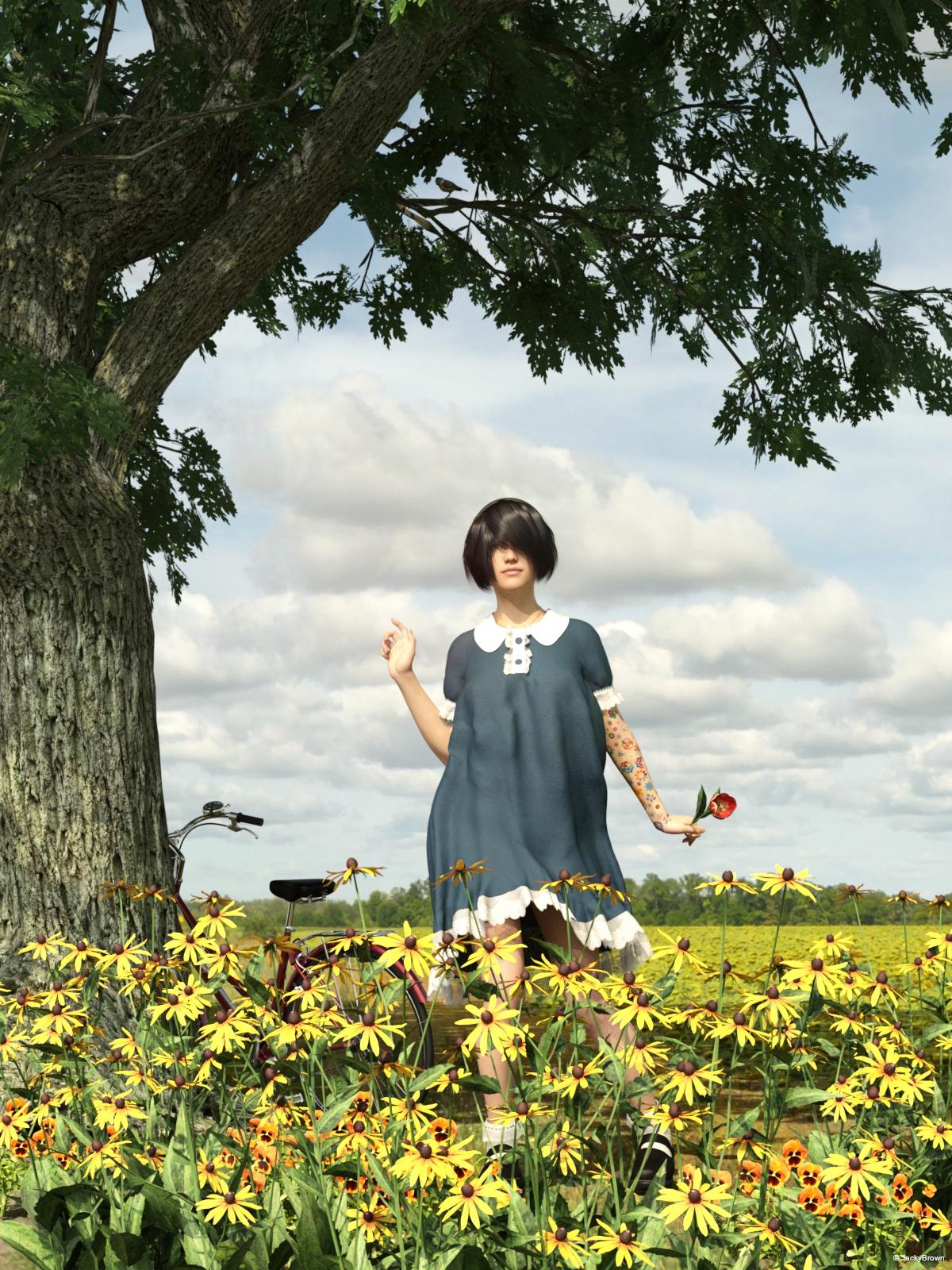
"Another Red Tulip" (A.R.T.)
The older generation: Victoria 2/3, Michael 2/3 and their children rendersDesert Dancer
Here are Victoria and Michael TWO. And their pets ... LOL
DazStudio 4.11 3Delight renderCredits:
Victoria 2 - Daz3d
Spring of '76 - Tamsin Character - 3D Universe
Subsurface Skin Shader - Tofusan
Gypsies & Genies - Anton Kisiel
Gypsies & Genies Textures 3 - Silverleif Studios
Anemone Hair - 3Dream, Mairy
Michael 2 - Daz3d
CDIBoris - Capsces
JebM2 - BluEcho
Subsurface Skin Shader - Tofusan
DNA_TempleGuard - Traveler
Gargoyle Hound - Daz3d
Desert Hounds - philosophersegg/Sparky
Easy Environments: Oasis - Flipmode
Morphing Magic Carpet - HyperKnux
Big Pillow - Runtimedna (Poser5 content)
Jewels of Architecture Volume 1 - Moyra (Textures for Carpet & Pillow)
Fat Jar - Runtimedna (Poser5 content)
Core Lighting 2 - Lantios (modified)Nice! Aww those gargoyles are cute:)) Had to visit the store for a check- wishlisted:) Love this from the product page:
Textures and Poses
- 500 by 3500 detailed texture map(no bump needed)
The older generation: Victoria 2/3, Michael 2/3 and their children rendersDesert Dancer
Here are Victoria and Michael TWO. And their pets ... LOL
DazStudio 4.11 3Delight renderCredits:
Victoria 2 - Daz3d
Spring of '76 - Tamsin Character - 3D Universe
Subsurface Skin Shader - Tofusan
Gypsies & Genies - Anton Kisiel
Gypsies & Genies Textures 3 - Silverleif Studios
Anemone Hair - 3Dream, Mairy
Michael 2 - Daz3d
CDIBoris - Capsces
JebM2 - BluEcho
Subsurface Skin Shader - Tofusan
DNA_TempleGuard - Traveler
Gargoyle Hound - Daz3d
Desert Hounds - philosophersegg/Sparky
Easy Environments: Oasis - Flipmode
Morphing Magic Carpet - HyperKnux
Big Pillow - Runtimedna (Poser5 content)
Jewels of Architecture Volume 1 - Moyra (Textures for Carpet & Pillow)
Fat Jar - Runtimedna (Poser5 content)
Core Lighting 2 - Lantios (modified) Report sales errors here: "There's Always Another Sale™"
All right, a Michael 8 Sale, I wonder how many of today's releases will be for Victoria 8!
90% of them.
It was only 53%!
To be fair, you could autofit everything to a male character..
Report sales errors here: "There's Always Another Sale™"All right, a Michael 8 Sale, I wonder how many of today's releases will be for Victoria 8!
90% of them.
Report sales errors here: "There's Always Another Sale™"All right, a Michael 8 Sale, I wonder how many of today's releases will be for Victoria 8!
Possible to put 3rd party items in Smart Content Products?Hi all. I purchased some items from outside of Daz and want to use Smart content in Daz Studio to view it. On the Files side- no problem. But on the other side/section Products I don't know how. Ideally like with Daz bought products for example Victoria- I click on her picture and then all her stuff is together (iray/3d delight skins, makeup options, etc). Is there a way to do this with 3rd party items? Thanks in advance!
Daz 3D is part of

Connect
DAZ Productions, Inc.
7533 S Center View Ct #4664
West Jordan, UT 84084Licensing Agreement | Terms of Service | Privacy Policy | EULA
© 2026 Daz Productions Inc. All Rights Reserved.