-
No 3rd birthday party for Victoria?
Soooooooo was I not invited to the party or did Vicky's birthday go by without celebration this year lol?
I don't know from experience, but I understood from chat here in the forums that Vicky's birthday has historically been made a banner/event and that her G8 version was "born" on 15th June 2017. Surely 3 isn't too old for a birthday party!

We are in July, I think there was something in June.
Yeah I know, 12th July, so we're nearly a month off her "birthday" now. I remember there was "All the Vicky's for FREE" in March or April, but no event in June unless I totally spaced and missed it ?
They did offer both the Michael and Victoria 7 Pro Bundles for $1,99 per piece for a day for PC-members, at June 1st......
I expect that the two people who didn't already own them took advantage of the offer.
Jack posted at the beginning of the June PC+ sale that one of the reasons for having the sale was because a lot of new people had recently joined the platinium club. As such I suspect a lot of these did not own M7 and V7 pros, as most new users will likely invest in Genesis 8. Therefore I imagine there was a lot more than 2 that did not have those bundles.
Just because new faces in the forums are quite rare, doesn't mean there aren't new buyers.
No 3rd birthday party for Victoria?Soooooooo was I not invited to the party or did Vicky's birthday go by without celebration this year lol?
I don't know from experience, but I understood from chat here in the forums that Vicky's birthday has historically been made a banner/event and that her G8 version was "born" on 15th June 2017. Surely 3 isn't too old for a birthday party!
We are in July, I think there was something in June.
Yeah I know, 12th July, so we're nearly a month off her "birthday" now. I remember there was "All the Vicky's for FREE" in March or April, but no event in June unless I totally spaced and missed it ?
They did offer both the Michael and Victoria 7 Pro Bundles for $1,99 per piece for a day for PC-members, at June 1st......
I expect that the two people who didn't already own them took advantage of the offer.
What was your first DAZ purchase, and how long ago?Hmm... July 12, 2008. Victoria 3. 0 base, head and body morphs and deformers, and a Daz Studio registration fee for Daz 2.3.3.146.
No 3rd birthday party for Victoria?Soooooooo was I not invited to the party or did Vicky's birthday go by without celebration this year lol?
I don't know from experience, but I understood from chat here in the forums that Vicky's birthday has historically been made a banner/event and that her G8 version was "born" on 15th June 2017. Surely 3 isn't too old for a birthday party!
We are in July, I think there was something in June.
Yeah I know, 12th July, so we're nearly a month off her "birthday" now. I remember there was "All the Vicky's for FREE" in March or April, but no event in June unless I totally spaced and missed it ?
They did offer both the Michael and Victoria 7 Pro Bundles for $1,99 per piece for a day for PC-members, at June 1st......
No 3rd birthday party for Victoria?Soooooooo was I not invited to the party or did Vicky's birthday go by without celebration this year lol?
I don't know from experience, but I understood from chat here in the forums that Vicky's birthday has historically been made a banner/event and that her G8 version was "born" on 15th June 2017. Surely 3 isn't too old for a birthday party!
Character converter from V4?Use Generation 4 textures on Genesis 8 with these products:
https://www.daz3d.com/legacy-uvs-for-genesis-8-michael-4
https://www.daz3d.com/legacy-uvs-for-genesis-8-victoria-4
There are a number of products that convert the textures to IRAY, I'm using this one:
Mystique for Genesis 8 Female(s) [Commercial]I'm getting close to the finish line... been working on this upcoming product for over 16 weeks now and have scraped a handful of items that just didn't live up to my expectations. Scraped items include two bras, a different choker, a pleated skirt with suspenders, mesh style shirt, asian style top, and previous versions of the stockings and pantyhose. The new stockings are called Universal stockings because, by design, you can get many different looks such as knee highs, fishnets, wide bands, etc and all included through various material expansions that will be available with release. The stockings material library will feature over 70 material options. You can expect close to that many for the other main clothing items as well. Many G8F micropressure HD morphs are and the newly official Mystique breasts, with two styles supported and unsupported. Also every clothing item has been indiviidually tailored to directly support the following chracters- Aiko 8, Aubrey 8, Bridgett 8, Charlotte 8, Eva 8, Jenni 8, Meo Lin 8, Monique 8, Sahira 8, Stephanie 8, Victoria 8, and Bodybuilding Details. The following is a complete list of items included:
1. Veil
2. Head Jewelry (earringsx4, eyebrow piercings x4, nose ring, lip piercings x3)
3. Neck Frill/Collar
4. Corset Choker (laces up in back)
5. Blazer
6. Lace Bra
7. Lace Gloves
8. Strappy Garter Underwear
9. Pantyhose (not yet teased)
10. Universal Stockings
11. Exotic Heels
I have yet to submit this to Daz so anything can change. I still have at least 1 more week of work in finishing up some morphs and materials. Which reminds me to bring up that this product comes with a lot of clothing morphs - Adjustments, Fitting, Undressing, and Material Specific.

The base outfit will come with a handful of starter materials but basics: Black, Taupe, White, Red, Blue, Pink. Additional styles and colors will be available through the texture expansions. There's a lot of styles and customization options! For example: Fishnets with large holes include HD pressure morphs where the skin is being pressed down by the individual netting lines. Here's some early renders of the basic mats. I will tease more once Daz has accepted my submission. In the meantime, I will be teasing more promo art on my artstation account.

 Michael 4 to Genesis 8 Converter?
You need this to use M4 textures on G8M: https://www.daz3d.com/legacy-uvs-for-genesis-8-michael-4 (You'll need to resave the material presets in .duf format first)
There's no direct tool to convert morphs from M4 to G8M, but you can use GenX2 and its add-ons to convert them from M4 to G3M, and then Character converter or Xtransfer to go from G3M to G8M.
Does anyone sell a M4 character that has been converted to Genesis 8?
I am wondering if buyng the converter is best for something that I might only need to do once.
I am sorry but I am a bit confused. Can the M4 textures be converted to Genesis 8?
In the genX products I don't see any mention of gen4?
In reply to the bit I've highlighted in red: From the Genesis Generation X2 product page:
Genesis Generation X2 (short GenX2 or just GenX) transfers morphs from legacy Poser figures to Genesis figures and between different versions of Genesis.
...[snip]...
The GenX2 plugin includes support for the generation 4 Poser figures (Victoria 4, Michael 4, and Kids 4) as well as for Genesis (version 1). Further figures are supported by add-ons sold separately. To transfer morphs from or to Genesis 2, the GenX2 AddOn for Genesis 2 is required.
So yes, it does natively transfer gen4 characters and/or individual morphs to Genesis "1". To get to Genesis 3 you would need that Genesis 2 AddOn and the Genesis 3 AddOn.
HS dForce BreastI bought the product. Its great. There's two ways of setting it up.
Basic Setup: Hamster includes a new base genesis 8 female. You dial in the character. Add the breast attachments. Pose the character and run the sim. You can check on the gallery. I put up two demo images using Lyoness' new model Karsyn. Its good test on Karsyn, because the model has larger breasts but are also droopy breasts as opposed firm breats. So it gives dForce more to move to so to speak.
Advanced Setup: This is where I'm having trouble. I'm trying with adding a weight map. For example, I load Victoria 8 (non HD). I add a dynamic dforce to her. I add the dForce weight map node. But going to tools settings, the Add Map button is greyed out. I can't add map.
Assuming I could add a map then I'd add Hamster's Base G8F model to the scen and copy and paste the weight maps from Hamsters G8F to Victoria's 8 Weight Map Node. Then add breast attachment to Victoria 8. Lastly add any modifers, pose Victoria and run the sim.
Hamster includes documentation on how to use it.
In my opinion, this product could replace all the squish and breast control dial ins. Its that good of product. If I could only figure out why I can't add a weight map, I could make greater progress. Anyone could help me with that I'd appreciate it.
Wow, there is a user manual, you have to dig to find it though. Its placed in a folder called of all things "Usermanual" whereas most merchants place it in the general folder with their name or sometimes in the documentation.
HS dForce BreastI bought the product. Its great. There's two ways of setting it up.
Basic Setup: Hamster includes a new base genesis 8 female. You dial in the character. Add the breast attachments. Pose the character and run the sim. You can check on the gallery. I put up two demo images using Lyoness' new model Karsyn. Its good test on Karsyn, because the model has larger breasts but are also droopy breasts as opposed firm breats. So it gives dForce more to move to so to speak.
Advanced Setup: This is where I'm having trouble. I'm trying with adding a weight map. For example, I load Victoria 8 (non HD). I add a dynamic dforce to her. I add the dForce weight map node. But going to tools settings, the Add Map button is greyed out. I can't add map.
Assuming I could add a map then I'd add Hamster's Base G8F model to the scen and copy and paste the weight maps from Hamsters G8F to Victoria's 8 Weight Map Node. Then add breast attachment to Victoria 8. Lastly add any modifers, pose Victoria and run the sim.
Hamster includes documentation on how to use it.
In my opinion, this product could replace all the squish and breast control dial ins. Its that good of product. If I could only figure out why I can't add a weight map, I could make greater progress. Anyone could help me with that I'd appreciate it.
Is Genesis 8 Going to Stick Around a While?I'm still on DAZ 4.8 on my old pc (will update after i upgrade computer, i think), so i use G3 and G8 (G8 a bit limited, but for my current needs still enough), so... hopefully by the time new generatio comes out, i'll be up to date :D
Meanwhile, curious to see what else DAZ work on, stuff like dforce, hair system, etc etc
Well Aiko 3 is still available as are Victoria 4 and other old products; that suggests that Genesis 8 wll still be available for those who want to use it for a long time.
Some of old products disappeared now though in ~recent years, i was not quick enough to get them.
Given how many of the actual PAs have disappeared over the years, that's hardly surprising. There number of PAs who worked on the first three generations of DAZ figures who are still actively selling is getting to be a pretty small list. My general attitude these days is that if something I want is in the store for more than two years and then disappears before I can buy it, that's my fault, not the store or PA's.
Hylas' corner
Another person posing prettily while staring into the middle distance. Apparently that's all I have the energy for these days :)
I know I've used Soraya's skin several times in the past but this might actually be my first time rendering her. If so it was high time... I think she's very pretty.
Picked up Dreamlight's LA Pool for a good price. I kinda assumed speed and convenience were the main selling points of that product but it took me longer than expected to set up this simple scene. The lighting just didn't quite seem right and I ended up adding several additional lights. I'm also not entirely sure what that floor is supposed to be made of; I turned up its glossy roughness because it was rather shiny out of the box. I'm not going to return the product, but I'm not sure it entirely met my expectations. Maybe I have to spend a little more time with it.
Freebies:
Dress by Adam Thwaites: https://www.most-digital-creations.com/g8f_classy_dress_2.php
Pose by Zeddicuss: Pose by Zeddicuss: https://www.zed3d.com/shop/pinup-pose-11-20-compiled-g3f/
Pose Converter by Agent Unawares: https://www.deviantart.com/agentunawares/art/G3F-to-G8F-World-s-Greatest-Pose-Converter-709591348The Doctor Appreciation threadI would just like to get some good Doctor morphs for G8 (especially Jody Whitaker). I have enough G8 models that I could come up with a texture/skin somewhere.
That's what are used to say about Michael and Victoria 4 , and as you can see by scrolling through the thread from page one till now several people have come up with morphs for these characters depicting various doctors with the promise of sharing only to bugger off and never be heard from again. So good luck with that
MONSTER MANUAL/MONSTERS & TREASURE DAZ3d Style
DRYADS:
DAZ ENTRY: Sadly, there is no Current (Gen 8) model in the Daz Store... so, I will look for the next newest, which seem to be a Victoria 4 (egad!)
Slender Stephanie 6
DESCRIPTION:
The beautiful tree sprites of mythology. Dryads are each a part of
their own respective tree and will stay within 40 Meters of their trees. They are shy and
non-violent, but they have a powerful Charm Person spell with a +10% chance of
succeeding, and anyone who approaches/follows a Dryad is likely (90%) to have
the spell thrown at him. Anyone charmed by a Dryad will never return from the
forest. Dryads have exact knowledge of the woods around them.
EFREET: Another one that was difficult... so I went with
SF Auras Genesis 8 Male
DESCRIPTION: These creatures are similar to the Djinn, but their basis is in fire and
they tend to be Chaotic. Their fabled home is the City of Brass. They are enemies
of the Djinn. The Efreet are otherwise like Djinn, with damage scored equal to
that done by a Giant (two dice, 2-12 points), and they can carry up to 10,000
Gold Pieces weight. In addition they can create a Wall of Fire and they can become
incendiaries. They will serve for 1001 days.
ELEMENTALS: There are four types of Elemental: Air, Earth, Fire, and Water
FIRE ELEMENTAL DAZ ENTRY:Frosty and the Matchstick Man HD for Genesis 8 Male(s)
WATER/AIR (These are more difficult than I first thought... So if I have to pick an asset, I'll choose
SF Auras Genesis 8 Female And then just change the color to fit Water/Air the best
EARTH ELEMENTAL DAZ ENTRY: Muud for Genesis 3 Male
GARGOYLES: DAZ ENTRY Gargoyle for Genesis 8 Male

DESCRIPTION: As depicted in medieval architecture, the Gargoyle is a reptilian
beast with horns, talons, fangs, bat-like wings, and often bipedal. They are hostile
and generally (75%) attack with no provocation regardless of the fact that they
may be attacking other Chaotic creatures. They are at least semi-intelligent, and
usually can be relied upon to behave with forethought and planning. Only magical
weapons/attacks affect Gargoyles
GHOULS
DAZ ENTRY Grave Ghoul HD for Genesis 8 Male
DESCRIPTION: As stated in CHAINMAIL for Wights, Ghouls paralize any normal
figure they touch, excluding Elves. They otherwise melee in the regular fashion
and are subject to missile fire. Any man-type killed by a Ghoul becomes one.
GIANTS: Giants act as mobile light catapults with a
200' range. Due to their huge weapons all Giants will score two dice of damage
when hitting an opponent. Wandering Giants will carry from 1,000 to 6,000 Gold
Pieces with them in their usual copious shoulder sack. Note that there can be
many types of Giants including the following:
Giant Type
Hill Giant
Stone Giant
Frost Giant
Fire Giant
Cloud Giant
GNOLLS: Gnolls are hyena-headed, evil humanoids that wander in loose tribes. Most gnolls have dirty yellow or reddish-brown fur. A gnoll is a nocturnal carnivore, preferring intelligent creatures for food because they scream more. A gnoll is about 7-1/2 feet tall and weighs 300 pounds.
Gnomes
Goblins
Gorgons
Gray Ooze
Green Slime
Griffons
Hippogriffs
Hobgoblins
Horse Light
Horse, Draft
Horse, Heavy
Horse, Medium
Hydras
Insects Large
Insects Small
Invisible Stalker
Kobolds
Lycanthropes
Medusae
Men
Minotaur
Mule
Mummies
Nixies
Ochre Jelly
Ogres
Orcs
Pegasus
Pixies
Purple Worms
Rocs
Sea Monsters
Skeletons
Specters
Treants
Trolls
Unicorns
Vampires
Wights
Wraiths
Wyverns
Yellow Mold
ZombiesIs Genesis 8 Going to Stick Around a While?I'm still on DAZ 4.8 on my old pc (will update after i upgrade computer, i think), so i use G3 and G8 (G8 a bit limited, but for my current needs still enough), so... hopefully by the time new generatio comes out, i'll be up to date :D
Meanwhile, curious to see what else DAZ work on, stuff like dforce, hair system, etc etc
Well Aiko 3 is still available as are Victoria 4 and other old products; that suggests that Genesis 8 wll still be available for those who want to use it for a long time.
Some of old products disappeared now though in ~recent years, i was not quick enough to get them.
Help me figure out anatomical elements for Genesis 8I also have the same Genitals question , I am completely new to Daz, so feel free to correct me if I'm wrong, as far as these victoria, Micheal models or what not, they are just G8M & G8F's alter model with another face correct? if so I rather buy the daz orignal pro bundle where I can at least do my own customerization. can someone just link me the bundle that will including Genitals feature for both G8M & G8F? if I need to buy 2 seperate bundle I guess that's fine too.
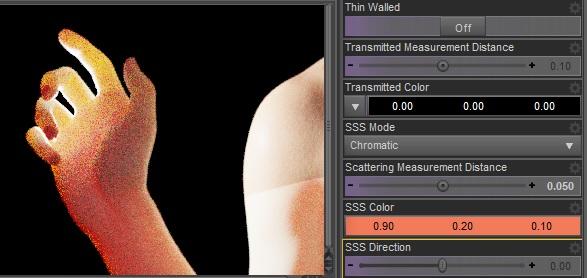
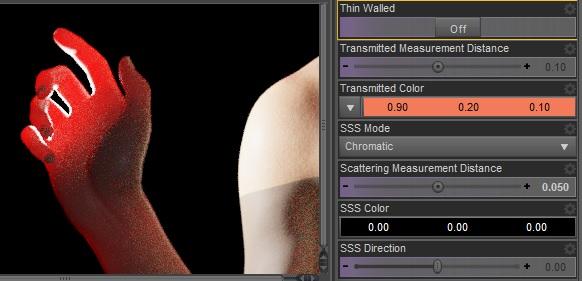
IRAY Photorealism?Back to iray. Below there's a little test showing scattering vs transmission. I did it to show why scattering can't be used instead of transmission or vice versa, since I see some "freedom" around on using and/or not using them. They are different physics effects and you need both of them to properly simulate volumetric skins. The shoulder seam is because I only changed the arm material for demonstration purpose. The subject is a Victoria 8 hand with a strong backlight. Scene included.
Scatter.
Transmit.
There's also my personal suggestion for a realistic skin. I agree for a high level translucency but I'd use the same color for scatter and transmit that's more pbr correct. This seems to work fine for the main skin features that are soft reaction to overexposure and soft shadows due to scattering, plus translucency due to transmission. Then again I'm more on the tech side so this is just a basic suggestion that I hope may be useful.
As for spectral rendering use faithful and avoid natural that doesn't work with photometric lights. I don't seem to be able to reproduce the spectral texture seams issue with these settings so may be this is fixed too. Personally I'd avoid spectral rendering though since it seems to strongly limit the translucency effect. Below you can see the standard rgb vs faithful spectral with the same skin settings.
edit. As for using the burn highlights or not in tone mapping, it depends if you want to simulate the human eyes perception or a real camera. For a real camera burn highlights and crash blacks are needed so it's up to you.
Standard RGB.

Faithful Spectral.
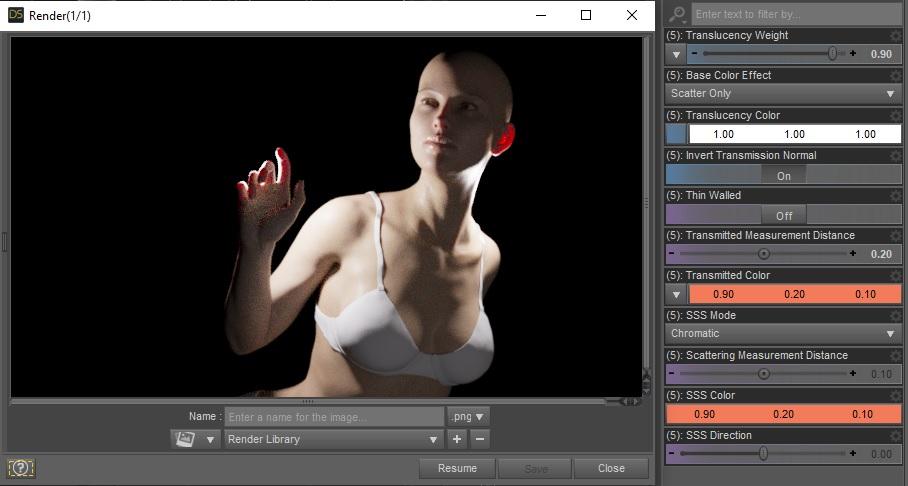
edit. Added picture labels. The included scene can be used to verify the results, it's Victoria 8 with the free basic wear.
*Released dforce Dark Match* Commercialhttps://www.daz3d.com/dforce-dark-match-hair-for-genesis-8-female
YAY for Strand Based Hair!!!
I'd like to include some general information and helpful tips for you to use my new sets in the store :)
What is the difference between strand based hair and fibermesh?
Strand Based Hair is generated inside Daz Studio. Fibermesh is actual mesh generated within Zbrush. Fibermesh can bring even the nicest computers to a painful crawl once it is imported into Daz Studio. Strand Based Hair is so much lighter!! There are a lot less hairs in your viewport, and the rest are generated during the render. I don't know all the magic behind that part, but its really awesome.
SBH ( Strand Based Hair ) is DYNAMIC! - Yes!!!!!!!!!!!!!. As an artist that has been working with Daz Studio and Poser for almost 20 years, this is what I always dreamed of!!!!!! Well I have also dreamed of being a millionaire too, but I'll settle for this
 .
.But what if I don't want to run a simulation? With the ones currently in the store, you do not need to run a simulation unless you want to. There are morphs that will move the hairs around like a traditional hair model too! The coolest part is that you can use the morphs before a simulation, without a simulation, and/ or after a simulation.
How do I use it? Select your figure and load the model like you normally would. Make sure that you do not have the geometry editor tool or the awesome Mesh Grabber Tool selected, pose your figure and render.
How do I use the morphs? These SBH hair models are currently in pieces to add more versatility. Selecting it in the scene tab will make the morphs appear in the parameters tab ( They are parented to the head) . Keep in mid that because these hairs are separate pieces they are grouped. So you will have to expand the options in the scene tab to find the individual pieces. Then just play with the sliders to your liking!
How do I simulate the hair? Welll there are several ways to do this, but the easiest way is to click on the simulate tab and click simulate. No extra settings needed. You can also use a timeline animation, or use the settings provided to use just gravity.
There will be so much versatility!! I have added a ton of separate surfaces so you will be able to easily kitbash these. Shut off certain surfaces to combine them with other SBH hairs orrrr maybe even combine them with some of the regular 3d hair models in the store and make a hybrid!
Technical Stuff:
Line Start With & Line End Width - This is how thick your hair is and how it tapers. I kept mine slightly thicker @ .09. and .03 to keep the amount of generated hairs to a minimum. If you want the hair to be thinner or taper more, you can turn this amount down, but oviously you will have to add more hairs.
Root Radius - This is the mode I have chosen to favor. It doesn't require painted maps or interpolation algorithms ( where hairs can go off in crazy directions for almost no good reason) and it is much more predictable for me when I import my hair from outside programs. With that said, there are no options for the cool stuff like frizz. Sorry guys :(
PS Points (per hair) - for those of you that model this is similar to CVS in a curve. It can control how smooth the hair will look. If you do a simulation and the hair just turns to a straight mess, try turning this down. The lower the setting, the more stiff the hair itself will behave and keep it's shape. Too low and you may end up with some jaggy edges. I feel like 20 to 30 is a good start for these stiffer styles.
PS Hairs (Per guide)- This is fairly self explanatory. If you want a fuller look, you can try adding more hairs. More hairs will probably require more computing power. But feel free to play with the setting.
PS Hair Tip Separation - This is a clumping option. Positive direction moves the hair away from the tip. Negative direction forms a clump at the tip.
Bias and Gain - This also has to do with clumping.
Bias is where along the hair shaft the clumping/non clumping starts. The lower the number the higher up the hair shaft the tip separation starts and vice versa.
Gain is how the bias transitions along the hair shaft.
I don't bother messing with these too much, but feel free to play with them.
PS Hairs and PR Hairs - PS hairs are supposed to be more accurate when simming than PR hairs. Also, I have found that PS hairs have a more delicate, natural look to them. PR hairs are great for adding a little extra bulk or frizz depending on how you use it. To get hair more dense looking, you can add PR hairs one or two at a time. I like to think of PR hairs as a multiplier, so you don't need to add a whole lot. If you want to make the hair appear a little more frizzy, you can play with the distribution radius and the tip separation for the PR hairs.
More Technical Questions * This will be added to as questions come up so all info can be placed in one convenient place
I want a certain section of my hair to drape more. Is there a way to do that? Yes! There are a few options you can use to adjust the draping so it suits your particular scene better. You can adjust the PS Points on the surface you select to something higher. The double dutch braids in particular are kept fairly low around 20. This keeps the whole hairstyle fairly stiff. I would start fairly high at maybe 60 and see what results you get and what you are exactly looking for. If it drapes better but its lost too much of your shape you can adjust other options as well.
You can also adjust the Local Shape Constraint Stiffness. Turning this down lower will also make the hair drape more while keeping the shape of the hair more in tact.
You can also adjust the tips of the hair with Local Shape Constraint Tip Stiffness. This will loosen up how the tips drape more. A lower number will spread those tips out more during a simulation.
All of this is a process of trial and error and what exactly you are looking for in an end result.
I want to simulate hair on a figure that is on a floor. When I sim the hair it makes an explosive mess. Help! This wasn't a question posed here yet but I know it's on the way :) You have a few options to handle this situation. If you are on an older computer that doesn't do so well with simulations, try keeping the model's head height as the same level the default figure loads in. I hope that makes sense. When a simulation is going it is essentially pulling those hairs to the end pose. Further away from default equals more pulling.
If you have a decent computer and you don't have an issue with simulations then you can simply change the simulation settings - Pose Transition Time to something higher than 1. The promos I did with Victoria on the floor all had a pose transition time of 3 - but I believe 2 probably would have done just fine.
Now go have some fun and be creative already!
I will be here checking this thread as often as I can to help, should you get stuck, have questions, or just wanna show off pretty pictures :
 Question about BVH Animations on certain figures
I am trying to use the BVH files from CGSpeed. I realized they are not compatible with Michael 4, as mentioned on the site.
They are compatible with Victoria 4, however. But I have Victoria 4.2, and at least some of the BVH animations do not work on my Victoria 4.2. Could the bone names be different on Victoria 4.2 as opposed to Victoria 4?. I may have to consider purchasing Aiko 4 soon.
The older generation: Victoria 2/3, Michael 2/3 and their children rendersHere is Stephanie 1 with Victoria 2's textures. Stephanie 1 is based upon Micheal 2 mesh so her orignal UVs were the same as Micheal's. AprilyYSH did a remap but her cr2 did not include the morphs so I added them back in so that I could use the Stephanie 1 morphs identified in on the PoserDAZfreebie wiki.
So here is Stephanie with Victoria 2's Sasha textures and 3Dream's fullbody morph for Stephanie 1.
Pretty - and I like her pose.
Daz 3D is part of

Connect
DAZ Productions, Inc.
7533 S Center View Ct #4664
West Jordan, UT 84084Licensing Agreement | Terms of Service | Privacy Policy | EULA
© 2026 Daz Productions Inc. All Rights Reserved.