-
DIM & Carrara8.5
I recently purchased and installed using the DIM "Central Business District for Carrara" and "Night and Day City".
To load a building into Carrara I select File > Import > Windows C > Program Files > Daz3d > Daz Studio4 > Presets > Objects > Instabuildings and I get a bunch of Car. files. That's the only place I can find it in Carrara.
Why does the DIM make it so difficult to locate anything?
I don't know if anyone is familiar with Pro Tool 12, but if I order a Reverb or EQ or any plugin from Pro Tools the install manager puts reverb in the reverb folder and EQ with my other EQ.s, and if I buy any compatible plugin from any software, the Pro Tools install manager puts it in the right place, no searching.
What's wrong with Daz?
Jaderail is looking down on the STUPID THREAD XI just had another thought.
 I assumed that in the original question CPU was an acronym for Central Processing Unit. If however one assumes that CPU is an acronym for Competent Person User then all all bets are off.
  Jaderail is looking down on the STUPID THREAD X
Can a computer run without a CPU?

Although I guess this is technically a central processing unit.
 More believable 'hard' sci-fi content, please: a rather lengthy request.
Thanks, Zylox.
I looked at these and they seem very well done indeed, and a bargain at the PC+ price. I'll probably pick up The New Colony in the near future because there may be some elements I can use, but...
The overall design is suited to planets with a significant and presumably breathable atmosphere (i.e. no dome over the whole settlement, no airlocks on individual buildings), which kind of rules it out for e.g. Mars. Could the ideas in this thread possibly interest you in producing content of the sort that some of us seem to crave? If so, you may find a ready market for it. Seems to me there's a void that's just begging to be filled.
...and while I may suck at 3D modeling, I'm a fair hand at sketching. As for ideas & concepts, I've got a million if you need 'em. Hell, some are even semi-original.

Cheers, eh?
Blind Owl
https://www.daz3d.com/space-base appears to have basic interiors and is appropriate for worlds with hostile atmospheres.
Very basic. The two round buildings each have the base divided into 3 areas (visible from the outside) and a non-functioning central core. One's got a big room on top too. They feel more like they're meant to be shown through the windows from outside.
The long quanset hut is just one big room inside, but feels more like it's designed with interior shots in mind. Including rafters and signs, etc.
DIM slow as molasses for anyone else?I'm in south-central PA and it's slower than slow. LOL Must be outages or something. Was downloading Luthbel's Vendetta and it took over an hour o.O
Laurie
Post Your Renders like it's the year 2020!!!+1
great renders... nice find Misty

you find the cutest mojis
 Post Your Renders like it's the year 2020!!!
+1
great renders... nice find Misty
April 2017 - Daz 3D New User Challenge - Open Render ChallengeIt's not going over the top - it looks great! The platform is there which gives continuity with the floor, but it is purely background and does not detract from your figure. The hint of color is a very nice touch. The depth of field is also excellent, as even the tentacles are fading off in the distance. You've kept that powerful negative space on the left and the central light is not too garish.
Good job!
Thank you! also thanks for your help!
April 2017 - Daz 3D New User Challenge - Open Render ChallengeIt's not going over the top - it looks great! The platform is there which gives continuity with the floor, but it is purely background and does not detract from your figure. The hint of color is a very nice touch. The depth of field is also excellent, as even the tentacles are fading off in the distance. You've kept that powerful negative space on the left and the central light is not too garish.
Good job!
Centaur 7 (Carrara) am not even going to speculatetoo big a risk for iClone let alone Carrara with Misty's addon
and a geograph too
So pass pass pass
My first thought was
yeah.... sure... lol
 April 2017 - Daz 3D New User Challenge - Open Render Challenge
I've added a bit more to my render. My dad asked a great question. He said " How is she floating in the air like that?"
My response was "Uh...hmmm, good question" and so I added this...
XD, lets assume that the machine below her holds her up with some type of force field or something.
Anyhoo, what do you think?
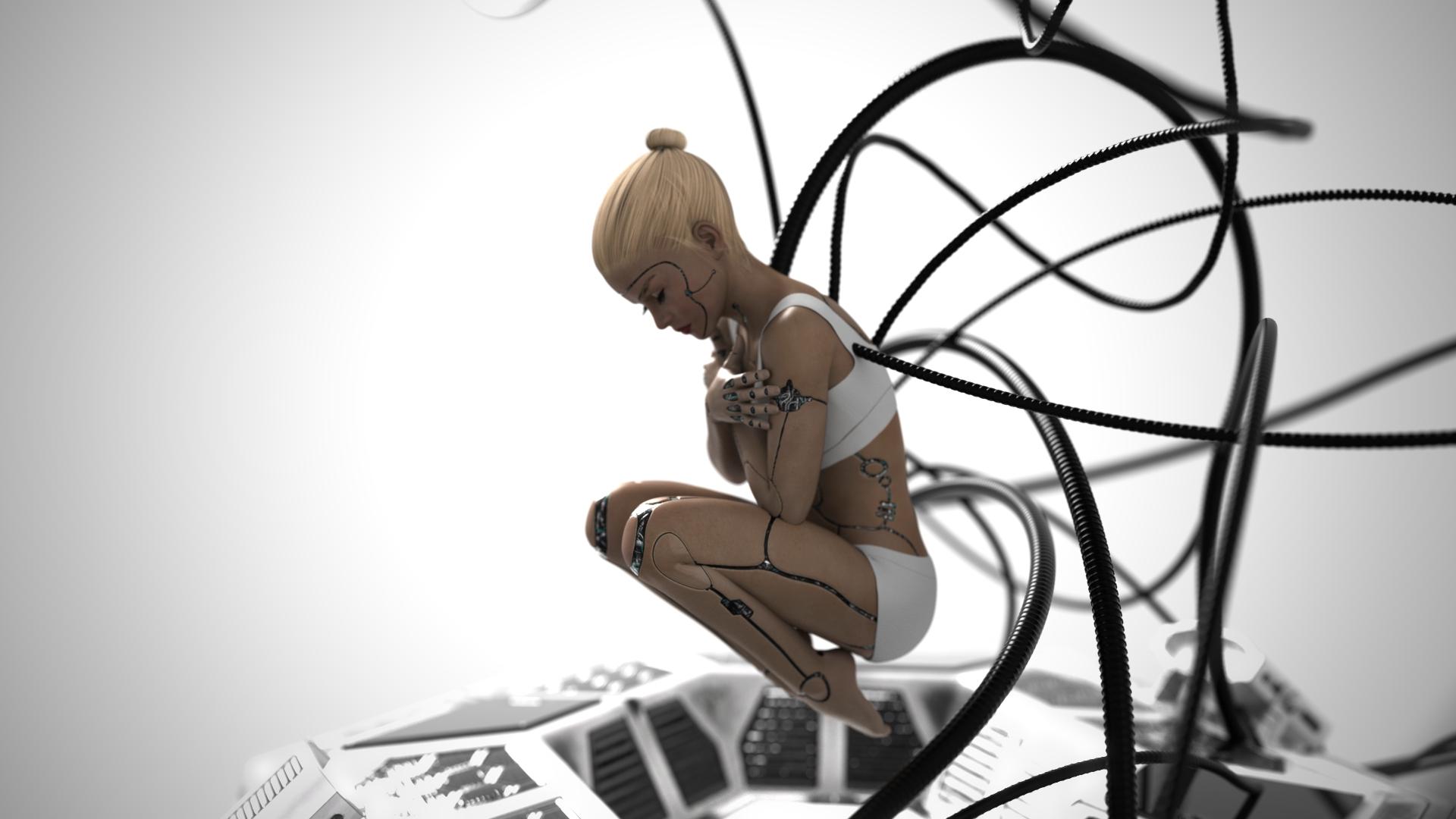
This is a great addition. I suppose the cables could be holding her up too. They may have some rigidity or even movement capability.... :)
There's a little half circle on the top, just left of center that seems a little out of place.
The other thing is that the cables are going through her top - or so it seems. Given her position, all the "naughty-bits" should be covered so you might consider losing the top. She's somewhat "under-construction" so it wouldn't be out of place to not be completly covered at this stage. Just a thought.
If you have the time, try experimenting with a little more DOF. I like the new addition, and that you have it out of focus a bit. I think it might be better a little more out of focus so the detail of the new prop doesn't draw your focus to it away from the central actor. Not sure if you really need to do this, but the exercise could be interesting.
This is really coming along nicely. Not really sure what else you could do - even my suggestions above are probably not necessary.
thanks,I will be back after I experiment wth the DOF a bit more. Also, I thought about that too, she probably wouldn't have clothes yet since she's created here.
Keep Calm : There's always another Sale (Daily Sale Talk)Oh, yeah... A fourth option, of course, is to wait for another sale...
And if you're trying to combine the two offers, be sure the items in you cart qualify for both offers...
I'll take the 4th, it's ok no big deal. I've been waiting to get the growing up skin merchant product for a while.
It was on the sale last night in the 2016 MM flashback sale, had it in the cart with several other items which I was trying to decide upon, and then around 11:20 central time just as I was nearing checkout, it and a few other items shot to full price and the buy 2 get 65% off did not work for it anymore. Sad, kinda been waiting for the skin merchant bundle to go on a good sale for a while. Had Daz left the sale going till right about midnight (as is normal, generally, haha) I would have gotten it too. Oh, well, as we say; theres always another sale.April 2017 - Daz 3D New User Challenge - Open Render ChallengeI've added a bit more to my render. My dad asked a great question. He said " How is she floating in the air like that?"
My response was "Uh...hmmm, good question" and so I added this...
XD, lets assume that the machine below her holds her up with some type of force field or something.
Anyhoo, what do you think?
This is a great addition. I suppose the cables could be holding her up too. They may have some rigidity or even movement capability.... :)
There's a little half circle on the top, just left of center that seems a little out of place.
The other thing is that the cables are going through her top - or so it seems. Given her position, all the "naughty-bits" should be covered so you might consider losing the top. She's somewhat "under-construction" so it wouldn't be out of place to not be completly covered at this stage. Just a thought.
If you have the time, try experimenting with a little more DOF. I like the new addition, and that you have it out of focus a bit. I think it might be better a little more out of focus so the detail of the new prop doesn't draw your focus to it away from the central actor. Not sure if you really need to do this, but the exercise could be interesting.
This is really coming along nicely. Not really sure what else you could do - even my suggestions above are probably not necessary.
The They Stuck Gears on my Convoy Whinging Complaint Thread...congratulations Kulay on completing another trip around our central stellar primary

Take that number above, multiply it by your age and that is the total distance in miles you have travelled so far were it stretched out in a straight line.
Ignoring the Sun's movement around the galactic centre, and relative to the galactic plane, and the Milky Way's movement towards the Great Attractor.
..yeah, not sure if anyone has those figures yet.
Too much math for my sinus addled brain right now.
The They Stuck Gears on my Convoy Whinging Complaint Thread...congratulations Kulay on completing another trip around our central stellar primary
Take that number above, multiply it by your age and that is the total distance in miles you have travelled so far were it stretched out in a straight line.
Ignoring the Sun's movement around the galactic centre, and relative to the galactic plane, and the Milky Way's movement towards the Great Attractor.
Don't forget the Milky Way's movement within the Local Group, and the movement of that within the Local Super Cluster. But it's all relative anyway, so movement is actually neither here nor there. We just get older.

Hmmm..., the Great Attractor. Isn't he "The World's Most Interesting Man"?
The They Stuck Gears on my Convoy Whinging Complaint Thread...congratulations Kulay on completing another trip around our central stellar primary
Take that number above, multiply it by your age and that is the total distance in miles you have travelled so far were it stretched out in a straight line.
Ignoring the Sun's movement around the galactic centre, and relative to the galactic plane, and the Milky Way's movement towards the Great Attractor.
The They Stuck Gears on my Convoy Whinging Complaint Thread...congratulations Kulay on completing another trip around our central stellar primary
Take that number above, multiply it by your age and that is the total distance in miles you have travelled so far were it stretched out in a straight line.
Render time on itemsI think it's all down to lighting, to be honest.
Plus, Look into these
https://www.daz3d.com/render-studio-iray
I made numerous threads asking for iray 'presets' and it sounded like I was insane.
Well, here is a bunch of them. Lol. I use these all the time to test my scenes and see what I get before the big commit.
and this https://www.daz3d.com/iray-ghost-light-kit
I have no idea why EVERY (sci-fi) SET I buy is dark. It's ALWAYS moodly like power is off or one of Josh Crocketts Monster's is lurking around the corner.
So I make a huge light, throw it up on the ceiling and use some draft to low render settings to see what I get and then adjust the lighting from there.
Calculating the light seems to be what always adds to render times. I bet you can see that difference alone in your products. Get a room with lots of little lights (Sci-fi hallways I'm looking at you) and BOOM it'll take forever. Get a room with one or two central light sources and it'll be quick.
I'm somewhat new (but I probably render more scenes than most since I do a graphic comic) and my experience tells me it's lighting.
TangoAlpha's Coming Soon: End of the Track [Commercial]Oooh nature set!
I am playing with my brand new City Hall set and it makes me long for that building's close cousin, the Community Center. My local community center is a big single floor building with a preschool room, two gymnasiums and an exercise room (and associated locker), a central lobby/lounge and a number of differently sized ball-room/mini-gyms/dance-studios/craft-rooms. And offices to manage the rental of city park facilities and stuff... I dunno if that could be made to work as an alternate interior for City Hall but in the realm of 'prosaic buildings you could set a hilarious sitcom in' I'd love to see it.
Hmmm... I wonder if it could fit into the crime lab. I don't have that set yet....Carrara Non Photo Realistic WorksA few different treatments of PhilW's excellent City Central Night scene.
Very nice, could be a New Yorker cover. Sorta like this:
https://s-media-cache-ak0.pinimg.com/736x/71/30/f8/7130f869d4e26157e4fd832b99726e7b.jpg
Thanks SteveK, that's very kind. wouldnt that be grande? :) ( I;m sorry I just saw your posT)
Daz 3D is part of

Connect
DAZ Productions, Inc.
7533 S Center View Ct #4664
West Jordan, UT 84084Licensing Agreement | Terms of Service | Privacy Policy | EULA
© 2026 Daz Productions Inc. All Rights Reserved.