-
Daz Encrypted Content
The following thread has a lot of tutorials on creating content for genesis and genesis 2 figures. It includes a lot of information on the transfer utility. For modeling, the thread includes information on a variety of programs (hexagon, blender,...), including Carrara.
Wellll... I'll just take my off topic talk over there! :) Seriously though... Thanks! Looks like I will be spending some time in those 3 threads also.
Daz Encrypted ContentThe following thread has a lot of tutorials on creating content for genesis and genesis 2 figures. It includes a lot of information on the transfer utility. For modeling, the thread includes information on a variety of programs (hexagon, blender,...), including Carrara.
One example of another general resource thread for creating content is here
http://www.daz3d.com/forums/viewthread/14421/
One example of a specific Blender-related tutorial is here.
http://www.daz3d.com/forums/discussion/comment/939565/#Comment_939565
One example of a hexagon-related tutorial is here
http://www.daz3d.com/forums/discussion/comment/939745/#Comment_939745
One example of a Carrara-related tutorial is here
http://www.daz3d.com/forums/discussion/comment/941921/#Comment_941921
A thread dedicated to using all of that genesis or genesis-2 related content in Carrara is here.
Michael and Friends Appreciation Association [Lots of images, please.]Very nice render. Although, I do have to say, "Ouch!" Gotta watch out for that barbed wire! He looks very nice, though. You did an excellent job!
Thanks very much! Yes I thought about that—I decided it's actually made out of rubber...
I did a lot of morph dialling on the face and I'm starting to think he looks a bit like a younger Daniel Craig (as James Bond, of course).
Daz Encrypted ContentI'm not a big DS user,. i use some functions,. and the transfer utility is one of the easiest things to use,. (It's all simple menu options)
you can model your own items in carrara aroud the figure in the assembly room,. then eport that object,.
Open DS,. load the figure you were using , load your object and use the transfer utility to auto rig your OBJ, by transferring the bones from the figure to the object to make conforming clothing,. Save that and load it in Carrara just like any other content
This makes Carrara less relant on purchased content, encoded or not.
Why thanks again,
The transfer utility does sound easy peasy if I understand you correctly... In Carrara I only form the object around a DAZ figure, *not* bothering with creating bones in Carrara since the bones will get created in Studio for example from G2 or G3 with the transfer utility which take the bones from the figure, G2 or G3, and apply them to the figure automagically. Absolute piece of cake. :) Note that in the case of G3 especially I would first export from DS as a simple object to load into Carrara. Actually it would also be best for other generations as well to save as objects in the default T pose to speed up loading into Carrara. Please correct me if I have misunderstood you.
I did watch a video, by DAZ I believe, on youtube for creating a dress... however I don't think it continued on into Studio... from start to finish, so to speak. It didn't mention setting up material zones either... oh well.
Thanks again :)
Daz Encrypted ContentI agree,. time will tell whether this is something which will stick, and be sellable to customers,. or not,. there are other content suppiers,. and customers have a choice.
I'm not a big DS user,. i use some functions,. and the transfer utility is one of the easiest things to use,. (It's all simple menu options)
you can model your own items in carrara aroud the figure in the assembly room,. then eport that object,.
Open DS,. load the figure you were using , load your object and use the transfer utility to auto rig your OBJ, by transferring the bones from the figure to the object to make conforming clothing,. Save that and load it in Carrara just like any other content
This makes Carrara less relant on purchased content, encoded or not.
Transferring Morphs from Genesis to G2M/G2F and from G2M/G2F to Genesis (Now with Clones!)So far I haven't run into any issues using content creation tools in 4.9, but I haven't gotten any of the suspect content either.
I'm rather enjoying the update, as it starts faster, and is bit more peppy. I'd not say that it is over all superior to 4.8. Figure loading isn't hugely faster, and you'd quickly not notice the difference. tdlmake still eats all the system resources. But the tools haven't shown any limitations
Still, I can't imagine an encrypted morph would be an issue, unless studio is specifically designed to prevent those morphs from being applied to exported OBJs. The whole method of this thread is using studio to apply a morph to the geometry, and then exporting said geometry. So long as that works, encryption just makes mass editing more tedious, which is not unlike compressed morphs.
Which is lightly related to why I came back to comment.
I'd said I'd do a tutorial, and I do mean to, but it won't be what I was originally planning. The method I came up with works, some times. Other times it doesn't I don't know why, so that means the theory I'd had as to what was happening is WRONG WRONG WRONG. I don't have a better theory. Until I know what's really going on, I can't really recommend any one else do it. Things could get broked.
I do have a fast and dirty method to getting better eye results, but it's super dirty. Results should be better, but not perfect. That's what I hope to have tut on soon. I just want to get one image done that I've been putting off doing for 2 weeks. And I've been putting off because mass editing resource files. (See? Lightly related.) I've always been bugged that you get these expression options that are particular to only one side of the face. Like a Coy smirk that only curls up on the left, and no right side mirror.
With Genesis 3 expressions being poses, it turns out you can basically mass edit the pose definition files to make Mirrored versions of stuff like that.
Rabbithole. I haz fallen down one. (It's a rabbit hole because... Well, if you ever had a reason to create a bone in studio, you know bones have names they display and then they have real names. The definitons for a pose reference the bone's real name, and the there are typos and inconsistencies in the real names of the face rig bones. e.g rCorner vs lCorver. So just flipping right to left with a mass edit find/replace doesn't quite do it. Also, once you've fixed all that, you have to flip the sign [- to + and + to -] on any X translations and Y rotations, and I can't think of a mass edit method to do that safely. In the end, I did it manually in the Property Hierarchy. Still, I was able to mirror 30 face poses in a day. The rest of the time was figuring if it could be done, while living the rest of my life.)
All of this is, itself, just me trying to get ready to create custom expressions for my custom characters. (Example, G3F Eyes up-down makes in really subtle movements of the eyelids on toon shapes, resulting in really wide eyed looks. I wanted to make custom eyelid controls without resorting to Joint controlled morphs) I don't want expression pose presets. I want expression sliders, so I can mix and match their own expressions. Suffice it to say, over the last several days, I have been poking the content creation in 4.9 pretty often, and it's not been an issue for any current content I have. The biggest problem I had was that the face rig bones were mysteriously missing from the scene tab, but that was just "Show Hidden Nodes" being unchecked. For most of what I want to do, the basic expression sliders provide plenty of control.Daz Encrypted ContentHI John :)
You can load files from studio directly in to Carrara,. and if you're predominantly working in DS "offline" (not using it to buy products, or to download / install encripted content) ...and you're only using DIM to download your content,.
I don't really see a huge issue at this point,. since only new content is being supplied as encripted for DS, and that content also sems to be available in Un-encrypted versions for download using DIM.or manual download and install.
As far as making conforming clothing,. you can already use carrara to model items,. export as obj,. then use the "transfer utility" in Studio, to add the rigging from the figure, to make conforming clothing,.
Hope it helps :)
Thanks, you always help... I do work offline and only use DIM. While I did grab the 1st 3 encrypted only free files I'll likely never bother with using 4.9 to download them... time will tell.
Please excuse me for being a bit unclear, my error... I meant that for those who did and will choose to purchase and download the encrypted only content. Also partially agree that "I don't really see a huge issue at this point". "Partially" because as more and more encrypted only content is released the more Studio will have a need for the options I mentioned. I don't forsee encrypted only to go away... again time will tell.
I did know about creating content with Carrara but as a fairly new user to DS since 4.8 I'm not yet familiar with the transfer utility... that will hopefully change very soon. I've previously had DS 2.9 and up only for it's content to use in in Carrara 4 Pro and up as well as Poser.
Daz Encrypted ContentHI John :)
You can load files from studio directly in to Carrara,. and if you're predominantly working in DS "offline" (not using it to buy products, or to download / install encripted content) ...and you're only using DIM to download your content,.
I don't really see a huge issue at this point,. since only new content is being supplied as encripted for DS, and that content also sems to be available in Un-encrypted versions for download using DIM.or manual download and install.
As far as making conforming clothing,. you can already use carrara to model items,. export as obj,. then use the "transfer utility" in Studio, to add the rigging from the figure, to make conforming clothing,.
Hope it helps :)
When was your first Daz purchase?14 December 2004
Vicky 3, Head & Morph Packs, Real Emotions for V3, Montana Skye, and a Platinum Club membership (oh, and a copy of DS 1.0 beta - that lasted on the Mac all of an hour). Took a couple of days to figure out that I couldn't use any of the clothing in Poser 5 with the DAZ figures.
I still wish I had my first render - somehow I had deleted all of the lights in the scene before I hit render.
M4/Genesis/G2M UV's for G3M [Solved - With new solution 07Feb16]Looks like Timbales was right to hope. I found a fairly decent utility for transferring textures to G3M. I've been working with Blacksmith 3D as my 3D paint program ('cause I'm too cheap for Photoshop). Blacksmith 3D has a Texture Transformer utility which has been expanded recently. You don't need the base paint program to buy the utility, I only mention it in case your results differ. Not sure of the rules for linking to other stores, so just do a Google search.
There are a few catches:
- Works only for M4, or any texture that can be Map Transferred to M4. There doesn't seem to be a plan to expand to Genesis or G2M
- The steps I used (and I'm still tinkering) didn't convert the the Spec or Bump textures. Might have been something I did, but I could always re-run it with those maps in the Diffuse spot.
- Needs the character saved as a CR2 file. I think the CR2's Daz saves will work, but I've been exporting Blacksmith 3D and saving a CR2 there. (Still trying to figure out Daz Studio's options under Export as CR2).
- For those who use Michael's 'toast' (okay, "Male Anatomical Elements", I still like 'toast'
 ) I don't think it works for that part. Haven't tried it, so I'm not sure.
 - Still not cheap, probably around US$60.
Once there I launched the utility, followed step by step locating files and selecting folders. At then end it saved the transferred maps and a .pz2 file (which worked on G3M to my surprise).
Here's what I got doing a transfer with DTG Calum (also from another site). No post work, just applying the PZ2 File to G3M.
Animation exercises to try.I was trying to mimic a basic rig used in a Modo animation tutorial using Carrara and I was looking for ways to transform a mesh other than Morph targets . Morph targets are limiting in that you can only have one morph target for a specific vertice. I figured out that the magnet deformer might work , it took a while to figure out how to set it up but at least it sort of works like in Modo..
Where in the World has the Forum Gremlin gone Now? Complaint ThreadWhat was that NCR device? A comptometer?
Oh buggers! I just lost a tooth filling. Must have swallowed it but there's a hole in my molar where it used to be and I think it took part of the tooth with it.
 Dentist warned me it could go soon, I delayed too long and now I'm going to have to at least have a new filling ($$) and he might have to replace the whole top with a cap ($$$).
An NCR device yes, but not a comtometer It was known as a Ledger Posting machine. I worked attached to the Foreign Exchange dealing room of a Major Highstreet bank in the City (London) and did Bought and sold Ledger for the Forward Contracts, It made like large spread sheets on thin card, and also could be fitted with a device to make paper punch tape to transfer to a Main Frame computer.
wow !
Where in the World has the Forum Gremlin gone Now? Complaint ThreadWhat was that NCR device? A comptometer?
Oh buggers! I just lost a tooth filling. Must have swallowed it but there's a hole in my molar where it used to be and I think it took part of the tooth with it.
Dentist warned me it could go soon, I delayed too long and now I'm going to have to at least have a new filling ($$) and he might have to replace the whole top with a cap ($$$). An NCR device yes, but not a comtometer It was known as a Ledger Posting machine. I worked attached to the Foreign Exchange dealing room of a Major Highstreet bank in the City (London) and did Bought and sold Ledger for the Forward Contracts, It made like large spread sheets on thin card, and also could be fitted with a device to make paper punch tape to transfer to a Main Frame computer.
the buttons look roundmy first job, they had hm cant remember was telex or teletype, they had a room to themselves
The buttons on the top are round, they are all the numeric keys for doing the computations.
Where in the World has the Forum Gremlin gone Now? Complaint ThreadWhat was that NCR device? A comptometer?
Oh buggers! I just lost a tooth filling. Must have swallowed it but there's a hole in my molar where it used to be and I think it took part of the tooth with it.
Dentist warned me it could go soon, I delayed too long and now I'm going to have to at least have a new filling ($$) and he might have to replace the whole top with a cap ($$$). An NCR device yes, but not a comtometer It was known as a Ledger Posting machine. I worked attached to the Foreign Exchange dealing room of a Major Highstreet bank in the City (London) and did Bought and sold Ledger for the Forward Contracts, It made like large spread sheets on thin card, and also could be fitted with a device to make paper punch tape to transfer to a Main Frame computer.
the buttons look roundmy first job, they had hm cant remember was telex or teletype, they had a room to themselves
You've been heard. Response re: 4.9 and Encryption"Make a wish props" now avaliable on torrent... One day! That's how well encryption and DRM works... *headdesk* If it takes less than a day to decrypt, it's hardly making things difficult for the pirates.
They were offered in DIM the same day since they supposed to be encrypted, so the unencrypted version is what is being shared.
I don't think that was the case with the Make a Wish set, though it had happened with older items. However, I'm also not sure that Make A Wish would be hard to reverse out of DS and rebuild - not like clothes or a figure with lots of ERC and/or overlapping areas to confuse Transfer Utility.
Where in the World has the Forum Gremlin gone Now? Complaint ThreadWhat was that NCR device? A comptometer?
Oh buggers! I just lost a tooth filling. Must have swallowed it but there's a hole in my molar where it used to be and I think it took part of the tooth with it.
Dentist warned me it could go soon, I delayed too long and now I'm going to have to at least have a new filling ($$) and he might have to replace the whole top with a cap ($$$). An NCR device yes, but not a comtometer It was known as a Ledger Posting machine. I worked attached to the Foreign Exchange dealing room of a Major Highstreet bank in the City (London) and did Bought and sold Ledger for the Forward Contracts, It made like large spread sheets on thin card, and also could be fitted with a device to make paper punch tape to transfer to a Main Frame computer.
NEW! Novica & Invited Guest Contributors Tips & Product Reviews Pt 6Rating: Recommend Iray Converter for Generation 4
Thanks folks! I've figured it out that everything is inside Content (I don't have a My Library) and it's going smoothly. Rendering Sabby's Cynthia (V4) and showing the WONDERFUL Iray Converter for Generation 4 by 3VDigitimes. If you have V4 or M4 and use Iray, wow wow wow. I'm here wondering though- there's one for Genesis too (I have it) but if folks don't, if they use GenX2 to transfer V4 skins to Genesis, would they apply this first?
Second, when we apply the optimized Genesis 2 Iray shader (it's a shader, right?) and hold down Crtl, get the Material Preset Load Options popup, then choose Ignore instead of Replace what exactly is that doing with the materials? I am going to show you a side by side of Cynthia, I have to say I think I like the one where I DIDN'T hold down Ctrl better. Her eyes have more shine and the skin seems more radiant.
Regarding the What's Hot- a $900 item is one of the most frequently purchased. Really? And the wonderful houseboat and robot (Helper) aren't on there. But yet there are many people spending $900 on a texture editor? Hmmm. So I bought the houseboat as my book is tropical/water based but did any of you buy the houseboat or the bot? Any of you buy the $900 product?
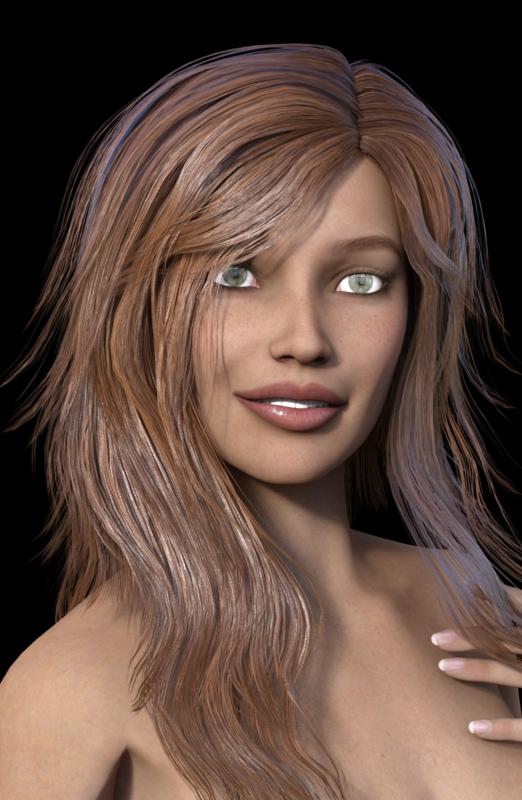
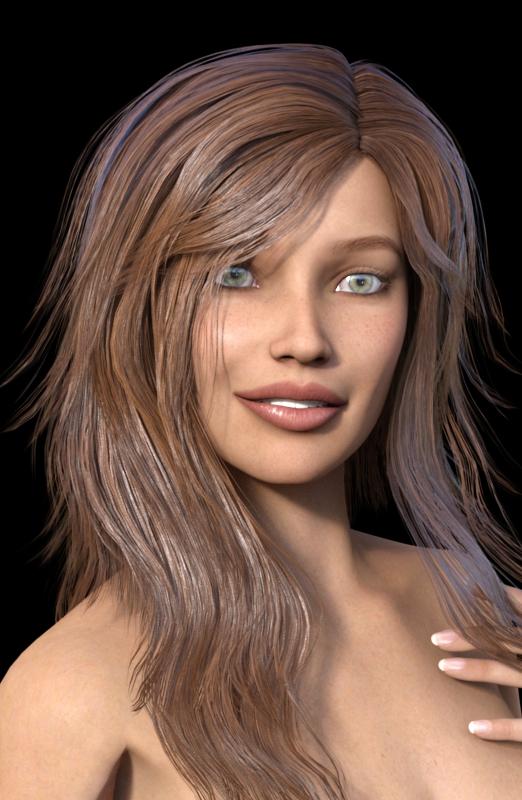
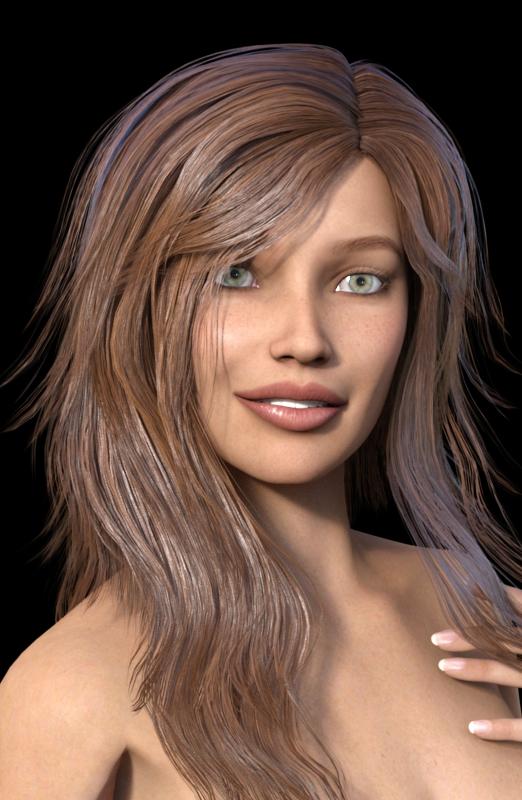
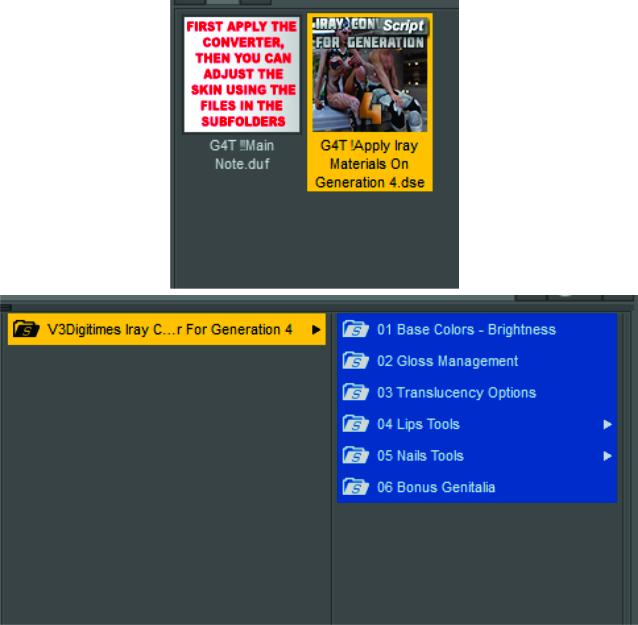
Below, Sabby's Cynthia (V4) (110836) with the mouth reduced/tweaked a bit, the first has default skin, then with the 3VDigitimes Iray skin converter without CTRL and third, with CTRL. I put the last two in my graphics program and clicked back and forth, and really, only the eyes were different. I like it without CTRL, they have more highlights. I did not change any of the converter settings- but it's neat because you have the sliders right there to move and play. Seriously, you gotta get this product if you use Iray and Generation 4! (EDIT: Added a screenshot. SO easy to use! One click, then use the sliders to play with it.) EDIT: Added the options when you click the glossy slider.
BTW, ignore how thin her arms are, I was tweaking an outfit and had to slim the body down, then decided I wanted to see more skin to test the converter. Forgot to beef back up the body. She isn't that thin in the body, honest!) The hair is Kelsie Hair with Slosh's UHT Iray shader on it.
 Carrara Challenge #22: “Wild, Wild West” - WIP Thread
Second try with smaller clouds for smoke.
Second try with smaller clouds for smoke.
Coming together better each time.
While the smoke may be coming from the use of the wall sconces I would add a cigar for perhaps one of the gamblers which would explain the smoke. In many westerns I picture Clint Eastwood with a cigar in the corner of his mouth. I grabbed a free one elsewhere awhile back. There are a few here at DAZ that require buying other things just to get the cigar.
Awkk... just noticed that there is no Deck of Cards... guess the gamblers are only using 10 cards. :)
Up at the Bar there is a Cowboy with a Pipe. Will be adding something else yet.
I have been looking at the http://www.daz3d.com/feralfey-s-poker-play which is the set I used but need to find the deck morph they talk about.
Add a bit more vertical depth to the smoke - at the moment I think it lacks volume. I think you can afford to spread it over more of the ceiling too.
Looks good though :)
Edit: I reckon one of the other players should be hiding something under the table . . . ;)
Already thinking of that we will see what comes out from under the table.
I am still playing with the smoke to get it to what I think I like.
You've been heard. Response re: 4.9 and EncryptionDIM vs DAZ Connect workflow example:
You are working on your laptop with limited HD space and now need a robot for your scene.
You have 3000+ products available. You only installed about 1000 to save space.
DIM workflow:
- Close DAZ Studio
- Open DIM
- Manually scroll down 2000+ products to find those who are robots
- install
- Open DAZ Studio
- load Scene again
- browse to product
How much time does it take you to find your robots in the DIM if you have 2000+ products?
Lets asume it takes you only 1 second to look at each preview image then you spend about 30 minutes searching trough them.
DAZ Connect workflow
- Open smart content tab with subtab "All" selected
- browse to figures/mechanical
- have a look at both installed and uninstalled products at the same time
- click on install
- wait 10 to 30 seconds.
- keep working on your scene
It takes you probably less then 1 minute to find a product with DAZ connect and installing it.
- - -
I can see DIM still being useful in managing software and plugin installations of BETA, General releases and products for 3rd party software like photoshop or e-on vue.
Now that I have gotten used to DAZ Connect there is no way I would ever want to go back to installing products with the DIM again.
Nope, I don't scroll through the products looking for robots, I simply type robots in the store search and up they come, and I have the My Products app and bingo, I have a page full of my bots in under 15 seconds. Let's see, Mars Explorer, Watch Dog, LG06 Combat Mech, the list goes on. And I see the images and can pick exactly what I want. Type it in and my installation is a lot faster than what it was when I tested Connect- about 38 seconds compared to over a minute with Connect.
DIM is my preference.
The estimated time of about one minute I provided to search for a product of a specific category with DAZ connect was including the time it takes to download and install the product.
Just showing the search results in DAZ connect may take 1-xy seconds. The more items there are in the search category the longer it takes for the search to complete. If you searched for the same category just before the search results stay in memory and the view may refresh almost instantly.
Example: figures/mechanical
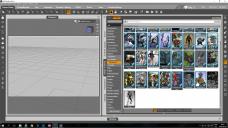
Alternative file view after installation:
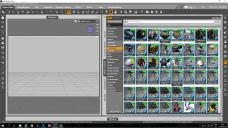
The whole benefit of DAZ Connect is that you do not need to use external applications. There is no need to leave DAZ Studio.
You can perform all search, install and update actions in the same interface.
- - -
I honestly do not know the "My products app".
Who did release this app? How does it work?
Is there any way to transfer the search results of that app over to the DIM?
IF not then you still have to manually enter all product names in the DIM.
With only about 10 products this is not that annoying. In the past I also used the store search and then copy pasted the name of each indiviual product into the DIM
But if you have search results of about 100+ products you may certainly not want to press copy and paste 100 times from the store page to the DIM.
- - -
Example:
Download and install all Shirts for Genesis 2 female
With DAZ connect all you have to do is:
- Place Genesis 2 female in the scene
- open the Smart content tab with subtab "All"
- make sure "Filter by Context is activated"
- browse to the category /wardrobe/shirts
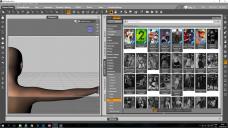
- now you can choose
- use one of the shirts that are allready installed
or
- download all shirts for Genesis 2 female
or
- just download a small selection of shirts for Genesis 2 female that you really want
- - -
As far as I am aware of
- there is no way to filter the search results in the DIM to show only "shirts" that were made for "Genesis 2 female".
- there is no way to filter the search results in the DIM to show only products of certain artists
- there is no way to have a look at a category and show both installed an uninstalled products in the DIM
I guess it would help other users as well if someone could post some screenshots how to install the same selection of shirts for G2F with the help of the store or an app and the DIM.
Mac vs PC: time to migrate?That's an interesting way of doing it. I also gave it some thought but I my living circumstances are such that I have my (silent) iMac in my lounge and the noisy PC is in another room connected by wifi, so no gigabit speeds there. I will mount the drive over the LAN but only to transfer the scene files. I have a mirror of my library on the PC.
I get what you are saying about it finishing before you are ready. I tend to do a series of renders - a kind of picture story - of about 30 or so images. So I start rendering one and while it is doing that I get to work on the next scene (one advantage of using Luxrender). If it is as fast as you say, my workflow will change but, after all, I do want the speed. And now I'll be able to carry on working on a scene while IRay is doing its thing.
I didn't get around to testing my setup yet but I will today (it is 7:00 AM here now). I suspect I will have a bit of a learning curve with IRay now.
Daz 3D is part of

Connect
DAZ Productions, Inc.
7533 S Center View Ct #4664
West Jordan, UT 84084Licensing Agreement | Terms of Service | Privacy Policy | EULA
© 2026 Daz Productions Inc. All Rights Reserved.