-
Novica & Forum Members Tips & Product Reviews Pt 11I also want the G8F Skin Builder although I know truthfully I may never use it. I've still not used the G2F Skin Builder I bought, not even once.
That may be in your favor. I have SBPro for G2F, and while it does everything advertised, SB3 and SB8 are so much easier to work with, and more intuitive. At least to me.
What would be really cool is an iRay / 3DL / 3DL pwToon version of Skin Builder for the all the DAZ Genesis - Genesis 8 characters or for just G8F/G8M would fly.How would a "3DL pwToon" version work any different than the crrent 3DL option? (I'm just curious. I have pwToon and ToonyCam Pro, and know next to nothing about either one. One of these days, though. One of these days…!)
Novica & Forum Members Tips & Product Reviews Pt 11Now that Genesis 9 isn't lurking in the near future I decided to spend more this MM than I normally would have. Has anyone else had a similar reaction?
I still need, OK want, to buy 3DU Monsters in My Cupboard, 3DU Grim the Toon Skeletoon, 3DU Vulture, even though I already have the PSISong Vulture, 3DU Baboon, 3DU Snail & 3DU Dodo to close out my wish list from the 3DU catalogue. I can hardy believe it as that was a goal back in March 2016 when I earnestly started. There is plenty of more I don't own but I don't want it except for possibly all the 3DU Heavies series of products. The others I don't have tend to more realistic mostly or I know I'll never use them.
I also want the G8F Skin Builder although I know truthfully I may never use it. I've still not used the G2F Skin Builder I bought, not even once.
What would be really cool is an iRay / 3DL / 3DL pwToon version of Skin Builder for the all the DAZ Genesis - Genesis 8 characters or for just G8F/G8M would fly.
More Non-photorealisitic Renders (NPR II)Long time lurker in this thread.. There are a lot wonderful NPR images here !
So These some images I render using PWToon and give several adjustment in photoshop .
These are cool. :) I hope you post more.
More Non-photorealisitic Renders (NPR II)I also would love to hear more about your postwork choices and filter usage.Actually my approach is very simple . Daz and PWtoon for base cel shade (the heavy lifting) . Photoshop for enhance smoothness -adjust or remap color and give finish fx like bloom etc.
I`ll posting postwork`s step by step if you or another think that`s worth to share in this thread , nothing fancy and no 3rd party paid plugin needed and I think discussion about how we getting there (toon/celshade/comic etc) in first place seem more useful , but please let me know if worth to share , i`ll be creating mini tutorial about it
In short , after studying and extracing color from lots toon-anime images reference out there , I`m start to understand that beside geometry/shapes we use , every color combination we picked in our scene also have big contribution to make our render look like nice 2D images or not .Like like my painter buddy said :
"those color work and look nice when combined together , so you can`t grab some color and mix with another color from another images . Those colors combination planned carefully by the artist who make it"
Yeah some postwork technique will help us get in there , but personally I need to getting right in first place
Here my mini setup in DAZ Studio and pwToon
1. Find and study image reference based on style you want to produce
2. Extract the color palette from reference(s) (manual or auto)
3. Start Daz Studio and make sure in 3Delight mode (check in render setting)
4. Make sure you have same Background color like reference (check in environment tab)
5. Create multiple primitive spheres for pwToon shader library
6. Change base color and shade value in every sphere based on your reference palette
7. Group those primitive based on functionality (BG - Character - Cloth Set - props etc )
8. Save scenes/Subset scene with all primitive for easy copy paste material
9. Setup Light sets (Distant/point plus Ambience)
10.Test render and tuning lights intensity until you`ll see colors just like shown in reference
11.Load your set or character and apply those shaders
12.Render in multipass for better control of color elements - shadow and geometry line
BTW I look at your Black and White render and saw video on youtube about real time line generated from late version of POSER . thats amazing !!! I wonder when DAZ studio will getting those features . Geoshell outline shader do the trick but I think POSER realtime BW and line render seem more powerful . Would you post some outline render with it ?More Non-photorealisitic Renders (NPR II)Long time lurker in this thread.. There are a lot wonderful NPR images here !
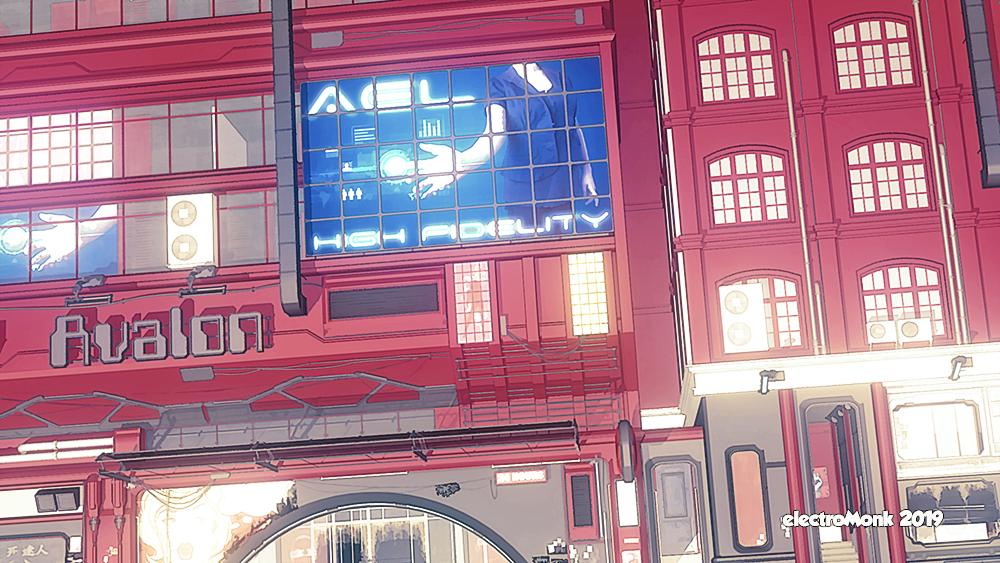
So These some images I render using PWToon and give several adjustment in photoshop .
Lurk no more, friend! You have definitely created some cool work wtih a nice illustrated look. I like your choice of using a muted color palette.
This image, in particular, looks like it came right out of a graphic novel.
I really like the chin on this guy: He looks like a classic cartoon character. Not sure the drop shadow works, though, as it's a bit dark and a little too close to the figure. Nevertheless, GREAT looking stuff.
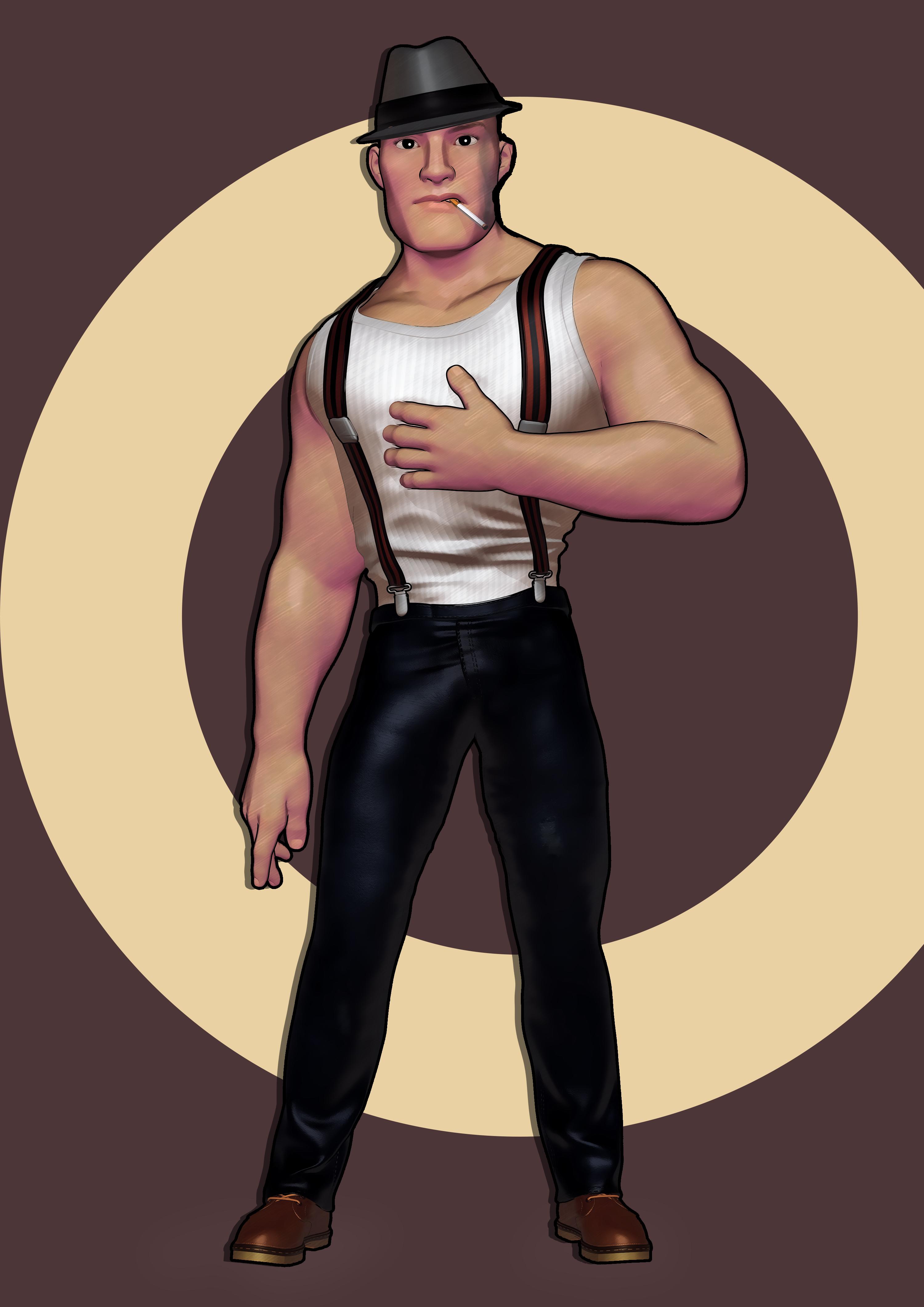
The more I look at him, the more I like him. If you wanted to go for an even stronger cartoon loo, you could consider making his eyes a little bigger.
I also would love to hear more about your postwork choices and filter usage.
Thanks for critiques and great tips how to improve my images .
I think I need to learn more from you all about how to create decent NPR images
Thanks again
More Non-photorealisitic Renders (NPR II)Long time lurker in this thread.. There are a lot wonderful NPR images here !
So These some images I render using PWToon and give several adjustment in photoshop .
Lurk no more, friend! You have definitely created some cool work wtih a nice illustrated look. I like your choice of using a muted color palette.
This image, in particular, looks like it came right out of a graphic novel.
I really like the chin on this guy: He looks like a classic cartoon character. Not sure the drop shadow works, though, as it's a bit dark and a little too close to the figure. Nevertheless, GREAT looking stuff.
The more I look at him, the more I like him. If you wanted to go for an even stronger cartoon loo, you could consider making his eyes a little bigger.
I also would love to hear more about your postwork choices and filter usage.
More Non-photorealisitic Renders (NPR II)Long time lurker in this thread.. There are a lot wonderful NPR images here !
So These some images I render using PWToon and give several adjustment in photoshop .
Kit Bashing Japanese-style and/or Pacic Rim Type Mechs. What have you done?that's pretty cool render tkrobert how you coloured it
I used a combination of Visual Style Shaders and PWToon. I tweaked the Vibrance, Saturation, Brightness, and Contrast in Photoshop. For the line-work I used LineRender9000, but had to touch it up quite a bit in Clip Paint Studio.
Can switching from CPU to GPU speed up renders with Graphics (not Video) Card?What path would I have to take in order to use GPU as the primary workhorse?
Use Iray.
Just to inform, I don't use iRay rendering at this time. iI presently use 3delight, with pwToon shaders.
I'd like to ask, are renders slower because of the size of images? I did download a free script that reduces the images to a smaller size, but the extra small images make props look blurry. is Scene Optimizer a better tool to use in order to reduce image sizes and retain better quality? Worst case scenario, maybe i should use GIMP to manually reduce the file size and retain the same high quality.
I realize also that using Genesis figures of any version may contribute to slower renders. I do have Victoria 4, but the trouble is, whenever Victoria 4 figures wear skirts, the skirt doesn't move with the legs. Is there any way to make a skirt move with the legs of a Victoria 4 or The Kids 4 figure?
I also think using props with a lot of images, particularly those by Stonemason and Dreamland Models, tend to take longer to load the images. I wonder if there are any low poly houses and neighborhoods I could purchase (but not the Toon style) anywhere?
ANYTHING can slow down a render. ANYTHING.
Can switching from CPU to GPU speed up renders with Graphics (not Video) Card?Just to inform, I don't use iRay rendering at this time. iI presently use 3delight, with pwToon shaders.
I'd like to ask, are renders slower because of the size of images? I did download a free script that reduces the images to a smaller size, but the extra small images make props look blurry. is Scene Optimizer a better tool to use in order to reduce image sizes and retain better quality? Worst case scenario, maybe i should use GIMP to manually reduce the file size and retain the same high quality.
I realize also that using Genesis figures of any version may contribute to slower renders. I do have Victoria 4, but the trouble is, whenever Victoria 4 figures wear skirts, the skirt doesn't move with the legs. Is there any way to make a skirt move with the legs of a Victoria 4 or The Kids 4 figure?
I also think using props with a lot of images, particularly those by Stonemason and Dreamland Models, tend to take longer to load the images. I wonder if there are any low poly houses and neighborhoods I could purchase (but not the Toon style) anywhere?
[Released] Sci-Fi Atmosphere Processing Deck [Commercial]PWToon version (although I pushed it toward a little more realism)
Show us your 3Delight rendersPWToon, but 'realistic' enough, I think, to plop in here instead of non photorealistic thread.
I hit the problem I remember from using 3dl a lot before, which is that very brightly lit elements are rather jagged/aliased against dark. And it's a bit annoying to try to fix.
More Non-photorealisitic Renders (NPR II)@vrba79 - you are getting reat results with the free toon shader.
@tkdrobert - love the dragon/warrior woman render. Could be a book cover.
@mmitchell_houson - I like the painterly effects and don't think it is too much.
Several of you on this thread recently mentioned/advised working with larger resolutions/images. For whatever reason, I never did that. I tried working with a larger render and found it is so much easier to draw lines/fix unclear areas and do clean up for turning the render into more of a comic book effect. I used a cross-hatch filter on this one and like how it turned out. The cleaned up/tooned up version w/out cross hatch is in my art thread.
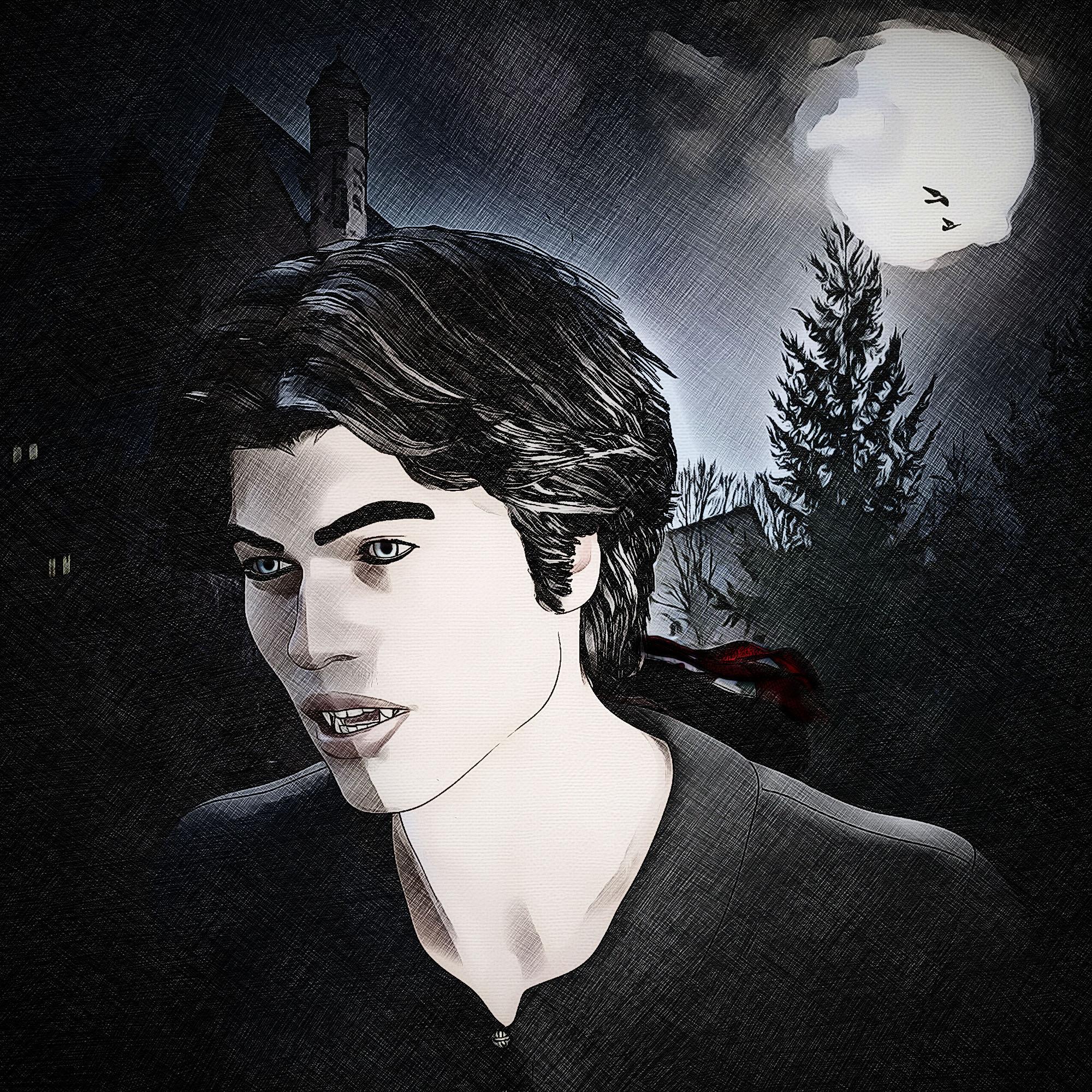
Looks very nice.
My main drive for piddling around with the free toon shader that comes with D|S, is to find new things people may have not known about, and to give cash strapped artists an attractive alternative to shelling out for stuff like VSS or PWToon, I own and use the later quite a bit, but its nice to have options.
Show us your 3Delight rendersI'm spoiled by Iray; if it takes longer than 10 minutes I'm doing something really elaborate. And I usually only render for an hour if I'm really trying to get a very polished look.
Also spoiled by using PWToon, where renders are also super fast. Heh
More Non-photorealisitic Renders (NPR II)So here's a technique in progress. Its striking to me, because it resembles that VSS painted look, but its not a toon shader. What you're seeing is the "Dazdefault" shader, being lit with a spotlight and an UberEnvironment. I've done no postwork to this image. It needs some tweaking, but I think I'm on to something.
This looks very similar to a technique I used to use in Daz Studio 3, before pwToon came out. I would set every surface to have about 50% diffuse and about 50% ambient, tweak the diffuse and ambient colours a bit, and then light the scene with a single direct light.
Fortunately i've managed to track down a couple of (VERY) old renders of mine I did using this technique back then. Both are of the Kururu freebie model along with the freebie Hatsune Miku outfit. These probably would've looked better had I remember to turn on raytraced shadows at the time.
That is very similar!
More Non-photorealisitic Renders (NPR II)So here's a technique in progress. Its striking to me, because it resembles that VSS painted look, but its not a toon shader. What you're seeing is the "Dazdefault" shader, being lit with a spotlight and an UberEnvironment. I've done no postwork to this image. It needs some tweaking, but I think I'm on to something.
This looks very similar to a technique I used to use in Daz Studio 3, before pwToon came out. I would set every surface to have about 50% diffuse and about 50% ambient, tweak the diffuse and ambient colours a bit, and then light the scene with a single direct light.
Fortunately i've managed to track down a couple of (VERY) old renders of mine I did using this technique back then. Both are of the Kururu freebie model along with the freebie Hatsune Miku outfit. These probably would've looked better had I remember to turn on raytraced shadows at the time.
Unreal Engine rolls out Real Time Ray TracingMy two cents worth: some still frame renderers might benefit from a real-time render engine, but I wonder what percentage of Studio users they comprise. And would the requirements for that boost be worth the cost of upgraded hardware to them.All of them really. It takes a few hours to think up & set up an original scene & then another few hours to render the new scene at a high quality & high resolution.
And what percentage of DS users have a pressing need for numbers of images in a short time frame? Animators and those that do webcomics would benefit the most, since they do want these things. The average DS user probably wouldn't see the need, especially if it means spending money on an updated graphics card.What I said was they'd beneifit as DAZ Studio users. Whether it's a 'pressing need' or not is not something I would not know for those DAZ Studio users personally. It's DAZ Studio, not a self-driving car. DAZ Studio users I realize aren't necessarily the same people as DAZ 3D shoppers. I have a mountain of content bought at DAZ 3D because of the long time it takes to render in iRay. The typical forum user is not a heavy DAZ 3D user judging by how many of them that have said anything at all about the amount of DAZ 3D products they own, have said they have thousands of DAZ products that they have never used. Unless one is doing renders in the pwToon shader that are super fast to render, there is no such thing as a heavy DAZ Studio user because DAZ Studio is too slow to make heavy use of.
Anyway, from the massive amounts of money the others in the forums speak of spending on repeated upgrades of their nVidiea video cards those users at least want renders done much faster than they are done now. They aren't spending that money because they want prettier renders as the glacially CPU renders are just as pretty. They're spending that money because they want their renders done faster.
Whether customers say they want real time realistical rendering or not; having a real time realistic render finish in 10 seconds is beneficial to them, as opposed to 30 minutes, an hour, or more, especially if one must CPU render like I must, it takes to iRay render. DAZ Studio users could work through multiple cycles of the pose, render, evaluate render. edit, and repeat of scene creation so much faster than with iRay. And that's to say nothing of the expensive problem CPUs & GPUs being ruined by excessive heat by repeatedly long rendering times essentially being halted.
What?!. I do renders daily and see images posted daily in the galleries. I also have lots of products I haven't used yet. Not sure where you are getting your info from, but I don't see it. Iray may be slow, but it's faster than reality and Lux and certainly usuable on a daily basis. It's human natuire, everyone wants more than they have, including render speeds. Just because we are complaining doesn't mean it isn't being used. I am sure we are all open to faster/better solutions for rendering, but to assume that iray is unusable to the general 3d public is just wrong.
My own CPU renders take hours & I've read many posters in these forums complaining about their nVidia aided renders taking 10 - 30 minutes and occasionaly much longer. Compare that to a real-time render via bridges to Unity and UE4 by DAZ Studio that would be done almost instantly. That is far more desireable I think.
Unreal Engine rolls out Real Time Ray TracingMy two cents worth: some still frame renderers might benefit from a real-time render engine, but I wonder what percentage of Studio users they comprise. And would the requirements for that boost be worth the cost of upgraded hardware to them.All of them really. It takes a few hours to think up & set up an original scene & then another few hours to render the new scene at a high quality & high resolution.
And what percentage of DS users have a pressing need for numbers of images in a short time frame? Animators and those that do webcomics would benefit the most, since they do want these things. The average DS user probably wouldn't see the need, especially if it means spending money on an updated graphics card.What I said was they'd beneifit as DAZ Studio users. Whether it's a 'pressing need' or not is not something I would not know for those DAZ Studio users personally. It's DAZ Studio, not a self-driving car. DAZ Studio users I realize aren't necessarily the same people as DAZ 3D shoppers. I have a mountain of content bought at DAZ 3D because of the long time it takes to render in iRay. The typical forum user is not a heavy DAZ 3D user judging by how many of them that have said anything at all about the amount of DAZ 3D products they own, have said they have thousands of DAZ products that they have never used. Unless one is doing renders in the pwToon shader that are super fast to render, there is no such thing as a heavy DAZ Studio user because DAZ Studio is too slow to make heavy use of.
Anyway, from the massive amounts of money the others in the forums speak of spending on repeated upgrades of their nVidiea video cards those users at least want renders done much faster than they are done now. They aren't spending that money because they want prettier renders as the glacially CPU renders are just as pretty. They're spending that money because they want their renders done faster.
Whether customers say they want real time realistical rendering or not; having a real time realistic render finish in 10 seconds is beneficial to them, as opposed to 30 minutes, an hour, or more, especially if one must CPU render like I must, it takes to iRay render. DAZ Studio users could work through multiple cycles of the pose, render, evaluate render. edit, and repeat of scene creation so much faster than with iRay. And that's to say nothing of the expensive problem CPUs & GPUs being ruined by excessive heat by repeatedly long rendering times essentially being halted.
What?!. I do renders daily and see images posted daily in the galleries. I also have lots of products I haven't used yet. Not sure where you are getting your info from, but I don't see it. Iray may be slow, but it's faster than reality and Lux and certainly usuable on a daily basis. It's human natuire, everyone wants more than they have, including render speeds. Just because we are complaining doesn't mean it isn't being used. I am sure we are all open to faster/better solutions for rendering, but to assume that iray is unusable to the general 3d public is just wrong.
Unreal Engine rolls out Real Time Ray TracingMy two cents worth: some still frame renderers might benefit from a real-time render engine, but I wonder what percentage of Studio users they comprise. And would the requirements for that boost be worth the cost of upgraded hardware to them.All of them really. It takes a few hours to think up & set up an original scene & then another few hours to render the new scene at a high quality & high resolution.
And what percentage of DS users have a pressing need for numbers of images in a short time frame? Animators and those that do webcomics would benefit the most, since they do want these things. The average DS user probably wouldn't see the need, especially if it means spending money on an updated graphics card.What I said was they'd beneifit as DAZ Studio users. Whether it's a 'pressing need' or not is not something I would not know for those DAZ Studio users personally. It's DAZ Studio, not a self-driving car. DAZ Studio users I realize aren't necessarily the same people as DAZ 3D shoppers. I have a mountain of content bought at DAZ 3D because of the long time it takes to render in iRay. The typical forum user is not a heavy DAZ 3D user judging by how many of them that have said anything at all about the amount of DAZ 3D products they own, have said they have thousands of DAZ products that they have never used. Unless one is doing renders in the pwToon shader that are super fast to render, there is no such thing as a heavy DAZ Studio user because DAZ Studio is too slow to make heavy use of.
Anyway, from the massive amounts of money the others in the forums speak of spending on repeated upgrades of their nVidiea video cards those users at least want renders done much faster than they are done now. They aren't spending that money because they want prettier renders as the glacially CPU renders are just as pretty. They're spending that money because they want their renders done faster.
Whether customers say they want real time realistical rendering or not; having a real time realistic render finish in 10 seconds is beneficial to them, as opposed to 30 minutes, an hour, or more, especially if one must CPU render like I must, it takes to iRay render. DAZ Studio users could work through multiple cycles of the pose, render, evaluate render. edit, and repeat of scene creation so much faster than with iRay. And that's to say nothing of the expensive problem CPUs & GPUs being ruined by excessive heat by repeatedly long rendering times essentially being halted.
More Non-photorealisitic Renders (NPR II)More of Catgirl Joy
A combination of PWToon without outlines, and my Smooth paint postwork method.
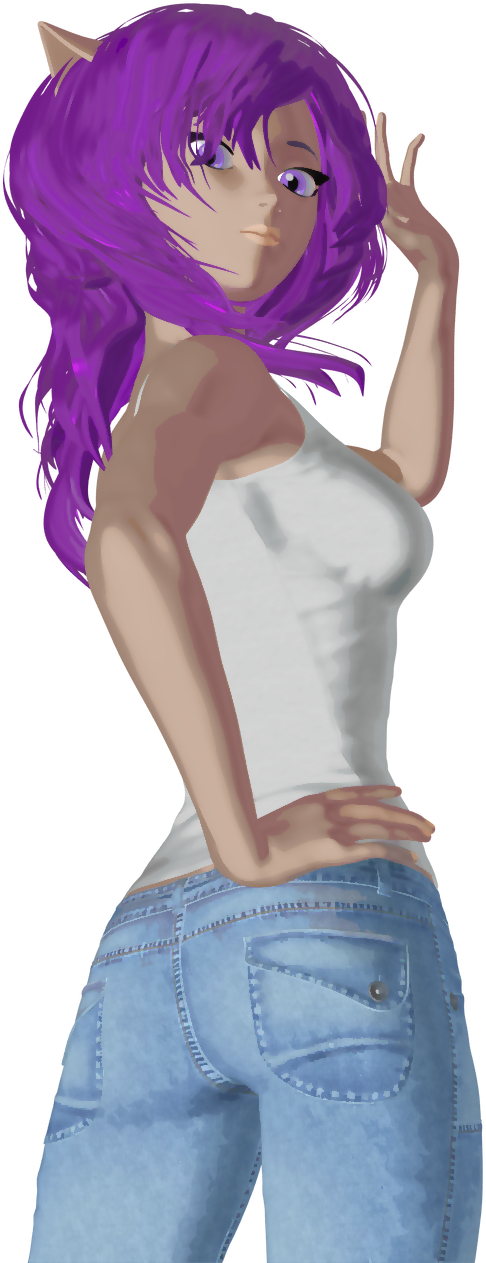
Very cute. I like the results you get with your apprach – it has a nice anime cel-shader look.
Thanks. I'm experimenting with it to see if its a viable process for an entire comic project.
If I may make a recommendation based on my own experience, once you have moderate confidence in the process (and I think you're there) you need to start making comic pages. Even if they are throw-away pages. I suggest this because you won't know how viable your process is until you start making sequential pictures and see if you can keep a consistent look from panel to panel. I learned very quickly in my b&w work that I needed to be very specific about my render dimensions, otherwise the width of my lines varied too much from panel to panel.
In your case, I think you will need to focus on keeping your shadows consistent from panel to panel in terms of darkness and general appearance.
If you try this, make sure you include a page that has the figure in long shot, medium and close-up. That will really give you a benchmark for moving forward.
And a last thought: I made two superhero pages for a comic I never finished, but it taught me so much in regards to addressing backgrounds and using 3D characters in a composed comic page. I feel that my art really grew from this point and the effort provided me with a leap forward that I would not have experienced if I had not made actual comic pages, rather than separate, static pin-ups.
Good luck, I look forward to seeing what you do next.
PS: I'm not going to repost those comic pages (I've shown it here several times), but here's a link to one of them if you're interested: https://www.daz3d.com/gallery/#images/181696
I used to do comics back in the day. I'm just out of practice.
Then get thee back to the drawing board, bucko!
Daz 3D is part of

Connect
DAZ Productions, Inc.
7533 S Center View Ct #4664
West Jordan, UT 84084Licensing Agreement | Terms of Service | Privacy Policy | EULA
© 2026 Daz Productions Inc. All Rights Reserved.