-
Real VS Ideal?
Judging by the "real" people I see in Walmart, it would be virtually impossible to morph them into an "ideal" form. So your hypothesis holds water.
Asian female face morphLoving this face morph! Thank you very much!
 Runtime DNA Merges With Daz 3D
Footwear is always a problem for conversions...even going from V4 to Genesis, or G2F to G3F, from everything I've read in the forums.
Dana
As a side note...it is often easier to export the shoes as an obj and fit them in a modeller, then import and rig as if a new item, than it is to try and transfer them.
Runtime DNA Merges With Daz 3D*gasp* Does this mean my absolute favorite outfit will get ported over to G2F/G3F???? (http://www.runtimedna.com/Oohlala.html)
That would be one item crossed off my bucket list!!!!
 The thought of this almost makes me as excited as that woman from Independance Day who said "God, I hope they bring back Elvis!"
Only if those vendors decide to port it over. If not, than it'll stay a V4 product only.
Couldn't hurt to ask Littlefox at some point.
But in the meantime it seems to transfer ok to G3f with Wear Them All. The shoes are the only part that gives me trouble.
Footwear is always a problem for conversions...even going from V4 to Genesis, or G2F to G3F, from everything I've read in the forums.
Dana
In this case there was evidently a morph pose needed to fit them to V4 in the first place so not much chance to get them working on G3F. The stockings converted just fine.
Runtime DNA Merges With Daz 3D*gasp* Does this mean my absolute favorite outfit will get ported over to G2F/G3F???? (http://www.runtimedna.com/Oohlala.html)
That would be one item crossed off my bucket list!!!!
The thought of this almost makes me as excited as that woman from Independance Day who said "God, I hope they bring back Elvis!" Only if those vendors decide to port it over. If not, than it'll stay a V4 product only.
Couldn't hurt to ask Littlefox at some point.
But in the meantime it seems to transfer ok to G3f with Wear Them All. The shoes are the only part that gives me trouble.
Footwear is always a problem for conversions...even going from V4 to Genesis, or G2F to G3F, from everything I've read in the forums.
Dana
Transferring Morphs from Genesis to G2M/G2F and from G2M/G2F to Genesis (Now with Clones!)I made it through the tutorial, although it was kind of hard for me, because I know little about Blender. Pressing the x key kept bringing up a delete dialog instead of making the model see through. I didn't see how you selected the upper half with the circular selection with the c key. I did it with selecting several small areas, because one big area made a convex selection at the bottom where yours was concave. I never would have made it without your detailed steps and diagrams, so thanks for all the detail. I also didn't see instructions for saving the clone morph, but I used Save As>Support Asset>Morph Asset to save it. It is necessary to save it isn't it?
The results so far are astounding! I've only tried one dress, the V4 MFD, because I don't have much V4 stuff installed right now. I even dialed a few morphs in the G3F and posed her as a little extra stress test. Look what a difference your clone made!
Woo! And yeah saving is important... But whats a tutorial by me without a few forgotten steps (I'm just proud half the steps weren't 'now use this dohickey to do this thing'
and 'x' didnt work because its 'z'... not even a typo, I honestly thought it was 'x'. In my defense the few blender hotkeys I know I do mostly by muscle memory. I can find it without looking, I just don't know what it actually is. (I'm worse in the real world, I do a disturbing amount of communication by pointing and grunting)
Asian female face morphfantastic morph, thanks so much. Here is a quick render to say thanks!
Hope there will be more to come!
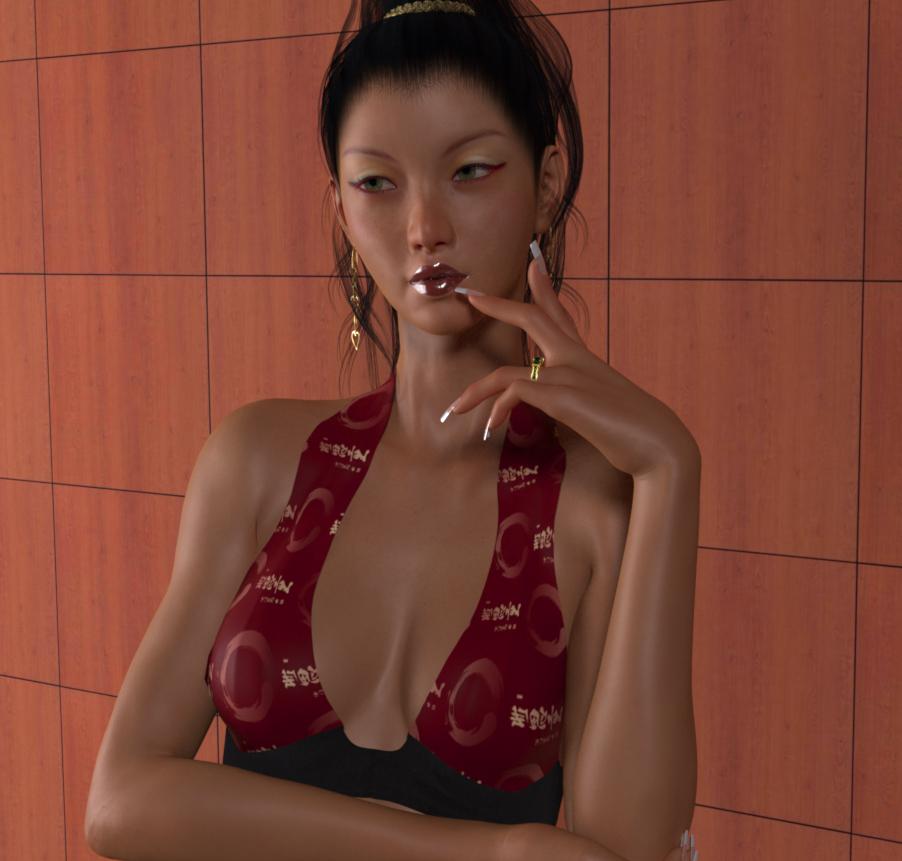 Released!...Aibell for Genesis 3 ( Commercial)
I don't buy much in the way of characters these days, but you're really tempting me here. Is this G3F-only, or will we need one of the base characters?
Aibell is G3 only - she doesnt require any add on characters. She has a custom morph but will still require the head and body morphs pack to look correct
Thank you all for your kind words :) It really does mean a lot to me!
Transferring Morphs from Genesis to G2M/G2F and from G2M/G2F to Genesis (Now with Clones!)I made it through the tutorial, although it was kind of hard for me, because I know little about Blender. Pressing the x key kept bringing up a delete dialog instead of making the model see through. I didn't see how you selected the upper half with the circular selection with the c key. I did it with selecting several small areas, because one big area made a convex selection at the bottom where yours was concave. I never would have made it without your detailed steps and diagrams, so thanks for all the detail. I also didn't see instructions for saving the clone morph, but I used Save As>Support Asset>Morph Asset to save it. It is necessary to save it isn't it?
The results so far are astounding! I've only tried one dress, the V4 MFD, because I don't have much V4 stuff installed right now. I even dialed a few morphs in the G3F and posed her as a little extra stress test. Look what a difference your clone made!
MimickingJust load your naked base figures in the 32 bit and do it there, save a scene subset then open it in the 64 bit dress, texture and morph em up.
(because the 32 bit can only use 3.5 GB of RAM most likely)
Good advice, but there is a problem: that lip-sync forces unwanted movements to the animation. Unless you setup a totally blocked mannequin, you have to fight with eye, neck and head movements...
yup all issues that don't happen whnen keyframing by hand
MimickingJust load your naked base figures in the 32 bit and do it there, save a scene subset then open it in the 64 bit dress, texture and morph em up.
(because the 32 bit can only use 3.5 GB of RAM most likely)
Good advice, but there is a problem: that lip-sync forces unwanted movements to the animation. Unless you setup a totally blocked mannequin, you have to fight with eye, neck and head movements...
MimickingJust load your naked base figures in the 32 bit and do it there, save a scene subset then open it in the 64 bit dress, texture and morph em up.
(because the 32 bit can only use 3.5 GB of RAM most likely)
i knew it was something like that. so after while you get sick of switching back and fourth between 32 byte and 64 byte for rendering so rather than keep switching between 2 different versions of software for each scene I just start to learn to keyframe.
In some of my animated films have 50 to 100 scenes files which if i did not hand keyframe the audio it would take me much longer to complete. I did tell you I'm lazy right. I look at all parts of animation like putting a puzzle together. and once you have the puzzle complete you have a finished animation..lol the current animation I am working on is already 9 minutes long with 120 individual scenes ranging from 3 to 10 seconds long each. so over time hand keyframing has just been easier for me then editing mimic files
MimickingJust load your naked base figures in the 32 bit and do it there, save a scene subset then open it in the 64 bit dress, texture and morph em up.
(because the 32 bit can only use 3.5 GB of RAM most likely)
Mimicking@ Ivy
Sorry, probably I misreaded something and got the wrong message!I use Mimic Lite often with many chars in the same scene. I tweaked it a bit to make it work with Genesis and it works fine. It tends to create too many keyframes, but I solved using MCasual Decimator that deletes a big portion of them, keeping a good final result, that obviously still needs some fine tuning. Normally, doing a precise lip-sync for a single phrase takes me about two/five minutes per character, eight or ten if the speech is pretty long or with many pauses (I hate how DAZ slows down when scrubbing the timeline with the audio track loaded!).
I don't know how you work with Mimic or wich version you used, but here's my workflow:
I cut the audio clips to be more manegeable. I cut the yells, yawns and similar away since they are parts that I animate manually. After this, I load the audio clips in Mimic Lite, turn off the random expressions, analize them and export the PZ2 file in a folder, naming it as the original file.
Then I create the "actions" in DAZ and after this I import the right PZ2 file to the char, importing automatically the audio (Ah, I never got the error you reported, Ivy...) and clean up a bit the messy amount of keyframes using MCasual's Decimate. In the end I just have to correct the remaining keyframes.About the DMC files... I never heard about special versions for specific chars... As I know the DMC files are for the base figure and it works with any morph applied to it! Do you know more about it?
I used Mimic lite as well. But what use to take 3 to 5 minutes to do with mimic. I can do in about 30 seconds with more expression just hand keyframing. everyone has their own way of doing things that work for them. its just over time working with daz for animation I just found lot of things are done better using keyframes . but that just what I prefer to do I have a pretty good size morph library so that helps a lot as well. and i work with every character generation accept genesis 3 . I never had any need to work with it and yes the base character is what I meant you need the dmc files for I apologize
this is a older animation I did completely using keyframeing for the audio .
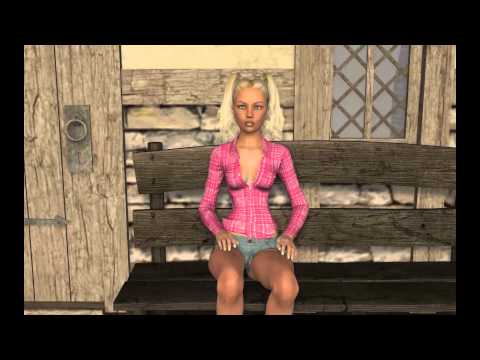
I wanna to have this spunky hill billy girl attitude when the girl was talking i could not archive it with mimic lite so after this video I pretty much stayed with hand keyframing for audio but like i said that is my preference of doing my animation everyone has their own way of doing things this mine.
New to DAZ; some questions about getting startedIf you've created custom content loaders for your Poser content and they are correctly defined they should still work with DAZ Studio unless they have newer features of Poser that DAZ doesn't support.
Thanks but I'm not sure I understand. I don't know what is meant by "custom content loaders" or "correctly defined." Can you please clarify what you mean? The screencaps were helpful in opening those preferences but I don't really know what to do with them. The content that I've got in my runtime, at least the content that has DS files available, do already show up. As in, the program is already finding those folders in the content library. The issue is DAZ failing to find the related texture files. It's locating the textures folder but seems to want me to place the files within a specific subfolder, instead of finding the files wherever they are within the textures directory.
I assume that you either saved a new cr2 with the changed path or accept tha 'missing texture find it' dialog each time you load something?
No, there's no need. As long as the textures for a particular item are located somewhere within the runtime > textures folder, Poser automatically loads it. You don't need to adjust any settings or do anything special. Occasionally, it will fail to find morph files in the runtime > libraries > morphs directory, but that's very rare. And when it does happen, it simply pops up a dialog telling you to locate one of the files, at which point you can navigate to the proper directory, double click the file in question, and then it automatically finds the rest of the files from there.
For Poser, products are either downloaded as zip files or exe files. Either way, I simply extract the product to a separate folder and then place the individual subfolders one by one into my Runtime. So if I download a hair product, I'll end up with folders like Character, Pose and Textures. I'll place the items from the Character folder into runtime > libraries > character > hair > female > name of hair. The poses (hair color and positions) would go into runtime > libraries > poses > hair > female > name of hair. And the textures would go into runtime > textures > hair > name of hair.
When I load the hair in Poser (the cr2 file), it automatically finds all of the related files throughout the runtime folder and loads them as normal. If I want to change the color or style, I go to my library > pose > hair > hair name and load whatever poses I want. The texture jpgs are normally untouched unless I want to customize them and load them individually for specific things (i.e. create a rainbow streak in the hair).
In contrast, DAZ seems to be saying that I can't sort my files the way I want to within those folders. That I have to place the files in very specific locations in order for them to load properly. With Poser, as long as the texture files are in the runtime > textures folder somewhere, they will load. If I'm understanding correctly, you're saying that DAZ can't do that. That I'm forced to put the files in very particular locations or they won't load, and there's no way to change that?
Load the item, don't worry about the missing textures...then in the surface pane, for each surface, manually navigate to the new folder you moved the textures to and add them. Then save an updated asset file.
Maybe I'm misunderstanding but it sounds like you're saying I have to manually load the texture for every single surface of every single item that way. Is that correct? Because that would be far too time consuming to do for every single item! Does DAZ really not have a way to simply browse, click the proper directory and automatically recognize the files within it? I have 400+ GB of stuff...it's not realistic to load textures individually or to have to save some sort of reference file for every single item. Hopefully I'm completely misunderstanding though...this is all very new to me :-)
Kismet2012 - thanks so much for all of the information on the Genesis characters! It's a lot to absorb but I'll go through the links you provided. I guess the main question for me would be whether products made for G3M would easily fit G3F and vice-versa or if, like V4/M4, there would be incompatibilities based on body shape and anatomical differences. Like if I wanted to put the "Norseman for G3M" outfit on a female G3 character, would it automatically adjust to accommodate breasts, etc.? Or in reverse, would a G3F outfit like "Jungle Goddess" conform to fit a flat-chested male body? If they are completely interchangeable, then why are they marketed differently (i.e. why say Leather Warrior for Genesis 3 Males instead of just Leather Warrior for Genesis 3)? I just want to make sure that I understand how that works!
Morgan's Freebies: Updated March 2, 2016New stuff, finally! Sorry this took a while. Real-life concerns prevented me from getting back to this sooner. Managed to find a bit of time to set aside for some new icons, though. Next will hopefully be some outlines in the same star shapes, and then a set of "peaked" stars (i.e., not flat as most of the icons have been).
*********************************************************
MRL Icons: Star Solids for Daz Studio 4.7+ and Poser 10+
by Morgan R. Lewis
*********************************************************
Free for use in commercial or non-commercial renders and animations.
These are not to be redistributed or sold without my express written permission.
In this package is a set of icons in six different shapes. The shapes load in at approximately 6 inches in size, "north-south". (I.e., if a letter A is arranged north-south, the peak is at north, and the feet are at south).
The following shapes are included:
* 3-Point Star
* 4-Point Star
* 5-Point Star
* 6-Point Star
* 7-Point Star
* 8-Point Star
Each icon loads at approximately 0.5 inches high (thick), and comes with an elevate morph that raises the top and lowers the bottom without distorting the rounded edge the way a vertical scale operation would. Each icon also comes with a "radial expand" morph that expands it proportionately without affecting thickness or the beveling.Go here to download: http://fav.me/d9tghup
Mimicking@ Ivy
Sorry, probably I misreaded something and got the wrong message!I use Mimic Lite often with many chars in the same scene. I tweaked it a bit to make it work with Genesis and it works fine. It tends to create too many keyframes, but I solved using MCasual Decimator that deletes a big portion of them, keeping a good final result, that obviously still needs some fine tuning. Normally, doing a precise lip-sync for a single phrase takes me about two/five minutes per character, eight or ten if the speech is pretty long or with many pauses (I hate how DAZ slows down when scrubbing the timeline with the audio track loaded!).
I don't know how you work with Mimic or wich version you used, but here's my workflow:
I cut the audio clips to be more manegeable. I cut the yells, yawns and similar away since they are parts that I animate manually. After this, I load the audio clips in Mimic Lite, turn off the random expressions, analize them and export the PZ2 file in a folder, naming it as the original file.
Then I create the "actions" in DAZ and after this I import the right PZ2 file to the char, importing automatically the audio (Ah, I never got the error you reported, Ivy...) and clean up a bit the messy amount of keyframes using MCasual's Decimate. In the end I just have to correct the remaining keyframes.About the DMC files... I never heard about special versions for specific chars... As I know the DMC files are for the base figure and it works with any morph applied to it! Do you know more about it?
How do I make transmaps in GIMP?Much easier...render to PNG with no background.
In Gimp... Layer > Add Layer Mask >Transfer Layer's Alpha
Then Layer > Show Layer Mask
Then Layer > New Layer from Visible...\
Save that layer as your mask.
NEW! Novica & Invited Guest Contributors Tips & Product Reviews Pt 6Okay, call me crazy, now I'm looking at Mog Ruith. All the add-ons and Mog Ruith are only .80 (96% off) so now I'm wondering if anyone has any renders of those? Even if they aren't stellar, would be good for DOF background buildings for period pieces. Even in theme parks where they have different time periods.
I used this a LONG time ago. It's by, believe it or not, Stonemason. For .80 Millennium Environment and Private Places goes with it. With DOF these would be interesting. They have props, it's not just a background. Parts of these actually morph. I don't have Private Places, I'll see about the Millennium Environment for a render tomorrow. Gotta get some sleep, up early this morning, so ttyl.
I have Millennium Environment and Private Places installed in DS 4.9.1.25 with Daz Connect. Private Places gives missing file errors and I cannot get it to work at all. Time for another bug report. This will be my third today and it isn't even noon.


That sounds like the bug that's fixed in the latest public beta (4.9.1.27).
I hope that is all it takes to fix it. It is frustrating that 4.9 and Daz Connect were released with so many things not working.
I read what you wrote in Jen's Updated Products thread -- it sounds like the add-on wasn't updated when the Mil Environment was, rather than it being the bug that was fixed.
Thanks for the additional information. I guess I'll have to wait and hope it will get updated.
Are the Poser files set up as .pz2's or .pp2/.cr2? If .pz2's don't work then it's probably the bug that's fixed in the latest beta, but .pp2/.cr2 would need to be updated.
The product contains all three of the file types you listed. Jen has indicated in her updates thread that the product needs to be updated and that see will fix it.
NEW! Novica & Invited Guest Contributors Tips & Product Reviews Pt 6Okay, call me crazy, now I'm looking at Mog Ruith. All the add-ons and Mog Ruith are only .80 (96% off) so now I'm wondering if anyone has any renders of those? Even if they aren't stellar, would be good for DOF background buildings for period pieces. Even in theme parks where they have different time periods.
I used this a LONG time ago. It's by, believe it or not, Stonemason. For .80 Millennium Environment and Private Places goes with it. With DOF these would be interesting. They have props, it's not just a background. Parts of these actually morph. I don't have Private Places, I'll see about the Millennium Environment for a render tomorrow. Gotta get some sleep, up early this morning, so ttyl.
I have Millennium Environment and Private Places installed in DS 4.9.1.25 with Daz Connect. Private Places gives missing file errors and I cannot get it to work at all. Time for another bug report. This will be my third today and it isn't even noon.
That sounds like the bug that's fixed in the latest public beta (4.9.1.27).
I hope that is all it takes to fix it. It is frustrating that 4.9 and Daz Connect were released with so many things not working.
I read what you wrote in Jen's Updated Products thread -- it sounds like the add-on wasn't updated when the Mil Environment was, rather than it being the bug that was fixed.
Thanks for the additional information. I guess I'll have to wait and hope it will get updated.
Are the Poser files set up as .pz2's or .pp2/.cr2? If .pz2's don't work then it's probably the bug that's fixed in the latest beta, but .pp2/.cr2 would need to be updated.
Daz 3D is part of

Connect
DAZ Productions, Inc.
7533 S Center View Ct #4664
West Jordan, UT 84084Licensing Agreement | Terms of Service | Privacy Policy | EULA
© 2026 Daz Productions Inc. All Rights Reserved.