-
Can you transfer a morph from one model to another
Just a morph question. I have both Daz African Elephant and Baby elephant with the Asian elephant morph. My uestion is can you tranfer the Asian elephant morph to the adult elephant model?
What is the general consensus on commissioned 3D art price..?As hphoenix states, this is highly dependent on the particular work. For example, I do scientific illustrations for books and online materials using various 3D apps as a side job (including DS on occasion, even though most of what I do with DS is just for hobby purposes). I charge by the hour (the time I need to to complete the project, estimated in an advance quote). depending on the type of project I charge $40 to $80 per hour. On top of that the client has to pay for any materials/assets that I have to buy (not for stuff that's already in my library). On average that results in a total of $200 to $400 per illustration. So it obviously depends on the market you work in, but I wouldn't take any commision for less. If it is a new client, half of the quoted price is due up front. For established clients I bill after completion.
Edit to add: These prices of course include a transfer of copyright to the client.
Ciao
TD
How to add geometry to G2M & keep/transfer the riggingTo transfer the shape to the new mesh? Is it failing entirely, or is it failing to transfer the rigging changes (which is, I think, expected)?
New Free Tutorial Video Series For New DS Users: What Do You Need?TBH, I could use a tutorial on applying Dformers to G3 characters - flattening thighs for seating on hard surfaces, enhanced biceps, and simlar.
And that's another one I can't do because I don't know how, sorry about that. I just do morphs for uses like that.
Thank you Szark!
I'd be happy with a morph tutorial! :-)
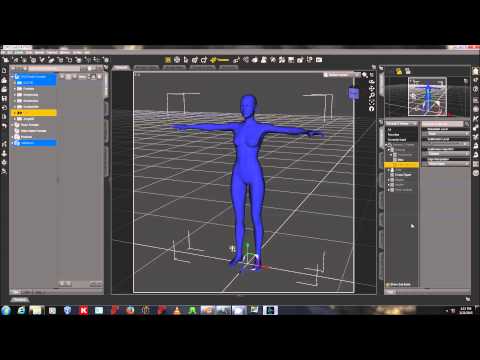
This procedure is the same on Genesis 1, 2 and 3.
Innards of "conforming"I've been using DAZ for a while, and am now getting interested in diving deeper. For me, at least, that usually turns into "wanting to know how the nuts and bolts operate."
Could someone explain some of the internal details of how conforming objects are built and implemented? (mostly commonly clothing, of course, but not restricted to that)
Here's what I think I know based on everything I've read:
- Conforming objects have their own rigging and morphs
- The low-level DSON format for a node_instance within a scene provides a conform_target that can sort of "bond" the conforming item to the item to which it is conforming
- When manipulations are made on the node identified as the conform_target, they get replicated back to the conforming item. This is how, for example, morphs to a figure that change its shape or rigging bends get reflected back to the clothing or whatever - the same transformations are automagically applied to the conforming item.
- The easiest way to get the appropriate rigging and morphs into a conforming item is to use the Transfer Utility
So here are some of the questions:
- How is an object "marked" as being able to conform to a target? How does DAZ know to set the "conform_target" to the item selected in the scene as opposed to just creating a new "unattached" instance of the object you're inserting?
- What (specifically) is it that DAZ uses to correlate things like rigging between the target and the that in the conforming object? Is it the low-level object ID for each of the bones, morphs, etc? This could be significant if, for example, one wanted to create something that both conformed, but also had non-conforming rigging. A set of angel wings comes to mind - you'd want to conform to the character's back, but you wouldn't want the wing rigging getting dragged around because it inadvertently got "attached" to some other part of the figure's rigging.
- When a morph or rigging setting in the target gets altered, is the corresponding item in the conforming object essentially set to the same value, as opposed to the transformation on the target mesh being replicated? Put otherwise, if I alter the rigging or the morph in the comforming item, is it things like the percentages that get copied, as opposed to the exact mesh translations, meaning that edited morphs could be used to alter exactly how the item "conformed" to the target?
- How does the Transfer Utility "know" how to attach the rigging and the morphs to the mesh of the conforming object? Does this depend on starting off with a clone of the original figure mesh so that there is a one-for-one correspondance between the mesh points?
- How does the Transfer Utility "know" what parts of the rigging and the morphs not to replicate? Conforming hair doesn't (usually LOL) have foot bones.
New Free Tutorial Video Series For New DS Users: What Do You Need?TBH, I could use a tutorial on applying Dformers to G3 characters - flattening thighs for seating on hard surfaces, enhanced biceps, and simlar.
And that's another one I can't do because I don't know how, sorry about that. I just do morphs for uses like that.
Thank you Szark!
I'd be happy with a morph tutorial! :-)
How to add geometry to G2M & keep/transfer the riggingyes, and I finally got it to work with the transfer utility, thx.
but it works only with the base shape of G2M. I'm now trying to transfer shapes also, but that doesnt seem possible :/
Help identifying a characterNo, it's this character, Novariens Holy: The artist is Joel Gecko. He did release a very similar morph as part of his Heavely Bodies set. It's the one named Aquarius) (Sorry, something weird is going on with thelinking today and the links keep coming up garbled. Other sites are fine, it's just DAZ for some reason.)
Novariens Holy is an outfit, not a character. That's the character in the illustration, though.
Yes, that was originally supposed to be a link but linking's not working for me for some reason, so I typed the product name instead. Sorry if that was confusing. Either way, it's the same character, which appears in dozens of other illustrations for other products as well. It was never released separately, although the Aquarius character in the Heavenly Bodies set is fairly close.
Help identifying a characterNo, it's this character, Novariens Holy: The artist is Joel Gecko. He did release a very similar morph as part of his Heavely Bodies set. It's the one named Aquarius) (Sorry, something weird is going on with thelinking today and the links keep coming up garbled. Other sites are fine, it's just DAZ for some reason.)
Novariens Holy is an outfit, not a character. That's the character in the illustration, though.
Help identifying a characterNo, it's this character, Novariens Holy: The artist is Joel Gecko. He did release a very similar morph as part of his Heavely Bodies set. It's the one named Aquarius) (Sorry, something weird is going on with thelinking today and the links keep coming up garbled. Other sites are fine, it's just DAZ for some reason.)
How would I remove specific points from a morph file via script?That's actually just a reference to the "object" stored with the node you are working on, not an .obj file, the name is just a coincidence
 .
.You would paste this into the SciptIDE pane, select the figure (select the "root node", not a bone), and run the script (F5). To see the changes you may need to remove and reapply your morph. When it looks good (and assuming the script works, no promises :-)), just save a new morph preset and you should have your new .duf ready to go.
How to add geometry to G2M & keep/transfer the riggingHi !
I'd like to add some geometry to the genesis 2 male figure (nothing huge, just a couple details on arms) and keep the rigging to be able to use poses in DAZ.
Here is what I do but it fails :
1) export G2M as OBJ to third party 3D modeler, add details (a few poly extrusion), save & export as OBJ
2) import the obj in the scene where I still have the original G2M figure loaded
3) use the object > transfert utility with G2M as source and the modified G2M as target
4) fails. the target fails to pose correctly after transfer.
The most important thing to me is to keep the rigging so that I can pose the modified G2M in DAZ. Keeping the possibility to use shapes & surfaces isnt a priority.
Your help would be very much appreciated.
Thx !
How would I remove specific points from a morph file via script?No problem :-). You could try the below to add ranges, its a little cumbersome but without getting really complicated, may be your best bet:
var node = Scene.getPrimarySelection();
var obj = node.getObject();
var morph = obj.findModifier("YourMorphName");
var deltas = morph.getDeltas();

//your list of verts to remove from the morph
var remove = new Array();

//Range 57 through 125
for (var i = 57; i <= 125; i++)
{
    remove.push(i);
}

//Range 245 through 290
for (var i = 245; i <= 290; i++)
{
    remove.push(i);
}

for (var i = 0; i < remove.length; i++)
{
	deltas.removeDelta(remove[i]);
}
You would copy/paste the "range" section for each range and change its number accordingly. Haven't tested this though, so you may need to experiment with it.
How would I remove specific points from a morph file via script?Cool. Thanks, I appreciate the work. Forgive my ignorance here, but can you plug in like a range of numbers instead of the individual? Say like list 4-9 instead of writing out each instance? Reason I ask is because in the morph file there are long stretches of numbers and then there'll be some skips.
How would I remove specific points from a morph file via script?This is definitelyt doable. I just tested this andx it seems to do what you are looking for:
var node = Scene.getPrimarySelection(); var obj = node.getObject(); var morph = obj.findModifier("YourMorphName"); var deltas = morph.getDeltas(); //your list of verts to remove from the morph var remove = new Array(4, 5, 6, 7, 8, 9); for (var i = 0; i < remove.length; i++) { deltas.removeDelta(remove[i]); }Couple of Head MorphsPlaying around with the ZBrush trial and the GoZ import process left me with these head morphs so I thought I'd share them. You can find the DSON morph files at the ShareCG links below.

 Introduce Yourself, Hello, my name is.....
Betsy,
Could you do it using a displacement map? If you could find (or create) a monochrome image of an appropriate footprint and use it as a displacement map on, effectively, a transfer, you could place that on the ground and the displacement map would render the ground down, with the amount depending on the displacement map. They're very powerful tools, but because they're only visible at render time, it means that there's a bit of trial and error required to get them where you want them. They're also quite resource heavy, so a lot of them will really slow a render down.
Might be worth investigating, though?
Bones constantly jumping out of figures... When loadingThese are Gen-3 (Victoria 7), with about 3-dozen applied morphs, about 12 "pose adjustments" and the rest are "Shape morphs".
They are not my morphs... They are ones from Daz, and some not from Daz. However, using just the default ones, stacked with a lot of "corrections" and cross-linked adjustments... I get this too. Seems to be worse in this version, and before, I would just trash the models and start all over. Now I know that they load fine, randomly... And I am NOT going to spend another 8 hours "tweaking" a default model, to get here again, and have this issue still have the same results. (Well I will, just not re-doing the same model again. I will be doing all my other models this way. Because I have no choice.)
I have the best luck with loading, if I save each individual model "broken"... If I save them "fixed" (on the screen), they alwasy load broken. If I save them broken, it is about a 50% chance that they load "fixed"... But there is also a 50% chance that the next MERGED subset or scene will break all previously loaded models in other odd ways. (Seems to like to shrink the breasts inwards, when a failed load breaks something already loaded in the scene.)
So, No, I have not adjusted the rigging in any way, or done an erc freeze, because I am not saving morphs, I am saving "Scenes", and "Scene Subsets".
If I could save the "Final results", of these "stacked morphs", as one new morph to apply.. That might offer a short-term resolution to my issue. (Then I just have to apply that one final morph to Gen-3, and be on my way. No actual "models" to save.)
Bones constantly jumping out of figures... When loadingWhat models are these? These are morphs you have done? For the DAZ figures? Do you adjust the rigging and erc freeze before saving the morph assets?
Where are the "Bump Maps" or "Normal Maps" in IRay?I am having an issue with the "Bump-maps" or "Normal-Maps", where models created as adults, with excessive details painted in to the normal-maps are interfering with any youth adjustments.
To be specific, Victoria 7 with IRay skin, has cut-lines under the breasts. (That actually interferes with every single breast-morph.)
In the "Materials" for the Torso, there is no Bump-Maps or Normal-Maps settings. (Well, there is one related to Bumps, but removing the bump-image or setting the values to 0.00 does absolutely nothing.
The only way I can get around this, is to use the script in the IRay skins which completely removes the "Normal-Map", but then I lose ALL detail. There is no indication of where the image is, no option to edit it, and no settings in the materials page to adjust the strength, when the materials are setup for IRay. (May be there in 3DeLight, but it seems hidden, as if it is still rendering with 3DeLight and Iray materials, even though it only shows the IRay materials in the materials page. Might explain the odd rendering times and larger memory sizes too.)
So... How do I locate the "Normal-Map", to edit it and remove the horrible breast-cuts under the breasts and other general deforming bumps that are disrupting all morphs and just resulting in lumpy models, for anything other than Victoria 7.
NOTE: Also does this for eyes, feet and hands. (The tendons and wrinkles, which younger people do not have.)
Daz 3D is part of

Connect
DAZ Productions, Inc.
7533 S Center View Ct #4664
West Jordan, UT 84084Licensing Agreement | Terms of Service | Privacy Policy | EULA
© 2026 Daz Productions Inc. All Rights Reserved.