-
Creating morphs/figures for distribution/sale
The sale value of a purely dial spun morph is rather low.
How to add geometry to G2M & keep/transfer the riggingAs jetsmart says, that would probably be simplest. In any event, using the Transfer Utility to rig a shape that doesn't match the original is asking for trouble, if you must use a new base mesh you would probably be better off sticking to the same base shape and creating new morphs to match the old base morphs.
How to add geometry to G2M & keep/transfer the riggingif I use the G2M base, I can : export, add geometry in an other app, import back in DAZ, use transfer utility and pose it with G2M poses.
if I apply shapes/morphs to G2M prior to exporting then the posing at the end of the process fails : the mesh gets heavily distorted in some parts. So i guess maybe its the rigging changes part that fails.
Do you know if its possible to "bake" morphs so that the shapes/morphs wouldnt interfere maybe ?
Reality 4.2 ~ Learn It ~ Chat With Paolo ~ WIPS ~ Renders Showcase!currently trying to fix out why one node is faster then the other..
node 1 - AMD 940 -4core@ 3.0gz 6gb Ram DDR2 System - Running Fine
Node 2 - AMD 965 -4core@ 3.4gz 16GB Ram DDR3 System - Running Slow
node 3 - AMD 8350 -8Core @ 4.7gz 32GB Ram DDR3 System - Running Fine
node 4 - AMD 955 -4core @ 3.2gz 8GB Ram DDR2 System - Not Fully tested
node 5 - AMD FX6300 -6core @ 4.1gz 8GB Ram DDR3 System - Not Fully tested
node 6 and Main PC - 4790k -4core @ 4gz 32gb RAm DDR3 Systems - Running Fine
All Nodes running Windows 10 64bit Home
Node 1 is faster then node 2 despite it being older. Node 3 is running just fine. The other nodes I havent fired up yet and tested properly as they are in other rooms and my inital problems with running nodes has kept me from using them... but with just running Luxrender by itself, it'll make that more of an option.
Also waiting for more material presets in Reality, I have used some.. and have made some of my own so far due to a problem with Iray Shaders... even the built in ones in daz sometimes only transfer to Reality as a white surface.. one material in question was BlackGranite.. By far most seem to work without problem.
That and I mentioned before, I'm use to applying the uber enviroment base to my surfaces, and sometimes in reality it'll turn the material into a blank white.. I havent really had time to test if Iray or 3Delight materials are better, but coming from Iray.. iray shaders have always been more realistic then 3delight in my experience.
Daz Studio Pro BETA - version 4.9.1.30! (HOTFIX - Release Candidate 3 - UPDATED)Hi, I hope someone test and confirm, then report it as new ticket.
because, I got reply two times. after I send this ticket,
they (support and their dev team ) can not re-produce it with this version beta (and product ver 4.9)
then I needed to send , all process, with new pic twice
 . I send reply again yesterday.
But wityout another ticket from another user, I afraid, they do not think, there is problem (not only for some user)
If it only happen with individual case, need to find conditions which cause this problem.
to test easy, I use hexagon bridge to make new morph for genesis3,(F and M)
. but it not cause any difference about auto-follow process, I believe.
FREAK 7 on the Wishlist!If you want a Freak-style face for Genesis 2 Male (not Genesis 3, at the moment), I'd suggest combining Massive, Swole and Klaus by Male-M3dia in whatever proportions would work for your projects. Unfortunately, he's not available for Genesis 3, but if GenX3 does come along, maybe he'll transfer OK. (Though he's an extreme enough shape that I'd expect difficulty.)
I've tended to use Klaus at 50-75% when I want him as an additive shape.
Do I want Poser or DAZ Studio, and what figure?Now that I am home and not typing on my phone, I'll add a little more.
As I said before with dial spinning, once you develop a talent, you really only need the base characters: Michael and Victoria, plus the morph packages for each. If you want the greatest versatility, get both Genesis 1 (M5/V5) and Genesis 2 (M6/V6).
Genesis 1: can use V4/M4 textures and eyes. Needs a converter to use G2 textures.
Genesis 2: can use Genesis 1 textures but not eyes. Needs a converter to use V4/M4 textures.
Both G1/G2 have growing up morphs (to create adult to age 5) and aging morphs.
These pictures are some examples of characters I have created, each one morphed from the original base.
Morgan's Freebies: Updated March 2, 2016Two more icon sets today, completing the stars sets. First up is Star Outlines, which should be reasonably obvious what it is. Each Star Outline icon has an elevate morph, inner and outer radial expand morphs, and morphs to move the hole. Second up is Star Peaks, which is a little different from most of the icons in that the surfaces aren't level. Instead, a single point on each side is elevated and connected by ridges to the points of the stars. Those do not morph, but will of course scale.
Download Star Outlines here: http://fav.me/d9tr3nb
Download Star Peaks here: http://fav.me/d9tta1w
Can you transfer a morph from one model to anotherJust a morph question. I have both Daz African Elephant and Baby elephant with the Asian elephant morph. My uestion is can you tranfer the Asian elephant morph to the adult elephant model?
What is the general consensus on commissioned 3D art price..?As hphoenix states, this is highly dependent on the particular work. For example, I do scientific illustrations for books and online materials using various 3D apps as a side job (including DS on occasion, even though most of what I do with DS is just for hobby purposes). I charge by the hour (the time I need to to complete the project, estimated in an advance quote). depending on the type of project I charge $40 to $80 per hour. On top of that the client has to pay for any materials/assets that I have to buy (not for stuff that's already in my library). On average that results in a total of $200 to $400 per illustration. So it obviously depends on the market you work in, but I wouldn't take any commision for less. If it is a new client, half of the quoted price is due up front. For established clients I bill after completion.
Edit to add: These prices of course include a transfer of copyright to the client.
Ciao
TD
How to add geometry to G2M & keep/transfer the riggingTo transfer the shape to the new mesh? Is it failing entirely, or is it failing to transfer the rigging changes (which is, I think, expected)?
New Free Tutorial Video Series For New DS Users: What Do You Need?TBH, I could use a tutorial on applying Dformers to G3 characters - flattening thighs for seating on hard surfaces, enhanced biceps, and simlar.
And that's another one I can't do because I don't know how, sorry about that. I just do morphs for uses like that.
Thank you Szark!
I'd be happy with a morph tutorial! :-)
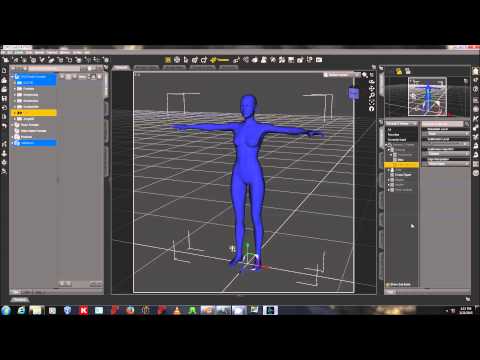
This procedure is the same on Genesis 1, 2 and 3.
Innards of "conforming"I've been using DAZ for a while, and am now getting interested in diving deeper. For me, at least, that usually turns into "wanting to know how the nuts and bolts operate."
Could someone explain some of the internal details of how conforming objects are built and implemented? (mostly commonly clothing, of course, but not restricted to that)
Here's what I think I know based on everything I've read:
- Conforming objects have their own rigging and morphs
- The low-level DSON format for a node_instance within a scene provides a conform_target that can sort of "bond" the conforming item to the item to which it is conforming
- When manipulations are made on the node identified as the conform_target, they get replicated back to the conforming item. This is how, for example, morphs to a figure that change its shape or rigging bends get reflected back to the clothing or whatever - the same transformations are automagically applied to the conforming item.
- The easiest way to get the appropriate rigging and morphs into a conforming item is to use the Transfer Utility
So here are some of the questions:
- How is an object "marked" as being able to conform to a target? How does DAZ know to set the "conform_target" to the item selected in the scene as opposed to just creating a new "unattached" instance of the object you're inserting?
- What (specifically) is it that DAZ uses to correlate things like rigging between the target and the that in the conforming object? Is it the low-level object ID for each of the bones, morphs, etc? This could be significant if, for example, one wanted to create something that both conformed, but also had non-conforming rigging. A set of angel wings comes to mind - you'd want to conform to the character's back, but you wouldn't want the wing rigging getting dragged around because it inadvertently got "attached" to some other part of the figure's rigging.
- When a morph or rigging setting in the target gets altered, is the corresponding item in the conforming object essentially set to the same value, as opposed to the transformation on the target mesh being replicated? Put otherwise, if I alter the rigging or the morph in the comforming item, is it things like the percentages that get copied, as opposed to the exact mesh translations, meaning that edited morphs could be used to alter exactly how the item "conformed" to the target?
- How does the Transfer Utility "know" how to attach the rigging and the morphs to the mesh of the conforming object? Does this depend on starting off with a clone of the original figure mesh so that there is a one-for-one correspondance between the mesh points?
- How does the Transfer Utility "know" what parts of the rigging and the morphs not to replicate? Conforming hair doesn't (usually LOL) have foot bones.
New Free Tutorial Video Series For New DS Users: What Do You Need?TBH, I could use a tutorial on applying Dformers to G3 characters - flattening thighs for seating on hard surfaces, enhanced biceps, and simlar.
And that's another one I can't do because I don't know how, sorry about that. I just do morphs for uses like that.
Thank you Szark!
I'd be happy with a morph tutorial! :-)
How to add geometry to G2M & keep/transfer the riggingyes, and I finally got it to work with the transfer utility, thx.
but it works only with the base shape of G2M. I'm now trying to transfer shapes also, but that doesnt seem possible :/
Help identifying a characterNo, it's this character, Novariens Holy: The artist is Joel Gecko. He did release a very similar morph as part of his Heavely Bodies set. It's the one named Aquarius) (Sorry, something weird is going on with thelinking today and the links keep coming up garbled. Other sites are fine, it's just DAZ for some reason.)
Novariens Holy is an outfit, not a character. That's the character in the illustration, though.
Yes, that was originally supposed to be a link but linking's not working for me for some reason, so I typed the product name instead. Sorry if that was confusing. Either way, it's the same character, which appears in dozens of other illustrations for other products as well. It was never released separately, although the Aquarius character in the Heavenly Bodies set is fairly close.
Help identifying a characterNo, it's this character, Novariens Holy: The artist is Joel Gecko. He did release a very similar morph as part of his Heavely Bodies set. It's the one named Aquarius) (Sorry, something weird is going on with thelinking today and the links keep coming up garbled. Other sites are fine, it's just DAZ for some reason.)
Novariens Holy is an outfit, not a character. That's the character in the illustration, though.
Help identifying a characterNo, it's this character, Novariens Holy: The artist is Joel Gecko. He did release a very similar morph as part of his Heavely Bodies set. It's the one named Aquarius) (Sorry, something weird is going on with thelinking today and the links keep coming up garbled. Other sites are fine, it's just DAZ for some reason.)
How would I remove specific points from a morph file via script?That's actually just a reference to the "object" stored with the node you are working on, not an .obj file, the name is just a coincidence
 .
.You would paste this into the SciptIDE pane, select the figure (select the "root node", not a bone), and run the script (F5). To see the changes you may need to remove and reapply your morph. When it looks good (and assuming the script works, no promises :-)), just save a new morph preset and you should have your new .duf ready to go.
How to add geometry to G2M & keep/transfer the riggingHi !
I'd like to add some geometry to the genesis 2 male figure (nothing huge, just a couple details on arms) and keep the rigging to be able to use poses in DAZ.
Here is what I do but it fails :
1) export G2M as OBJ to third party 3D modeler, add details (a few poly extrusion), save & export as OBJ
2) import the obj in the scene where I still have the original G2M figure loaded
3) use the object > transfert utility with G2M as source and the modified G2M as target
4) fails. the target fails to pose correctly after transfer.
The most important thing to me is to keep the rigging so that I can pose the modified G2M in DAZ. Keeping the possibility to use shapes & surfaces isnt a priority.
Your help would be very much appreciated.
Thx !
Daz 3D is part of

Connect
DAZ Productions, Inc.
7533 S Center View Ct #4664
West Jordan, UT 84084Licensing Agreement | Terms of Service | Privacy Policy | EULA
© 2026 Daz Productions Inc. All Rights Reserved.