-
How do I install Poser4 format content from Renderosity etc to DAZ 4.9?
That's a good point, there's a huge amount of Poser-format stuff coming across with the RDNA transfer. I wonder how much of it has been set up yet for the proper metadata? It's taken long enough to set up the existing DAZ store stuff, and that's an ongoing job that's nowhere near finished yet. And until that's done, none of it will appear in Smart Content.
Need More Face Morphs For GF3 and GM3I agree. I really need some morphs that aren't currently in the system, particularly for men.
I'd like:
'eye length' I really like longer eyes, and this morph isn't there
'eye squint'. I realize this is a pose, but I use this nearly constantly on male characters, and it would be nice if this was also a shaping morph, because it looks so good dialed in.
'nose indent' at the top of the button type noses for guys, there is no morph for that.
More mouth and lip morphs.
Ability to widen the face and head, not just the jaw.
More lip morphs.
Year 1: What is missing for G3F now ?- Fantasy armor that won't get her killed due to an arrow striking right through her bare skin.
Bikini Mail allows the wearer to add their charisma bonus to their AC.
The effect is +1 if they're also weilding a broadsword.
Girls can wear boy's armour with the figure swap morph slider thingie. Pretty good for equiping armour sets with flat heels, too. Then again if they do that they lose the Gender Feat: Never Flat Footed, pretty much a game breaking bonus, but really useful for rouges.
Export MD (CLO3D) Clothes to DAZ3D , and posing.By defaul transfer utility will project the figure's rigging on the clothes. this doesn't work well for long skirts: it makes them follow the leg's bones so the mesh streches when you move the legs.
To get a better result you need to apply a projection template intended for a dress / skirt when you run the transfer utility, instead of using the default projection.
For G3F this product will provide you with additional projection templates for various types of outfits: http://www.daz3d.com/sy-ultra-templates-for-genesis-3-female-s
I've used Sickleyield's other templates in the past and can vouch for them...they are much better than the default templates and will go a long way to minimize the problems with skirts.
Year 1: What is missing for G3F now ?Preteens, and appropriate clothing. There needs to be an equivalent to The Kids 4, or millenial kids for G3.
With a bit of creative morph work, it's possible to make quite a variety of preteens. I've done it working down from Girl 7, up from the Little Ones, and a half-dozen other ways, with and without the Youth morph from Growing Up.
Appropriate clothing is a bit more of a challenge. Autofitting from earlier Genesises helps.
...I find Zev0's Growing Up morphs work very well.
"Appropriate" clothing? I agree.
Year 1: What is missing for G3F now ?I'm not clear on why people want 200 head morphs - well, I guess that depends on whether we are talking morphs or shapes. The more morphs the better - then I can created my own shapes as I please. But I don't buy pre-made face shapes nor do I buy characters for their shapes (I buy them if the skin looks apppealing). A big part of my enjoyment of this hobby is creating my own characters from base shapes using the morph dials. That's why Zev0's products are such a help - being able (at least on G2F) to dial the age up or down is wonderful. I wish there were realistic skins for all ages though. Again, I use Cailin for almost every G3 female but I like to include older ladies and the options are very limited with G3F.
EDIT: oh, sticking with the theme of the OP ... what G3F also needs are realistic nipples. The present ones look like they were created using origami, not pro-level 3D modelling.
200 head morphs is a specific package.
Cailin's texture is lovely but it's really only useful for pale redhead youngish females.
...like my character Leela, however 18$ is a bit much for a single skin.
Export MD (CLO3D) Clothes to DAZ3D , and posing.By defaul transfer utility will project the figure's rigging on the clothes. this doesn't work well for long skirts: it makes them follow the leg's bones so the mesh streches when you move the legs.
To get a better result you need to apply a projection template intended for a dress / skirt when you run the transfer utility, instead of using the default projection.
For G3F this product will provide you with additional projection templates for various types of outfits: http://www.daz3d.com/sy-ultra-templates-for-genesis-3-female-s
Export MD (CLO3D) Clothes to DAZ3D , and posing.When you save the zip file containing the object and texture files, it's name must not have any spaces in it. If it has spaces then the texttures won't be applied.
So if you have G2M Pants it must be saved as G2M_Pants or G2MPants, then the textures will be applied. Hope that is clear.
When you use the Transfer Utility with an A pose then you must change the Item Shape to current and tick the box "Replace source shape from Target" in the Project Options tab for it to rig the garment correctly.
The obj import can be very finicky with textures...things like spaces in the names can prevent them from automatically importing. As long as everything is properly UV mapped, then it's just a matter of going to the textureless surface, in the Surface tab and clicking on the little down arrow in Diffuse Color and navigating to the map location and picking it (repeat for any other maps, like bump, transparency, etc).
Yes this happens almost all the time. It is properly mapped , however DAZ still ignores them when importing . And i end up with a blank textureless surface, where i have to rearrange the textures .I can't resize the textures in DAZ , or perhaps there is a way to resize them that i dont know of ?
Without seeing examples it would be hard to say about what can be done within Studio itself...
Is MD writing an mtl file to go with the obj? If it is, open it in a text editor and look at where and what it has written for the textures.
Instead of editing the avatar, should i edit the garment in MD instead , to fit G3 Female default pose?
Yes...because the rigging tools are set up to work at the base pose, in Studio.
Thanks guys! I got it to work.
As adviced by mjc2016, i edited the garments to fit the default G3 pose, exported it as obj and imported it to DAZ3D , then selected transfer utility, it works! Only issue is that i get is when i change to certain poses, the texture gets stretched out. Anyway to fix this?
Who needs Sharks? [Commercial]And yet again, poor herdbeast...
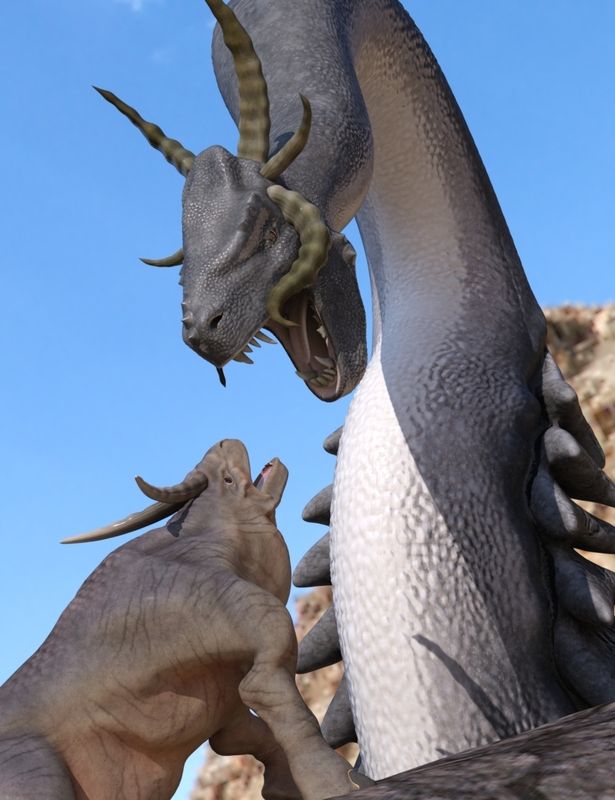
I really should make a "Terrified" expression morph for the critter...
I would suggest it needs a new agent.
Who needs Sharks? [Commercial]And yet again, poor herdbeast...
I really should make a "Terrified" expression morph for the critter...
Export MD (CLO3D) Clothes to DAZ3D , and posing.When you save the zip file containing the object and texture files, it's name must not have any spaces in it. If it has spaces then the texttures won't be applied.
So if you have G2M Pants it must be saved as G2M_Pants or G2MPants, then the textures will be applied. Hope that is clear.
When you use the Transfer Utility with an A pose then you must change the Item Shape to current and tick the box "Replace source shape from Target" in the Project Options tab for it to rig the garment correctly.
Please Bring Back "HIRO"!I really prefer anime-type males that don't have that pointed chin... Hiro 4 always seems to work a little better when mixed with other morphs. Dialing in any amount of his "American" morph always made him a bit more pleasing and less feminine-looking.
3Delight Laboratory Thread: tips, questions, experimentsLooks interesting, but I'd wait for further development of the OSLtracer. You probably remember that OSL lends itself well to working with real-world units, so maybe the devs are going to add it down the line. And even if they leave it up to the user, it's still easier in OSL I think.
That's a superb render =) I like your morph better than the original.
Yeah...and even the math would be a bit easier to implement in OSL, if it isn't included.
There's even a chance that OSL lights could use luminous flux instead of intensity....and maybe even IES profiles.
General installation question.Victoria 7 is a morph for Genesis 3 Female. So Genesis 3 is all that is required for her. So, no, the newest does not require the older versions.
3Delight Laboratory Thread: tips, questions, experimentsI've always thought it would be interesting to have 3DL lights that you could set the color temperature on...
I found this
http://www.tannerhelland.com/4435/convert-temperature-rgb-algorithm-code/#comment-24753
It looks like it could be used to set the color of the light.
Looks interesting, but I'd wait for further development of the OSLtracer. You probably remember that OSL lends itself well to working with real-world units, so maybe the devs are going to add it down the line. And even if they leave it up to the user, it's still easier in OSL I think.
That's a superb render =) I like your morph better than the original.
Year 1: What is missing for G3F now ?I for one love Gianni even more than Michael 7. His facial morph is pretty realistic and actually reminds me of someone I know.
Leo just did not impress me at all, that's why he's still on my wishlist and The guy is well, the guy.
Kinda curious about Lee 7. I wasn't a big fan of Lee 6 so I hope this time around, I'm gonna like him.
I like the look of Gianni and the Guy (both kinda suffer in their official promos though) but money meant they have to wait. I liked the look of Leo initially but only coming with 1x skin texture is questionable, and 1x eye colour inexcusable. Yeah I could use other characters' eyes or make my own but I'm not paying to support that even if I do like the shape and HD versions.
Year 1: What is missing for G3F now ?I for one love Gianni even more than Michael 7. His facial morph is pretty realistic and actually reminds me of someone I know.
Leo just did not impress me at all, that's why he's still on my wishlist and The guy is well, the guy.
Kinda curious about Lee 7. I wasn't a big fan of Lee 6 so I hope this time around, I'm gonna like him.
Export MD (CLO3D) Clothes to DAZ3D , and posing.The obj import can be very finicky with textures...things like spaces in the names can prevent them from automatically importing. As long as everything is properly UV mapped, then it's just a matter of going to the textureless surface, in the Surface tab and clicking on the little down arrow in Diffuse Color and navigating to the map location and picking it (repeat for any other maps, like bump, transparency, etc).
Yes this happens almost all the time. It is properly mapped , however DAZ still ignores them when importing . And i end up with a blank textureless surface, where i have to rearrange the textures .I can't resize the textures in DAZ , or perhaps there is a way to resize them that i dont know of ?
For things to properly pose, they need to be rigged...and to be properly rigged, it is best to model the clothing to the base model...so if you are using Victoria 7, for example, you don't model to her...but rather Genesis 3 Female. And in the default position...the t-pose that they load in. Moving things around often throws off the auto-rigging...like in your image. There are some options when rigging that may help, but please post your eacat sequence...and what options you do use. Some screenshots of the process would be helpful, too.
My exact sequence would be as above. I just checked my sequence and i actually used a Genesis 3 Female as base , not Victoria . Sorry about that
1. Export Avatar of MD in its default pose
2. Load G3 Female in DAZ3D and Import MD's Avatar in its default pose
3. I would reposition my G3 Female model in DAZ3D to mimic the imported MD avatar.
2. Export the edited G3 Female model , and import it in MD . Then simulate the garment and the garment in MD would very well simulate it because the avatars pose's are alike
3. Export the garment only in OBJ
4. Bring the OBJ into DAZ3D and it would fit G3 Female
5. Edit hair , makeup of G3 Female
6. Transfer morph of Genesis 3 Female to Garment OBJ by using Assets - > Transfer UtilityImages are below. Is there anything i am doing wrong.
Instead of editing the avatar, should i edit the garment in MD instead , to fit G3 Female default pose?
(Images removed due to nudity.)
3D Art Freebie Challenge ---April: “When I Grow Up I Want To Be A Woodland Fairy” (Entry Thread)DAZ3D April, 2016 Freebie Challenge: "When I Grow Up I Want To Be A Woodland Fairy"
Entry #2. The Dangers Of Being A Woodland Fairy
It's not all a flight in the park.
"Hey, wait a minute!", chimes in Vicki, "Great! I've come down to this now, have I? Featuring Victoria as a pair of protruding legs?"
Rendered in DAZ Studio with 3Delight, no postwork
No Counts: DAZ Genesis 3 Female (G3F Starter Essentials), G3F Head and Body Morphs
Paid content: DAZ Victoria 7
DAZ Victoria (for the protruding legs)1. RDNA Sluggians by Traveler (Registration required)
http://www.runtimedna.com/RDNA-Sluggians.html2. Night Wings by Prae
http://freezone.thefantasiesattic.net/index.php?main_page=product_info&cPath=138_219&products_id=4633. Amy for Genesis 3 Female by Silver & Raziel
DSCreative Magazine, Issue #13, July 2015, page 73.
https://issuu.com/philatdsc/docs/ds_creative_13
(head morph and texture)4. P3D Tara by P3Design
DSCreative Magazine, Issue #18, December 2015, page 18.
https://issuu.com/philatdsc/docs/ds_creative_18
(body morph only used)5. Aditi Hair V4,A4,G4 by Propschick (Registration required)
https://www.renderosity.com/mod/freestuff/aditi-hair-v4-a4-g4/617156. Love Fairy - Outfit by Pretty3D (Registration required)
http://www.artraiders.com/download_page.php?file_id=1957. In the Forest by Corbie (Registration required)
http://www.sharecg.com/v/19470/browse/15/2D-Resources/In-the-Forest
(background)8. FallenTree by FranOnTheEdge (Registration required)
http://www.sharecg.com/v/3676/browse/5/3D-Model/FallenTree9. XfrogPlants Chestnut (Registration required)
http://xfrog.com/product/EU43.html
(for the bark texture on the fallen log)10. Tiling Texture Pack 17 by Yughues aka Nobiax (Registration required)
http://www.sharecg.com/v/55336/related/6/Texture/Tilling-Texture-Pack-17
(for the moss on the log - #91)11. Precious Mushrooms by rebelmommy (Registration required)
https://www.renderosity.com/mod/freestuff/precious-mushrooms/5928812. Mushrooms by DennisH2010 (Registration required)
http://www.blendswap.com/blends/view/6255713. Saxon3d Morphing Fae Leaf by Saxon3d (Registration required)
https://www.renderosity.com/mod/freestuff/saxon3d-morphing-fae-leaf/7152314. The Snail of the Cemeteries by gabrima (Registration required)
http://www.sharecg.com/v/20309/browse/11/Poser/The-Snail-of-the-Cemeteries15. Butterfly Figure by Age of Armour
http://www.ageofarmour.com/3d/free/butterfly.php16. Mlw-butterflyMats by Mike (Registration required)
http://www.sharecg.com/v/36437/browse/11/Poser/Mlw-butterflyMats17. Fern v2.1 (double-sided) by Yughues aka Nobiax (Registration required)
http://www.sharecg.com/v/52199/browse/5/3D-Model/Fern-v2.1-double-sided18. Faerie Wings I for ALL figures by fabiana (Registration required)
https://www.renderosity.com/mod/freestuff/faerie-wings-i-for-all-figures/59783
(For Vicki)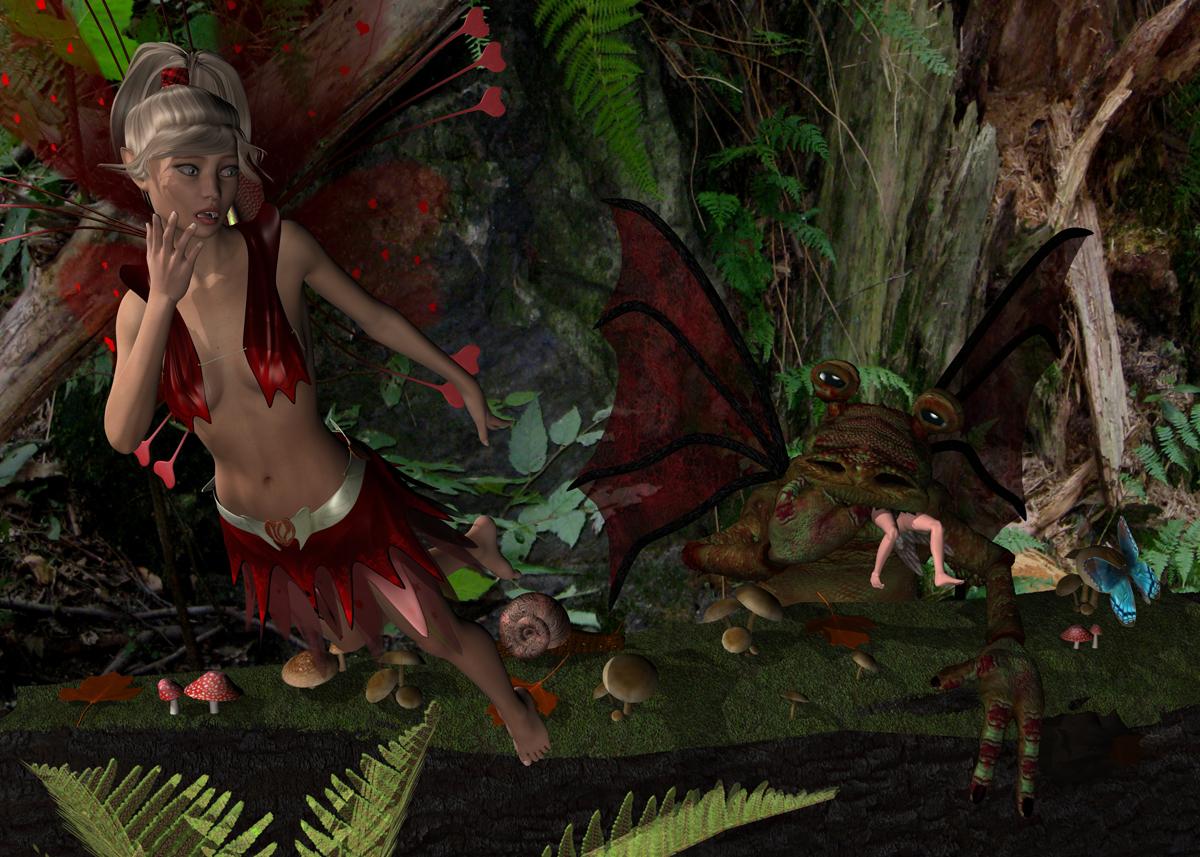 Dynamic clothing tips
Sorry if someone posted this earlier but you can update your V4 optitex wardrobe to G3F pretty easily. There's a bunch of OptiTex freebies for V4 and if you're like me you bought a few too. Nice to be able to use them on the latest figures. Here's what I do, but you need the "wear them all" product to have a V4 clone or you'll have to make your own.
- Load G3F and load the dynamic item.
- In the animation timeline, make sure your on frame 1.
- Select G3F and look for "Hidden" under properties, open it up and then select "Clones". Dial up your V4 clone to 100%. Wow, the clothing matches her shape perfectly.
- Now you slide the animation bar ahead to some future frame. I use frame 25. There you set the V4 clone back to 0%. If you slide from frame 1 to frame 25 now you will see G3F morph from V4 shape back to G3F shape. This is what we need.
- Make sure for your dynamic cloth item you set collision to G3F.
- Now all you need to do is go back to Frame 1 and do an animate drape of the cloth.out to the final frame where G3F is back to G3F shape. Cool, the clothing is a perfect fit for your G3F.
At this point I like to freeze the dynamic simulation so it's a prop which I can convert to either a dynamic item or a conforming one. I generally convert it as a conforming item since I do most of my stuff with confirming clothes. If you freeze the simulation you'll notice that the created prop has a morph in it set to 100%. This is the morph going from V4 to G3F. If you use the transfer function at this point it will confirm the item BUT it will reset that morph to zero (making it V4 size again) and then get rid of the morph so you can;t reset it. Bummer. So BEFORE I use the transfer function I export the clothing as an OBJ and re-import it. Now it's a prop without a morph and transfer function works great. You can also use that OBJ to create a dynamic version if you have to proper utility.
The pic attached is G3F wearing the basic dress from the Univeral Dynamic Pattern Kit converted into a conforming dress for G3F. if I need to have G3F sittting down or something I may convert this into a dynamic item to get a proper drape. Otherwise it works great as a conformer. I imagine the same approach would work great to make conforming clothes out of poser dynamic items designed for V4. Hope this is some use to you all.
Daz 3D is part of

Connect
DAZ Productions, Inc.
7533 S Center View Ct #4664
West Jordan, UT 84084Licensing Agreement | Terms of Service | Privacy Policy | EULA
© 2026 Daz Productions Inc. All Rights Reserved.