-
Question for vendors: what Daz figure's products sell better these days?tl155180: Dial-spinning is how I create my own faerie characters. They don't look like human actors with ear prosthetics - their face shape is different and their eyes are large and slanted. I have something in mind and I create it myself.
I do try that because I have Thorne's head and body morph packages for G3F, but they never come out as good as the pre-made characters because no matter how much you fiddle with the dials they will never achieve the same perfect results as a hand-crafted character model with its own purpose built morphs and textures. They'll always look a tiny bit off. For example, the eye dials stretch the eyelids too much and make them look a bit disconnected from the eyeball. What can I say? I'm a perfectionist.
Transferring textures between Gen 2 and Gen3 - what is the best way?Oh, thanks for explanations! I hope Blacksmith3D will have those important addons for Gen2 to Gen3 conversions. Though it would be very useful to convert V4 to G2F and M4 to G2M. So far, if to use Blender or Maya for conversions, is it possible to make backward conversions from G3F to G2F or not? I feel, if Genesis 3 Female has the clone of G2F and shaped as G2F, there shouldn't be much difference from the forward Blender method, but I am a Blender noob and there may be some "underwater reefs" with different UV mapping. Someone had problems with nails and eyes of G3F and with jagged seams after forward conversions. How to exclude all odd parts like mouth, eyes and nails from the conversion process and transfer just body and head textures in either direction? Which tool is easier to use for this purpose - Blender, Maya, or something else?
Question for vendors: what Daz figure's products sell better these days?With Genesis 1&2, I can have humanoid cats, bulls, various serpents and reptilian creatures, demons, various aquatic creatures, things with hooves, horns, tails, wings, multiple arms, eyes, robotic bits, and more.
I have aging and youth morphs, plus the core morph bundles, ethnic bundles, skin packs, skin builder/overlay, etc.
All told, that's probably a buy-in of several hundred dollars or more, assuming anyone actually gets around to making any of it for Genesis3.
For creatures, clearly G3 is a long way off Genesis 2 (although RawArt has added a fair few G3 creatures). However, I assume the extra realism of Genesis 3 is of less importance for non-humans anyway.
Question for vendors: what Daz figure's products sell better these days?With Genesis 1&2, I can have humanoid cats, bulls, various serpents and reptilian creatures, demons, various aquatic creatures, things with hooves, horns, tails, wings, multiple arms, eyes, robotic bits, and more.
I have aging and youth morphs, plus the core morph bundles, ethnic bundles, skin packs, skin builder/overlay, etc.
All told, that's probably a buy-in of several hundred dollars or more, assuming anyone actually gets around to making any of it for Genesis3.
Transferring textures between Gen 2 and Gen3 - what is the best way?Another question about that old annoying problem with Genesis 2 Textures and Genesis 3 Figures. I found several ways to make Genesis 2 textures usable on G3F - at first, the Blender-baking way (I've read the PDF tutorial from here - http://www.daz3d.com/forums/discussion/59665/tutorial-converting-textures-from-gen2-to-gen3/p1), and Blacksmith 3D Texture Converter, described here - http://www.daz3d.com/forums/discussion/66645/m4-genesis-g2m-uv-s-for-g3m-solved-with-new-solution-07feb16 , and Legacy UVs for Genesis 3: G2F (https://www.renderosity.com/mod/bcs/legacy-uvs-for-genesis-3-g2f/113284), which work with Geograft shells of G3F, UV-mapped as G2F or V4. As I understand, Blender must make real texture maps for G3F or G3M from old ones of G2F or G2M. What does that Blacksmith 3D Converter - does it make real texture maps or additional UV sets for G3F or G3M? If I understand it right, it can transfer textures between DAZ and Poser native figures (eg from V4 to Dawn), and even from M4 to G3M) as Windamyre wrote in that thread. Can it be used to transfer textures vice versa - from Genesis 3 Male to Genesis 2 Male, for example? The same with female figures. Ii not, is it possible to create UV-set of Genesis 3 Figures for old Genesis 2 figures in Blender or another program? It seems that Legacy UVs by Cayman Studios use namely UV sets very succesfully. How to make such geoshells with UV sets by myself, if I have G2F clone (shape) for G3F and vice versa, G3F clone for G2F? In some thread about V4 to G3F transfer I found an inspiring phrase - "This is about the same thing I did in C4D VAMP (I had G3F and G2F matched both to G2F default shapes and transferred UVs from G2F", - does it mean that creating an additional UV-set for G3F and G3M is possible? It would be much simpler than full baking process in Blender. What is the best way and tool to do it - Maya or Blender and how to bake textures vice versa, if I want to use some new excellent textures for G3F on old G2F characters?
Runtime DNA content migration and downloadIs there any way to get an official confirmation that you see our RDNA account? I would like to see if I need to resolve some connection issue or if everything is ok for the eventual transfer.
I don't think we have anythnig planned for this. If you see us announce that your RDNA contents should be available in your content library and you don't see anything there then you can either try changing your RDNA email address or contact support.
Fiddling with Iray skin settings...Me also, particularly if it came with appropriate maps, shaders, etc. The eyes are always the first thing I notice as a problem in most renders where everything else is right.
I just grumbled about the caruncle lacrima or general about the inner eye "edge" shape.. and i saw that you had a way more realistic morph/shape posted .. is that custom modeling or from a morph product?
The most recent image I posted is a full custom eye and it is fantastic but complete overkill, it's its own full object that replaces the gen3 eyes. Thats why, among other things, it has a back. I'm not sure what I'm going to do with it. Right now its way to fiddly to be a proper product (and even if I get it non fiddly I wonder how wide its appeal would be)
Also I've finally got round to packaging up my basic iris morphs for gen3 male and female. Get 'em here
Me...it would save me having to make my own...eventually.
March 2016 New User 3D Art Contest “Posing” (WIP Thread)Here is my WIP trying to get the model pose (2nd on down on left hand side) from this picture I got from Google (Will Post ink when I find the pic again)
Image removed for nudity in last sub-image
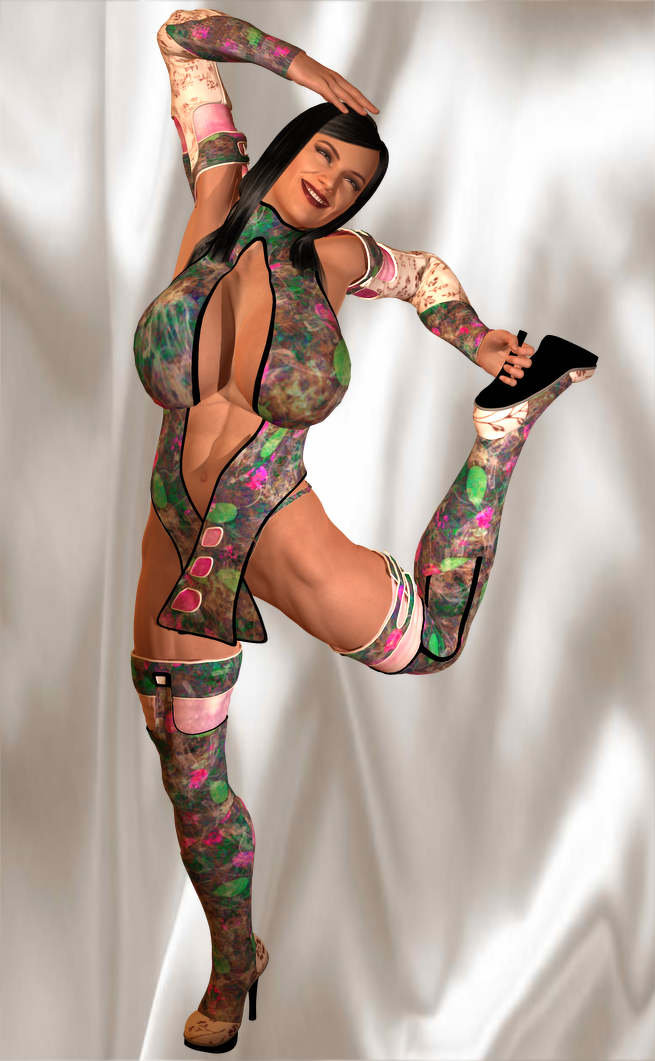
You certainly didn't cut the easiest peace for you. ok, for one comparison is a bit hard as you chose a busted lady (nothing wrong with that but to make life easier for you, safe the morph, complete the posing with a "standart" model and when you are done add the morph back on).
Now the pinup girl has her body basically in a C shape with belly and chest on the outside of the C, there surely is a sideway move in there but that comes in a second step. Start with the hip (that valid for any posing) and then get her a solid stand, balance point is on one foot only so that must move in the middle position from the hip, the slight twist to the front adding to stability in this one. Pelvis and leg need a lot of rotation/ bend to get the leg up that far. now you lady needs to get her left ellbow down and try to keep the collarbones low. Don't forget that there are pectorals to move as well
 (I'm not a bad person, I want to help)
Thanks for the advise Linwelly I am going to use your suggestions in the next render
 Runtime DNA content migration and download
Is there any way to get an official confirmation that you see our RDNA account? I would like to see if I need to resolve some connection issue or if everything is ok for the eventual transfer.
NEW! Novica & Invited Guest Contributors Tips & Product Reviews Pt 6Edit: Updated after Daz fixed some of the bugs March 8, 2016.
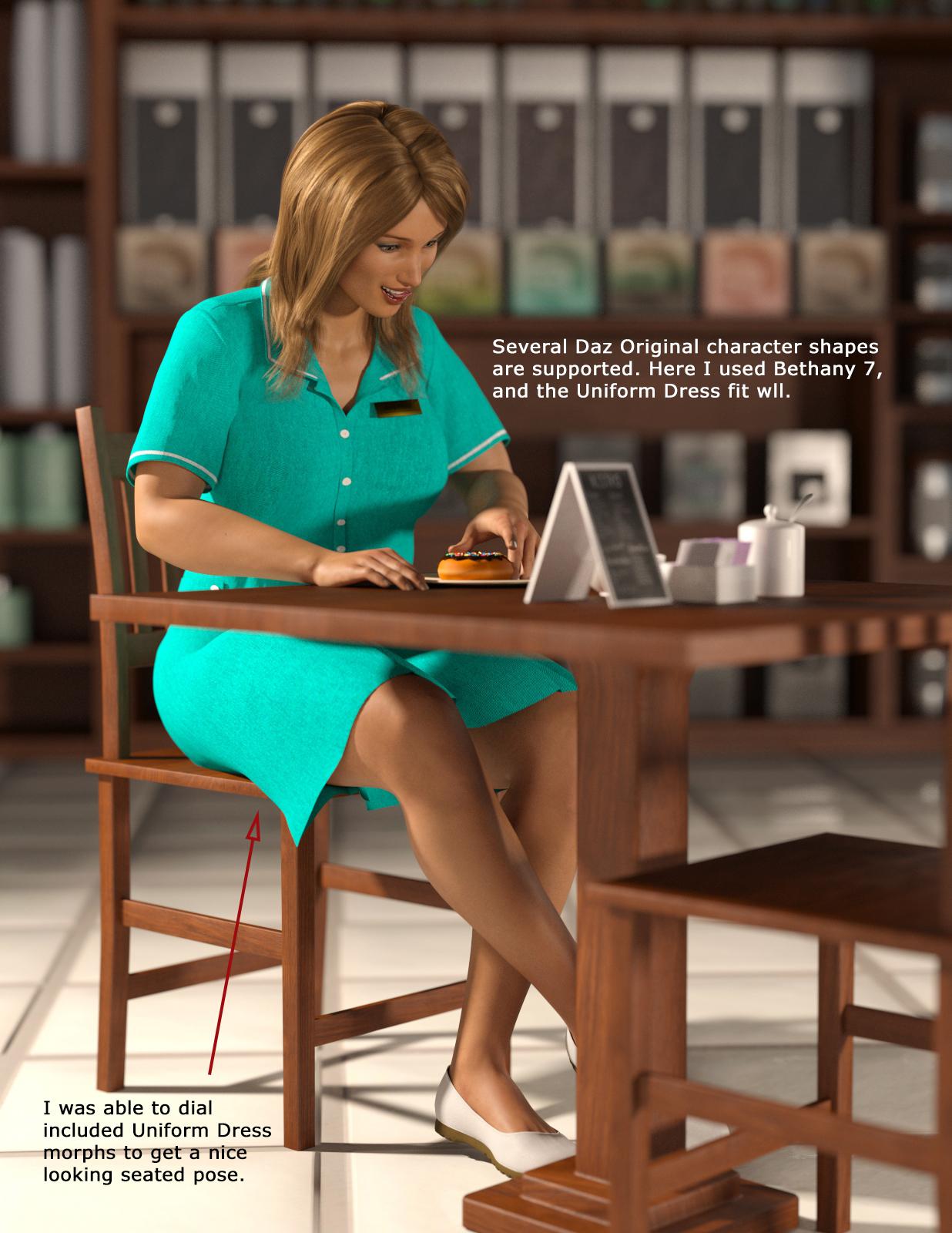
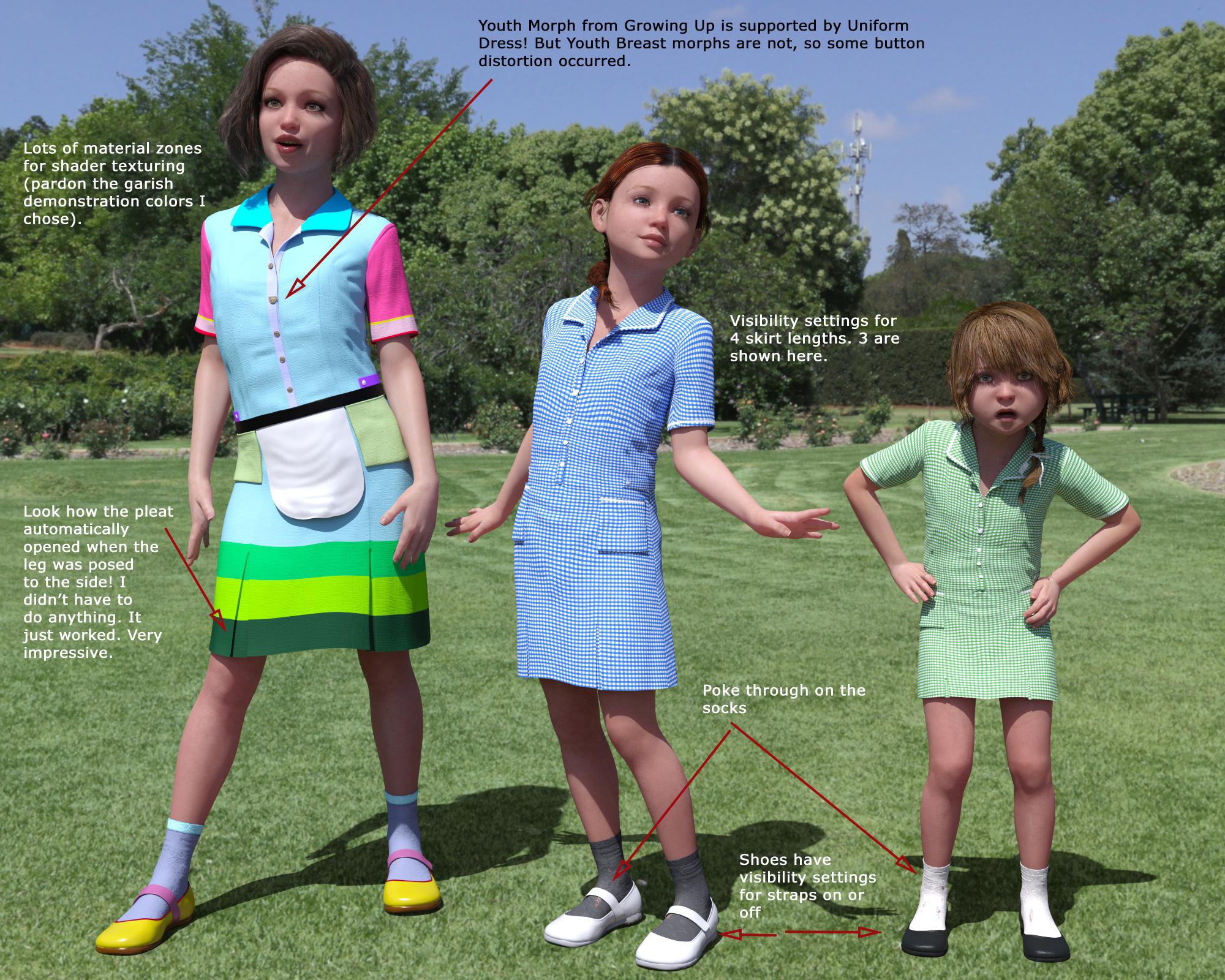
I'd like to showcase Uniform Dress for Genesis 3 Female(s) by Dogz. Dogz is one of my favorite vendors in the Daz store.
Rating: Recommended with Reservations (Highly Recommended after Daz fixed the worst bugs).
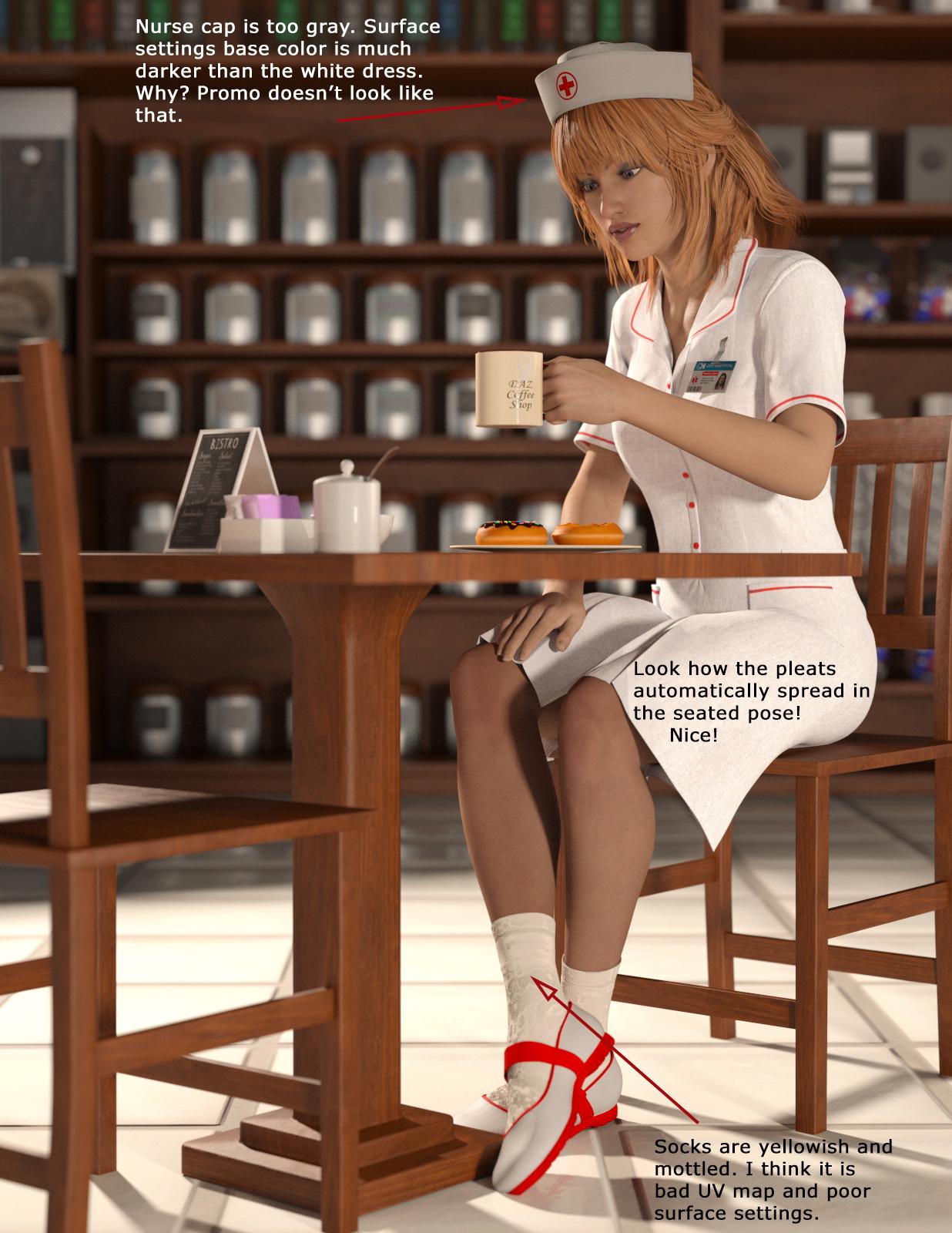
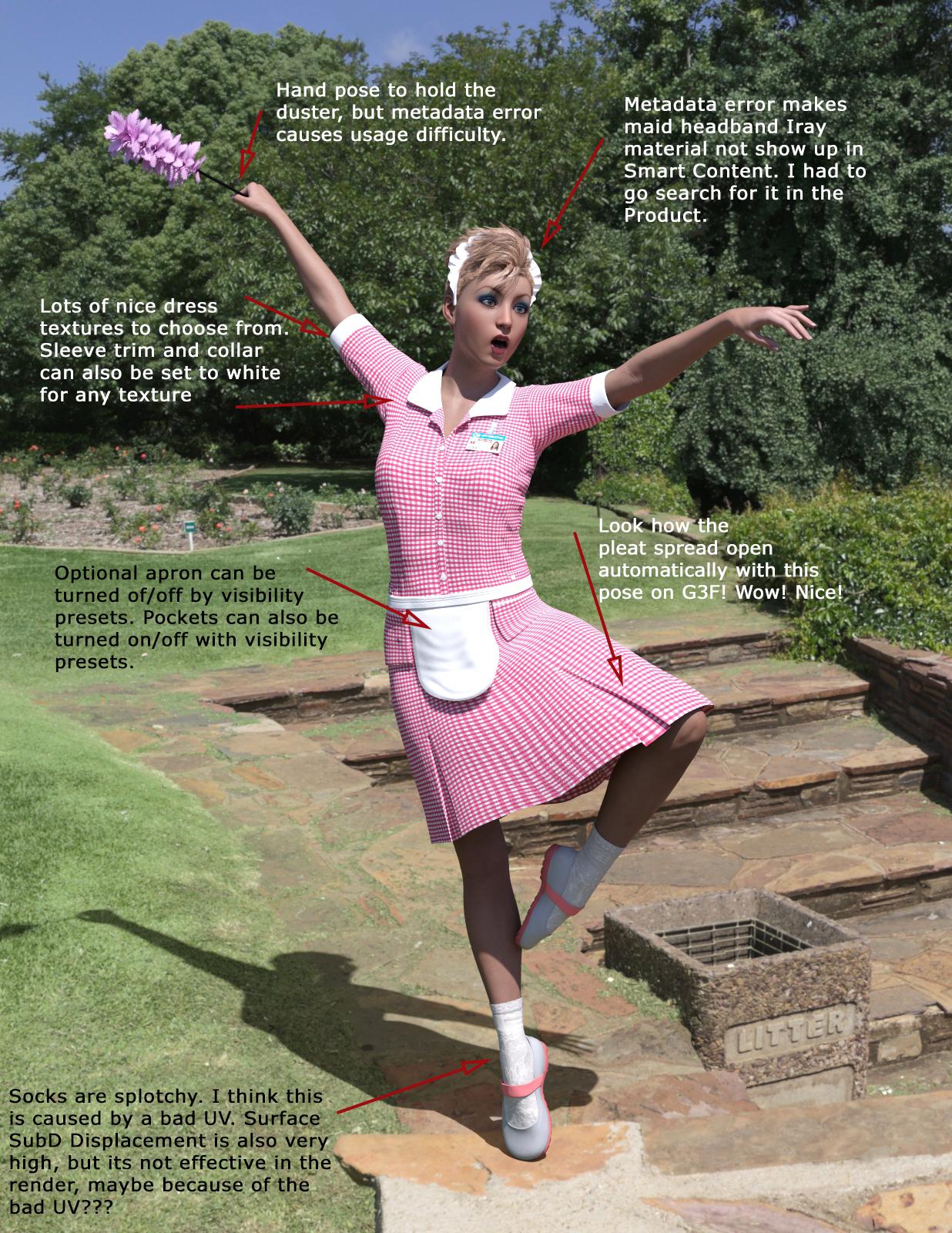
The modeling is top notch and there are lots of included textures and morphs. I noticed that when I pose G3F legs, the pleats in the dress open or close automatically to match the leg pose!!! I've never seen that before and I am very impressed. It supports several Daz Original character shapes and even the Growing Up Youth morph. But the "with Reservations" part of my rating comes from the Iray surface settings errors (in my opinion) and metadata errors that detract from this product. I have attached some annotated renders to show off some of the features and problems with the Uniform Dress product. I tested only Iray materials. The product loads with 3Delight materials by default, but I did not render any 3Delight images.
These are the bugs I reported:
- Poses>By Function>Grasp has two icons for Right Hand Grip Duster.duf. What is the difference? When the Duster is selected in the Scene pane, both Right Hand Grip Duster poses show up in Smart Content as being compatible with the Duster, but only one works. The other displays an error message when it is applied. What is wrong? Is one of the poses supposed to be compatible with G3F instead of the duster? Both poses seem to work now when applied to the duster, but Daz did not answer the question about what the difference is. Both poses seem to do the same thing.
- Utilities>Visibility has two icons for each action. I assume one is for Iray and one for 3Delight, but there is no way for a user to distinguish which is which. Fixed by moving the icons into the Materials category and subcategory of Iray or 3Delight.
- Nurse ID Badge.duf is in Lost and Found. Fixed.
- When Maid Head Band is selected in the Scene pane, Smart Content>Materials, Files, Filter by Context checked, shows only 3Delight materials. Iray material is not shown. Instead, the Iray material for Maid Head Band is shown as compatible with Name Badge. Fixed.
- Iray material icons have no text or symbol to distinguish them from 3Delight materials. This makes selecting them from the Content Library Product display difficult. Not changed. If you don't use Smart Content and prefer to use the Content Library>Products view, you will have a hard time.
- All 4 surfaces of the Socks Iray materials use very high SubD Displacement Level (value of 4). High surface SubD Displacement like this is very resource intensive in Iray. It seems unwarranted for a pair of socks that are unlikely to be the center of focus of a render of this product and may even be half covered by the shoes. Not changed. Workaround if displacement is causing too much system load: Just turn off displacement in the sock materials when using the Iray materials. I don't think you get any value from it in a normal render.
- Nurses cap Iray materials render very gray, not white as shown in the promo images. I noticed that the base color is set to a pretty dark gray. Why? Not changed. Workaround: Change the Base Color to a lighter value, like the value used for the white dress.
- The white socks render yellowish and splotchy, not white as shown in the promo images. The gray socks Iray material also renders splotchy. I think the splotchy issue is caused by a bad UV map. UV map was fixed. Color is unchanged. In other lighting I guess it looks OK, so I won't worry about it. My lighting was probably mostly to blame for the yellowish tint.
- The socks also have a poke through problem sometimes. You can even see it in the store promos. Not fixed. Workaround: hide the character's feet and toes and/or use the FBMExpandAll morph on the socks. Turning off displacement may also help.
I have not updated these renders. They represent the product before the bug fixes. The only significant difference would be the socks, which now look like socks with ribbing at the top and not all splotchy anymore. The comments about metadata errors for the duster gasp pose and missing headband material no longer appy. Metadata was fixed.
 Fiddling with Iray skin settings...
@nonesuch00 -> try the orginal cornea morph with 200 - 210%... this comes closest whitout a lot of fiddling...
however - it IS possible to come very close to a real eye.. without a concave iris (which looks great from the front but not from the sideview)..
Image sideview... FLAT but correct modeled iris and cornea on the upper eyeFiddling with Iray skin settings...image one ... matching cornea (on a orginal g3 eye) to a real measurement scan.....
image two.. render orginal g3 eyes using the scan matched custom cornea morph....
better .. but because of the low polygon count and unlucky choice of polygons arangment for the cornea (circle to square?) a 100% match is not possible....Fiddling with Iray skin settings...So is the 3rd cornea possible to apply as morph to Genesis 3 corneas?
Genesis 3 GoZ with HDTo become a PA you need to create a product to sell, and have it accepted by DAZ. If you don't have anything to sell then you obviously can't be one.
As for adjusting the mesh for a pose, you can always use Dformer (= equivalent to Poser magnets). Another possibility could be to export your posed figure as .obj once you've decided your pose is final, edit that directly and replace your posed figure with the edited prop rather than creating a morph for the figure.
DS4.6 Pro & 3D Coat - Need Advice on IMPORT/EXPORTAbout Voxel room, it only need when you bake maps ( displacement, or normal) from high -poligon to low poligon (it is model which you use in daz studio)
then it is not easy,,.. then I have not used Voxel room to make maps for daz studio products, at current. (may need to learrn more,,)
And you may try tweak room for simple morphing,, too,, then add normal map on morphed mesh to add more detail.
but i3d coat tweaki room, is not so good as same as blender (so that you may better, make morph before
export it,, if you hope to change mesh shape for raised edges etc,,)
To make depth maps, in paint room, only check On depth icon and, keep OFF about color and specular,,
add new layer (for your normal modify normal_2 etc,). then paint on surface, with each brush tool carefully ,only about part which you hope to modify
on current new layer. with ajusting brush size, strongness , change alpha texture,, etc,,,
3d coat will gather all depth of layer,, them generate it as one normal or displacement map, when you export texture with UV sets.
(there are too many option for brush and stroke,, then you need to learn them ^^; I am still learning each option usage, with Smart material.
then I thanks all of this topic . (and I hope, more professinal advice from user for same purpose ^^;)
=====
ithough it is not so expensive compare with another paint tool,, but actually cost much for me too ^^; maybe real blender artist can do it only by blender paint tool,with customized brush set, but As for me,, I feel the cost fit for my purpose and current skill,, then hope marble enjoy it as same as blender,,, (Yes I only play with morph for daz figures, almost 2 years, then, not understand what UV template means etc,, at all,, though I start daz studio 4 yeas before,, not planed modeling , or sculpt something,, those days,,then I think you learn everything relly first.)

added really dirty test work, (actually it is difficult for me to add good detaill,, with only paint brush, at current)
(but if someone find this topic,, may help a litte,, ,about option,,,)
Genesis 3 GoZ with HDI see... I always had the impression that it is more important for DAZ to create new content than to using it...
How do you do high quality renders then? With Victoria 4 and Smith Micro's Poser i was able to use the Morph Tool to change the mesh according to the pose (for example to simulate preassure of the skin from cloth) but because of V4's low resolution it was hard to get it right. Now with Genesis 3 the resolution is even lower which makes it simply impossible to do that. Does that mean we simply cannot create high quality renders with Genesis 3? Is not even Hexagon able to do that? It would be such a shame if all that money would be wasted on Genesis 3 stuff...
Thanks again for any help! Thank you thank you!
Ps.: Is it complicated/possible to become a PA for just getting the plugin to create art?
Is there an easy way to transfer G1 morph to G2?Yes, the easy way is to use these two excellent products:
http://www.daz3d.com/genesis-generation-x2 and http://www.daz3d.com/genx2-addon-for-genesis-2
GenerationX2 allows for transfering Gen4 morphs to Genesis 1. The add on for Genesis 2 allows for transferring morphs from Gen4 and Genesis 2 and transfer morphs between Genesis 1 and Genesis 2. They are currently discounted for March Madness, perfect timing.
It currently doesn't work with Genesis essential packs and morph add-ons installed with DAZ Connect. If you install with DIM or manually you will be OK.
March 2016 New User 3D Art Contest “Posing” (WIP Thread)Here is my WIP trying to get the model pose (2nd on down on left hand side) from this picture I got from Google (Will Post ink when I find the pic again)
Image removed for nudity in last sub-image
You certainly didn't cut the easiest peace for you. ok, for one comparison is a bit hard as you chose a busted lady (nothing wrong with that but to make life easier for you, safe the morph, complete the posing with a "standart" model and when you are done add the morph back on).
Now the pinup girl has her body basically in a C shape with belly and chest on the outside of the C, there surely is a sideway move in there but that comes in a second step. Start with the hip (that valid for any posing) and then get her a solid stand, balance point is on one foot only so that must move in the middle position from the hip, the slight twist to the front adding to stability in this one. Pelvis and leg need a lot of rotation/ bend to get the leg up that far. now you lady needs to get her left ellbow down and try to keep the collarbones low. Don't forget that there are pectorals to move as well
(I'm not a bad person, I want to help)Genesis 3 GoZ with HDHD morphs can only be created by Daz PAs because it requires a tool which is NDA in order to import the HD morph back to Studio. Only PAs have access to the tool.
You can work on higher geometry, but the changes may only be reflected in Studio via displacement or normals. The geometry itself is not re-importable as a morph.
Genesis 3 GoZ with HDYou can't create a morph from a subdivided object, or add polygons to the base object. Well, at least not with the tools included in DS. There's a way to produce HD morphs, but it's only available to DAZ PAs currently.
What you could try is creating displacement or normal maps from your high-res sculpt to add the details to the base morph.
Daz 3D is part of

Connect
DAZ Productions, Inc.
7533 S Center View Ct #4664
West Jordan, UT 84084Licensing Agreement | Terms of Service | Privacy Policy | EULA
© 2026 Daz Productions Inc. All Rights Reserved.