-
Legacy UVs for Genesis 3 [Commercial]
Thanks, Redz.
Yes, as well as Genesis, there are a fair few G2F textures which use the V5 UVs as well. I went through the store product pages for Genesis 2 Females and before my stamina gave out I'd found at least thirty. There's probably a lot more all told, here and elsewhere.
I'd like to know how many Victoria 6 UVs there are. It's a shame we can't just run a query on a database somewhere and get these figures out. And a lot of the product pages, certainly early on in the Genesis 2 run, don't even say what the UVs are. But I would like to do sets for the core UVs if it's manageable.
Where do you see that? Most of the Older (Genesis/early G2) characters tht i looked into did not note this on the STorepage, like the newer ones most of the time do....
Yes, you're right, many of the earlier ones don't. I have a few which are undocumented in this way, for example FW Diana, which lists Olympia 6 as a requirement (for the morph), but actually uses Victoria 5 UVs. But there are others which are documented, e.g. Rene for Monique 6 and EJ Guadalupe.
In the early days of Genesis, the store's assumption seemed to be that if a character used a given base figure's set of morphs, it would also use that character's UV set. That went right off the rails as soon as vendors figured out that they could make more money making a character for both Genesis and V4 using V4 UVs (or Genesis and M4 using M4 UVs.) lt would be nice if there was a master-reference list or forum thread listing which character sets use which UV.
Knittingmommy's LaboratorySo, here are the two renders I did with our G3F model.
This one is after the Fit Control morph to take care of covering the breast and nothing else. It is okay and some would be perfectly happy to stop there and that's fine.
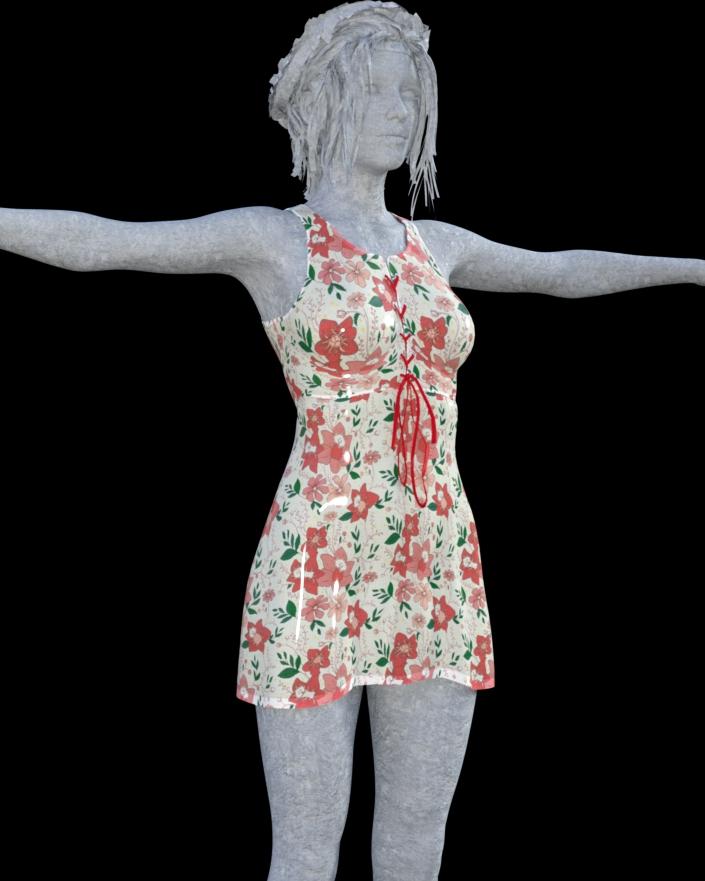
Here is the one where I made a few more subtle adjustments to decrease the amount of shrink wrap effect between the breast cleavage.
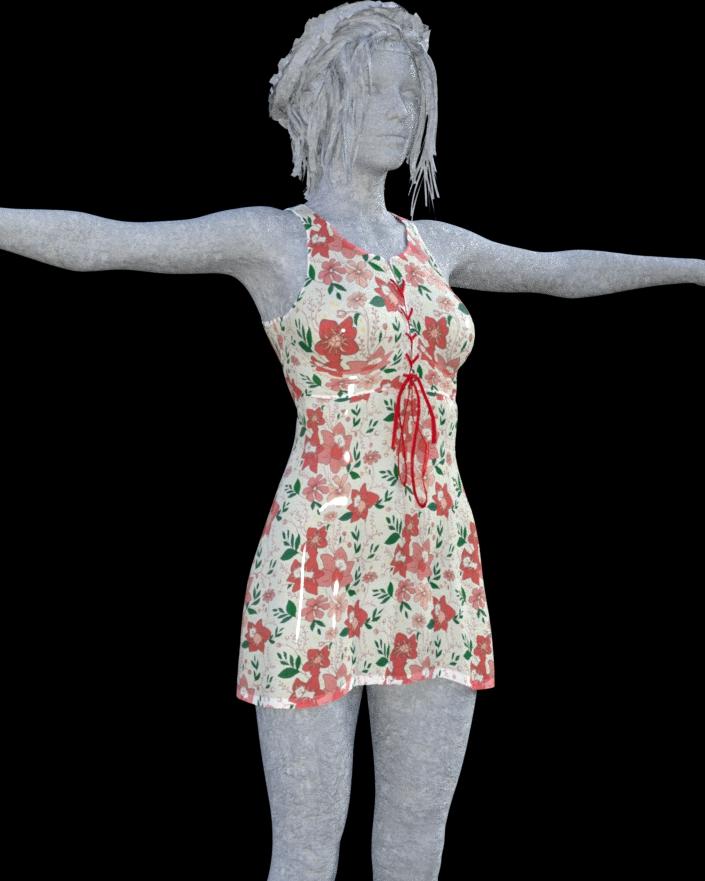
I could have taken it a little further to show what it would look like as if the model were wearing a full support bra and there was no dip between the breasts at all. But, I like this effect and it looks more natural. Again, it is a subtle difference that I notice and others might not. It is, however, another reason why I think Zev0's products are so useful and why I'm glad he wrote them. They make my work look so much more realistic!
3 Questions on "Legacy UVs for Genesis 3: Michael 4"I'm reading the promo info on this product, and I'm very interested because I do own many Michael 4 textures. It says in the promo, See the documentation for fuller instructions.
Question 1: But I don't know how to get to the documentation other than to buy the product. Is there a link to where I might read the documention?
Question 2: It also says in the promo UV support and an additional geograft for the Anatomical Elements is also included. I'm assuming these elements would be the M4 gens. Correct?
Question 3: It says the M4 material files must be in .duf format. Here's what may be my stumbling block in deciding to buy the product: I don't know how to transfer .pz3 files or .mc5 or .mc6 files into the .duf format. Is this included in the product? Or, is there somewhere I could read about how to do this? (It has to be simple, or I won't understand it.)
V4 to V7?Actually, I was wondering around Deviant and found a user called Darkhound1 who has a morph converter for sale. It is specifically only made to convert V4 or G2 over to G3. I was wondering if anyone has seen or used this item, and what people's thoughts are about it. This item, along with the UV converter, could be a viable solution.
Take note there are some small NSFW images on the page the item is on if you go looking for it, which is why I did not link it.
Knittingmommy's LaboratorySo, I was asked earlier today if I had Fit Control for Genesis 3 by @Zev0 and if I would recommend it. Well, my first thought was to immediately say, "Yes, I used it all the time and find it indispensable!" I changed my mind about doing that, though, for one simple reason. Everyone I've ever asked for advice from on a particular product usually either really likes a product or hates a product and they don't always tell you why. I'm a firm believer that if I'm going to recommend something, I should actually be able to tell you why I like it and why I would recommend it. Do I like Zev0s Fit products? Yes! Would I recommend the Fit products? Yes! Now, I'm going to show you why I have these.
Before I start I should mention that I couldn't remember how to get the nontextured figure to show up in the viewport. I decided, in the interest of sticking to TOS, to turn the figure into a statue with a stone shader. Hopefully, that was acceptable.
I took one dress that I have and loaded it up as it is a perfect example of why people need a script like Fit Control. It is the dress for G2F from the Skyler Clothing for Genesis 2 Female. It is a great dress, but it was geared for the younger 3D generation and has practically no breast adjustments. While it fits fairly well on most body types in the lower department, the breast is usually left just hanging out there. It has some nice morph adjustments for movement, but little else. I admit that I'm using the dress on a figure type that it wasn't geared to be used on, but then isn't that what a lot of us do?
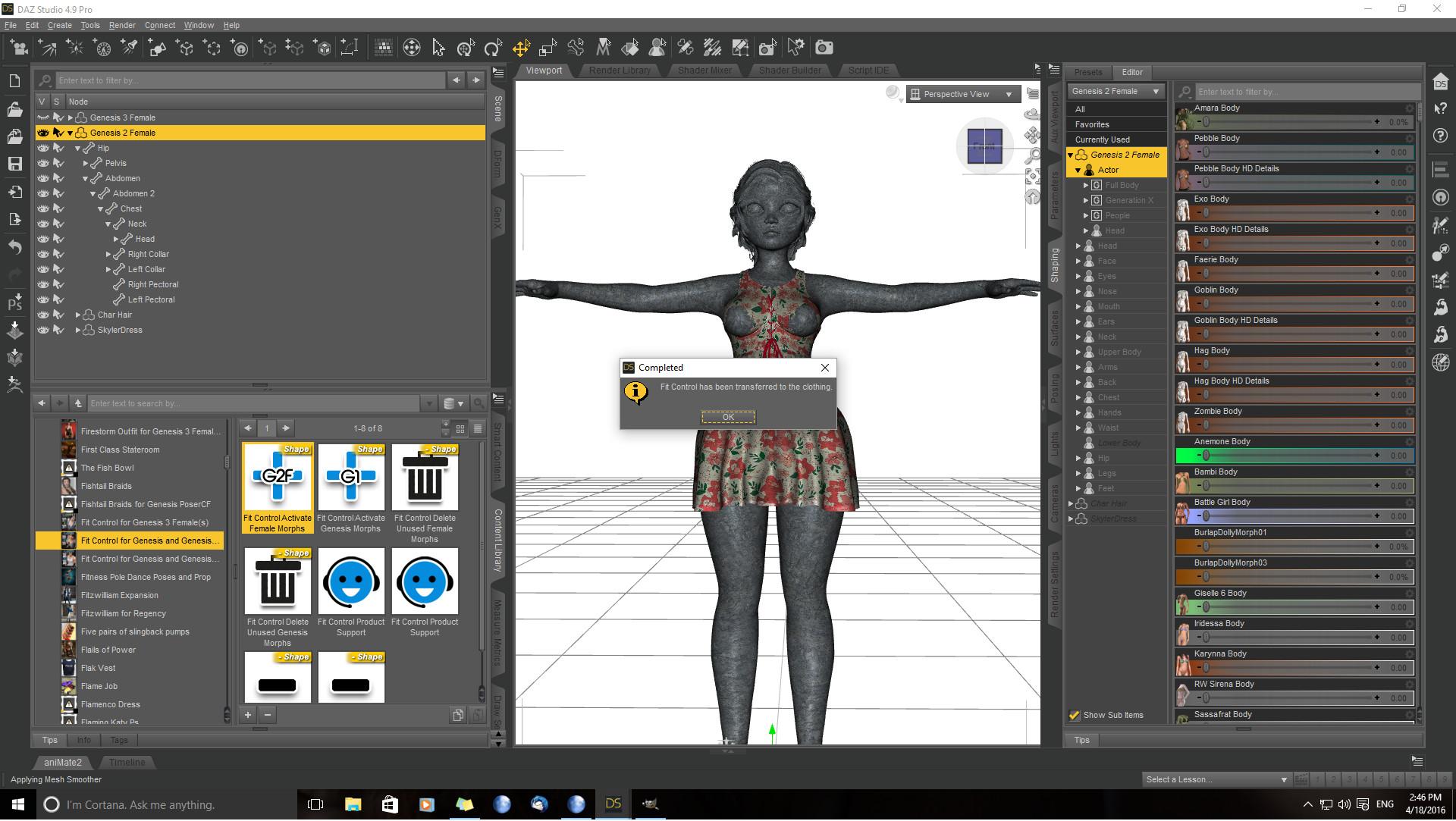
So, in the first screen shot, I've loaded the dress on LY Trini by Lyoness which has one of my favorite female body shapes. The dress actually fits her fairly well in the bottom despite the fact that she is a little more well endowed than some of her G2F counterparts. It isn't perfect, but we can work with it. Her breasts are left completely exposed and there are no morphs to help us fix this. So, I selected my G2F figure, found where Fit Control is located (I tend to use the Library Content tab for everything rather than Smart Content.) I double clicked on the Fit Control Activate morphs (make sure you figure is selected in the Scene Tab and not the outfit). When it is done, you select the dress in the Scene Tab, go over to the Parameters Tab select >Actor and you should see a whole bunch of new morphs for the dress that weren't there before. Then it is a simple matter of playing with all of the morphs and getting the look you want.
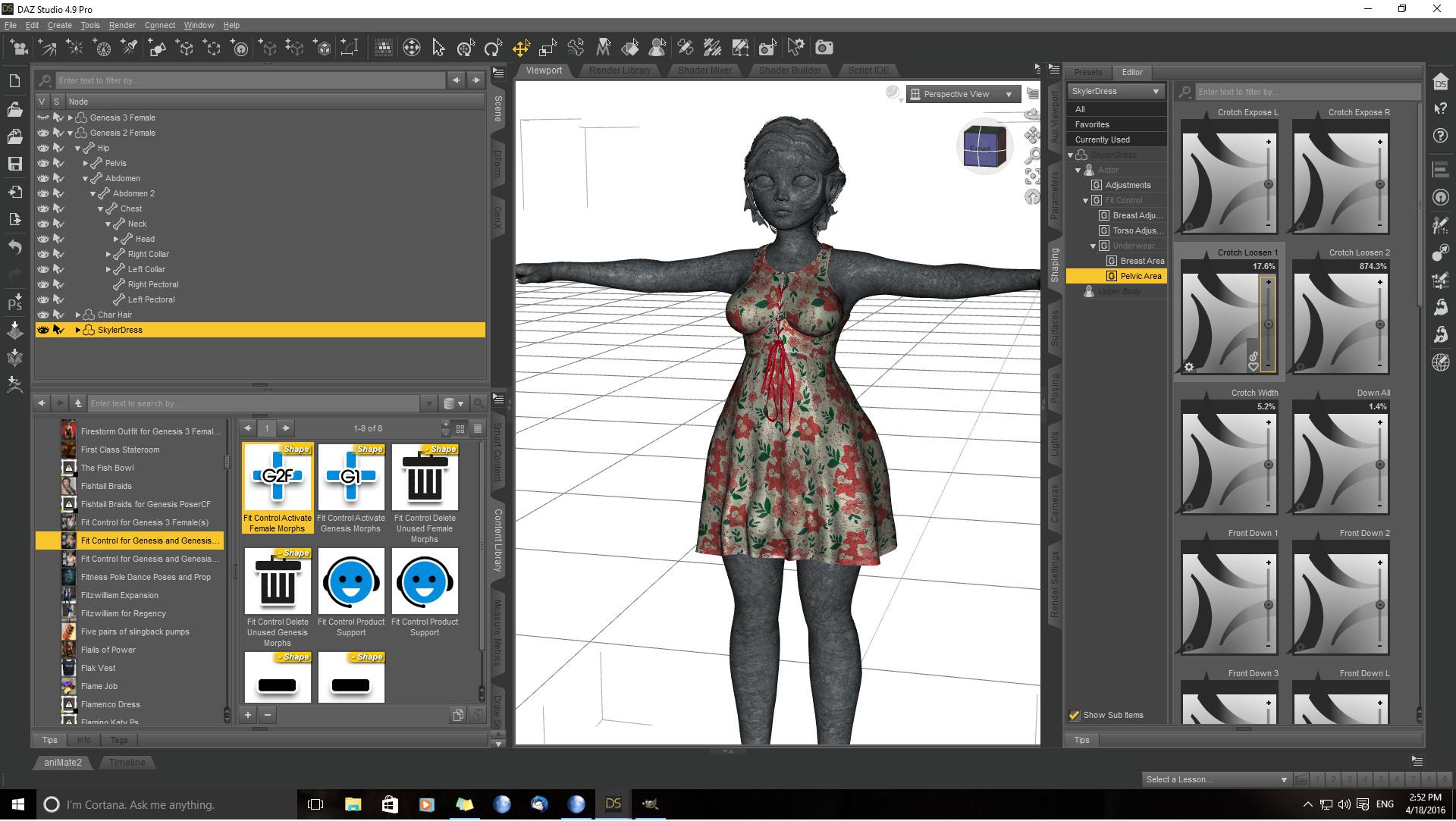
With this dress on G2F, I not only fixed the breast, but also played with the underwear morphs to fix the indentation at the groin area so it wasn't quite as noticeable and lengthened the dress.
To keep this fair, I used the same dress on the G3F figure even though there is a version of the dress specifically for G3F. Realistically, not all of us are investing in G3F clothing and we have a lot of G2F clothing we would like to fit onto G3F. Surprisingly enough, the dress fits G3F better in the lower section than it does on the Trini body type. I admit I left G3F at default since she was coming in with a dress one generation behind her.
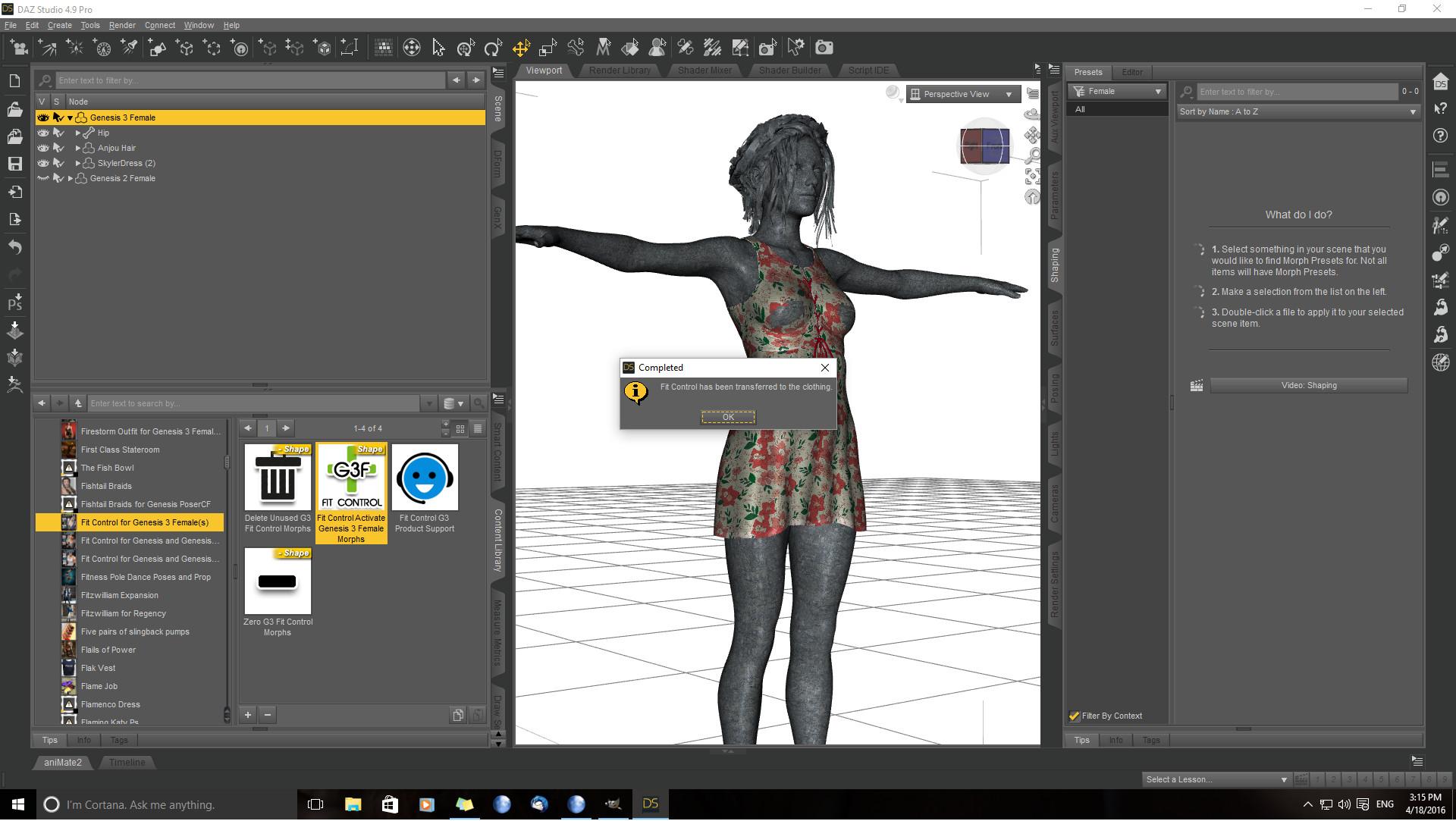
The breast still has issues, again this is mostly because the dress wasn't designed to be used on a full figured girl, but a teen. So, I did the same procedure and applied Fit Control for G3F this time and fixed the dress.
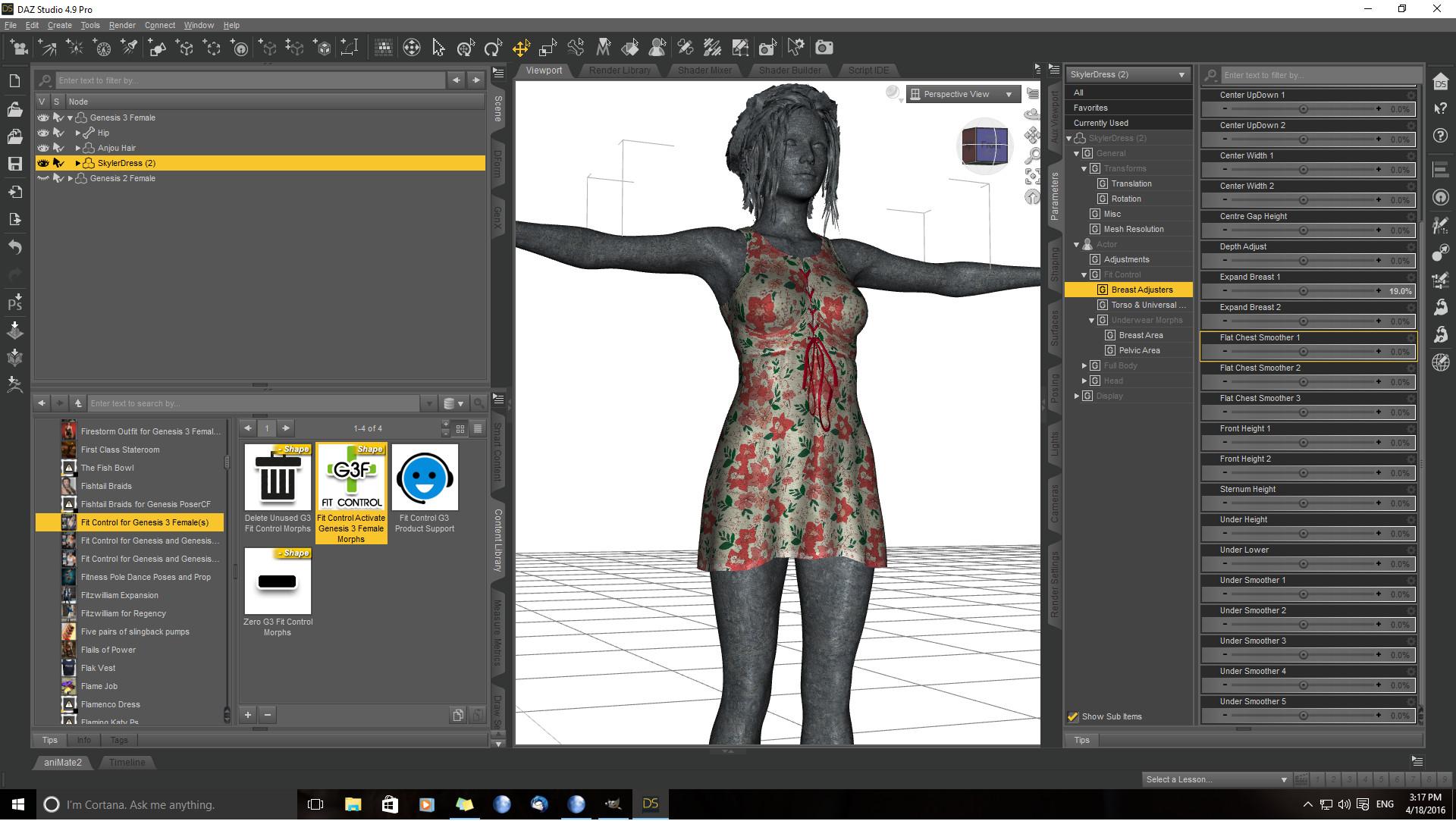
Now, I'm going to show you why I use this on all outfits even if they technically fit a figure straight out of the box. Most outfits have that shrink wrapped effect especially in the breast area. With Fit Control that is easily fixed with a few slider adjustments. The results of playing around with the sliders on G3F resulted in the following results. They are small adjustments but they can have a dramatic effect on how an outfit fits. As soon as they are finished, I'll post a rendered before and after of the last breast adjustment.
rigging & transfert utilityhi !
I made an obj by fusing a genesis 2 & a geograft. since its not the same polycount, i cant morph load it.
i want to tranfert the rig & weight maps from g2 to my obj, so i use the transfer utility:
Image removed
just to make sure i adjusted the skeleton to shape. the experiment goes well on most poses:
Image removed
but a not all (below is in fact a walk animation from creator stimuli)

what did i miss ?
i've tried different transfer setting, same problem.
i did NOT erc freeze (as i would for a morph) for the simple reason that i dont know which property i should freeze.
help !
Donor rig: how to use it?You would use a figure rigged that way as the Source. Transfer Utility isn't, as far as I know, for transferring an abstract rig not attached to a model.
Donor rig: how to use it?In Daz Studio.
Maybe what I really want an answer to is: how do I get a custom rig of my own to show in the Transfer Utility as a new option (My Tunic, My Cape, My Cloak, etc)?
I can extract a rig but there's no info anywhere on using it.
V4 to V7?Keep in mind that while the maps can be 'transferred' over, it does absolutely nothing for morphs! Whether we get a morph translation from previous generations to G3F remains to be seen...
D3D said recently they're still working on GenX2 update and add-on to support Genesis 3 (no ETA given though).
In the mean time it's possible to transfer the morps manually with a bit of work.
Gen3 Fit Control on Gen2 outfits?When you say "the autofit clothing" what do you mean exactly? That may sound like a dumb question but I'm unfamiliar with that term. When i apply Gen 2 clothes to a Gen 3 character, a window pops up and asks what kind of character it was orginally designed for. So I pick Generation 2 Female for instance and then I select the proper type of clothing "shirt" or "pants" or "foot wear" and it fits it to the character for me. Is that what you mean?
Yes, that is exactly what I mean. The dialog that pops up is the Autofit dialog. Daz Studio is automatically fitting clothing for one generation to another generation. Sometimes the automatic fitting (autofit) leaves the clothing fitting very close to the models skin. People refer to "shrink wrap" effect. Fit Control has lots of morphs to improve that condition. It can pull the clothing away from the breasts so that it fits more naturally. Fit Control adds lots of morphs to the clothing. It is up to you to dial those morphs to make the adjustments you want. It is not always easy to figure out which morphs to dial. It will take some experimentation, so don't be discouraged. Just try various morph combinations and get familiar with what they each do. I am very pleased with the product and own all the Fit Control versions that have been released. Be sure to read all instructions that come with the product, so you know how to add the morphs to the clothing and how to remove ones you decide you don't need (if you want to reduce the size of your saved scene).
Runtime DNA Merges With Daz 3DGreetings,
I'd bought Melody on RuntimeDNA as a way of getting to the Fox & Wolf characters, back in 2012. When Melody and Micah showed up here, the price was such that I figured even if I'd bought Melody already, grabbing Micah for that price would be great. I did recall that it required RTEncoding to decode, but I hoped that would be handled during the transition.
Turns out it hasn't, unfortunately. Today I was given a refund for the Melody and Micah bundle I'd bought here. They're working on fixing it, but since it's not usable in its current state, they've evidently decided to refund folks who bought it here.
I understand this, entirely, and I appreciate it. I do hope, very much, that they do turn it into a proper A3 morph. The big advantage the Capsces/Littlefox Fox & Wolf has over the Genesis foxy and wolfie is that it has an actual muzzle. I do have it in my runtime still, I believe, so I suppose it doesn't matter hugely, but I do look forward to an 'official' version.
Given that the refund came as a surprise to me, I thought I might share with folks that they're still looking over this stuff, and while they want to fix it, and I trust that they will, it's not ready yet.
-- Morgan
V4 to V7?Keep in mind that while the maps can be 'transferred' over, it does absolutely nothing for morphs! Whether we get a morph translation from previous generations to G3F remains to be seen...
Legacy UVs for G3... Same as at Rendo? (SOLVED)Hm. I wonder when we're going to have a morph converter to Gen3 :/ GenX Converter used to do that, no?
This might help you: http://www.daz3d.com/forums/discussion/comment/1074561/#Comment_1074561
Legacy UVs for G3... Same as at Rendo? (SOLVED)Hm. I wonder when we're going to have a morph converter to Gen3 :/ GenX Converter used to do that, no?
Legacy UVs for Genesis 3 [Commercial]Thanks, Redz.
Yes, as well as Genesis, there are a fair few G2F textures which use the V5 UVs as well. I went through the store product pages for Genesis 2 Females and before my stamina gave out I'd found at least thirty. There's probably a lot more all told, here and elsewhere.
I'd like to know how many Victoria 6 UVs there are. It's a shame we can't just run a query on a database somewhere and get these figures out. And a lot of the product pages, certainly early on in the Genesis 2 run, don't even say what the UVs are. But I would like to do sets for the core UVs if it's manageable.
Where do you see that? Most of the Older (Genesis/early G2) characters tht i looked into did not note this on the STorepage, like the newer ones most of the time do....
Yes, you're right, many of the earlier ones don't. I have a few which are undocumented in this way, for example FW Diana, which lists Olympia 6 as a requirement (for the morph), but actually uses Victoria 5 UVs. But there are others which are documented, e.g. Rene for Monique 6 and EJ Guadalupe.
Parented Geographed Toon Head - Main Head Disappears UnderneathA geograft completely replaces the polygons that are 'inside' the ring that makes up the connection point. So, if the connection point for the toon head (I haven't looked at it to see) is somwhere on the neck, then it is going to totally replace the original head...not hide or make it invisible. That's the power of geografting (geometry grafting) and its 'curse'.
THANK YOU! I actually had no idea that was what 'geographed' stood for. Yeah... that kind of sucks basically though...
However
 With some forum instructions and a clothing tutorial from SickleYield on YouTube - I actually was able to export the 'Geographed Toon Head' as an .obj file, then import it back into DAZ, add the 'Transfer Morph Utilities' to the Toon head in order to have it conform (with some tweaking here and there) to my Hiro 5 model - and then made the blank face with the ability to turn the opacity to 0% for only the head and neck - so the face was left with 100% opacity. It actually worked. It's not perfect - I had to take my original Hiro 5 model and remove or minimize most of his facial features, but I'll just use this model with the Ghastly's Toon Head as an alternate in my comics when I need a wild take in a frame.
I appreciate you answering me so quickly. Thank you again! Now I know! (and knowing is half the battle - GIJoe).
Edit Rigging and ERC freeze problem with monster and alien morphsNeed help with Edit Rigging Option for transferring extreme non-human morphs (feline, lycan, aliens) between Genesis generations. Recently I tested HFS (Hellfish) alien morphs, transferred from Genesis 1 to Genesis 2 Male and found they need some adjusted rigging, later I wanted to transfer latest Lekkulion G3M morph to G2M too and it needed bone adjustments much more. But I found a big problem with ERC Freeze. Here is the very Lekkulion Morph transferred to Genesis 2 Male with original positions of bones (they are misplaced in hands and feet mostly)

I tested these morphs in DS 4.6 and when I pressed Edit rigging to shape (with checked Adjust Orientation) I get the right position of all bones. Then I made ERC Freeze, at first with unchecked Restore Figure Rigging (which spoiled all bone positions) and then with checked Restore Figure Rigging, which kept right bone positions and orientation. Here is the result I got after ERC Freeze:
Then I zeroed the morph and tried to save it at first as Save Modified assets (it gives Duplicate Formulas error and I had to fix it by changing morphs color and resaving). Then I saved this Lekkulion morph as a new morph with bone adjustments. But when I reload G2M, I cannot find the new edited morph in the list of morphs and the rigging for the old morph is wrong again. And I found the same problem with old HFS morphs for alien feline-like legs, Navarians, and surprizingly I managed to make one successful edited morph for Catfolks Base shape (it was the first one I edited before duplicate formulas error).
How to make ERC freeze for such animalistic and alien morphs to make all bones to follow the shape? Before I had no problems with dwarfish or tall Genesis 2 morphs and had a success with classic G3M morphs like Gianni7 Body - all bone positions, even fingers, after ERC Freeze were saved as modified assets and worked correctly. But I cannot save bone adjustments for such alien morphs, especially for legs. Your help and tutorials will be highly appreciated!looking for middle aged figures, male and female-- any suggestions?I'll note that the G2M default skins look pretty non-young, assuming you morph the figure appropriately -- what with razor burn, freckles, mottled skin, etc. Compare that to Brandon or many of the other even skin-toned figures.
Introduce Yourself, Hello, my name is.....Hi, all. My name is Tracy and I'm a comic book and free lance commission artist. I've been doing 2D art professionally for a few years and have always wanted to learn 3D. When I discovered Daz Studio (and more importantly that it's FREE), I had no more excuses to not learn how to do 3D. I'm a complete 3D newb though, and honestly I'm feeling a bit overwhelmed. There are SO MANY figures and models and different versions of Genesis and different figures and many aren't compatable with different Genesis versions and I just don't know where to start.
I don't make much money - as a freelance artist some months I barely make enough to put some food on the table, so I need some advice. What figure(s) and product(s) should I get that will give me the most "bang for my buck". I'm really into toon type figures but I also enjoy realism and realistic figures. I'd love to have figures that I can do "hybrid" morphs with that will give me a cool mix of realizm and "toon"/anime looks. I also would want to know what figures would be best to get for someone who is going to need to rely pretty heavily on finding "freebies" (again, I'm a "starving artist" and often barely make enough to pay some bills, so I won't be able to buy many products at all and will be interested in the products/figures with the most freebies available).
Any help and advice you can give me on what to get for someone in my situation would be a huge help! Thank you in advance for those who take the time to give some advice! I do hope I get some - because right now I'm feeling so overwhelmed and have no idea what I should get and where to start.
There's nothing saying you have to pick just one figure. Many items can be covnerted from one figure to another (clothes are free to convert, using AutoFit, from one generation to the next and you can do a two step conversion to go from Genesis to Genesis 3, or Victoria 4 to Genesis 2; maps from the previous generation are usable on the next up to Genesis 2 but skipping generations or going to Genesis 3 requires a paid-for add-on or more fiddling; morphs can be transferred using the Transfer utility or the paid-for GenX 2 utility) and you can always simply use more than one geenration of figures in a scene. Toons are harder to judge sicne there are many kinds of toon, and not so much that is free. I assuem you are checking out http://www.daz3d.com/forums/categories/freebies
Legacy UVs for Genesis 3 [Commercial]since these are geocrafted bodyparts, will my custom and purchased G3 morph sets still work???
Yes, the geografts adopt whatever morphs the host surface uses.
Daz 3D is part of

Connect
DAZ Productions, Inc.
7533 S Center View Ct #4664
West Jordan, UT 84084Licensing Agreement | Terms of Service | Privacy Policy | EULA
© 2026 Daz Productions Inc. All Rights Reserved.