-
Need More Face Morphs For GF3 and GM3
They are morph-able to a certain extent before you realize there is a limit you could morph with the existing dials morph slider.
What the morphs dial/ character blender in DAZ studio allows you to do, is just general blocking of the shapes of the characters you want, such as the head and body shapes. but the smaller details all over the body, such as the eyes and mouth, you can't. So if you spend X amount of time on creating a character and you have no 3D modeling/ sculpting experience, you will be in a dead-end and at the mercy of DAZ Shop, hopefully if they have the ideal eye/body shape you needed, most of the time....they won't carry it or for the right generation of model.
Character creation in DAZ Studio currently is tedious, stressful, time consuming task, there is just not enough technology innovation since 2011 with DAZ studio when I last used it.
many 3D modeling app similar to DAZ has On-Spot-Morph directly on the model you are viewing and not having to go to a list of dials, just by dragging various points on the model.
The morphs have limits set by default; what this means that the extent of the range of change is limited, but if you know how to unlock them, you can get a greater range of adjustment. As for "on the spot morphing", it's actually harder to get a morph that you can save the settings of and recreate on another computer if you want to do so.
Transfering a rig from one OBJ to another in DAZRigging on a house? Is the house a figure? Not sure how that works, but the transfer utility is what's used for transferring rigging. Edit/Figure/Transfer Utility. You can transfer everything though (weight maps, morphs, etc.)
For just transferring the bones, you can convert the object to a figure. In the scene tree, first select the original house then hold CTRL and select your imported figure. Both must be selected, but the original must be selected first. Now go into Edit/Figure/Rigging/Transfer Rigging. I haven't had much luck with it, but maybe it'll work for you.
The house had rigging on doors and windows so they open and close...
JD
When Jayden/Brodie 7?Actually the dearth is not teen males, it's *official* teen males. Between AliveSheCried and S-F Design there is no shortage of teen male dial-spin characters. They don't come with skins, and they don't come with bundles, but the morphs are reasonably varied.
DAZ stopped providing any kind of child figure after Genesis 1, and at that, it wasn't an official figure with a bundle. Just a morph. With Zev0's Growing up morphs very few have felt the lack -- apart from when looking for something for them to wear.
I'm a little grumphed at the lack of the kind of clothing that came in the teen male bundles. All of it was useful and most of it was casual sportswear that you could put on just about anyone.
This is the point I was trying to make originally. Adjusting a figure to a teen male shape is easy (mainly thanks to Zev0.) Making all the appropriate companion content that bundles bring appear is not.
I'm guessing the existence of Genesis is Daz's logic for them supplying a male+female adult, teen, and child already (though they lack a baby.) As the ones supplying the software and advertising their realistic tolerances etc. it feels as though they should have some sort of base model for these things, regardless of sales (not necessarily bundles or premier figures of course.) Maybe I'm wrong in that? But it seems right to me.
When Jayden/Brodie 7?I only picked up the female teens for the hair and clothes. Too bad we can't get a mini bundle for a male teen to fill a much needed niche. Personally, I think mini bundles like the one for Ysabeau 6 was a really good idea. Can't stomach another teen/kid female morph, though. I really liked 3DUniverse's Sylar and Raine, but without a corresponding boy, I couldn't justify buying kids just to fill a gene pool that I don't use very often.
But the boy teen clothes are so versatile (as long as they are not skinny jeans). Men still need capenter jeans, cargo pants, sweats and more baggy clothes.
Koshini QuestionI seem to remember some texture packages in the Deep Freeze, but it was long enough ago that I may be connecting something to Koshini that wasn't hers.
But by no means all of the stuff from this era of 'Toon has made it over here yet. We've several more days of new/old 'Toon stuff yet to show up.
I was pleased to see the CDI morph pack show up for Kit. She did one for most of Littlefox's Toon people.
When Jayden/Brodie 7?Actually the dearth is not teen males, it's *official* teen males. Between AliveSheCried and S-F Design there is no shortage of teen male dial-spin characters. They don't come with skins, and they don't come with bundles, but the morphs are reasonably varied.
DAZ stopped providing any kind of child figure after Genesis 1, and at that, it wasn't an official figure with a bundle. Just a morph. With Zev0's Growing up morphs very few have felt the lack -- apart from when looking for something for them to wear.
I'm a little grumphed at the lack of the kind of clothing that came in the teen male bundles. All of it was useful and most of it was casual sportswear that you could put on just about anyone.
Finding the files used in a modelHi. I'm not new to DAZ, but I've never really delved so far into it to learn the various intricasies of the program; to learn where the actual files used on a particular model are, If I can't remember the exact one I used.
So I'll posit my question thusly. Hoping I ask it properly.
Say I use a V4 base, Inject it with morph++, and several others.
Where exactly do I look to find the name of the objects/morphs used if I need to tell someone what I used.
Or in my current case restore my computer to factory. That's the concern I have. I need to know those particular files I used from years ago, and having upgraded DAZ several times since then.
Where do I look?
Thanks for any help provided, I do hope I asked the question correctly.
Did i make big mistake accidentally Buying Dynamic clothes Or can i convert to Conforming?"then do a rigging transfer from G2M to the now karate suit prop"
I don't understand this part. What do you mean do a rigging transfer. What menu is that at?
Did i make big mistake accidentally Buying Dynamic clothes Or can i convert to Conforming?I don't see why you couldn't just do edit->figure->rigging->convert figure to prop
then do a rigging transfer from G2M to the now karate suit prop
That should make it conforming.
When Jayden/Brodie 7?You can just buy Guy 7 HD, morph, and use the Eddie or other less 'ruggedly' males textures in the meantime.
putting back the dson morph into the figureThat sounds more like there is a missing morph that some items are dependent upon...was your custom morph a dial spun or sculpted morph?
If it was a dial spun morph, all the ones that went into need to be reinstalled.
putting back the dson morph into the figuremy reinstal must have failed, the morphs showing up are not all working and reading the log i get
WARNING: general\dzcontentmgr.cpp(3388): Empty path passed to DzContentMgr::findBaseDirectory()
and a wall of:
WARNING: fileinput\dzassetdaz.cpp(4534): Could not find parent for modifier:
i as for my custom morph, it is read but of course WARNING: fileinput\dzassetdaz.cpp(1358): Failed to create modifier:
the previous version of my g2f was installed via the old installer; the new reinstal was done via a dim - if this as to do with that.
putting back the dson morph into the figurei've been experimenting with g2f figure and messed up.
reinstalled the g2f and a truck load of morphs back in.
now i had 2 custom made morphs i want to put back into my g2f. i still have the dson files in the data folder but the reinstalled g2f doesnt read them by default.
how do i tell the g2f to use these 2 morph files ?
My First PropWhen you import an OBJ into Carrara,. there should be an option to "Disable auto scaling" (even on it's own objects,. carrara can easilly import it at the wrong size.
if autoscaling is enabled.. (make sure you fix this by using the "motion tab" and adjust the overall scaling back to 100% ,. don't try to edit or manually scale.
Don't change the object,. it's the correct size,. but imported wrongly.
2. Should I bone it in Blender or Carrara
If you add bones to this object,. it becomes a "Figure",. not a "Prop",. You would need to add bones to a model in Poser or DS, if you ere using the "figure" in those programs.
3. Should I UV map it in Blender or do it in Carrara?
UV map this in whatever program you're most comfortable with using the UV tools,.
4. Should the bowstring be a separate object or should I attach it. Note I am going to animate the bow wiht a draw back motion.
Either way will work,. as long as the two parts are "ONE Object.
make sure that the polygons of each part are defined as different shading domains,. so you can apply different textures to each part.
5. I was going to make the string using a cylinder divided at the center since that is the only place it bends. Is the the best solution? Or is a cylinder too may polys for a tiny string? Maybe a really thin rectangle?
You need much more definition in your bow string,. than a single division,. try 10, or more,
You can use a cylinder or a rectangle to create the Bow String,. I'd probably go with a rectangle,.(less edges to work with,. with a line for the length and divisions,. and use sweep path to create the mesh,. then add one level of smoothing to turn the rectangle into a smooth cylindrical tube shape,.
Cylinders normally have a definition of 10 or more,. rectangle is only 4, so that keeps the polycount low,. and adding Smooth will make it look like a cylinder.
6, / If you add "smoothing" to a model,. then export it ,. it is subdivided and exported,. since it's the 3D Program which applies subdivision, not a model format,. you can add subdivision smoothing in DS.
7. How do I make the bow attach to a hand like hair does to the head?
Parenting,. You move the "prop" into the "Figure's" heirarchy, and drop it ont the "hand" . This "parented pose" can be saved as a Smart prop which will load in place and parented to the figure./ this is best done when the figure is in the default T-Pose.
8. I have never morphed before. Any tips for morphing the bow so it when the string is pulled back the bow bends? Do I just move both separately? Is that in stages or just jump to the final morph and Daz will fill in the rest?
You need to have "both" components of your object selected to create a "morph area" which effects the whole object,.
You would select the entire model,. then create a morph area,. then create a "target" and edit that,. then change the shape of your model,.to the "fully drawn" position.
then "validate" that target,. Once that's done,. you'll see your newly created Morph area, and your new morph, wirth it's slider control.
You can jump into "Animation mode" in the vertex modeller,. which allows you to "test" the slider control to see the morph in action.
then you can jump back to edit mode, and edit the target again if needed. or add more morph targets to that morph area.
Hope it helps
Legacy UVs for Genesis 3 [Commercial]Skinbuilder and skin overlay is a wonderful combo.
Glad this bridges it's usefulness to Genesis3
Don't forget to add LIE Baker to that combo. The one issue I've had with Skin Builder is that the files can get corrupted... especially if you've hacked the tanbuilder to add tanline for non-supported swimsuits like I have. It's also a lot easier to apply any iray or other skin convertor on a Genesis or G2 figure and then transfer the whole thing to G3F rather than try to do it directly on G3F.
My First PropI found some excellent begining advice in a previous post and have since created my first prop in Blender; which is an archery bow. I am now looking for advice on how to finish it correctly.
1. When I test imported the Bow.obj into Carrara it came out big. A simple re-scale in Carrara fixed that. Should I re-scale in Blended or is it OK just to do it in Carrara?
2. Should I bone it in Blender or Carrara
3. Should I UV map it in Blender or do it in Carrara?
4. Should the bowstring be a separate object or should I attach it. Note I am going to animate the bow wiht a draw back motion.
5. I was going to make the string using a cylinder divided at the center since that is the only place it bends. Is the the best solution? Or is a cylinder too may polys for a tiny string? Maybe a really thin rectangle?
6. I was trying to keep the poly count low, so the bow looks blocky. Can I use smoothing in Blender? it looks good Carrara, but didn't want any surprises. See comparison image,
7. How do I make the bow attach to a hand like hair does to the head?
8. I have never morphed before. Any tips for morphing the bow so it when the string is pulled back the bow bends? Do I just move both separately? Is that in stages or just jump to the final morph and Daz will fill in the rest?
Thanks you!
Who needs Sharks? [Commercial]And yet again, poor herdbeast...
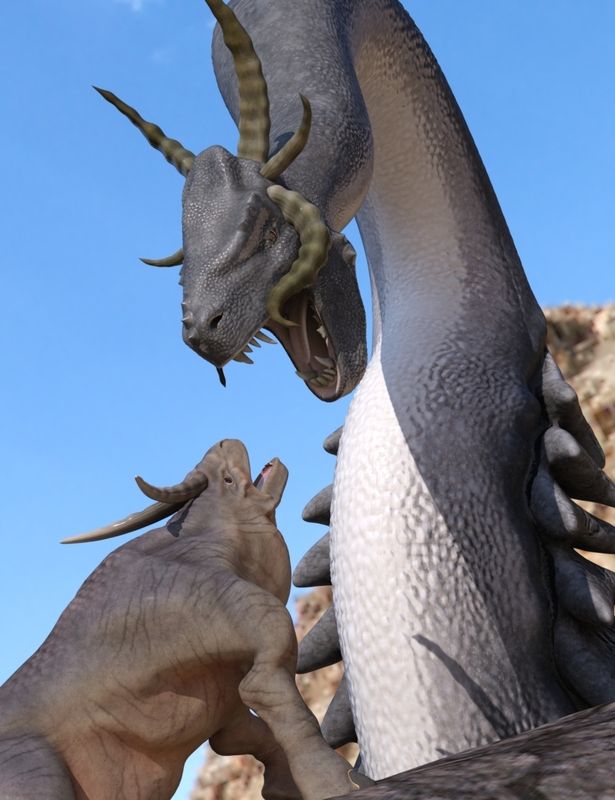
I really should make a "Terrified" expression morph for the critter...
I would suggest it needs a new agent.
Or World Animal Rescue...
If Genesis is supposed to be step above Michael/Victoria, why then are they still making new vrsionsFor history's sake, Michael through M4 and Victoria through V4 were standalone figues that had some morphs you could use to shape them into different characters but not too extreme ususally. They had poser style rigging and with each generation got more polys and better bends, etc but were still the same basic technology. Because it was poser rigging, the mesh was cut up into segments and that made it tough to give it really extreme body morphs because it was hard to make them across bundaries of the body zones. Then came Genesis , a fairly androgynous character with a new rigging style that gave "better" bends (less sharp) and was fairly low poly but was all one mesh so it was easy to morph it like crazy. As a reult you could morph it up into all sorts of creatures and, perhaps more importantly, into new versions of the base characters Michael and Victoria. From Genesis on, Mihacel and Victoria are no longer seperate models, they are just morphs of a particular genesis mesh. Benefit: ecause it was all one mesh with one rigging set up, all of those crazy morphed characters (men, women, kids, monsters, aliens, etc) could use the same clothes natively, no conversion required. With SubD the lower res meshes still look good when rendered, though some will say the reduction in polys in various places made some poses poor and content creation awkward. Especially gender specific stuff like breasts. Hence the move back to seperate male and female meshes with the Genesis 2 line and now 3. Each is an incremental improvement over what we got with Genesis but some will say the loss of the single mesh for both male and female was a step backwards. For example, sharing clothes across models is now harder and needs some 3rd party stuff or you have to do some work to create a "clone". Also animators that want to morhp characters in an animation had it easy with Genesis since it could be anything. Options are more limited with G3F/G3M, for example.
It all depends on what you want to do. I do still renders so I don't need the extreme morohing of Genesis and am quite happy with Genesis 2 / 3 models. On the other hand plenty of people still use V4 and M4 exclusively. Heck plenty of people are still loving Aiko 3!
Why sometimes Morphs in a clothing set don't do anything?If I am having trouble figuring out what a morph is doing (if anything) I will take limits off. It is important to make sure it is the morph that is being unlimited, not a controller that drives the morph.
Help Create Collision. Genesis Not CollidingAdding a suit to a body will not solve your problem. You'll end up with your colliding character splattered around the body suit.
The collision in DS just isn't "good enough" to simulate proper physical collision like the one you want to achieve. Like I said, you best bet would be deformers, or create a morph specifically for this action, that you then can dial in as needed.
Daz 3D is part of

Connect
DAZ Productions, Inc.
7533 S Center View Ct #4664
West Jordan, UT 84084Licensing Agreement | Terms of Service | Privacy Policy | EULA
© 2026 Daz Productions Inc. All Rights Reserved.