-
the freak
hello!!! I try to use the freak character... I have buyed it, with the morph injections, but it stays unemployed since today... I have installed everything, but the morphs, after the morph injections, doesn't work... For example, to get an ogre belly, I have some polygons growing disorderly, and that's all... as The Freak is a classic character, what happens, and how to get the differents morphs working correctly?? thank you for your comments!!!
Best practices? using genesis and genesis 2 content in CarraraI hardly ever use V4 or M4 anymore, unless I want to use Carrara hair items that grow directly on their models. Using the wearable preset method on previous pages, I have converted over 100 items for V4/M4 and dozens of items for older figures for use with the Genesis 2 figures. Just one clarification, although one selects the Genesis 2 figure when exporting a wearable preset from Daz Studio, one does not need to have any figure in the Carrara scene to load a wearable preset. Exported wearable presets become free-standig figures in Carrara. Once exported as a wearable preset from Studio, the ability to load as a figure in Carrara and then mix and match across figures and content is amazing in my experience.
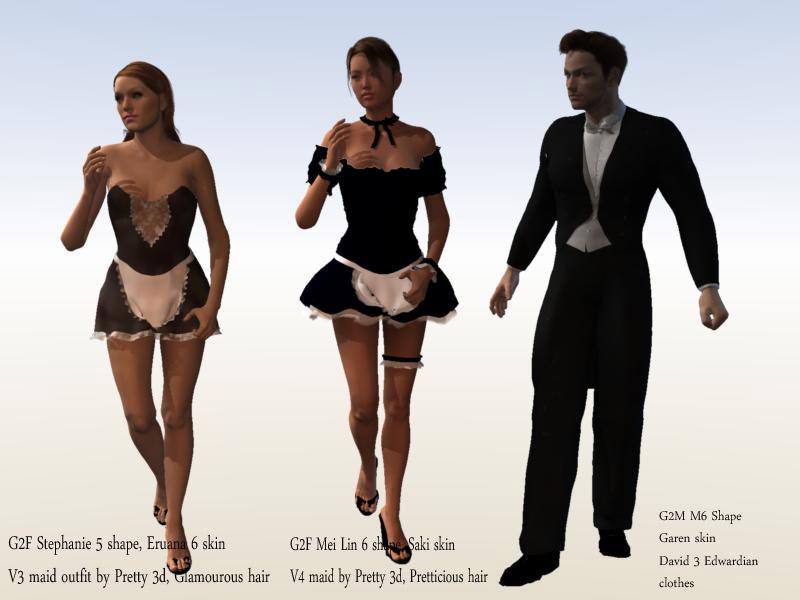
For example, I have loaded 2 G2Fs and 1 G2M. The G2Fs have been shaped to be Stephanie 5 and Mei Lin 6. The G2F/SP5 has skin based upon the maps for Eruana 6. The G2F/MeiLin6 has skin based upon the Saki character for Mei Lin 6. The G2F/SP5 is wearing a maid outfit for Vicki 3 by Pretty3D. The G2F/MeiLin6 is wearing a maid outfit for V4 by Pretty3D. The hairs are for V4. The G2M has been shaped to be Michael 6. Th G2M's skin is based on maps for the Garen character. The G2M's clothing is an Edwardian suit for David 3.
I have simply loaded the figures, dragged saved global shaders to the ball for each figure at the top of its shaer tree in the "actor" level, dialed the shape I want from Daz morphs, loaded clothing items that have ben passed through the Studio transfer utility, and then "fit to" the figure. In this case, there was no poke through and I have not done any other adjustments for the clothing or hair.
Thus, using Genesis 2 figures and their clones, I am able to mix and match content from V3/M3, V4/M4, V5/M5, V6/M6 and more.
 daz emissive shader and reality
No, Iray shaders won't transfer to Luxrender (Reality or Luxus).
Rigging
With a donor rig of the G2M. Is it not possible to use Transfer Utility?
Finding the files used in a modelIf you saved a scene or character preset, you can load it, go to the Parameters pane, and click on "Currently Used" to get the morph values. There is also a product http://www.daz3d.com/content-gatherer to collect the files used, which will give you the objects and textures.
THANK YOU!!! Totally appreciate it.
When Jayden/Brodie 7?Even though making good numbers on male figures is difficult, please don't think that we've given up. We have no intention of focusing on just female figures. We simply learn from each figure we launch, and then adjust based on what we learned. Each generation there are figures that disappear, and each generation there are new figures we try.
By way of an example, although it isn't Hiro, I will tell you that Generation 7 of Aiko definitely does have a male counter part.
Also, although the point that there are more female figure releaed than males is indeed a true assessment, another way to look at the situation is that, with the fact that Daz is releasing 2 figures most months now, and most of those months include a male one, that Daz is in fact releasing more male figures than ever before.
High level, we have some really amazing looking male figures planned for the rest of this year (although I don't discount he point that osme of you ahve made of wanting us to reconsider making a Gen 7 teen. We will look into it.)
Excellent information. I know I'm a nag, but it'd be cool if you shared these sorts of 'looking forward ideas' from time to time (no concrete promises or expectations) maybe in the PC+ area or something. Obviously plans change and people should understand that, but like with movies, games, music, etc. it's cool seeing that something is coming or at least being thought about - gives us something to want to save for and keep checking the store for too~
I'm really happy to hear that there's an anime male coming with Aiko (although I liked Hitomi/Keiko more in 5/6) and I like the idea of a male teen: so long as they go together. It's not just about having male x type, but say "oh I'm making a scene with a girl. Now I want a boy. Sure I can morph some random thing, but I want two that were actually made to be together (or I'm new and don't know or want to go to the effort of frankensteining one together myself.)
I actually think the release rate of Genesis 3 males has been really, really good - which was why it was such a surprise when there was no teen male last month since it seemed the perfect slot for it.
Also seconding the idea of some sort of smallish packs for 1-5yrs / babies / cats and dogs - nothing too fancy, just something that isn't 20 years old in technology. Genesis can cover 5-80 in a range of sizes and genders very well in a pinch but there are no real options for the former without delving into ancient technology. I think Studio is better if it at least has some sort of basic options to appeal to any sort of customer that might come across the program.
Need More Face Morphs For GF3 and GM3They are morph-able to a certain extent before you realize there is a limit you could morph with the existing dials morph slider.
What the morphs dial/ character blender in DAZ studio allows you to do, is just general blocking of the shapes of the characters you want, such as the head and body shapes. but the smaller details all over the body, such as the eyes and mouth, you can't. So if you spend X amount of time on creating a character and you have no 3D modeling/ sculpting experience, you will be in a dead-end and at the mercy of DAZ Shop, hopefully if they have the ideal eye/body shape you needed, most of the time....they won't carry it or for the right generation of model.
Character creation in DAZ Studio currently is tedious, stressful, time consuming task, there is just not enough technology innovation since 2011 with DAZ studio when I last used it.
many 3D modeling app similar to DAZ has On-Spot-Morph directly on the model you are viewing and not having to go to a list of dials, just by dragging various points on the model.
The morphs have limits set by default; what this means that the extent of the range of change is limited, but if you know how to unlock them, you can get a greater range of adjustment. As for "on the spot morphing", it's actually harder to get a morph that you can save the settings of and recreate on another computer if you want to do so.
You should tell OP how to unlock the morphs then...
 Transferring Morphs from Genesis to G2M/G2F and from G2M/G2F to Genesis (Now with Clones!)
Anyone know how to solve this problem? The rest of the morph looks fine. She's much taller than standard G3F, could that be part of the cause?
putting back the dson morph into the figureWhen you save the figure, it saves every single morph and sometimes it even saves them into the wrong folders so that you have duplicates.
What I would suggest is that you uninstall Genesis 2 Female and all her morphs and then navigate to the morphs folder and make sure it is empty. Any that got created when you saved will still be there, so delete them. Then reinstall everything again and it should be working.
Finding the files used in a modelIf you saved a scene or character preset, you can load it, go to the Parameters pane, and click on "Currently Used" to get the morph values. There is also a product http://www.daz3d.com/content-gatherer to collect the files used, which will give you the objects and textures.
viseme morphs in beards the ¿¿¿¿ obviousCan anyone describe how to get the Hein character's beard to animate like the youtube video in Poser?
OK, well, I sorta figured it out myself, I just copied the head morphs to the beard, but I still need to adjust them individually. I am on Poser 2014, I think 11 has more morph dial options for controlling multiple layers. I really need to learn this tool better.
putting back the dson morph into the figureyes, the 1st time around i saved the merged as a figure without checking the fields.
Thats when i got the blocky g2f. I deleted the experiment save, reinstalled g2f, loaded her & immediatly made a copy to work on (save as a figure) but this time around i did check & change the feilds (but i guess it was already too late). Proceeded with the geograft merge. Things looked fine until i tried the morph.
And yes, all the morphs that are fonctional are add-on.
Demonara & Demonaro: Demon Characters for Genesis 3The green guy could be a super villain from a certain comic book or am I wrong?
Edit are the horns geograped or part of the morph?
Carrara Challenge #24: “Under the Sea” or "Out of the Box" - WIP ThreadThanks for the feedback, Dartanbeck. I decided to do a few experiments with my first entry, the rehabbed head from the object browser. All of this talk about Genesis 3 bones in the face and expressions got me thinking. Why not try that in Carrara? So, I added a skeleton to the converted and remapped malehd2 object from the browser. The core is a set of bones from the base of the neck to the top of the skull but set back of the central Y axis. I then extended new bones from the base of the head to: chin, mouthright, mouthleft, nosebase, nosetip, cheekleft, cheekright, eyeleft, eyeright, and forehead central. Here are some initital tests of attaching the head mesh to the facial skeleton. I exaggerated to make the changes clear. To make expressions, a person could now do a combination of bone movement and morphs. The hair is from the sample Carrara hairs in the browser, but less wave/kink/etc
Not sure I will use anything like this for the challenge (a single morph may be easer), but I thought it was worth reporting as an experiment.
When Jayden/Brodie 7?I am sooo happy the couple releases seem to be a thing now : )
What I think is needed more than a male teen are more characters of color. You can always dial in something like the young morph or the growing up morphs, but characters of color with good skin textures and the right facial features are rather hard to come by.
So I'm eagerly waiting for the native american, arabic, polynesian and indian couples : )
Mei Lin and Lee look just awesome : )
putting back the dson morph into the figureAh, are you sure when you saved your merged figure that you changed the author and product fields in the option dialogue? If not you will have also saved the morphs as morphs on the merged mesh over the originals, which might very well break them - reisntalling the base figure would not affect add-on or created morphs. Reinstalling the original morph sets would fix those, but unless you have a pre-merge copy of your custom morphs I'm not sure there's anything you could do for them.
Twin tweens for Genesis 3Nadiya's body shape is done, finally. Need to fine tune her head morph, skin textures and shaders yet. Then on to Niren.
Daz Studio Pro BETA - version 4.9.2.70! - Released - (*UPDATED*)Daz 3D is pleased to announce Daz Studio Pro BETA - version 4.9.2.70! (*UPDATED*)
!! IF YOU HAVE NOT UPGRADED TO THE GENERAL RELEASE OF 4.9, IT IS HIGHLY RECOMMENDED THAT YOU BACKUP YOUR CONTENT DATABASE IN DAZ STUDIO 4.x (E.G., 4.6, 4.7, 4.8) BEFORE LAUNCHING DAZ STUDIO 4.9 !!
How do I backup my User Data in Daz Studio?
!! IF YOU HAVE NOT ALREADY MIGRATED FROM THE OLDER VALENTINA DB BASED CMS TO THE POSTGRESQL BASED CMS, IT IS HIGHLY RECOMMENDED THAT YOU DO SO BEFORE LAUNCHING DAZ STUDIO 4.9 !!
Has the Content Management Service (CMS) changed?
Highlights:
4.9.2.70 - Release Candidate (*UPDATED* May 25, 2016)
- Smart Content pane
- Made improvements to the "Show Asset(s) in > Smart Content > Products" and "Show Product in > Smart Content > Products" actions found in context menus for assets/products in the Content library pane
- Made various tweaks to context menus to improve clarity and/or consistency with the Content Library pane context menus
- Content Library pane
- Added the ability to "Show Asset in > Virtual Folder" from the context menu for an asset that is installed via Daz Connect, when the selected container is not a virtual folder
- The ability to "Show Asset in > Mapped Folder" from the context menu for an asset that is not installed via Daz Connect is now available only when the selected container is not a virtual folder
- The "Show Asset in > Products" option in the context menu for an asset is now available only when the selected container is not a product
- Fixed a crash triggered by "Show Asset in > Smart Content > Products" when the invoking asset is the result of performing a Files search in the Content Library pane; for speed purposes a Files search (as opposed to a Database search) does not pre-load metadata for the asset, however sending the asset to a database driven view requires that the metadata for the asset to be loaded in order to determine the category it is assigned to and the product that provides it
- Fixed an issue with "Show Asset in > Smart Content > Files" when the invoking asset is the result of performing a Files search in the Content Library pane; for speed purposes a Files search (as opposed to a Database search) does not pre-load metadata for the asset, however sending the asset to a database driven view requires that the metadata for the asset to be loaded in order to determine the category it is assigned to
- Made various tweaks to context menus to improve clarity and/or consistency with the Smart Content pane
- Database Driven Content Views
- Added the ability to "Show Asset in > Content Library > Virtual Folder" to the context menus for assets that are installed via Daz Connect
- Fixed several event/timing issues in database driven asset/product views that were causing interference with triggering automated navigation/selection from remote sources; e.g., "Show % in > %", setting/restoring selection, etc
- FBX Importer
- Added support for importing limits
- Made improvements to handle a case where Maya applies local transformation to skinned nodes
- Interface Scaling
- Made tweaks to Shader Mixer sizing policies to better support DPI scaling on Windows; further refinements needed
- Fixed bugs in various areas; see the Change Log for details
4.9.2.67 - Release Candidate (May 18, 2016)
- NVIDIA Iray
- Updated to 2015.3.11 (see this post for more information)
- Added support for Light Portals; a "Light Portal" property becomes visible when "Photometric Mode" is enabled and "Light Geometry" is set to "Rectangle"
- The value of the General > Misc > Auto Headlamp property in the Render Settings pane is now stored between sessions; unless a scene is loaded and the settings from the scene are applied or a preset is applied
- Interface Scaling
- Added support for High-DPI displays on Windows (via OS virtualization and scaling)
- Material copy/paste
- Fixed an issue with copy/paste of texture instance modifiers; the settings found in the Image Editor dialog
- Transfer Utility
- Fixed an issue when using replace source with target where skin binding was not being setup correctly
- Fixed bugs in various areas; see the Change Log for details
4.9.2.60 (May 10, 2016)
- NVIDIA Iray
- Added support for Non-Blended Draw modes in the NVIDIA Iray DrawStyle
- Properties presented in the Render Settings pane while the NVIDIA Iray is the active renderer are now aliased on the Draw Settings pane when the NVIDIA Iray DrawStyle is the active DrawStyle for the active viewport; adjusting a property alias on the Draw Settings pane adjusts the property on the Render Settings pane and vise versa
- Added a “Manipulation Resolution” property to the Drawing group of the NVIDIA Iray DrawStyle; produces a mosaic proxy while the scene is being manipulated (faster preview)
- Fixed a bug in the DrawStyle drawing code where it would momentarily flash OpenGL in the middle of a render
- FBX Importer
- Fixed an issue with reporting errors
- Fixed an issue with setting the vertex count on empty skin bindings
- Image Editor dialog
- Fixed an issue that caused the “Instance Color” and/or “Instance Tiling” page labels to not be displayed unless hovering the cursor over the position where the label should be in the Highway and Main Street styles
- Styles
- Updated to make the Daz Connect virtual folder base (in the Content Library pane) visually distinct
- Updated to make the Filter Menu Button (to the left of filter fields in various panes) visible
- Fixed bugs in various areas; see the Change Log for details
4.9.2.55 (May 4, 2016)
- NVIDIA Iray
- Updated to 2015.3.9 (see this post for more information)
- Added a "Glossiness Squared" property to the Iray Uber material; defaults to true on newest version, but set to false on old loaded files
- Preferences
- Added a preference to control whether or not the Login page is displayed on launch; Startup > On “Launch” > Show Login Page
- Smart Content pane
- Added an “Edit Product Metadata…” action to the context menu for products
- Made various tweaks to context menus to improve clarity and/or consistency with the Content Library pane context menus
- Content Library pane
- Added an “Edit Metadata…” action to asset container context menus
- Added “Export Metadata…” or “Export Metadata per Product…” actions to asset container context menus
- Made various tweaks to context menus to improve clarity and/or consistency with the Smart Content pane
- Categorize dialog
- Reworked hiding/showing of top-level (i.e., "Categories") and first child (i.e., Default) when in isolation
- Added a context menu option that allows creating a category path via string; pre-populated with the full path of the selected category
- Fixed enabling/disabling/hiding/showing of actions in the the context menu
- Content DB Editor
- Fixed an issue that caused the Content DB Editor to not commit changes to Content Type, Compatibility Base and Audience on an asset if it was already defined
- Measure Metrics
- Added an “Export Measurements…” action to the pane option menu
- PowerLoader
- Speed improvements
- Geometry Editor Tool
- Tweaks to action labels, descriptions and dialogs
- FBX Importer
- Made improvements to allow importing figures that were not exported from the FBX Exporter
- Now handles more general weight configurations
- FBX Exporter
- Fixed an issue that caused large weight values
- Fixed various bugs in several areas; see the Change Log for details
4.9.2.44 (April 22, 2016)
- Content Library pane
- Added Daz Connect virtual folders as the first child of Daz Studio Formats and Poser Formats top-level containers; these virtual folders are only displayed when products have been installed via Daz Connect
- Added Create Links > This Folder Only… and Create Links > This Folder & Sub-Folders… actions to the context menu for folders (both virtual and real)
- Install pane
- Added a new pane for installing product via Daz Connect; a subset of Smart Content > Products with modified defaults
- Smart Content pane
- The Filter Field on the Products page of the Smart Content pane now uses the product name to filter by default instead of keywords on the assets in those products; the previous behavior can be obtained by prefixing the term with "key::" (include the quotes if the keyword is comprised of multiple words); similar functionality can be obtained for the Filter Field on the Files page by prefixing the word(s) with "name::"
- Metadata Driven Content Views
- The Lost & Found category has been promoted (moved to the top of the list and styled like the "All" filter) to help make finding user-facing files that have not been categorized easier; appears in the Smart Content pane and Presets pages in various other panes (i.e., Posing, Shaping, etc.)
- All child categories of the Lost & Found category created by Daz Connect are now created as (converted to) user categories; this allows a user to assign the assets to other categories, remove those assets from sub-categories of the Lost & Found category, and delete those sub-categories
- Metadata
- Changed a trigger on pre-4.9 tables to handle uninstall/reinstall without loosing User Data; products that are installed, but not via Daz Connect, will no longer cause the DB record to be deleted when uninstalled (so as to preserve user data) and so will display a missing icon indicator and an installed state indicator
- User keywords, user notes, and user categorizations are now unified across all files (in all products) with the same relative path instead of isolated to a specific asset in a specific product; this improves the reliability of filtering results based on user assigned keywords, displaying user notes, and the reliability of filtering results based on category selection
- Improved the speed of metadata update start; give better initial indication of update started
- NVIDIA Iray
- Added Diffuse Overlay Color and Diffuse Overlay Roughness properties to Base/Diffuse/Overlay group on the Iray Uber Material
- Added Diffuse Overlay Color, Diffuse Overlay Roughness and Diffuse Overlay Weight to the Iray Uber Base Shader Mixer brick
- Morph Loader Pro
- Added mirroring options
- Added attenuation options
- Joint Editor Tool
- Added a Duplicate Bones action to the context menu Create submenu
- Weight Brush tool
- Added a Distribute Selected Bone Weights action to the Weight Editing submenu for the context menu; this action distributes the weights from the selected geometry of the primary selected bone among the other selected bones
- Fixed many bugs, in various areas; see the Change Log for details
*Note: Switching between builds provided via the General Release channel that are older than 4.9.1.30 and builds provided via the Public Build channel (and the Private Build channel for those involved in that endeavor) will cause a "Configuration Changed" message to display.
Important Notes:
- The first time you launch Daz Studio 4.9, any data that exists in the content database is migrated so that it can be used in Daz Studio 4.9.
- The amount of time the database migration operation takes is proportional to the amount of data to be migrated.
- The database migration operation does not delete the data that it migrates from the previous location so that it remains accessible by earlier versions and other applications, such as Carrara.
- Daz Studio 4.9 uses the same PostgreSQL database as Daz Studio 4.6 and later, and/or other applications, such as Carrara.
- A portion of the data contained within the database is shared amongst versions but not entirely. For example:
- Creating a category in either Daz Studio 4.9 or 4.8 will cause that category to exist in the other version
- Assigning a file to that category in Daz Studio 4.9 will NOT cause that file to be assigned to that category in Daz Studio 4.8
- Assigning a file to that category in Daz Studio 4.8 WILL cause the file to be assigned to the category in Daz Studio 4.9
- Reseting the database in any version of Daz Studio that uses PostgreSQL (e.g., 4.6 or later) will purge all of data in the database, including any data that may be used by earlier versions or other applications, such as Carrara.
- After the initial migration operation, edited metadata in Daz Studio 4.8 will not be migrated to Daz Studio 4.9.
- A workaround is to export User Data from Daz Studio 4.8 and reimport User Data in Daz Studio 4.9.
Frequently Asked Questions:
- How do I backup my User Data in Daz Studio?
- What is a BETA?
- What is a Release Candidate?
- General Release, Public Build, BETA... What is the difference?
- Will the version in the Public Build channel replace the one in General Release?
- Has the Content Management Service (CMS) changed?
- What is the Application Improvement Program about?
- Have the content packages been updated too?
- How do I get the latest version?
- Can I have a General Release and a BETA installed at the same time?
- What about the plugins I have?
- Why are my custom categories missing after 4.8 database migration to 4.9?
- What is new in this build? Do I need to update my copy?
- Is there any documentation?
Frequently Asked Daz Connect Questions:
- What is Daz Connect?
- What are the goals of Daz Connect?
- How do I get my purchased products now?
- How can I get new products through Daz Connect?
- Are all products Daz Connect ready?
- Will the products I already own keep working?
- Will products from stores other than Daz 3D keep working?
- Can I use products installed through Daz Connect with other software?
- Does this update make it easier to find content I can use with Auto-Fit in Smart Content?
- Can I use the Content Library pane with Daz Connect?
- Does Daz Studio 4.9 require me to use Daz Connect?
- Does Daz Studio 4.9 require me to be online to use Daz Connect installed content?
- I use my content on multiple computers. Can I still do that?
- I have multiple people in my household who share content with each other. Can we still do that?
- Is the encryption associated with Daz Connect essentially Digital Rights Management (DRM)?
- Can I copy products installed using Daz Connect from one computer to another?
- I like to move files around on disk to organize them differently. Can I still do that?
- What will happen with the content already on my hard drive(s)?
- What will happen to my custom metadata?
- Can I still custom sort my files?
- If the content is stored encrypted, how do I reinitialize morphs?
- Will Daz Install Manager and Daz Connect work side by side? Can I choose one or the other?
- Do I have to re-download all of my products?
- Does having the Daz Connect service mean that all content will finally be Smart Content capable?
- Does Daz Connect work with plugins?
- Will my saved scenes also be encrypted?
- How do I add content that I have created myself to Daz Studio?
- What happens to my Bryce and Carrara content?
- Does Daz Connect support 32-bit operating systems?
- Will this update work with products like ZoneAlarm or other software firewalls?
- Will this update eliminate the Hexagon, Bryce, GoZ, or Photoshop bridges?
- Will the DSON Importer for Poser plugin work with products installed using Daz Connect?
- Will this update keep zip packages on my computer like Daz Install Manager does?
- Is there a reason to upgrade to 4.9 if I do not plan to use Daz Connect?
General Release Thread:
Previous 4.9 Beta Threads:
When Jayden/Brodie 7?So, inspired by this thread...
Brandon morph/skin, Older Teen preset from Growing Up, some tweaks to the nose (really don't like the Brandon nose as is), iray skin converter, omri hair with shader cribbed mostly from Antonia hair, painter's lights, clothes from Horror Survivor Marius.

Click on image for full size.
Your model is awesome, could you share us the model (morph) in order to we could have him too?
putting back the dson morph into the figuremost of the morph dont work, even tho they show up.
the victoria 6 morph shows up for example, but has no effect on the figure. Its parent reads:
"parent" : "/data/DAZ%203D/Genesis%202/Female/Genesis2Female.dsf#GenesisFemale"
while the androgenous morph works and reads:
"parent" : "/data/DAZ%203D/Genesis%202/Female/Genesis2Female.dsf#GenesisFemale-1"
where does the -1 comes from ?
i tried to change the parent name on the victoria6 morph to match that of the androgenous but no result.
Daz 3D is part of

Connect
DAZ Productions, Inc.
7533 S Center View Ct #4664
West Jordan, UT 84084Licensing Agreement | Terms of Service | Privacy Policy | EULA
© 2026 Daz Productions Inc. All Rights Reserved.