-
Export HD models to zBrush
You can't export your HD morphed figure to ZB with the HD morphs at present and probably never will be able to unless DAZ3d release the plugin to do this... or a third party developer produces a similar plugin (assuming that DAZ3d will allow such a plugin).
However you can make some morphs in ZB at higher than base resolution then revert back to base resolution for the export back to DS. This at least makes it easier to get the shape you want.
To avoid unwanted side effects of this process such as unmorphed verts being changed in the conversion process you should use the following work flow:
1) Import your figure (e.g. via GoZ) and select Edit in the main options bar
2) Go to the Geometry Sub Tool and deselect the "Smt" button.
3) Sub-divide your figure using the "Divide" button or press CONTROL-D.
4) Although nothing appears to happen, if you now morph your figure, only those verts which you morph will be subdivided.
5) When you have finished morphing you can return the figure to DS via GoZ. (Although you don't need to return the "Sdiv" slider back to 1, this is good practice and may be necessary if you export the figure without GoZ.)
The new morph in DS won't have all the fine details which you could place in ZB, but it will be a low rez approximation of what you did and for many purposes it is easier to morph in HD and accept a low rez version of the morph than to try morphing in low rez.
I can only hope that DAZ3d (or a 3rd party) will take pity on us amatuer morphers and release a plugin to allow HD morphs to be passed between DS and ZB using GoZ.
Strange ripples in figure mesh following export from Zbrush using GoZHi Josh,
I was using a whole range of dials including Body Scale. I also used the Youth Morph from Shape Shift by Zev0 and Boy-Girl Male body from BOY-GIRL Genesis 3 Female by Mar3D(Renderosity) to get a start on a smooth chest form before I went into Zbrush.
Interestingly, I went into Zbrush again with this model after removing all the morphs with any scaling effect except for the two mentioned above and after updating to DS 4.9.2.55 and GoZ 1.6.2.55 and in ZB applied a smoothing brush to the rippled area (which was actually showing now as ripples in the mesh). When I sent this figure back to DS via GoZ, the ripples were gone. So the morph I made in ZB was correctly applied in DS.
So, I don't know if simply removing the majority of scaling effect morphs before going to ZB via GoZ, or if the latest updates of DS and GoZ, have solved the problem. However, the problem appears to have been solved.
The extra screen shot you asked for is attached.
Failed to Save MorphWhen I go to save as morph assets, all the sudden now I'm getting an error thats saying "Failed to save as morph Asset(s) See Log file for details.
I check it and this is what it says.
WARNING: fileoutput\dzassetoutfile.cpp(640): File could not be opened.
WARNING: dzmorphsupportassetfilter.cpp(664): Failed to write Morph Asset(s).
Failed to save Morph Asset(s). See the log for more details.200 Plus Head MorphsThat is such a realistic morph, Kharma! She looks like a girl/woman I know. Thanks for sharing it.
My G3M gene pool is pathetic really.
 Was playing around with these morphs and came up with this character. this is certainly a very useful product and I too would like to see one for the guysCan anyone identify this V4 character?
If you compare the SKUs there are only two V4 characters from Thorne (Nadia and Sondra) that are older than the textures the character is promoting. So if any, it should be Nadia. I gave it a try and with a lot of morph++ dialing I was able to get close, but I'm still not convinced. Among others the makeups included do not look like the one on the promo, but it could be postwork of course. Could not find any DS textures btw, despite it says both DS and Poser, so this is P5-6 textures.
 200 Plus Head Morphs
. Adding 200 more dials to my face morph list will make finding any of them practically impossible.
I thought the same thing when it came out, revisiting it I finally noticed: it's got teeth morphs. How did I miss that?
This really does look pretty awesome so cheers for bringing it back to my attention maxamillion (and of course Dogz for making it).
A G3M version would be incredibly useful.
200 Plus Head MorphsI'm already having trouble navigating through a morph dial list that extends from my pc down through several apartments below LOL. Adding 200 more dials to my face morph list will make finding any of them practically impossible.
Cannot select one character in a scene through viewportI have the same issue... Only I know it's not caused by user error... I have zeero cameras in my scene. Character is put to selectable and I cant save morphs with this figure either... I've tried saving it as a new scene. no go. I have tried saving it as a scene asset. no go. i have tried saving it as a scene sub set. no go. I have tried saving it as an actor preset, no go. i have tried reinstalling Daz... no go. The character is legitimatly broken and the last time it was usable. All I did was switch to edit mode and move some morphs into another group. I know it's not anything to do with tool settings either, because I tried to save her zbrush morphs and they wont save as a morph asset. I save the morphs, and load a new G3 in a fresh scene, and the morphs I just tried to save, arn't there. It's like a bridge was lost... The bridge that connects the character to the scene.
Rigging a new body part help please!I created a mechanical leg model for G2F in zbrush (and attached a ring of the original polygons at the top to allow geografting) and imported said obj into Daz studios. So the leg is flat on the ground and is not in the correct position. Is there anyway I can copy the rigging from the default G2F onto this new leg? I tried fitting and obviously it ended up with G2F with a mechanical leg flat on the ground. Any ideas?
EDIT: Fixed it with a quick to-and-fro transfer to Hexagon. However, now when I move the bone, the whole mesh is distorted!!
Cori for G2FIf you are referring to the links to Ramwolf's stuff, he removed all of that a long while ago as has been explained earlier in this thread. However, Sassanik created a new morph that doesn't require the Ramwolf morphs that is provided in the last post by the author here.
Ah, Thanks, SixDs! :) There are like 20 responses to the post so I didn't read them all. lol I'm downloading it now and am looking forward to seeing what I can do with Cori. Thanks!
Cheetah Girl for Genesis 3 FemaleShe has a lot of personality...
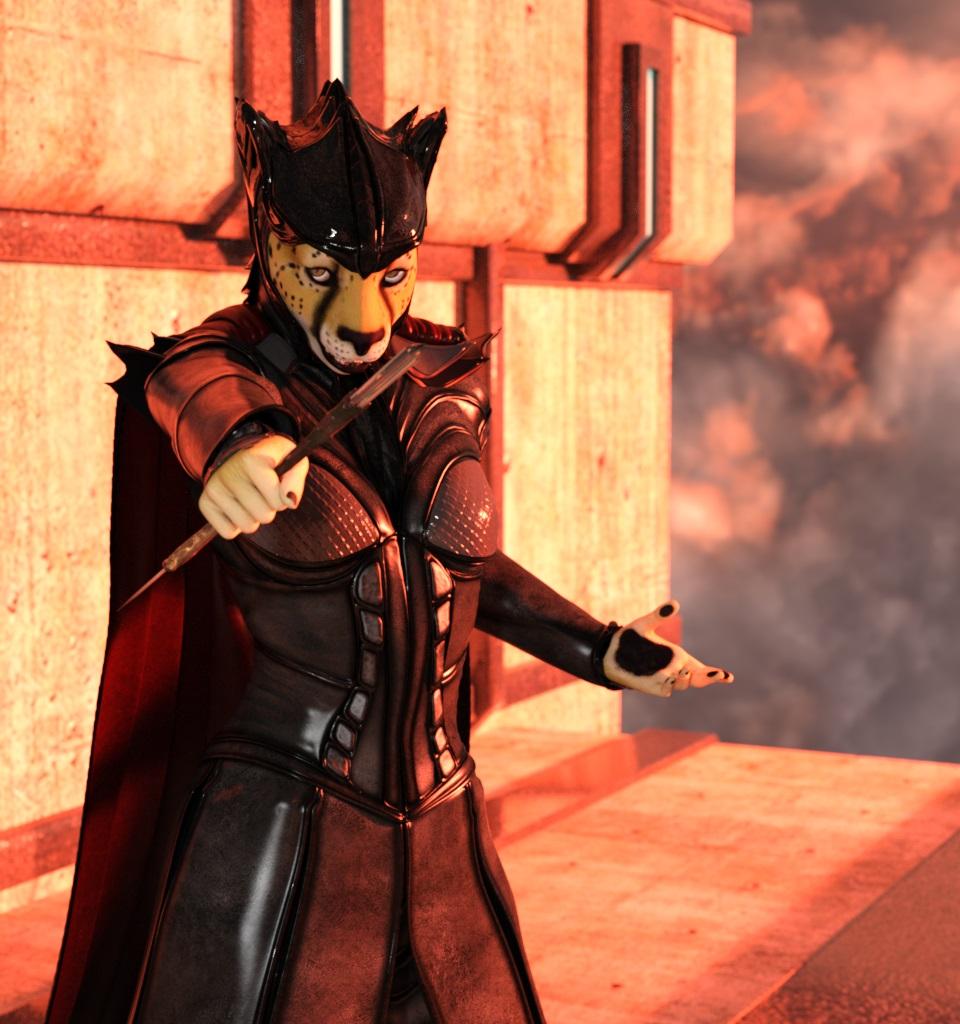
OHH NICE! :D
It's a great character. I'm fond of it and I'm looking forward for more furry/animal-like characters, specially rabbits. We need more semi-realistic rabbits with long expressive falling ears :)
Here is my use of it with some morphs and stuff :)
If possible, I would advise to make a separate morph for ears. a morph for the head without ears (ears gone, at most possible), and then a morph for ears. It would allow to work with fitted hair and props to follow or not ears. (why hair ? I would say: why not hair :) it's fantasy! )
:origin()/pre12/0119/th/pre/f/2016/123/7/a/toon_fantasy_cheetah_girl_in_a_forest_by_yupasama-da16sya.jpg)
higher resolution: http://yupasama.deviantart.com/art/Toon-Fantasy-Cheetah-girl-in-a-forest-606658834
Yep we'll be updating her files soon to have Ear Morphs, and we're taking alot of sugestions from here to put into our next morphs that have already been in development. Still trying to pin down the Geo tail however.
Creating MorphsI have made a lot of morphs in Hexagon and done this sort of thing. But I have noticed that if the bounding box size increases when you are making the morph you seem to get unexpected behaviors in some of the morphs. All sorts of distortions. I had the idea of putting an invisible object in the original base file that would force the bounding box to be bigger so that I could bend things like hoses and have them stay inside the bounding box of the original base object. I am still trying to sort out how to reliably make bending morphs. I have had lots of linear morphs (expand, extend etc.) work just fine but bending hoses often results in strange distortions which seem to happen if the bending goes outside the original objects bounding box. Also there are a lot of checkboxs in the Hexagon export to obj screen and apparently you want nearly all of them unchecked except I think flip textures and maybe export UVs. I tend to use morph loader advanced but I am not sure it matters which of the two I have available I use. Bending hoses has been something I have also been unable to seem to get to work just right. To get things to fit in Hexagon I tend to import them at 0.1 scale and then export them at 10x scale to restore them to what DAZ exported them as. And I do not use the function to send to Hexagon. I export the OBJ and then open Hexagon and import it and save it as a Hexagon file for good measure. If someone can figure out how to bend hoses without making them multiple segments and then creating an "actor" and adding bones and using pose I would love to hear why this gives me such fits also. Bends seem to be a special case somehow.
That may be what's happening with me. The original bounding box just barely fits the worm so when I bend the front or back half into a curve, the bounding box gets bigger. Also, I guess I should mention that it was not changing shape at all, just scaling.
I will try those 2 things mentioned (making sure scaling matches in both Daz and Hex and using a bigger bounding box, perhaps an invisible cube) as soon as I get a chance.
Thank you both for your suggestions.
*edit*
Maybe I was wrong and didn't see it before, but it does bend when it finally hits 100% for the morph, but by then it's so tiny LOL
200 Plus Head MorphsThe cranium morphs make it easy and simple to get head shapes that occur naturally everywhere except Dazland. I had to use alien morphs from Creature Creator in Genesis 2 in order to even approach the rounded craniums that some people have. In each case of these morphs, every facet of control is given. Other morph packs go only so far, and there are usually two or three elements of shaping a feature that they ignore.
I am petitioning Dogz for the G3M version. Perhaps we can convince him that it's worth the work.
One more thing: The price is great!
So I gotta ask..Of course! However 'anatomically accurate' you want your Genesis figure to be, "there's an app for that"! (Well, in this case, a morph.)
I don't recall if the nipple morphs are on the base figure (it's been a while since I'e had only the base figure), but there are any number of morph sets you can look at. Just enter 'Genesis breasts' in the search box, and be prepared to do some serious clicking. (In my case, it's right-clicking, since I like to open the product pages in a separate tab.)
200 Plus Head Morphs200 Plus - Head & Face Morphs for Genesis 3 Female(s) by Dogz is an Olympian morph kit. The level of control and detail this morph pack gives me over G3F faces is unprecedented. I have not had Nostril Size control since V4. The Inner, Middle, and Outer Brow controls render easy what was heretofore impossible. If you like to dial in specific faces or look-alikes then you have to have this pack! (This is merely my informed opinion, and I have received no remuneration or encouragement from the PA for this message).
Poor G3M needs this so badly. There are only a few G3M characters (other than Daz Original base models) that look much different from the G3M alien doughboy mesh. Perhaps GenX Add-On for Genesis 3 will save the poor fellow.
Strange ripples in figure mesh following export from Zbrush using GoZOK, I know there is a bug in Morph Loader (which is also used under the hood when going through GoZ) with scale. You are far more likely to have good results if you don't have scale going on.
What morphs are you dialing up that use scale? If you are dialing up a full character it is important for you to know that we split our characters into head and body morphs and we don't apply scale to those. We create a control property that dials up the head and body together and then also scales it. If you are starting from existing morphs you should never work with that control property, you should instead dial up the head and body morphs individually.
Daz mommy and baby posesNothing baby-oriented for G3 at all, nor G2 so far as I know. We've made do with the Growing Up morphs for kids ever since G2 came out, and the Growing Up morphs don't reach all the way down to baby. There were two versions of a baby for Genesis 1, and they may have come with some basic poses, but nothing interacting with the adult figures. There were a few pose packs that included the Toddler morph for Kids4. But that's going a long way back.
Now, over on Hivewire there is Baby Luna, and there are a couple of pose packs for using her with Dawn and Dusk. I've used Dawn poses with G2F and there wasn't a lot of problem with them, so the Dawn and Dusk pose packs might work. You'd probably need to do some tweaking afterwards. And since the Hivewire figures come in both Poser and Studio versions you'ld need to be sure that the pack you want is actually designed to work in Studio. Or Poser, if you're a Poser user.
Export HD models to zBrushI just learned of DAZ and it could be an awesome tool when combined with zBrush. If I purchase an HD added on for a model, how do I export it to zBrush? I'm thinking of getting Michael 7 with the HD and exporting the HD version to create a cool morph in zBrush to then use back in DAZ.
Can someone explain the process of exporting the HD version of a model?
Thanks!
Creating MorphsI have made a lot of morphs in Hexagon and done this sort of thing. But I have noticed that if the bounding box size increases when you are making the morph you seem to get unexpected behaviors in some of the morphs. All sorts of distortions. I had the idea of putting an invisible object in the original base file that would force the bounding box to be bigger so that I could bend things like hoses and have them stay inside the bounding box of the original base object. I am still trying to sort out how to reliably make bending morphs. I have had lots of linear morphs (expand, extend etc.) work just fine but bending hoses often results in strange distortions which seem to happen if the bending goes outside the original objects bounding box. Also there are a lot of checkboxs in the Hexagon export to obj screen and apparently you want nearly all of them unchecked except I think flip textures and maybe export UVs. I tend to use morph loader advanced but I am not sure it matters which of the two I have available I use. Bending hoses has been something I have also been unable to seem to get to work just right. To get things to fit in Hexagon I tend to import them at 0.1 scale and then export them at 10x scale to restore them to what DAZ exported them as. And I do not use the function to send to Hexagon. I export the OBJ and then open Hexagon and import it and save it as a Hexagon file for good measure. If someone can figure out how to bend hoses without making them multiple segments and then creating an "actor" and adding bones and using pose I would love to hear why this gives me such fits also. Bends seem to be a special case somehow.
Creating MorphsThey probably do bend, but the scaling is off so it doesn't look like they are doing anything else.
You need to match the import scale to the scale you exported at....so if you used the Daz Studio scale to export you need to make sure that Morph Loader is using the same scale to import them.
So restart Studio, as long as you didn't save the morphs, and reimport one...making sure you have the correct scale. If that works, go ahead with the rest of them.
Daz 3D is part of

Connect
DAZ Productions, Inc.
7533 S Center View Ct #4664
West Jordan, UT 84084Licensing Agreement | Terms of Service | Privacy Policy | EULA
© 2026 Daz Productions Inc. All Rights Reserved.