-
G3F - Waist Width morph and bad results on bending (also when just using the Olympia body shape)
I can't really show what Cosmo and Marble are seeing, since I'm not getting it as badly, I think. I hope the image titles and sliders will explain it well enough.
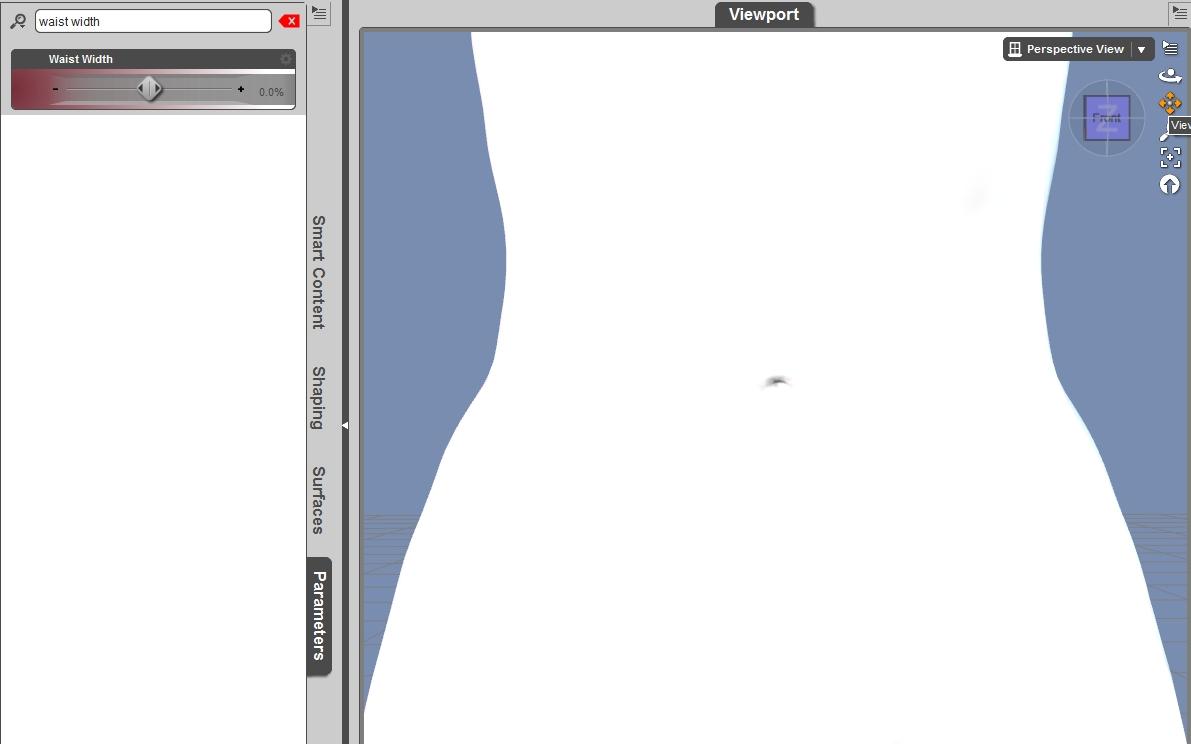
If I've done this right: first picture is a clay capture of Olympia 7 shape with default waist width, front view
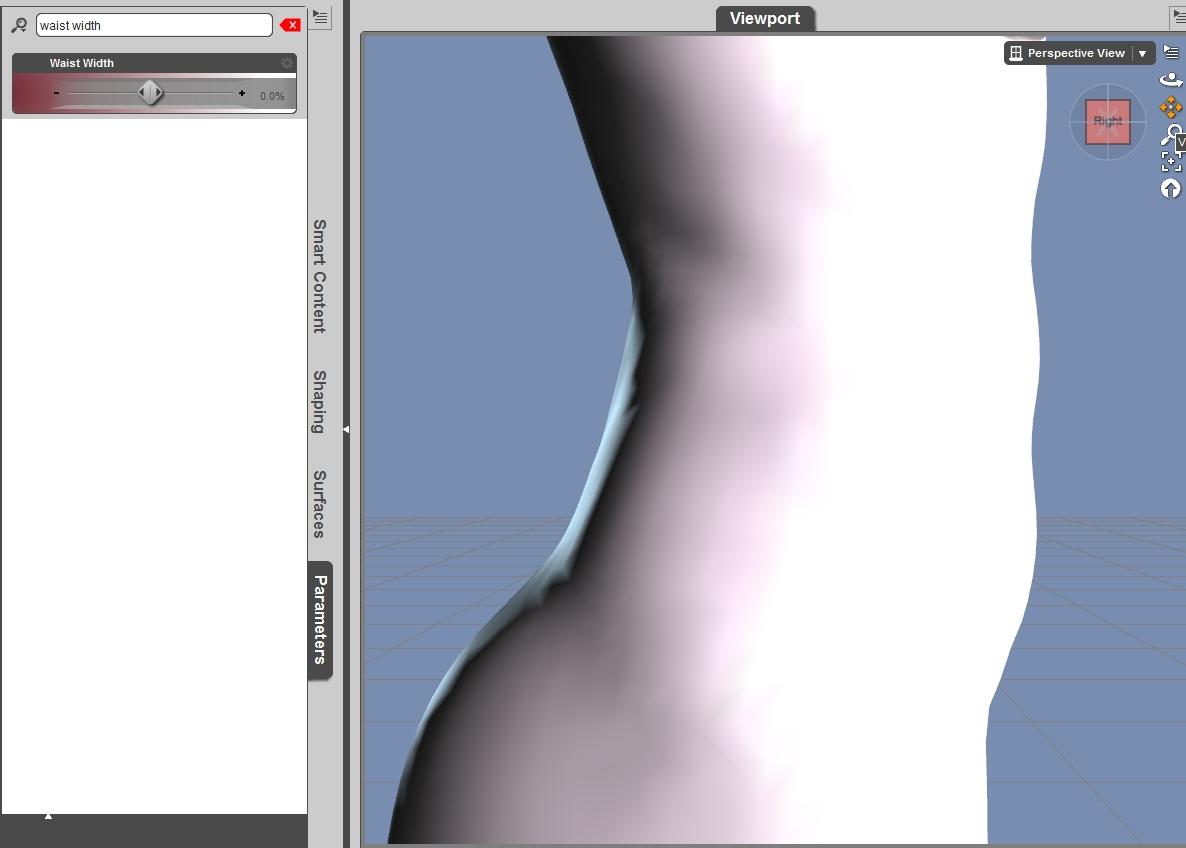
Second image should be Olympia default, side view.
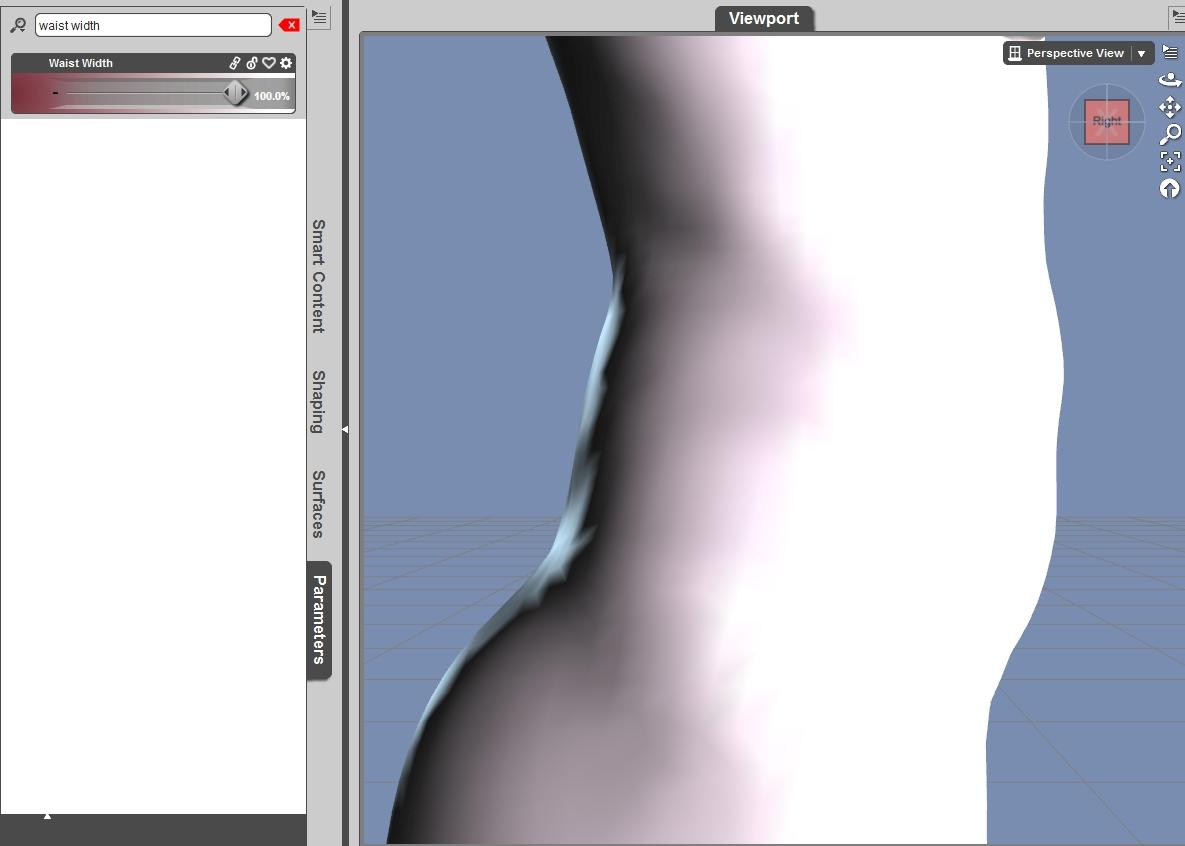
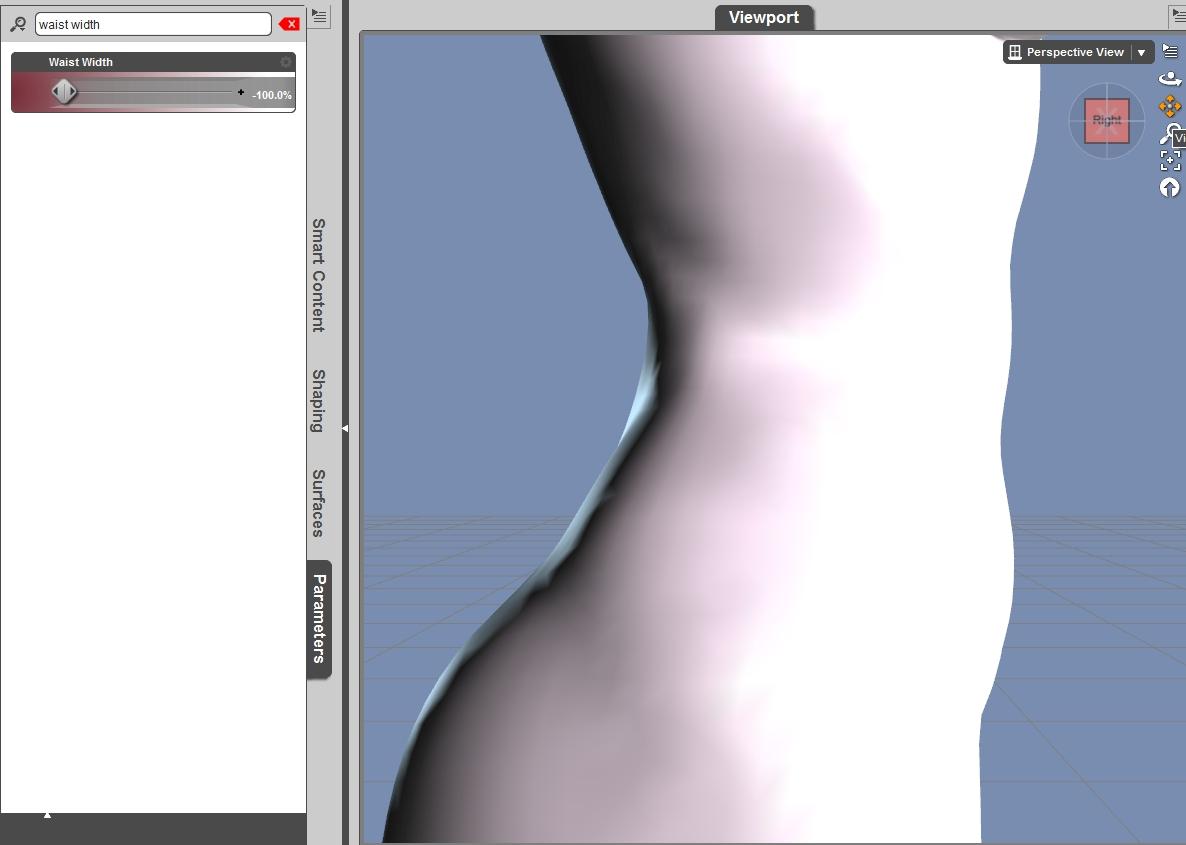
Third picture should be waist width at 100 percent, side view. Front-to-back thickening is visible, as is a "pad" between her lower abdomen and buttocks.
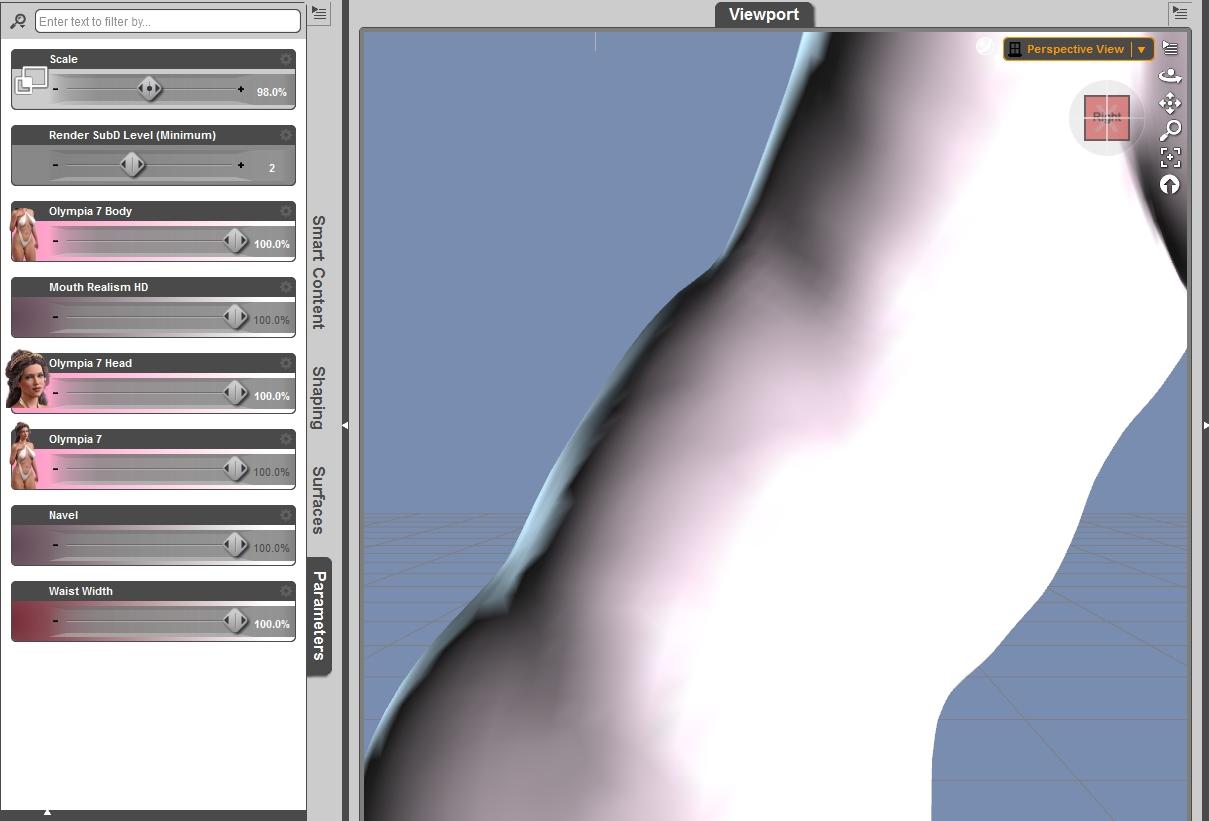
Fourth picture should be Olympia 7, waist width 100%, side view, lower abdomen bent forward.
Hope this is helpful. I don't have Bend Control or Glute Control, so that's not an issue here. Also, I tried using the height morph to shrink both Olympia and Bethany down, but couldn't duplicate the issue that Marble described.
EDIT: forgot one. Waist Width at negative 100%. Front-to-back narrowing is very apparent.
 G3F - Waist Width morph and bad results on bending (also when just using the Olympia body shape)
It's not just bending, though. Using the "Waist Width" morph from the Genesis 3 Female Body Morphs to widen the waist side-to-side also increases the front-to-back thickness of the waist area. (Conversely, using it to reduce the size of the waist width also decreases the waist depth.) It's not even a matter of the Waist Width morph dragging the Waist Depth slider along for the ride; that slider doesn't move at all. That really shouldn't happen, should it?
Bending can make it more apparent, but it's not necessarily the only issue. Maybe the increase in depth is causing the correctives not to function as they should; if the Waist Depth slider isn't being invoked, the correctives may not be getting invoked either.
All that said ... I haven't noticed any particular issues with Bethany and bending. Actually, she seems to have much fewer issues in the hip/thigh/waist area than Olympia or other shapes; Genesis 3 generally seems to have issues in that area; I've noticed it with the male shapes as well, although not as much
G3F - Waist Width morph and bad results on bending (also when just using the Olympia body shape)For me, it was not bending that caused the ridge, it was just the tweaking of the G3F morph dials. It seems that making the figure shorter compresses the waist and buckles the mesh. I do have Zev0's bending products for G2F as well as some others so perhaps that's why I don't see the same problem on G2F.
Puh-leeeeeease PAs.....Depending on how much decoration you want, and if you don't mind autofitting/transfer utility, and how much you're willing to spend, these might also work:
http://www.daz3d.com/biker-bandit-for-genesis-3-male-s (may be shorter than you want)
http://www.daz3d.com/dead-nation-boots
http://www.daz3d.com/lone-wolf-for-genesis
For Dead Nation and Lone Wolf, you'll need to use "full body" instead of "footwear" for autofit/transfer utility, because the boots come up too high on the leg for the footwear projection morph to cope.
The other trick to converting Genesis clothing to later generations is that you need to turn the smoothing WAY down. For example, Dead Nation boots have a default smoothing value of 20; that should be turned down to around 3, with collision iterations of either 1 or 5 or 7 (can't be 3 because it can't be the same as the smoothing value because then smoothing/collision fails to work at all). If you don't do that, and you save the scene, the next time you open it up, the boots explode.
The material sets also convert reasonably well to Iray, if you're using that. And, of course, that's not an issue with Biker Bandit.
G3F - Waist Width morph and bad results on bending (also when just using the Olympia body shape)If it is a problem with a corrective morph that should be applying and isn't or one that is not 'strong' enough, then there is NOTHING we can do here in the forum...it has to be corrected through CS. And until they know about it (most of them seldom, if ever look at the forums, much less track down every post talking about a problem/error) they can't even begin to fix it...
I don't have either Olympia or Bethany, so I can't confirm or refute the problem.
Studio 4.8 and 4.9 won't load textures, unless done manuallyNot sure how I would get rid of the double Content. I just took a look and don't have one (in studio or in Windows Explorer). It's just E: a Content folder and all of the Studio toys in their splendor! No extra Content folder inside of a Content folder.
Ontop of that my error log is a 4mb text file for just a simple G2F, in a V4 bodysuit, wearing a G3F hair and Genesis Boots. (It's a file from 5 weeks ago) all the morph files are missing from the character.
Thank you, but I don't think what was it...one of these idea has to hit the wall and stick....and will be the right one. :-)
-Paul
G3F - Waist Width morph and bad results on bending (also when just using the Olympia body shape)That sounds like one of the corrective morphs isn't strong enough or just isn't correcting...probably a candidate for a help ticket.
well it is not just bethany, if you use olympia you have the same result (even worse). All characters that have a higher waist width have this problem, the waist width morph of g3f causes this also.
Michael and Friends Appreciation Association [Lots of images, please.]Hivewire Dusk, CRWR's Jackson head and body morph and Rodrigo mats.
Can anyone ID this character?I'm pretty confident in saying that it is a morphed V3 character. It simply has that "V3 look". I strongly suspect that Magix used V3 New Generation 2005 morph package to produce the character.
Geometry Shell questionsI was trying to export a geometry shell of G3F to Hexagon, via the bridge, with the intent of making a morph to fix the breast "shrinkwrap" issue one gets with autofitting. My idea was that I would create an invisible shape to set as a clothing collision item that bridged the cleavage and fixed the underside.
Anyway, every time I tried to send the geo shell, DS would crash as soon as Hexagon started to open (Studio 4.8), and the mesh would fail to transfer.
So, (1) Is it possible to create morphs for geometry shells at all?
(2) Is this a known bug causing the crash?
(3) Can the Geometry shell be exported as an .obj instead of using the bridge?
The new Centaur 'n stuff thread - reloadedYeah no kidding with the 'take so long' thing! Been a little over six months now since I replaced that last 1 TB data drive that konked out. Still installing stuff from my saved archive files, and still recreating character Figures. At least I DID save most of my fave character creations as "Morph Poses". That way, when I load the pose, as long as all the right morph packs are loaded, the character is too. Whew!
Failed to Save MorphYou can set the base content directory used at the top of the options dialogue, the other names then dertermine where in that directory's data folder the morph is saved.
Failed to Save MorphOk, it looks like it's only doing that to one particular morph. Weird...
That is weird...
200 Plus Head MorphsThanks for giving us some hope, Dogz. ;-) It looks as if your G3F morph set became something like a standard, so it is ESSENTIAL to have a male set, too...

I'll say, it's a standard. Vyktohria's last two characters require it.
CORRECTION: last three; her new one uses it too!
Creating MorphsI have a model of an electric air pump I made from a blank screen in Hexagon based on a real world one. I wanted to add a hose and an inflation adapter to it, short but able to bend up. Never could get that to work. Morphs would load fine but then when you tried to bend just the hose the pump would distort and rotate and flatten and go crazy.
I tried exporting from DAZ to Hexagon. Usually I just save to an OBJ, work on it in Hexagon 2.5 and then save the morph file and back in DAZ import the base, select the base, and then edit object and use morph loader advanced to add the morphed file to it. Works fantastic for all sorts of changes but goes bonkers with bends.
Scales and extends all work fine. I finally found out what Base Camp was for and had a use for it but did not like the dome so I exported one of the stock bases to Hexagon and made from scratch a new glass dome that could be made taller and shorter and also the rounded top could be flattened or even dished down or made into a tall bullet shape etc. Zero problem. Works great. I have even made versions with labels on them like "Caution Creature Bites".
But bending this pump hose never has worked. Indeed even with letting DAZ send it to Hexagon and being very careful I get total acid trip garbage with only 10% bend attempt. Even the pump body is horribly twisted and distorted.
So I went back to my original Hexagon 2.5 file of the pump fitted with the desired short hose segment and adapter. Then made a box to go around it rather tightly but allow for upward bend without violating the bounding box. Then I made sure it was all one item and all the material surfaces still existed and now there was a new surface with a texture for "Box" that could be invisible but which forced the bounding box. Now I bent the hose again.
It worked up to a point. I think the method I used to bend the hose was not quite suitable. But at 100 percent bend it is just right. Inbetween there are some distortions but like I said that is because I did not hold my mouth right when bending. But the bounding box trick apparently works. The pump body says put and sized and just the hose segment bends inside the volume of the new forced bounding box. I think if I figure out the problem with settings other than 0 or 100% I can get what I want but for now I can live with just being able to have the hose segment straight or bent at a useful angle.
And no I did not flip the file, I just rotated view in Hexagon because that is easier for me to select segments and bend each one. I probably should have used another method or made absolutely sure I only bent in one axis and then moved only in the Y direction. I touched it up a bit by moving a bit here and there in the X axis and I think that is what makes the things like 50% bend a little bit distorted.
200 Plus Head MorphsThanks for giving us some hope, Dogz. ;-) It looks as if your G3F morph set became something like a standard, so it is ESSENTIAL to have a male set, too...
Failed to Save MorphOk, it looks like it's only doing that to one particular morph. Weird...
Strange ripples in figure mesh following export from Zbrush using GoZYou can also try using Growing up for Genesis 3.. I believe it has a zero breasts dial. That might help you get closer to home.
http://www.daz3d.com/growing-up-for-genesis-3-bundle
There is also a few Alien morphs out there too. This morph might help.
http://www.daz3d.com/grey-alien-for-genesis-3-female
Though, the Gray Alien morph is a single full body morph "no seperate head dial". I really wished single body morphs by Vendors was a banned pactice.
It really limits the creativity of the user and makes it hery hard to get the head and body you want.
Failed to Save MorphI've seen that error when the folder I was trying to save to was not writeable...
Where are you trying to save the morph to? (full path)
200 Plus Head MorphsThanks, Dogz, for responding. To save effort and time, maybe you could leave off the full head morphs and just give us all the facial feature morph dials for G3M. I know how boring it is to do the same work twice. Or you could split the full head morphs into a separate package since they are basically the ethnic morphs that Daz has refused to put out for Genesis 2 and 3.
Oh, no! I love those full face presets! I even took the time to do the ERC freeze thing to create sliders for them so I could mix and match them for extra fun.
Sorry, Ms. Barb; I got carried away with the thought of the power to shape my G3M the way I wanted.
Daz 3D is part of

Connect
DAZ Productions, Inc.
7533 S Center View Ct #4664
West Jordan, UT 84084Licensing Agreement | Terms of Service | Privacy Policy | EULA
© 2026 Daz Productions Inc. All Rights Reserved.