-
Is Genesis 8 Going to Stick Around a While?
Is Genesis 8 going to stick around a while?
Well Aiko 3 is still available as are Victoria 4 and other old products; that suggests that Genesis 8 wll still be available for those who want to use it for a long time.
Many folks use older characters for a variety of reasons.
When a new one is released, you'll still be able to use any product you already possess. Genesis N will be provided for free (presuming this continues), and if you're serious about creating art, you'll use the best tool you can for any given project; that may or may not be the "latest and greatest".
Question about BVH Animations on certain figuresI tried to apply a BVH animation which involves sitting, onto a Michael 4 figure. Apparently, the animation still stands and moves around strangely.
I'd like to ask, would it be recommended for me to use the Joint Editor tool in order to make the animation work well?
I did read somewhere that BVH animations may not be applied to Michael 4 or Victoria 4, but can be added to older versions.
Is Genesis 8 Going to Stick Around a While?There is no need for a new line without improvents or changes that customers want. G8 could be the standard for years to come for the hobbyist render market of which I am a part as well. Unfortunately the hobbyist market is not always going to have the best hardware so there is only so much you an improve core figures before you lose that market due to hardware requirements
rather the g9, id rather see paid upgrades for G8m, m8 victoria etc which make my current figures more useful. I'd have preferred that with g3 as well. But then they couldn't sell us a new round of the same figures over again
 [Released] Character Converter from Genesis 2 Female to Genesis 8 Female [Commercial]
Hi,
unfortunately I do still have issues with conversion efforts. Tried the main character converter on Belle 6, Victoria 6 and Teen Josie 6.
Both Belle and Victoria do not have no neck. Teen Josie has one but the eyes look weird. Any ideas or what further info do you need? I do have lots of your products so could there be any problems with one product having a negative impact on another one?
Edit: Just tested The Girl 6. Even worse. No neck and the head looks bad. Don't know what goes wrong. Just recently started to update my complete runtime. So currently there a not much figures installed, just some plus the main morph packages. Have no idea where to look for to fix things.
Thanks,
RWD
The best thing to do is RENAME the converted morphs directory. The converted morphs go in data/DAZ 3D/Genesis 8/Female/Morphs under the FIRST directory for Daz Studio Formats specified in the Content Directory Manager (F2->"Content" tab->"Content Directory Manager..." button). Rename the Morphs to OldMorphs so Daz does not pull it in while loading G8F. Now, try to convert Belle or Victoria. I would uncheck the convert JCMs just because the conversion goes faster. Did it work properly? If not, can you post the daz log of the conversion?
Kayo 8Wow, only $15 off DOs even with 4 add-ons? The deals seem to get worse and worse... She's OK, nothing special, I would only use a bit of her to mix with other characters, I like one outfit in the bundle (CB Take Down Outfit) and the Togatta hair especially as used on men. I hate the strategy of making us buy two items in advance to get a discount on a future bundle sight unseen. I wish we could get another character as beautiful as Victoria 7 was. Besides her, I always prefer the PA characters to the Daz core characters.
"There's Always Another Sale™" (Report sales issue here.)Is Behemoth HD by Kayleyss supposed to be included in the selection of horror items for the Slay Your Urge sale?
I'm asking because Kayleyss' other G8 demon character, Tara 2 HD, *is* included in the selection for the sale.
Despite being a horror fan, I'm having a tough time making a satisfactory cart, but Behemoth at the sale discount could make it worthwhile, so I'm hoping the omission was a mistake.
I don't know about this offer specifically, but I do know in general, the PAs usually have a say in which products are included in specialized offers.
Today's featured artist stores seem to be incomplete. For example, when I browse Fugazi's store from the list on the sales page, only 6 items are shown. However, when I browse Fugazi's store directly, many more items are shown with a 40% discount (base for this sale). If I add one of the items that isn't shown from the link on the sales page (eg - messy room bundle) and a new release, it seems to be getting the additional discount.
As a side note, on Fugazi's store page, all not new releases are showing a discount except home props.
It has become less common for Daz to feature a complete back catalog of any given PA in a daily promo. In the past, doing so lead to offers stacking that were never meant to stack. Getting 83% off a PAs back catalog, (for example,) might be nice for the customer, but wasn't so great for the PAs income.
Fugazi1968 is featured in today's promo. She (he?) is also featured in the "Take Your Medieval Up a Notch" promo from two days ago. Both promotions offer an increased discount by purchasing qualifying products. As the previous requirement was any new release, anything from today's offer will bump the discount to 60%. If the full back catalog were included in both offers, it would be possible to stack 60% on top of 50% or 60% with the purchase of one or two of today's new releases.
The way it is set up now, you can get up to 60% off, but the two offers do not stack. (Which is how it should be, IMO. I'd hate to see a PA leave for another store, or quit altogether, because they can't make enough money with all the stacking discounts.)
[Released] Character Converter from Genesis 2 Female to Genesis 8 Female [Commercial]Hi,
unfortunately I do still have issues with conversion efforts. Tried the main character converter on Belle 6, Victoria 6 and Teen Josie 6.
Both Belle and Victoria do not have no neck. Teen Josie has one but the eyes look weird. Any ideas or what further info do you need? I do have lots of your products so could there be any problems with one product having a negative impact on another one?
Edit: Just tested The Girl 6. Even worse. No neck and the head looks bad. Don't know what goes wrong. Just recently started to update my complete runtime. So currently there a not much figures installed, just some plus the main morph packages. Have no idea where to look for to fix things.
Thanks,
RWD
ZDG random Daz Studio discoveries and questions.well, an interim post, some fussing around with the versa dress and a few figures.
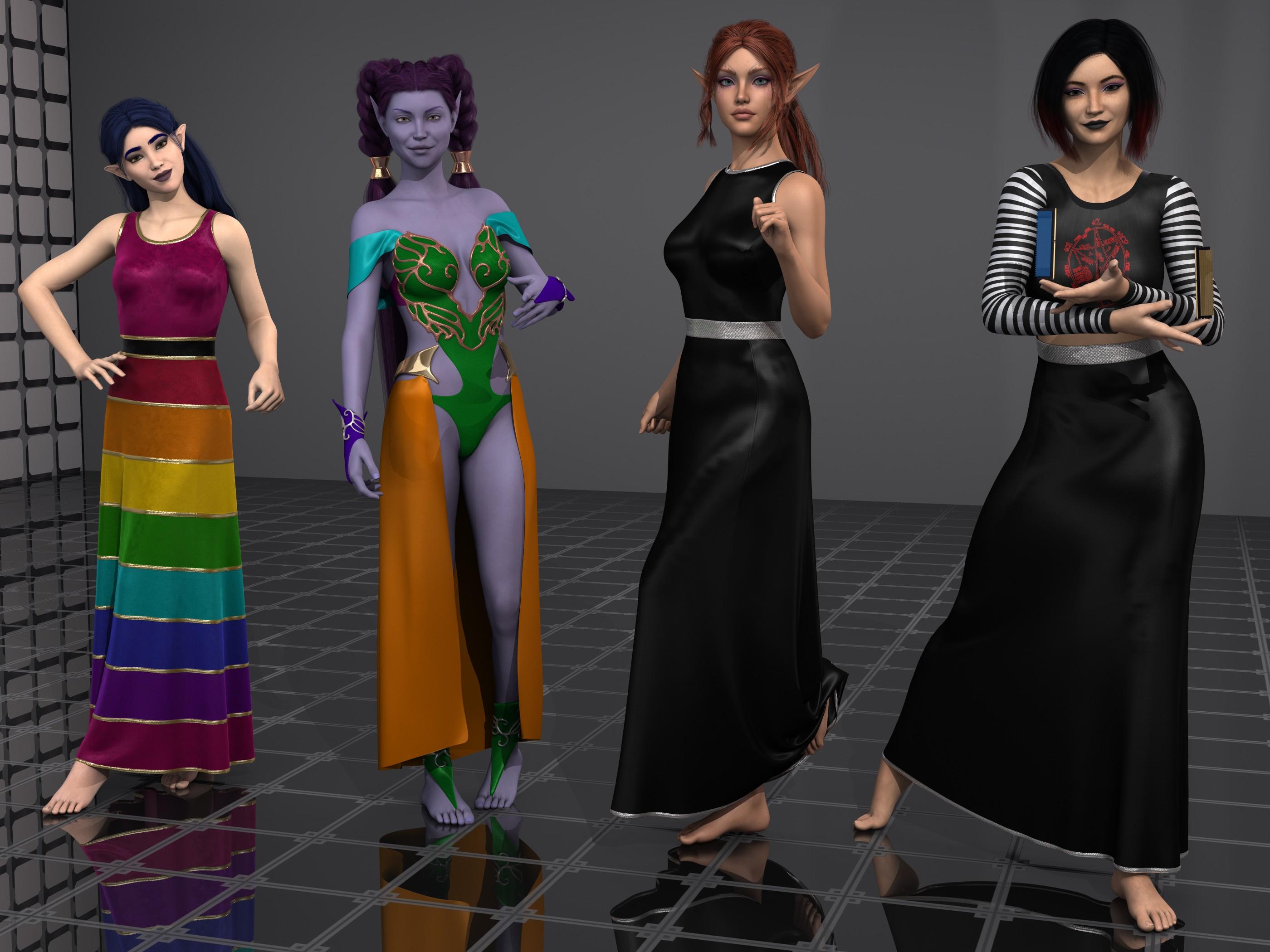
Left is Daisy8, this time with the dress all as that preset is instead of zones set to invisible for the monster tube top thing. Realy nice Rowana hair for elves. Next over is Violetta (Rendo) with an outfit I pulled out due to a promo that caught my eye for someone else. I messed up the skirt by forcing D-force on it, I could have done that better, however, it was the surface zones then the versatile dress shaders I was more interested in. Next is ADJA Alloralla, overall ok, some adjustments, tho overall not bad. Sherry hair was nice to work with (I don't recall auto fitting the G3F item to G8F, tho I may have). Then far-right is Norah, ahhhh, well, yeah. For a start, I will say turning the black dress preset on ADJA Alloralla to the left into a skirt, and using the Party monster top was rather fun, including the fun new AHOC memory OCing spell shirt design Buildzoid made. The Carla hair was also easy to set up. so, first up is Violetta skipping past Daisy that I only have nice nice nice to say about.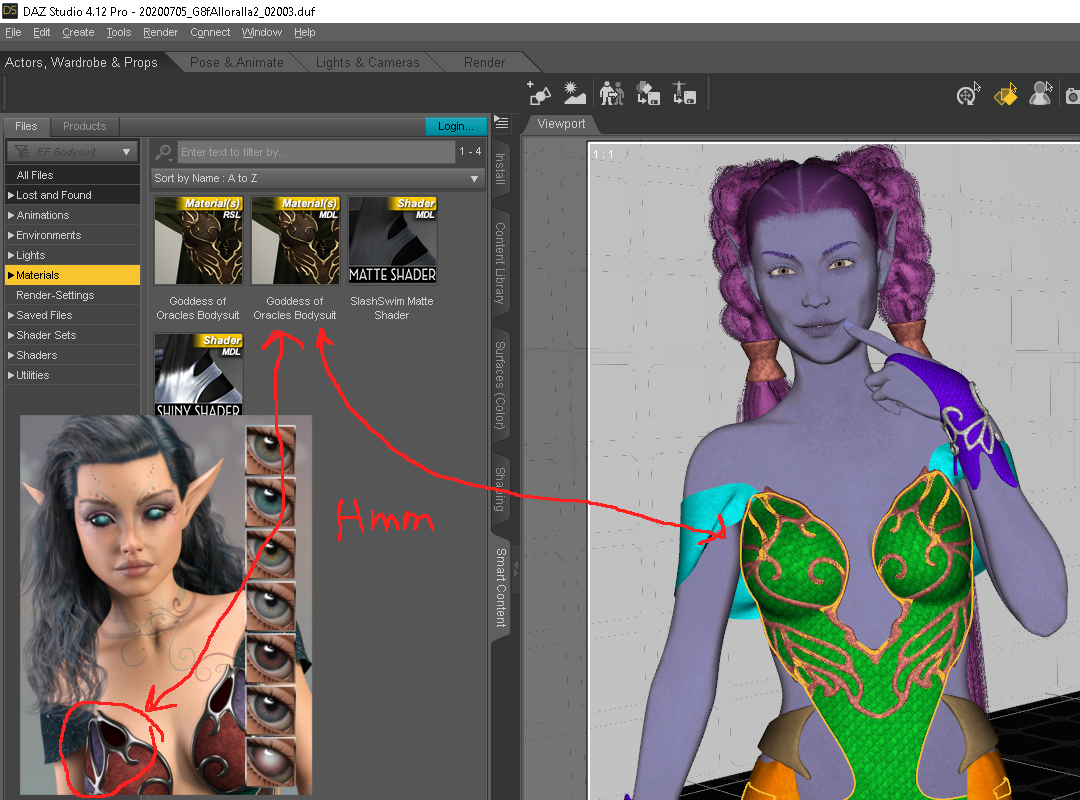
for the most part, Violetta was a pleasant surprise to set up, drop the maps into a 3DL shared throw a shaping dial and render away. As for the outfit (goddess of oracles? Ethereal Fantasy?),
yes, Ethereal Fantasy outfit, as I was saying, I just don't want people looking at Alloralla's promo and thinking that outfit has more surface zones than it has. the entire area on Violetta that is green, is a single zone. so unless there is an add on texture set (oops, there is) I didn't notice, or you make maps yourself for the outfit, that is all going to be one shader preset there. The outfit does have plenty of zones to work with for the most part, and that is where the deforce forced onto the skirt was a mistake. I should have set the top edge of that skirt cloth as a separate zone so I could turn to deforce off on it, that way the cloth would not be falling off the metal band part. That is about the only missing zone on the thing, the rest is really nice. ... after digging up links, I notice I don't have the correct skirt matched with that bodysuit, hmmm, I think I made a few mistakes there. When going threw the smart tab icons of stuff, it looked like it belonged with it, lol. And it looks like the preset used in the promo is in the Ethereal Fantasy add-on set I didn't know existed.
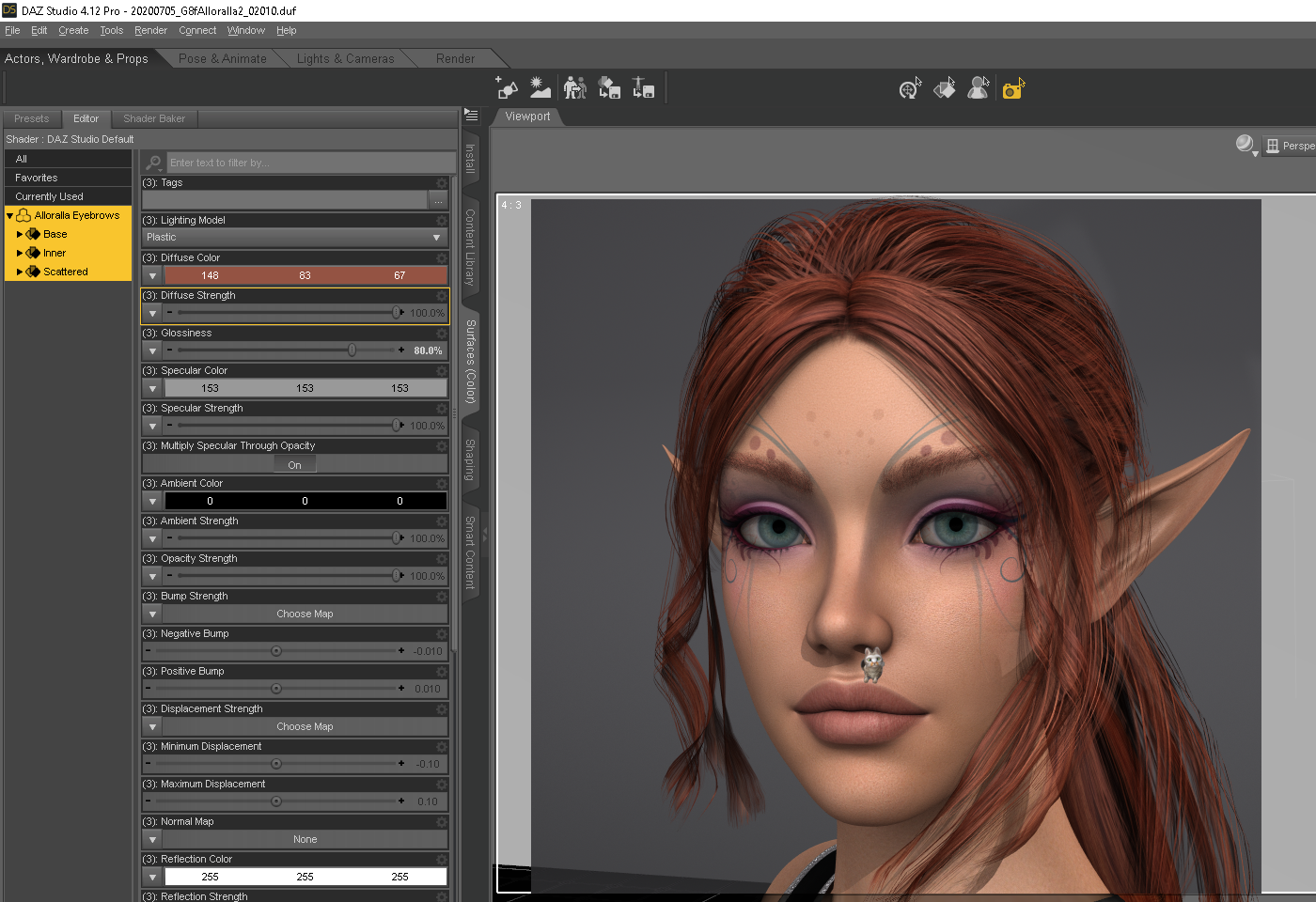
ok, the FYI out of the way for the promos, I do have a few constructive criticisms for ADJA Alloralla. For one, the 3delight presets are on the dark side compared to the promos, which is rather easy to address with some value adjustments (more diffuse surface strength&brightness, less wax candle maybe). Also, the "ginger" eyebrow preset looks a tad more bleach-blond in 3delight than red, I ended up setting my own colors for that, shown above. Maybe someday I can find a shaping dial that tames the upper lip ledge a tad (Graystillplays lounging Tonsils not included), some are ok others a bit excessive, it's just eh. Other than that, really glad to have another cute elf in my collection.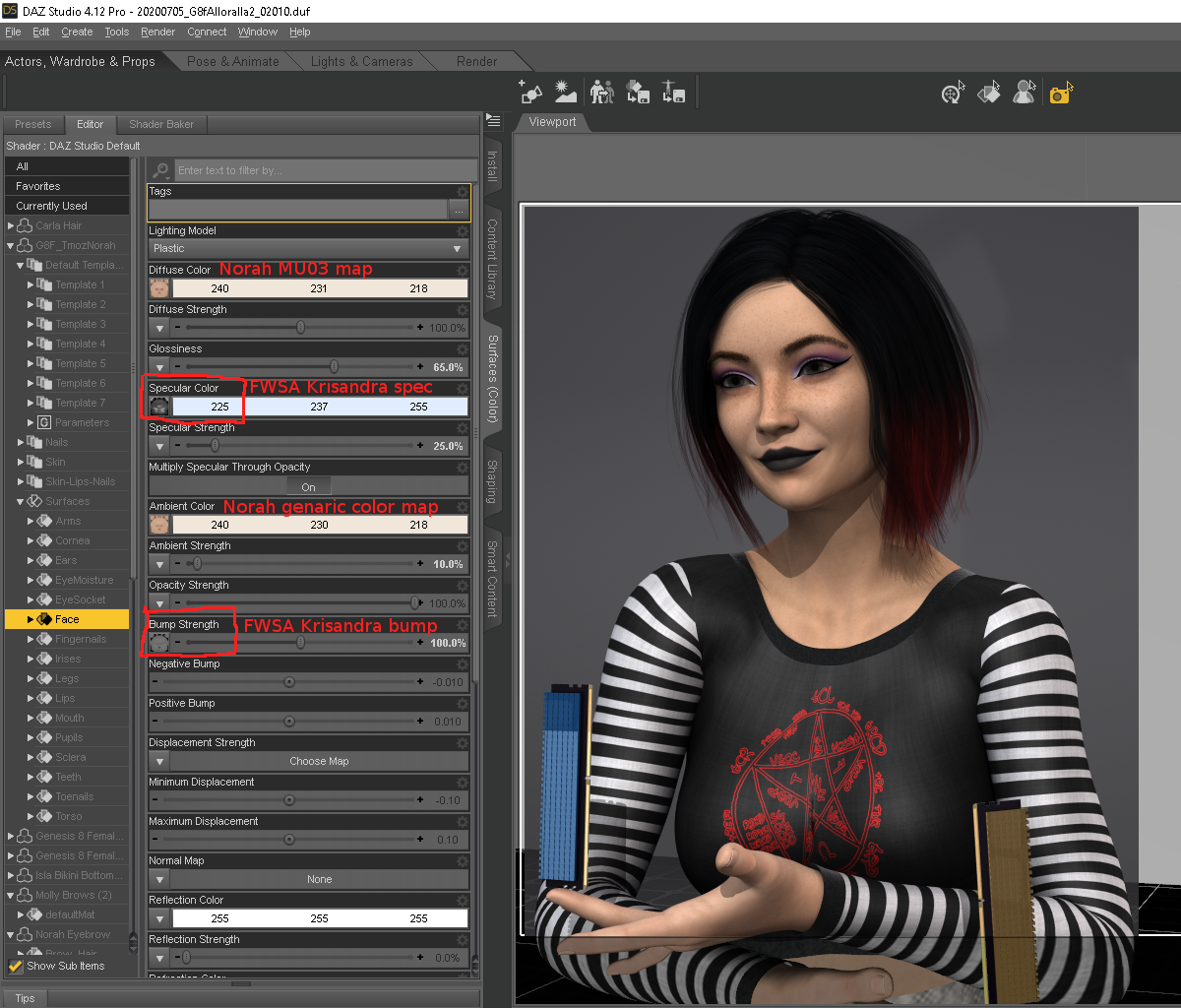
All I'll say here is maybe she looks incredible in Iray with the included Iray only mats, I'm not working in Iry. I knew this may be a 3DL failure given the store page, so I won't harp too much. I took one look at the two included spec maps and the complete lack of bump, and decided I wasn't going to play the how to tile one map for each surface zone without tiling the other maps game. As for the normal maps, it was just something I didn't want to waste time with, as so many times in the past the ever so slight rib shaping in Iray ends up looking like malnourished bulging ribs with some in 3DL or just a mess, so I didn't even bother looking, yet.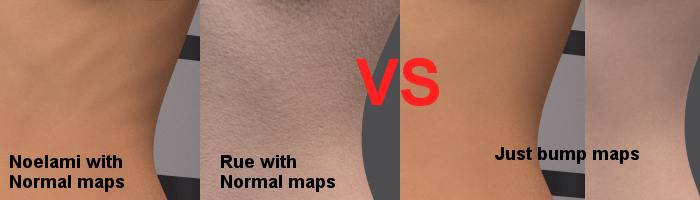
For some, it's just better to drop the Iray normals in 3DL and only use the bump maps. Norah has no bump maps, so, I borrowed all the spec and bump maps from FWSA Krisandra (no baked in eyebrow options for use with fiber-mesh brows), and went from there. the color maps are ok (they are not inverted colorspace maps), so things didn't go as bad as I was first afraid they would when first I looked at the maps folder. The PartyMonster top is a completely custom map I baked up for the stripes on the sleeves and the AHOC memory OC joke. I do need to look at some stuff more, tho over all the figure-shaping is ok, and the makeup options did go rather well.
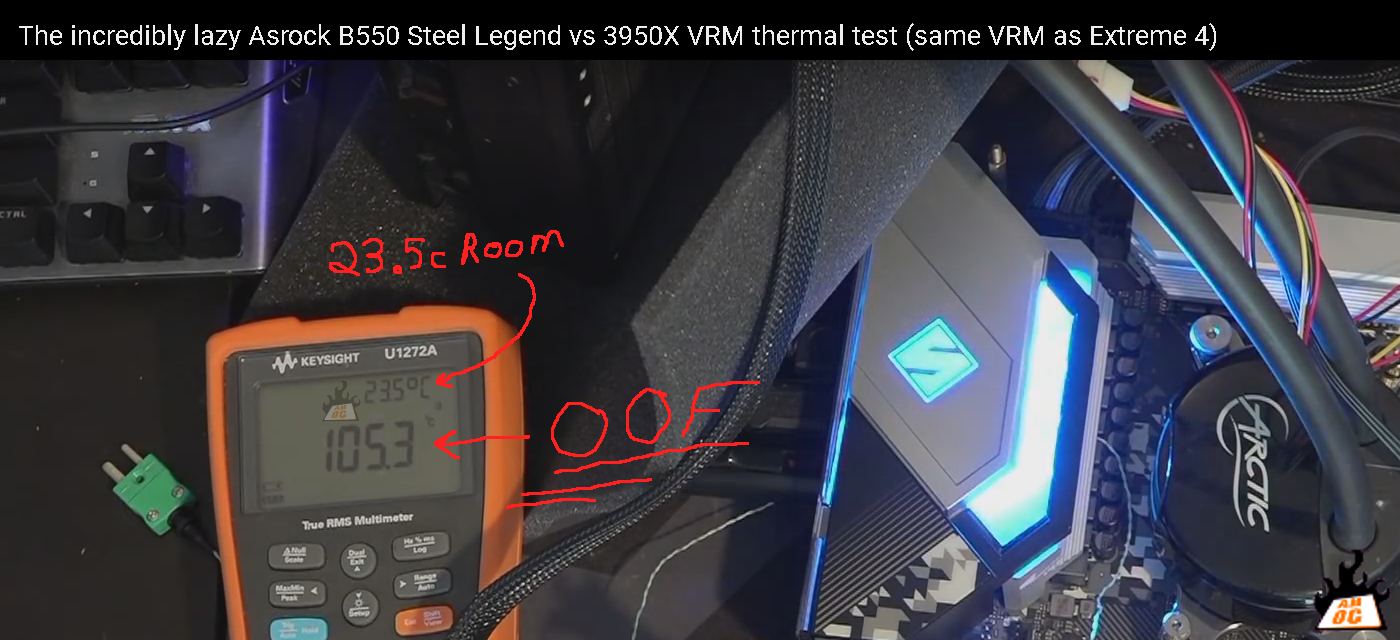
ye know, 23.5c room temp (AHOC YT vid link) is a bit low compared to the ATX spec of below 40c inside a case, and just because some parts are rated for "up to" a Tmax of 125c does not imply that is the preferred operating temp for them.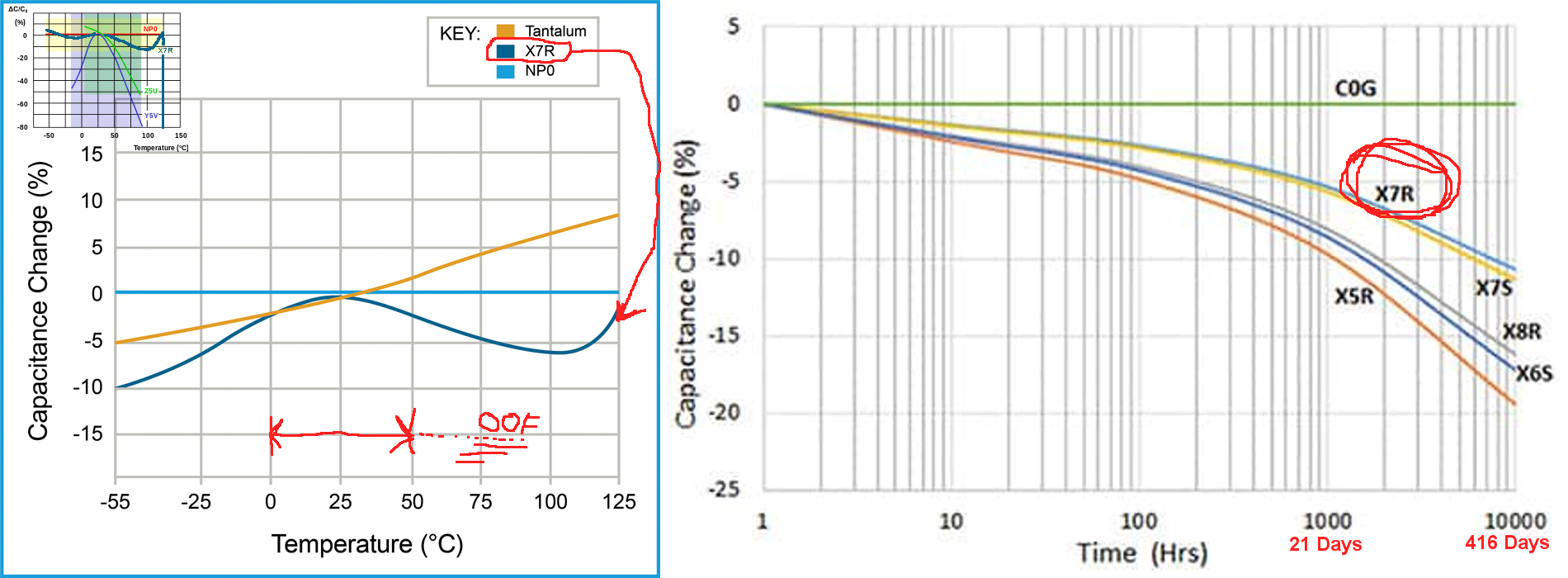
ah, yeah, in any case, that short VRM test Buildzoid did was cool, and at least there was no breaking ceramics from thermal expansion of the metal film inside them. Just som rather toasty FETs. in a case with even modest airflow (forget the original Evolve or InOven cases), the VRM should be 'OK' so long as ye isn't pushing things. That particular Asrock isn't nearly as bad as some z490 ones Hardware unboxed looked at, tho that is for another pending post.
in the meantime, I guess I am going through some Computex withdrawals, esp the GN Steve vs PC World Gordon collabs.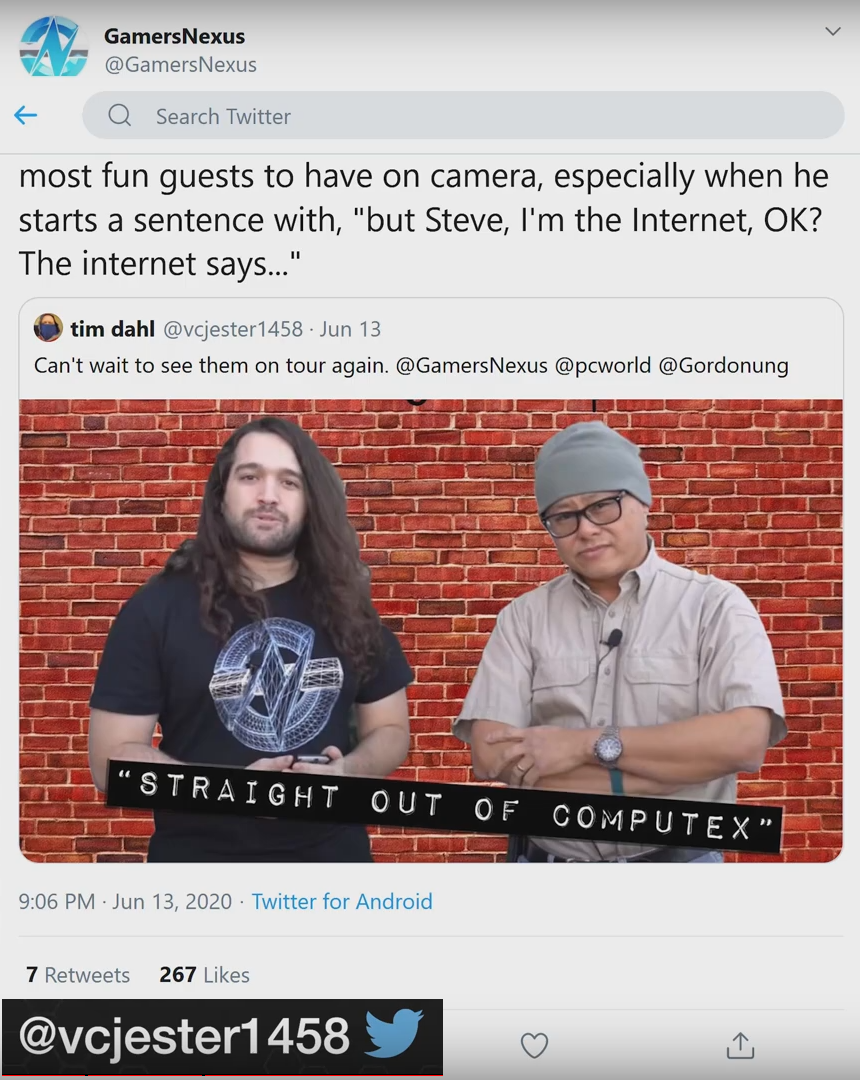
With luck, we will maybe get some more content from the both of them, I hopes at least.
"we get it amd, ye can make a 3700x, like Nvidia can make a 1080ti", oof, just like motherboard makers are perfecting the featureless lump of metal some erroneously call a VRM heatsink, lol. Steve is being brutally honest again (YT 3800XT vid). 39% more watts for 3.7% more performance, really reminds me of the 7700k vs 6700k 200MHz bump, hmm.
"There's Always Another Sale™" (Report sales issue here.)Is Behemoth HD by Kayleyss supposed to be included in the selection of horror items for the Slay Your Urge sale? I'm asking because Kayleyss' other G8 demon character, Tara 2 HD, *is* included in the selection for the sale. Despite being a horror fan, I'm having a tough time making a satisfactory cart, but Behemoth at the sale discount could make it worthwhile, so I'm hoping the omission was a mistake.Dynamic Clothing Control - old alternative for dforce? [solved]well there was this thing that annoyed me with those dynamic items: they only fit the figure they were designed for. and since i happily mix everything cross-generation and -gender... i got very few of the freebies from their site and then gave up.There's an easy(ish) solution to the Optitex dynamics only fitting one figure; don't fit them. I use dynamics on a lot of critter characters from Melody and Micah, which are based on the Aiko3 and Hiro3 figures. I've also used them on all Genesis generations, and even some non-human characters — the old RDNA store used to have the Jager werewolf figure, so I now know how to do a dog in a dress.

- Load the clothes into your scene without trying to fit-to the figure.
- Parent the clothes to some body part of the figure; where you parent it depends on what the clothes are. Trousers or dresses I parent to the figure's hip, a bikini top parents to the lower or upper chest.
- On the root body part of the clothes, zero all Translate and Rotate transforms.
- This is where it can get a bit fiddly. Working out from the clothes body part corresponding to where on the figure you parented the clothes, fiddle with each part's Transform controls until the clothes pose more or less matches the figure pose. Don't forget Scaling, sometimes that's the only way to get something to fit. It doesn't have to be exact; unlike dForce, Optitex dynamics don't always explode when there's pokethrough. Only sometimes.

- Honest, long sleeves and trouser legs can be done using this technique. It just might take a while to get everything lined up right.
- Cross your fingers and try to run a simulation. If there's only a little pokethrough, the clothes will jiggle about as the simulation tries to push it out from under the figure's surface. If it doesn't explode, but the clothes obviously haven't settled at the end of the run, do another simulation.
- Don't forget materials; I think all the Optitex clothes were made long before Iray, so their materials will all be for 3Delight rendering. If you want to convert them to Iray, do this as step zero and save a materials preset.
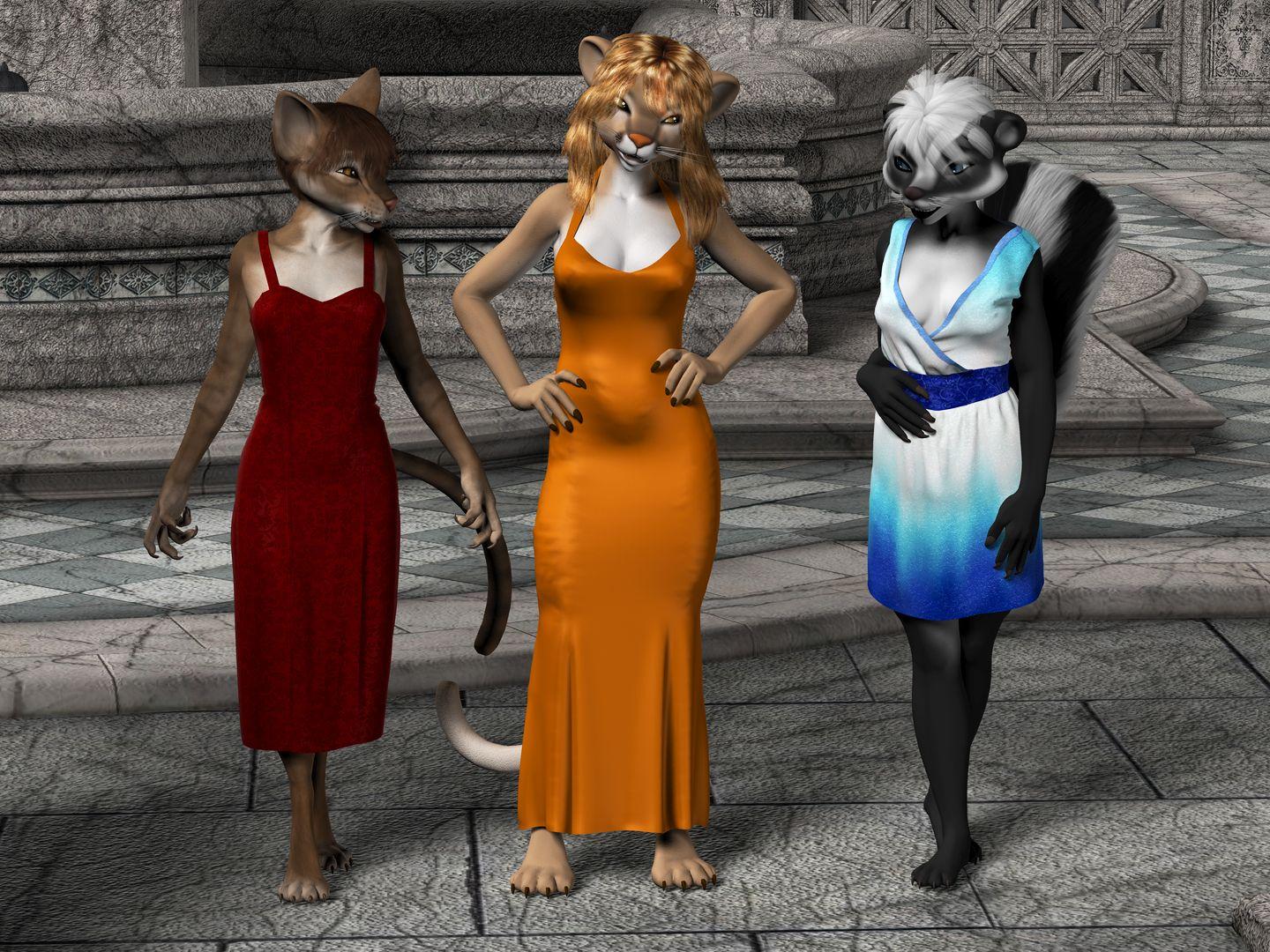
And here's what's possible if you fiddle long enough. Originally rendered a good few years ago, so these are all 3Delight materials. The Melody figures are all based on Aiko3, and the dynamic clothes are all for Victoria 4.
omg.. this sounds like an awful lotta work XDDD - just to get some old cloth to fit.. especially in the age of G8 with all the clones fitting everything. no, srsly, i enjoy playing with my dolls, but it has to be fun, not too much work. maybe it's necessary for special figures, but i use mainly G8 and G3, i have clones and fit-them-all, and usually the results are ok. if all i had to do was buy this optitex plugin, click a few buttons, and whoop my cloth falls elegantly, ok. but fumbling around to that extent.. it's already hard enough with clones, SY fitting tools, and just a coat/robe made for another generation...
anyways, i'll keep a tab on this too, just in case i'm in the mood to experiment, thank you ^^
Dynamic Clothing Control - old alternative for dforce? [solved]well there was this thing that annoyed me with those dynamic items: they only fit the figure they were designed for. and since i happily mix everything cross-generation and -gender... i got very few of the freebies from their site and then gave up.There's an easy(ish) solution to the Optitex dynamics only fitting one figure; don't fit them. I use dynamics on a lot of critter characters from Melody and Micah, which are based on the Aiko3 and Hiro3 figures. I've also used them on all Genesis generations, and even some non-human characters — the old RDNA store used to have the Jager werewolf figure, so I now know how to do a dog in a dress.
- Load the clothes into your scene without trying to fit-to the figure.
- Parent the clothes to some body part of the figure; where you parent it depends on what the clothes are. Trousers or dresses I parent to the figure's hip, a bikini top parents to the lower or upper chest.
- On the root body part of the clothes, zero all Translate and Rotate transforms.
- This is where it can get a bit fiddly. Working out from the clothes body part corresponding to where on the figure you parented the clothes, fiddle with each part's Transform controls until the clothes pose more or less matches the figure pose. Don't forget Scaling, sometimes that's the only way to get something to fit. It doesn't have to be exact; unlike dForce, Optitex dynamics don't always explode when there's pokethrough. Only sometimes.
- Honest, long sleeves and trouser legs can be done using this technique. It just might take a while to get everything lined up right.
- Cross your fingers and try to run a simulation. If there's only a little pokethrough, the clothes will jiggle about as the simulation tries to push it out from under the figure's surface. If it doesn't explode, but the clothes obviously haven't settled at the end of the run, do another simulation.
- Don't forget materials; I think all the Optitex clothes were made long before Iray, so their materials will all be for 3Delight rendering. If you want to convert them to Iray, do this as step zero and save a materials preset.
And here's what's possible if you fiddle long enough. Originally rendered a good few years ago, so these are all 3Delight materials. The Melody figures are all based on Aiko3, and the dynamic clothes are all for Victoria 4.
Need help identifying the clothing in this character promo pictureHello. Does anyone know what is the clothing in the promo pictures in this charac product?
https://www.daz3d.com/fw-destiny-hd-for-victoria-6
Thank you.
Need help identifying the clothing in this character promo pictureHello. Does anyone know what is the clothing in the promo pictures in this character product?
https://www.daz3d.com/fw-destiny-hd-for-victoria-6
Thank you.
Would someone make some Arab turbans?Yes, Generation 4 is Michael 4 & Victoria 4.
Would someone make some Arab turbans?Stoic, If you don't mind me asking,
Generation 4 is Michael 4? (and Victoria 4?)
I really like the Michael 4 character, there is a huge bundle I would love to pick up sometime soon and a lot of clothes for him that are really cheap in the store.
Your last post is extremely helpful!!!
Thanks for the extra info!
Welcome to Hatsune Miku Anime Manga Cafe ☕I Love your Aiko 3 creations!!! I'm now finding that Aiko 3 clothing works really well in Carrara to auto-fit to my Rosie 5 Genesis figure, so I've been collecting. Perhaps one day I'll have enough Aiko 3 stuff to try an Aiko 3 hero of my own!
I've also found that Vicky 3 animated pose files (Poser PZ2) seem to be working somewhat well with Rosie 5. I do get plenty of oddities, but in Carrara I have no troubles fixing it all up to work.
The shape I use for Aiko 3 is an injection of Victoria 3 morph inj and Kioki. I also inject aiko19 morph, I inject gens as well. Is a big custom morph. See works below.
The clothings adjustment I use MorCloth is a python utility to add morph on the clothes.
PoserDAZ Freebie Wiki - Image Creation Party 2020Hello everybody. It's that time of year again! We had an amazing turnout last year and dropped our page tally below 8700 pages! Since the last party we have been busy adding more freebies. Saying good-bye to some sites. Updating broken links, making images and creating pages. Oh and we have galleries to some of the figures and their associated products.
Here is a look back at what we did. https://poserdazfreebies.miraheze.org/wiki/Image_Creation_Party_2019
New and updated features of the wiki: Gallery Creation:Victoria 4 Hair https://poserdazfreebies.miraheze.org/wiki/HairGallery-Free-Victoria_4
What Galleries we do have: https://poserdazfreebies.miraheze.org/wiki/Category:Gallery
Sites that have closed or can only be accessed through the internet archive: https://poserdazfreebies.miraheze.org/wiki/Freebie_Sites such as Poser Content and Morphography.
The untiring work of Kerya to add each day the new freebies uploaded to Renderosity, Sharcg, and freebies listed on forums. Of Glaseye for the work on Vechiles, Air, Land and Water. Of Robkelk for being the admin and of JHVipond for the broken links patrol.
Overall we have been busy. I made some changes to some of the major figures Landing Pages. I added a list of Wardrobe pages without images to the bottom of the page. If you click on one of the below links it will take you to that list and you can pick what ever freebie you want to render. This is not to say you can't do something else like hair, or vechile it is just a way for those not sure of how to navigate the wiki to getting something done and knowing that you helped.
Aiko 3: https://poserdazfreebies.miraheze.org/wiki/Aiko_3#Wardrobe_Pages_Needing_Images_for_Aiko_3
Genesis: https://poserdazfreebies.miraheze.org/wiki/Genesis#Wardrobe_Pages_Needing_Images_for_Genesis
Genesis 2 Female: https://poserdazfreebies.miraheze.org/wiki/Genesis_2_Female#Wardrobe_Pages_Needing_Images_for_G2F
Genesis 2 Male: https://poserdazfreebies.miraheze.org/wiki/Genesis_2_Male#Wardrobe_Pages_Needing_Images_for_G2M
Genesis 3 Female: https://poserdazfreebies.miraheze.org/wiki/Genesis_3_Female#Wardrobe_Pages_Needing_Images_for_G3F
Genesis 3 Male: https://poserdazfreebies.miraheze.org/wiki/Genesis_3_Male#Wardrobe_Pages_Needing_Images_for_G3M
Genesis 8 Female: https://poserdazfreebies.miraheze.org/wiki/Genesis_8_Female#Wardrobe_Pages_Needing_Images_for_G8F
Genesis 8 Male: https://poserdazfreebies.miraheze.org/wiki/Genesis_8_Male#Wardrobe_Pages_Needing_Images_for_G8M
Michael 4: https://poserdazfreebies.miraheze.org/wiki/Michael_4#Wardrobe_Pages_Needing_Images_for_Michael_4
Victoria 3: https://poserdazfreebies.miraheze.org/wiki/Victoria_3#Wardrobe_Pages_Needing_Images_for_Victoria_3
Victoria 4: https://poserdazfreebies.miraheze.org/wiki/Victoria_4#Wardrobe_Pages_Needing_Images_for_Victoria_4
Baby Luna: https://poserdazfreebies.miraheze.org/wiki/Baby_Luna#Wardrobe_Pages_Needing_Images_for_Baby_Luna
Dawn: https://poserdazfreebies.miraheze.org/wiki/Dawn#Wardrobe_Pages_Needing_Images_for_Dawn
Dusk: https://poserdazfreebies.miraheze.org/wiki/Dusk#Wardrobe_Pages_Needing_Images_for_Dusk
Well for this entry I am done. If you have questions or requests please don't hesitate to ask, plead or what ever. Looking forward to seeing your new images.
LGBTQ* content appreciation thread!The promos for the transgender shapes really highlight the absurdity of society's double standard about showing breasts.
Well, we could ask Daz to implement the no-no for showing male breasts, just to be "equal" of course. It would start a whole new line of clothing for male characters. Victoria's Public Carnal Knowledge brings us Chesterton Bras for the brahs! A through FFS cups for the feminine man and A through FFS pectangles for the masculine man!
Indeed, it is absurd how we choose the quixotic over the pragmatic.
Temple Garments?
 Installing just the base application
So, I created a new account today. Purchased nothing. Put DAZ in new folder w/ new paths. Did everything I could to not install anything but DAZ 4.12.1.117 Pro 54 bit for Windows.
I have more than a dozen "Lost and Found" items I have no use for. I do not need SciFi Melee Weapons and Rocker outfit and Level 19 nor anything to do w/ Genesis 2, 3 and others. I do not have Victoria, so I do not need a string bikini for her. I would like to have a clean database (directory, folder, whatever) so I can add only what I want to work with.
Is this not possible? Apparently, by downloading the newest version, I am consider to have purchased these eclectic items and if I don't install them, they will appear as ghosted icons.
Looking for a more pristine look...
Genesis 8 takes forever to load...Ok just to clearify. The Genesis8 [\Data\Daz 3D\Genesis 8\[Gender]\Morphs\] Morph Folder was changed to Morphs Backup. From there I just made a new empty folder called Morphs in the same directory.
In the Morphs Back up folder I grabbed 10 folders and added them back to the empty Morph folders until I found my duplicate formula errors folders. Solving my Duplicate Errors problem. I had only 200 folders to add back, at 10 at a time it didn't really take that long. Except for the Creeping load time G8 Starter took to load as more folders were added back. Everytime 10 folders were added I started G8 starter to see if the error popped up. When it popped up in a folder of 10 I just removed those 10 and added 1 folder at a time till I found the problem. Then I added all the rest and the error popped up again that's how I found the second troublemaker.
When all were done I moved all the morph folders (except Daz 3D folder) back to the morph backup folder and loaded my custom characters.
My custom G8 characters when I load them and morphs are missing for them I just go back into the Morphs Backup folder and add them as needed. The error popup tells me which folder is needed as the character is loaded. Not a problem there.
Thanks for the info on Briallen HD for Alexandra 8 but I'm not going to bother reinstalling it because I have to remove characters I don't use to speed up my G8 loading times so I'm not even bothering with her.
I use Configurtion Manager Trace Log Tool from microsoft. Here an example of G8 loading error I get and have no clue how to fix.
2020-07-05 09:40:47.297 WARNING: ..\..\..\..\..\src\sdksource\fileinput\dzassetdaz.cpp(6681): Could not find target property for formula: Genesis8Female:/data/DAZ%203D/Genesis%208/Female/Morphs/DAZ%203D/Victoria%207/FBMVictoria7.dsf#FBMVictoria7_v1?value in file : /data/DAZ%203D/Genesis%208/Female/Morphs/Xameva_and_Meipe/XandM_UltimateBreastMorphs/XandM_V7_ShoulderCor2_R.dsf
I know it's XanM Ultimate Breast Morphs but this is suppose to be a Genesis 3 item why is is coming up as an error for Genesis 8 I have no clue. I also see the Auto Face Enhancer coming up as an error so I removed it from my Daz. I liked AFE but I didn't use it often so I'm not going to bother with it right now.
Just did a new experiment. I took one of my Genesis 3 characters and saved a pose. Then I took my genesis 8 character and loaded the genesis 3 pose, it took less then 1 minute to load the pose.
I took one of my saved Genesis 8 pose and loaded it onto a Genesis 3 character took less than one second to load. The same pose took 6 minutes to load on the Genesis 8 character.
So now I know I ain't crazy. There's something going wrong here?? My Genesis 8 loads Genesis 3 poses that I save fast, not as fast as when the Genesis 3 loads the pose but 50 times faster than loading it's Genesis 8 pose.
There's some kind of issue with saving Genesis 8 poses and using them on Genesis 8 characters.
When you save a pose it saves all the morphs that are activated during the last save. Try loading the pose and then saving it again, this may solve the problem. My old characters that I created before I started moving morphs come up with errors when first loaded. I just save them again and they are good. As for the drive issue, I think the usb might be the problem. Are both of the usb ports 3.0?
@RD2ART this isn't an issue of missing morphs. This is the problem that made me start this thread in the first place. The morphs aren't missing the Pose for Genesis 8 just take dirt long to load when I use a saved pose on a Genesis 8 character.
The Steps that I did before were I find a pose in Smart Content I apply it to Genesis 8 which takes a few seconds to load. Then I save the Pose in the Presets folder in a pose directory I made there. If I then go load that pose on to Genesis 8 again it take a S#IT long time to load the pose sometimes as long as 45mins. But if I load it on a Genesis 3 character it take 2 seconds. If I save a Genesis 3 Pose the same way and load it on a Genesis 8 it loads in less than a minute or two. If I use the same Genesis 8 pose on a Genesis 3 character it loads in seconds.
The Problem has to do with Genesis 8 "Saved" Pose on Genesis 8 characters after it's saved.
@brvsn I don't really want to use my Favorites menu for poses because I save lots of poses and I can imagine my menu when over 200 poses I like is saved there. Also I don't think there's a preview to see what the poses look like. Also I can't groups poses to each individual character I use for specified poses, and so on and so on. See where I'm going...
I use Favorites for things like Pose Resets and Bone Transfers from different generations ie: Genesis 3 pose for Genesis 8 transfer etc. and Other important utilities that I might need to use everyday. Can't use favorites for anything else.
I would report more but I saw there was an update to Daz Studio in DIM and when I installed it, it installed in a different directory than my old version so I have to uninstall my Daz and reinstall it back into my old directory. Stupid program....
Daz 3D is part of

Connect
DAZ Productions, Inc.
7533 S Center View Ct #4664
West Jordan, UT 84084Licensing Agreement | Terms of Service | Privacy Policy | EULA
© 2026 Daz Productions Inc. All Rights Reserved.