-
More Non-photorealisitic Renders (NPR II)
It still needs just a bit of tweaking, but this dzDefault+Postwork combo I'm cooking up is nearly ready for a public tutorial release.
Hi...these bunch of screenshot my PWToon setting to getting smooth render
I hope useful for you . Feel free to tweak- enhance and make it better
Thanks
NOTE :
This render use two lights , AoA distant light with 75% intensity and 192 192 192 as color and AoA ambient light with 25-30% intensity and also 192 192 192 as color . I think you can use equivalent lights if you dont use AoA light setsFor render setting , All parameter Default except changes on : Max Ray Trace Depth set to 1 and Gain set to 1.2
For main figure outline ,I`m using Geoshell and the rest using outline from pwToon
I'm geniunely curious as to what advantages AoA lights have over regular lights, when using something like PWToon.
Getting Started. Single QuestionHi all, hope this is in the right place.
Here's the thing, I have everything downloaded and I think, with the help of tutorials be able to figure out what I'm doing on a technical level. I have the $ to buy what I need and the time, but I am 50+ yrs old. - As this program goes, can I still learn it without having a great deal of graphics experience? I want to do comic books but wanted to ask before I make myself happily nuts for the next year learning.

When ya get older, learning is tougher.
Thanks
Brandt
50+ years, eh? Youngster.
I was 60 when I finally had a computer powerful enough to run Daz Studio.
But Sven is right… there is no way out of this rabbit hole, once you fall in.
And you will probably make yourself nuts while learning, but know learning never stops as Daz is constantly improving and adding new features to Daz Studio. Just have fun, and make art that makes you smile.
As you want to do comic books, I recommend you stick with and learn using the 3Delight render engine. PwToon works really well in 3Delight. And with a decent computer, those images will render pretty fast. Iray came out about 6-7 months after I got started with Daz Studio. I was barely to the point where I could light a scene in 3Delight, but I jumped into Iray with both feet. Now I'm still very much the newbie when it comes to using 3Delight, and I really regret not learning it better before I switched.
Here's a thread over in the Art Studio forums dedicated to 3Delight renders. There is some truly amazing, jaw-dropping work showcased there: Show us your 3Delight renders
Alpha One Ghost Outfit For Gen 8 FemaleLoom awesome ! It seems a lot variation you can get for just one suit. Let me know if you need tester for 3delight toon (pwtoon)More Non-photorealisitic Renders (NPR II)Hi...these bunch of screenshot my PWToon setting to getting smooth render
I hope useful for you . Feel free to tweak- enhance and make it better
Thanks
NOTE :
This render use two lights , AoA distant light with 75% intensity and 192 192 192 as color and AoA ambient light with 25-30% intensity and also 192 192 192 as color . I think you can use equivalent lights if you dont use AoA light setsFor render setting , All parameter Default except changes on : Max Ray Trace Depth set to 1 and Gain set to 1.2
For main figure outline ,I`m using Geoshell and the rest using outline from pwToon
New Product Iray Only???Even without Oso Toon shader, if you want a comic/cartoon style, weren't most people using specific shaders for that, not the DAZ Studio Default shader? Once you're applying different shaders, it doesn't matter whether the original shader applied was for 3Delight or Iray. I have yet to come across an "iray only" item that I couldn't apply pwToon to.More Non-photorealisitic Renders (NPR II)I was trying out the Side Layered Messy Hair here, and saw it in wireframe mode and thought it might work really well for toon hair. Wanted to try out some of my pwToon presets on it, and I like the texture you can get out of it. Not happy with the eyebrows, will need to figure out how I want to handle those in the future.
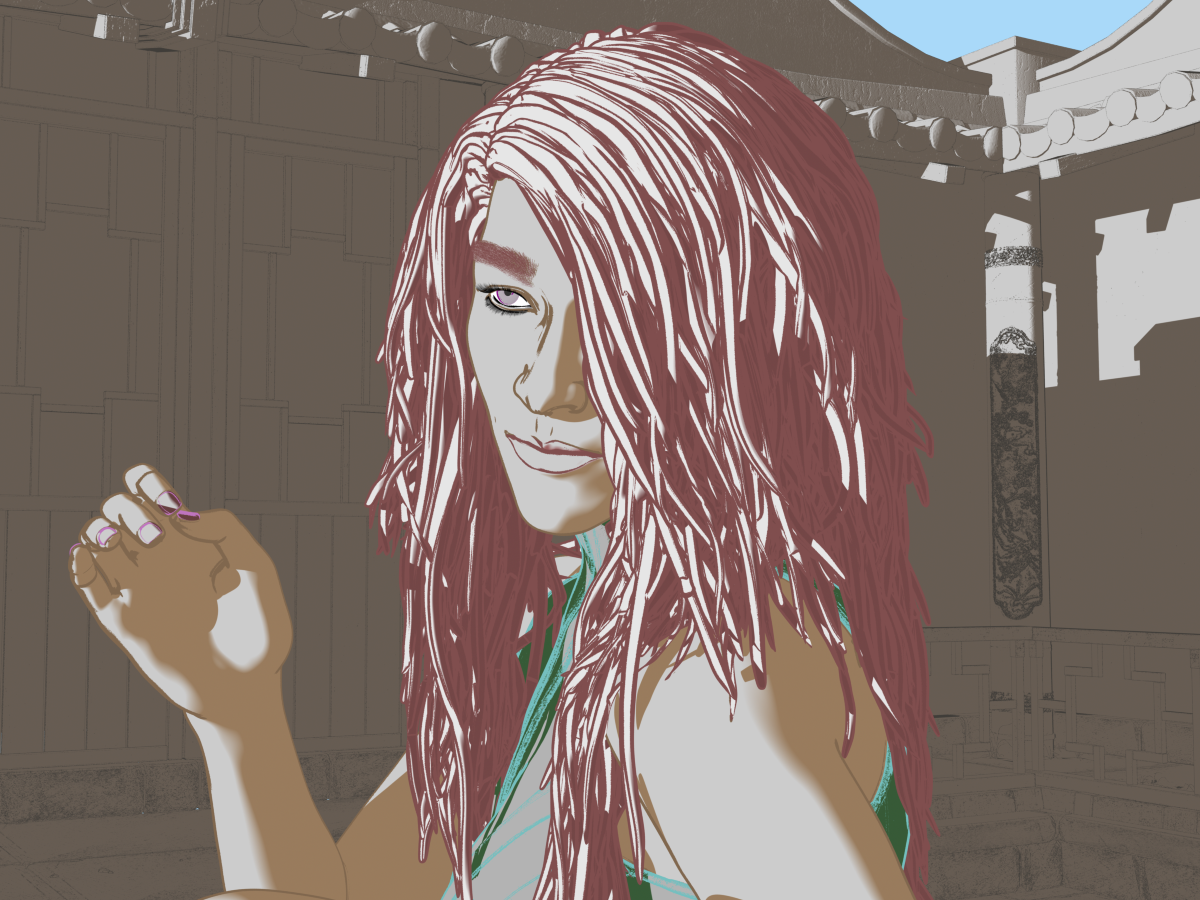
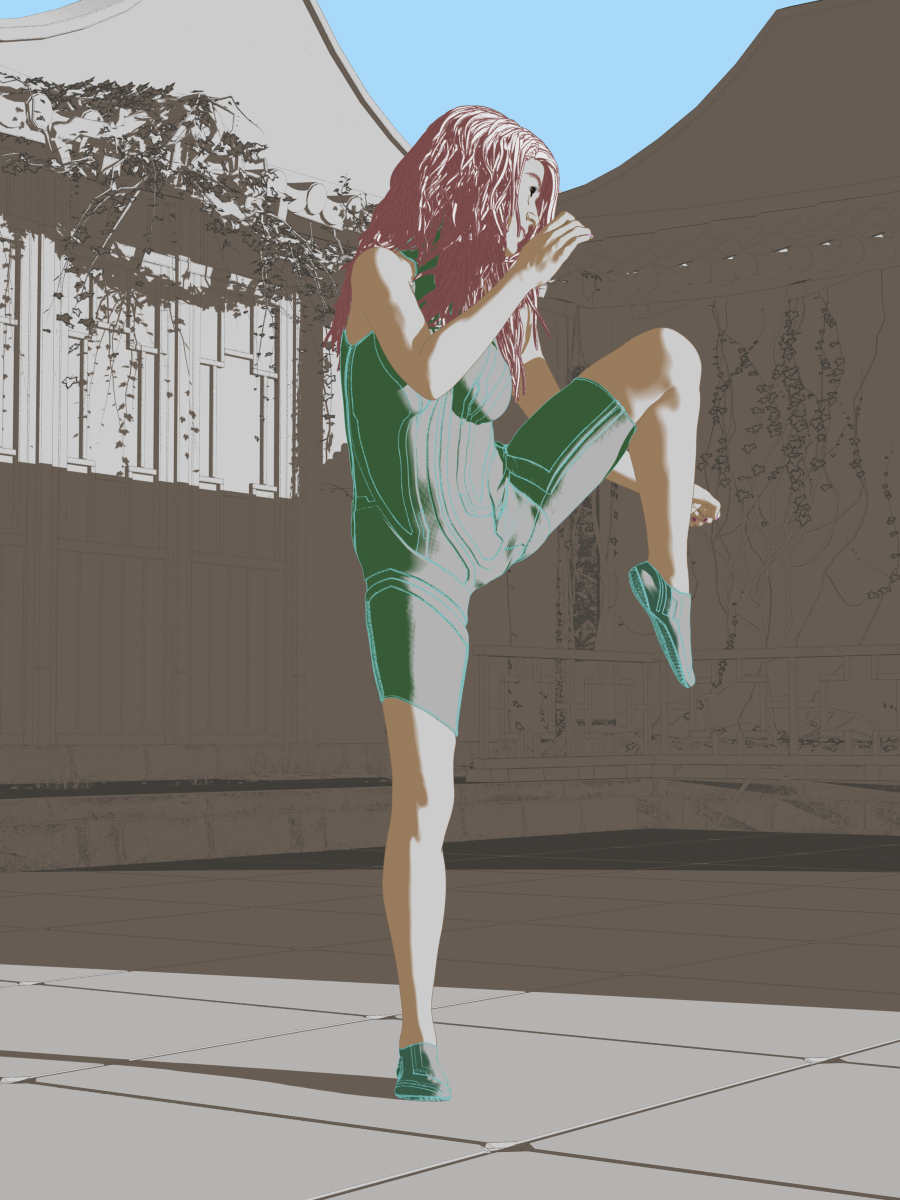
Don’t get me started ranting about eyebrows! Ugh, they drive me crazy. In my work on those pages, I really don’t like the eyebrow treatment, but I’m just accepting it and moving forward (although I might go back and make them a bit smaller, now that I think of it).
I really like what I’m seeing here with the hair. I’ve got to remember to consider trying the hair set to a different display mode. That might solve some of the issues I’m having with women’s hair, in particular.
I really like the strong colors and look you achieved here. Background is a bit wonky to my eye (I think a little more light on it would bring out some of those cool architectural details I see in the next pic), but since this is all about the girl I’m digging it!
More Non-photorealisitic Renders (NPR II)Mech Pilot: Inspired by the comic book series Mech Cadet Yu
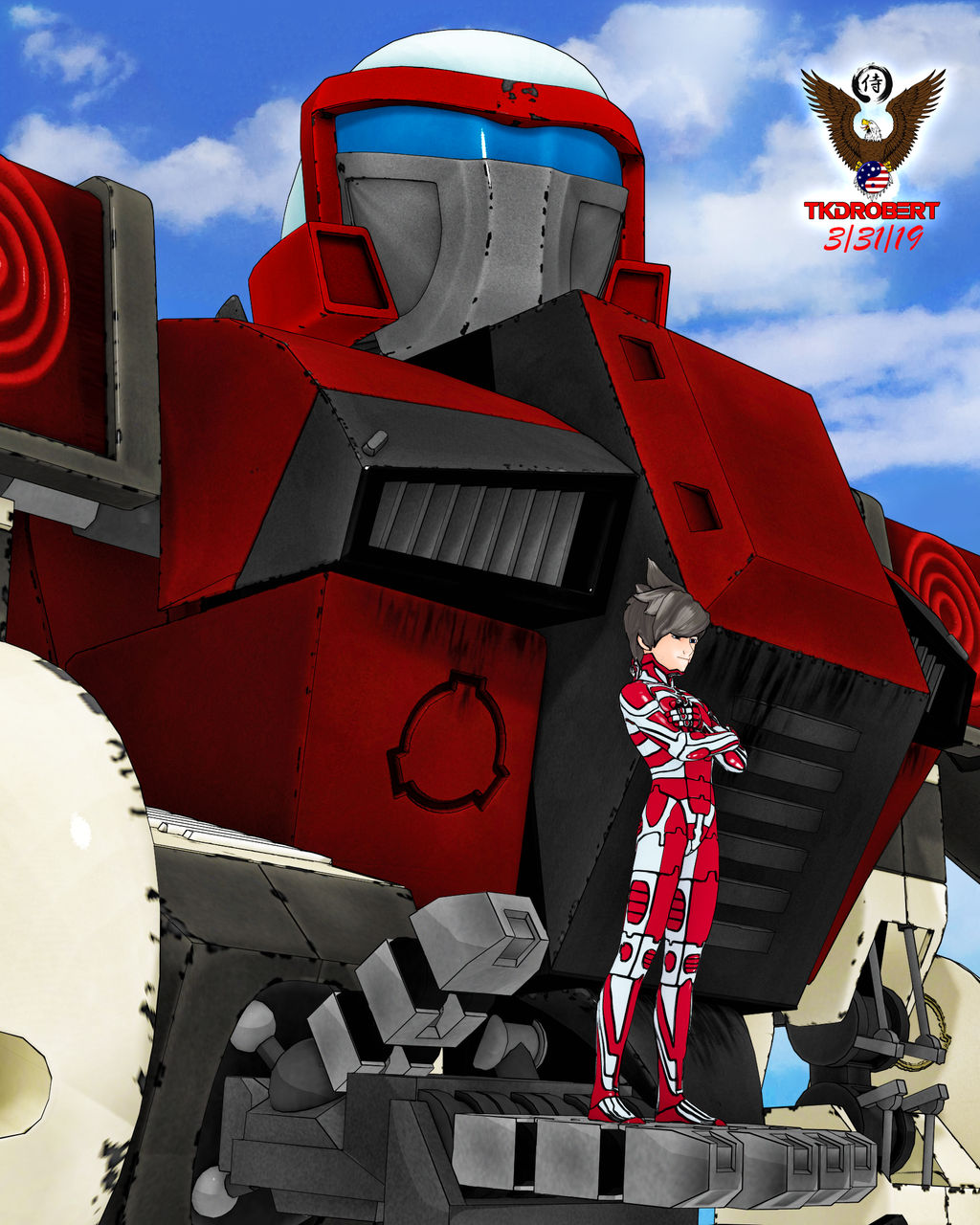
This one is really cool. You definitely capture the old-school anime from the 80s-90s look. Also, there is a confidence to your outlines that is stronger and more mature than it was just 6 months ago. You're relly going somewhere great with this.
My one critique (oh, c'mon, you knew it was coming!) would be that there is a disconnect betwixt the colors on the figure and the mech. The figure colors are super clean and crisp with very light shadows and strong, tight highlights on the armor. But the background has very strong, very deep shadows with difused highlights. I know they sometimes did this effect in anime, but since this isn't moving it seems more like a Robotech comic than cartoon, so that's probably why it isn't working for me.
BTW: I really like his pose. The arch of the back seems particularly realistic, and the folded arms and tilt of his chin really convey confidence. I like it.
Composition wise, the color of his hair is very similar to a piece of the mech right behind his head. When I first looked at him, for one second I thought he had some sort of "fin hairdo" or mohawk. Just for a second, mind you, but it was there for a second. Just recoloring that little wedge would fix that problem completely.
Great work! Now... when are you going to start on that graphic novel? You're ready!
In reference to paragraph 2, the mech pilot is 100% Visual Style Shaders with no additional textures. The mecha is PwToon, cel-shading, with the textures maintained. I tried using VSS on the mecha, with and without the texrures and I wasn't happy with it. I'm still learning PwToon and I'm going to try juvesatriani_S settings, so we'll see how the next one comes out.
We're all still learning and trying to figure out what works and doesn't I still think the final image is very strong. Maybe if you just lightened the background figure in Photoshop? That might bring it more in line with the tones you have in that super cool figure. I really look forward to seeing what you do next.
More Non-photorealisitic Renders (NPR II)This another quick render and using setting I posting above as start and tweak until I feel ok . and postworked in PS for BG and correction Light etc
Sorry about geometry mesh up , I was try to fit V3 outfit to my fave Genesis 1
I like the look. I mix and match VSS with PwToon. I'm going to try your PwToon settings and see if they work for me.
More Non-photorealisitic Renders (NPR II)Mech Pilot: Inspired by the comic book series Mech Cadet Yu
This one is really cool. You definitely capture the old-school anime from the 80s-90s look. Also, there is a confidence to your outlines that is stronger and more mature than it was just 6 months ago. You're relly going somewhere great with this.
My one critique (oh, c'mon, you knew it was coming!) would be that there is a disconnect betwixt the colors on the figure and the mech. The figure colors are super clean and crisp with very light shadows and strong, tight highlights on the armor. But the background has very strong, very deep shadows with difused highlights. I know they sometimes did this effect in anime, but since this isn't moving it seems more like a Robotech comic than cartoon, so that's probably why it isn't working for me.
BTW: I really like his pose. The arch of the back seems particularly realistic, and the folded arms and tilt of his chin really convey confidence. I like it.
Composition wise, the color of his hair is very similar to a piece of the mech right behind his head. When I first looked at him, for one second I thought he had some sort of "fin hairdo" or mohawk. Just for a second, mind you, but it was there for a second. Just recoloring that little wedge would fix that problem completely.
Great work! Now... when are you going to start on that graphic novel? You're ready!
In reference to paragraph 2, the mech pilot is 100% Visual Style Shaders with no additional textures. The mecha is PwToon, cel-shading, with the textures maintained. I tried using VSS on the mecha, with and without the texrures and I wasn't happy with it. I'm still learning PwToon and I'm going to try juvesatriani_S settings, so we'll see how the next one comes out.
More Non-photorealisitic Renders (NPR II)I was trying out the Side Layered Messy Hair here, and saw it in wireframe mode and thought it might work really well for toon hair. Wanted to try out some of my pwToon presets on it, and I like the texture you can get out of it. Not happy with the eyebrows, will need to figure out how I want to handle those in the future.
More Non-photorealisitic Renders (NPR II)I also would love to hear more about your postwork choices and filter usage.Actually my approach is very simple . Daz and PWtoon for base cel shade (the heavy lifting) . Photoshop for enhance smoothness -adjust or remap color and give finish fx like bloom etc.
I`ll posting postwork`s step by step if you or another think that`s worth to share in this thread , nothing fancy and no 3rd party paid plugin needed and I think discussion about how we getting there (toon/celshade/comic etc) in first place seem more useful , but please let me know if worth to share , i`ll be creating mini tutorial about it
In short , after studying and extracing color from lots toon-anime images reference out there , I`m start to understand that beside geometry/shapes we use , every color combination we picked in our scene also have big contribution to make our render look like nice 2D images or not .Like like my painter buddy said :
"those color work and look nice when combined together , so you can`t grab some color and mix with another color from another images . Those colors combination planned carefully by the artist who make it"
Yeah some postwork technique will help us get in there , but personally I need to getting right in first place
Here my mini setup in DAZ Studio and pwToon
1. Find and study image reference based on style you want to produce
2. Extract the color palette from reference(s) (manual or auto)
3. Start Daz Studio and make sure in 3Delight mode (check in render setting)
4. Make sure you have same Background color like reference (check in environment tab)
5. Create multiple primitive spheres for pwToon shader library
6. Change base color and shade value in every sphere based on your reference palette
7. Group those primitive based on functionality (BG - Character - Cloth Set - props etc )
8. Save scenes/Subset scene with all primitive for easy copy paste material
9. Setup Light sets (Distant/point plus Ambience)
10.Test render and tuning lights intensity until you`ll see colors just like shown in reference
11.Load your set or character and apply those shaders
12.Render in multipass for better control of color elements - shadow and geometry line
BTW I look at your Black and White render and saw video on youtube about real time line generated from late version of POSER . thats amazing !!! I wonder when DAZ studio will getting those features . Geoshell outline shader do the trick but I think POSER realtime BW and line render seem more powerful . Would you post some outline render with it ?The real-time (in Poser Pro 11 teminology, it's called "live") Comic Book Preview is VERY fun to use, and very powerful because you get to see how the shadows are falling on your artwork as you move the lights. Plus, you get to set different line widths based on material group names. So I can have a thinner line on the edge of the teeth and eyes than on the hands and chest. Or thicker still on clothing and armor. This gives me a lot more control than I would get with the geoshell look.
I really haven't been doing much work with my comic lately, but that's about to change. I think I've finished with the space-themed book cover, so I can get back to my comic. But I'm happy to post something new that I don't think you guys have see, yet. I'll do it in another post.
BTW: Thanks for the detailed list of your process. It gave me some insights into how you are generating your work. If you're interested in seeing more of how I do mine, check out the "Poser Noir" link in my signature line.
More Non-photorealisitic Renders (NPR II)This is my Universal/go pwToon shader setting to get base smooth render .
Mostly I`ve used in Cloth or hair which already have good textures , but it also can work in skin with changing several parameters like Rim exterior color and makes diffuse shading (upper/lower bound) ratio to 80 - 0 or maybe 30 - 0 if you still need cel shading fx .
just remember rim bounding exterior/interior ratio setting really depend on main diffuse shading ratio . So if you wanna smoothness fx make sure your difuse shading (upper/lower bound ) ratio not set in 50-50 , 30 - 30 and so on
You can also play with specular/glossines/sharpeness if you want boost leather or some metal element
For Lighting I use one Aoa Distand light for shadow direction , and AoA ambient light for smooth ambience FX ( you can turn AO or not depend on how you want Smooth FX you need ) . Both use 128 128 128 as color , and set in low intensity
( reference images would help you to judge how bright your scene needed )
I believe you can use standard distant light with raytracing and Uber Env lighting to subsitute Aoa light setsThanks. I'll give this a try when I use PwToon again.
More Non-photorealisitic Renders (NPR II)This is my Universal/go pwToon shader setting to get base smooth render .
Mostly I`ve used in Cloth or hair which already have good textures , but it also can work in skin with changing several parameters like Rim exterior color and makes diffuse shading (upper/lower bound) ratio to 80 - 0 or maybe 30 - 0 if you still need cel shading fx .
just remember rim bounding exterior/interior ratio setting really depend on main diffuse shading ratio . So if you wanna smoothness fx make sure your difuse shading (upper/lower bound ) ratio not set in 50-50 , 30 - 30 and so on
You can also play with specular/glossines/sharpeness if you want boost leather or some metal element
For Lighting I use one Aoa Distand light for shadow direction , and AoA ambient light for smooth ambience FX ( you can turn AO or not depend on how you want Smooth FX you need ) . Both use 128 128 128 as color , and set in low intensity
( reference images would help you to judge how bright your scene needed )
I believe you can use standard distant light with raytracing and Uber Env lighting to subsitute Aoa light setsMore Non-photorealisitic Renders (NPR II)Long time lurker in this thread.. There are a lot wonderful NPR images here !
So These some images I render using PWToon and give several adjustment in photoshop .
These are cool. :) I hope you post more.
thanks ..here another render i made , still learning about how to setup geoshell outline properly .Also I`m still confusing about"catch shadow solution in 3delight ("thats why almost my render cut in half )
These have a really good look to them, I like the soft toon style you have here. You mention the outline, and the one thing I did think is that the outlines come off strongly compared to the softer look of the rest. It may just be thickness, or even adjusting the color to be closer to the main surface colors might help soften it, if you think that would be closer to what you want to get.
I just tested, and pwCatch is working (both for shadows and reflection) in Studio 4.10.
More Non-photorealisitic Renders (NPR II)Long time lurker in this thread.. There are a lot wonderful NPR images here !
So These some images I render using PWToon and give several adjustment in photoshop .
These are cool. :) I hope you post more.
thanks ..here another render i made , still learning about how to setup geoshell outline properly .Also I`m still confusing about"catch shadow solution in 3delight ("thats why almost my render cut in half )
I love the one labeled "BigFuturbe"! The shading and colors are very nice! :D
More Non-photorealisitic Renders (NPR II)Long time lurker in this thread.. There are a lot wonderful NPR images here !
So These some images I render using PWToon and give several adjustment in photoshop .
These are cool. :) I hope you post more.
thanks ..here another render i made , still learning about how to setup geoshell outline properly .Also I`m still confusing about"catch shadow solution in 3delight ("thats why almost my render cut in half )
I'm also enjoying the shading of your artistic rendering style. The gradients for the skin and clothing textures in your last image stands out.
More Non-photorealisitic Renders (NPR II)Long time lurker in this thread.. There are a lot wonderful NPR images here !
So These some images I render using PWToon and give several adjustment in photoshop .
These are cool. :) I hope you post more.
thanks ..here another render i made , still learning about how to setup geoshell outline properly .Also I`m still confusing about"catch shadow solution in 3delight ("thats why almost my render cut in half )
Yeah I haven't leaned the shadow catching thing yet either. I have pwCatch or whatever it's called, but I haven't tried to use it yet.
Novica & Forum Members Tips & Product Reviews Pt 11I also want the G8F Skin Builder although I know truthfully I may never use it. I've still not used the G2F Skin Builder I bought, not even once.That may be in your favor. I have SBPro for G2F, and while it does everything advertised, SB3 and SB8 are so much easier to work with, and more intuitive. At least to me.
What would be really cool is an iRay / 3DL / 3DL pwToon version of Skin Builder for the all the DAZ Genesis - Genesis 8 characters or for just G8F/G8M would fly.How would a "3DL pwToon" version work any different than the crrent 3DL option? (I'm just curious. I have pwToon and ToonyCam Pro, and know next to nothing about either one. One of these days, though. One of these days…!)
Thanks for the info - I added SkinBuilder to my cart.
The 'toon skin builder' would work the same as the Skin Builder 8 - but it just needs a set of different style appropriate toon style skins templates to build on. Zev0 told me in the forums last year that Skin Builder 8 can be extended via scripting and such. Maybe that would be a good project for me for toon skins since they don't need all the details of realistic skins. So by pwToon skins I mean basically very plain non-detailed skins that very plain non-detailed details (if that's not a contradiction) could be added to like a mole for a Marilynn Monroe caricature for example.
More Non-photorealisitic Renders (NPR II)Long time lurker in this thread.. There are a lot wonderful NPR images here !
So These some images I render using PWToon and give several adjustment in photoshop .
These are cool. :) I hope you post more.
thanks ..here another render i made , still learning about how to setup geoshell outline properly .Also I`m still confusing about"catch shadow solution in 3delight ("thats why almost my render cut in half )
More Non-photorealisitic Renders (NPR II)Long time lurker in this thread.. There are a lot wonderful NPR images here !
So These some images I render using PWToon and give several adjustment in photoshop .
Lurk no more, friend! You have definitely created some cool work wtih a nice illustrated look. I like your choice of using a muted color palette.
This image, in particular, looks like it came right out of a graphic novel.
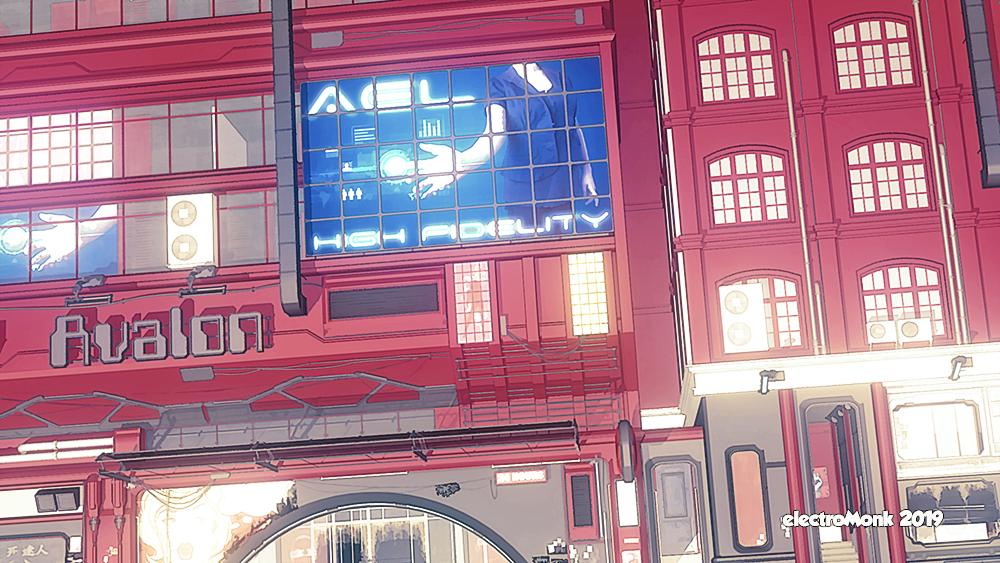
I really like the chin on this guy: He looks like a classic cartoon character. Not sure the drop shadow works, though, as it's a bit dark and a little too close to the figure. Nevertheless, GREAT looking stuff.
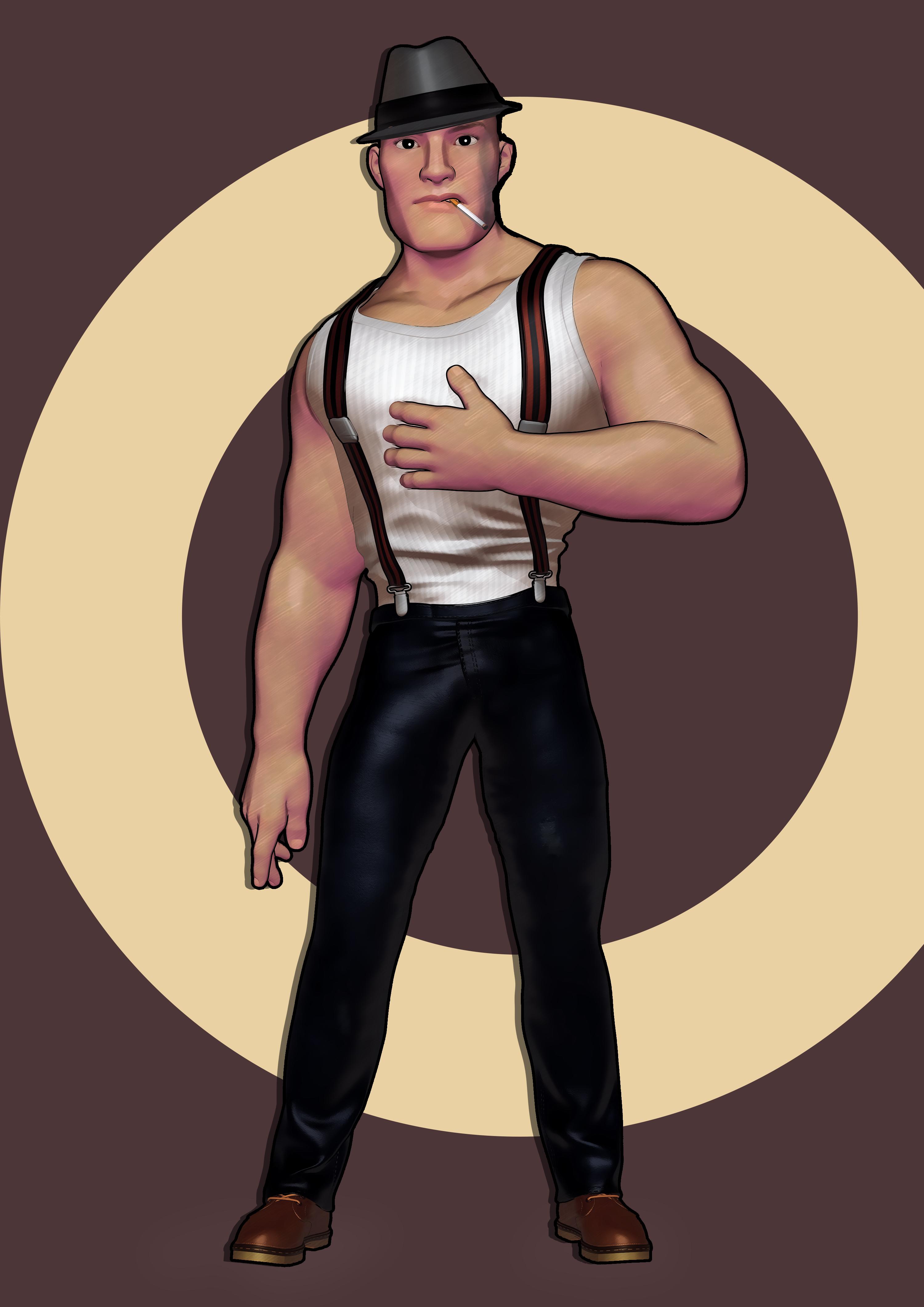
The more I look at him, the more I like him. If you wanted to go for an even stronger cartoon loo, you could consider making his eyes a little bigger.
I also would love to hear more about your postwork choices and filter usage.
Thanks for critiques and great tips how to improve my images .
I think I need to learn more from you all about how to create decent NPR images
Thanks again
Nice. I like thr top image a lot.
Daz 3D is part of

Connect
DAZ Productions, Inc.
7533 S Center View Ct #4664
West Jordan, UT 84084Licensing Agreement | Terms of Service | Privacy Policy | EULA
© 2026 Daz Productions Inc. All Rights Reserved.