-
Headshop 11 Questions
Hey all, I'm playing around with Headshop and having fun, but wow, the skin color on the imported head looks NOOOOOTHING like the skin on the rest of the Gen8 body. (For some context, I've used Daz off and on for a long time, but I always end up having to take long breaks, so I never feel like I know enough about what I'm doing. There might be an easy answer, and this might be a dumb question!!) I can post a pic of my result later.. when the computer decides to cooperate.... But for now, what have people done to try to match those skin colors/tones when they end up being radically different for the head/face and body?
I would open up the face texture file with Photoshop and change the overall hue in the many tools Photoshop provides. Then apply the newly saved texture faile to the face in DAZ Studio
Photoshop is not a free program, and many users may not know how to use it, either. Its strange that you market Headshop as being very easy to use with its one click ability, yet also expect those customers to know how to use external software to solve problems like this. I have used GIMP for years, and even though I consider myself "ok" at it, the task of fixing these textures can take some time to get right with lots of trial and error. Facegen handles this better, it is certainly not perfect, but it makes an attempt at it and it works alright.
I want to like Headshop, I really really do. It has promise, and it does do some unique things. But it still has some really glaring issues. You still have not directly addressed some of the issues I raised in my last review after the update, they are right here on page 3 of this thread. There are still UV problems where the texture leaves a nasty line at the seam. The morph can actually effect the entire body. This is somewhat subtle, but it gets worse as the morph gets dialed up higher. Regardless of how subtle it is, this should not happen, period.
World's_Edge said they didn't notice this, but I can see it quite clearly. Look at this pic:
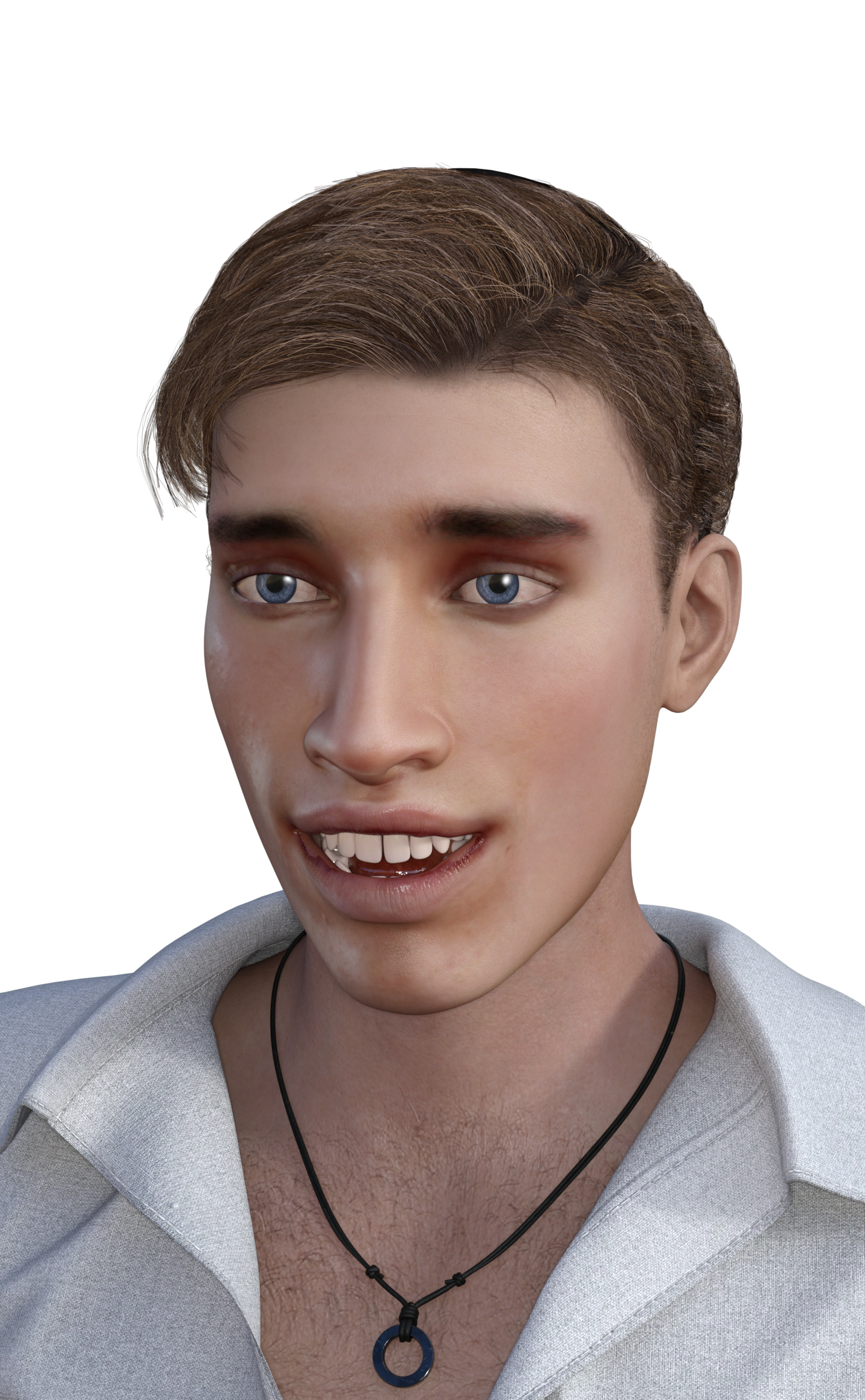
Notice the gap between the front teeth, and how strange and goofy the teeth look in general. That is because the teeth are actually shrinking and deforming with the head morph shape! The more it gets dialed in, the more noticeable this gets. I have also seen that the eyelashes on Genesis 8 do not conform to the face morph at all. The eyelashes do not move with morph, and this winds up messing things up bad. You MUST turn the eyelashes off as a result. And if you look at this man close, you will notice he has no eyelashes at all. They are painted on by the texture.
It depends on the source picture you use. Sometimes it blends ok, sometimes not (more often not). When it does not blend, there is no choice but to use an editor to try to fix it. There are numerous ways to tackle it, and these may not be the best ways. In GIMP or PS you can paint with low opacity over the face to get it to match, then use the heal tool to blend in the edges. Another way is to open the face twice as two layers, use any option to tint one image, and then copy or heal the altered portion over the original face image. Either way can work.
Could you also just apply another character's skin materials once you load the headshop character into Studio to start working on your scene?Of course, you can apply any texture just like you can for any other Daz Genesis based character. But in doing so you probably create a whole different person. This may be ok if your goal is purely making unique characters, but if you are trying to capture a specific person's likeness, odds are you lose that.
Headshop 11 QuestionsYeah. I am really surprised that the author released a new version and didn't address that. To me it is the biggest major liability Headshop has compared to Facegen and I agree, it makes Headshop a non-starter for me.
Making Daz Face Model from a photo?I have FaceGen, FaceShop 8 and Headshop 11 ( FaceShop is now called HeadShop). I get the best images using FaceShop 8 but none of them give you a perfect likeness.
You could try asking Sangriart on rendo for some advice. They've managed to recreate several well known actresses. Audrey Hepburn, Emma Watson, Eva Green, Natalie Dormer and some of the Games of Thrones ladies like Lena Headey, Emilia Clarke, Sophie Turner and Maisie Williams.
Headshop 11 Questions
I later on picked up Facegen Pro - which actually creates an entire full body mat for characters and avoids this "clown-face" problem that Headshop seems to suffer.And for that reason alone it's the only biometric style face product I'll purchase. Head clones are useless if it looks super fake because the rest of the body doesn't match and having everyone wearing turtlenecks limits usage lol. That being said I've only ever gotten one good result using it (I made myself) and there's still a nasty seam in the armpit for me.
Headshop 11 QuestionsUsing the actual skin mat from the person you are trying to model is usually pretty important to getting an accurate likeness.
I picked up Headshop Oneclick a while back and was disappointed with the same issue. I see it here in some of the example characters posted too. The face looks "painted on", or you can tell the source image was strongly lighted from one direction.
I later on picked up Facegen Pro - which actually creates an entire full body mat for characters and avoids this "clown-face" problem that Headshop seems to suffer.
Usually I just use Facegen Pro and call it a day. I keep exploring the reviews on this product to see if it is improved in this regard, but it doesn't really sound like it. Occasionally - I'll use Headshop Oneclick to create the morph and then use a skin map generated by Facegen. A neutral expression image in neutral lighting like a passport photo is always where you are going to get your best results.Headshop 11 Questions
Could you also just apply another character's skin materials once you load the headshop character into Studio to start working on your scene?It depends on the source picture you use. Sometimes it blends ok, sometimes not (more often not). When it does not blend, there is no choice but to use an editor to try to fix it. There are numerous ways to tackle it, and these may not be the best ways. In GIMP or PS you can paint with low opacity over the face to get it to match, then use the heal tool to blend in the edges. Another way is to open the face twice as two layers, use any option to tint one image, and then copy or heal the altered portion over the original face image. Either way can work.
Headshop 11 QuestionsHey all, I'm playing around with Headshop and having fun, but wow, the skin color on the imported head looks NOOOOOTHING like the skin on the rest of the Gen8 body. (For some context, I've used Daz off and on for a long time, but I always end up having to take long breaks, so I never feel like I know enough about what I'm doing. There might be an easy answer, and this might be a dumb question!!) I can post a pic of my result later.. when the computer decides to cooperate.... But for now, what have people done to try to match those skin colors/tones when they end up being radically different for the head/face and body?
I would open up the face texture file with Photoshop and change the overall hue in the many tools Photoshop provides. Then apply the newly saved texture faile to the face in DAZ Studio
Headshop 11 QuestionsHey all, I'm playing around with Headshop and having fun, but wow, the skin color on the imported head looks NOOOOOTHING like the skin on the rest of the Gen8 body. (For some context, I've used Daz off and on for a long time, but I always end up having to take long breaks, so I never feel like I know enough about what I'm doing. There might be an easy answer, and this might be a dumb question!!) I can post a pic of my result later.. when the computer decides to cooperate.... But for now, what have people done to try to match those skin colors/tones when they end up being radically different for the head/face and body?
Making Daz Face Model from a photo?I have FaceGen, FaceShop 8 and Headshop 11 ( FaceShop is now called HeadShop). I get the best images using FaceShop 8 but none of them give you a perfect likeness.
No Need to Buy HairShop Separately, It is Included in HeadShop 9! (Commercial)Just bought Headshop 9.2 in the sale. Get the same error whatever I do. Is the developer still around and any remedy in the works? On High Sierra and latest DAZ Studio.
Yes, the developer is around:-) Please download the attached file and override Mac security (Steps 4-6).
Hello - thanks for a very quick reply! Great support! And the steps got the plugin running! Many thanks!


/H
No Need to Buy HairShop Separately, It is Included in HeadShop 9! (Commercial)Just to give more information, I am using a macbook pro, my system is macOS High Sierra version 10.13.3. My dazstudio is Version 4.10.0.123 Pro Edition (64-bit).
The locations of my headshop files are shown in the pictures. Essentially, I tried csrutil disabling, but my headshop still gives the same error: "Headshop closed before nessecary files could be created"
I have the same problem with Macbook Pro, system Mojave 10.14.1 and dazstudio is Version 4.10.0.123 Pro Edition (64-bit). All the files are on the right place and csrutil disable, but get the error "Headshop closed before nessecary files could be created" . HELP please!!!!
Just bought Headshop 9.2 in the sale. Get the same error whatever I do. Is the developer still around and any remedy in the works? On High Sierra and latest DAZ Studio.
Yes, the developer is around:-) Please download the attached file and override Mac security (Steps 4-6).
No Need to Buy HairShop Separately, It is Included in HeadShop 9! (Commercial)Just to give more information, I am using a macbook pro, my system is macOS High Sierra version 10.13.3. My dazstudio is Version 4.10.0.123 Pro Edition (64-bit).
The locations of my headshop files are shown in the pictures. Essentially, I tried csrutil disabling, but my headshop still gives the same error: "Headshop closed before nessecary files could be created"
I have the same problem with Macbook Pro, system Mojave 10.14.1 and dazstudio is Version 4.10.0.123 Pro Edition (64-bit). All the files are on the right place and csrutil disable, but get the error "Headshop closed before nessecary files could be created" . HELP please!!!!
Just bought Headshop 9.2 in the sale. Get the same error whatever I do. Is the developer still around and any remedy in the works? On High Sierra and latest DAZ Studio.
Headshop 11 QuestionsHeadShop 11 comes with 3D hair models, and you can place them in the Headshop 11 software. But when I export only the head of my Genesis 8 character changes, and there is no site of the hair. If I setup Hair, and accesories in head shop, it would be nice to see it all transfer to Daz, once Headshop 11 closes. I love working with 3D, but the price of 3D hair is rediculous.
I wish some one would make a software just to generate 3D hair. For gaming. Like Marvelous Designer is for clothing. Export as obj, so I can create hair styles for Character Creator 3. Generating Beards,moutash body hair would be nice as well.
yeah i second this. hair generation is a nightmare. i only got zbrush but the fibermesh is kinda challenging to use. using hair cards and i dont know how to texture the hair. maybe i lack practice. i wish someone can make a headshop or facegen version for hair into 3d hair mesh than can be used with genesis models. my purchased hair from daz store is but less than 15. i wish i have more hair too but its a bit pricey. and we can't morph hair into another hair like we can morph genesis body and faces.
HeadShop Oneclick 2 - Now Installed, but cannot find in DazHello All,
Just an updated on my progress here. I managed to get the program to install and I can find it in my DAZ 3D directory. From there, I can manually start the program, however, it doesn't work as it says it can't find the model. Given the description of the program saying it is a plug in, I figured I would have to have Daz running and there was someway to access it from within Daz. However, I can't find any trace of Headshop: One Click in Daz.
So does the program run within Daz or not?
While trying to run it outside, I get an error message. I tried to follow this tutorial:
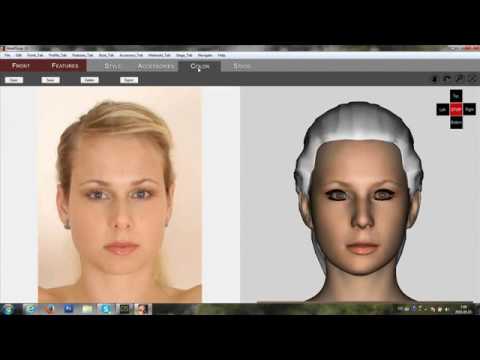
I don't get as far has he does. I only get as far as to loading the picture in and then I get the error message in the first picture attached below. From there I can continue by selecting Genesis 8 for the figure. When I click on apply, I get the second error message.
So I am just wondering how to proceed from here as I would like to get this going.
Thank You
Cannot get Headshop OneClick Plugin to work once installed manually.I am having the same issue. I followed the installation instructions, all my files are in the recommended locations, but I don't see option under the edit menu to initiate headshop. Please help
HeadShop Oneclick 2 - Now Installed, but cannot find in DazHeadShop is currently NOT a DIM installer. You have to download a zip file and unzip. It has its own installer and README.
DAZ will be working on a DIM version - soon.
Ok, got that far and started to do the install manually. Now it is asking for a license number. Where do I get that?
On the Daz Store website click on the user icon in the top right corner, it will show a dropdown list where you select "MY ACCOUNT", then click the "Serial Numbers" link. It will be listed there.
Thank you! That did the trick!
HeadShop Oneclick 2 - Now Installed, but cannot find in DazHeadShop is currently NOT a DIM installer. You have to download a zip file and unzip. It has its own installer and README.
DAZ will be working on a DIM version - soon.
Ok, got that far and started to do the install manually. Now it is asking for a license number. Where do I get that?
On the Daz Store website click on the user icon in the top right corner, it will show a dropdown list where you select "MY ACCOUNT", then click the "Serial Numbers" link. It will be listed there.
HeadShop Oneclick 2 - Now Installed, but cannot find in DazHeadShop is currently NOT a DIM installer. You have to download a zip file and unzip. It has its own installer and README.
DAZ will be working on a DIM version - soon.
Ok, got that far and started to do the install manually. Now it is asking for a license number. Where do I get that?
Headshop 11 Problems
I actually figured out how to get the plugin to work within DAZ, but still discovered exact same issue of "DAZ Model not find"...& I have since confirmed that all files are in the correct locations (data path)... I returned Abelone's FaceGen 2 due to horribly inaccurate results. Looks like I'm gonna have to do the same with HeadShopp 11 - & prolly just avoid Abelobne products in the future. Sigh...It appears that I have more or less the same problem as user "d32un3d" just above this post.
I bought HeadShop 11 today and have had problems installing the software.
The files appear to be in the right places, but since I have a custom Daz Studio installation, HeadShop is not finding the correct path to the standard Daz characters.
On top of this issue, there might be some extra issues as a result of the Daz Connect/Cloud system, just thought I'd mention that.
Error message: "Daz model not found".
I would suggest for the developer to add a text-box where the user can see either a working path to the necessary folders/models/resources,
or an input field and/or browse functionality to manually set the correct path. This would be useful in cases where the user have a custom installation.
Apart from that, I haven't found anything regarding HeadShop 11 in Daz Studio, there is no link from the "Edit" menu or other reference to HeadShop.
There is no plug-in showing up in the plug-in list in Daz Studio either.
As I said, the HeadShop files appear to be in the correct locations as are laid out in the documentation.
I have only started HeadShop from the .exe file, since there is no menu available in Daz Studio.
Questions about HeadShop 11 WIN requirements.I'm looking at the HeadShop 11 WIN and wondered if anyone has used it. The list of requirements on the site listed required software and hardware but it didn't say what they were. Does anyone know? Also, what do you think about it?
Daz 3D is part of

Connect
DAZ Productions, Inc.
7533 S Center View Ct #4664
West Jordan, UT 84084Licensing Agreement | Terms of Service | Privacy Policy | EULA
© 2026 Daz Productions Inc. All Rights Reserved.