-
messed eye balls in zbrush, already imported morph. can I restore just eye balls?
The latest version of DazStudio has the ability to clear selected deltas from a morph (that you first add to favourites). Josh Darling has a nice explanatory video. You might find that after you've zeroed the morph from the eyes that you'll need to make further adjustments so that they 'fit' the morph though.
 July 2016 New User 3D Art Contest “Portrait Rendering” – WIP Thread
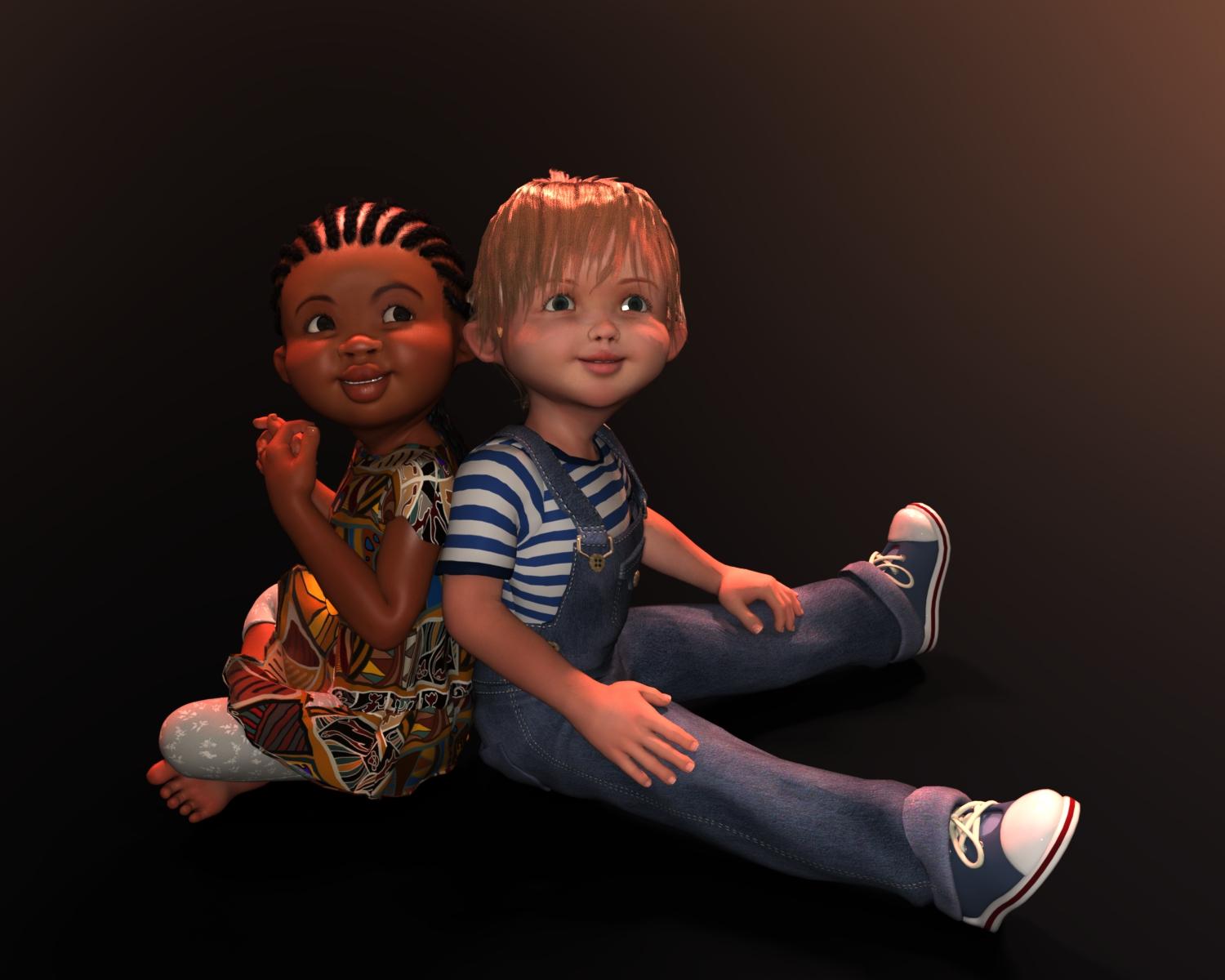
I managed to work on the poses for my 'Best Friends'. Posing these two was not easy as their heads kept getting in the way. I can't figure out any way to morph them either, because somehow d-formers just don't work on these 3D Universe figures or hairs. I don't how they managed to turn off the ability to apply d-formers, but if anyone knows how I can undo that, I'd appreciate the advice as I think could get their head closer together if I could move Toby's hair. However, there are no morphs of any kind with the hair and trying to create a d-former doesn't even get me the grid and the d-former itself can be moved all over the place, but does absolutely nothing! I've seen a few items like this and I can't say I like the trend of hiding the ability to make modifications to a prop or figure or hair. I tried taking the figures into Hexagon via the bridge and adjusted stuff, but when I brought it back in to DS, the morphs did unusual things and not in a good way.
Tell me what you think. The only things changed were the poses and a slight adjustment to the camera angle because of the pose changes. Everything else is the same for now.
Knitting, ususally when d-formers are hard to apply there is a lack of polys. So lets say you have a floor and you want to make a dell with a d-former, but the whole floor is just one poly because the creator meant it to be flat anyway you d-former won't do a thing. I don#t own the little ones but maybe check the wireframe for them to see if the area you want to deform gives you enough polys.
messed eye balls in zbrush, already imported morph. can I restore just eye balls?Good morning,
here's my problem. I resculpted my model a lot in (zbrush), but I messed eyes by the accident. I released it when I imported it as a morph back.
Is there any way to keep morph but restore just eye balls to original shape.
here's the screenshot
 Aiko 7
Just to avoid making a whole new thread... my favourite thing about Aiko really is the characters that always seem to appear around her.
http://www.daz3d.com/eleanor-for-aiko-7
It's fine, Raiya. I don't need to keep my money. Geez.
+1 THIS.
Though the base Aiko 7 is a bit off. I think the face is too long/narrow for its proportions. I think this is why mixing with The Girl 7 seems to work so well, as the Girl 7 face morph is wider as well as stylized.
I think we'll see a LOT of character morphs and skins for A7, just as we did with the prior Aiko bases.
July 2016 New User 3D Art Contest “Portrait Rendering” – WIP ThreadI managed to work on the poses for my 'Best Friends'. Posing these two was not easy as their heads kept getting in the way. I can't figure out any way to morph them either, because somehow d-formers just don't work on these 3D Universe figures or hairs. I don't how they managed to turn off the ability to apply d-formers, but if anyone knows how I can undo that, I'd appreciate the advice as I think could get their head closer together if I could move Toby's hair. However, there are no morphs of any kind with the hair and trying to create a d-former doesn't even get me the grid and the d-former itself can be moved all over the place, but does absolutely nothing! I've seen a few items like this and I can't say I like the trend of hiding the ability to make modifications to a prop or figure or hair. I tried taking the figures into Hexagon via the bridge and adjusted stuff, but when I brought it back in to DS, the morphs did unusual things and not in a good way.
Tell me what you think. The only things changed were the poses and a slight adjustment to the camera angle because of the pose changes. Everything else is the same for now.
These two are adorable. I love the little story you shared with your first post. In the first render Toby looked like my four year old... daughter. But looks more like a boy now. I wonder if the problem with Toby's eyes are actually that his cheeks are too big? Comparing them to... Makena's (?) they seem to jut out just a little bit more, definitely to the side, and possibly to the front.
Non-photorealistic Renders (NPR)Very cool, ghosty. :D The vampire reminds me of Drucilla on Buffy.
Thank you.. :) About the only problem is I can't do finer detail to the morph because do not have access to the special PA only HD morph pack.. Which sucks but ah well.. :(
Maya to DAZ StudioThanks all for the suggestions!
I tried FBX, but 2016 loads everything scattered and scaled at different sizes. Bellow 2016 loads an empty scene.
The closest I`ve got is with DAE-FBX (Not FBX). I still don`t know how to handle scale with that format, but using meters and then scalling to the desired size in DAZ Studio seems to work. If someone is interested, in the export options just uncheck everything except Default File Extensions (or DAZ Studio crashes on import). And be double sure "Lights" is unchecked (or Maya crashes on export).
Otherwise, it seems like a very close transfer from Maya to DAZ Studio. It even preserves groups and shaders as close as possible. I don`t know about rigging, I`m only doing architecture.
:)
When you saved everything to fbx, did you freeze your transformations to 0 our scale and tranform? Also did you scale up? I find that Daz imports fbx files pretty small.
Before exporting did you combine your mesh or did you leave them seperated?
You could export at 0 and subdivide in DAZ Studio. Or the subdivisions would be baked in the mesh at export.
I've found using meters on the Maya export settings help. Then in DAZ Studio I create a Null and parent everything to it, so I can scale everthing at once. I found out a scale of 5000 is pretty close to DAZ proportions. Or at least in my project.
I export everything separated. I drag and select the whole scene and use export selection.
I hope it helps!
Girls, girls...girlsI always get a little skeptical when people say "business is business" but they're stacking the deck to support whatever statistics they're trying to promote, such as when Hollywood knows that actions films and sci fi tend to sell well overseas and comedies don't and they keep saying films with minority leads don't sell abroad, yet the majority of minority led films they tend to greenlight are comedies.
If the male figures or accessories for those figures aren't what the majority of people are requesting, or the aritcles don't meet user requirements, it's easy to say male stuff just doesn't sell, show the figures for the last item that didn't sell because it didn't fit, or morph well, call it a day and go back to designing skimp wear, and another female character that looks like a cousin of Victoria 7.*
* And there honestly seem to be a couple of female characters coming out each week to the point now that I have a really hard time trying to figure out how they differ from the last figure that came out last week.I promise you if the promo renders didn't have hair and they didn't have names, you probably couldn't tell them all apart. I'd be curious to know how all these female characters are really selling.Aiko 7Hmmm, I'm kinda sad and happy at the same time. I was really waiting for Aiko 7, and was saving some money to get her as soon she's released. I even had to skip Ivan 7, and that guy really rocks, but now I'm not so sure I like her. Her body is nice and skin looks really good, but her face looks just...I don't know? She's not a cartoon character nor a real character, but something in between. To be honest, she looks much better in this thread's user renders than in those promo renders, but I'm still kinda sitting on the fence. Maybe combining Natsuko's face and Aiko's body would create a better hentai/manga character, but how Natsuko would look with Aiko's skin, and how well you can dial spin Aiko's face to something new...oh well, maybe later. Well, so I was sad that she was not what I was expecting, but at the same time I'm really glad I saved some money so I can finally buy Ivan and his brand new HD Add-on. Yay! He looks super!
I think the problem some are having is that she is swimming in the uncanny valley a bit too much. Her skin looks more real, but because the morph is less exaggerated compared to her past versions, it ends up looking weird. It's like the life like Super Mario somebody did once...kind of disturbing. (Look it up.)
Aiko should be all anime. I'd even suggest she should have some more cartoonish skin to complete her look, let the spin off characters go realistic if they want. All of the Daz G3 releases, except Girl 7, have more realistic skin. Realistic skin doesn't make sense for nearly every character. And if people want more real morphs, they can simply dial down the base morph. As it is, you need to add something like Girl 7, or maybe Izabelle 7, to get that anime look. The Lolita character looks more Aiko than Aiko does...
Anyway, now that GenX has updated, one can just try converting Aiko 6. Actually, has anyone done this? How does she look? I'd really like to see Aiko 6 converted to G3 next to Aiko 7, with both characters using the same skin, especially Aiko 7's skin.
I hope this doesn't offend anyone, but Aiko 7's promo pics are not inspiring. Just looking at those does nothing for me. Nothing at all. Its like they can't make up their mind which direction to take her, like the character herself, and the result suffers. As has happened for recent releases, there are pics in this thread that are FAR more interesting. Daz better hope everyone who is interested in Aiko 7 and is on the fence somehow finds this thread...
July 2016 New User 3D Art Contest “Portrait Rendering” – WIP ThreadI managed to work on the poses for my 'Best Friends'. Posing these two was not easy as their heads kept getting in the way. I can't figure out any way to morph them either, because somehow d-formers just don't work on these 3D Universe figures or hairs. I don't how they managed to turn off the ability to apply d-formers, but if anyone knows how I can undo that, I'd appreciate the advice as I think could get their head closer together if I could move Toby's hair. However, there are no morphs of any kind with the hair and trying to create a d-former doesn't even get me the grid and the d-former itself can be moved all over the place, but does absolutely nothing! I've seen a few items like this and I can't say I like the trend of hiding the ability to make modifications to a prop or figure or hair. I tried taking the figures into Hexagon via the bridge and adjusted stuff, but when I brought it back in to DS, the morphs did unusual things and not in a good way.
Tell me what you think. The only things changed were the poses and a slight adjustment to the camera angle because of the pose changes. Everything else is the same for now.
These 2 are adorable.
I have issues with dformers as well. Sometimes I can get them to work and other times I can't.
Looking for an "Egg" shaped chairExpose PinUp Set has some slightly different chairs. And poses! You can really morph those chairs and make them plumper, etc. And here at DAZ.
Aiko 7Just managed to get this together. Love the outfit (although not the shoes.) Then again I hate heals.
I dialed down the Aiko morph, and reduced the eye size in addition as I just don't like the large eyes.
I like the face with the eyes smaller, nice job. Any chance of another image without that hair, or less hair to see the face more.
Can Star character be converted onto Genesis?Check the thread on how to move morphs between figures with transfer utility, maybe the same kind of technique could work?
July 2016 New User 3D Art Contest “Portrait Rendering” – WIP ThreadI managed to work on the poses for my 'Best Friends'. Posing these two was not easy as their heads kept getting in the way. I can't figure out any way to morph them either, because somehow d-formers just don't work on these 3D Universe figures or hairs. I don't how they managed to turn off the ability to apply d-formers, but if anyone knows how I can undo that, I'd appreciate the advice as I think could get their head closer together if I could move Toby's hair. However, there are no morphs of any kind with the hair and trying to create a d-former doesn't even get me the grid and the d-former itself can be moved all over the place, but does absolutely nothing! I've seen a few items like this and I can't say I like the trend of hiding the ability to make modifications to a prop or figure or hair. I tried taking the figures into Hexagon via the bridge and adjusted stuff, but when I brought it back in to DS, the morphs did unusual things and not in a good way.
Tell me what you think. The only things changed were the poses and a slight adjustment to the camera angle because of the pose changes. Everything else is the same for now.
In my poinion I think they look great the way they are, but that is only my opinion!!!
Aiko 7Just managed to get this together. Love the outfit (although not the shoes.) Then again I hate heals.
I dialed down the Aiko morph, and reduced the eye size in addition as I just don't like the large eyes.
July 2016 New User 3D Art Contest “Portrait Rendering” – WIP ThreadI managed to work on the poses for my 'Best Friends'. Posing these two was not easy as their heads kept getting in the way. I can't figure out any way to morph them either, because somehow d-formers just don't work on these 3D Universe figures or hairs. I don't how they managed to turn off the ability to apply d-formers, but if anyone knows how I can undo that, I'd appreciate the advice as I think could get their head closer together if I could move Toby's hair. However, there are no morphs of any kind with the hair and trying to create a d-former doesn't even get me the grid and the d-former itself can be moved all over the place, but does absolutely nothing! I've seen a few items like this and I can't say I like the trend of hiding the ability to make modifications to a prop or figure or hair. I tried taking the figures into Hexagon via the bridge and adjusted stuff, but when I brought it back in to DS, the morphs did unusual things and not in a good way.
Tell me what you think. The only things changed were the poses and a slight adjustment to the camera angle because of the pose changes. Everything else is the same for now.
Is It A Secret?I really, really hate to say this. I swear I followed this to the letter Chris. But now I'm getting:
Loading morph its the eyes2...
Error: Facet count mismatch Base does not equal target(16828!=73828)
Error: Error matching facets
Warning: Geometry did not match, failed to create morph.I tried with both the whole body chosen and just the head chosen, neither of them work.
I think I'll just give it up. Thanks so much all for your time, efforts and help.
Girls, girls...girls...I've found myself a touch frustrated with the quality of content lately made for men.I've bought a number of suits and the shirts collars and ties are very flat and odd looking. They also look quite tight and not loose like suits should fit.
The pelvic regions of some outfits look off or don't allow for bulge morph. I've bought several outfits which look designed for women because they don't allow for any room for male genitalia at all.
I do buy a lot of the men's non-fantasy content. but if it doesn't sell sometimes there is a reason.
I completely agree. Sometimes I buy female clothes that will deform better on males than some products specifically sold for males.Show Us Your Iray Renders. Part VI don't remember if I have that bikini. Yeah, things like that don't fit very well with Autofit. Sometimes even Fit Control can't quite help it either. In those cases, I usually end up unfitting and taking the whole thing into Hexagon and trying to fit things there, but every once in awhile I come across an outfit that just doesn't want to work no matter what I do in Hexagon and then cross it back over the bridge with a morph that just doesn't work. I'm trying to lean how to do those things in Blender with Sickleyield's tutorials, but it isn't easy getting a handle on Blender. You did a good job on getting it to look decent, though.
Girls, girls...girlsPersonally a lot of older generation content for men doesn't cut it for me even with morphs and adjustments it looks dated. With the advent of Iray render engine I crave more realism in my clothing for men.
I've found myself a touch frustrated with the quality of content lately made for men.I've bought a number of suits and the shirts collars and ties are very flat and odd looking. They also look quite tight and not loose like suits should fit. There is usually clipping and sometimes pockets and zippers are missing.
The pelvic regions of some outfits look off or don't allow for bulge morph. I've bought several outfits which look designed for women because they don't allow for any room for male genitalia at all.
I do buy a lot of the men's non-fantasy content. but if it doesn't sell sometimes there is a reason.
Daz 3D is part of

Connect
DAZ Productions, Inc.
7533 S Center View Ct #4664
West Jordan, UT 84084Licensing Agreement | Terms of Service | Privacy Policy | EULA
© 2026 Daz Productions Inc. All Rights Reserved.