-
Rhinehold the Rhinoman [commercial]
It's amazing how many utter *s there are out there.
Keep up the good work, I'm a huge fan of your stuff (as witnessed by my owning half of your products here. ;)
Does this model use HD morphs? I'm trying to expand my list of options with GenX2, now that it includes G3, but the inability to transfer HD morphs is a fly in the ointment.
Don't forget Will that HD morphs are not the only issue with transfering these kind of creatures via GenX2. Geografts are also not transferred, and I would be very surprised if the horn on Rhinehold was not a geograft.
Horn is not a geograft ;)
I would have been surprised to find that it was as most of the RawArt characters I have are modeled all the way. I don't think I have a single one of his characters with geografts on them.
edit: I think it was a bad grammar day for me. ;) fixed the word order.
Rhinehold the Rhinoman [commercial]The one two punch of G3 is that both morphs and Skin are hard or impossible to transfer, so you miss the detail of HD plus any bump/normal/displacement from texture.July 2016 New User 3D Art Contest “Portrait Rendering” – WIP ThreadI managed to work on the poses for my 'Best Friends'. Posing these two was not easy as their heads kept getting in the way. I can't figure out any way to morph them either, because somehow d-formers just don't work on these 3D Universe figures or hairs. I don't how they managed to turn off the ability to apply d-formers, but if anyone knows how I can undo that, I'd appreciate the advice as I think could get their head closer together if I could move Toby's hair. However, there are no morphs of any kind with the hair and trying to create a d-former doesn't even get me the grid and the d-former itself can be moved all over the place, but does absolutely nothing! I've seen a few items like this and I can't say I like the trend of hiding the ability to make modifications to a prop or figure or hair. I tried taking the figures into Hexagon via the bridge and adjusted stuff, but when I brought it back in to DS, the morphs did unusual things and not in a good way.
Tell me what you think. The only things changed were the poses and a slight adjustment to the camera angle because of the pose changes. Everything else is the same for now.
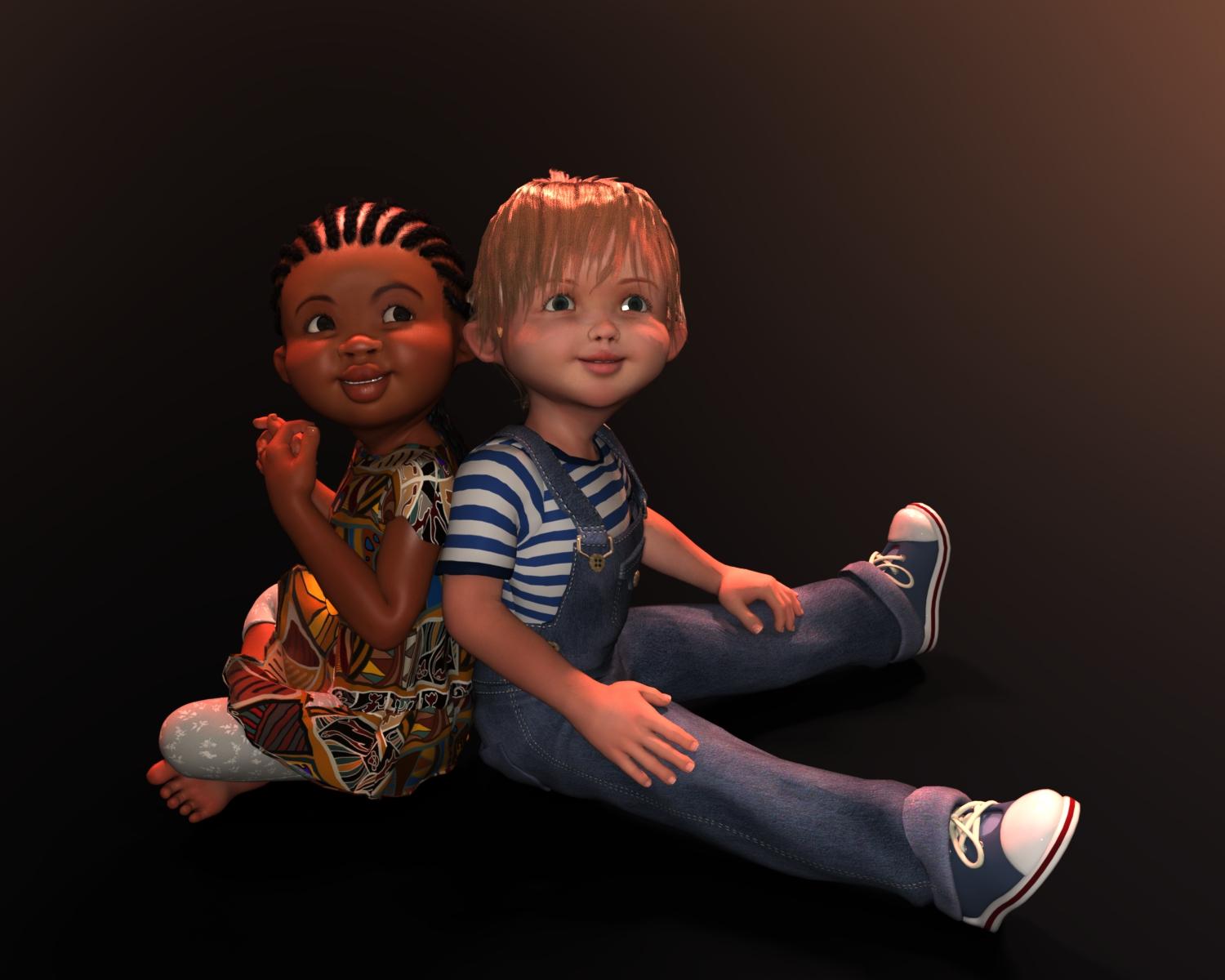
Adorable but I'd like a hint of what they are looking at and maybe a background would help this..? Also, since this contest is about portraits, maybe zoom in a little? There is a lot of empty space that doesn't add anything to the scene...
Since this is a WIP, I haven't worked on that yet. I did clearly state earlier that I was working on posing right now. I do plan on adding a background, which I also stated earlier, but that will come later. As for this being a portrait contest, I guess that depends on your definition of portraits. When it comes to kid photography, especially when there is more than one subject, portraits tend to include more than just the head and shoulders. Portraits of adults are usually head and shoulders, especially when you're talking about Glam Shots, but not always. Portrait in the broader sense is just defined as "A painting, drawing, photograph, or engraving of a person, especially one depicting only the face or head and shoulders." That definition doesn't means portraits are always of the head and shoulders, just especially, not exclusively. Look at most kid shots and you'll find that, while there are some head and shoulder shots, most portraits of kids are upper body or full body shots. This is especially true when there is more than one kid in the shot. There is definitely a place for Glam Shots and I love those kind of portraits, especially when the portrait is of a guy as that is kind of where I tend to like to specialize. I'll probably even do a proper guy portrait for my second entry, but I also like kids and I have a soft spot for these. Yes, it definitely needs some work, but it's getting there. However, my portrait will probably still have 'open space' even in the final version, but probably not as much as in the current version. In my workflow, I tend to do posing first and try to get everything just the way I want it, then I'll start blocking things in and figuring out camera angles. I don't know yet what I'll do as I didn't want to start working on all of the other stuff until I had the posing locked down, but the final version will probably still be a full body shot. They just work so well with kids. I think it has to do with their so short body stature and the fun things you can do with their poses. But then, that's why we have WIP threads. To work out the kinks and get others' opinions regardless of whether we take the advice or not. The more opinions, the better. I do take in everyone's thoughts even if I don't always act on them. And, I do appreciate the advice. So, thank you for the advice and I will definitely consider everyone's opinion as I continue to work on my kids. That's one thing I love about this contest, the ability to get free advice from such great artists.
to create a conform cloth with script?You would need to be able to set the Transfer Utility options via script too, I don't know if that is possible. Converting a prop to a single-bone figure is not at all the same as using the Transfer Utility to create a new figure with bones that match the source figure.
Rhinehold the Rhinoman [commercial]It's amazing how many utter *s there are out there.
Keep up the good work, I'm a huge fan of your stuff (as witnessed by my owning half of your products here. ;)
Does this model use HD morphs? I'm trying to expand my list of options with GenX2, now that it includes G3, but the inability to transfer HD morphs is a fly in the ointment.
Don't forget Will that HD morphs are not the only issue with transfering these kind of creatures via GenX2. Geografts are also not transferred, and I would be very surprised if the horn on Rhinehold was not a geograft.
Horn is not a geograft ;)
NVIDIA VR.... (Virtual Reality!)I'm with you, VR is the s**t and it's great that it is finally happening and this time for real (I hope). :)
Can't speak for DAZ, but I don't see that happen in Studio, simply because VR is all about realtime and Studio isn't.
In theory you could already render VR movies - render frames from two cameras, add morph to the final images to make it work with the lenses - but VR is also about interactivety. You could watch a static movie, but where's the fun in that? :)
What you need to do instead is to export the scenes to a 3D Engine. I did it with Unity a good while ago, because it was supported by oculus (I own the DK1,DK2+CV), but it was really complicated to get the morphs into Unity as well (there is a plugin, which helps with that, but it costs you quite some money). No idea about the latest releases of Unity, but the results in terms of skin rendering was quite underwhelming - still it was a good experience, because VR.But then, simply "dropping" the characters into an Engine is only the beginning, there's a lot of things you can and often need to do, to make it an cool overall experience. :)
PS: VR isn't a NVidia thing, they have nice whitepapers though. ;)Rhinehold the Rhinoman [commercial]It's amazing how many utter *s there are out there.
Keep up the good work, I'm a huge fan of your stuff (as witnessed by my owning half of your products here. ;)
Does this model use HD morphs? I'm trying to expand my list of options with GenX2, now that it includes G3, but the inability to transfer HD morphs is a fly in the ointment.
Don't forget Will that HD morphs are not the only issue with transfering these kind of creatures via GenX2. Geografts are also not transferred, and I would be very surprised if the horn on Rhinehold was not a geograft.
Transfer Utility distortionHmm.. No, it is definitely reacting to the Victoria5 and Supermodel morphs.
I must not be doing the "clear generated morphs" procedure correctly.
When I "zeroed" the "shape", I assume you meant the Genesis figure.
When finding the names of the Victoria5 and the V5supermodel morphs ("FBMVictoria5" and "FBMVictoria5Sprmdl" respectively), I wrote the names down rather than copying them to a text file, but I assumed the text file was to facilitate the copy/paste functions and just wrote them down for reference.
After entering entering Edit Mode on the collar parameters, I right-clicked on one of the transform sliders to create new property (couldn't figure out any where else to do this) and typed rhe names of the morphs into the name window, doing this for each morph, and left all other entries as is. Then clicked on the create button.
Then used the Morph Loader Pro to create the new morph.
Does this look like I did everything correctly?
thanks again for your extended help!
Get Your Encrypted Daz Connect Content Here Thread - none at the moment 2018-01-30I have to disagree about the feasibility. Character artists create morphs to adjust bits and pieces dramatically or subtlely, and the same CAN be done for a basic/generic automobile. Morphs like 'grill pointed', 'hood curve', 'wheelbase', 'windshield wrap', and more are not THAT out of line or difficult. It would be more difficult than just creating a good specific automotive model.....but this would be a more 'generic' auto to begin with. Geografts could be used for 'attachments' like airdams, spoilers and ground effects. No argument that such a vehicle (done correctly) would be pretty pricey, but I don't see the feasibility being any more difficult than a good detailed original figure.
(yes, I know custom rigging and modelling an original figure is a rather large undertaking. I'm just saying it's about the same level of effort.)
The hard part is the initial design of the mesh that would support all the morphs, without being ungodly high-poly.
Here is the main problem I see with the idea. Any character morph in order to work must maintain the exact same number of polygons as the base mesh. So the entire vehicle would need to be able to change shape without adding or removing polygons. For a mesh of a human its easier to do since most of the mesh is one large piece. For vehicles though, we're talking hundreds of pieces even for a basic vehicle. Even if the HD morph tech was used to help compensate which would allow for more diverse morphs across the vehicle, the problem with HD morphs is that it will not just subdivide one or two parts of the mesh but the whole thing so its adding extra polys where none are needed. Geografts represent in issue in this case cause they have to match the UV of the part they are attaching too AND if that part has a morph in it, it further complicates the issue. And then there is the rigging. Getting all the parts to function correctly with the different morphs applied would be something else all together.
I dont want to discourage you if its something you would like to tackle in your spare time but keep in mind that as you build a vehicle, or any product for that matter, you need to be able to think 5-7 steps ahead. Building something like a car is like creating a puzzle. You know what the end product should look like but the problem is you have to make each puzzle piece one at at time and make sure they all fit together in the end.
July 2016 New User 3D Art Contest “Portrait Rendering” – WIP ThreadI managed to work on the poses for my 'Best Friends'. Posing these two was not easy as their heads kept getting in the way. I can't figure out any way to morph them either, because somehow d-formers just don't work on these 3D Universe figures or hairs. I don't how they managed to turn off the ability to apply d-formers, but if anyone knows how I can undo that, I'd appreciate the advice as I think could get their head closer together if I could move Toby's hair. However, there are no morphs of any kind with the hair and trying to create a d-former doesn't even get me the grid and the d-former itself can be moved all over the place, but does absolutely nothing! I've seen a few items like this and I can't say I like the trend of hiding the ability to make modifications to a prop or figure or hair. I tried taking the figures into Hexagon via the bridge and adjusted stuff, but when I brought it back in to DS, the morphs did unusual things and not in a good way.
Tell me what you think. The only things changed were the poses and a slight adjustment to the camera angle because of the pose changes. Everything else is the same for now.
Adorable but I'd like a hint of what they are looking at and maybe a background would help this..? Also, since this contest is about portraits, maybe zoom in a little? There is a lot of empty space that doesn't add anything to the scene...
Daz keeps closing.I am using Daz 3, and until today, all was fine.
When I open it, it says something is wrong and closes. keeps doing it.
Is there also a way to transfer all I got on Daz 3 to Daz 4. whatever? Also, looking at Daz 4.whatever....looks VERY different from what I am used to, and seems overwhelming. T_T
July 2016 New User 3D Art Contest “Portrait Rendering” – WIP ThreadSo I looked at the image before I read your comment. When I first looked at the image my initial reaction was impressed, I think it's a good image, but I remember thinking "Why is she holding this rose?" I think it's more the epxression on her face, but she looks more like she is trying to look romantic, and I recall thinking to myself "She's got a lady waiting for her in some wooden shack back home". So if she is supposed to look like she is smelling the flower... well, I think that's a difficult action to portray in a still image, but maybe if she held the flower closer to her nose. Also, when I think of someone "stopping to smell the roses" I imagine them closing their eyes, but that's... just like my opinion, man.
Also, at first I thought her skin was too reflective... but then I thought "No, she's in the middle of battle... she would be sweaty and shiney, so why do I think she looks too reflective?" I'm not sure, but I think that the dirt might be reflecting light a little? Maybe you need to provide a spec map that prevents reflection on the dirty areas.
Then I thought "Maybe I need to just start sharing objective statements rather than my whole thought process".
Anway, I think it looks good over all, those are just the things I notice when you ask me to put on my judgemental glasses.
Hello Defenistrat,
I vote for your whole thought process rather than simple objective statements....

I'm doing some experiments with her eyes and the shine on her skin. I had thought about having her eyes closed while smelling the rose, but Kismet noted that she is probably still very "situationally aware" and that might not be quite right. But the eyes are definitely in need of change.
Good thought about the rose as well. I'll experiment with moving it a little closer to her nose. I don't want to obscure her smile too much. I think the smile looks good on her. So many of the characters don't emote well - you either have the attractive neutral look or an "I want to kill Batman" type of smile. But this one seems to morph pretty well for a subtle smile.
Lot's of different things to try. If we got it right the first time, it just wouldn't be as much fun!
Thank you!
Aiko 7Just managed to get this together. Love the outfit (although not the shoes.) Then again I hate heals.
I dialed down the Aiko morph, and reduced the eye size in addition as I just don't like the large eyes.
I like the face with the eyes smaller, nice job. Any chance of another image without that hair, or less hair to see the face more.
I'm still working on the scene so can't post it completed yet, but this is the shape I'm going for. I've reduced the eyes a bit more.
to create a conform cloth with script?So, what you want to do is launch and drive the "Transfer Utility" from within a script? If it's possible, perhaps it would be a DzAction, but that's just a guess. I'm a bit curious myself now.
messed eye balls in zbrush, already imported morph. can I restore just eye balls?For future reference, I would recommend that you 1) store a morph target of the base in ZB, 2) mask the eyes and other parts you do not want affected. The morph target brush will then restore back to what you had on the base model if the masking failed or you made an error.
Exporting Genesis 3 from DazStudioThose are some good questions. I know nothing about JCMs. I've heard the term but not sure what it is. Joint controlled morph? If that's so I would have to think they would be less common with figures since the release of the Genesis platform, which use weight maps to control deformation.
The bones in the face are for creating more detailed expressions and otherwise deforming the the mesh. They are very handy, especially for those that are less inclined to use modelling tools to create morphs.I also assumed the HD morephs were just morphs created at higher subdivision levels, but I'm not sure. So, basically I can't help you but I'm interested in what answeres might popup.
messed eye balls in zbrush, already imported morph. can I restore just eye balls?thanks a lot for sharing link.
it helped a lot but I stacked in the middle.
I selected eyeball but when I click right button, there's no Morph Editing option.
I have the latest version of daz and morph as you can see affects eyes
if you have any idea what's wrong please share
thanks a lot
 Aiko 7
Just managed to get this together. Love the outfit (although not the shoes.) Then again I hate heals.
I dialed down the Aiko morph, and reduced the eye size in addition as I just don't like the large eyes.
I like the face with the eyes smaller, nice job. Any chance of another image without that hair, or less hair to see the face more.
Thank you, and sure I'll post one later.
Here's my expiriments with A7 rendered in Iray and tonemapped in PS with the lines rendered in blender and then composited. Blender does really nice toon lines. I could probably do smething toonier fully rendering in blender, but that takes more setup

the other image is the straight Iray render, no blender no postwork etc. which is still pretty toony looking IMO
Really like this. I particularly like how the line doesn't extend around the face; I really don't like it when it does, which seems to be the norm. You've faded it out, which really works.messed eye balls in zbrush, already imported morph. can I restore just eye balls?The latest version of DazStudio has the ability to clear selected deltas from a morph (that you first add to favourites). Josh Darling has a nice explanatory video. You might find that after you've zeroed the morph from the eyes that you'll need to make further adjustments so that they 'fit' the morph though.
 July 2016 New User 3D Art Contest “Portrait Rendering” – WIP Thread
I managed to work on the poses for my 'Best Friends'. Posing these two was not easy as their heads kept getting in the way. I can't figure out any way to morph them either, because somehow d-formers just don't work on these 3D Universe figures or hairs. I don't how they managed to turn off the ability to apply d-formers, but if anyone knows how I can undo that, I'd appreciate the advice as I think could get their head closer together if I could move Toby's hair. However, there are no morphs of any kind with the hair and trying to create a d-former doesn't even get me the grid and the d-former itself can be moved all over the place, but does absolutely nothing! I've seen a few items like this and I can't say I like the trend of hiding the ability to make modifications to a prop or figure or hair. I tried taking the figures into Hexagon via the bridge and adjusted stuff, but when I brought it back in to DS, the morphs did unusual things and not in a good way.
Tell me what you think. The only things changed were the poses and a slight adjustment to the camera angle because of the pose changes. Everything else is the same for now.
Knitting, ususally when d-formers are hard to apply there is a lack of polys. So lets say you have a floor and you want to make a dell with a d-former, but the whole floor is just one poly because the creator meant it to be flat anyway you d-former won't do a thing. I don#t own the little ones but maybe check the wireframe for them to see if the area you want to deform gives you enough polys.
Daz 3D is part of

Connect
DAZ Productions, Inc.
7533 S Center View Ct #4664
West Jordan, UT 84084Licensing Agreement | Terms of Service | Privacy Policy | EULA
© 2026 Daz Productions Inc. All Rights Reserved.