-
Character used in 2nd + 3rd promo image of HS Mirage Strands Hair
Hi Mary! Thank you, but I don't think it's Pixie, at least not entirely. She does have stylized and exaggerated features like Pixie, but they're not as pronounced. But maybe it's a morph where Pixie 9 is in the mix?
Young Adult and Elder versions of Sophia 9You can apply the young and old morphs to other characters, sometimes takes a bit of tweaking. The older versions don't have their own materials, but the younger versions pretty much all do.
The alt shapes also have proportions sliders or individual proportions adjusted, so have a look which sliders are active when you load an alt shape so you can adjust the same ones on destination figure.
I took youth Olympia and Olympia Youth skin and applied to Sophia and worked pretty good for the face, but because of the subtractive nature of the morph the bust needed tweaking (grown up Olympia is very busty).
You might get different effects if you are mixing HD and non HD morphs
Young Adult and Elder versions of Sophia 9Gordig said:
I haven't spent much time with G9 and have very few assets, so bear that in mind. Are the young/old morphs of figures full morphs, or additive morphs to the base figure? In other words, if you dialed say, young Mira on top of Sophia, would it make it look more like Mira, or just younger?
Theyre supplementary morphs if that makes sense. They require the base morph to work, but they have a very specific look, so no the young adult Mira with Sophia wouldn't work. They also have young textures. It's a good product addon. More useful then the body shape morphs we've gotten so far (Which imo are kind of unnecessary as you can get a curvy look for example pretty easy without needing a specifically shaped morph)
Odd eyes question (G9)I've had this intermittent issue for a while where G9 eyes will get malformed when blending character shapes. It's not the typical issues with a non-zero morph, because saving/re-loading the scene fixes it (and I've checked hidden & all non-zero morphs, etc.) - I haven't run into any other mention of it on the forums, so I'm wondering if anyone else has run into this and what the cause might be. Attached images of the issue, and exact same camera view after reloading - these are from the viewport (iray), but result is the same when doing a full render.
Saving morph with ERC freezeFormulkas link two properties, so that the controlled proeprty gets a value in response to the controller. The classic examples would be a joint adjustment morph linked to a bend, and head/body morphs linked to a master character morph. Duplicate Formulas mean that there are two formulas linking on specific property to another specific property (e.g. JohnDow to JohnDoeHead). Usually that happens because a generic name has been used by two different artists, but it can happen in a single file. One way to get duplicates is to run ERC Freeze twice on the same controller, without using ERC Bake in between to remove the original link and just leave the raw values so that they can be revised.
Saving morph with ERC freezeWhile this is an ancient post, it came up when I was searching for the same problem and did not yield the answer, so I want to put this here for informational purposes.
I had this problem, and I literally wiped every trace of DAZ from my system and started fresh/reinstalled my stuff to no avail. Turned out the Shape Rigger tool was to blame (G9). It didn't work correctly for one, the bones weren't even close. I did not use Shape Rigger's save morph, but just used the rigging portion. After seeing the bones incorrect, I just used the built-in "Adjust Rigging to Shape" feature, then saved the morph under the Save As => Support Asset => Morph menu.
After doing that, I got the duplicate formulas (why this is called a "formula" is beyond me and completely unhelpful) message, and in the log file, it showed the exact same file path as the "previous" and "duplicate."
So unless I'm missing something, that was also incorrect, because I did not have the morph in 2 places, it just referred to the same single file as a duplicate. So I dunno of that's DAZ's fault or Shape Rigger's, but I deleted it completely, then just stuck w/ Adjust RIgging to Shape, ERC Freeze, then saved the morph--problem gone--both the erroneous duplicate message and the fact that the bones didn't track on a new scene.
The older generation: Victoria 2/3, Michael 2/3 and their children rendersAnother using some older stuff I have that's been sorely under used:
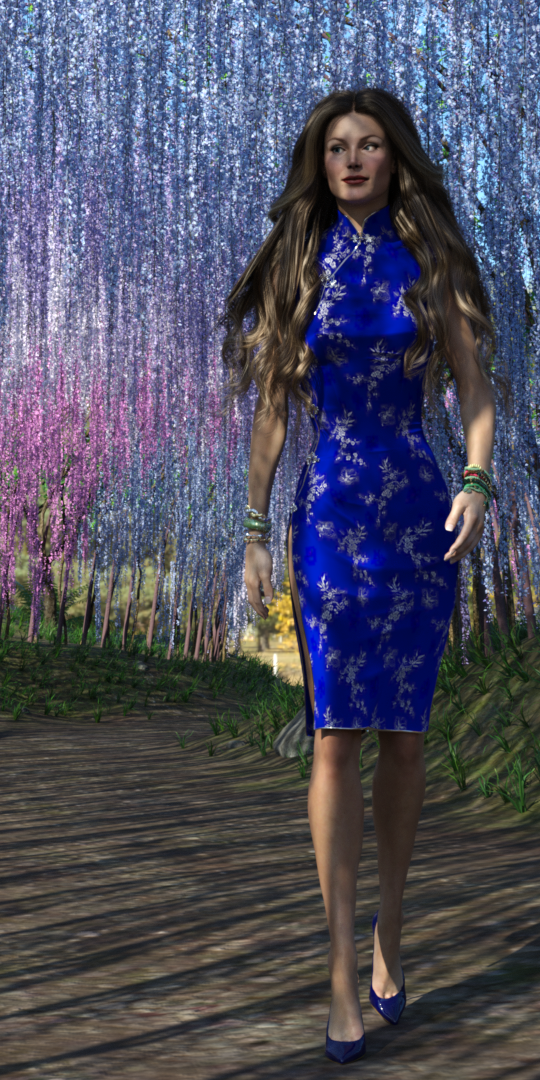
TriAx GV3 with Jim Burton's Cheongsam for GV3, in the Wisteria tunnel. Been meaning to use this much more than I have. Hair is Linday's Classic Blowout hair.
I've been trying to make the character's hands and fingers rather more slender using yScale=zScale = 90%. However, when I do, the hands actually EXPAND, and contract when I use a scale of 110%, though the fingers expand as well with a scale > 100%. It's somewhat nuts. May have to try to create a 'Slender Hands' morph instead.
Regards,
Richard
Transferring G8 morphs to G9How do I use the transfer utility?
There's Always Another Sale Thread -- Discussions Only Pt 2Wonderland said:
Sophia 9 looks pretty much the same as all the Daz originals. A 30-something average looking woman with the same skin tone and same average boring body. They should at least do a new Girl 9 or Aiko 9 or SOMETHING a little creative and different, The PA characters are always so much better than the Daz ones and priced much better. I have no interest in this bundle at all.
Who is the character with this hair? This is a much more interesting character that would add a bit of something to the gene pool. I wish she was Sophia 9.
it's not letting me upload an image. I was referring to the character here. The hair is cute too. https://www.daz3d.com/hs-riley-shades-hair-for-genesis-9-8-and-81-femaleIt's quite literally Mira 9 with either some of her young adult morph dialed in or some nose bridge slope tweaks, bigger breasts, Mira 9 makeup collection, FPE Monochrome & Colorful Tattoos mix, Nocturne Outfit + texture expansion, and Schoolgirl Sexy Lingerie outfit for Genesis 9 (rendo). I'm still trying to figure out her chin piercing - can't find a heart shaped one for the life of me.. maybe it's an earring that's been relocated. I think it's joelegecko who made that render.
Help, the morph I've purchased isn't working properly.I've purchased thr Uchenna morph for Genesis 8 female and after installing it doesn't load properly. The head shape and navel change size slightly but the morphs barely changes at all.
Under BreastIs there a morph that will eliminate the gap between breast and the chest?
 Let's appreciate/discuss today's new releases - ongoing thread
Gordig said:
I was relieved to see the promos for dForce Salvage Tech show the outfit actually functioning as clothing:
The thumbnails for both the outfit and the texture expansion, and also some of Sophia's own promos, just show the outfit as basically sexy cosplay, which I have no interest in. A functional set of coveralls, though? All day.
I also rather need the closed versions, so i am happy whenever an open one has a closed version or morph in addition. I could use both on the same piece of clothing on occasion (even just for heat managment).
Face Transfer 2 ErrorThe missing Face Transfer issue is apprantly in the process of being fixed.
There is a sample script showing how to use alternative textures here http://docs.daz3d.com/doku.php/public/software/dazstudio/4/referenceguide/scripting/api_reference/samples/specific_ui/appsettings_facetransfer/start
Transferring G8 morphs to G9nabob21 said:
Does this convert full figures only or can it convert single morphs? I would like to transfer specific morphs and not all of my G8 morphs to G9.
The best way to convert individual morphs is using the transfer utility. Both RRSY converter and Manfriday merge these morphs together.
Transferring G8 morphs to G9Does this convert full figures only or can it convert single morphs? I would like to transfer specific morphs and not all of my G8 morphs to G9.
Transferring G8 morphs to G9Hello,
I seem to recall a product being released a while ago that allowed you to transfer morphs from a G8 character to a G9. I don't mean the character converters that Riversoft does, but a plug-in or utility to transfer specific morphs. However, I can't seem to find a product like this. Does anyone know what this produck is, or am I just imagining it?
Thanks in advance for any replies.
nabob21
How come Animations in the ViewPort Don't Play in Real Speed and they skip Frames?doug said:
Robinson said:
It could do with a caching pass so the first time you play through it's slow and the second time it's super smooth. Anyway if you want to play all frames without dropping any there's an option on the hamburger menu on the top right (Play All Frames).
We really need this on the next version. no reason to render every frame over and over.
Don't forget that morph deltas (the shape chnage) are not loaded until needed - so on first play through the scene is potentially loadign various JCMs for the bends that were not needed for frame 0.
[Released] LIE Makeup Manager [Commercial]Thanks, Josh.
I will experiment more, but it fixes my problems with Face Transfer 2 characters, so I am happy, so far.
Merging Daz LibrariesI realize that my difficulty of having old projects open on a new machine is that there is more than one Daz Library that Daz accessed on the old machine. Slightly different libraries on different hard drives. Is there a way to merge libraries...one library to rule them all?
The alternative is I transfer each library and make sure it's noted in the database manager. This would involve a lot of duplicate files.
Trouble creating morph for Gen9 using Blender 3.4barbult said:
Your figure image will probably be removed for violation of the nudity TOS. There is something strange by the crotch, though. What is causing that black area near her left thigh?
Oh thank you, I re-upplaoded a censored version! and you're actually seeing through her body because I'm using Golden Palace (3rd party genitalia addon) and when I remove it to export i creates a hole- wait..
THAT WAS IT.
the Golden Palace addon once actually deleted from my scene deleted the mesh hole and the morph imports correctly!
If I export with Golden Palace ON it doesnt work, if i just hide Golden Palace it does not work.
Daz 3D is part of

Connect
DAZ Productions, Inc.
7533 S Center View Ct #4664
West Jordan, UT 84084Licensing Agreement | Terms of Service | Privacy Policy | EULA
© 2026 Daz Productions Inc. All Rights Reserved.