-
GenX2 Update / Genesis 3 Add-On [Commercial]
Unfortunately, the jaw bones are assigned to the mesh very differently in V4, Genesis, Genesis 2, and Genesis 3. In particular Genesis 3 will not work well because the Gums/Teeth are a separated mesh in the other figures, but not in Genesis 3. There are two options. On the one hand, there are correction morphs in Genesis 3 to fix problems that are caused when transferring the scaling for the jaws. On the other hand, you may freeze the scaling into a morph by exporting the morphed/scaled geometry as an OBJ and then reimport it as a morph that works without scaling. (The latter may still need manual joint adjustments.)
GenX2 and Genesis 2 AddOn released! [Commercial]Lyone: "Invalid formula" is just a warning. This means that GenX isn't able to interpret some dependencies, so it will ignore them. This will not affect the morph transfer itself, but may prevent some things like correction morphs to work. Have a look at the DS log file after loading the figure, probably it will issue warnings about the formulas as well.
To load Genesis figures as source, you have to load them directly from the "Source" button, not from the library. To find a particular morph, you can use the search feature of GenX. If the Genesis figure uses a combination of several morphs, you can load the figure in DS and use "Get values from figure in scene" to set the morph values. If it still doesn't work, compare the morph values shown in DS under "currently used" in the shaping tab and the values in the morph list in GenX.
kyoto kid: Sure, you can transfer morphs created by GenX to another figure like any other morph. You still may need to create the clone morph for the initial figure if it doesn't exist.
However, the result will be different from a direct transfer. GenX always transfers morphs directly from the source figure to the target figure. It only needs the intermediate figures and morphs once to transfer the clone morphs. Depending on the morph, the quality may degrade when transferring morphs several times.
Hypergenetic bioarmorThe Bio Armor is legacy rigged. Did you convert it to Triax WM if you are using Genesis or G2 or Dual Quaternion if you are using G3?
There's no point in covnerting that way as the joint centres won't match. The best routes are AutoFit or, for a har surface model, probably better to manually reposition the geoemtry and then import as OBJ and rig with the Transfer Utility.
Transfer Morphs from Genesis 3 to Genesis 2I think you need
http://www.daz3d.com/genesis-generation-x2
AND
http://www.daz3d.com/genx2-addon-for-genesis-3
This add-on extends Genesis Generation X2 (GenX2) to the world of Genesis 3. Now, it's possible to transfer morphs from Genesis, Genesis 2, and supported Poser figures to Genesis 3 Male and Female. In addition, morphs may be transferred from Genesis 3 to Genesis and Genesis 2 or between the Male and Female version of Genesis 3. Facial expression joints of Genesis 3 are adjusted to the transferred morph if required.
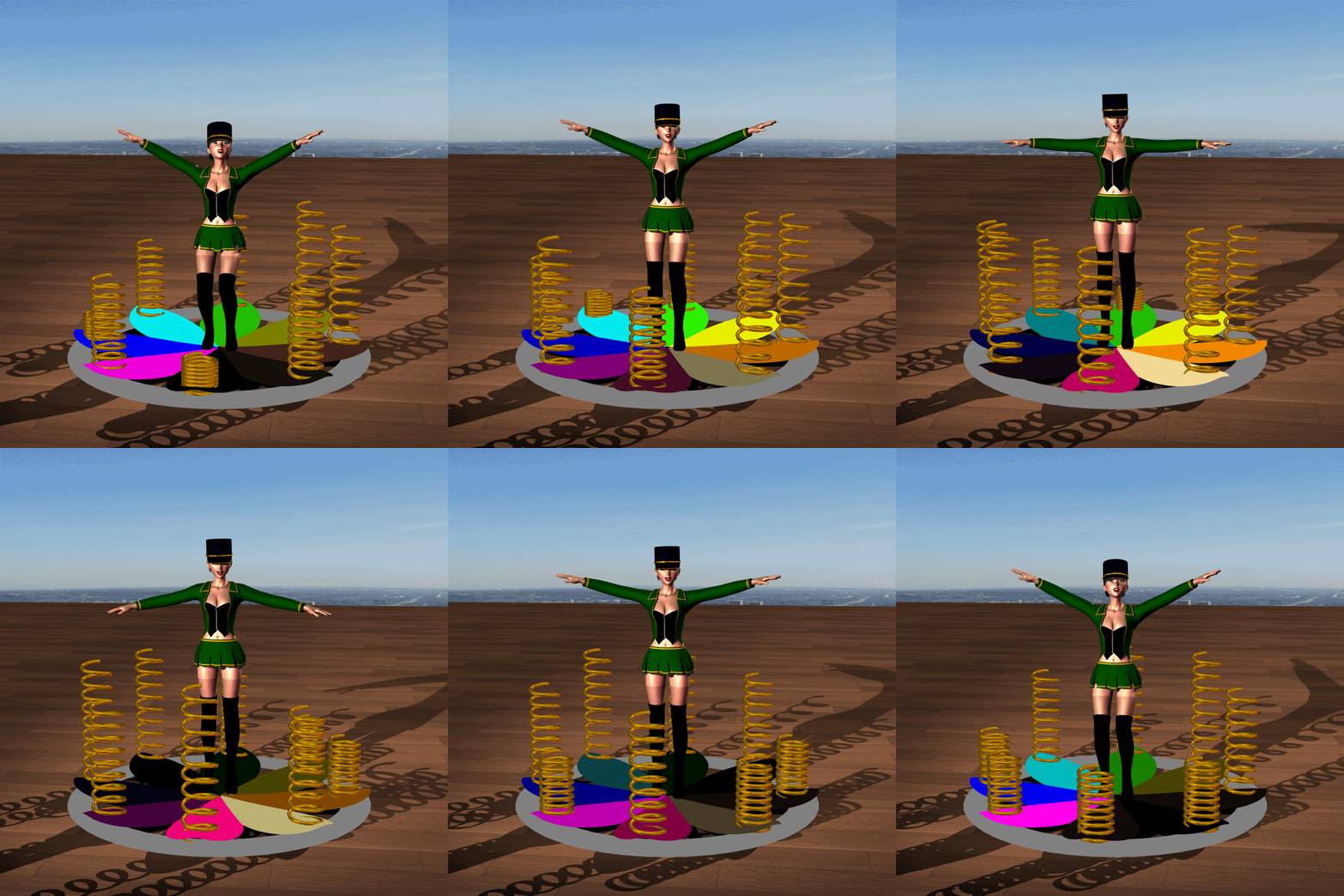
Ready! - mcjPropagate - Daz Script to propagate shift and rotate animationsThe MULTI surface/ material animation alone is SO awesome already. To sync/ propagate morph + shift/rotate + mat change, is just SUPER COOL!!!!
 APPLAUSE!!!
Example 3 - you can also select a series of objects and have the surface/material property animations propagate from one object to the other
here 1 button had its ambient strength animated, then the script propagated it to the 3 others
Example 4 - within the same object, if you select a series of surfaces, you can have property animations propagate across the chain of surfaces
This example also shows the propagation of morph strengths for the springs
 Moving my G2M figures to G3M
Or a third choice is to keep your G2M characters and add characters that are new and G3M; I've never understood this urge to endlessl transfer characters to new generations.
Me 2 or 3 or 4 or 5 or 6 or 7.
Have you compared your older renders to a strictly iRay/G3 figure/scene? The difference for me has been nothing short of the difference between stick figures I drew as a 10yr old, to somethign Pixar would produce. I LOVE the new iRay, and while it took a lot of tweaking, asking other artists here that I admire, and many hours of tria and error, I am really happy with this generation.
I am the opposite of those who stand by V4 and M4, they look so outdated and plastic looking to me in comparison. They had the largest range of gear sure, and that''s a lot of investment, but my investment in the new tech is really paying off for me now, with exponentially shorter render times and far higher quality than ever before. It's been worth every cent.
All of this has a flow on effect, due to faster renders, I can work on more images, and am currently able to take on more commissions within a given time period, which means more money for me.
Moving my G2M figures to G3MThanks everyone for your replies.
As for my I am want to move to Gen 3 instead of sticking with Gen2M, is mainly because I want to be able to move into the latest generation, and have the items and gear being made for them ready to go and consistent across the board. All Gen3 items have iRay, which I am really liking, as all new props, locations, clothing are all coming with iRay, and I want my rendering to be faster and more reliable. Iray renders blisteringly fast for me, and as I use only props and gear with iRay shaders on it, I am able to push out high resolution, high quality, and large-sized pictures in a 10th of the time I could with 3Delight.
That said, moving to Gen 3 puts all my items into iRay for renders, meaning there is nothing that will look odd or out of place, nor slow my render times, have issues with mis-matched shaders, and hopefully give a smoother flow.
If I knew a way to already transfer the G2M to G3M (and G2F to G3F), I'd have already loaded Daz onto my new computer with only G3 items loaded in.
Serene Night, for me it is less the upgrade of G3 morphwise, and more then shaders/skins than anything else.
Fred, I expect the better render times within iRay form moving to G3. Already getting great results, and as I move further into the world of 3D, I wish to keep up with the technology to push my ability as best I can.
Why Are Anime Figures Impossible in DAZ?Just out of curiousity, what are your thoughts about Star!? She's now here at Daz3d and I was wondering if that would fit your purposes?
Honestly Star's head is perfect for my needs, the only issue is her very skinny and stylized body. If there was a way to transplant her head onto a Gen 2 or 3 body with all of the shaping and body type options available to them Star would work perfectly.
Unfortunatley, atm with it's 1 stylized body fits all model, her uses are very limiting.
It is the norm for head and body shapes to be seperated. So will likely be the same with Star 7 when she appears; I hope at least.
I can ask Lady Littlefox to see if this is the case, and post here once I find out; I suspect it will be possible, but it would be nice to know for certain.
Edit: Just heard from and yes, she does have the separate head and body morphs.
Good news.
Not really my stype, but I do like to add small amounts of a character's morph to see what it does; who knows I may jump off the wagon (again).
Transfer Morphs from Genesis 3 to Genesis 2It's incredible, but I'm asking for if there is a way to trasfer Morphs from Genesis 3 to Genesis 2. Yes, I didn't get wrong. I want to transfer from Genesis 3 to Genesis 2. The reason is I work in Poser, and Genesis 3 has a lot of issues working in Poser, because it isn't compatible with Poser. I didn't have problems working with Genesis 1 and 2 in Poser, but Genesis 3 is impossible to work (it isn't exported correctly, the viseme map doesn't work, animations don't work, etc.) So I decided to work in Genesis 1 and 2, especially 2 for Genesis 3 morphs, but I'd like to know if there is a way to transfer them. I know there are methods to transfer morphs from Genesis 2 to Genesis 3, but I want from Genesis 3 to Genesis 2.
So, can you help me guys?
GenX2 and Genesis 2 AddOn released! [Commercial]Because clone morphs in Genesis figures exist only for the previous generation, GenX needs access to the intermediate figures to transfer the clone morph (and then other morphs). In your case, to transfer morphs from V4 to G3F, GenX needs access to Genesis and Genesis 2 Female, because G3F has a clone for G2F, G2F has a clone for the initial Genesis, and Genesis has a clone for V4. So, ensure that Genesis and Genesis 2 Female are installed correctly and GenX is able to load them as source figures.
..so if you already have V4 morphs transferred to G2F via the previous version can you then simply transfer them to G3 by transferring the G2 clone?
Female jacketsI want to autofit the jacket from Alternate Identity ( https://www.daz3d.com/alternate-identity-for-genesis-2-male-s ) to G2F.
What I want is for a jacket that fits reasonably and, well, hangs off the breasts. Like loose jackets do.
I HAVE Fit Control, Ultra Bodysuit, Genesis supersuit. I know about hidden morphs. I have GenX2 so I can make a G2M look like G2F.
I keep running into the problem that while I can smooth over the transition between breasts and torso, it still pretty obviously follows the outline (and has an annoying kink under the breast that plays havoc with the zipper).
I could convert to dynamic, but then the zipper goes kablooie.
If I dial down the 'female'ness, I end up skewing the arms out of alignment. I've mostly managed to dial away the breasts for the jacket, but then it's submerged in her body and I have no easy way to smoothly 'scale forward' the torso.
Halp?
How about a quick trip into Carrara (which you already have) using the displacement/smoothing brush to create a morph?
- Greg
SimTenero Randomizer Characters Showcase Thread Everyone WelcomeThis is a Zaya, a randomizer character with a skin builder skin and make up. Huh not sure why the large pictures didnt' show up the first time....
Nice work Sonja!
Thank you! I actually toned down my morph selections on this one, I usually select almost everything and just take out things out don't want like say, orc morphs lol. but I narrowed the selection down by quite a bit this time and used mostly asian and african american morphs. I really like her a lot and skin builder just made her darn near perfect as far as I am concerned lol.
Female jacketsNormally, there is an "Expand All" morph in the clothing for this sort of thing, at least in my experience.
3DXTRACT 10th anniversary coming up!Morph Tutorial
What Does Anybody Know About Setting Uo Morph Injections Like Phil Wilkes Tutorial.
DIM Will Not Operate - So please Help-out.
Mechtrof14
this quote is from this year looking for help.
Dynamic cloth + related Carrara plugins - Best Practices, Tips and RendersI didn't get as much time to experiment as I had hoped but I did a few more tries. Here is a man wearing a tunic in a sitting position. A personal workflow for the Genesis and Genesis 2 figures and premade content is starting to come together. Find it outlined below. One nice thing is that you can custom model to a custom shape. However, for premade content, I think it is best to start with the default shape. here is my approach thus far using content bought from the Daz store with the G2M figure. In this example, I want a man wearing a tunic and pants to sit in a small boat (coracle). Only the tunic will be dynamic. I am most concerned about the bottom of the tunic when the figure sits in the coracle. For this example, the pants are conforming; I aw no need to make the pants dynamic. Therefore, I need multiple collision objcts including the G2M, the Pants, and the seat in the coracle.
- Note - VWD is not initiated until later steps
1) I loaded the G2M Garen character, the Viking pants, and the Viking tunic. All are available from the Daz store. I also inserted a primitive cube for where the seat will be. No othe figures, props, or terrains were loaded.
2) I zeroed the G2M back to its default shape, I "fit to" the pants to G2M. I did not fit to the tunic.
3) In the animation sequencer, I advanced to the 1 second mark.
4) I dialed some of the G2M morphs to taste. In this case, I dialed in a little Michael 6 (about 0.25) and little more Garen (about 0.5). The pants morph with the G2M but the tunic does not.
5) I advanced the sequencer to the 2 second mark.
6) I posed the G2M in the sitting position. The pants conform but the tunic does not.
7) In the Carrara File menu, I launch VWD. I uncheck weld vertices because I had gotten some errors finding objects and this option was suggested to avoid the errors. A menu appears on the right.
8) A box on the top of the menu says SCENE IMPORT. Click the Host List button and VWD will import and list the animation scene elements. In this case, it includes the G2M, the tunic, the pants, and the cube.
9) Need to designate each element. Select the G2M and click the "collision" button. A set of parameter options appear. I just left them at default. Click the collision button again. VWD will make a few calculations and return to the scene import menu. Repeat for the pants and then for the seat.
10) Select the tunic. This time click the cloth button instead of collision. A menu appears but again I left it at default. Click the cloth button and reurn to main VWD.
** Note - this is where I occasionally get errors. Sometimes only about half of the main menu reappears and I get an error saying VWD can't find the cloth obj file. One time I got a memory error. Unchecking the weld vertices option when starting VWD has helped reduce these errors but has not eliminated them.
11) For this example, the cloth does not have thin straps or other features that one would want to attach to the figure's shoulders, or a tube top thatone would want to attach to the chest, or a belt to the waist. If it did, the next step would be to open the vertices tools menu. Once open the mesh will turn blue and there are selection tools. There is a quick way to select the outer edges of an object byclicking the "free edges" button. Note that if you use that button on a skirt, you might be satisfied with the waist but you would probably want to deselect the bottom fringe of the skirt. Once satsified with the selection, you can "nail" the vertices to the collision object by opening the "Vertices Groups" menu. There you would click the "Nail to Collision" button.
12) Either with nailed vertices or none, the next step is to run the dynamic simulation. To do that, open the simulation parameters menu. Here, I did increase the values for sub samples and iterations.
13) Click the "Start Dynamic Simulation" button. VWD will have a running count of the frames at the bottom right of the menu.
14) Once VWD has completed the calculations, it will go to an repeating loop f the animation frames. Hit escape to stop the loop.
**** You can still do edits and adjustments, including pulling the cloth around and allowing for more dynamic draping frames. More on that in later posts.
15) Once all adjustments have been made, click "send dynamic to host" or "send pose to Host" depending on whether you want more than one frame.
16) VWD closes and you are back in Carrara. The original cloth figure is still in the scene but its invisibility is now unchecked. A new object is in the scene that is the cloth figure as an obj but withmorphs for each frame. I deleted the oriinal cloth figure (tunic in this case).
*** as per my previous pos, you can vertex edit each frame's morph in the Carrara assemble room in anation mode (posed).
17) Only after generating the dynamics do I then started to refine the scene. I changed the shader of the G2M to be more compatble with Carrara. I added other clothing elements that do not need to be dynamic like the boots. I added hair, the coracle, the lake surface, the terrain, etc. It still needs the paddle, the fishing gear, etc. but I thought this was enough to show the workflow.
It is still incomplete, but you can see how the Tunic dynamics worked. In this case, the change in G2M size with the M6 morphs did not cause a problem and the tunic is not too tight fitting. I like the drape in the chest and the shoulders. However, I really focused on the bottom of the tunic where the sitting position usually causes challenges for conforming clothing. Seems to have done OK.
Bottom line, this is an example of converting a Daz-purchased conforming tunic to a draping cloth tunic that interacts with the character figure, conforming pants, and a seat prop. Still much to learn. This is not an easy learning curve. However, I think it will be worth the time spent.
Knittingmommy's LaboratoryBy the way, when you want to export to Daz from Blender, I used the following Blender Export options (based on SickleYield's morph tutorial+some other info):
Selection Only
Apply Modifiers
Include Edges
Write Normals
Include UVs
Write Materials
Polygroups
Objects as OBJ Objects
Keep Vertex OrderLeave the default Scale, Forward, and Up settings.
Hope this helpsI Bought Sickleyield Clothing Smoothers for G2FI don't own the product, but i did do a little digging. i found a post on deviantart by sy saying it's a dialed projection morph, which apprently means the morph is dialed from the characer and projects on to the clothing. Click on the character and search for the morphs listed on the product page (i.e Victoria 6 Smoother 01) and see if it pops up. If so, dial it in and see if the clothes are affected.
GenX2 Update / Genesis 3 Add-On [Commercial]Hi so far my Gen X2 update for G3 works great, I managed to import my G2F characters with only minor tweaks
(eg some of the GenX specific morphs used to port an old character from V4 to G2F, like Jaw translations, are not ported when I then port the G2F morph from G2F to G3F).none of my generation 4 base models/assets load successfully in DS 4.9It's to do with the way the ExP morph system works in all Generation 4 figures; the morph packs must be installed to the same runtime location as the base figure, then the activation script must be run (if you're using DIM this should happen automatically). Connect is completely incompatible with this, because it essentially installs each product into its own runtime, so the activation script can never find the proper data files. The only way now to use these figures and their morphs is to use DIM, or a manual install.
Dynamic clothing tipshi all
so is this software primarily for convert poser dynamic clothes over to Daz?...or is it also good at converting conforming clothes which I think would be cool if it allows for a more relaxed fit.
and on page 4 Modern Wizard posted the following...
"Back on the subject of dynamic clothing, I experimented last night with G3F and the free player. I dialed up the fat, voluptuous, large-breasted character that I always have trouble with and dynamified the free Optitex tank dress. Exported the dynamified tank dress as an obj, then exported the G3F character [made of many morphs] as an obj, then used Morph Loader Pro to make it a full body morph. Adjusted rigging to shape in three stages [one for everything but inner squints and eyes, one for inner squints, one for eyes], did ERC Freeze, saved as morph asset.
Then I imported the tank dress obj and used Transfer Utility to rig it. Source: G3F. Morph: [name of character full morph created in previous paragraph]. Weight Maps, Merge Hierarchies. Reverse Source Shape from Target. Fit to Source. Apply Smoothing Modifier.
Voila -- a piece of clothing for a fat, busty character that does NOT stick between or under the breasts! Furthermore, I can fit this dress to the figure, make the dress invisible, then set other pieces of clothing to collide with it. Then the other pieces of clothing don't stick under the figure's breasts. This is amazing! I now have another tool with which to make digital clothing fit one of my most-used characters."
is the "free Player" he talks about the dynamic clothes plug in that comes included with Daz?
Daz 3D is part of

Connect
DAZ Productions, Inc.
7533 S Center View Ct #4664
West Jordan, UT 84084Licensing Agreement | Terms of Service | Privacy Policy | EULA
© 2026 Daz Productions Inc. All Rights Reserved.