-
Morph Loader (Pro) confusion
I have a nagging suspicion I'm just not properly adding 2 and 2 here, so any insight would be greatly appreciated. Following the help of SickleYield in a different post, I've created a dress in Marvelous Designer 5. Exported it, imported it, rigged it. It's working as desired. I'm trying to create some custom movement or pose morphs for it. So I load a new scene, fit my dress to the base G3F model, and pose her as I need. I hide her, export the dress, hide the dress, export her. Load them both in MD5 (as avatar and garment), simulate the cloth, and once it's looking as I would like, export the dress.
When I use morph loader (or pro) to import the OBJ as a morph, it does create the morph. However, instead of being just a subtle delta applied to the already moved dress, it appears to still execute the morph from the base object. So it over does it like this:

What am I missing in my understanding? How do I get the dress to be fit to the model, and the morph to adjust from the final spot of the pose, rather than applying the morph from "0"?
Thank you in advance for your assistance!
-Ken
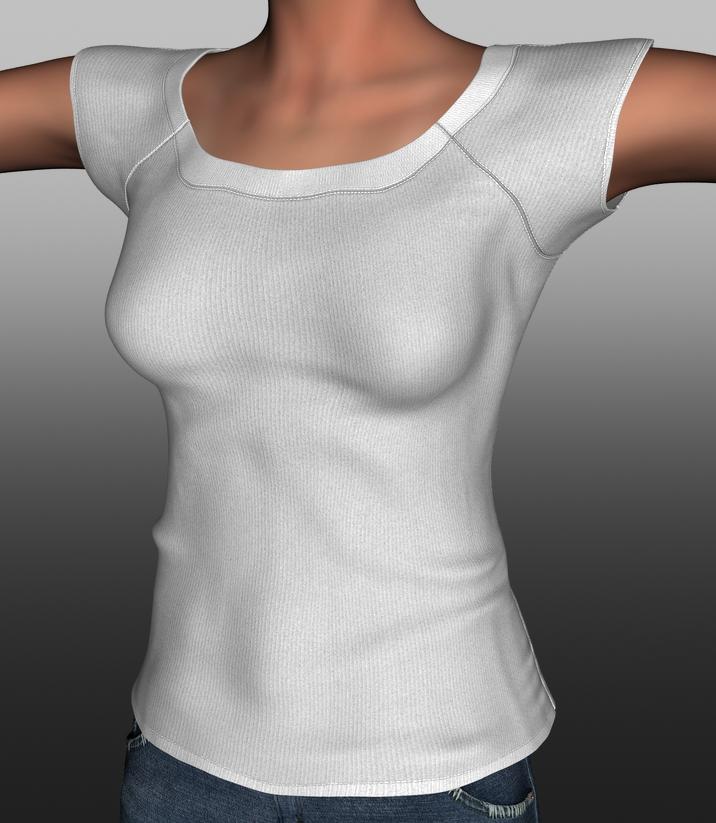
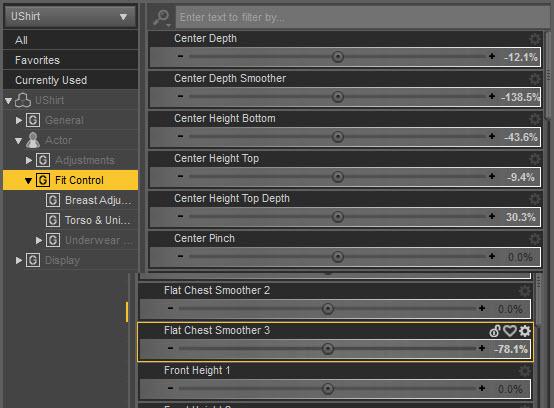
HaleyFor those who have Fit Control, that can help as well. I attached 2 morph combos I used from the breast adjusters.
Didn't recall I had that one too, must be buying too much stuff. lol
Yes, that does a good job too with the UShirt on Haley:
 My First Prop
Hello again Andy, very good explanations. As long as I've used Carrara morphs never drew my attention. My loss. I do have a few questions if you don't mind. Pardon my intrusion. :)
- Does creating the morph for the string reshape the bow or would that also need to be done. I'm assuming that the bow would not have to be reshaped... if so how did you do that, the bow looks very evenly shaped into it's new position?
- Would I want to Subdivide or Tessalate the object before exporting it?
- After adding the Shader/Texture zones and before exporting it for Poser/Daz/etc wouldn't I then Bake them to the object/prop? I know/think they don't need to be Baked on when for Carrara. I'm familiar with material zones for Shaders/Textures.
- When/Why would you want to "weld" an object? I design static main props, some with moving parts.
Note: In your illustration should'nt there be at least 1-3 draw morphs? Drawing a bow IMO and experience can be quite slower than release.
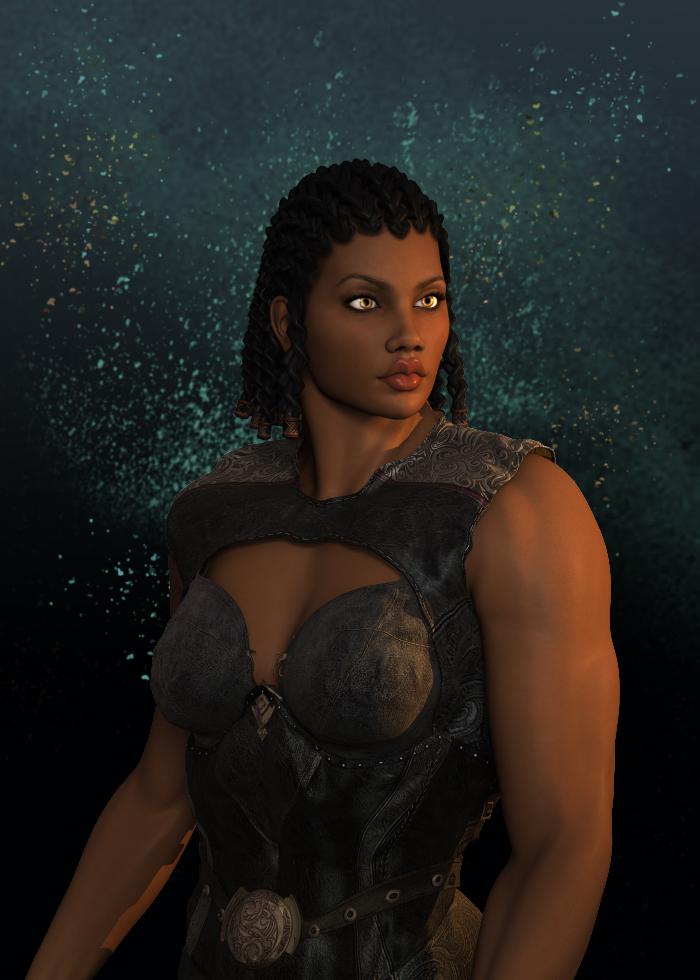
Dracorn's Render ThreadI had a short break before more overtime, so made this portrait for the Black is Beautiful thread.
Rendered in 3Delight using Niara's skin on Victoria 5, with the Head Morph Resource Kit for Genesis for the lips. I rendered it without the background and then played around in Photoshop. Got the lighting just right.
Zetra is the heroine for a book I'm working on. Heroines need to look kick-butt. Can't tell you how many times I've rolled my eyes over some little 120 pound cheesecake beating up a bad guy who outweighs her by 100+ pounds. Gimme a break. Zetra is 6 feet tall and 175 bounds of kick-butt tough gal... who doesn't wear high heels. That's more like it.
 Haley
HaleyFor those who have Fit Control, that can help as well. I attached 2 morph combos I used from the breast adjusters.
Black Is Beautiful IIHere's mine:
Zetra is rendered in 3Delight using Niara's skin on Victoria 5. I used the morph dials plus G1 Head Morph Resource Kits for the lips.
 May 2016 New User 3D Art Contest "Action & Props" - Entries
Title: Top Gun
Software Used:
Daz Studio 4.9 - Creation and IRAY Render
Blender - Custom clothes morph for red top
Photshop CC 2014 - Volleyball levels adjust
fitting older hair to genesis without losing morphsAuroFit will retain morphs - however, some "morphs" are actually pose controls for additional bones (in tails, for example) and AuoFit will remove the extra bones so, without restoring the bones and their influences, those will cease to function.
And is there a way to restore the bones and their influences (without adding them them back in manually, one by one)?
Autofitting without removing bones is a feature Daz should really look at for an update to Daz Studio...
It's not simple, but between Transfer Utility and the Joint Editor tool, it can be done. I did it once, after a lot of trial and error with various options.
Semi-OT - nVidia Pascal cards debut finished, 1080GTX and 1070GTX announced!Thanks Jura, I have my system already and just upgraded to i75960x Hasweel-E and it is overprized but with my 3x Titan X SC it will be just perfect even if I decide to get 1080ti ,Titan Hydro water cooled later so just in case for the future . I have also i74820K and i75820K , on i75820K iray render genesis figure in 3 second with my 3 cards with. But there is larger delay since processor need to update the scene if morph or pose is changed to 3 cards the camera movement is super fast with no delay in real time, with 2 cards everything was faster regarding updates and delay , also Xeons tend to render slower with iray than i7 so definitely not my choice , my socket support both 2011 v3 & Xeon but I think the one you suggested use 2011 socket . I hope it make sense lol
Iray is kind of hybrid , a lot of stuff need good processor , cores don;t matter for GPU rendering as long you have 4 cores 4 cards can run smooth, but then you have another stuff that is processed by CPU like bloom filter, Tone mapping , Updating of the scene when you pose, morph or add another model so good speed core is important , I over clocked just 4 cores of 6 to test stuff out with my i75820K , the Ghz did matter a lot so between 1ghz and 2 ghz very slow , the moment it was on 3ghz it started to run smoother with 4.40 Ghz it was just perfect , I run my older LGA 1150 i74790K at 5ghz that was the best but my mother board got damaged when the card got unlocked and the PCI-e socket was pulled off the board by the card, glad it happen at night when PC was off . I was so mad it was 6 months old motherboard , my case use clips no screws for mounting cards.. well that was for me ..back to screws only as I will never trust this again . So after that I decided to get different MoBo with better processor and jump ahead . Added one more Titan SC Hydro so now 3 total and they going to rock with i7560X , also changed the memory back to 64GB [Corsair DOMINATOR Platinum Series 64GB] they are double expensive than Crucial but the best you can get for my system and they overclock and adjust itself automatic using XMP 2 profile build in so there is not need to do anything for optimal result and can go high . I always wanted but did compromisers , this time I said NO , I will get the rest of the memory when the budged allow. I want the best for me this time making myself the best B-Day gift rig ever lol My complete workstation reach almost 9K investment over 2/½ years without the parts I replaced but hey it is my business not just for rendering in Daz Studio as hobby or games and the only thing that stay me in the way to get better is my budget , not for nothing they say compromises are for losers, as each time I try to cheat with something it die or get broke so I am losing on it only and zero savings , not this time . sorry for the long reply but I am obsessed with gadgets and electronic stuff , I can't never get enough . lol
With 4 x Titan X you need no more than 4 cores processor anything more will make no difference , the only difference is the 4 cores clock as I tested today from 1ghz to 4.2 ghz on my 6 core i75820K
since iray is more of a hybrid , that use both cuda and cpu in the workflow a faster card and slower processor will not improve anything . Each time you move object in the scene you qill have to wait for the CPU to update the scene before it render .
I am closer to my perfect build rig , I am never finished as before I do something new come out and I upgrade lol
LGA 2011 v3 Intel Core i75820K Haswell-E 6 cores at 3.30Ghz Boost 4.4Ghz Haswell-E water cooled $400
CPU water cooler $88
GA-X99P-SLI Mobo $270
128 GB memory $ 428
1TB SSD $320
1+2 TB Sata HD $160
3 xTitan X 12GB Superclocked Hybrid water cooled $3.600
1300W PSU $220
Case Fans +Cables $150
Case - $160
------Total ----- $5590 + my work an time as I build it myself for the last year , but you know, you never finish with building your CPU , I started 18 years ago and still doing it until today lol
now go and buy that by a computer dealer , you will pay at last $1000 or more for that just for the 60 min of work connecting cables .
If I ever want one more Titan X I will have to switch the processor to i75930K at last , same core count but more PCI-e lanes but I guess next year faster processor will be already much cheaper for upgrade
My Mobo and CPU can run now my cards at 16x 8x 8x but I had to disable some SATA ports in the Bios to free some lanes for that
Urrrggghhh... So do I buy a 980ti for my new build, or wait and buy a 1080? All I do with it is render, right now I have a 960 4gig.
I'm lost.
Seriously, I'd wait.
Either until the 980ti drops a decent amount, or the 1080 is proved to be worth the cash for rendering; it is likely to be months though, and probably more likely next year.
A 970 might be a decent compromise, while you consider it.
...think I'll just go back to considering a pair of Titan-Xs for now. They at least work with the current release of Iray and should give me enough video memory for handling the rendering load of most (but still not all) of my scenes. Definitely gonna need that 10 core i7 and gobs of quad channel memory for rendering scenes that exceed the Titan's memory.
if you have the cash, a dual core Xeon (2 x 22 cores) would be awesome; the price is also awesome, as just the Xeons are about $4,000 each.
Although it looks like 10 series cards will be able to share memory, how soon, or if that will include rendering on the consumer versions i'm not going to speculate on.
...yeah need to win the Megabucks lotto for that, however, most Xeons tend to clock slower than i7s (the E5‑2699V4 is rated at 2.2GHz, slower than my old Nehalem i7).
For just the price of those 22 core CPUs, I could build a pretty hefty i7 beast (now up to 10 cores at a base of 3.0 GHz), 128 GB of memory, x 4 Titan Xs (Maxwell) dual 1 TB SSDs with several 4 TB HDDs for storage as well as a 2,000 W PSU to drive it all.
As to memory sharing (using DX12), that will not facilitate memory stacking for rendering purposes and from what I have gathered is more to benefit to frame rate for the latest games.
Hi Cath
If you don't play games or if you are really not to gaming,then I would suggest something like is E5 2683 V3 ES,those ES chips cost lot less than brand spanking new Xeon E5 or i7-5820/5930/5960x etc and they just works,I'm running same ES(Engineering sample) on mine X99 ASRock X99 Extreme 6,this CPU have 14 cores/28 threads and speed 2.35GHz on mine,temps under rendering in 3DS MAX I've never seen higher than 60C with fans running just at 750RPM,just downside is if you are using single threaded application then you are in bit of trouble,have played and playing games on mine and I'm happy with mine,I7 5960X is great CPU,just over priced as well sadly
Regarding using slower GPU and Titan X,I've been using Titan X with GTX780 in IRAY or Octane for few months without the issues,GTX Titan X alone is not slow card,but still with GTX 780 renders are faster,I've done few tests and in some tests GTX780 is fast as GTX Titan X(I'm running Titan X SC with EVGA AIO kit with different fan as stock fan on their kits are just loud,I'm running BeQuiet Pure Wings fan) in some renders,this depends on scene and what counts for me with Titan X is 12GB VRAM although still is way over priced
And regarding GPU rendering as whole,this depends there,I'm still fan on proper old school CPU rendering with Corona and V-RAY which I use most of the time,in work we are have RedShift and Arnold with which I play a lot and would love to have them,but they're well over my budget right now
And if GTX1080 will dethrone Titan X in rendering,I'm loking forward if its worth to get or is worth to wait on new Pascal based Ti or Titan X
Hope this helps
Thanks,Jura
Hi Cath
E5 2683 V3 is LGA 2011-3 CPU with this I'm pretty sure,as I'm running X99(LGA 2011-3) motherboard,have look
http://ark.intel.com/products/81055/Intel-Xeon-Processor-E5-2683-v3-35M-Cache-2_00-GHz
Yes i7-5960x is probably best CPU top the date if you do renders,my friend borrowed me his 5960x and 5820k for few days as I wanted to decide which one will suit me best,this E5 2683 V3 I pulled from our workstation in work as they upgraded and those CPU has been destined I think for bin..I've done only few quick renders in Corona,V-RAY and few other renderers and then I decided,E5-2683 V3 has been fastest in Corona or V-RAY
How to say,in Corona Benchrmark my CPU renders scene in 2:05(stock speeds without theb turbo),with slight OC to BCLK I can do 1:50's,i7-5960x renders same scene at 1:58 and i7-5820k will render same scene in 2:18 and 4790k will render same scene in 3:12(on mine render took 3:28 and this has been my fastest render)
Here is the Corona bechmark link
https://corona-renderer.com/benchmark/?result_page=1
Yes agree different story is in the DS as DS I still think using single core,its not multi threaded,due this you need there good CPU with higher speed,not many threads with lower speeds,same can apply for 3DS MAX,where my old I7-4790k will destroy my current setup in viewport performance,but when comes to rendering,that's different story as with i7-4790k my renders took so long and they're been slower than with my old X5670 which I overclocked to 4.2GHz
In most of CPU renderers you need to OC CPU,you will gain better performance,in some you will gain not so much and heat which they create will not result in better performance in many cases is just not worth it,I went via few of the cases and few cooling solutions and right now Phanteks Enthoo Primo SE is best case to the date what I owned(I would say is on par with my previous case Thermaltake Core X71),if you are looking for good case with good cooling which is quiet and where you can put what you want,get this case and you will be very happy Cath,its nice and roomy case
Regarding the screws,I use always screws for GPU,I think something similar happen with my friend old motherboard,when he broke PCIE slot,but this is pretty much normal on newer motherboards as they have issue/suffer with "sagging",you can get something like this,which is support bracket
http://mnpctech.com/gpu-support-bracket/
Same issue my old Asus Maximus VII Gene with i7-4790k suffered too
Regarding the memory,I can't go beyond 2400MHz on mine(limitation of the Xeon) and on yours,this will depends,I've been using Corsair RAM for many years,but still best RAM to the date what I've used has been G.Skill,with those RAM has been OC very easy,with Corsair,you can get cheaper 3200MHz RAM,but what I don't like on them are latencies,on memory you shouldn't do any compromise,if budget is allowing,if not,then all depends on more factors like where this will be used more in gaming or rendering
I don't use and never used XMP profiles,usually they putting too many volts to vCore or RAM voltage etc,usually quick dirty OC working for me,I don't like pump too many volts to CPU or RAM or MB,most of the time I spend few hours with tuning the settings to perfection if time allows,if not then I'm keeping in reasonable levels and voltages and if I see there is no BSOD in rendering,then I will lower vcore as first and CPU input voltage,CPU cache voltages etc,but mainly higher voltage usually results with higher CPU temps and this I don't like at all
This my build is test build I would say,I still have 2 months at least to return this item if I don't like or I'm not satisfied,I'm still deciding if I want to go with Z10PE-D16 or other Dual CPU workstation baord for next build or I will stick what I've,that's the question for next weeks
Cath regarding Titan X SC Hybrid,did you put own Hybrid AIO or did you bought as they're assembled ? In my case I bought Hybrid kit and put on mine this kit,as temps on stock SC has been very high when I rendered and mainly noise of fan has been too loud,but in my case this pump on Hybrid AIO makes noise
Hope this helps there and good luck
Thanks,Jura
RAMWorks Tutorials: PP2 and HR2 to figure & Painting Genesis in ZBrushHere is a modified one for the Hivewire figure users:
Load up Dawn or Dusk and then deselect the figure.
Load in the hr2 or pp2 file, it will load at the bottom of the Scene list.
NOTE: DO NOT MOVE THE HAIR prop, DO NOT!
NOTE: IF it's a hair prop and the hair loads too high or too low or back a bit or too forward you will need to move and resize Dawn or Dusk to fit that prop pretty much perfectly. So in the image you see below (Alisa you may remember this prop as it's from Apollo, called the Blunt Cut ) it loaded in high and slightly backwards so using the Y translation dial I moved Dawn's body backwards (I turned off the top two layers of the hair in the Surfaces tab to make sure Dawn's head was were it needed to be. I then used the Scale all dial and scaled her body up to the correct height to match the height of the hair.
I then ran the transfer utility with the vary basics:
a: Source: Scene Item: Select your figure, like Dawn or Dusk...
Item Shape: Current
b: Target: Scene Item: Converted prop name will be in the drop down, select that!
Item Shape: Default (leave this setting alone for this transfer)
Projection Template: You can play around with DVL's templates if you want but they are not necessary!
Keep "Smart Left / Right Filtering" on
"User Near Vertices" or "User Adaptive Tolerance" off
General Options, leave at default and make sure and add a check mark to the "Reverse Source Shape from Target"!
Keep the "Fit to Source" on and you can check the "Add Smoothing Modifier" if you so desire.
Click Accept and let it run. The Hair SHOULD now be a figure parented to Dawn or Dusk's head.
Next step, test the hair. Make sure it moves with the head nicely.
NOTE: Medium short styles you will have extra bones that will cause unwanted deformation. So my suggestion is to go back to the Joint Editor. The bones will now be visible. Zoom in and go thought each bone EXCEPT for the main HEAD one, right click on it and and from the menu Delete> Delete Bone (I've not tried the Delete Unused Bones so that's up to you to try that, post if you've had good results using that).
If there are morphs in the hair, they SHOULD come over with the hair. The Apollo Blunt Cut hair had none so can't test that out...
Have fun!Sally... Looks very impressive.I think she's beautiful. I didn't even notice the lines until Serene Night mentioned them. And if I find I really don't like them, I'll photoshop them out with the content-aware healing tool. The eyes are slightly big, but I have met people, both men and women, who've had larger eyes than average. And there's a morph for eye size. Not sure if it's an add-on or not, but I do use it from time to time, usually to make the eyes slightly larger! lol
Sadly, my wallet is empty, but Sally went into my wishlist for a time when I have money again. And these days, I tend to concentrate on male models and clothing, so wanting Sally says a lot about how much I like her.
I have a freebie for asymetric adjustment, and eyes are in there; so even if not included, free is available.
... And yeh, I didn't notice the lines until mentioned.
I vouch for SC's work 100%!!! Every characters is a true joy to work with. Helena from the other store is my no1 character to go to for closeups even thought she's for G2F. Truly quality work!!!
I don't have this beauty yet but here's some renders of Ayako, Mary Jane and Helena!
I think you've just convinced me.
Bryce to DS bridgeDoes everything give you the hang/crash, or only certain things? Bryce is pretty limited in memory, so if you try to transfer something that makes it run out that could be the problem. You might want to try a small test, like just a primitive or single item to see if that works. If that is the issue you might be able to cram more into it by doing it in pieces, restarting to clear any memory used by undo, reducing texture sizes or eliminating unneeded materials prior to transfer, etc.
Some people also do an object export and import rather than using the bridge. Although I forget why, you could try that and see if it makes a difference.
Also although I don't recall the details, there either is or was something where the Bryce screen didn't refresh when the transfer was complete so I spent a lot of time sitting and staring at it in the past before I realized it had actually completed the transfer much earlier.
Sally... Looks very impressive.I think she's beautiful. I didn't even notice the lines until Serene Night mentioned them. And if I find I really don't like them, I'll photoshop them out with the content-aware healing tool. The eyes are slightly big, but I have met people, both men and women, who've had larger eyes than average. And there's a morph for eye size. Not sure if it's an add-on or not, but I do use it from time to time, usually to make the eyes slightly larger! lol
Sadly, my wallet is empty, but Sally went into my wishlist for a time when I have money again. And these days, I tend to concentrate on male models and clothing, so wanting Sally says a lot about how much I like her.
Is there a product to morph G2F to G2M?What I like about conversions like this is being able to broaden weird figures or geografts. Like, if I wanted to give Reptilian 6 breasts... I can. Or if a neat outfit is crossfitting poorly, it's sometimes easier to change the figure.Yep, with such a large proportion of content made to fit female models, sometimes it's just easier to morph them to male shapes and retexture. Especially 3rd generation.
Any Chance of getting HD Add-Ons for The Girl 7 and Kimo 7 ?Rendering in highest quality possible doesn't necessarily depend on HD add-ons. I think it depends (a lot0 more on the skill of the artist.
Or in the near future it depends on searching for an interesting angle and clicking on a button with Nvidia Ansel.
http://www.geforce.com/hardware/technology/ansel
https://www.youtube.com/watch?v=nanaE-vnjo8
In any case the result will be that a lot more people will now create reat time "game art" renders.
People will compare the renders DAZ3D artists do to the "screenshot art" real time renders of games.
Products like HD add ons have the potential to make DAZ3D characters show a bit more detail in the face and other areas.
One might think that having access to the morph add ons right on launch would help to bring across the point that prerendered CG images can still feature more detail then real time games?
Please do not forget why some people spend money in the DAZ store instead of making "game art".
And now read my previous post again. Maybe with that additional information it makes more sense.
Is there a product to morph G2F to G2M?Nalin has a morph for v6. This came out before Genesis 2 male was available : http://www.daz3d.com/fw-naida-and-nalin
Need some simple programming scripts for dazScene, not Sceen.
You need to get the primary selection (if that is what you want to work on), check it's a valid type (usually using .inherits( classname )), then use the findProperty on that, then set or examine the values on that (checking for validity each time).
var figure = Scene.getPrimarySelection();
// Check there was a return and that it's a figure
if ( figure && figure.inherits( "DzSkeleton" ) ) {
	// get the object
	var object = figure.getObject();
	// Make sure that worked
	if ( object && object.inherits( "DzObject" ) ) {
		// get the morph using its name
		// we could usually get this more directly from the figure node
		var lats = object.findModifier( "PBMLatsSize" );
		// check we did get a modifier
		if ( lats && lats.inherits( "DzModifier" ) ) {
			// get the value channel - which holds the value and its keys
			var valueChannel = lats.getValueChannel();
			// this should be a float property, but we will check just that it is a property
			if ( valueChannel && valueChannel.inherits( "DzProperty" ) ) {
				// get the number of keys on the property
				var nKeys = valueChannel.getNumKeys();
				// print the number of keyd and their values
				print( nKeys );
				for ( var n = 0 ; n < nKeys ; n++ ) {
					print( valueChannel.getKeyValue( n ) );
				}
			}
		}
	}
}
(This is what Rob calls arrow code, but I haven't sorted out the anonymous function approach that prodcues neater results yet)
If you execute this in the ScriptIDE pane it will print its results under the edit panel, if you run it from a file it will print to the log.
Animal lovers: Woolly Mammoths releasedGorgeous work. I already had it in my cart when I found out I'd need to buy the elephants as well, which I have no use for and which bring the mammoth to a price tag I just can't justify anymore. Sold as a stand-alone item (at a reasonable price) it would have been an instant purchase for me.
I'm sorry about that, but I actually got several requests to derive morph models out of a main character rather than making standalone figures all the time.
Is there a product to morph G2F to G2M?Yeah it has a morph the that changes G2M to G2F shape and vice versa.
You wanna see a quick render?
Edit: Too late, you've got two now.
Mine is G2F, G2F+50%male, G2F+100%male
Edit2: Spelling
Edit3: 'Course you can't use morphs for G2M on a G2F morphed to G2M shape unless you have transferred them with GenX or Transfer Utility and the same for G2F shape on G2M.
Is there a product to morph G2F to G2M?It is a morph. There is also a G2M shape available for free inside G2F, just look in the hidden clones, and you will find it. However this clone does not pose well, and you need to do an ERC freeze if you wanted to use it. The cross resource kit morph mentioned by Pack58 is a proper morph. I have used it in the image below. G2M on the left, G2F on the right, both using Nevio's skin.
Daz 3D is part of

Connect
DAZ Productions, Inc.
7533 S Center View Ct #4664
West Jordan, UT 84084Licensing Agreement | Terms of Service | Privacy Policy | EULA
© 2026 Daz Productions Inc. All Rights Reserved.