-
3D Art Freebie Challenge ---May: From This Hill I Can See... MAIN Thread
Cosy season
In my country, it's getting pretty cold now... All I wish is I could stay home, in my computer, drinking a hot cocoa...
PS1: Render is without postwork. Render2 is with postwork.
PS2: I can't write more than that as I'm afraid the submission time passed

PS3: the chocolate cup freebie was made by me last year! : D---------------------------------------------------------------------------------------------------------------------------------------------------------------------------
- Floors n Walls** - http://www.sharecg.com/v/65660/browse/11/Poser/Floors-n-Walls
- Mitzy – G3F Head Morph** https://www.renderosity.com/mod/freestuff/mitzy---g3f-head-morph/76254
- Simple Hair** https://www.renderosity.com/mod/freestuff/simple-hair/60687
- Office Desk** http://www.sharecg.com/v/25964/browse/11/Poser/Office-Desk
- Office Swivel Chair** http://www.sharecg.com/v/25957/browse/11/Poser/Office-Swivel-Chair
- Laptop** https://www.renderosity.com/mod/freestuff/laptop-figure/68748
- Glasses for Genesis** http://www.sharecg.com/v/69673/browse/21/DAZ-Studio/freeSPEX-Glasses-for-Genesis-DAZ-4.6
- Glasses for G2F** http://www.sharecg.com/v/80722/browse/21/DAZ-Studio/Nowadays-glasses-for-G2F
- Socks** https://www.renderosity.com/mod/freestuff/g2-socks/75948
- Lamps** https://www.renderosity.com/mod/freestuff/lamps/73799
- Pajama** https://www.renderosity.com/mod/freestuff/g2-pijama/75940
- My Chocolate Cups** http://www.sharecg.com/v/82344/view/21/DAZ-Studio/Chocolate-Cups
- Books** http://www.sharecg.com/v/79164/gallery/5/3D-Model/Book-for-Daz-4
paid: the skin is http://www.daz3d.com/ly-ashlyn-hd

Very nice, and certainly looks cozy! But no hill?
Dana
Omg it's obligatory? I didn't know!

 Well, no hills where I live haha
  My city is a plane... it's 1000 meters above the sea, but it's all plane, it's crazy... And freezing cold this time of the year I like the heat! I want the summer back... Thank you! :D3D Art Freebie Challenge ---May: From This Hill I Can See... MAIN Thread
Cosy season
In my country, it's getting pretty cold now... All I wish is I could stay home, in my computer, drinking a hot cocoa...
PS1: Render is without postwork. Render2 is with postwork.
PS2: I can't write more than that as I'm afraid the submission time passed
PS3: the chocolate cup freebie was made by me last year! : D---------------------------------------------------------------------------------------------------------------------------------------------------------------------------
- Floors n Walls** - http://www.sharecg.com/v/65660/browse/11/Poser/Floors-n-Walls
- Mitzy – G3F Head Morph** https://www.renderosity.com/mod/freestuff/mitzy---g3f-head-morph/76254
- Simple Hair** https://www.renderosity.com/mod/freestuff/simple-hair/60687
- Office Desk** http://www.sharecg.com/v/25964/browse/11/Poser/Office-Desk
- Office Swivel Chair** http://www.sharecg.com/v/25957/browse/11/Poser/Office-Swivel-Chair
- Laptop** https://www.renderosity.com/mod/freestuff/laptop-figure/68748
- Glasses for Genesis** http://www.sharecg.com/v/69673/browse/21/DAZ-Studio/freeSPEX-Glasses-for-Genesis-DAZ-4.6
- Glasses for G2F** http://www.sharecg.com/v/80722/browse/21/DAZ-Studio/Nowadays-glasses-for-G2F
- Socks** https://www.renderosity.com/mod/freestuff/g2-socks/75948
- Lamps** https://www.renderosity.com/mod/freestuff/lamps/73799
- Pajama** https://www.renderosity.com/mod/freestuff/g2-pijama/75940
- My Chocolate Cups** http://www.sharecg.com/v/82344/view/21/DAZ-Studio/Chocolate-Cups
- Books** http://www.sharecg.com/v/79164/gallery/5/3D-Model/Book-for-Daz-4
paid: the skin is http://www.daz3d.com/ly-ashlyn-hd
A very nice cozy scene. You have 2 different sets of glasses but it looks like you used Item 8: Glasses for G2F. You also listed a book but I do not see a book in your scene. Even without these 2 items you have enough free items to qualify.
All links verified
ENTRY ACCEPTED
Please move to Entry Thread
Oh Noes! it's because I changed the camera view somehow and didn't notice! Also the glasses I had two options, but ended up with one (I didn't want to lose the links though). It's been really rushed lately for me, sorry for the lack of attention!
That's okay. I am sure anyone who needs glasses will appreciate having both links. You provided links to some really nice freebies.
3D Art Freebie Challenge ---May: From This Hill I Can See... MAIN ThreadCosy season
In my country, it's getting pretty cold now... All I wish is I could stay home, in my computer, drinking a hot cocoa...
PS1: Render is without postwork. Render2 is with postwork.
PS2: I can't write more than that as I'm afraid the submission time passed
PS3: the chocolate cup freebie was made by me last year! : D---------------------------------------------------------------------------------------------------------------------------------------------------------------------------
- Floors n Walls** - http://www.sharecg.com/v/65660/browse/11/Poser/Floors-n-Walls
- Mitzy – G3F Head Morph** https://www.renderosity.com/mod/freestuff/mitzy---g3f-head-morph/76254
- Simple Hair** https://www.renderosity.com/mod/freestuff/simple-hair/60687
- Office Desk** http://www.sharecg.com/v/25964/browse/11/Poser/Office-Desk
- Office Swivel Chair** http://www.sharecg.com/v/25957/browse/11/Poser/Office-Swivel-Chair
- Laptop** https://www.renderosity.com/mod/freestuff/laptop-figure/68748
- Glasses for Genesis** http://www.sharecg.com/v/69673/browse/21/DAZ-Studio/freeSPEX-Glasses-for-Genesis-DAZ-4.6
- Glasses for G2F** http://www.sharecg.com/v/80722/browse/21/DAZ-Studio/Nowadays-glasses-for-G2F
- Socks** https://www.renderosity.com/mod/freestuff/g2-socks/75948
- Lamps** https://www.renderosity.com/mod/freestuff/lamps/73799
- Pajama** https://www.renderosity.com/mod/freestuff/g2-pijama/75940
- My Chocolate Cups** http://www.sharecg.com/v/82344/view/21/DAZ-Studio/Chocolate-Cups
- Books** http://www.sharecg.com/v/79164/gallery/5/3D-Model/Book-for-Daz-4
paid: the skin is http://www.daz3d.com/ly-ashlyn-hd
A very nice cozy scene. You have 2 different sets of glasses but it looks like you used Item 8: Glasses for G2F. You also listed a book but I do not see a book in your scene. Even without these 2 items you have enough free items to qualify.
All links verified
ENTRY ACCEPTED
Please move to Entry Thread
Oh Noes! it's because I changed the camera view somehow and didn't notice! Also the glasses I had two options, but ended up with one (I didn't want to lose the links though). It's been really rushed lately for me, sorry for the lack of attention!
3D Art Freebie Challenge ---May: From This Hill I Can See... MAIN ThreadCosy season
In my country, it's getting pretty cold now... All I wish is I could stay home, in my computer, drinking a hot cocoa...
PS1: Render is without postwork. Render2 is with postwork.
PS2: I can't write more than that as I'm afraid the submission time passed
PS3: the chocolate cup freebie was made by me last year! : D---------------------------------------------------------------------------------------------------------------------------------------------------------------------------
- Floors n Walls** - http://www.sharecg.com/v/65660/browse/11/Poser/Floors-n-Walls
- Mitzy – G3F Head Morph** https://www.renderosity.com/mod/freestuff/mitzy---g3f-head-morph/76254
- Simple Hair** https://www.renderosity.com/mod/freestuff/simple-hair/60687
- Office Desk** http://www.sharecg.com/v/25964/browse/11/Poser/Office-Desk
- Office Swivel Chair** http://www.sharecg.com/v/25957/browse/11/Poser/Office-Swivel-Chair
- Laptop** https://www.renderosity.com/mod/freestuff/laptop-figure/68748
- Glasses for Genesis** http://www.sharecg.com/v/69673/browse/21/DAZ-Studio/freeSPEX-Glasses-for-Genesis-DAZ-4.6
- Glasses for G2F** http://www.sharecg.com/v/80722/browse/21/DAZ-Studio/Nowadays-glasses-for-G2F
- Socks** https://www.renderosity.com/mod/freestuff/g2-socks/75948
- Lamps** https://www.renderosity.com/mod/freestuff/lamps/73799
- Pajama** https://www.renderosity.com/mod/freestuff/g2-pijama/75940
- My Chocolate Cups** http://www.sharecg.com/v/82344/view/21/DAZ-Studio/Chocolate-Cups
- Books** http://www.sharecg.com/v/79164/gallery/5/3D-Model/Book-for-Daz-4
paid: the skin is http://www.daz3d.com/ly-ashlyn-hd
A very nice cozy scene. You have 2 different sets of glasses but it looks like you used Item 8: Glasses for G2F. You also listed a book but I do not see a book in your scene. Even without these 2 items you have enough free items to qualify.
All links verified
ENTRY ACCEPTED
Please move to Entry Thread
3D Art Freebie Challenge ---May: From This Hill I Can See... MAIN ThreadCosy season
In my country, it's getting pretty cold now... All I wish is I could stay home, in my computer, drinking a hot cocoa...
PS1: Render is without postwork. Render2 is with postwork.
PS2: I can't write more than that as I'm afraid the submission time passed
PS3: the chocolate cup freebie was made by me last year! : D---------------------------------------------------------------------------------------------------------------------------------------------------------------------------
- Floors n Walls** - http://www.sharecg.com/v/65660/browse/11/Poser/Floors-n-Walls
- Mitzy – G3F Head Morph** https://www.renderosity.com/mod/freestuff/mitzy---g3f-head-morph/76254
- Simple Hair** https://www.renderosity.com/mod/freestuff/simple-hair/60687
- Office Desk** http://www.sharecg.com/v/25964/browse/11/Poser/Office-Desk
- Office Swivel Chair** http://www.sharecg.com/v/25957/browse/11/Poser/Office-Swivel-Chair
- Laptop** https://www.renderosity.com/mod/freestuff/laptop-figure/68748
- Glasses for Genesis** http://www.sharecg.com/v/69673/browse/21/DAZ-Studio/freeSPEX-Glasses-for-Genesis-DAZ-4.6
- Glasses for G2F** http://www.sharecg.com/v/80722/browse/21/DAZ-Studio/Nowadays-glasses-for-G2F
- Socks** https://www.renderosity.com/mod/freestuff/g2-socks/75948
- Lamps** https://www.renderosity.com/mod/freestuff/lamps/73799
- Pajama** https://www.renderosity.com/mod/freestuff/g2-pijama/75940
- My Chocolate Cups** http://www.sharecg.com/v/82344/view/21/DAZ-Studio/Chocolate-Cups
- Books** http://www.sharecg.com/v/79164/gallery/5/3D-Model/Book-for-Daz-4
paid: the skin is http://www.daz3d.com/ly-ashlyn-hd
Very nice, and certainly looks cozy! But no hill?
Dana
3D Art Freebie Challenge ---May: From This Hill I Can See... MAIN ThreadCosy season
In my country, it's getting pretty cold now... All I wish is I could stay home, in my computer, drinking a hot cocoa...
PS1: Render is without postwork. Render2 is with postwork.
PS2: I can't write more than that as I'm afraid the submission time passed
PS3: the chocolate cup freebie was made by me last year! : D---------------------------------------------------------------------------------------------------------------------------------------------------------------------------
- Floors n Walls** - http://www.sharecg.com/v/65660/browse/11/Poser/Floors-n-Walls
- Mitzy – G3F Head Morph** https://www.renderosity.com/mod/freestuff/mitzy---g3f-head-morph/76254
- Simple Hair** https://www.renderosity.com/mod/freestuff/simple-hair/60687
- Office Desk** http://www.sharecg.com/v/25964/browse/11/Poser/Office-Desk
- Office Swivel Chair** http://www.sharecg.com/v/25957/browse/11/Poser/Office-Swivel-Chair
- Laptop** https://www.renderosity.com/mod/freestuff/laptop-figure/68748
- Glasses for Genesis** http://www.sharecg.com/v/69673/browse/21/DAZ-Studio/freeSPEX-Glasses-for-Genesis-DAZ-4.6
- Glasses for G2F** http://www.sharecg.com/v/80722/browse/21/DAZ-Studio/Nowadays-glasses-for-G2F
- Socks** https://www.renderosity.com/mod/freestuff/g2-socks/75948
- Lamps** https://www.renderosity.com/mod/freestuff/lamps/73799
- Pajama** https://www.renderosity.com/mod/freestuff/g2-pijama/75940
- My Chocolate Cups** http://www.sharecg.com/v/82344/view/21/DAZ-Studio/Chocolate-Cups
- Books** http://www.sharecg.com/v/79164/gallery/5/3D-Model/Book-for-Daz-4
paid: the skin is http://www.daz3d.com/ly-ashlyn-hd
Simplifying autofit hair?Also make sure that you haven't done something like used Full-body' for the transfer.
A dummy for posingI bet some code could be written to use the xbox kinect and transfer the pose to Daz. Some of the VR/3D stuff people do with that gadget is insane.
mCasualJacques has already done this, the scripts and instructions are available on his website: https://sites.google.com/site/mcasualsdazscripts4/mcjkinectkit001
Now all I need is a kinect then...
Used Kinect for Xbox360 can be bought for $40 or less lots of places. Got mine at GameStop, with the power cord for $40.
I should note that mCasual's scripts for the Kinect do NOT work with the new Kinect One. Only the older 360 Kinects.
How to export a moph from zbrush to daz?16. Make changes to your character, ensuring that you don’t add or subtract polysEdited to include FixmypcMike's extra step for G3.
This part is key. If you alter the number of polys in zbrush, all bets are off and the object will not import properly. This effectively limits the brushes you can use in zbrush (only the move brushes and a couples others). -PJust to mention it once again in another thread:
You can use any brush you want in Zbrush no matter if it adds or removes vertices or polygons if you use a Projection based workflow
- - -
Between step 10 and 11
10B
- create a copy of the base mesh so you have two meshes in the sub tool list
- leave the original base mesh as it is and work on the copy (the projection source mesh)
- hide the base mesh to better see the projection source mesh whilie working on it.
- - -
Between step 16 and 17
- 16B use Projection to project all the changes made on the source mesh to the original base mesh.
In order to efficiently use projection
- hide all the parts of the source mesh that you do not want to project.
- use masks on the target mesh to block out any areas that you do not want to affect
- Experiment with the projection settings to get the result you are looking for.
- project changed areas one after the other (instead of trying to project the whole mesh at the same time)
- - -
Limitations and challenges of a projection based workflow:
So far I have not been able to project very complex character shapes in one try.
But Projection works pretty well to transfer shapes that just affect one area.
In any case it is some kind of a trade of:
You can use any brush you want during the modeling stage and are completly free.
But as a downside you may have to goof around a bit longer during the projection stage to figure out the proper settings that work to transfer the changes back.
After some experimentation you will start to get a feeling for which type of morphs a projection based workflow is better suited and when you might want to use the default workflow with brushes that do not alter the polygon count.
- - -
Side note:
Especially all the Zmodeler brushes allow low polygon sculpting in very creative ways but some of them do alter vertices and polygon count.
Have a look at all the tutorial videos in the ZClassroom.
Once you know how to use all those brushes that target combinations of points, edges and polygons you may also find that using them together with a projection based workflow offers a lot of interesting ways to create morphs.
Not only for characters...
compare:
http://pixologic.com/zclassroom/course/digital-sculpting-modeling
- - -
Use the search function in this forum and on google to find some screenshots and tutorials about Projection.
- - -
Semi-OT - nVidia Pascal cards debut finished, 1080GTX and 1070GTX announced!We can agree on many things and that is true, I am not arguing with you I just see the facts for today .
Same here. We just interpet them differently.

There is a difference between Overclocked and Super clocked , Super clocked are the cherry picked GPUs that can run faster than the regular standard one without any adjusting in voltage or memory water cooled or not , they have higher standard clock and so the boost and many of them running much faster than the specifications on the page , as no one card I own match any specification as they run match faster and in most case 25% more than the specification page
Actually, they DO have adjusted voltage and current limits. They're just done on the board, at the factory, based on the increased cooling performance. Those 'cherry-picked' GPUs are mainly for being able to handle those increases. Too many impurities or crystallographic faults in the silicon where important gates are result in failures at higher power/voltages/frequencies. This is why overclockers look for certain 'batches' of chips based on the data printed on the chip (which includes the batch date.) The ones that had a very good silicon ingot the wafers were cut from will have fewer potential issues, and thus can be pushed further beyond baseline specs. Most modern GPUs this isn't a big issue anymore (like it was back in the 90s and early 2000's) so it's more a matter of having sufficient cooling, increased power and regulation, and better heat transfer......all hardware the AIB's upgrade on their 'performance' cards.
But my point is that the standard 1080 they used for the public test was heavy overclocked and the benchmark numbers will never reach the speed on consumer machine . It may be faster but not for us , if Nvidia want they can run Titan X 70% faster in iray as it already is but for that you need to pay 3 times the price , so thinking that 1080 will be better in iray make not sense for the people that spend so much money for multiple cards . And maybe one M6000 is slower in iray than 1 Titan X but 2 M6000 are faster than 2 Titan X .. it is controlled by iray software and have nothing to do with graphic card specifications or the speed of GPU it never was that is how business is made . So what we can expect from super clocked multiple 1080 in iray is up to Nvidia and not product specifications and since Nvidia see Titan X 12 GB more as workstation card than game there is a chance thing can change for better soon regarding rendering .
It was overclocked in ONE demo, and they pointed it out. Hence why they showed the 2144MHz clocking and the temp (67C)...but they audience couldn't hear the fans blowing at full speed since the boxes were backstage.....And the graphs did show where the power consumption was estimated for at those overclocks.
As for the 'business' side, I think nVidia wants to push 1080/1070 right now and Iray WILL be faster on Pascal than on Maxwell. I'm still betting that the next quadro/titan generation will be Volta, not GP102. I think GP102 will be the Titanium cards. And the Volta, if it follows even close to what nVidia claims, will be another big jump. So Quadro and Titan will get even MORE powerful. But that's at least a year away, maybe more. 1080 won't be HUGELY more powerful than top-end Quadro or top-end Titan-X, but it will be slightly more. Most businesses won't pay a premium just for a small (10-20%) boost with less support. But when Volta debuts, they'll pay $$$$ for those kinds of boosts.
Yes, I know they have hamstrung render performance in the drivers in some generations to prevent them from competing with their more professional-oriented cards. Kepler was a perfect example of this, and they continued it with Maxwell. It's nothing new in the computing industry. It's easier typically to mass-produce one thing, then sell it at various price-points based on artificial limits. Given the needs Pascal was created to solve, I would think they're planning more along what I described. GP102 might have an 'interim' quadro/titan....but I think it'll be quite limited....And Volta is where they'll truly bring out the Professional-level cards.
And if 1080 run soon 5 times faster in the games I will be happy for the gamers but for me it will have no value if the GPU is compromised in iray .. I can just hope for the best , bird in the hand is worth 2 in the bush lol
I can't see it running quite THAT fast. 3x, maybe up to 4x, in VR, where the simultaneous Multi-View basically doubles performance for stereoscopy.....but just plain render/pipeline speed, It's about a 30%-50% gain over Maxwell at base clocking (or will be, once they get the drivers fixed.) That's pretty impressive, and doing it for less power is even better.. But it isn't the GPU that is compromised.....it's usually in the driver or firmware. That's almost as bad, but it CAN be gotten around. Just a LOT more effort to do so, and a lot of risk to the hardware.
And I wouldn't recommend to anyone to go out and buy the Founders Edition cards yet. There's a lot left to do for Pascal to be really evaluated. Just like EVERY initial hardware/software release. If they need performance NOW, get a 980Ti or a Titan-X. If they can wait until Pascal finishes its shakedown cruise (and starts showing the gains it should and is fully compatible with Iray and such which I think it will) THEN they should wait and (1) let 980Ti/Titan prices drop and (2) see what the actual performance of Pascal is when it's no-longer 'bleeding-edge'. Then I think they'll go with the 1080....or wait for the 1080Ti.
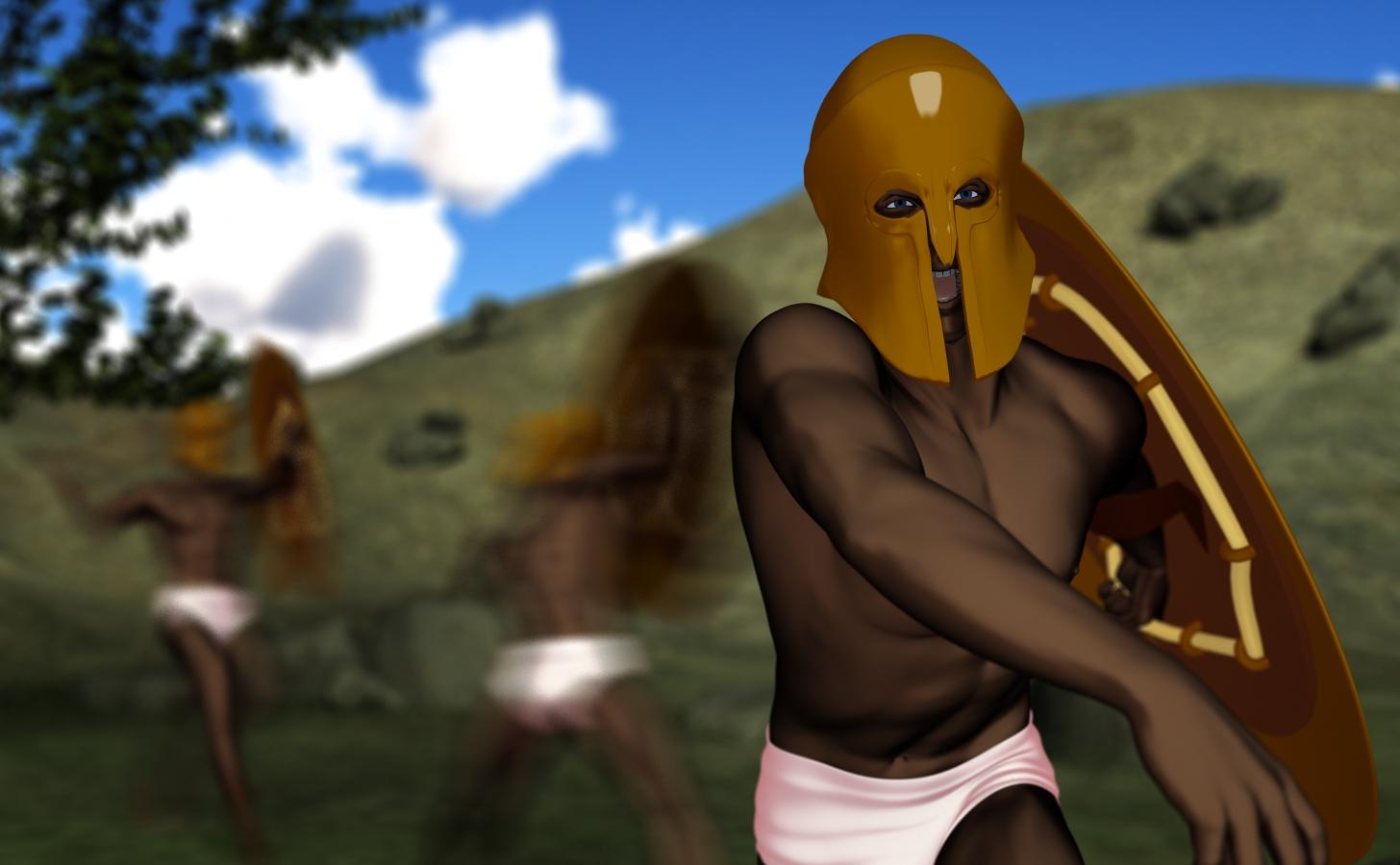
May 2016 New User 3D Art Contest "Action & Props" - WIPWell, I didn't have time to do this earlier to get feedback, so it is what it is. I was hoping to have time to develop more of a story, but it basically turned into practicing a bunch of new things. This month I started learning about toon renders, motion blur, how to do some stuff with puppeteer, how to morph terrains (still working on the clothing thing), found out Daz will use .obj files, found some really good free content, etc. It has been a great month for learning. Thanks to everyone who has offered such great input into this discussion board, I appreciate it!
That said, I think the background is blurred too much and I added too much motion blur to the background figures. I also think my shading is too dark on my character, especially for such a sunny day. I still need to work on adding shaders or using the toony cam pro to get a toon background (but I can't do motion blur with the toony cam because it uses scripted 3delight). Fun nonetheless.
 My First Prop
Andy. I should have asked how you got the very smooth look to to both ends of the bow. I was trying with dynamic extusion checked with no luck and drawing in the Z axis. Hmm... wonder what this "double sweep tool does"? Hah... the more I learn the more I need to learn. :)
I know that the bow was made quickly which explained it's simple look. Thanks for the pointers.
I understand the morph but had forgotten the power of keyframing. ;\
FBX Export morphing problem with scaling and skeletonIt would appear that morphs that use scaling, when exported, do not affect the skeleton. Using MS Lycan as an example, when exported with the MS-Lycan morph from Daz to any other program will retain the Genesis skeleton scaling and position making animations impossible. If there's a certain function I need to access and can write into a C# class, that would also be acceptable, but searches for any solution return null.
Transferring Morphs from Genesis to G2M/G2F and from G2M/G2F to Genesis (Now with Clones!)Just getting caught up in this thread... if I wanted to create separate G2F->G3F morphs for head and full body, I would still have to transfer the entire figure's OBJ -- I just have to do it two times, each for the head and body, right?
Thanks :)
Celebrity Look-a-Likes for 3D figures Part 2what's the best way to pack up a g3f face to give out?
Custom-modelled morph of using standard morphs? Shaping preset for the latter.
No Goz plugin for 4.8.0.59Hello Friends,
I have installed Zbrush 4R7 P3. Unfortunately Goz plugin is not present. And i am not able to find how to download plugin for my daz version.
Can someone provide me or tell me a how to transfer my model into Zbrush without plugin.
Thank You.
Ps. I dont want to update either of software.
Semi-OT - nVidia Pascal cards debut finished, 1080GTX and 1070GTX announced!+1 exactly ... I saw that ... I actually believed everything for a moment until I got hint from sommeone that own the pre release ...for that reason I purchased different card and saved myself a troubles not only with the card but also late support for iray .
Thats... not what's happening. The clock is scaled back due to the increased temperatures, not because the fan speed is dropping down and indicating heat/power got too high.Tom's has a pretty good chart http://www.tomshardware.com/reviews/nvidia-geforce-gtx-1080-pascal,4572-11.html which shows the temperature curves. The problem is that the fans cannot provide enough thermal cooling with a full load, not because the fans cannot ramp up fast enough. It also clearly shows how the 1080 *does* work properly by delinking the temperature-fanspeed feedback and running the fans at 100%. That indicates a few things, namely:
- Heat dissipation design is inadequate, either from a heat sink or fan design issue (or both)
- Not enough thermal contact/transfer between die and heat spreader -- typical for smaller dies because of smaller surface
- Final clocks and voltages were changed *after* the thermal design was completed
Semi-OT - nVidia Pascal cards debut finished, 1080GTX and 1070GTX announced!Not sure if it was brought up in this thread yet -- there are a lot of pages -- but I heavily urge caution at anyone who is thinking of the 1080 at this point purely on benchmarks. In particular, specific reviewers noticed that most synthetic benchmarks were performed in open environments and not in enclosed cases. In most cases, the card was unable to sustain boost clocks inside a case and were thermally throttled. There were also issues with overclocking the 1080 due to the power regulator design on the Founders Edition.
At this point, no one *really* knows how well FinFETs and Pascal can overclock due to the inherent board limitations of these reviews. It's doubtful that there's an actual thermal issue with the product, so waiting for some hybrid coolers to come out may be a good idea...
A lot of people are throwing around info here, and not all are understanding it. The 'Fan Issue' is a small issue. The big issue (in the minds of those who understand what is going on with the board) is that thermal/power throttling is happening after a few minutes of high-load usage. Now, being brutally honest, the issue isn't the card, but the default settings in the driver/firmware for fan speeds at varying load temps. It doesn't ramp up quickly enough, and you end up getting 'spikes' of the fan jumping up to full (100%) tach, then slowly dropping back to a more tolerable level. And when this happens, it indicates the heat/power got too high, so the GPU throttles back on any OC'd frequency.
If you just run the card at stock speeds, it holds up pretty admirably even at full load. But when you start overclocking, you will need to put your GPU fan at a fixed (and rather high) value if you don't want it to 'choke' out and be constantly revving/slowing the fan. Of course, running the fan at full all the time works perfectly.....except for the massive noise.
Thats... not what's happening. The clock is scaled back due to the increased temperatures, not because the fan speed is dropping down and indicating heat/power got too high.
Either I didn't communicate it clearly, or you misunderstood. I wasn't implying the fan was controlling the behavior, but was simply a symptom of the heat/power increasing, and the fan not being appropriately increased until it had reached the throttling point. At which point it maxes the fan, cools down, the fan reduces back too low, and we start the cycle over. This is what can be seen in the graphs of the fan behavior under heavy GPU loads.
Tom's has a pretty good chart http://www.tomshardware.com/reviews/nvidia-geforce-gtx-1080-pascal,4572-11.html which shows the temperature curves. The problem is that the fans cannot provide enough thermal cooling with a full load, not because the fans cannot ramp up fast enough. It also clearly shows how the 1080 *does* work properly by delinking the temperature-fanspeed feedback and running the fans at 100%. That indicates a few things, namely:
- Heat dissipation design is inadequate, either from a heat sink or fan design issue (or both)
- Not enough thermal contact/transfer between die and heat spreader -- typical for smaller dies because of smaller surface
- Final clocks and voltages were changed *after* the thermal design was completed
I've seen plenty of the graphs. The most telling is that if the fan is manually set at 100%, then the Founders Edition cards will run at 2100 MHz with temps staying below 80C. The problem is that the current implementation isn't handling load vs fan speed correctly.....it waits too long before ramping the speed of the fan up, and then ramps the fan very slowly. When the heat build-up gets too high, the GPU throttles down and the fan goes to max. Once the heat is dissipated sufficiently, the GPU unthrottles, and the fan slows down. And then the cycle repeats.
It's a symptom of the current firmware/drivers being gaming based, where GPU load is very transitory. If the load doesn't stay high for more than a couple of minutes, the cooling in the Founders Editions is sufficient. But if it lasts longer than that, it becomes a problem. Furthermore, if it goes straight to max load, and pretty much stays there, it happens even faster.
Since the card operates at full load without temps being an issue when the fan is set to 100%, you can't really say the thermal design is 'inadequate'. Even overclocked 30%, it holds up just fine that way. It's only when the firmware/driver is controlling the fan speed that the issue manifests. That points directly to fan control issue. Yes, a bigger and more capable thermal solution will also work, but only masks the real issue until you hit another heat/load level at which it will likely also show the same behavior.
Semi-OT - nVidia Pascal cards debut finished, 1080GTX and 1070GTX announced!Not sure if it was brought up in this thread yet -- there are a lot of pages -- but I heavily urge caution at anyone who is thinking of the 1080 at this point purely on benchmarks. In particular, specific reviewers noticed that most synthetic benchmarks were performed in open environments and not in enclosed cases. In most cases, the card was unable to sustain boost clocks inside a case and were thermally throttled. There were also issues with overclocking the 1080 due to the power regulator design on the Founders Edition.
At this point, no one *really* knows how well FinFETs and Pascal can overclock due to the inherent board limitations of these reviews. It's doubtful that there's an actual thermal issue with the product, so waiting for some hybrid coolers to come out may be a good idea...
A lot of people are throwing around info here, and not all are understanding it. The 'Fan Issue' is a small issue. The big issue (in the minds of those who understand what is going on with the board) is that thermal/power throttling is happening after a few minutes of high-load usage. Now, being brutally honest, the issue isn't the card, but the default settings in the driver/firmware for fan speeds at varying load temps. It doesn't ramp up quickly enough, and you end up getting 'spikes' of the fan jumping up to full (100%) tach, then slowly dropping back to a more tolerable level. And when this happens, it indicates the heat/power got too high, so the GPU throttles back on any OC'd frequency.
If you just run the card at stock speeds, it holds up pretty admirably even at full load. But when you start overclocking, you will need to put your GPU fan at a fixed (and rather high) value if you don't want it to 'choke' out and be constantly revving/slowing the fan. Of course, running the fan at full all the time works perfectly.....except for the massive noise.
Thats... not what's happening. The clock is scaled back due to the increased temperatures, not because the fan speed is dropping down and indicating heat/power got too high.
Tom's has a pretty good chart http://www.tomshardware.com/reviews/nvidia-geforce-gtx-1080-pascal,4572-11.html which shows the temperature curves. The problem is that the fans cannot provide enough thermal cooling with a full load, not because the fans cannot ramp up fast enough. It also clearly shows how the 1080 *does* work properly by delinking the temperature-fanspeed feedback and running the fans at 100%. That indicates a few things, namely:
- Heat dissipation design is inadequate, either from a heat sink or fan design issue (or both)
- Not enough thermal contact/transfer between die and heat spreader -- typical for smaller dies because of smaller surface
- Final clocks and voltages were changed *after* the thermal design was completed
My First PropHi John :)
Does creating the morph for the string reshape the bow or would that also need to be done. I'm assuming that the bow would not have to be reshaped... if so how did you do that, the bow looks very evenly shaped into it's new position?
both parts need to be edited together as a single verex model,. since a morph is a transformation of the vertices of an object,. both "parts" of the model need to be together in the same "Object" ,.. so,. the Bow and String are modelled and morphed as a single "vertex model", which is made up of two unconnected poly-meshes.
the Bow I made was very simply modelled,. which makes it easier to adjust since there's not much geometry,. I just grabbed both ends of the bow and moved them to get the curve,. then moved the string into position and moved the middle back to create the final "Drawn back" morph target.
After adding the Shader/Texture zones and before exporting it for Poser/Daz/etc wouldn't I then Bake them to the object/prop? I know/think they don't need to be Baked on when for Carrara. I'm familiar with material zones for Shaders/Textures.
When you export as OBJ,. it'll save the names of the "shading domains", and those appear in DS or poser,. for the shaders or textures, it depends on what you're using.
If you're using Carrara shader functions such as procedural patterns or noise,. then you'd need to bake those to a texture map,. since DS or Poser doesn't have those shader functions. (or you could try to rebuild that procedural shader in the host application)
TIP: If you create a plane,. add your procedural shader to it,. and export as OBJ (with the option to ) "Create texture maps from procedural shaders"
to create a "basic" diffuse texture map. (just bin the Plane.OBJ and.MTL,. and keep the texture map. :)
Baker for Carrara gives you much more control and exports a range of maps from shaders, eg: Diffuse, Bump , Specular, Normal etc. which maks the process much simpler.
Once the shaders are baked to texture maps,. you'd load those into the shaders for DS or Poser.
When/Why would you want to "weld" an object? I design static main props, some with moving parts.
I suppose,. the same reasons you would weld things together in the real world,. it simply joins two things into one,. by connecting vertices and edges,.
If you made a Chassis for a vehicle,. and you used a single tube section,. duplicated and repositioned to make the frame,.
Although that would work, and be low poly,. it could be awkward to work with and texture,. so welding those parts together makes sense.
In the Bow and string,. you could weld both parts together, then create a morph and select polys to create the shading domains,. but I think it's easier to have the two parts simply placed together in the modeler,. and be able to select each part and adjust it's mapping or shader seperately.
Note: In your illustration should'nt there be at least 1-3 draw morphs? Drawing a bow IMO and experience can be quite slower than release.
Actually you only need the one morph target shape for the main "Fully Drawn" position,.
I added a couple more to create the effect of reverb on the string,. those were animated with a couple of keys and the oscillate tweener.
When you create a Morph target,. you're setting a target shape for the original geometry,. and this creates a slider control,. which goes from (0) "no effect" to (100) "Full shape" ,.. and those morph values can be keyframed over time to animate the model,.
think of a Smile or Blink morph,. and how it can be adjusted, and animated to make the actor smile slowly or suddenly grin,. or Wake up slowly or flutter the eyelids
so,. a single morph, can be adjusted and keyframed, with different values and speeds, to create different effects.
How long it takes to draw back,. Hold,. and the speed of the release and springback of the bow,. (and the archer),. are all down to animating those mophs values to create keyframes at different points in the timeline,. and moving keyframes in the timeline to get the action, or effect, you need.
You could,.for example,. have a much slower animation of the release,. to create a slow-motion section, or follow the arrow leaving the bow.
Hope that makes sense :)
Daz 3D is part of

Connect
DAZ Productions, Inc.
7533 S Center View Ct #4664
West Jordan, UT 84084Licensing Agreement | Terms of Service | Privacy Policy | EULA
© 2026 Daz Productions Inc. All Rights Reserved.