-
July 2016 New User 3D Art Contest “Portrait Rendering” – WIP Thread
Thanks Dracorn! You have a great eye for detail. Good comments and suggestions all around.
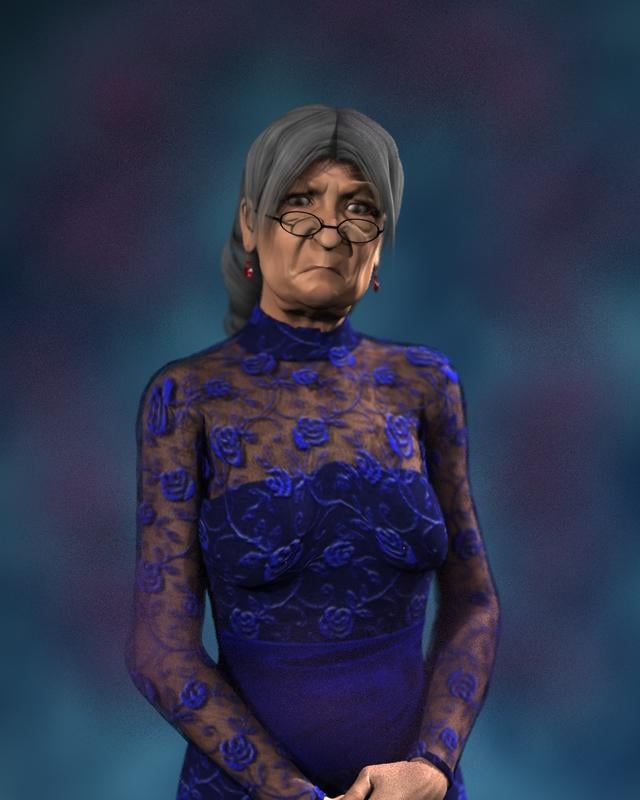
I was concentrating on the face and expression and overall layout. One thing I know I need to work on, but am really hesitant to tackle is the Fit Control. The gown really got distorted when I made adjustments to the bustline. That's next.
I did make a few changes. Color scheme still needs work, I know. Maybe a gold background...
Oh, and I stand corrected. McGillicuddy it is!

edit to add: yes, I did use an aging morph for V4; and yes, I tweaked the settings for the face, and the expression .
I like, I just realized I am using that same dress for my WIP entry. Oh the embarrassment. Something is telling me she needs to be in front of a chalkboard and grasping a ruler in a classroom environment.
@ nonesuch00 HA! Same dress! That's ok...go for it.
I was going to try using Fit Control to smooth out the dress at the bustline after it got deformed during the aging process, but...guess what! There is no Fit Control for V4! So...now she looks kinda saggy, and her dress looks kinda saggy to match!
I meant to do that.

https://www.youtube.com/watch?v=9hNIX7V21pU
I like your choice of characters!
I suggest recropping so she is not cut off in the middle of her hands. I'd even like to see it cropped above the elbow (I've been told to never crop at a joint), to make the image more about her face and expression. That is also a good trick to avoid that under breast fit issue.

The texture of this dress (the purple lace, etc.) seems a little two "evening wear" for a 2nd grade teacher. There are many many textures for the MFD, some even free. Perhaps a different one would say "teacher" a little more.
Celebrity Look-a-Likes for 3D figures Part 2I believe it to be Rachel Lefebre - especially when you consider the following image of her in "Under the Dome"
If https://www.renderosity.com/mod/bcs/index.php?ViewProduct=111690 is supposed to be Rachel Lefebvre, then I am Brad Pitt
Okay Mr Pitt.
I can't see there being any doubt that it's supposed to be Rachelle Lefevre, or at least her character of Julia from Under The Dome. The promo pic and similar name are a clear giveaway.The promo image is made to look similar to Rachel's photo, I give you that much, but I'm just saying the the character morph itself looks nothing like the actress...not by a long shot, if that is indeed what the creator was going for
 Kenji 7 - DiscussIf you have SimTenero Shape Reprojector I'm sure you could throw together a decent genital bulge morph...
I don't have that. It would be cheaper to buy the Genesis 3 Male Body Morphs. lol
And simpler. And you get a bunch of other insanely useful dials as well as the bulge (same thing for ShapeShift.)
Yeah, I'm feeling the pull to those for sure. They've been on my wish list for a couple of months and I'm hoping they get added to a deep sale soon. :D
Kenji 7 - DiscussIf you have SimTenero Shape Reprojector I'm sure you could throw together a decent genital bulge morph...I don't have that. It would be cheaper to buy the Genesis 3 Male Body Morphs. lol
And simpler. And you get a bunch of other insanely useful dials as well as the bulge (same thing for ShapeShift.)
Kenji 7 - DiscussIf you have SimTenero Shape Reprojector I'm sure you could throw together a decent genital bulge morph...I don't have that. It would be cheaper to buy the Genesis 3 Male Body Morphs. lol
Carrara Genesis 3Well now we have GenX to bring G3M and F morphs over and I have gotten a reasonable workflow to transfer outfits over to G2M and Female and Genesis with additional bones, these new pro bundles like Kenji 7 looking slightly more tempting, only Skins, poses and HD morphs unuseable in Carrara on my Genesis2 and below.
The only stumbling block for me now is the still abysmal Australian dollar.
but once that improves if it does and there is another sale, might start to buy Genesis 3 stuff and wrestle it into Carrara friendly assets in DAZ studio, I am a sucker for new shiney .
Wendy,
can you list the products needed to do it... with maybe the links to the items in the store

would like to see what's involved as well as the cost... then maybe wishlist till a big sale comes along
For taking Genesis3 clothes to turn them into Genesis1 clothes, you need Sickleyield's Genesis 3 Clones for Genesis (link is for the bundle, but if needed you could buy either the Genesis3Female to Genesis1 clone or the Genesis3Male to Genesis1 clone):
http://www.daz3d.com/genesis-3-clones-for-genesis-bundle ($32.95)
For taking Genesis2 clothes to turn them into Genesis2 clothes there are 2 products for the male and female versions (no bundle that I could find on this one):
http://www.daz3d.com/genesis-3-male-for-genesis-2-male-s (Genesis 3 Male for Genesis 2 Male, $14.95)
http://www.daz3d.com/genesis-3-female-for-genesis-2-female-s (Genesis 3 Female for Genesis 2 Female, $19.95)
For taking character morph shapes from any Genesis 3 character and putting it on a Genesis2 or Genesis1 figure, you'd need the Genesis Generation X2 tool/plugin:
http://www.daz3d.com/genesis-generation-x2 ($37.95)
but that's just the base program to get shapes from Generation 4 figures and poser figures to Genesis1, by itself it doesn't cover Genesis2 or Genesis 3, so you'd need the plugin addons:
http://www.daz3d.com/genx2-addon-for-genesis-2 ($9.95)
and http://www.daz3d.com/genx2-addon-for-genesis-3 ($14.95)
Thanks @jonstark
Daz may have to bundle it all up and discount it heavily to entice us... while we wait ( only been 3 years ) for the update to come.
 July 2016 New User 3D Art Contest “Portrait Rendering” – WIP Thread
Thanks Dracorn! You have a great eye for detail. Good comments and suggestions all around.
I was concentrating on the face and expression and overall layout. One thing I know I need to work on, but am really hesitant to tackle is the Fit Control. The gown really got distorted when I made adjustments to the bustline. That's next.
I did make a few changes. Color scheme still needs work, I know. Maybe a gold background...
Oh, and I stand corrected. McGillicuddy it is!
edit to add: yes, I did use an aging morph for V4; and yes, I tweaked the settings for the face, and the expression .
I like, I just realized I am using that same dress for my WIP entry. Oh the embarrassment. Something is telling me she needs to be in front of a chalkboard and grasping a ruler in a classroom environment.
@ nonesuch00 HA! Same dress! That's ok...go for it.
I was going to try using Fit Control to smooth out the dress at the bustline after it got deformed during the aging process, but...guess what! There is no Fit Control for V4! So...now she looks kinda saggy, and her dress looks kinda saggy to match!
I meant to do that.
https://www.youtube.com/watch?v=9hNIX7V21pU
Well the sag is sort of expecting with the aging process. If you dialed in the Girl 7's body, it would look wierd.
I've done that PeeWee Herman stunt a few times on 10 speeds myself but never on purpose...lol, even landing on my feet for a few of those bucking bikes.
July 2016 New User 3D Art Contest “Portrait Rendering” – WIP ThreadThanks Dracorn! You have a great eye for detail. Good comments and suggestions all around.
I was concentrating on the face and expression and overall layout. One thing I know I need to work on, but am really hesitant to tackle is the Fit Control. The gown really got distorted when I made adjustments to the bustline. That's next.
I did make a few changes. Color scheme still needs work, I know. Maybe a gold background...
Oh, and I stand corrected. McGillicuddy it is!
edit to add: yes, I did use an aging morph for V4; and yes, I tweaked the settings for the face, and the expression .
I like, I just realized I am using that same dress for my WIP entry. Oh the embarrassment. Something is telling me she needs to be in front of a chalkboard and grasping a ruler in a classroom environment.
@ nonesuch00 HA! Same dress! That's ok...go for it.
I was going to try using Fit Control to smooth out the dress at the bustline after it got deformed during the aging process, but...guess what! There is no Fit Control for V4! So...now she looks kinda saggy, and her dress looks kinda saggy to match!
I meant to do that.
https://www.youtube.com/watch?v=9hNIX7V21pU
July 2016 New User 3D Art Contest “Portrait Rendering” – WIP ThreadThanks Dracorn! You have a great eye for detail. Good comments and suggestions all around.
I was concentrating on the face and expression and overall layout. One thing I know I need to work on, but am really hesitant to tackle is the Fit Control. The gown really got distorted when I made adjustments to the bustline. That's next.
I did make a few changes. Color scheme still needs work, I know. Maybe a gold background...
Oh, and I stand corrected. McGillicuddy it is!
edit to add: yes, I did use an aging morph for V4; and yes, I tweaked the settings for the face, and the expression .
I like, I just realized I am using that same dress for my WIP entry. Oh the embarrassment. Something is telling me she needs to be in front of a chalkboard and grasping a ruler in a classroom environment.
GenX2 Update / Genesis 3 Add-On [Commercial]Hi there I need some help. I created a custom morph which is currently saved under MORPHS on the figure but I'd like to use that morph in genesis 3 and I don't want to have to create it again (Mainly because I've forgotten how I even did it!) When I use gen x to transfer morphs it never turns up in the list and I've hunted through the entire list looking for it. Is there anyway to transfer this morph? Can you give me step by step instructions on how to do it? I'd be really greatful! Thanks!
The morph is a fully body monster morph I created in sculptris, it works well on genesis 2 but I want to use it with genesis 3. The morph also only appears on the parameters tab not shaping and I'm not sure how to move it to there.
Kenji 7 - DiscussIf you have SimTenero Shape Reprojector I'm sure you could throw together a decent genital bulge morph...Star Trek Builders Unite 7: The Continuing Missionmr pdsmith . did you ever configure my spacepeople morph poses into a format that the genisis figures { at least 1 and 2 } can use ?
Data folder under the carrara library?trying to figure out is supposed to go in there?
i see like preview.car files. guessing it's for the wizard dialogs?
the Plants older has bunch of stuff like pinecones.car.
i put Howie's scened in separate lib folder, there is another data folder with plants.
wondering if i can move them to a Presets Plants folder, or if needs to be there to be called from tree editor?or those plant files have to be in the one data folder under the program files?
thanks!

i've been slowly moving my poser stuff to the carrara tab,
and saving shaders to shader tab.i see how to save the shaders,
but is there a syntax to call the morphs into V4's morph channels and shaders in one file?ideally, i load only the morphs used in the character.
How to transfer G3M Maps to G2M Figureswhatever happened to the DS map transfer utility?
did it kaput?
need a common UV option
http://www.daz3d.com/legacy-uvs-for-genesis-3-genesis-2-male-and-michael-6
This would give the common UV, but you'd have to correct the differences manually (shoulders, back of head, etc) as there are no geograft options to use G3M textures on G2M.
SimTenero Shape Reprojector [Commercial]Glad you found that useful :) In the vein of things that should have been obvious in hindsight, if you want a self-collision (like someone grabbing his own arm) you could export genesis hand by deleting all non-relevant polygons and save it as a figure so that it retains rigging and morphing capabilities and pose it and morph it exactly as the receiving figure... or you can use gloves. Gosh-darn-it gloves. K.I.S.S. never seemed so appropiate.
Also, another tip: if there are more than one collision zones (that is, a figure is laying on a couch and the head, back and glutes impact it in clearly defined places) it's far faster (as well as accurate) to do separate morphs for every place. As a rule of thumb, if the bounding box covers too much of the receiver, Bad Things (tm) happen--either the morph takes an ungodly amount of time to calculate or the resulting figure has been smoothed beyond recognition (specially bad when a human body is the receiver). On a positive note, I have yet to see any problems with parented items.
On another note, any suggestions for organic figures? Flesh deformation under pressure was my big motivator, but I haven't quite managed to grock with the tool.
Multipe versions of Vicki in the libraryWhich figure is this? In the Parameters pane option menu (the lined button in the top corner, or right-click the tab), uncheck Cosolidate Properties - each morph will then be listed individually and you can open its Parameter Settings (by clicking the gear icon on the slider) and chaneg the label to make it unique - though commercial sets should not be doubling up labels.
SimTenero Shape ReprojectorIt was a sphere I created myself. It has 0.4 diameter with 40 segments and 40 sides. I found I had to make a new surface and select it in the "include by material group" to get the best result (you can see the size of the new surface as it has the yellow fabric). I also used the following parameters:
- Hit Fixed Distance
- Projection In
- 3 Passes
- Distance 140
After the projection, I turned Smooth Before morph slider to -6% so the fabric didn't cling to the feet so tightly. I also had to raise the figure as otherwise the feet were buried within the pillow.
The shape projector is not totally intuitive so start with something simple and experiment, but I got to this stage with about a dozen test runs.
Thanks for sharing your experiments' results. I don't have the patience or attention span to figure out the settings.
Girls, girls...girlsI buy more male figures, or rather male textures, but it's mostly because they have a much, much wider range of hair distribution patterns and let's say, nicely, skin problems, that are deemed unacceptable to represent on a woman.
For woman, it's basically you buy one representaive figure and you are pretty much set because they all have that same unblemished tan look, one could even say tropical native look given the way iRay renders with the DAZ Store textures. Really you have just hair styles to buy.
For both though, there is a paucity of very light textures with basic common tones that actually are light and actually render light in iRay. If would actually be nice to have a wider ranger of male and female textures from the very light pink white of some places to the very dark blue black of some places and the many varients inbetween but I understand California girls sell best so it's not a big problem. Well for me. I can imagine if you have a dream of making a game or animation or render of a certain type of person and not the talent or budget to hire an individual profressional that could actually do a good job with that it might be frustrating for you. Since DAZ 3D has decided to get into supplying the hobby game makers of the world you will see a better balance between men & woman; with even maybe the number of supplied men, at least texture wise and body morph wise, outnumbering the supplied women for the first time, owing to that old complaint of some women they must meet certain thresholds of beauty that men don't have to worry about.
As far as the clothes go, I wound up buying a boat load of male & female clothing from the M4/V4 days due to both price considerations and variety considerations. Despite the higher polygon count they actually don't look better than a good set of G3 clothing when you can find the style you are after.
DAZ and the PA must of learned long ago that products that aren't nearly naked in their ad copy don't sell nearly as well and if you make a clothing set if it's not some type of horror theme, whether that be the old golem and vampire horror or the new end of the universe sci-fi horror, it doesn't sell well, so given that I enjoy playing with DAZ as a hobby from time to time during the year I am not going to argue with their experience. It ultimately saves me money that I don't want any of those products.I can't really expect the DAZ Studio and PAs with over 200 countries and at one time about 7000 languages and language dialects, that they are going to research all that and start producing realistic products on all those people. I've very happy when I see major subgroups done realistically like the polynesians recently and rugby kits.
Multipe versions of Vicki in the libraryBecause when you morph them it does it to the multiple of the parenthesis
Michael and Friends Appreciation Association [Lots of images, please.]Messing around with Blender's particle/fluid sims.

How do you get from Studio to Blender? I tried some scripts, but it massively failed... and I didn't go hunting down why.
oh, and awesome, as usual.
No scripts used. Just regular export and then assigning all the materials to the correct regions.
So just export to OBJ and then transfer all the materials by hand? You are either dedicated or insane, man!
I do it for all my scenes lol. It can get pretty chatoic, but I have more control though :)
This is not the first time you've got me thinking I should poke harder at Blender.
Daz 3D is part of

Connect
DAZ Productions, Inc.
7533 S Center View Ct #4664
West Jordan, UT 84084Licensing Agreement | Terms of Service | Privacy Policy | EULA
© 2026 Daz Productions Inc. All Rights Reserved.