-
Fitting clothes with Transfer Utility
Hello,
I've been wondering if it was possible to fit clothes to another model using Transfer Utility (e.g. G3F Clothing to Star).
I can't find a Crossdresser licence for G3, and everytime I use Transfer Utility, Daz3D keeps crashing at 11%.
There's probably something that I'm not doing right, but without something to work to (like a tutorial), I don't know what.
Thanks for any help :)
Superheroes Rebooted - Ready to Rrrrrender?Here's my approximation of a popular Superman image, testing out the latest draft of my Christopher Reeve morph for Genesis. The cape needs work where it attaches to the neckline (any tips are welcome), but other than that, I'm quite happy with it so far. Am I right to be pleased?
Very nice job. I think you're doing an excellent job of approximating the Christopher Reeve Superman look. I would suggest, though, toning down the bump map on his logo, and lightening the shade of blue to it more closely matches what was in the movies. Just a thought.
What features would you like to see appear in dazstudio 5?I would like to see a morph brush to adjust geomety manually... I'm sorry but the deformer tool is a sad excuse for a deformer. A brush tool would have good use with clothing and hair and collision and the list goes on and on... Especially if it had a displacment Alpha. There is a billion reasons why a morphing brush is usefull. And with 3D... isnt just a nice thing. It's a nessessity for any sort of quality.
I would also like to see a circular disk plane primitive. That would be very nice indeed! Many times I needed a flat circular plane primitive and its not an option... =[
I like to use them for enviorments... Often times people use square planes and have to hide the corners of the plane. This isnt only annoying. It's unrealistic. We live on a circular planet. Not a sheet of paper :D
Who uses Marvelous Designer and Genesis 3?So, If I use the MD5 garment as it is, could I just make a pose, and then export G3F with that pose as obj, load it on MD5, and it would made the drape, a drape that can be then used with Morph Loader Pro?? o.O
How do you go from Gen3 to Gen2?Sorry, was having a real issue earlier with errors.
Seems its easy as loading the Genesis 3 figure, then applying pose from the scene subset file and transferring morphs.
Going to try the same with pose conversion as that wasnt working too...
Edit: Pose conversion is not working.
I load the pose. Select the male or female (eg G2F to G3F) and transfer. The newly created pose doesnt affect the G3F figure in any way.
when going to open a figure in smart content always activated some morph how to fixWhen posting an image of an unclothed figure please use Smooth Shaded view rather than texture shaded (ctrl(Win)/cmd(Mac)-7, ctrl/cmd-9 to switch back)
In the Parameters pane click on the Currently Used group - you will presumably see the Aiko 7 morph, as well as Navel and Mouth Realism, but are there any others? We need to make sure that the issue is the Aiko 7 shape itself (which you could fix most simply by uninstalling and reinstalling Aiko) and not some other morph that is triggering it indirectly.
when going to open a figure in smart content always activated some morph how to fixI opened the genesis and my Activate the Alko
Who uses Marvelous Designer and Genesis 3?I use MD<>Daz a lot. See my DeviantArt gallery in the link below. You can either export your MD mesh and use the transfer utility, or you can do an animated G3F/M pose and import that as an MDD/OBj Seq into MD to drape your MD clothing with. Draping Poser/Daz clothing is very hit and miss because vertices have to be welded or your costume falls apart, which is where Poser's Cloth Room can be useful. You could always strip your garmnet of attachments (buttons, etc) and use the MJC script or Daz attachemnt feature to reattach them to your bare bones draped cloth.
Who uses Marvelous Designer and Genesis 3?The way I use MD for now for temporary renders is using the MorphTarget option inside the MD, you can export the garment as OBJ and import back to Daz as a morph, sometimes it's more effective if you don't want to clean up your garment mesh. Also lots of Poser dynamic clothes can be draped and imported as morphs this way to their original mesh (which will show as a prop in DS) and used for rendering fast and easy. Of course if you change the pose of the model, you'd have to redrape it and make a new morph for a new pose... it goes for those who'd want to escape rigging and geometry fixes of their MD garments.
So basically... exported zero posed garment from MD, import to Daz as OBJ and save as Prop. Later on, just export to MD, drape there, export OBJ, import to your prop in DS as a morph.
I did practically that with my Salsa Dress winner showoff (because rigging it would be a pita), and explained the process in the post on my website: http://www.valzheimer.info/2015/10/marvelous-designer-va2015-salsa-dress.html
MD screenshots:
I still dream of a day when MD will make a completely integrated plugin for DS... *sigh* we can dream ;)
Edit: you can do this kind of draping with any clothes from DS be it dynamic or not. Load your model, load clothes, export one and the other as OBJ. Import avatar (posed or not), import OBJ to garment, when you're happy with the result (but watch out for some things that might get dettached from the mesh - pin them if needed to the avatar so they don't fall down to the ground, like buttons, ribbons and such) - export your drape back as OBJ, import to your clothes in DS via morph loader. Just make sure clothes are back to zero position when you import the pose, as MD will drape based off the zero shape of cloth, not posed one even if you exported it posed.
I think that's all, lol... V.
Any way to permanently "adjust rigging to shape"?Does it work before you save it? Can you go back to the base figure by zeroing the morph, then reapply the moprh and get the shape and rigging adjustments?
Multipe versions of Vicki in the libraryIt shouldn't be the same morph - that would throw errors - it's different moprhs with the same label - which is allowed by DS.
Superheroes Rebooted - Ready to Rrrrrender?Here's my approximation of a popular Superman image, testing out the latest draft of my Christopher Reeve morph for Genesis. The cape needs work where it attaches to the neckline (any tips are welcome), but other than that, I'm quite happy with it so far. Am I right to be pleased?
Who uses Marvelous Designer and Genesis 3?Use reverse deformations in Morph Loader Pro when you load it as a morph on the clothing with the figure posed?
Who uses Marvelous Designer and Genesis 3?Here's what I don't understand. You pose your character, export them to OBJ, then import them to MD as morph targets to same character set up as an avatar. Okay, got it. Then you engage the timeline to have the morphs play out while draping. Okay, got that too. Export the garment out. Then in Studio youhave the original garment and you import the posed one as a morph target. Cool it works. HOWEVER if it's a conforming item, when you pose the figure it follows the pose and the morph will not look right because it's a morph of the unposed original figure and if it's posed AND morphed it looks bad indeed. So this seems to be best for a static prop clothing item.
And yet vendors have morphs for things like the aforementioned MFD that you apply after posing and it looks perfect. What's the workflow to use the morphs as helpers for a pose like that?
Headshop 10 - Any opinions yet?Ok, I totally overlooked that instruction. But even after placing the blue dots exactly as you say, I still get the unhandled exception error. I am not using the pic in another process! The pic does not load after hitting continue. Another user is having this same issue, so this is not just happening to me. This needs to be resolved. (To note, I just linked the same picture from above because it is the same error.)

Also, even though I have multiple projects saved, the "open saved project" selection is still gray and I am unable to start a saved project.
I also tried using an existing obj file that I had created with Headshop 10. Comically, Headshop 10 then tells me that the obj file was not created by Headshop and might not load properly. Huh?
After selecting an existing obj and existing texture to load into Headshop, along with the face, lips, texture settings, and then head figure settings (as instructed in the readme) from the HS launcher in Daz, nothing happened. The program did not launch, it just disappeared. Ok then.
Its also worth noting the naming structure of files and GUI elements in Headshop refer to the program as FaceShop and Headshop interchangeably. Your best tutorial video is for Printahead. The default morph name is "fs." When I start from Daz, the program calls itself FaceShop in the box that pops up. I'm wondering if perfhaps the Unhandled Exception Error has anything to do with that wacked out naming schemes. The file that is in use is by Headshop, but it seems that Headshop "thinks" another program is using it, perhaps confusing old FaceShop files for a different program? Look, you need to decide what this product is called and call it that ONE name. All references to Faceshop in the GUI, read me files, and whatever need to be properly updated. I already linked a picture showing where your readme has an outdated instruction to locate a file that no longer goes by that name.
Who uses Marvelous Designer and Genesis 3?Really? When you're talking about going from a zero-position garment meshed outside of MD to sim on a posed figure?
Yes, it's better to start from zero figure in MD and import posed avatar as morph target. I did the draped morphs for MFD that way.
Kenji 7 - DiscussFBM = Full Body Morph. That one is pretty easy, but there's a lot of alphabet soup in this hobby. (Well, in most hobbies, to be honest. And the soup doesn't taste the same or even similar in different ones.)
hahah I've noticed! I finally got LAMH down (after having to ask at least twice what it stands for lol). Good thing I like soup! :P
Any way to permanently "adjust rigging to shape"?This doesn't seem to be working for me. I have followed all the steps (see screen shot 1) and clicked "accept" on the ERC freeze, then saved the morph as a "morph asset". But, when I delete the figure and load a new G2F and apply the morph I saved, the bones don't adjust. (screen shot 2). Are my settings correct in the ERC Freeze dialog?
Kenji 7 - DiscussFBM = Full Body Morph. That one is pretty easy, but there's a lot of alphabet soup in this hobby. (Well, in most hobbies, to be honest. And the soup doesn't taste the same or even similar in different ones.)
July 2016 New User 3D Art Contest “Portrait Rendering” – WIP ThreadThanks Dracorn! You have a great eye for detail. Good comments and suggestions all around.
I was concentrating on the face and expression and overall layout. One thing I know I need to work on, but am really hesitant to tackle is the Fit Control. The gown really got distorted when I made adjustments to the bustline. That's next.
I did make a few changes. Color scheme still needs work, I know. Maybe a gold background...
Oh, and I stand corrected. McGillicuddy it is!

edit to add: yes, I did use an aging morph for V4; and yes, I tweaked the settings for the face, and the expression .
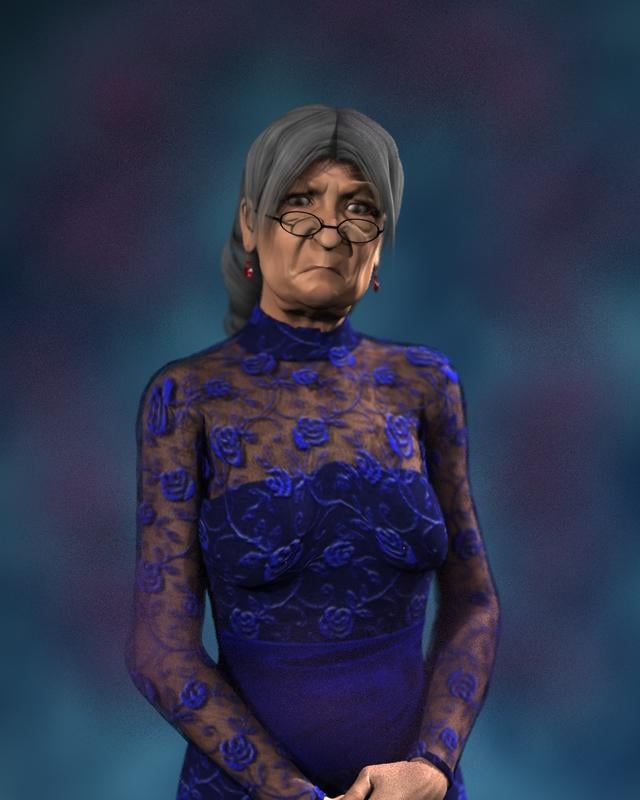
I like, I just realized I am using that same dress for my WIP entry. Oh the embarrassment. Something is telling me she needs to be in front of a chalkboard and grasping a ruler in a classroom environment.
@ nonesuch00 HA! Same dress! That's ok...go for it.
I was going to try using Fit Control to smooth out the dress at the bustline after it got deformed during the aging process, but...guess what! There is no Fit Control for V4! So...now she looks kinda saggy, and her dress looks kinda saggy to match!
I meant to do that.

https://www.youtube.com/watch?v=9hNIX7V21pU
I like your choice of characters!
I suggest recropping so she is not cut off in the middle of her hands. I'd even like to see it cropped above the elbow (I've been told to never crop at a joint), to make the image more about her face and expression. That is also a good trick to avoid that under breast fit issue.

The texture of this dress (the purple lace, etc.) seems a little two "evening wear" for a 2nd grade teacher. There are many many textures for the MFD, some even free. Perhaps a different one would say "teacher" a little more.
Daz 3D is part of

Connect
DAZ Productions, Inc.
7533 S Center View Ct #4664
West Jordan, UT 84084Licensing Agreement | Terms of Service | Privacy Policy | EULA
© 2026 Daz Productions Inc. All Rights Reserved.