-
Sue Yee Appreciation Post
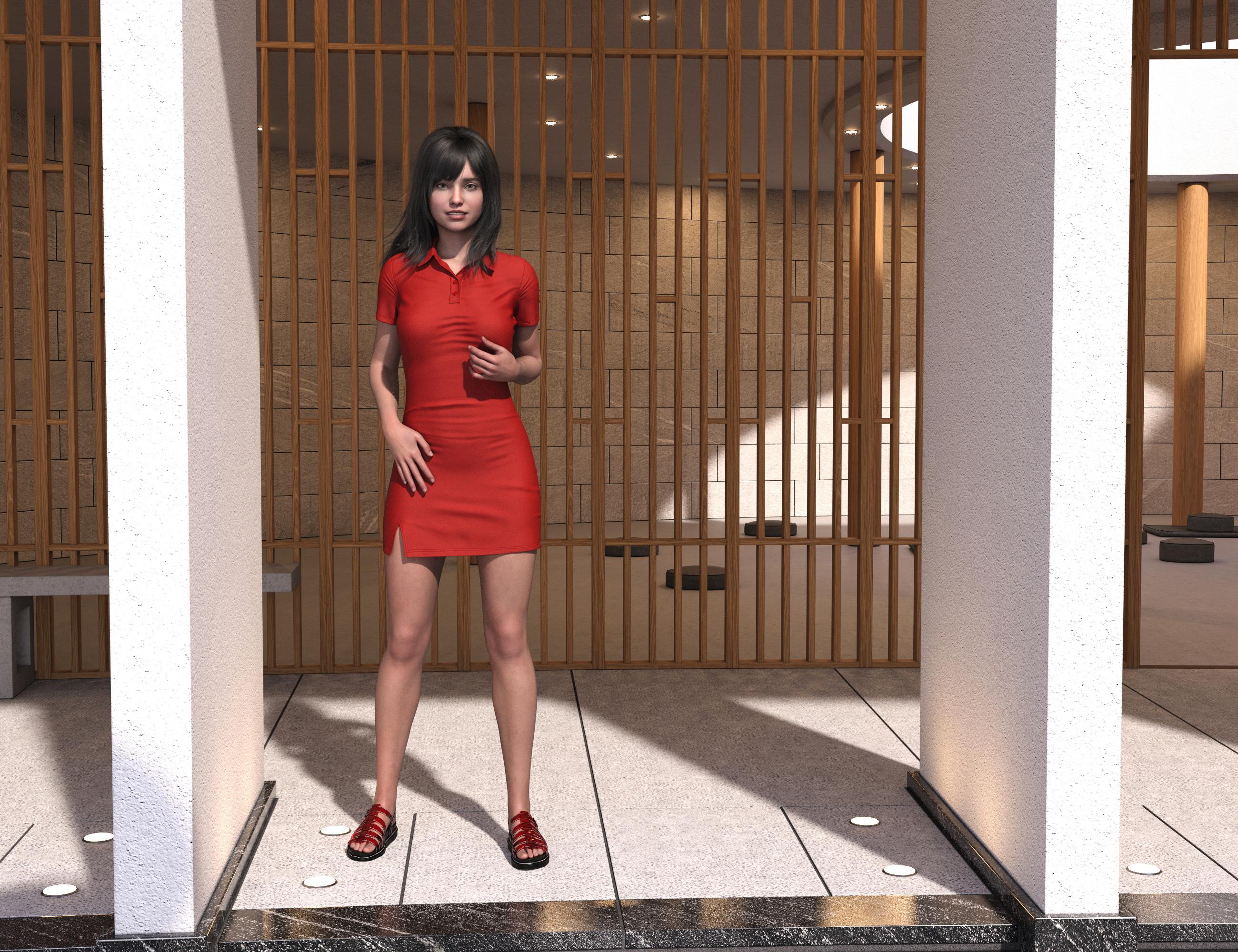
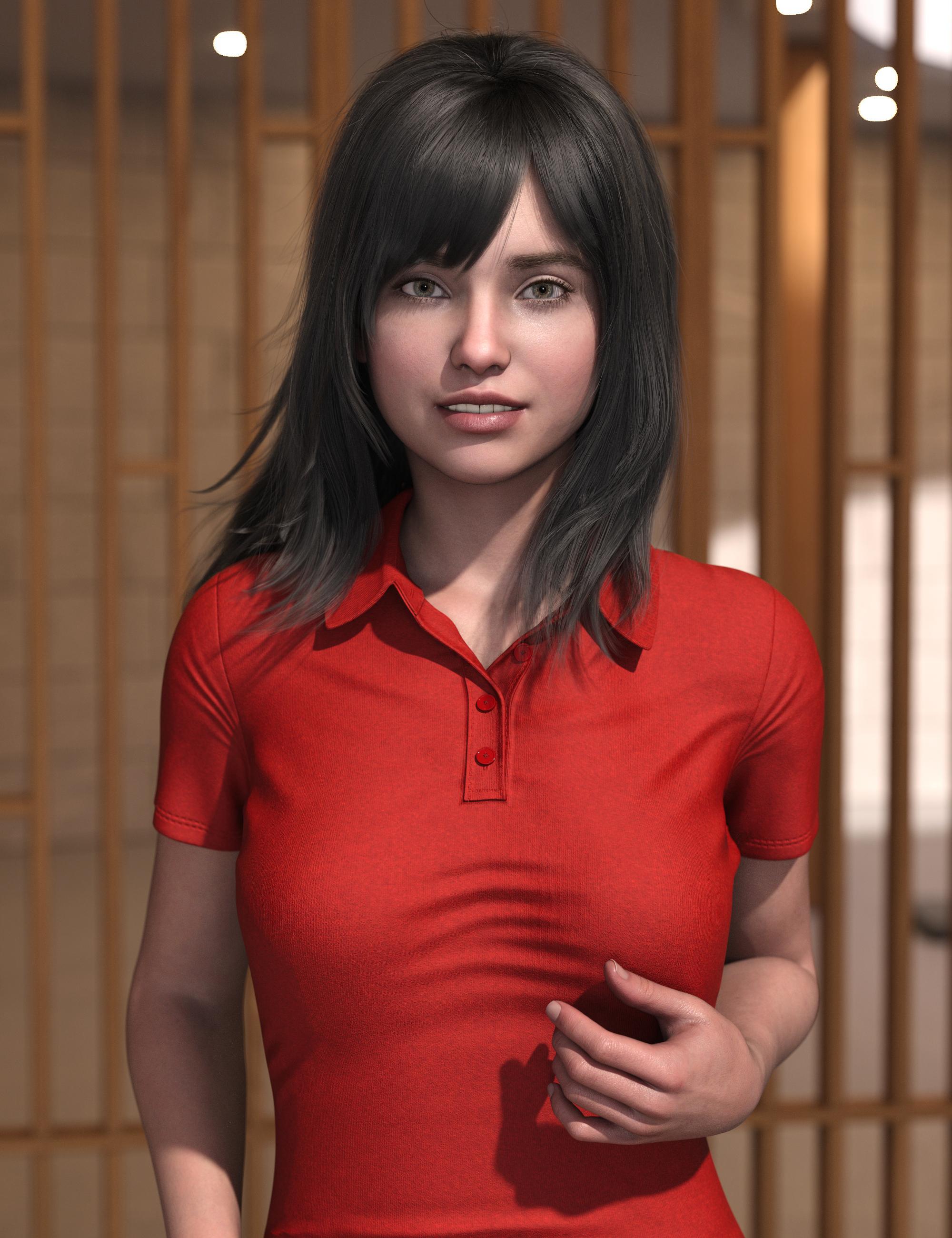
This is the new dForce SU Shirt Dress for Genesis 9, 8.1, and 8 Female and the older SU Medium Length Hair for Genesis 8 and 8.1 Females
I used the "longer" morph on the dress. It's still pretty short.
 Skin Effects Adventure not working if my model uses additional geo shells?
barbult said:
Oh, I wasn't aware of that, since I don't own the Golden Palace either. So it has both a geograft and a geoshell?
I don't own Golden Palace for G9, but I do for G8. (To be honest, the main reason I got it for G8 was to allow me to de-Barbie figures that didn't have anatomy maps for the Daz anatomy, but I now know enough about UV mapping and transfer to solve that problem myself).
At least as it was on G8, the geograft used the torso textures of the figure and a geoshell over the top of this was opacity mapped to overlay detail that probably wasn't in the base textures.
However, in this case, it's very likely the geograft portion of that which is the problem, as the Skin Effect geoshell almost certainly does not have surface parameters telling it what to apply over the geograft surfaces, so it defaults to the 50% opacity white 3DL shader that geoshells load with by default (which remains a bug, as way back in about DS 4.14 or 4.15 or so, the change notes proudly declared that created objects would now use the correct base shader for the selected renderer, but no, geoshells still always default to 3DL). The geoshells could be conflicting because of equal offsets, but ultimately I think the "this geoshell preset doesn't know what to do when it finds this geograft" is the problem.
Using geoshells with geografts is always a hassle, particularly as geoshells have often added a custom UV to the figure that the geografts will not have access to, and therefore simply transferring parameters between the surfaces on the geoshell will not match up seams.
[Released] RSSY Hair Converter from Genesis 3 to Genesis 9 [Commercial]Submitted update
- Fixed bug where incorrect default content type (Follower/Wardrobe/Unknown) instead of Follower/Hair/Unknown was used for adding hair
- Fixed bug where dForce Hair cannot sim after conversion
- Fixed 2 major bugs in using Transfer Utility for dForce part of hair, where adding a smoothing modifier will just crash DS with lots of errors and setting “Reverse Source Shape From Target” to true for dForce part of hair breaks simulation
- Updated Conformers
[Released] RSSY Hair Converter from Genesis 8 to Genesis 9 [Commercial]Submitted update
- Fixed bug where incorrect default content type (Follower/Wardrobe/Unknown) instead of Follower/Hair/Unknown was used for adding hair
- Fixed bug where dForce Hair cannot sim after conversion
- Fixed 2 major bugs in using Transfer Utility for dForce part of hair, where adding a smoothing modifier will just crash DS with lots of errors and setting “Reverse Source Shape From Target” to true for dForce part of hair breaks simulation
- Updated Conformers
G9 Hair to ear fit.Hello Richard,
I started with the figure in the scene and could not get the hair item to ignore the ear shape no matter how I set things up.
What I ended up having to do was start with an empty scene and put the hair in by itself. Then follow the process you initially gave to create the dummy morph.
Once that was done, I brought the figure in and fitted the hair to the figure. That brought success.
As you said, I still had to make some tweaks and even hide small items of mesh but seems good now.
Thanks for the assist.
DJ
This looks great Zev0 and DMasterFaeryl Womyn said:
Oh ya I keep forgetting I use clothes from all generations on all generations...thank you Morph Loader Pro lol ... I actually got an old AlphaSeed, formerly known as Aery Soul, outfit for V3 to fit G3. I don't bother with the plugins and extra bits, just take whatever version model with the outfit in question into Blender (use to use Hexagon) make the outfit adjustments, save out obj and import to daz as morph, then I can keep the original rigging and morphs. Just save as morph asset to use again.
I do plan on trying to make clones to help with the progress for better fits.
I should learn to do that. Sounds great! From what I've tried, the clones work like magic! Mostly, I've been dressing some of my G8 people in V4 clothes.
This looks great Zev0 and DMasterTorquinox said:
Faeryl Womyn said:
I've dabbled with G9 but rarely, I'm more of a G8 and G2 person, I still have all models all the way back to Generation 3 installed. The older models are great for background characters since they're lower poly.
Cool! I also still use the older figures. I'm getting more range out of their outfits with clones. It would not be trivial to start really using G9. To me, it would mean (at minimum) having https://www.daz3d.com/genesis-9-essential-shapes-bundle and https://www.daz3d.com/natural-movements-pack-for-genesis-9 - maybe also https://www.daz3d.com/ultimate-natural-bend-morphs-for-genesis-9-female-base. That does not include visiting the Naughty Store for enhancements that I already have for earlier generations. Then I have to actually use all that, and I've already got thousands of items.
I like the look of some G9 outfits, but using those on older figures would require https://www.daz3d.com/mmx-genesis-9-clones-for-all or rolling my own g9 clones. I suppose I'll have to at least buy/find/put together few clones to take advantage of the few G9 things I've already acquired. I got the entertaining (if impractical) https://www.daz3d.com/skinny-jeans-ourfit-for-genesis-9 to for my Pot of Gold. I'm just wondering how someone like https://www.daz3d.com/dragonsbane-barbarian-character-hd-for-genesis-3-male would look in that. It would be different!

Apologies for thread-jacking. Happy St Patty's Day!
Oh ya I keep forgetting I use clothes from all generations on all generations...thank you Morph Loader Pro lol ... I actually got an old AlphaSeed, formerly known as Aery Soul, outfit for V3 to fit G3. I don't bother with the plugins and extra bits, just take whatever version model with the outfit in question into Blender (use to use Hexagon) make the outfit adjustments, save out obj and import to daz as morph, then I can keep the original rigging and morphs. Just save as morph asset to use again.
I do plan on trying to make clones to help with the progress for better fits.
My Genesis 9 figures look deformed.Please remember to put the Viewport into a non-textued mode if you need to show nude figures.
The first machine has a character installed (or saved as a morph asset by you) with a non-zero default value, the second machine doesn't. Load a plain Genesis 9 Dev Load figure and I think you will find it has an unwanted extra shape too - assuming that is true, Edit>Figure>Zero>Zero Figure Shape. If that restores the proper shape then go to File>Save As>Support Assets>Save Modified Assets and make a note of what it says will be saved, then cancel (to make sure you don't overwrite something like the joint correctives, which should be non-zero). One of the things listed will be the problem character.
G9 Hair to ear fit.You can stop the hair responding to the ear morph at all by creating a dummy morph with the same name before fiitting or before applying the morph to the base figure, then you can use other tools (dForms, Push Modifiers etc.) to deal with any fitting issues.
to get the name (not label) of the actual morph (if the ears come ftrom a character morph it may actuall be the head morph that you need) click the gear icon on the slider and go to Parameter Settings.
to create a dummy morph, select the hair. Right-click in the Parameters pane and check Edit Mode (if it isn't already checked). Right-click in a group (such as Hidden) that you don't mind cluttering>Create New Property. Give the new property the name of the morph with the ears, and set it to Hidden - it isn't actually going to do anything so the rest of the settings don't matter. That should do the job.
HEAT Animation Plugin License ClarificationSirRonmit said:
SimonJM said:
Has anyone actually managed to get this to work? I have installed it via DIM and all the bits seem to be there, but I just get a HEAT Bridge is not connected message witha suggestion to download it - which I have.
Yes, you run the HEAT program separately (from your Program Files) and have it minimized on the right corner. While that is running, the screen you showed will say HEAT BRIDGE IS CONNECTED in tiny green font above the DOWNLOAD HEAT BRIDGE button. From there, select your G8/G8.1/G9 figure (I found out HEAT ONLY works with those so I've been trying to convert all my v4 items to g8/g9), switch to the HEAT BRIDGE and select whatever you want to export (actually says IMPORT). One note, make sure you have DAZ selected on the lower left as it is set to BLENDER by default.
What I DO NOT LIKE and haven't figured out yet to change is that all heat animations are set to 0.0.0 workspace. Even if your character is off to one side (say, 1000.0.0), the animation moves your character to the 0.0.0 position. VERY frustrating. I only have aniMate Lite so I'm not sure if aniMATE2 allows editing. I moved my character back to 1000.0.0 but as soon as the HEAT render starts, it moves the character back to 0.0.0 for the rest of the animation. If that is so, then paying the Pro price is worthless/pointless because I'd have to edit each animation to match my scene.
Anyone else able to tell me if I'm doing something incorrectly? Or do I need to purchase aniMATe 2 ?
Try to bake the keyframes to the timeline and then go into the keyframes and delete the translation and rotation keyframes on the character to see if it still moves after you place them where you want them. If it still moves, it's probably baked into the hip. Then I think, and I'm not sure but Dartanbeck would know this for sure if he sees this, if you have 3D Universe's animation tools, there's a body to hip setting that should transfer the hip movement to the body.
Young Adult and Elder versions of Sophia 9I think a better idea is to scrap the alternate shapes and just give us something else. All these alternate shapes and ages can be morphed individually. Between the two, I'll definitely say the age ones are better as they actually have key differences. And with all that's out there-if you have one age/body morph you can apply it to them all. If they want to do an alternate shape, do something like Tara, where it's, you know, actually something unique and has a theme. Snow Queen was okay with the blue skin but the different ages look very strange to me; like old Genesis 8 models that weren't finished.
Odd eyes question (G9)I've noticed eye problems from the beginning, for one thing, no matter what character morph you use, the eyeballs seem either turned in like cross eyed or turned out.
Daz Studio BETA - version 4.23.0.4! (*UPDATED*)
I don't think I was using any tools other than selecting items in the scene pane. No Geometry Editor or Weight Mapping, Transfer Utility or anything like that. I was using the BJ Camera Manager a lot. I did have the Aux viewport open at one time, but I think it was closed before I tried to create the new scene. I was using Iray Preview and Texture Shaded draw styles off and on. There were no characters, clothes, or hair in the scene. In the scene I was beta testing an unreleased plugin for a PA. I don't know if that was the cause of the problem, but I have also reported this crash to the PA. But I have been extensively testing this plugin and don't get this crash every time. I have not seen this crash yet when testing in 4.21.0 5 general release. That's all the info I can remember now.Richard Haseltine said:What was in the previous scene and what tools had you been using (especially ones that put their actions on the undo stack)?
Character used in 2nd + 3rd promo image of HS Mirage Strands HairHi Mary! Thank you, but I don't think it's Pixie, at least not entirely. She does have stylized and exaggerated features like Pixie, but they're not as pronounced. But maybe it's a morph where Pixie 9 is in the mix?
Young Adult and Elder versions of Sophia 9You can apply the young and old morphs to other characters, sometimes takes a bit of tweaking. The older versions don't have their own materials, but the younger versions pretty much all do.
The alt shapes also have proportions sliders or individual proportions adjusted, so have a look which sliders are active when you load an alt shape so you can adjust the same ones on destination figure.
I took youth Olympia and Olympia Youth skin and applied to Sophia and worked pretty good for the face, but because of the subtractive nature of the morph the bust needed tweaking (grown up Olympia is very busty).
You might get different effects if you are mixing HD and non HD morphs
Young Adult and Elder versions of Sophia 9Gordig said:
I haven't spent much time with G9 and have very few assets, so bear that in mind. Are the young/old morphs of figures full morphs, or additive morphs to the base figure? In other words, if you dialed say, young Mira on top of Sophia, would it make it look more like Mira, or just younger?
Theyre supplementary morphs if that makes sense. They require the base morph to work, but they have a very specific look, so no the young adult Mira with Sophia wouldn't work. They also have young textures. It's a good product addon. More useful then the body shape morphs we've gotten so far (Which imo are kind of unnecessary as you can get a curvy look for example pretty easy without needing a specifically shaped morph)
Odd eyes question (G9)I've had this intermittent issue for a while where G9 eyes will get malformed when blending character shapes. It's not the typical issues with a non-zero morph, because saving/re-loading the scene fixes it (and I've checked hidden & all non-zero morphs, etc.) - I haven't run into any other mention of it on the forums, so I'm wondering if anyone else has run into this and what the cause might be. Attached images of the issue, and exact same camera view after reloading - these are from the viewport (iray), but result is the same when doing a full render.
Saving morph with ERC freezeFormulkas link two properties, so that the controlled proeprty gets a value in response to the controller. The classic examples would be a joint adjustment morph linked to a bend, and head/body morphs linked to a master character morph. Duplicate Formulas mean that there are two formulas linking on specific property to another specific property (e.g. JohnDow to JohnDoeHead). Usually that happens because a generic name has been used by two different artists, but it can happen in a single file. One way to get duplicates is to run ERC Freeze twice on the same controller, without using ERC Bake in between to remove the original link and just leave the raw values so that they can be revised.
Saving morph with ERC freezeWhile this is an ancient post, it came up when I was searching for the same problem and did not yield the answer, so I want to put this here for informational purposes.
I had this problem, and I literally wiped every trace of DAZ from my system and started fresh/reinstalled my stuff to no avail. Turned out the Shape Rigger tool was to blame (G9). It didn't work correctly for one, the bones weren't even close. I did not use Shape Rigger's save morph, but just used the rigging portion. After seeing the bones incorrect, I just used the built-in "Adjust Rigging to Shape" feature, then saved the morph under the Save As => Support Asset => Morph menu.
After doing that, I got the duplicate formulas (why this is called a "formula" is beyond me and completely unhelpful) message, and in the log file, it showed the exact same file path as the "previous" and "duplicate."
So unless I'm missing something, that was also incorrect, because I did not have the morph in 2 places, it just referred to the same single file as a duplicate. So I dunno of that's DAZ's fault or Shape Rigger's, but I deleted it completely, then just stuck w/ Adjust RIgging to Shape, ERC Freeze, then saved the morph--problem gone--both the erroneous duplicate message and the fact that the bones didn't track on a new scene.
The older generation: Victoria 2/3, Michael 2/3 and their children rendersAnother using some older stuff I have that's been sorely under used:
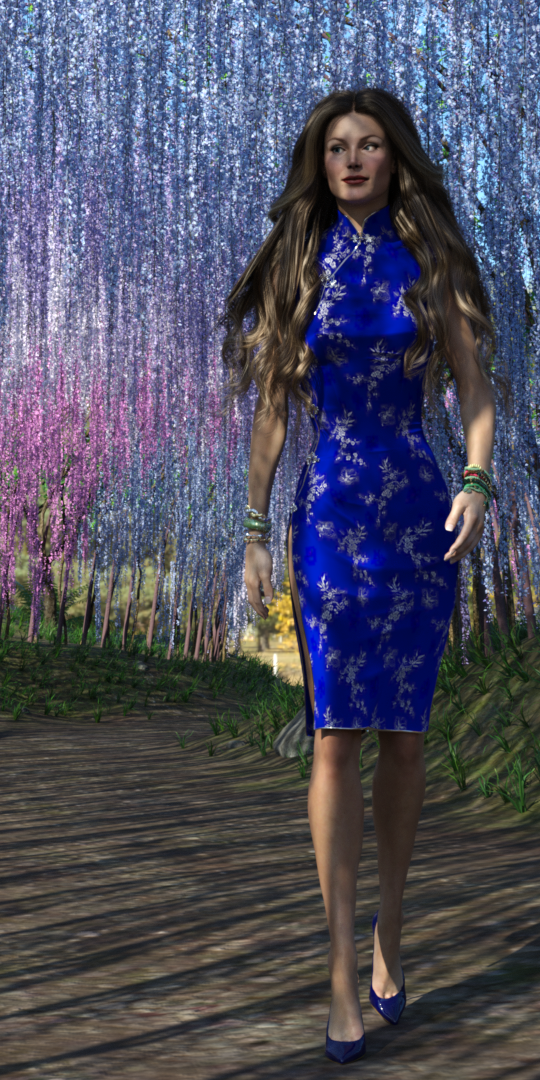
TriAx GV3 with Jim Burton's Cheongsam for GV3, in the Wisteria tunnel. Been meaning to use this much more than I have. Hair is Linday's Classic Blowout hair.
I've been trying to make the character's hands and fingers rather more slender using yScale=zScale = 90%. However, when I do, the hands actually EXPAND, and contract when I use a scale of 110%, though the fingers expand as well with a scale > 100%. It's somewhat nuts. May have to try to create a 'Slender Hands' morph instead.
Regards,
Richard
Daz 3D is part of

Connect
DAZ Productions, Inc.
7533 S Center View Ct #4664
West Jordan, UT 84084Licensing Agreement | Terms of Service | Privacy Policy | EULA
© 2026 Daz Productions Inc. All Rights Reserved.