-
do alot of you guys use gen 2 clonths on gen 3 figures
You can autofit gen 2 clothes to gen 3, but as with any automatic conversion program the results are not always optimal, and will not be as good as having an item custom crafted and rigged for your figure. Some items will convert better than others. High heels are notoriously problematic, for example, or long skirts if you don't have something like SY Ultra Templates to enhance the conversion. Moreover if an item has for example custom bones to pose some parts then when you use autofit they will be lost during the conversion, so the converted clothes will have less functionalities than the original one.
I'm not saying it's not worth trying to use them, most items convert well, and that will give you more options to choose from. But don't expect it to work flawlessly for everything.
You might see a difference when using a particular official Gen3 shape too: with clothing made for Gen3 you might have a custom morph to support that shape, with converted clothing you'll have to rely on automatic morph following.
The future of carraraI am sure they are working on it, they have limited resources so it takes time.
But the internals of Carra are very very different compared to DS so don't expect any big transfer of features from DS to Carrara any day soon and you actually have most things you need in Carrara, G2 works to some extent and with some G3 support it would be pretty cool, but it would need a new file format (saving to DUF maybe...), saving everything in a single CAR file is a disaster, In the end I spent 20% of my time loading or saving scenes so I had to give up.
do alot of you guys use gen 2 clonths on gen 3 figuresYes. Most things transfer well (except the guys' pants can be tricky).
There's not a huge difference in the level of craftsmanship between Genesis 2 items and Genesis 3. There are good vendors and mediocre vendors for both.
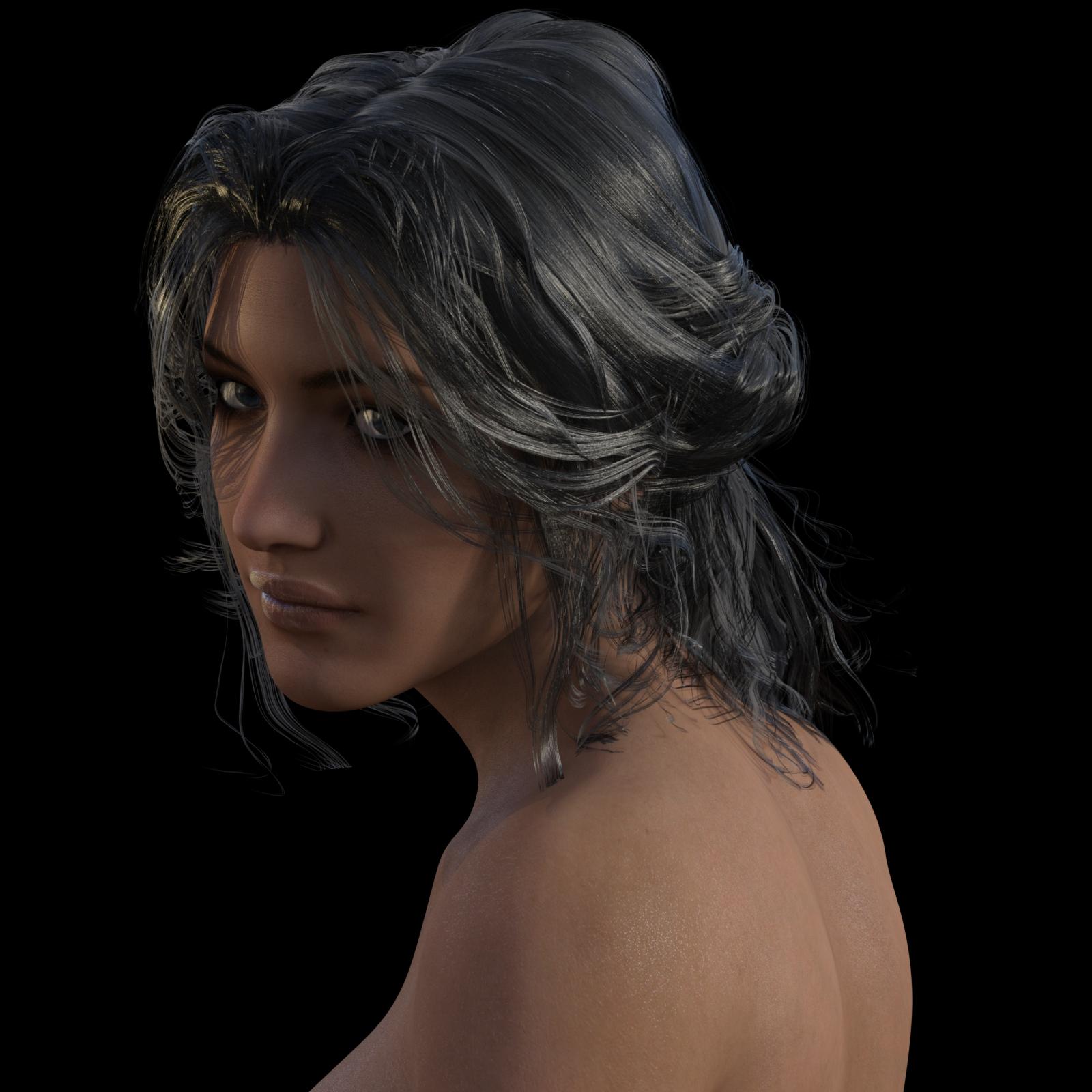
Dynamic scarf usagehow to drape itself seems quite straightforward,now the problem is how to put it around my character's neck...i even tried draping it around the char in horizontal position;saving the draped obj and applying that as a morph to the scarf but it won't let me do itLlola Lane's Song/Music/Story/Poem Inspired Render Thread... Join me if you wish!!!render didn't quite come out the way I wanted, not really close, lighting didn't come out the way I wanted, so just did a render of a head
was listening to Dear Frederic - Stare Into the Light , and had an idea, so I started up DS, and started with G3F, then for the music while I played with the morph dials was April Rain - Waiting For Sunrise [Full Album] , was done with the morphs and working on the lighting towards the end of track 8 , where you hear the people talking.
there are some renders I have seen others do I could match a song to, easily , but I understand it has to be our own renders, what inspired us
 CC Reagan for Rune 7 - On Sale Now!! [Commercial]
For your freckled painted warrior needs, I present CC Reagan for Rune 7!
http://www.daz3d.com/cc-reagan-for-rune-7
I'd intended to do this the day she released, but unfortunately, I had to be away from the computer for the last few days. The promos on the store page show her full normal morph set.
The breast morph indicated as included is separate from the body morph and can be dialed out. It's purpose is to allow clothing that covers cleavage from warping in that region. The set should work for most clothes to remove this warping (without altering the size of the breasts so it can be used with any Rune character you want to put a regular shirt on).
Attached are two images *not* included in the promos on the sales page. One is the custom morph on base Genesis 3 Female. The other is the custom morph (without Rune), with Genesis 3 Male dialed in as well as 50% Leo and 50% Gianni (using GenX2 AddOn for Genesis 3). Also, you can use her skins on Genesis 3 Male using SloshWerks's Genesis 3 UV Swap: Male and Female Base.
I was having a little fun with it :D
*How to Put a Morph (ERC) Dial on a Pose*You're right, I tried selecting the head and then they appeared, Thanks for helping me out! :) I didn't think of selecting just the head
I was really confused because I used them just yesterday but suddenly couldn't find them when I tested.
It would be nice if maybe this could be fixed so that they appear the same as all other morphs (I don't know how to reorganise dials though (or I'd have reorganised the ten billion HSTW morphs that are all in the wrong place ages ago...))
Agreed! Took me some time to figure out the missing head/ expression morphs issue can be "solved" by selecting the actual head in the scene manager.
This, coupled with a few 'ego vendors' who - instead of respecting Daz3D file organization convention - clutter up BOTH the library and the /data folders with their own folder structures.
Unfortunately we're not allowed to name/rate/review the bad apples so customers will have to learn from experience.
My first 2 years with Daz3D is not about CG learning but proprietory file format maze orientation and 'how to power-Google to find daz fundamentals'!
People who joined after 2014 probably had it easier, now there are some basic official user PDF guides and even advanced video tips so things are improving which is good.
It's definitely very cool for morph vendors to mention ERC dials. Because Genesis 3 has face bones, and some users use G3F for animation, morph quality control is even more important today than yesterday.
As the character system become more refined and sophisticated, more comprehensive and RELEVANT product details and description will be expected.
I'm more stringent these days with content buying - will give more attention to vendors who understand current gen user needs!
zbrush Making gloves form Genesis 3Hi there I've seen some tutorials on creating clothes on Zbrush, i made a pair of gloves but after importing the .obj and applying the transfer utilities (default setting) the gloves got stock near the pelvis of the Genesis 3 figure,
I've read something about converting it into a figure and rigging to shape, I've tried everything but it doesn't work, i want to create just small props like gloves, bandages, simple belts. I hope you can help maybe i need to change the configuration of the transfer utilities (I've tried using the gloves projection template) but i haven't touched the advanced options.
Thanks in advice
 *How to Put a Morph (ERC) Dial on a Pose*
You're right, I tried selecting the head and then they appeared, Thanks for helping me out! :) I didn't think of selecting just the head
I was really confused because I used them just yesterday but suddenly couldn't find them when I tested.
It would be nice if maybe this could be fixed so that they appear the same as all other morphs (I don't know how to reorganise dials though (or I'd have reorganised the ten billion HSTW morphs that are all in the wrong place ages ago...))
There is this. I bought it, but I have not needed it since my recent clean re-install: All the morphs (and there are tons from HSTW, Zev, Dogz, etc.) pretty much went in a logical order. Never had that happen before.
That seems potentially quite useful - not sure I entirely understand it from the description though. Buying a product just to fix badly organised products I've bought and then reorganising them all sounds like kind of a pain though. I'll wishlist it for now - thanks for the link!
virtual penny 4 yor carrara thoughts ?The way that I now determine when to use a Bezier Tweener:
Animations that need to start and end slowly, with a climactic middle. These get a Bezier.
 I don't mean to make them sound bad, because they truly are an excellent in-betweener. It was the default tweener in Poser when I was learning to animate figures in that. It took me a long time to finally figure out why my morphs would go beyond their limits - it was a nightmare. In the end, it was almost like I didn't need tweeners since I had to end up with a key at every frame in order to defy the bezier effect.
Nowadays I am a lot more used to animating, so I know ahead of time whether I want to use Bezier or something else - so I leave my default Tweener as Linear, but change it to Bezier when I want to design whole details along the timeline with them in. Otherwise I just select the tweeners I want and set them to Bezier manually.
Use what feels most comfortable to you. The big thing to take away from all of this is that, if things are looking all wonky, like the eyelids are getting way too wide open or way too closed... switch the tweener before head-aching over endless tweeks! ;)
Bezier are fantastic for times when you want to set one pose at 0:00, and then move a few seconds away and change the pose... the Bezier is the tool to make that sort of thing look very natural. But when you need to make eyes blink or switch targets (what they're looking at), try using linear ;) If you want a subtle movement of the blouse to make it look like there's a breeze in the air, try a Noise tweener - set the movement morph at the very end of the animation, or even a few seconds beyond, and put a Noise tweener between that and the beginning, set the type to "Cubic", the bottom radio button, and adjust the T-Scale to make it either change quickly, many times, or slowly, just a few times. Magnitude will adjust how close to either end the morph is applied.
Animating is a real joy! Have fun with it!
Daz Studio Pro BETA - version 4.9.2.70! - Released - (*UPDATED*)if you use Manipulation Resolution at 1/4 the msec my not play big difference when adding objects to the scene , I use 100 with 2 Titans X and MR on Normal , with 4 cards I use 0 to 50 msec deoends of the scene with 1 card around 360 msec MR on Nornal or 1/2 so I can move easy objects and light
but if I overlock my CPU cores the magic start and the all delays become shorter , I wish we have Realtime iray viewport in place of the curenlty OpenGl , things would be so much esier or at last working Interactive mode that does not consume the vram where you can set off the AO and have it as fast as almost Realtime mode so you can see iray materials and light , DAZ should make Deluxe version with iray only lol
Viewport delay I think it is when you using blending between internactive with Photoreal , as I see no difference when using just Photoreal mode , as you I am avoid Interactive mode due to the memory issues
The moment you move body parts or slide up the morph your CPU take over this job and sending the updates to your card that why you experience slow down , it is not your card and even if you have 4 of them it will be even slower .. that why I upgraded my CPU so it can handle it faster with my 4 cards, , and how faster is your CPU core how less delay you will experience while working with iray and there is nothing we can do to speed the delays up as it all have to do with your System in general .
P.S you can increase the msec under the Draw Style tab , it will help you with posing or moving objects or light in the scene but will not speed up with loading morphs or new objects into the scene
The other option are under DRAW style tab not under Render mode, render mode has only 2 options , Draw style have also 2 extra blend option and other functions for the iray viewport
I have a simple question and I am NOT any kind of techie person.
I just noticed in DS4.9 latest release that I only have 2 options under Render Mode.....Photoreal and Interactive. Yet when looking at online documentation, I see 4 options. The other 2 are 'Blend Photoreal to Render Settings' and 'Blend Interactive to Render Settings'. Why don't those show for me? Is it because my Nvidia card is 2 years old and less powerful? Below are my specs, and thanks for any help.
Win8.1 64 bit
i7-4770 @ 3.4GHz
32GB Ram (31.91GB usable)
NVIDIA GeForce GTX 760 (192 bit)
version 368.81 (release date 07/14/2016)DS4.9.2.70 Pro 64 bit
Is there any written guidance on how to set the draw style options for Iray?
My Iray viewport is extremely slow to update when I move any body part or dial a morph. Surface setting changes update pretty quickly. I only have one graphics card (980Ti) and it runs both Iray and the monitor. It seems like the viewport used to be faster in previous DS versions, so I'm guessing my settings are not optimum for my situation. I have it set to photoreal, because of the issues with interactive using way to much GPU RAM and never releasing it.
Thanks, that info is helpful. My msec was on default 100. I'll try 300.
Should I have Inactive Viewport Delay On or Off? I have no idea what it is for. I have it on the default On. Draw Node Avatars??? Again, no clue. It is On.
My Manipulation Resolution is 1/4. I do see how that works when I rotate the scene.
Daz Studio Pro BETA - version 4.9.2.70! - Released - (*UPDATED*)The moment you move body parts or slide up the morph your CPU take over this job and sending the updates to your card that why you experience slow down , it is not your card and even if you have 4 of them it will be even slower .. that why I upgraded my CPU so it can handle it faster with my 4 cards, , and how faster is your CPU core how less delay you will experience while working with iray and there is nothing we can do to speed the delays up as it all have to do with your System in general .
P.S you can increase the msec under the Draw Style tab , it will help you with posing or moving objects or light in the scene but will not speed up with loading morphs or new objects into the scene
The other option are under DRAW style tab not under Render mode, render mode has only 2 options , Draw style have also 2 extra blend option and other functions for the iray viewport
I have a simple question and I am NOT any kind of techie person.
I just noticed in DS4.9 latest release that I only have 2 options under Render Mode.....Photoreal and Interactive. Yet when looking at online documentation, I see 4 options. The other 2 are 'Blend Photoreal to Render Settings' and 'Blend Interactive to Render Settings'. Why don't those show for me? Is it because my Nvidia card is 2 years old and less powerful? Below are my specs, and thanks for any help.
Win8.1 64 bit
i7-4770 @ 3.4GHz
32GB Ram (31.91GB usable)
NVIDIA GeForce GTX 760 (192 bit)
version 368.81 (release date 07/14/2016)DS4.9.2.70 Pro 64 bit
Is there any written guidance on how to set the draw style options for Iray?
My Iray viewport is extremely slow to update when I move any body part or dial a morph. Surface setting changes update pretty quickly. I only have one graphics card (980Ti) and it runs both Iray and the monitor. It seems like the viewport used to be faster in previous DS versions, so I'm guessing my settings are not optimum for my situation. I have it set to photoreal, because of the issues with interactive using way to much GPU RAM and never releasing it.
Thanks, that info is helpful. My msec was on default 100. I'll try 300.
Should I have Inactive Viewport Delay On or Off? I have no idea what it is for. I have it on the default On. Draw Node Avatars??? Again, no clue. It is On.
My Manipulation Resolution is 1/4. I do see how that works when I rotate the scene.
Daz Studio Pro BETA - version 4.9.2.70! - Released - (*UPDATED*)The moment you move body parts or slide up the morph your CPU take over this job and sending the updates to your card that why you experience slow down , it is not your card and even if you have 4 of them it will be even slower .. that why I upgraded my CPU so it can handle it faster with my 4 cards, , and how faster is your CPU core how less delay you will experience while working with iray and there is nothing we can do to speed the delays up as it all have to do with your System in general .
P.S you can increase the msec under the Draw Style tab , it will help you with posing or moving objects or light in the scene but will not speed up with loading morphs or new objects into the scene
The other option are under DRAW style tab not under Render mode, render mode has only 2 options , Draw style have also 2 extra blend option and other functions for the iray viewport
I have a simple question and I am NOT any kind of techie person.
I just noticed in DS4.9 latest release that I only have 2 options under Render Mode.....Photoreal and Interactive. Yet when looking at online documentation, I see 4 options. The other 2 are 'Blend Photoreal to Render Settings' and 'Blend Interactive to Render Settings'. Why don't those show for me? Is it because my Nvidia card is 2 years old and less powerful? Below are my specs, and thanks for any help.
Win8.1 64 bit
i7-4770 @ 3.4GHz
32GB Ram (31.91GB usable)
NVIDIA GeForce GTX 760 (192 bit)
version 368.81 (release date 07/14/2016)DS4.9.2.70 Pro 64 bit
Is there any written guidance on how to set the draw style options for Iray?
My Iray viewport is extremely slow to update when I move any body part or dial a morph. Surface setting changes update pretty quickly. I only have one graphics card (980Ti) and it runs both Iray and the monitor. It seems like the viewport used to be faster in previous DS versions, so I'm guessing my settings are not optimum for my situation. I have it set to photoreal, because of the issues with interactive using way to much GPU RAM and never releasing it.
Daz Studio Pro BETA - version 4.9.2.70! - Released - (*UPDATED*)The other option are under DRAW style tab not under Render mode, render mode has only 2 options , Draw style have also 2 extra blend option and other functions for the iray viewport
I have a simple question and I am NOT any kind of techie person.
I just noticed in DS4.9 latest release that I only have 2 options under Render Mode.....Photoreal and Interactive. Yet when looking at online documentation, I see 4 options. The other 2 are 'Blend Photoreal to Render Settings' and 'Blend Interactive to Render Settings'. Why don't those show for me? Is it because my Nvidia card is 2 years old and less powerful? Below are my specs, and thanks for any help.
Win8.1 64 bit
i7-4770 @ 3.4GHz
32GB Ram (31.91GB usable)
NVIDIA GeForce GTX 760 (192 bit)
version 368.81 (release date 07/14/2016)DS4.9.2.70 Pro 64 bit
Is there any written guidance on how to set the draw style options for Iray?
My Iray viewport is extremely slow to update when I move any body part or dial a morph. Surface setting changes update pretty quickly. I only have one graphics card (980Ti) and it runs both Iray and the monitor. It seems like the viewport used to be faster in previous DS versions, so I'm guessing my settings are not optimum for my situation. I have it set to photoreal, because of the issues with interactive using way to much GPU RAM and never releasing it.
Using GenX - How do I just transfer just a Head morph from M4 To Gen 3 Male?Found the answer, at least to my question (but I think it will apply to the topic of the op too) by researching prior threads on the forum and found where the creator had already answered this on a prior thread:
Besides "Create single morph" mode, there is also the "Selected morphs" transfer mode. This should work best for morphs like Bethany. All you need to do is to select the Bethany morph in the morph list and transfer it with the "Selected morphs" mode. No need to set values at all.
BTW the prior thread is here: http://www.daz3d.com/forums/discussion/comment/1384251/#Comment_1384251
I'm sure it contains tons more info, but a quick trial of this function seems to have worked, and I can now dial in Kenji7 on my Genesis1 and get the character (and not just the belly button) to work :)
Edit: just noticed that the belly button morph is the only part of the character shape which *didn't* make the transfer lol, so I guess I'm glad I still have the slider for my prior attempt so I can dial the belly button in too as needed :) I do recall there was mention of a belly button fix that might be needed somewhere in documentation, so this is probably why (I'll have to go look) but net effect is I now have Kenji 7 on my Genesis 1... or perhaps I should redefine it that I now have Kenji 5 :)
Now I've just got to figure out what textures might work best on this shape...
Looking for an anthropomorphic morph for Gen2AH! I knew there was a morph! Thanks!
*How to Put a Morph (ERC) Dial on a Pose*You're right, I tried selecting the head and then they appeared, Thanks for helping me out! :) I didn't think of selecting just the head
I was really confused because I used them just yesterday but suddenly couldn't find them when I tested.
It would be nice if maybe this could be fixed so that they appear the same as all other morphs (I don't know how to reorganise dials though (or I'd have reorganised the ten billion HSTW morphs that are all in the wrong place ages ago...))
There is this. I bought it, but I have not needed it since my recent clean re-install: All the morphs (and there are tons from HSTW, Zev, Dogz, etc.) pretty much went in a logical order. Never had that happen before.
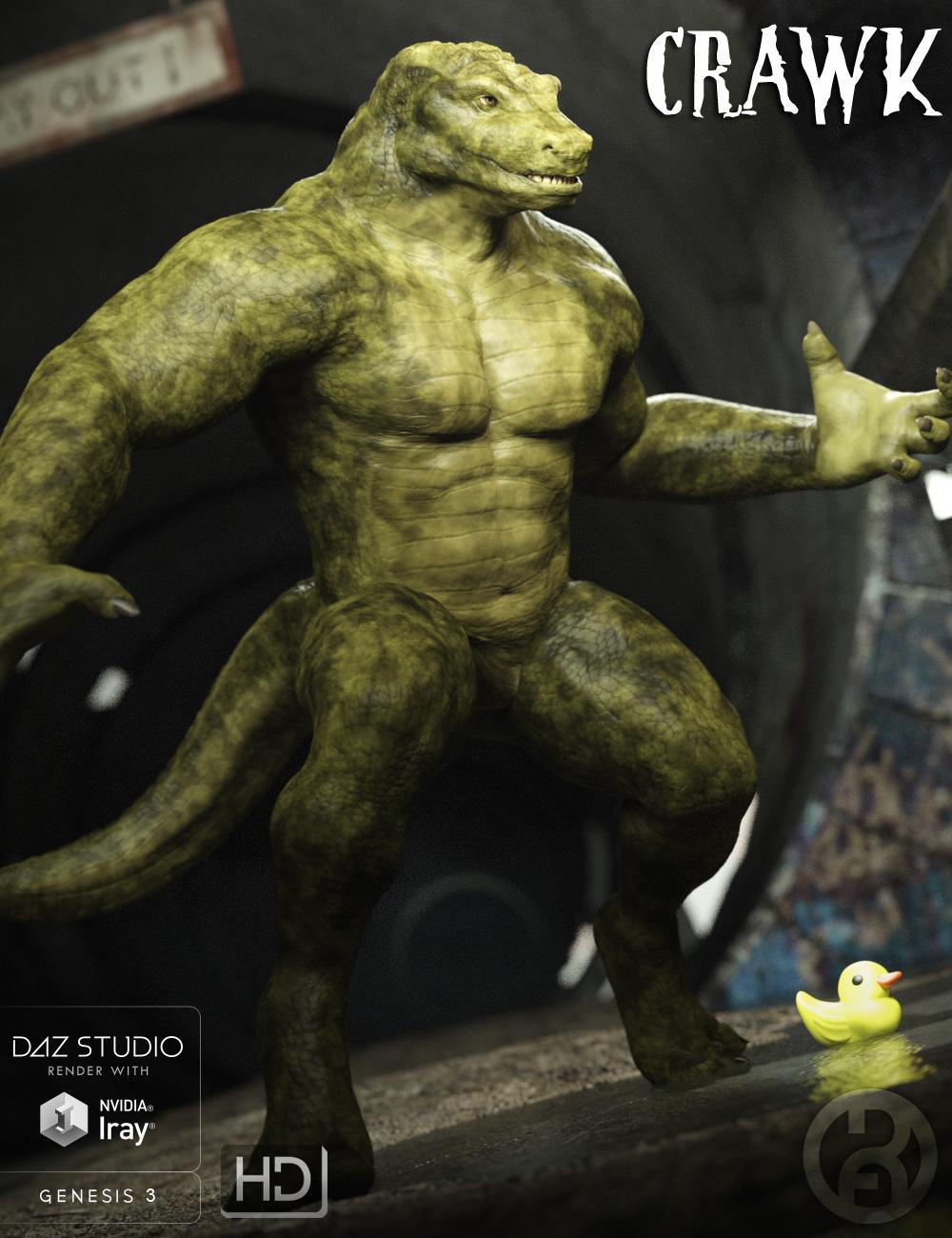
Crawk for G3M [commercial]make a great Killer Croc for the Batman renderers, thought it was you that also did the King Shark (the Flash) one must've been someone else but you do have Rhino (good for TMNT or Spiderman) and some of your others like the Cobras your making a good selection for a rogues gallery ya need a warthog (TMNT) oh no it was you did a shark guy just found him and Muud could be Clayface, Apeworld could be Grod. Does Crawk have a snarl morph showing some long sharp teeth
Using GenX - How do I just transfer just a Head morph from M4 To Gen 3 Male?For me at the moment I'm struggling with figuring out how to get Kenji 7 onto a Genesis1. I can transfer Sasori (a Kenji7 character) with no problems, but since I don't find any head/body inj that's just for the base Kenji, I'm having trouble. I will have to look into learning how to save a character preset, maybe that will be the key. Thanks for the tip :)
Crawk for G3M [commercial]Crawk!!!!
http://www.daz3d.com/crawk-for-genesis-3-male
Something dangerous lurks in the sewers today. He does not know what caused his mutation, but when Crawk woke up, he woke up hungry, so if you hear a splashing down below city manholes, you best not go and investigate. The human crocodile has claimed this as his domain.
The set comes complete with custom crafted High Definition Morphs, and a highly detailed texture set, suitable for Iray and 3DL
Product Includes:
One Crawk Character Preset
One Crawk Morph Preset
One Crawk Tail Geograft
Two Crawk Full Material Presets
Also includes IRAY and 3DL MAT files
Daz 3D is part of

Connect
DAZ Productions, Inc.
7533 S Center View Ct #4664
West Jordan, UT 84084Licensing Agreement | Terms of Service | Privacy Policy | EULA
© 2026 Daz Productions Inc. All Rights Reserved.