-
Genesis loading with Victoria 5 morphs auto applied?
Recently, I have been having an issue where whenever I load the Genesis model, it will automatically apply the Victoria 5 morph, as well as the Breasts Heavy, Breast Small, Chest Depth, Areolae Depth, Collar Bone Detail, Love Handles, Navel, Navel Size, Nipples, Nails Length, Glutes Volume, Hip Volume, Glutes Upper Depth, Glutes Width, Sacral Dimples, and Thighs Tone morphs. Granted, I can undo these changes manually or by zeroing the character model, but it'd be nice to not have to do that each and every time I load the genesis model.
July 2016 New User 3D Art Contest “Portrait Rendering” – WIP ThreadI really regret trying to work on a second image at the beginning of the month when I got this one posed. I took a break from this one because I was putting off the daunting task of building these gloves. Then I had a week long family vacation, and here I am, end of the month, and what feels like a lot of work ahead of me still…
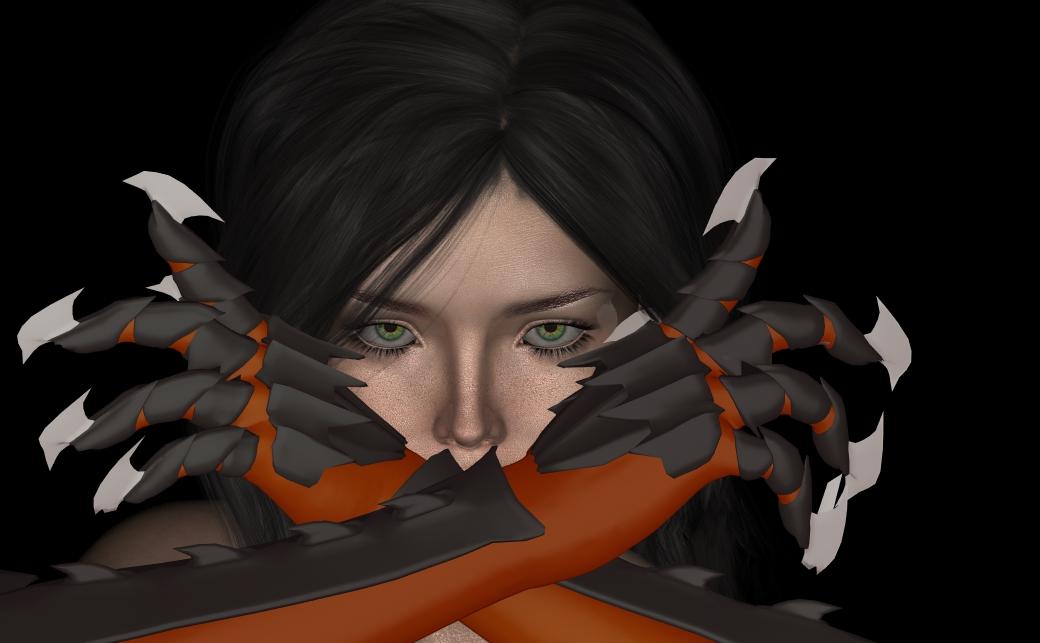
Anyway, hoping someone can help. I built these gloves, and was surprised with how easy they were to turn into a wearable object for Genesis 3 Female… but I’m having problems with the mesh deforming when I pose the figure. Basically all the black parts are supposed to be metal, and shouldn’t bend. Also the blades on the fingers are pretty deformed as well.
I tried putting all the individual metal pieces in rigidity groups. The problem is that I created a bunch of vertex groups in Blender to use as rigidity groups in Daz, but I can only use them as Face Groups for selection before I use the transfer utility. Once I use the transfer utility, I can no longer select the polygons via the vertex groups I made.
However, I am starting to suspect that this isn’t the right way to be going. The more I Googled to try to solve my problem, the more it seemed that Rigidity Groups are more for preventing objects from changing too much when a morph is applied to your base model. I am thinking that I probably want to be rigging the metal pieces to the bones of the character myself, as I suspect the transfer utility is just mapping vertices to the nearest armature. But… I have no idea where to start doing that...I do not use Blender so cannot help you there.
I like the composition, especially the way you framed her eyes. I am guessing you have not done much with lighting due to the issues with the gloves?
M4 and V4 items on sale for $4I agree there is still a lot of usefullness out of the v4/m4 products. Even if you don't transfer them to the newer figures which I have done with some, the base v4/m4 figures are still very useful to have and there are some great looks that don't even come close to what is happening with the new figures. I happen to be very glad they are here and plan to get a lot of mileage out of the ones I am buying.
I don't think I'll ever stop using them. This whole "only Poser users still use them" I've seen thrown around the forums is rubbish. I get the look I want almost always...maybe it's because I used them in Poser for so long and I'm familiar with them so they work for me in Daz. I fuss more with the Genesis 2 stuff though I'm learning. I currently use M4/V4 through G3. My current render has 3 generations of DAZ figures and not one looks older than the previous. They look great together. I know they don't compare to the newer generations of DAZ figures, but they are far from old and needing laid to rest.
And I totally agree Knittingmommy, there truly is an amazing amount of RDNA talent and I am so thankful they made the move to DAZ. I think the artists and their products have added a lot to an already amazing DAZ community/store.
❤ Taemimun / Cherubit's ART ❤Nice render, taemimun! The sweater is the Essentials: Sweater for V4 by Evilinnocence available from the Freebie section over at RDNA, but is also available from their own site. And that is Amarseda Hair by AprilYSH. I, for one, do use V4 quite a lot, despite having a great many other base figures, both old and new, to choose from. She does tend to render quickly, although she also takes longer to load initially, especially if one has many of the available morph packages set up to load with the morphloader. When it comes to variety, she's pretty hard to beat.
Thank you! :D yeah it's true! Its faster and has a lot of variety, I'm stunned... I see myself drooling over V4 stuff more often than other generations, and it's possible to fit on newer models, so it's a plus!
M4 and V4 items on sale for $4M4 for Gen2male is in fastgrab now
very useful
when i am converting the old stuff to gen2 i often feel how much better V4/M4 have looked
theres something....dont know what
they just do not bend that good
even though there are lots of morph helpers out
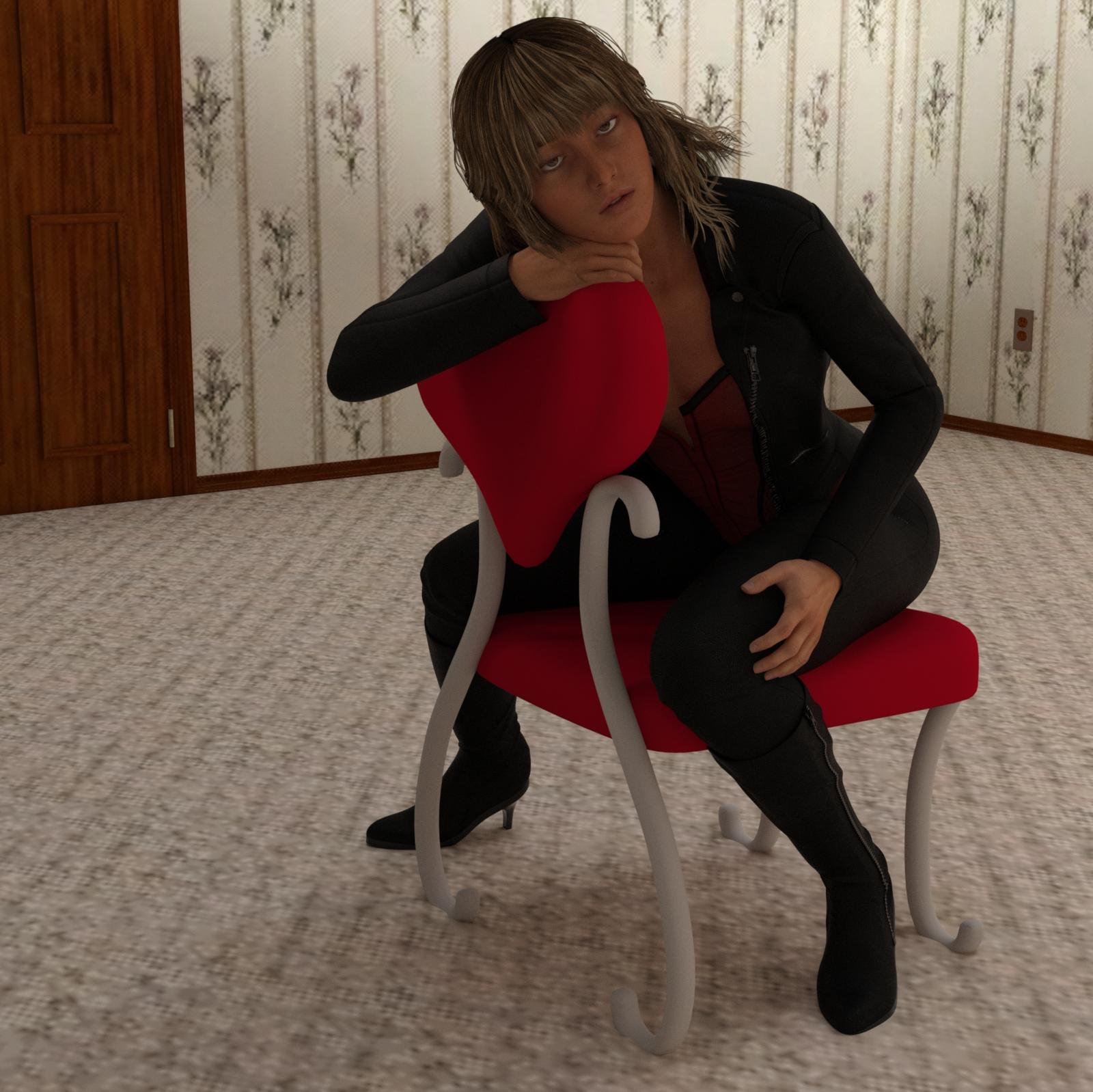
My Renders, Now I can go to bedjust working on a chair pose, with just a G3F, no morph dials used
still not completely what I was wanting, the head is just not the way I was imaging I wanted it, same with eye pose.
maybe later I'll get it
used a mix of lighting . . not a good choice

 best animation program to use with Daz?
K this just killed it lol. What do you mean with the part "iClone 6 lipsync improvement and conforming clothing do not apply to imported characters." so if I import a clothed Daz charracter into iclone then its clothing won't be able to be gravity morphable at all from the iclone options? maybe I am misnderstanding.
Daz Genesis + Daz conformed clothing imported into iClone works nice. Import process is mostly automated.
Morphing, as in changing base character shape, is very limited. Morphing shape as expression, tedious process. Morphing as in "shapeshifting" animation, not possible.
Many Daz users soon miss all the DS render options. To find bringing the actual actors back here for iRay treatment, not possible to date.
You can't conform (or autofit in DazSpeak) newly created or unrigged clothing mesh to Genesis inside iClone.
You also can't conform/autofit Daz-rigged Daz clothing figures to your Genesis inside iClone. You can do this in Carrara, with G1 (and I believe G2).
This means, if you choose G1/2/3 as your character, it's one clothing = one character inside iClone. No spontaneous fitting clothes or shoes over there for Genesis.
Everytime you change your character clothes, another round of import and character profile loading saving via their asset importer (3Dxchange). Extra purchase.
The Genesis equivalent in iClone is "G6 CC" for Character Creator character. lol mouth full. It's a separate "plugin" purchase.
If you use CC you can't bring them back to DS. They enjoy the best new iClone 6 features like lipsync extras and conforming wardrobe autofitting inside iClone.
Genesis in iClone don't get these new iClone 6 lipsync and autofit/ auto-conforming features. Auto lipsync on Genesis pops all over the place like in old iClone 5. No morph sliders in iClone to fix them, so hand craft the mouth anim yourself if you care to.
Clothing poke throughs when characters start moving can only be fixed with awkward opacity map (paint it yourself in photoshop), no adjustment morph, no direct-to-iClone morph import, smoothing or deformer to fix. No sign of that changing soon. All these, are non-issue in Carrara.
Everyone uses Genesis differently. If your Genesis dont' change clothes, don't morph much during animation, don't emote on the face, just use body motion, then not an issue, go ahead with iClone.
Otherwise do more youtube research. Lots of user traffic between the 2 apps anyway.
July 2016 New User 3D Art Contest “Portrait Rendering” – WIP ThreadI really regret trying to work on a second image at the beginning of the month when I got this one posed. I took a break from this one because I was putting off the daunting task of building these gloves. Then I had a week long family vacation, and here I am, end of the month, and what feels like a lot of work ahead of me still…
Anyway, hoping someone can help. I built these gloves, and was surprised with how easy they were to turn into a wearable object for Genesis 3 Female… but I’m having problems with the mesh deforming when I pose the figure. Basically all the black parts are supposed to be metal, and shouldn’t bend. Also the blades on the fingers are pretty deformed as well.
I tried putting all the individual metal pieces in rigidity groups. The problem is that I created a bunch of vertex groups in Blender to use as rigidity groups in Daz, but I can only use them as Face Groups for selection before I use the transfer utility. Once I use the transfer utility, I can no longer select the polygons via the vertex groups I made.
However, I am starting to suspect that this isn’t the right way to be going. The more I Googled to try to solve my problem, the more it seemed that Rigidity Groups are more for preventing objects from changing too much when a morph is applied to your base model. I am thinking that I probably want to be rigging the metal pieces to the bones of the character myself, as I suspect the transfer utility is just mapping vertices to the nearest armature. But… I have no idea where to start doing that...Long clothing collar distorts when the neck of the figure twists, please helpOh these collars are just determined to fight me at every turn :) So thanks to the prior help I've now dealt with the collar tips not moving when the neck is twisted, all is well.
But then I discovered when I morph my Genesis from its default to a specific larger character (in this case, Kenji7) the autofit makes all the clothing get bigger and take the same shape as well (exactly as expected and working just fine) but the tips of the collars suddenly distort slightly as well (in reaction to the head resizing I think). This seems like an entirely different problem, but I have no idea how to solve it.
Does anyone have any ideas?
War Bird - Out Now [Commercial]Rendered in iray. LOTS of postwork LOL. Used Retrodevil's free "Natasha" morph for the body plus Olympia 7 default skin and the markings are from "Warrior Makeup for G3F".
I was actually kinda happy with this one - reminds me of an album cover LOL.
 zbrush Making gloves form Genesis 3
Yes i line them up (when i import the .obj its at the same location as her hands as if she were wearing them) but after using the transfer utilities they "move down" and got stuck there
Extreme Poke through of the chest on Gen2 with Gen3 clothes, no way to fix it?I want to say another thing. Even if the clothes were for Gen 2, if you morph the chest to be bigger. the shirt won't adjust to the chest. Anyway to get it to adjust? Now i'm using a G2F shirt and fitting it on her but the chest pokes all out thourhg
George HD SuccessThank you for all settings and beautifull renders of George.
Here's a setup of George thinner...
Those are great. George was a much needed figure; hence his popularity. Everybody is NOT doing renders with idealized people in every scene. You need characters that can also represent the "everyman" to add some realism to scenes. I don't know about anyone else, but I have never been to anyplace in the world where all the guys look like Brad Pitt, and all the women look like Charlize Theron (and if any of you have let me know where it is so I can muck it up by making an appearance
 ).
).
People are thriving for "realism", and yet most of their art lacks realism in the one of the most obvious aspects, the amount of variety that you find in people.
Glad we have some PA's that are in the game as a labor of love and not exclusively for money.George is indeed a marvelous creature, though I have yet to purchase him, but I think most folks overlook the option to create their own folks of large (or other) stature and hope that some kind soul will create the entire population of the images that they wish to create. Again, I do respect Deapsea's work, but wish that folks would spin the dials themselves a little more often to see what they can do for themselves.
I hear what you are saying. I do like to dial various characters and morphs to create characters. I buy some but not all of the base characters and very very few add on characters. Most look pretty much the same to me. But George is not just a big man shape. He has JCMs to adjust his movement to accommodate the extra size. He has a fabulous HD morph. He has an interesting older man skin. I suppose with weeks or months of effort (if I had the skill) I could create JCMs for a dialed character, but I could not create HD details. So even though I like "rolling my own" characters, I'm very happy I bought George.
Shoe Morpfh help.I don't understand why the toes would poke through. Parent the shoe to the FOOT, then you can move the toes where you want into their correct position without affecting the position of the shoe.
Or better yet, do the following. It's a lot of steps, but once you're done, you can adjust the dangle angle by simply bending the toes. This assumes the shoes are two separate shoe figures. If not, you'll have to load two sets and make one shoe invisible on each through the material or turning off the bones and then appling the following to one set.
1. Fit the shoes to your figure when in the default zero postion. Make sure the shoes fit correctly and that the feet have the correct pose.
2. Turn off the visibility of absolutely everything except the shoes. If you have two shoes, turn off the one that you're not dangling. If you have two copies of a pair, turn off the pair that is visible on the non-dangling foot. Turn off everything else (figure, scenery, hair, clothes, EVERYTHING).
3. Make sure the shoe is using its base resolution and that the number of subdivisions is 1.
4. Export to obj. Just use the DAZ settings. Make sure the option to not export invisible objects is on. The rest don't matter.
5. Unfit the shoe.
6. Try to position it back where it was. Doesn't need to be exact. In fact, I don't think this step is actually necessary.
7. Parent to the toes. Make sure the "in place" checkbox is on.
8. With the shoe selected, use Morph Loader pro and load the .obj as a morph. Defaults should be good.
9. Apply the morph you just created at 100% to restore the original shape and position.
10. Bend the toes. The shoe will automatically dangle according to the bend of the toes. You can now apply whatever pose you have with no worries.
Novica & Forum Members Tips & Product Reviews Pt 7were using Michael 4 as an example, so didn't say anything. I am using Genesis 2 on Genesis 3, not the M4/V4 generation. The product I got was from Renderosity, and is the G2 to G3. It works the same way. I don't have problems loading the skin, it won't transfer as a material preset. I just saved as a scene subset.
Okay, let me make sure I understand. You put whatever skin you choose to convert onto Genesis 2 female. Presumabaly you make it nice and pretty for Iray. You save as material Preset. You then load genesis 3 female. You apply the converter. They you find your preset in your presets and apply it. After it is applied it looks funky. You then apply the uv from the converter utility folder.
When ou say it doesn't transfer as material preset, are you selecting it, after you apply the converter utility so the appropriate areas of genesis 3 female remain highlighted?
Ayleth for G3F -- What about the hair?Yeah, the hood fits almost every hair I threw at it.
If you have problems with hats I can suggest the tottally hipster outfit. It has a hat fixer that I now use with all the hats I own. I don't know if there's anything similar out there but I'd really like to know.
Can you describe "hat fixer"?
The problem I have is that hair should morph to fit the hat/hood, not the hood to the hair. :(
You just load the hatfixer to the character and then load the hair. The hat fixer has parameters to deform the hair to fit under hair. Pretty easy.
Hmm.. Anyone use this with G2F?
What features would you like to see appear in dazstudio 5?I'm also longing for a Poser style morph brush to push a little bit of geometry around. It was awsome to be able to shink morph clothing and put in creases. And also morph depressions onto beds, pillows and chairs etc.
+1

+1 for me too.
Stormwind Capes for V4 (Poser Dynamic?)No luck with the Dyncreator, it totally comes apart; as it is, the item can't be used in DS.
EDIT: Note: The dynamics transfer properly, but the parts of the clothing are not welded together, so you have several objects when you start the dynamics run. The cape itself, for example, is somewhat draped over the box.
 M4 and V4 items on sale for $4
Generally speaking, having the opportunity to use V4/M4 at a discount means that I can widen my 'toolchest' for any given purpose. The usefulness I find from older V4/M4 stuff are usually skin textures and clothing. Occasionally props transfer over well, but it's a bit of a hit or miss. Same with morphs and poses, as I tend to have equivalent or better ones with current generations.
Also these V4 products that they're importing from RDNA at $4 each are still $8 to $25 each there, at least. More for bundles. And there's some really amazing skin textures in there. Getting them applied to modern UV's can be done without any extra products if you're clever about covering the gaps in the textures.
We're almost there - only 6 items left in my RDNA wish list, and two of those will probably be bundled.
Arent' they though? Some of the skins I've tried out have looked great inside DS. There is an amazing amount of talent filtering over here and not all of those V4/M4 characters are old. Some are actually kind of new because Poser people still use them.
Yes, some V4 skins can be *very* new as a lot of vendors outside of DAZ only started to switch away from V4 when G3F came out. Off the top of my head, I believe V4 generally had larger textures (with an extremely high polycount too, I think?) so it allowed for some really detailed skins to be published...
Llola Lane's Song/Music/Story/Poem Inspired Render Thread... Join me if you wish!!!render didn't quite come out the way I wanted, not really close, lighting didn't come out the way I wanted, so just did a render of a head
was listening to Dear Frederic - Stare Into the Light , and had an idea, so I started up DS, and started with G3F, then for the music while I played with the morph dials was April Rain - Waiting For Sunrise [Full Album] , was done with the morphs and working on the lighting towards the end of track 8 , where you hear the people talking.
there are some renders I have seen others do I could match a song to, easily , but I understand it has to be our own renders, what inspired us
She's very realistic looking XaatXuun... I don't have time to listen to all the music so far... but I can see how you would be inspired. The lighting in the first video would be tricky to match in Daz/Poser... But it sure would be fun to try.... Your render matches the mood perfectly! Thanks for sharing.
Daz 3D is part of

Connect
DAZ Productions, Inc.
7533 S Center View Ct #4664
West Jordan, UT 84084Licensing Agreement | Terms of Service | Privacy Policy | EULA
© 2026 Daz Productions Inc. All Rights Reserved.