-
My Request to HairStudio
I love HairStudio Hair.
Very realistic, super high quality and almost perfect, but:
Please, include more Morph Targets and please make it DForce.Seeking Help with Daz Riggingcrosswind said:
Ah... I would say rigging / skeleton system of Genesis figures are a bit unique. You can make or import any stand-alone figures with rigging / bone system of their own, e.g. Mr. Bobble, a rigged character from Blender or other software with FBX format.
You can search on youtube, there're lots of tutorials related to this topic.
An alternative, wrap other stand-alone character with Genesis figure by using FaceForm Wrap software. In that way, you don't have to rig anything, just bring the wrapped morph back to Genesis figure in DS. Then you can use all Daz assets on them.
These are great suggestions. Thank you for your help. I appreciate it.
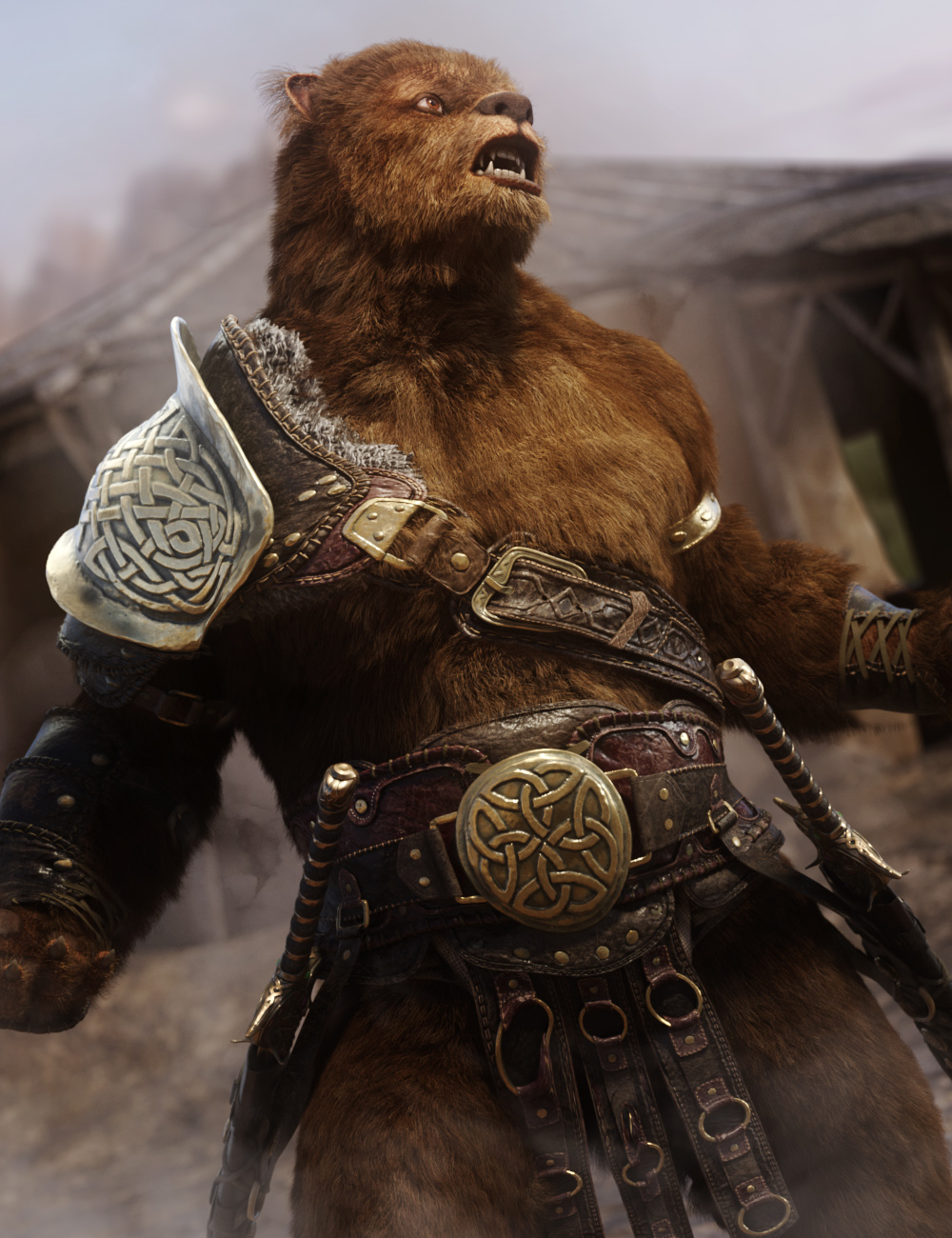
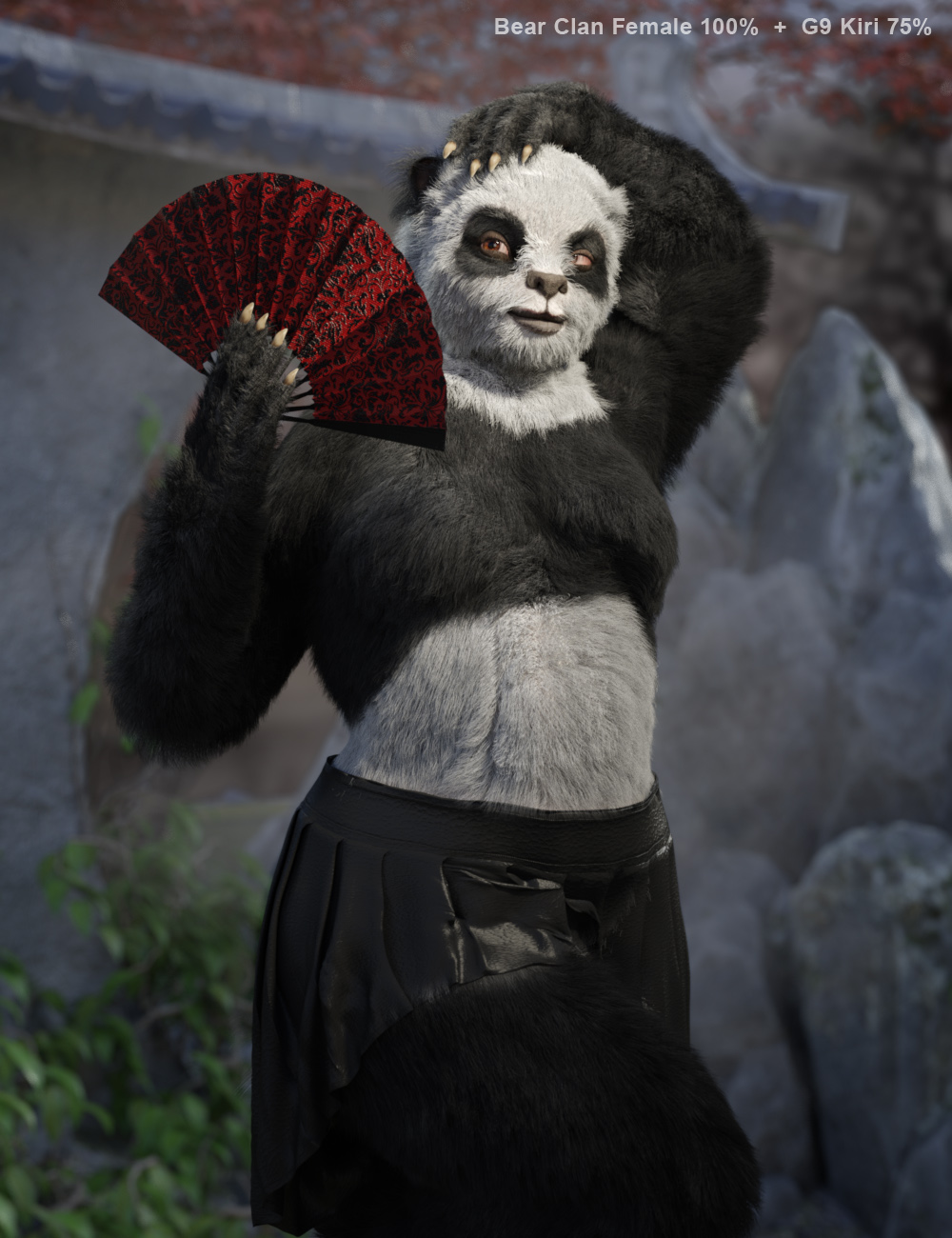
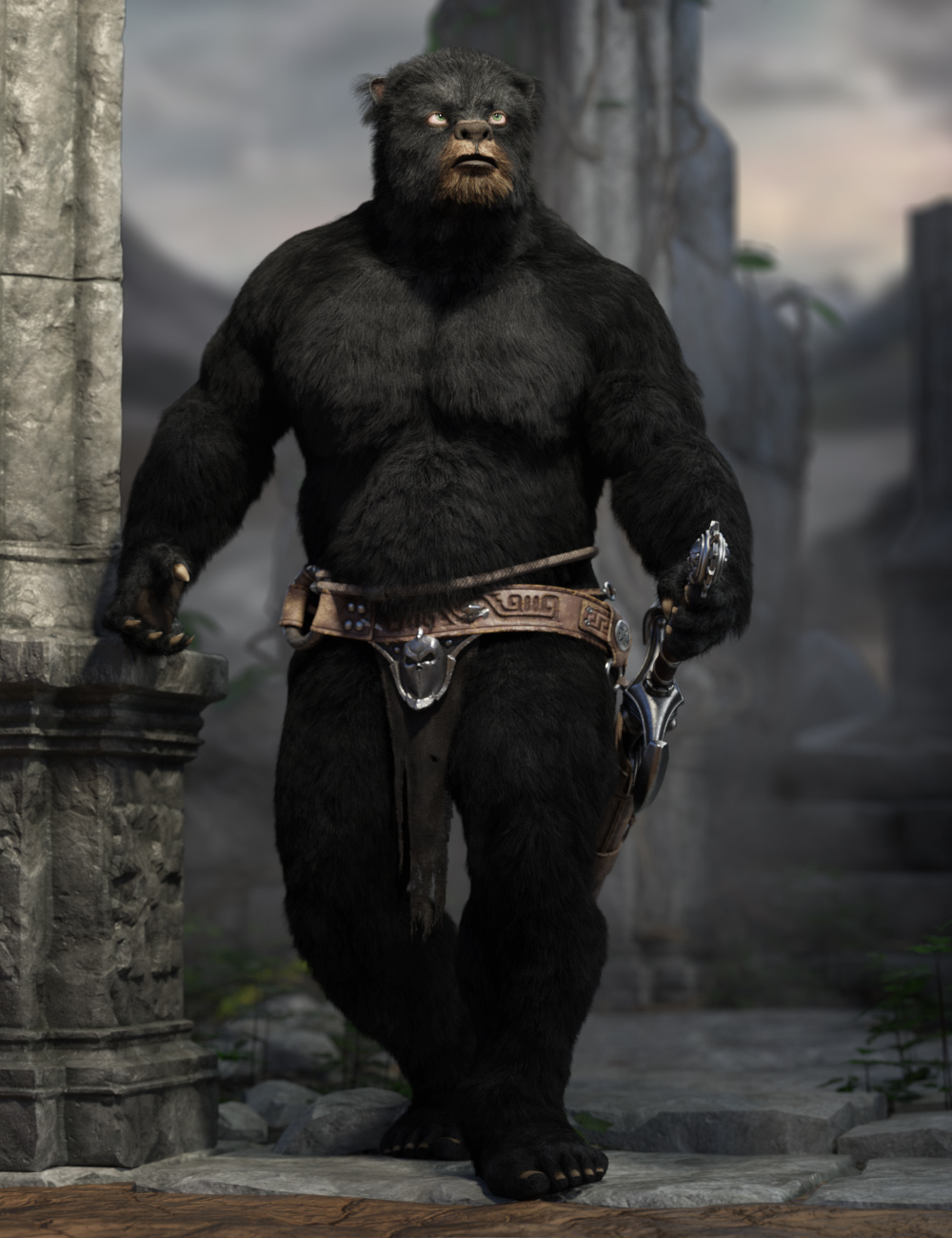
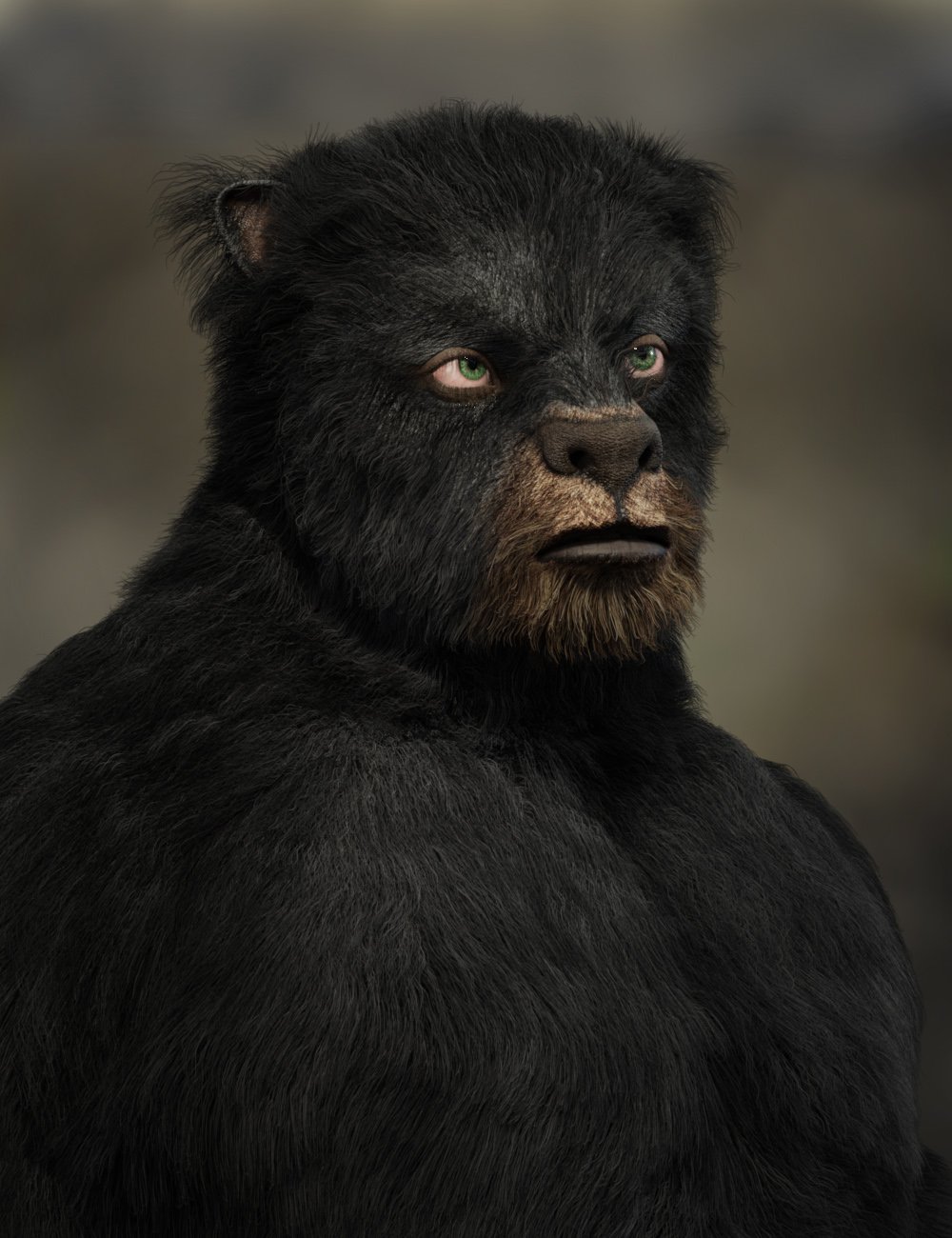
The Bear Clan for G9 [commercial]Hibernation is over, the Bear Clan Awakens
https://www.daz3d.com/bear-clan-for-genesis-9
If you go into the woods today, you're sure of a big surprise... the Bear Clan is back again.
These brawny bruins are powerful warriors, ready to bring some wildlife to your renders!
This set was designed with ultra-realistic PBR skin skin techniques. The high-definition morphs, dForce Fur, and High-Quality textures really bring this character to life for your renders.
What's Included and Features
- Bear Clan for Genesis 9: (.DUF)
- Bear Clan Character Preset
- Four Bear Clan Shaping Presets (two male and two female)
- Bear Clan Snout Length Morph
- One dForce Fur Attachment
- Material Options:
- Four Full Skin Mats with Anatomical Elements
- Five Eye Material Presets
 Bridged morph controller not working with character solver
I don't think I ever got it to work with Auto-IK as well. My workflow at the time was to bridge a character over, use a Cascadeur animation to drive the character via the Solver tag, but exclude all the head joints from the Character Definition so that they didn't conflict with the Morph Controller. I don't remember if I even figured out how to use the Character Definition and Solver to drive an Auto-IKed figure, but it wasn't a priority for me.
Product identity neededRichard Haseltine said:
If they have a forum presence you can try PMing them, but it is better to open a support ticket, so that suppot can contact them once if they don't already have the information.
However, in my opinion, it's not worth your time.
Last time I contacted support with a question like this, I was asking what morph was associated with the teen skin for Angela 9 (and I'd say it's a fairly reasonable request that when the product is half a character to ask what the other half of what you see in the promos is), but was rather bluntly told the information was not available.
Now, I should say I do appreciate that the CS team do have to make decisions about what requests actually merit being passed on - their agreement with vendors to act as the front line when it comes to support requests does require that. And I'm guessing that this probably means they're unlikely to pass on any queries or issues that don't actually directly relate to the product in question. Given that a lot of artists would have to take the time to look up their character formulae, a lot of combinations are not practical to share (a character may be made out of many different product packages, or involve customisation that cannot legally be shared) and a lot of artists deliberately seek to use customised characters to develop their own visual trademark and thus wouldn't share the recipes anyway, I can understand why it would be a request that the CS team would by default shoot down.
I'm generally philosophical about this though; the Angela Teen stuff was the first time I'd queried this in a long time, because I realise I already have access to more characters than I will possibly ever use, and have the potential to mix my own that can then be unique to me.
G8F default shape has changed and I don't know how to reset itTo fix any ill-behaving (non-zero default value) morphs, do as follows;
1. Open DS and load "Genesis 8 Basic Female" (to an empty scene)
2. Right Click at Parameters Tab->Preferences->Choose "Show Hidden Properties" (part 3 zeroes only 'visible' dials)
3. Right Click at Parameters Tab->Zero->Zero Figure (Zeroes the value of all the 'visible' dials)
4. Right Click at Parameters Tab->Memorize->Memorize Figure (Sets the current value of all the dials as their default value)
5. Edit->Save As->Support Asset->Save Modified Assets (Writes the changed default value to the morph files that were changed)When saving "Modified Assets" DS shows a dialog and asks for confirmation;
"The following file(s) will be permanently modified:" - "Accept/Cancel" - Choose "Accept"Announcing: Daz Deals Browser Add-on IIPaperMoon said:
I emailed: info at bigbluehatcom today, but very recently discovered this forum to address some issues I'm having.
I have used the Daz Deals Pro extension since March 2022. It was updated on March 7, 2024 and my membership has been extended to March 2025.However, it no longer works in Daz3d, plus I have not received any email at all from Daz Deals Pro.
About a month ago, I had to change my Daz3d email. That worked out fine for me, but my Daz Deals Pro never made the change from the old email address to the new email address. This has been an ongoing headache because my old email address will soon be discontinued through my ISP.
I filed a ticket with Daz ZenDesk, but no response yet, in nearly two weeks.
It all worked perfectly before I changed my email address.
In a private message (or email) please send me your old address and your new address. I'll check what's going on and where the process could be stuck. A change of email address is complex: you need to register your new address in the addon, and you need to transfer your addon subscription to the new address.
Daz closing for no reason (not crashing)jodhan322 said:
My techie ability far exceeds my ambition to make renders. I don't know what those things mean:
increasing their virtual memory (All my drives have lot of free memeory) [I looked this up online, and did the recomended change]
"disabling all non-daz plugins" I didn't realize I had any non daz plugins. I don't use Daz Central, or whatever the new thing is that's replacing it. I just update my meta datas, then install. I do use Hexagon when I'm creating a morph, but I don't if that's a daz or non daz plug in.
Hi. :)
It's possible you don't have any non-daz plugins. In Studio, at the top on the menubar you can go to Help -> About Installed Plugins to view a list of what plugins are currently installed. Quite a few plugins ship by default with the Daz Studio application, so there should be some in there. But those would be considered daz plugins, in other words, the plugins that came preinstalled with Daz Studio are generally considered safe, but third party plugins can also be installed and those could have negative effects on Daz (such as crashing etc). When trying to figure out a solution to a problem like this, it's always a good idea to start from just the base application, and slowly reintroduce plugins back into the application so you can try to narrow down which one, if one at all, is contributing to the problem.
As far as the confusion about Virtual Memory goes, the operating system (typically Windows, and is in this case), uses several different kinds. Virtual Memory, Random Access Memory (RAM), and Video Memory (VRAM). These memory types differ from hard drive disk storage space, as your hard drive is a place to permanently store data and memory is considered a place for temporary data. Memory is usually "flushed" (cleared), with every reboot.
Virtual Memory in particular uses the hard drive disk to create extra space for Windows to store stuff temporarily, and the end-user (you), can manually set the amount of disk space Windows is allowed to use in Advanced System Settings in Windows. (Open Run and type Advanced System Settings). The place to set it is under the Advanced tab, in the Performance box, click Settings. I would advise against changing the values in there though if you do not know what they mean or what they do as you can cause wide scale issues all across Windows in certain scenerios. I think it's a little prudent to mention that the user who reported that as fixing his issue with the error you're facing is the only person who said that worked out of many other people who are facing the same issue as you, at least, at the time I posted my comment in regard to Virtual Memory.
nvAPI is nVidia's GPU API, I'm guessing you're seeing that because Studio is failing to communicate properly with it because of the other error. But that's just my best guess.
Felton the PuppetBefore I saw SapphireBlue's comment, I installed a free "transgender" G8 morph (https://www.deviantart.com/agentunawares/art/Transgender-Genesis-8-723851486) and created this scene for possible use in an animation project of mine.
G8F default shape has changed and I don't know how to reset itPerttiA said:
"Currently Used" shows only those dials that have their value at something other than default.
You probably have some morph saved at 100% default value and while it is on for all your G8F based characters, the "Currently Used" does not show it because it is at it's default value.
Zero the figure and check "Currently Used", the culprit is the dial(s) that have their 0 values shown in white.
Hey, that worked! I found the morph that was causing trouble!
Now how do I make zero the default going forward?
Seeking Help with Daz RiggingAh... I would say rigging / skeleton system of Genesis figures are a bit unique. You can make or import any stand-alone figures with rigging / bone system of their own, e.g. Mr. Bobble, a rigged character from Blender or other software with FBX format.
You can search on youtube, there're lots of tutorials related to this topic.
An alternative, wrap other stand-alone character with Genesis figure by using FaceForm Wrap software. In that way, you don't have to rig anything, just bring the wrapped morph back to Genesis figure in DS. Then you can use all Daz assets on them.
FaceTransferUnlimited: Can'tSendParticular Character Only!Oh never mind. I found what the problem was. It wasn't face transfer it seems to be if you transfer huge polyogon hairs it wont let you. I was trying the MSO Loong hair which looks like the style bruce lee has and it always crash with that one but i switched to simpler one and i was able to do it no prolbem.
Daz closing for no reason (not crashing)suffo85 said:
The flurry seemed to die down after one of the main helpers around here suggested disabling all non-daz plugins, recommended by Richard Haseltine.
I would try that and see if it fixes the issue. Another user reported increasing their virtual memory (this would be found somewhere in Advanced Settings in Windows).
My techie ability far exceeds my ambition to make renders. I don't know what those things mean:
increasing their virtual memory (All my drives have lot of free memeory) [I looked this up online, and did the recomended change]
"disabling all non-daz plugins" I didn't realize I had any non daz plugins. I don't use Daz Central, or whatever the new thing is that's replacing it. I just update my meta datas, then install. I do use Hexagon when I'm creating a morph, but I don't if that's a daz or non daz plug in.
G8F default shape has changed and I don't know how to reset itRonwald said:
PerttiA said:
"Currently Used" shows only those dials that have their value at something other than default.
You probably have some morph saved at 100% default value and while it is on for all your G8F based characters, the "Currently Used" does not show it because it is at it's default value.
Zero the figure and check "Currently Used", the culprit is the dial(s) that have their 0 values shown in white.
I had this happen a couple of years ago when I installed a character I'd purchased on another marketplace. Fortunately, the character was fairly inexpensive so I just uninstalled it.
You've could have gone into the Character's *.dsf file and changed "value" to zer0.
How to change properties on custom morphs.Richard Haseltine said:
The changes would remain if you saved a scene (or a Character preset and used that to load a new figure, rather than modify a figure already in the scene). You can save individual morph assets (modifier assets in the new beta, though they are functionally the same) though I do dislike the inability to be selective in Save Modified Assets.
Thanks Richard. That basically worked.
What's weird is I thought I had tried saving the scene as a solution before, yet it did not work. No. Wait. Not so weird. Here's why:
I just tried it again and it only partially works. I changed some properties on two moph assets and saved the opened file as a scene. Then I shut down DS. Then I started DS by double clicking on the scene file I just saved. The property changes for the two morphs had survived. All good there.
But then I shut down DS again and started it raw, with no previously made scene file loaded. I loaded in a G3F base figure to check the morph asset properties again. But this time the changes did not survive. They had been erased.
So I shut down DS again and started it again loaded with the saved scene file again. And the changes were present again. So at least DS saved the changes in a limited way, limited to just that scene file.
But now I tried re-saving the morph assets as morph assets again, hoping to over-write the morph assets with these new versions with changed properties. And THAT worked. Now the morph asset properties have the property changes permenant in subsequent re-starting of DS.
This is all in 4.11.
AIUTO...CHI CONOSCE L’ITALIANO? PARTE QUATTORDICIMuscleman said:
Però in descrizione, è specificato cosa vai a compare :)
Ho guardato, Ragazzone, parla addirittura di una "rampa rettrattile" e di Smart Props, il che mi fa pensare che qualche forma di rig o di morph sia presente nel prodotto e che non sia un misero mucchietto di prop raggruppati.

A parte questo, oggi piango alla notizia che il primo Maggio Akira Toriyama è venuto a mancare.

Era un vero maestro e un artista coi fiocchi.
G8F default shape has changed and I don't know how to reset itPerttiA said:
"Currently Used" shows only those dials that have their value at something other than default.
You probably have some morph saved at 100% default value and while it is on for all your G8F based characters, the "Currently Used" does not show it because it is at it's default value.
Zero the figure and check "Currently Used", the culprit is the dial(s) that have their 0 values shown in white.
I had this happen a couple of years ago when I installed a character I'd purchased on another marketplace. Fortunately, the character was fairly inexpensive so I just uninstalled it.
G8F default shape has changed and I don't know how to reset it"Currently Used" shows only those dials that have their value at something other than default.
You probably have some morph saved at 100% default value and while it is on for all your G8F based characters, the "Currently Used" does not show it because it is at it's default value.
Zero the figure and check "Currently Used", the culprit is the dial(s) that have their 0 values shown in white.
Proper way to do general weight map?Lyoness said:
After weightmapping, where everything is smoothed as best as you can for that joint, next we make JCMs or CBSs....
You go into blender or zbrush and create and morph for the bend.
There are lots of lovely tutorials on rigging (youtube) and you are starting off great. Take it to the next level and make the movement morphs for your outfit.crosswind said:
Firstly, you should've smoothed the Weight Map on Left Thigh Bend rather than Pelvis.... I don't know what modeling / sculpting software you use... but you don't have to tweak weight map in that way which is too cumbersome.
As a routine Blender user, I'd like to share my workflow with a pretty quick and good fix for such a case. It took less than 10 minutes to complete rigging and fixing pJCMs on both Left / Right Thigh with Side-Side. If you have interest, pls just let me know.
Thanks for the answer guys, I didnt use any external softwares, I just exported the mesh and imported it back to daz. Iam not an avid users who could make JCMs likes you guys, I was just wondering why is HM mesh looks so good even without JCM? His meshes are so clean even with just basic weight-mapping? Its driving me crazy, I just want to know!
G8F default shape has changed and I don't know how to reset itI have no idea how to explain it, but I noticed that some of the figures I had made with Daz in the past looked off, and upon inspection I've found that somehow the default shape of the default G8F figure has somehow changed. Fortunately I had a base figure saved in Diffeomorphic and when I imported that to Blender I noticed it looked visibly different from how it now looks in Daz (note the lips).
The only value that's not at zero when I load a new figure is FHMMillawa8 but adjusting it makes absolutely no change whatsoever. I've tried reinstalling the G8F starter essentials a dozen times but it doesn't fix anything. I don't know what's going on - I'm not getting any duplicate formula errors, restoring the figure doesn't fix it, checking "Show Hidden Properties" doesn't show anything extra in "Parameters" OR "Shaping", I don't know what the heck the "developer version" of Daz is or how to open the base morph asset, and nothing else I've installed seems to be causing any problems.
Am I going insane? What happened? Why are all my models now messed up? How do I fix the G8F base?????
Daz 3D is part of

Connect
DAZ Productions, Inc.
7533 S Center View Ct #4664
West Jordan, UT 84084Licensing Agreement | Terms of Service | Privacy Policy | EULA
© 2026 Daz Productions Inc. All Rights Reserved.