-
Creating a custom Carrara character and morphing in posed position
Thanks!
you added the morph area before attaching skeleton?
you just have to do that for the 1st morph? the rest can be added after rigging is done?
to do it in poser, used to create morphs for a few body parts, then would create 'full body morph' to dial them in all at once.
Anyone have issues exporting mdd files of certain dynamic cloth sims?Have you tried freezing the simulation (which creates a morph per frame) so that you're bypassing the dynamic aspect?
G3F Morph packs that are merchant resourcesI really don't plan to sell anything, but I really would only like to buy merchant resources for morphs and textures, just in case I change my mind. I'd really hate to sitting there with a great character if only I hadn't used ......So in an effort not go into debt too much I want to stick to merchant resources for G3F. Help please. I tried searching but couldn't tell what was ok to use as a merchant resource or not. I am just assuming unless it says merchant resource, its not one.
virtual penny 4 yor carrara thoughts ?I put the steps for adding a morph for a Carrara-rigged mesh in its own thread. It will also be useful for adding morphs to other objects and meshes.
Little Ones for Genesis 3 FemaleStupid question, but how do you make an extra dial? Can you also make separate head/body dials from a single character morph?
There is a tutorial here:
http://www.digi-dotz.com/index.php/free-poses/tutorials/daz-studio-tutorials/47-morph-in-daz-studio
And AFAIR you can't make e.g. a head morph from a single character morph that way (I think you have to mess with the mesh to do that).
Creating a custom Carrara character and morphing in posed positionWas going to put this as a reply in another thread but think it is worth its own. The original question had to do with creating morphs for Daz and Poser figures, but then the question of all-Carrara figures came up. Here is the bare bones basics of creating morphs for a custom Carrara figure in the posed position. I begin with creating the character because adding an initial morph is important.
For fun, I am going to start with a low poly toon ChickenAlien.
1) I modeled a simple chicken alien toon mesh in the vertex modeler. Standard stuff - like creating material zones, etc. This isn't a modeling tutorial so I will just show the initial mesh. Yuck! But it will suffice.
2) I created and saved an initial full body morph (FBM). To do so, I entered the modeling room and the morph tab. The first thing I had to do was create a morph area for the morph. In this case, I selected the entire chicken alien mesh. I clicked "create" and a dialog came up prompting me to name the morph area. By default, it was "morph area 0." I renamed it "all" and saved. Once the morph area was ready, I used the drop down menu to the right of the current morph area (All) and selected "create target." A dialog appears prompting for a name. I chose FBM All Edit for the name. Click "Edit" next to the empty morph name (FBM All Edit or whatever) and the mesh will turn green. Use the vertex modeling tools to adjust the mesh as desired. Remember to save and validate the morph so that it is properly stored. Once saved and validated, a new morph channel appears with the slider set to zero. You can return to the assemble room and test your new morph. The morph will appear in a list under the "general" tab.
3) Rig your mesh. This isn't a rigging tutorial but the basic work flow is to use the directional cameras in the assemble room (and select the mesh and hit "0" as needed to zoom properly) to place the diamonds where you want joints (knees, wrists etc.). You can just rig one side (ams and legs) then use duplicate with symmetry for the other side.
4) Use the "animation group" under the animation tab, not the normal group under the edit tab. I group my mesh and my skeleton and save to the browser without attaching, but that is personal preference.
5) Once the mesh and bones are ready, click Animation from the top menu of the Assemble Room and choose attach skeleton. You can now pose your figure. Normally, you would want to edit the joints, weight maps, etc..
6) Adding morphs in general. Even when the skeleton is attached, you can select the mesh, enter the vertex modeler, and add new morphs to any existing morph area under the "model" tab.
7) Editing morphs in the posed position. If the figure is posed, you can select the mesh, enter the vertex modeler, choose animation mode, and edit morphs. Very handy!
8) You can also edit bone influences and weightmaps in the posed position.
Genesis 3 female saved pose errorsOK I TRIED SAVING FIGURES AS SCENE SUBSETS ALSO SAVING poses as presets and still when I re open the file none of the hands are correctly positioned. and I have to re position then all over again. Its a real pain taking ages each time i want to use the scene. Why isnt the pose being saved accuratly ? I dont get it, I m guessing its something to do with the rigging. Like I said everytime I load one of the Genesis 3 female figures that had a youth morph appled it loads with wierd mishaped hands and eye sockets and I have to apply the adjust rigging to shape to make them work normaly, saving doesnt save the rigging so I guess thats why the pose gets alll messed up. Is there any way to save a figure with all the shaping morphs applied and not have to ajust the rigging every time it loads? Im going to try saving the figures as character presets and see if they retian the rigging info
Little Ones for Genesis 3 FemaleThere is a body & head dial for The Little Ones here is another image
V7 100% G3 50% G3 25%
Ah, I just couldn't find it then. I ended up making another dial. I'll have to see about undoing my dial in the morning then. Yours came out rather cute, too!
Stupid question, but how do you make an extra dial? Can you also make separate head/body dials from a single character morph?
+1
Tween Julie 7Okay, I did some more head banging on the thumb issue, I think I've figured it out. It looks like intended values for the "x-orientation" of each of the thumb bones was inserted into the morph, instead of the difference values. So, for example, on lthumb1 the value stored in the file is 27.1542, when in reality it should have been the value -10.1142 (which, incidentally, ends up being the final value of the x-orientation on the unmodified figure).
To clarify; for both lthumb1 and rthumb1, the fixed value should be -10.1142; for lthumb2 and rthumb2, the fixed value should be -6.87205; for lthumb3 and rthumb3, the fixed value should be -6.98508.
Looks pretty good there Nightwolf, though kinda have a gap between the finger and thumbs. I may apply those values you have to the Olivette FBM to see if that improves hers just a bit more. But the Victoria 7 values that I used seem to work for me on Julie and all hand poses.
Not sure on the Brita one since I didn't get the pro pack. So I don't know if she is just a modifier or has her own FBM with hand values.
virtual penny 4 yor carrara thoughts ?For me, I have found that I use a slightly different work flow depending on how the figure was rigged.
Background. I am going to use the terms "Poser-style" for the old rigging system even though Poser itself has since moved on, "Daz-style" for the Genesis figures (sometimes called the triax system) and Dragon 3 even though Daz has since moved on, and "Carrara-style" for figures rigged using Carrara's bones and weightmaps. Carrara can read the old Poser style and we can see the bones and edit the weightmaps of V1-4, Aiko3, etc, but Carrara has trouble with the newer Poser weightmap system used by Miki4, Tyler, Rex, Roxy, Dawn, etc., although there is a plugin attempt to use the newer Poser figures (inconsistent success). Carrara can read the old Daz-style Genesis and Genesis 2 figures including seeing the bones but some of the editing functions are disabled. Carrara can't use the newer Daz-style Genesis 3. Obviously, Carrara can use Carrara's own bone/weight system.
There are a couple of things to keep in mind, independently of the rigging system. 1st - Carrara can edit the object mesh directly even if no morphs exist, with a few caveats discussed below. 2nd, to add an adjustable morph dial, as opposed to editing the general mesh, the object needs to have a morph zone defined before the mesh is attached to the bone skeleton.
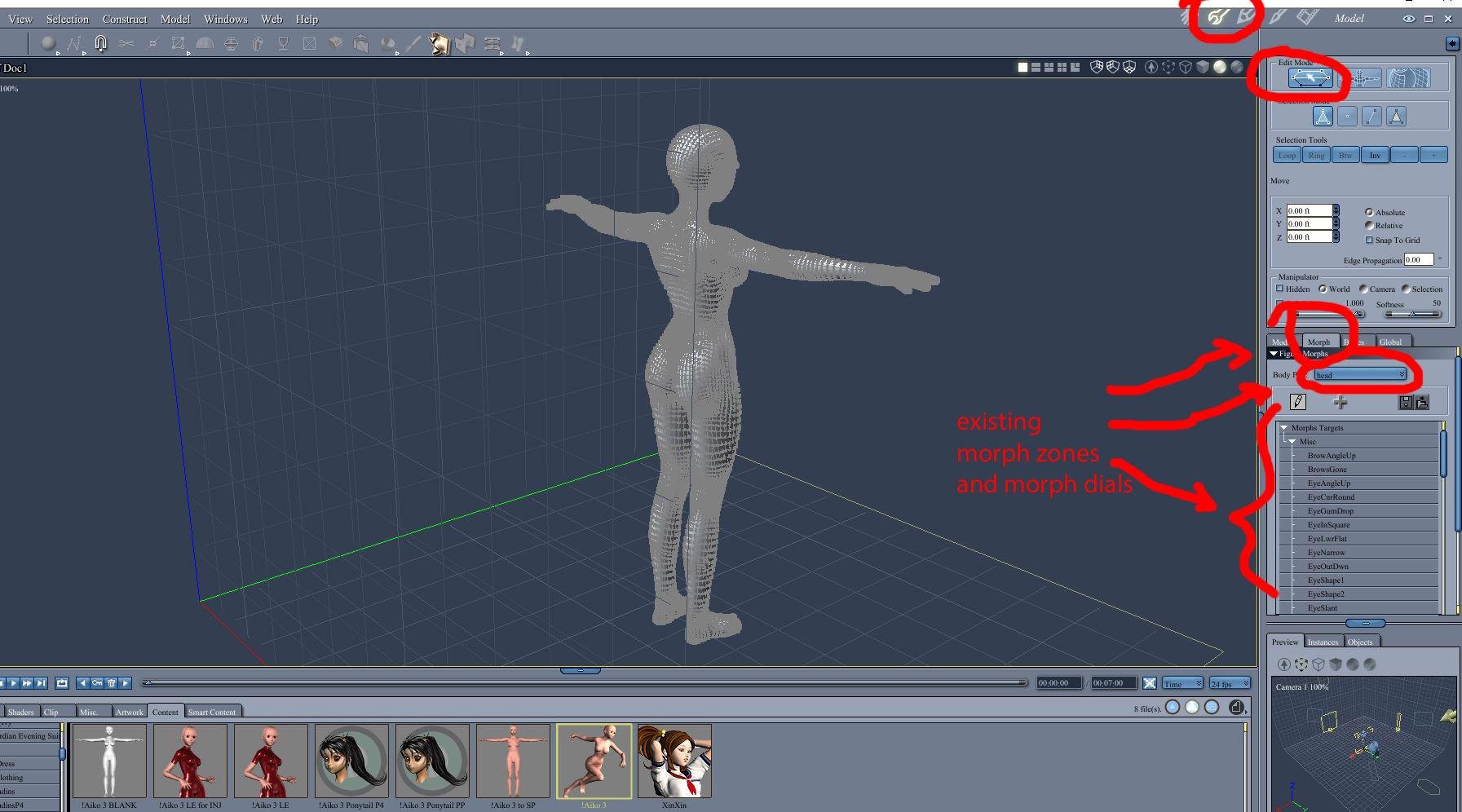
- For Poser-style rigged figures, such as Vicky 1-4, Michael 1-4, Aiko 1-4, Star stand alone, etc., Carrara has a lot of great options and functions. First, as mentioned above, you can load the figure in Carrara, edit the mesh directly, and save the result for future use without ever adding morphs. Carrara has the magnet tool and the displacement painting brush for loaded figures. Second, you can load the figure and create and save new dial morphs. A morph zone must aready exist to add a new morph dial. Here, I loaded Aiko 3 and note that under the morph tab of the vertex modeler (model level) there are already morph zones by body part. Third, you can actually make the morphs in another program (such as hexagon) and load them in the appropriate morph channel. The weightzones figure can be edited in the posed position, which is a great help. Similarly, a new morph can be added in the posed position as long as a morph zone already exists.
Aiko 3 loaded and already has morph zones so that morph dials can be customized (see below)
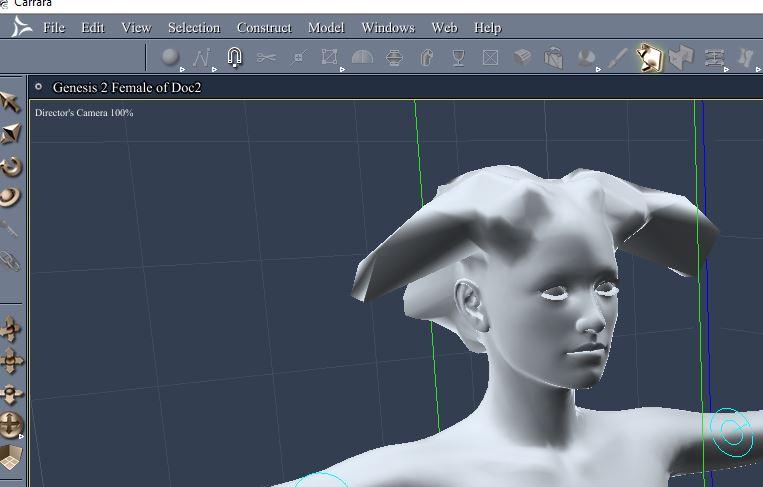
- For Genesis and Genesis 2, Carrara still has some good functions but there are some limitations. First, you can still edit the mesh directly but Carrara wil give you a "protected topology" warning. I just ignore it. I have not been able to add morphs within Carrara for these figures, I've had to use Daz Studio's morph loader, but maybe Dart's workflow above changes that. I defer to Dart.
Genesis 2 character Riven loaded and then the displacement brush used ignoring protect topology and without creating a moph zone. (see below)
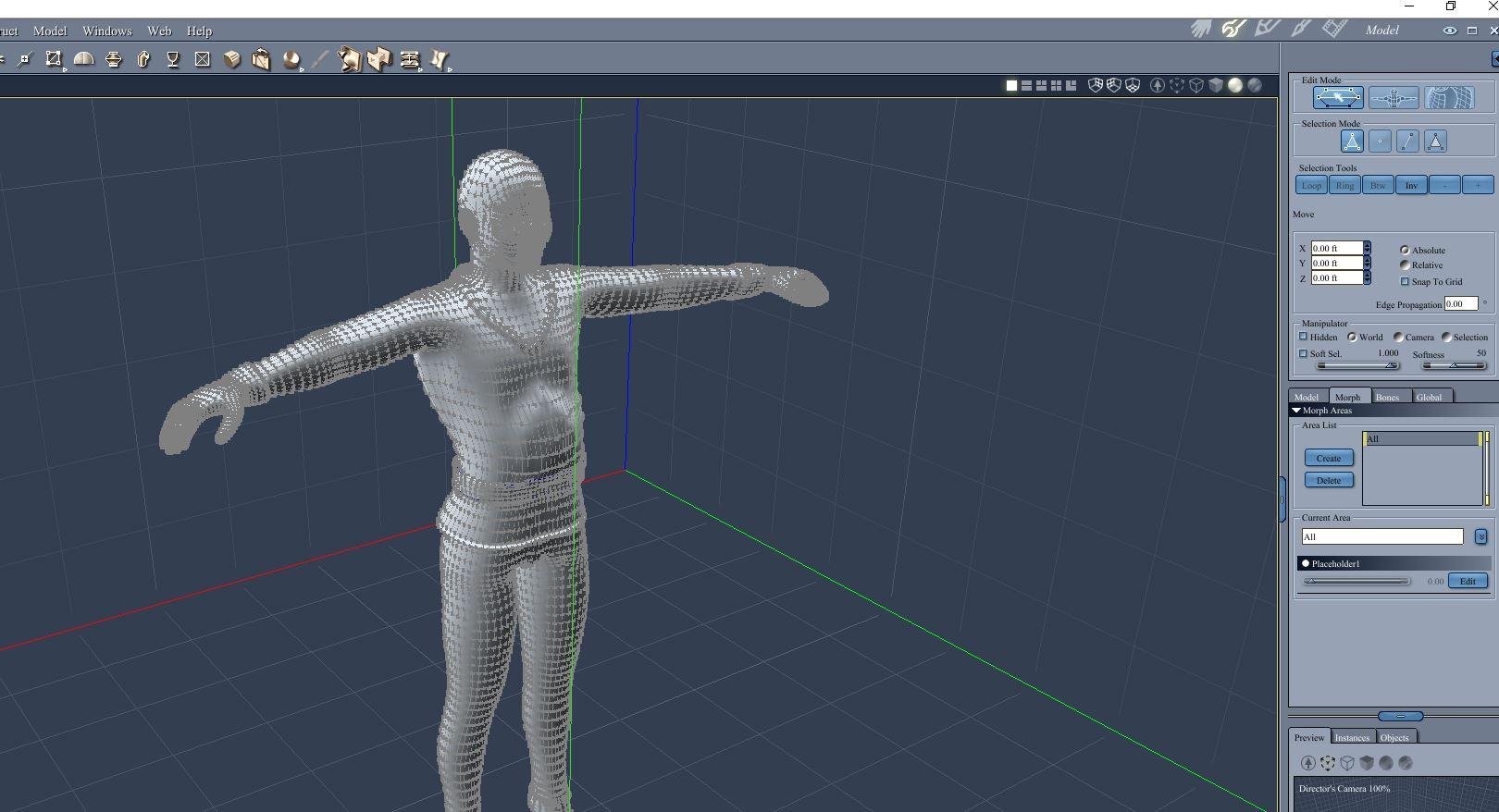
- For Carrara-style, plenty of functions, but a few limitations. Remember to create a full-body morph for the object mesh before attaching the bone skeleton to the mesh. That is needed to add new morph dials which is very helpful for editing in the posed position. If you need to detach the skeleton to edit the mesh you may lose a lot of your bone weight adjustments when you re-attach.
Carrara custom figure already has a morph zone (all) and a placeholder morph. (see below)
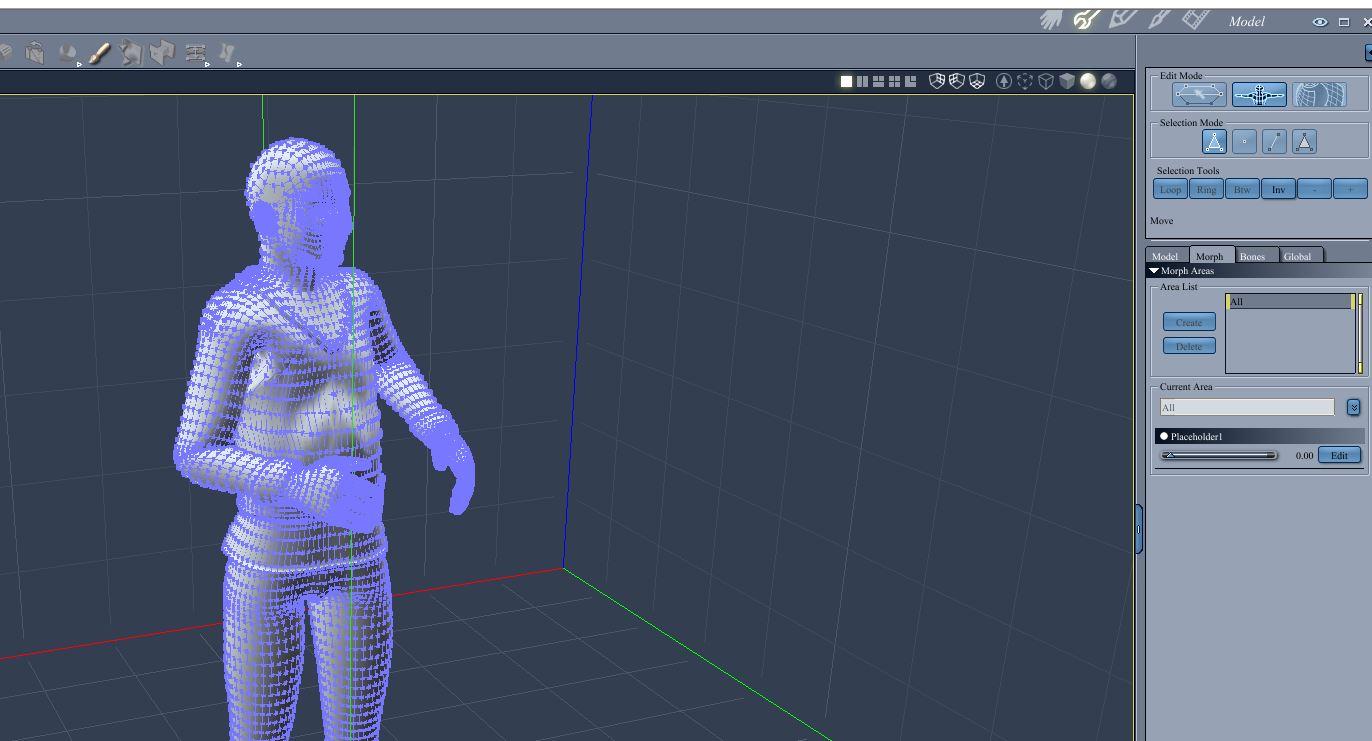
Carrara custom figure capable of editing vertex mesh in the posed position. (see below)
 M4 Anatomical Elements doesn't move when I change body shape
When you say you are attaching, do you mean fitting (assuming this is DS) or only parenting? If you are fitting, try right-clicking on the Michael 4 figure and from the menu selecting Transfer Active Morphs.
Ice Dragon Art WIP'sTaisha - Half Elf
Genesis - Rapture Morph and Mats
Mitsu Hair - UHT2 Hair Salon
MFD - Reign
She is a character for the story I am putting together - I will be posting the pictures with the very short stories that go with them on my deviant art account.
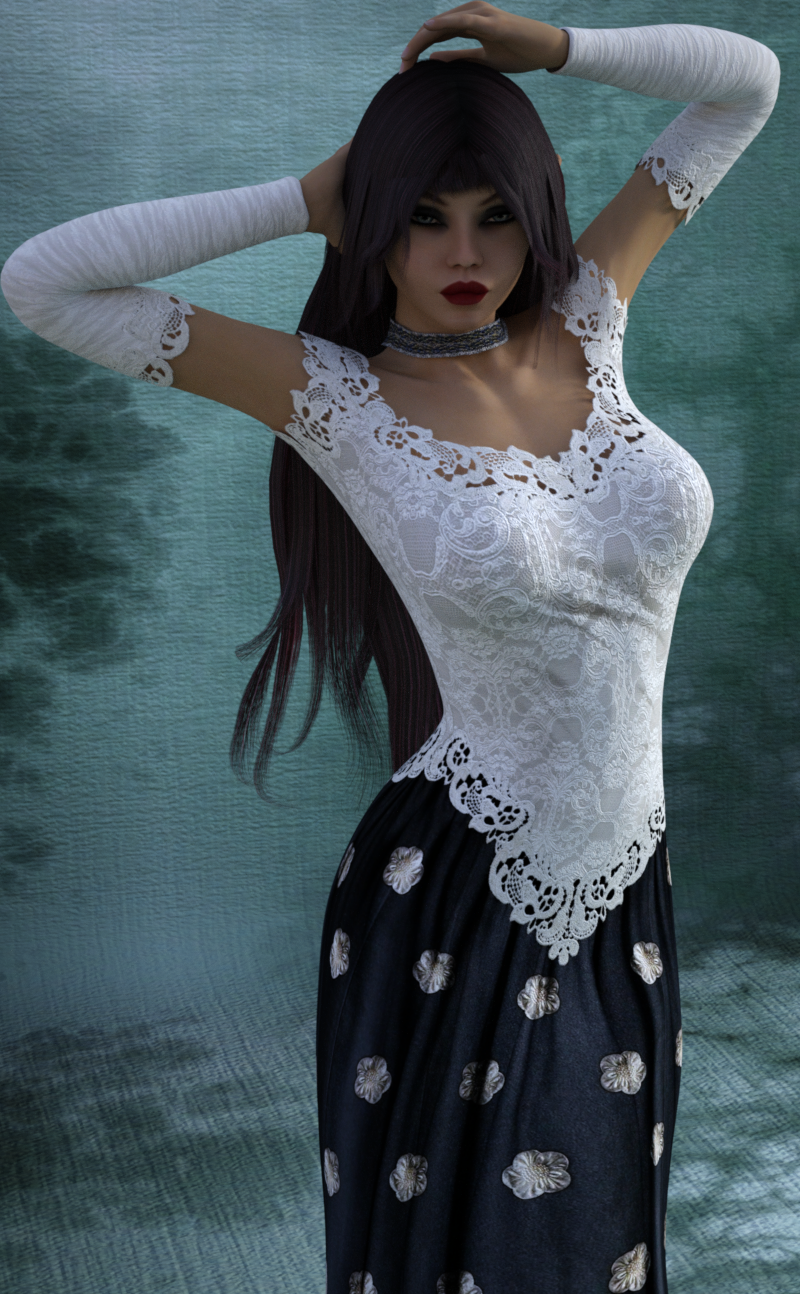
That looks lovely! What a pretty character and outfit! :D
What are the stories about?
Sorry! I meant to finish my sentence and my husband was hollering it was time for bed (I have a bad tendency to stay up way too late on a work night if I am working on art lol)
The stories are under this folder http://icedragonart.deviantart.com/gallery/59725557/1-The-World-of-Akasa-Gahari ; on my Deviant art account which is in my signature line as well. I will probably be changing the world name and making this name the name of the cloud kingdom. Very very much a a work in progress, I just started this idea, we will see how it works out lol. I wanted to tell short little stories that link together one way or the other inside a fantasy world. (I suck at writing so short little blurbs are about all I can handle lol) I have all these stories and characters in my head and the only real way for me to get them out is through pictures. But I wanted to flesh it out just a bit, and link them all together.That sounds like a good idea. I've subbed and I'm looking forward to the stories. Your Kimina character is AWESOME! I read a little of her bio and she sounds really cool. Do you have any stories of her up? :)
virtual penny 4 yor carrara thoughts ?Thanks!

what about for vertex figures? completely made in carrara?
adding channels in carrara completely mysterious.
and re-arranging the morph list heirarchy in carrara. in poser i drag them around in the property palette.i'se a list of scene inventory to make. Carrara turnkey solution

custom dragon wings for dragons and g2m/g2f.
dragon emperor's palace
minotaur (officially giving up on g2m minotaur, hd + geograft = epic fail)
starships of the lineIce Dragon Art WIP'sTaisha - Half Elf
Genesis - Rapture Morph and Mats
Mitsu Hair - UHT2 Hair Salon
MFD - Reign
She is a character for the story I am putting together - I will be posting the pictures with the very short stories that go with them on my deviant art account.
That looks lovely! What a pretty character and outfit! :D
What are the stories about?
Sorry! I meant to finish my sentence and my husband was hollering it was time for bed (I have a bad tendency to stay up way too late on a work night if I am working on art lol)
The stories are under this folder http://icedragonart.deviantart.com/gallery/59725557/1-The-World-of-Akasa-Gahari ; on my Deviant art account which is in my signature line as well. I will probably be changing the world name and making this name the name of the cloud kingdom. Very very much a a work in progress, I just started this idea, we will see how it works out lol. I wanted to tell short little stories that link together one way or the other inside a fantasy world. (I suck at writing so short little blurbs are about all I can handle lol) I have all these stories and characters in my head and the only real way for me to get them out is through pictures. But I wanted to flesh it out just a bit, and link them all together.Little Ones for Genesis 3 FemaleThere is a body & head dial for The Little Ones here is another image
V7 100% G3 50% G3 25%
Ah, I just couldn't find it then. I ended up making another dial. I'll have to see about undoing my dial in the morning then. Yours came out rather cute, too!
Stupid question, but how do you make an extra dial? Can you also make separate head/body dials from a single character morph?
Little Ones for Genesis 3 FemaleI really should have gone to bed half an hour ago, but it seems I couldn't resist mixing things up. So, here are a few more mixes for you. She is wearing the Little Ones skin and hair in all three images. And, she is short, but not quite as short as the full Little Ones characters. I'm off to bed. I hope these help you.
First, the same amount of the Little Ones morph plus 50% of the Girl 7 Head and Body.
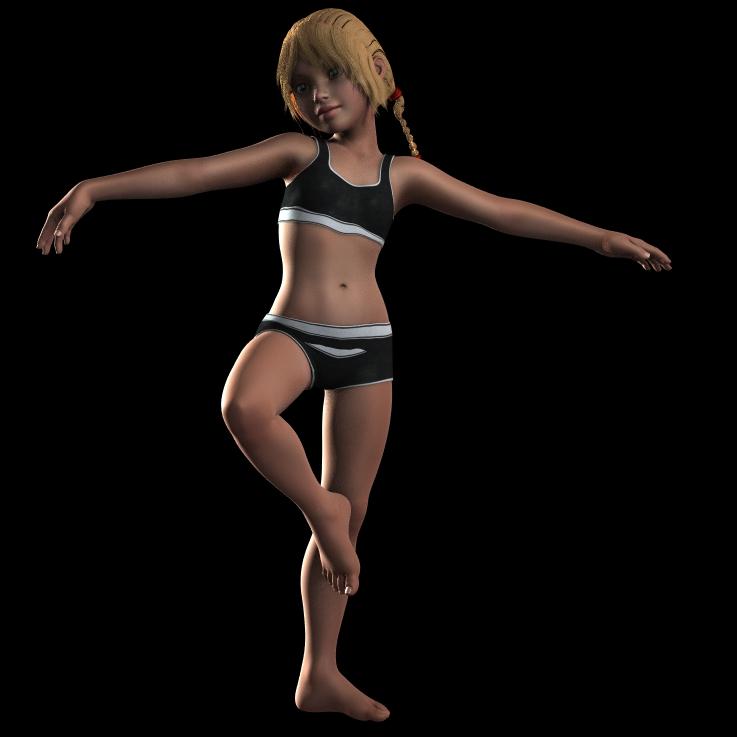
Second, the same amount of the Little Ones morph and 70% of Brooke head and body.
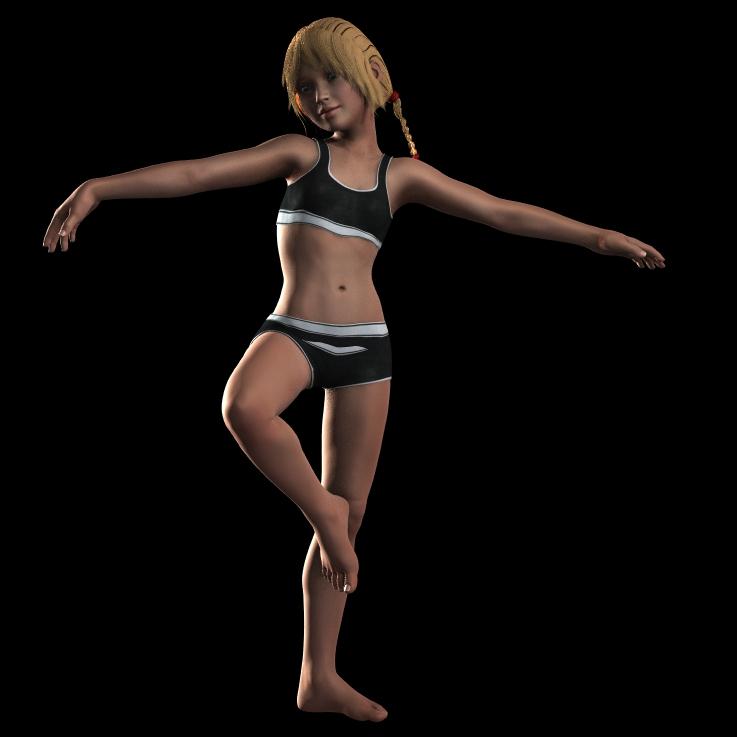
Third, the same amount of the Little Ones morph and 50% of just the Girl 7 Head.
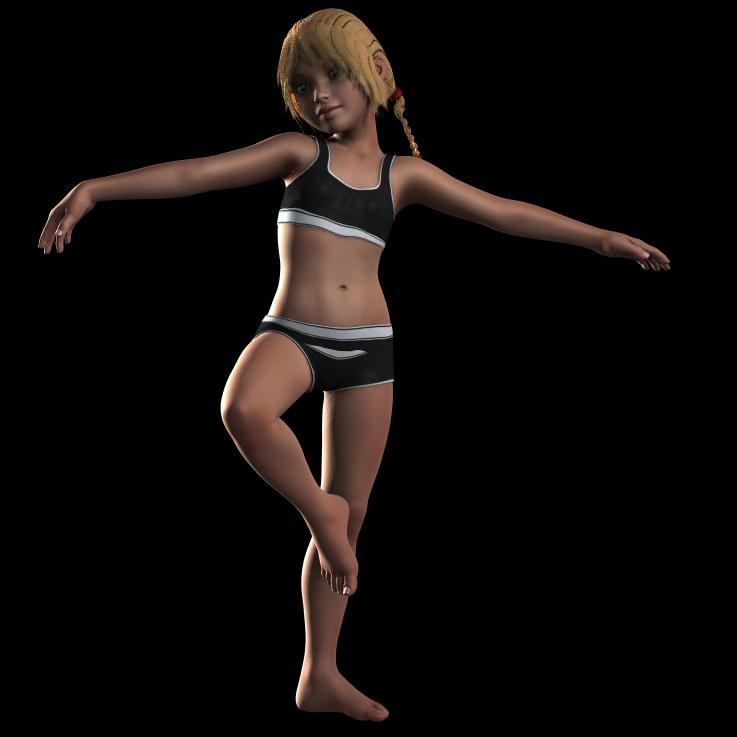
I'm sorry to keep you up - I hope you get enough sleep. Thank you for taking time to do these - they came out really cute! I'm going to get Little Ones for sure!
Ah, it wasn't really you that kept me up. I like a challenge and you got me curious! It's all good. :)
Genesis 3 SuperheroesKinda surprized on Rawarts promos since the suit says it has some breast morphs to help eliminate the clingy breast issue, but his promos don't show it being used, hmmmm.
My morph "helps" with it...but the smoothing on the suit fights against it, and makes it conform tighter again. You could turn off smoothing if you prefer that look, or use a morph directly on G3F to bridge the chest (Like the one in my "No-Suit" product)
Rawn
Guardian for the Super SuitGuardian for the G3 Super Suits
http://www.daz3d.com/guardian-bundle-for-genesis-3-super-body-suits
Guardian for the Super Suit comes with an extremely detailed set of textures, complete with details for realistic stitching and tailoring. Enhanced HD morphs add even more natural wrinkles to the suit, and new cowl morphs will add more variation to your heroic style.
New material zone options allow for new and greater versatility to your Super bodysuit for more completely original looks.
Guardian for Genesis 3 Male Super Body Suit
One Custom Genesis 3 Male Super Body Suit with new Material Zones
3 Material Presets for Super Body Suit Boots
3 Material Presets for Super Body Suit
3 Tiled Material Presets
9 Shader colour presets
1 Transparency Shader Preset
5 Cowl Morphs
1 HD Wrinkle Morph
Material Presets for both Iray and 3Delight
Guardian for Genesis 3 Female Super Body Suit
One Custom Genesis 3 Female Super Suit with new Material Zones
3 Material Presets for Super Body Suit Boots
3 Material Presets for Super Body Suit
3 Tiled Material Presets
9 Shader colour presets
1 Transparency Shader Preset
2 Cowl Morphs
1 Chest Morph
1 HD Wrinkle Morph
Material Presets for both Iray and 3Delight
How to use
For new material zones, you must use the included “Guardian Bodysuit” wardrobe preset, and fit to the figure.
Material presets should be applied to surfaces before applying shader colour presets.
For best effect on cowl morphs and HD wrinkles, “Smoothing Type” on the body suit should be switched to “Generic” instead of “Base Shape Matching”


 Genesis 3 Superheroes
Hi Jaki :) Its not modelled in - its a material zone, handy to edge shirts and pants. There's an HD morph to make it look like a belt, but the suit itself is completely smooth with it turned off.
Yes... as Mada said, it has an HD morph to make it stand out (see the promos with belts that don't look funny? That's it..."). There are a couple of textures with belts which don't seem to use the morph by default, but you can alway turn it on and off as you please. The missing sleeves, pant lets, and detached hood in some of the promos might look like some sort of "transparency" option done with materials, but they are geo-grafts instead. (Example: Applying one of the Shirt Collar geografts will remove the mask/hood and give you a nice shirt collar.)
Genesis 3 SuperheroesAHA!!!!!!!! thank you Mada! That makes the supersuit a LOT more attractive to me :D One of those promos made G3F look like she was wearing a nappy. LOL.
Hi Jaki :) Its not modelled in - its a material zone, handy to edge shirts and pants. There's an HD morph to make it look like a belt, but the suit itself is completely smooth with it turned off.
Daz 3D is part of

Connect
DAZ Productions, Inc.
7533 S Center View Ct #4664
West Jordan, UT 84084Licensing Agreement | Terms of Service | Privacy Policy | EULA
© 2026 Daz Productions Inc. All Rights Reserved.