-
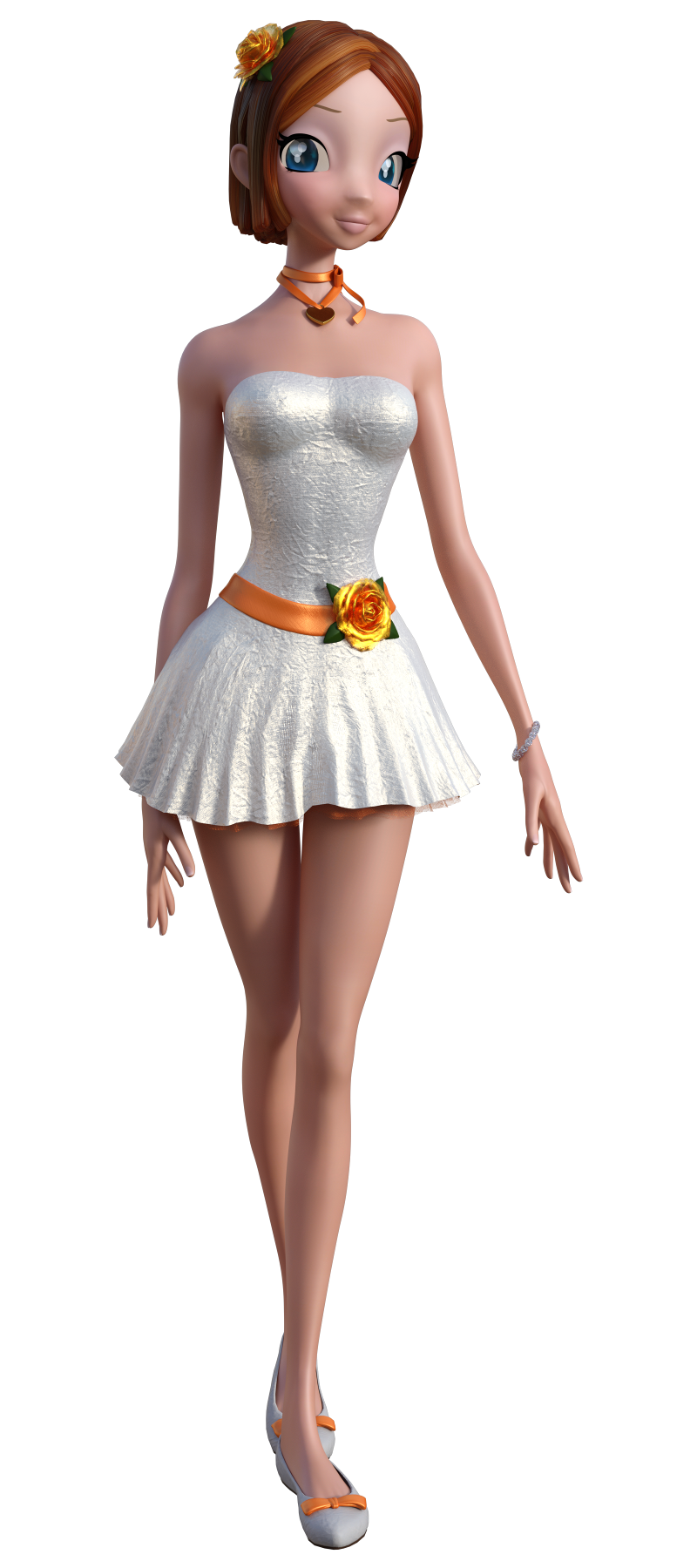
Star 2.0 for G3F!!! whoot!!
I noticed that new Star had a face morph for the Creme Brulee outfit, so since I grabbed that yesterday along with the bundle (but before the RDNA sale started. Thanks Daz. Again -__-) here's new Star with her old Creme Brulee hair and outfit.
 Dynamic Cloth Solutions
You are welcome, xyer0, glad I could help.
RAMWolff:
For production work, that would be a base rough (not final product for customers), and I use the conforming mesh trick/transfer MT's from simulated base to production model, along with smooth modifier to smooth out any roughness, and subdivision modifier to put the higher displacement levels into the production mesh. It's the trick that was outlined by DAZ_Randall (when he was at DAZ) for the Genesis Supersuit.
You can create morph targets in a VWD session by using DS Duplicate Node after every completion of a simulation and using "Send Pose To Host". I outlined the complete workflow in a thread over at Rendo. I will try to add later, or do a proper tutorial. VWD is a viable product for product content creation.
Laurie:
Yes, you can pull and push the mesh while it is draping. It works best from a live simulation, including animated simulation. Case in point, the green shirt above was a quick example of an already completed sim (months ago), re-added with tessellation turned on, and minor push/pull used without re-simulating (the main static simulation was not used, but the dynamic push/pull [holding SHIFT] was used). In these instances, the mesh tends to want to stick to or maintain form closer to original draping. But, you can manipulate it with the tools to get it where you want it. It is just easier with first time drapes.
timmins.william:
Did you find the manual? Yeah, it is not a quick, one button solution. There is a bit of a learning curve, and all the different meshes out there require learning what settings work best with which mesh. The more you work in it, the more you will get along with it, but I recommend reading and watching everything availabe for learning it.
Eyes Popping Out - Saving as fbxThat's because as an OBJ files it does not keep any data outside of current position of vertices. That's how you can export an OBJ file of a morphed figure and keep all the morphs working.
Also, what you bought is a CR2 file - its a Poser Figure. Usually you would buy something from the Genesis line, which is native to DAZ and does not have such problems.
That said - I'll have to check the stuff I was working on. Maybe I can create a corrective morph for you there that will fix the eyes. Does iClone accept DAZ morphs though?
Animation vs Still Art?VWD is working with everything. You can drape Dragon 3 over a table as a nice table cloth.
It's true!
 How to drape a daz dragon!
Ok, not very good table cloth material, I confess...

VWD works with any Genesis.
VWD works with conforming items.
VWD even works with NON-UNIMESH, like those typical multi-hair-piece hair objects of hobbyist land that takes Herculean efforts to glue them together!
Notice the dragon's teeth and eyeballs didn't fall apart? That's VWD's good thinking! Try that with the unofficial Dynamic Clothing Control script or iClone Apex soft or Carrara Bullet and see what happens! Clue: popping eyeballs and flying nails and fallen teeth LOL
Majority of content and assets that come out of the Poser/ Daz Studio shops typically fall apart as soon as you move them.
Creating content for one frame still render is EASY. Just pile on the polys and maps and mesh parts. Creating content for animation use, 95% Daz Studio vendors will not pass the most basic tests!
VWD are treasures to the hobbyist community. It's really no small feat to enable non-pro assets for animation! Takes dedication on the plugin dev's part, and creative passion on the users part too!
Now Daz Studio users - still renderers or animation makers - have no more excuse for ugly blob skirts with infamous auto-trasfer crotch imprint or nonsensical hand morph hair!

 Pose Sets
Thanks for the nods, fixmypcmike, Destiny's Garden, and Knittingmommy. I appreciate it.
Making poses is my passion, I guess you could say. And I try to make useful poses, so it pleases me that people find them so.
Personally, I go back and forth on whether or not to include partial poses (separate tops and bottoms). On the one hand, I understand the appeal, but on the other hand, I know that mixing tops and bottoms doesn't always create balanced poses - and making balanced and realistic poses is important to me. But those of you who like them bring up a valid point about finding a hand pose or arm pose that you want to use, but it's attached to legs that aren't in a position you want. I've been toying with some way to figure out how to give you all partial poses like this, without compromising the balanced look of a pose. I'll put some more thought into it.
I do have plans on releasing a hand pose set (including some props) in the near future. I'll post info and sneak peeks on my facebook page, for those who are interested. I'm always looking for suggestions for poses people would like to see, too. So feel free to drop me a line there.
Oh! Serene Night, if you own any of my pose sets that include expressions for Genesis 3, I always include a reset pose for the expressions. Just use one of those and you should be good to go. :) (Caveat - my Big Drama Expression sets do not include the reset pose preset, as these are morph dial expressions only.)
Thanks again for those of you have purchased my pose sets over the years. Your patronage is deeply appreciated. Happy posing and thank you!!
Post Your Renders - Happy New Year yallthanks DB, very kind, I would have your animation skills to get a proposable work; dunno about your style, I'd like to watch a clip before make a choice, in CG field you can't judge until you watch
I partially solved the pattern/issue due to the scale of the model, too small, for any reasons carrara can't manage maps too reduced
in this shot Ariana is 5 times bigger so the issue is less evident (by the way how could I make dimpled cheecks? is there a morph somewhere to be used?)
Looking *a lot* better... still there but not as noticable. Cool... keep on... curious to see a final render.
Unused morphs - can they slow down the machine?To be pedantic, there is memory used for the Qt slider and UI elements but nothing is used for the morph data itself. There is nothing to "slow down" the machine.
Kendall
How to transfer G3M Maps to G2M Figures
Here's a new way to transfer textures (for Unwrap3D users):
http://unwrap3d.com/u3d/tutorial_repaint_mesh.aspxBlender not required.
All you need is this to morph G3M and G2M into the same shape:
http://www.sharecg.com/v/83139/gallery/21/DAZ-Studio/Texture-Conversion-Helper-morphs-G3MIn fact, as long as you have the morphs to morph two characters into the same shape, you can transfer textures between any generation of Genesis.
Wow, thanks for the link I use Ultimate Unwrap3D pro all the time, didn't know this was avaliable.
Aging Morphs for Genesis 3 Female(s) and Male(s) (Commercial)Have a suggestion for a morph. Maybe I am not the only one thinking that the ribcage of g3f is a bit flat (low detailed) what means that we have a costal arch of the ripcage but we have no rips, so a "rib-morph" would be good from zero ribs-to detailed rips. Sure there are Characters which have a more detailed ripcage but the problem is, that all the character morphs are morphs for the whole body not just for several bodyparts. But if I need just a more detailed ribcage but not a more detailed hip for example, what shall I do?
virtual penny 4 yor carrara thoughts ?Enjoy your snooze.
I do have Tera Yuki 2 buried in an old runtime. Man, could have been using it all this time. Cool figure. Here are the steps that I used to make a nose morph (just standard morph, not in the posed position). Note, the validation of the morph was done by clicking the pencil icon a second time. There were no separate save and validate buttons like for my custom all-Carrara figures.
- load TY2
- select a body part in the skeleton (I went to the head)
- enter the modeling room and go to the morph tab
- TY2 has existing morph areas and existing morph subgroups. I selected the head area and then the brows-eyes subgroup and clicked the + symbol to create a new morph
- I accepted the default name for the morph. Carrara sent me back to the figure level. I returned to the head brows eyes group.
- I selected the new empty morph and clicked the pencil icon to edit the morph.
- The mesh turned green. I used the standard vertex modeler selection and manipulation tools to give TY2 a pinoccio nose.
- I clcked the pencil icon a second time to validate and accept the new morph.
- Carrara returned me to the default mesh.
- I returned to the Assemble room and selected the head body part of TY2 and went to the parameters tab. The new morph could be found in the middle of the list (aargh) among the brows morphs because that is the group I put it in.
- I used the morph dial to give TY2 a longer nose.
Body By Sublime IV Fantasy EditionMuch convenience as you get the target morph all on one dial. You can fine-tune from there, but you don't have to "hunt and peck" to get to the starting point.
How to transfer G3M Maps to G2M Figures
Here's a new way to transfer textures (for Unwrap3D users):
http://unwrap3d.com/u3d/tutorial_repaint_mesh.aspxBlender not required.
All you need is this to morph G3M and G2M into the same shape:
http://www.sharecg.com/v/83139/gallery/21/DAZ-Studio/Texture-Conversion-Helper-morphs-G3MIn fact, as long as you have the morphs to morph two characters into the same shape, you can transfer textures between any generation of Genesis.
virtual penny 4 yor carrara thoughts ?thanks
 yeah, his tail needed it, was seeing the vert points.
intending to see how it does for terai yuki2.
makin morphs practice not going so well, mebbe i'm doing wrong order, i see the plus sign. adds morph target##. and a pencil button.
should sleep a few hours, so tired can barely move mousie Saving poses
Oh, and actually I have a follow up - is there a way to translate a static pose clip onto a figure, the same way you would load a pose from the content library?
I know you can edit a clip, and I have seen talk of "converting to keyframes" - but would a static pose have keyframes?
If there way to load a master pose onto the NLA track, but then instead absorb the parameters of that pose into the character, well that would be swell...?
 I'm not entirely sure I understand what you're asking.
If we need to save "Pose" files (static or even animated) back into a runtime library, like those we'd buy from Daz3d, we CAN do that with Generation 4 and earlier figures - figures which use the older Poser CR2 format - and that's by using Fenric's BVH/PZ2 Exporter, which works really, Really well! But again, it won't work for Genesis 1 or newer Daz3d figures.
If you're looking for a way to Save a Static Pose for Genesis or Genesis 2 in Carrara, you'll need to use the NLA tab and use the button: Create Master Pose. When doing so, it's always a good idea to examine the list of check boxes, and deselect anything that doesn't need to be included in the Pose file.
Now this will create an NLA clip... the animated NLA clips and the NLA Master Poses both look the same in the tray, so we need to use proper organization and naming conventions to be able to tell them apart in the future.
For example, in My Documents > DAZ 3D > Carrara xxx > My Presets, I use the folder My Clips, which then shows up in the browser under the Clips tab.
Inside My Clips, I create a folder like "Genesis", inside which I would create "Static Poses" and "Animated". Inside Animated I'd add "Walk" "Jump" "Head and Arm Only" sorts of folders, depending upon what I'm creating for my animation controllability. I often save head and arm animations separately from many other animations, because they combine so easily afterwards.
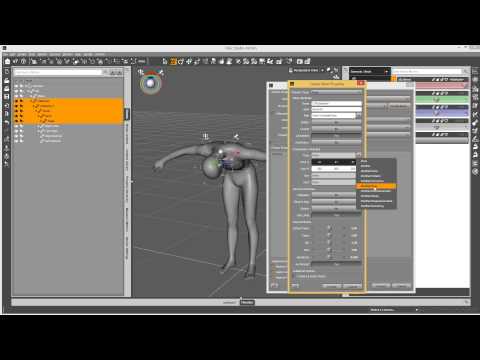
Okay, but the last half of what you've said seems like you might be insterested in saving poses Directly Onto the Figure, so tht we can aply the pose via a morph dial on the figure. This is very possible, and is best explained by my good pal, Josh Darling:
 Star 2.0 for G3F!!! whoot!!
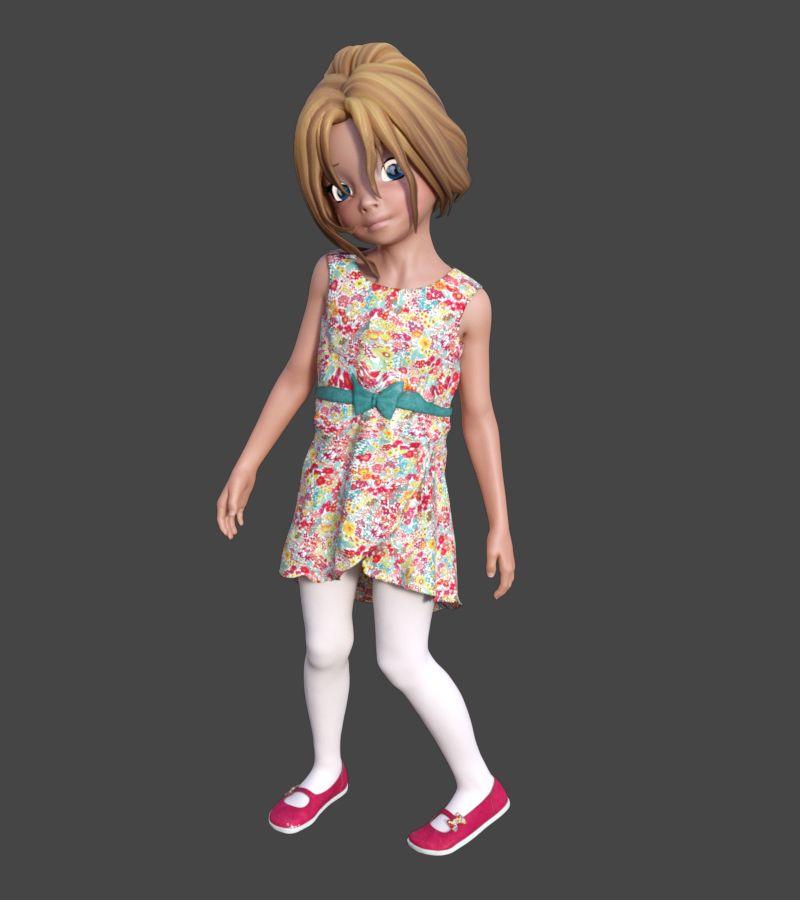
I was messing around with Growing Up to try and get a Cookie look and wound up with something completely different xD
The face could use some more morphing but I'm lazy. I really hope there'll be some Star specific morph packs like all the old adjustments classic Star had.
 Star 2.0 for G3F!!! whoot!!
Actually it's an optical illusion that she's watching you. It's because of her inverted eye whites.
Try searching for the morph EyeDisk-Inward, it's under pose controls>Head>Eyes>Star2>StarEyes>EyeDisk.
You'll want to use a negative setting and see if that helps...
Also can try Eye-Disk-Side from profile and straighten her gaze a bit... it makes her look crosseyed from head on, but from the side it looks more straight forward.I don't believe in optical illusions - her eyes are quite clearly following the viewer via magic!
Best result I've had is to position the camera first, then click on the anime eyes, go to the head bone, then use the Twist and Bend sliders to manually position the eyes.
Star 2.0 for G3F!!! whoot!!Actually it's an optical illusion that she's watching you. It's because of her inverted eye whites.
Try searching for the morph EyeDisk-Inward, it's under pose controls>Head>Eyes>Star2>StarEyes>EyeDisk.
You'll want to use a negative setting and see if that helps...
Also can try Eye-Disk-Side from profile and straighten her gaze a bit... it makes her look crosseyed from head on, but from the side it looks more straight forward.Oh, you used the Jesus Statue trick, you, uh, sly little fox.
Here's Star at 25% with all Genesis 3 mats. With no expression, she looks a bit shocked.
 Star 2.0 for G3F!!! whoot!!
Actually it's an optical illusion that she's watching you. It's because of her inverted eye whites.
Try searching for the morph EyeDisk-Inward, it's under pose controls>Head>Eyes>Star2>StarEyes>EyeDisk.
You'll want to use a negative setting and see if that helps...
Also can try Eye-Disk-Side from profile and straighten her gaze a bit... it makes her look crosseyed from head on, but from the side it looks more straight forward.virtual penny 4 yor carrara thoughts ?what i thought was model level2 was only the smoothing,
1 - tail smooth-none
2 - tail smooth on, model lvl1
3 - tail smmoth on, model lvl2oh well. next is to try creating an ear morph test, in posed position!
Star 2.0 for G3F!!! whoot!!*beams* So glad everyone's enjoying her! Was a true labor of love and so many people helped out with her! THANK YOU ALL!!!
(and bless you, this sale is going to hopefully pay for my new computer... one I am desperately needing!)
So to answer some questions that I hadn't seen answerd yet...
Eyes aren't completely removed only hidden... with Star at full size though the eyes don't fit quite right . If you want to use the Star morph with other figures to mix and don't care about the anime eyes, you can just load the native Genesis 3 Female and her morph is in there to play with once you've installed her. Have many people who like the 50% Star and less even more than Star ;). Personally like mixing 25-25 Star and Girl, gives her a really spritely mix. In lower settings of star you can use the native G3F eyes without too much trouble. ;) I
Okay eyes following you... in the pose eyemorphs there are some eye disk dials that allow you to translate the disks forward. That should help with the appearance of her looking at you, though you'll need to manually adjust them depending on your pose because that can make the eye disks pop out of her head with some expressions ;P
She's instantly by far my favourite release of the year. She has so many extra things with her and morphs and expressions and things and ahhhh. Currently I like having the Star body setting to 0% while keeping the head and body proportions settings at 100% for a less bishoujou type figure, but I've only been testing her out for a few minutes so I'm sure I'll find more since she has about a billion settings and possibilites.
I can't find anything to translate the disks forward - there are side to side settings for them but that makes her cross-eyed, and settings in the anime eyes discs themselves that allow you to manually set the direction of the eyes - but in both cases they continue to follow you (at their new angle) as soon as you move the camera. Is there some sort of advanced setting making them do the following that we can mess with?
p.s. If you want Star but without the eyes, just load G3F or whoever and then dial in Star's morph afterwards. No messing around with anything needed then.
p.p.s. Cookie+Chip G3 please~
Daz 3D is part of

Connect
DAZ Productions, Inc.
7533 S Center View Ct #4664
West Jordan, UT 84084Licensing Agreement | Terms of Service | Privacy Policy | EULA
© 2026 Daz Productions Inc. All Rights Reserved.